


 本文详细介绍了如何使用C++编程实现RGB到YUV及YUV到RGB的色彩空间转换,包括函数定义、查找表初始化、缓冲区分配等关键步骤,并通过实际编程验证了转换的正确性。
实验内容:1.编写RGB转化为YUV程序,重点掌握函数定义,部分查找表的初始化和调用,缓冲区
分配。将得到的RGB文件转换为YUV文件,用YUV Viewer播放器观看,验证是否正确。
2.编写将YUV转换为RGB的程序。将给定的实验数据用该程序转换为RGB文件。并与原
RGB文件进行比较,如果有误差,分析误差来自何处。
YUV与RGB空间的相互转换
由电视原理可知,亮度和色差信号的构成如下:
Y=0.2990R+0.5870G+0.1140B
U=-0.1684R-0.3316G+0.5B
V=0.5R-0.4187G-0.0813B
R=1.000Y+1.4020(V−128)
G=1.000Y−0.3441(U−128)−0.7139(V−128)
B=1.000Y+1.7718(U−128)−0.0013(V−128)
 需要在项目属性中设置命令参数和工作目录
rgb2yuv.cpp
#include<stdio.h>
#include<stdlib.h>
const int width = 256;
const int height = 256;
int main(int argc,char *argv[])
{
    FILE* rgb=NULL;
    FILE* yuv=NULL;
    //判断是否成功打开文件
    if (fopen_s(&rgb, argv[1], "rb") != 0)
        printf("file not opened\n");
    else
        printf("file opened\n");
    if (fopen_s(&yuv, argv[2], "wb") != 0)
        printf("file not opened\n");
    else
        printf("file opened\n");
    //建立缓冲区
    unsigned char* buffer_rgb = (unsigned char*)malloc(sizeof(unsigned char) * 3 * width * height);
    unsigned char* buffer_y = (unsigned char*)malloc(sizeof(unsigned char) * width * height);
    unsigned char* buffer_u = (unsigned char*)malloc(sizeof(unsigned char) * width * height / 4);
    unsigned char* buffer_v = (unsigned char*)malloc(sizeof(unsigned char) * width * height / 4);
    //读文件
    fread(buffer_rgb, sizeof(unsigned char), 3 * width * height,rgb);
    //计算y分量
    for (int i = 0; i < width * height; i++)
    {
        buffer_y[i] = 0.299 * buffer_rgb[3 * i + 2] + 0.587 * buffer_rgb[3 * i + 1] + 0.114 * buffer_rgb[3 * i];
        if (buffer_y[i] > 235)
            buffer_y[i] = 235;
        else if (buffer_y[i] < 16)
            buffer_y[i] = 16;
    }
    //计算u分量
    int k = 0;
    for (int i = 0; i < height ; i++)
        for (int j = 0; j < width; j++)
        {
            if (i % 2 == 0 && j % 2 == 0)
            {
                buffer_u[k] = -0.1684 * buffer_rgb[3 * (i * width + j) + 2] - 0.3316 * buffer_rgb[3 * (i * width + j) + 1] + 0.5 * buffer_rgb[3 * (i * width + j)]+128;
                if (buffer_u[k] > 240)
                    buffer_u[k] = 240;
                else if (buffer_u[k] < 16)
                    buffer_u[k] = 16;
                k++;
            }
        }
    //计算v分量
    k = 0;
    for (int i = 0; i < height; i++)
        for (int j = 0; j < width; j++)
        {
            if (i % 2 == 0 && j % 2 == 0)
            {
                buffer_v[k] = 0.5 * buffer_rgb[3 * (i * width + j) + 2] - 0.4187 * buffer_rgb[3 * (i * width + j) + 1] - 0.0813 * buffer_rgb[3 * (i * width + j)]+128;
                if (buffer_v[k] > 240)
                    buffer_v[k] = 240;
                else if (buffer_v[k] < 16)
                    buffer_v[k] = 16;
                k++;
            }
        }
    //写入文件
    fwrite(buffer_y, sizeof(unsigned char), width * height, yuv);
    fwrite(buffer_u, sizeof(unsigned char), width * height / 4, yuv);
    fwrite(buffer_v, sizeof(unsigned char), width * height / 4, yuv);
    //释放缓冲区,关闭文件
    if (buffer_rgb != NULL)
        free(buffer_rgb);
    if (buffer_y != NULL)
        free(buffer_y);
    if (buffer_u != NULL)
        free(buffer_u);
    if (buffer_v != NULL)
        free(buffer_v);
    if (rgb != NULL)
        fclose(rgb);
    if (yuv != NULL)
        fclose(yuv);
    return 0;
}
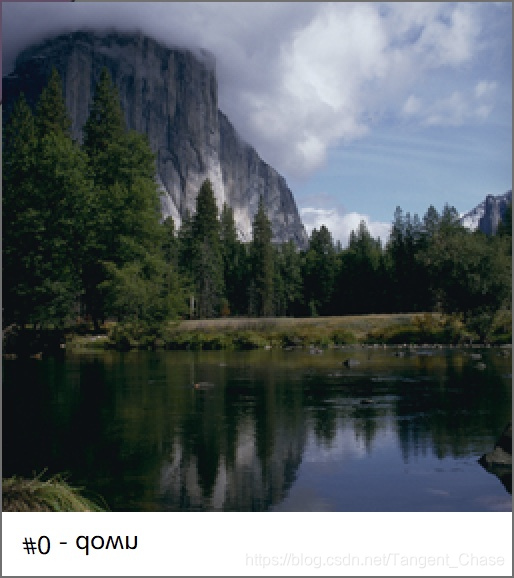
原rgb图像
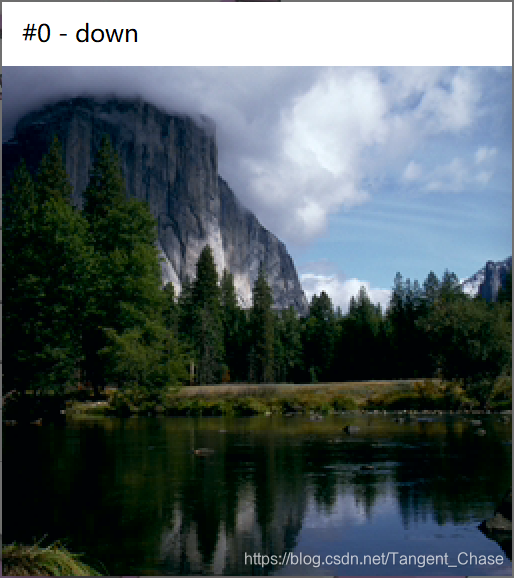
转换后的yuv图像
可见转换后的yuv图像与原rgb图像没有什么区别
yuv2rgb.cpp
#include<stdio.h>
#include<stdlib.h>
const int width = 256;
const int height = 256;
int main(int argc,char *argv[])
{
	FILE* rgb = NULL;
	FILE* yuv = NULL;
	//判断是否成功打开文件
	if (fopen_s(&yuv, argv[1], "rb") != 0)
		printf("file not opened\n");
	else
		printf("file opened\n");
	if (fopen_s(&rgb, argv[2], "wb") != 0)
		printf("file not opened\n");
	else
		printf("file opened\n");
	//建立缓冲区
	unsigned char* buffer_rgb = (unsigned char*)malloc(sizeof(unsigned char) * 3 * width * height);
	unsigned char* buffer_y = (unsigned char*)malloc(sizeof(unsigned char) * width * height);
	unsigned char* buffer_u = (unsigned char*)malloc(sizeof(unsigned char) * width * height / 4);
	unsigned char* buffer_v = (unsigned char*)malloc(sizeof(unsigned char) * width * height / 4);
	//读文件
	fread(buffer_y, sizeof(unsigned char), width * height, yuv);
	fread(buffer_u, sizeof(unsigned char), width * height / 4, yuv);
	fread(buffer_v, sizeof(unsigned char), width * height / 4, yuv);
	//处理y分量数据
	unsigned char y[width][height] = { 0 };
	for (int i = 0; i < height; i++)
		for (int j = 0; j < width; j++)
			y[i][j] = buffer_y[i * width + j];
	//处理u和v分量数据
	unsigned char u[width][height] = { 0 };
	unsigned char v[width][height] = { 0 };
	int k = 0;
	for(int i=0;i<height;i++)
		for (int j = 0; j < width; j++)
		{
			if (i % 2 == 0 && j % 2 == 0)
			{
				u[i][j] = buffer_u[k];
				v[i][j] = buffer_v[k];
				k++;
			}
			else if (i % 2 == 0 && j % 2 == 1)
			{
				u[i][j] = u[i][j - 1];
				v[i][j] = v[i][j - 1];
			}
			else if (i % 2 == 1 && j % 2 == 0)
			{
				u[i][j] = u[i - 1][j];
				v[i][j] = v[i - 1][j];
			}
			else if (i % 2 == 1 && j % 2 == 1)
			{
				u[i][j] = u[i - 1][j - 1];
				v[i][j] = v[i - 1][j - 1];
			}
		}
	//计算rgb分量,注意这里是bgr
	for(int i=0;i<height;i++)
		for (int j = 0; j < width; j++)
		{
			buffer_rgb[3 * (i * width + j)] = y[i][j] + 1.7718 * (u[i][j] - 128) - 0.0013 * (v[i][j] - 128);
			buffer_rgb[3 * (i * width + j) + 1] = y[i][j] - 0.3441 * (u[i][j] - 128) - 0.7139 * (v[i][j] - 128);
			buffer_rgb[3 * (i * width + j) + 2] = y[i][j] + 1.4020 * (v[i][j] - 128);
		}
	//写入文件
	fwrite(buffer_rgb, sizeof(unsigned char), 3 * width * height, rgb);
	//释放缓冲区,关闭文件
	if (buffer_rgb != NULL)
		free(buffer_rgb);
	if (buffer_y != NULL)
		free(buffer_y);
	if (buffer_u != NULL)
		free(buffer_u);
	if (buffer_v != NULL)
		free(buffer_v);
	if (rgb != NULL)
		fclose(rgb);
	if (yuv != NULL)
		fclose(yuv);
	return 0;
}
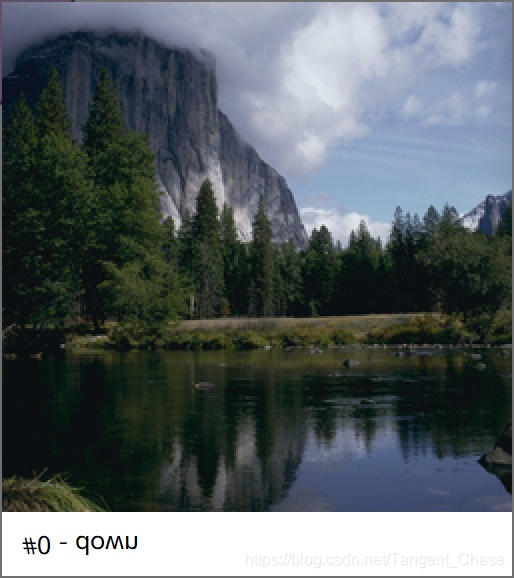
原rgb图像
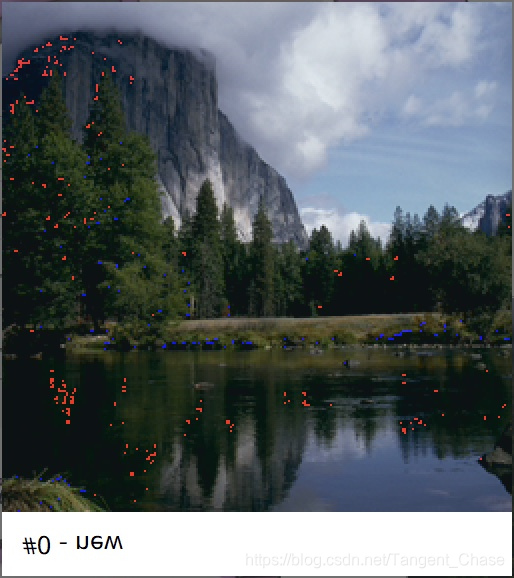
由yuv图像转换的rgb图像
可见转换来的rgb图像与原来的相比出现了一些红色和蓝色的点。产生误差的原因:由于采用4:2:0的色度格式采样,yuv图像的一些uv数据并不是由原图像的rgb数据得到,所以再转换时会产生误差。





 扫一扫
扫一扫


 578
578

 被折叠的 条评论
为什么被折叠?
被折叠的 条评论
为什么被折叠?
 到【灌水乐园】发言





