


 文章介绍了如何在ECharts图表中实现自动轮播提示功能,包括参数设定、事件处理和滚动条控制,以及在Vue项目中的使用示例。
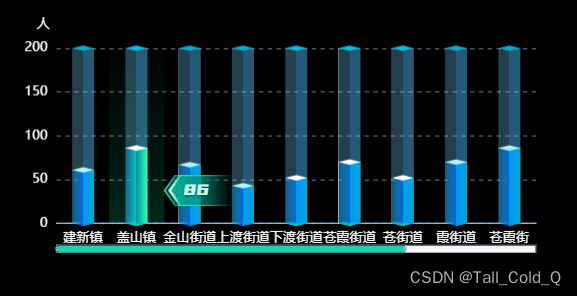
下面是js文件,直接引入后使用 – 使用方法在后面~
/**
* echarts tooltip 自动轮播
* @param dom // 图表的dom
* @param myChart // 初始化echarts的实例
* @param option // 指定图表的配置项和数据
* @param length // 类目数量(原因:循环时达到最大值后,使其从头开始循环), x轴有几项就填几
* @param pageSize // 一页显示的数据数目
* @param timeObj // 轮播定时器记录
* @param time // 轮播间隔时长
*/
// 比如length是12,一页显示9个数据 == pageSize
export function autoHover(dom, myChart, option, length, pageSize, timeObj, time) {
function circleHandler() {
count = count % length;
let center = Math.floor(pageSize / 2); // 4
if (pageSize < length) { // 因为一页显示不满 所以才显示滚动条
// 如果当前下标在中间值后面 则 滚动条不动
if (count <= center) {
console.log("count <= center", count)
// 先滚动条走到最刚开始 再高亮
option.dataZoom[0].endValue = pageSize - 1;
option.dataZoom[0].startValue = 0;
myChart.setOption(option);
setHighLight(myChart, count);
} else if (count > center && option.dataZoom[0].endValue != (length - 1)) { // 如果当前小标大于中间值并且滚动条还没到最后,走滚动条
option.dataZoom[0].endValue = option.dataZoom[0].endValue + 1;
option.dataZoom[0].startValue = option.dataZoom[0].startValue + 1;
myChart.setOption(option);
myChart.dispatchAction({
type: "downplay",
seriesIndex: 0, //serieIndex的索引值 可以触发多个
dataIndex: count-1
});
setHighLight(myChart, count);
} else if (count < (length - 1) && option.dataZoom[0].endValue == (length - 1)) { // 如果滚动条到最后
option.dataZoom[0].endValue = (length - 1);
option.dataZoom[0].startValue = (length -1) - (pageSize - 1) ;
myChart.setOption(option);
setHighLight(myChart, count);
} else if (count == (length - 1)) { // 下标结束了
setHighLight(myChart, count);
}
} else {
setHighLight(myChart, count);
}
count++;
if (count >= length) {
count = 0
}
}
var count = 0;
timeObj.timeTicket && clearInterval(timeObj.timeTicket);
timeObj.timeTicket = null;
timeObj.timeTicket = setInterval(circleHandler, time);
// 设置移入移除
dom.addEventListener("mouseover", () => {
console.log("dom==mouseover")
timeObj.timeTicket && clearInterval(timeObj.timeTicket);
})
dom.addEventListener("mouseout", () => {
console.log("dom==mouseout")
timeObj.timeTicket && clearInterval(timeObj.timeTicket);
timeObj.timeTicket = setInterval(circleHandler, time);
})
}
function setHighLight(myChart, count) {
myChart.dispatchAction({
type: "downplay",
seriesIndex: 0, //serieIndex的索引值 可以触发多个
dataIndex: count
});
myChart.dispatchActio 最低0.47元/天 解锁文章






 扫一扫
扫一扫


 1517
1517

 被折叠的 条评论
为什么被折叠?
被折叠的 条评论
为什么被折叠?
 到【灌水乐园】发言





