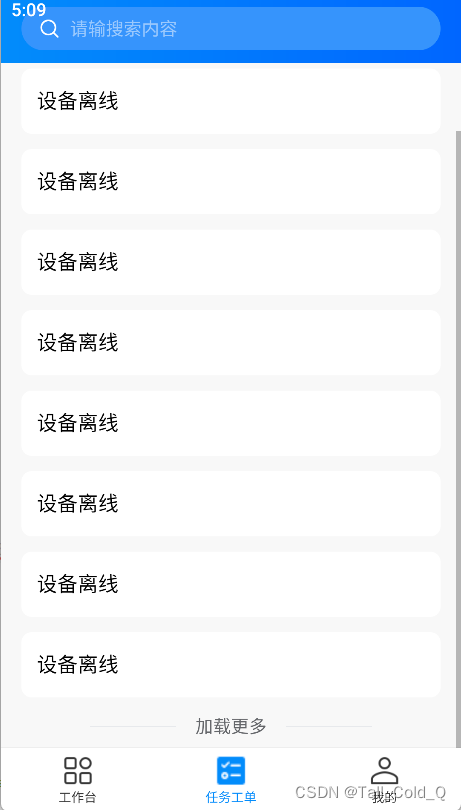
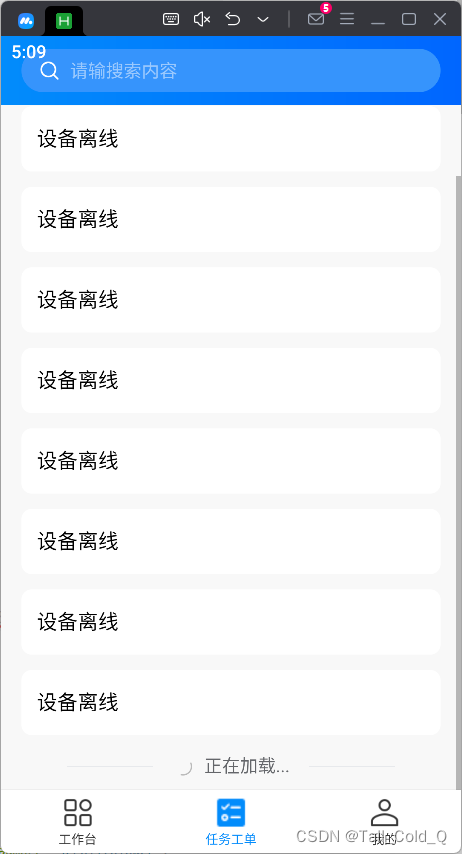
nvue滚动列表的使用——<list>标签

因为项目使用到了nvue经过一系列的碰壁和研究,写一下总结
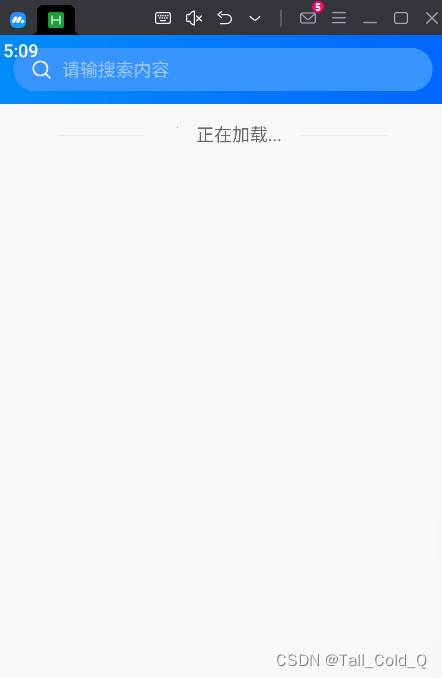
在这里插入图片描述
在这里插入图片描述
在这里插入图片描述

下面是封装list的组件

template部分

<template>
	<list class="list-wrap" :loadmoreoffset="loadmoreoffset" @loadmore="scrolltolower">
		<header>
			<slot name="top"></slot>
		</header>
		<cell v-for="(item, index) in list" :key="index">
			<slot :item="item"></slot>
		</cell>
		<cell>
			<slot name="loading">
				<u-loadmore v-if="statusRef" :status="statusRef" line @loadmore="scrolltolower"></u-loadmore>
				<u-empty v-else mode="list" height="280" marginTop="50"></u-empty>
			</slot>
		</cell>
	</list>
</template>

setup部分

import { computed, ref, onMounted, reactive } from 'vue';

	const props = defineProps({
		// limit为0时不分页
		limit: {
			type: [String, Number],
			default: 8,
		},
		// 初始化 不获取数据
		initNoFetchList: {
			type: Boolean,
			default: false
		},
		height: {
			type: [String, Number],
			default: 0,
		},
		loadmoreoffset: {
			type: [String, Number],
			default: 100,
		}
	})
	const emits = defineEmits(['getList']);

	const pagination = reactive({
		page: 1,
		pageSize: props.limit,
		total: 0,
	});
	const list = ref([]);

	onMounted(async () => {
		if (props.initNoFetchList) return;
		setTimeout(async () => {
			fetchList();   // 发送请求
		}, 1000);
	});
	
	const loadingRef = ref(true);
	const finishedRef = computed(() => (pagination.page * pagination.pageSize >= pagination.total));
	const emptyRef = computed(() => (pagination.total === 0));
	const statusRef = computed(() => {
		console.log("finishedRef.value", loadingRef.value, emptyRef.value, finishedRef.value)
		if (loadingRef.value) return 'loading';
		else if (emptyRef.value) return '';
		else if (finishedRef.value) return 'nomore';
		else return 'loadmore';
	});
	
	const fetchList = (refresh = false) => {
		if (refresh) {
			pagination.page = 1;
		}
		loadingRef.value = true;
		emits('getList', {   // 把请求参数抛出去,并使用callback在组件中处理
			params: {
				pageNo: pagination.page,
				pageSize: pagination.pageSize, // limit == 0 不分页
			},
			callback: (res) => {
				loadingRef.value = false;
				if (refresh) {
					list.value = [];
				}
				list.value.push(...res.records);
				pagination.total = res.total;
			}
		});
	}
	const scrolltolower = () => {
		if (finishedRef.value) return;
		pagination.page++;
		fetchList();
	}
	const refreshList = () => {
		fetchList(true);
	}
	defineExpose({
		refreshList,
	});

组件的使用

<ListNvue class="hf-list-page" ref="hflistRef" @getList="getList" :limit="20">
		<template #top>
			<view class="static-wrap">
				<view class="search">
					<u-search bgColor="rgb(50,144,252)" color="#FFFFFF" :clearabled="false" searchIconColor="#FFFFFF"
						placeholderColor="rgba(255,255,255, 0.5)" v-model="keyWords" :showAction="false"
						placeholder="请输搜索内容" @search="refresh"></u-search>
				</view>
			</view>
		</template>
		<template v-slot="{ item }">
			<text>{{ item.name }}</text>
		</template>
	</ListNvue>

setup部分

import ListNvue from '@/components/hf-list/list-nvue.vue'
	import {
		computed,
		onMounted,
		reactive,
		ref
	} from 'vue'
	
	const keyWords = ref('')
	const hflistRef = ref(null);
	const refresh = () => {
		hflistRef.value && hflistRef.value.refreshList(true)
	}
	async function getList({
		params,
		callback
	}) {
		const res = await queryPageList({    // 发送api
			keyword: keyWords.value,
			...params,
		});
		callback({
			total: res.total,   // 总页数
			records: res.records.map((item, index) => {   // 在这里可以过滤一些不要的参数
				return {
					...item
				}
			})
		});
	}

上述下拉刷新未实现,后续进行补充
参考官网文档:https://uniapp.dcloud.net.cn/component/list.html#list

<template> <view class="conten"> <!-- 控制弹窗的按钮 --> <button @click="showPickerA">打开选择器 - 全量数据</button> <button @click="showPickerT">打开选择器 - 精简数据</button> <button @click="showPickerT">打开选择器 - 精简数据</button> <button @click="showPickerT">打开选择器 - 精简数据</button> <button @click="showPickerT">打开选择器 - 精简数据</button> <button @click="showPickerT">打开选择器 - 精简数据</button> <button @click="showPickerT">打开选择器 - 精简数据</button> <button @click="showPickerT">打开选择器 - 精简数据</button> <button @click="showPickerT">打开选择器 - 精简数据</button> <button @click="showPickerT">打开选择器 - 精简数据</button> <button @click="showPickerT">打开选择器 - 精简数据</button> <button @click="showPickerT">打开选择器 - 精简数据</button> <button @click="showPickerT">打开选择器 - 精简数据</button> <button @click="showPickerT">打开选择器 - 精简数据</button> <button @click="showPickerT">打开选择器 - 精简数据</button> <button @click="showPickerT">打开选择器 - 精简数据</button> <button @click="showPickerT">打开选择器 - 精简数据</button> <button @click="showPickerT">打开选择器 - 精简数据</button> <button @click="showPickerT">打开选择器 - 精简数据</button> <button @click="showPickerT">打开选择器 - 精简数据</button> <button @click="showPickerT">打开选择器 - 精简数据</button> <button @click="showPickerT">打开选择器 - 精简数据</button> <button @click="showPickerT">打开选择器 - 精简数据</button> <button @click="showPickerT">打开选择器 - 精简数据</button> <button @click="showPickerT">打开选择器 - 精简数据</button> <button @click="showPickerT">打开选择器 - 精简数据</button> <button @click="showPickerT">打开选择器 - 精简数据</button> <button @click="showPickerT">打开选择器 - 精简数据</button> <button @click="showPickerT">打开选择器 - 精简数据</button> <button @click="showPickerT">打开选择器 - 精简数据</button> <button @click="showPickerT">打开选择器 - 精简数据</button> <button @click="showPickerT">打开选择器 - 精简数据</button> <button @click="showPickerT">打开选择器 - 精简数据</button> <button @click="showPickerT">打开选择器 - 精简数据</button> <button @click="showPickerT">打开选择器 - 精简数据</button> <button @click="showPickerT">打开选择器 - 精简数据</button> <button @click="showPickerT">打开选择器 - 精简数据</button> <button @click="showPickerT">打开选择器 - 精简数据</button> <button @click="showPickerT">打开选择器 - 精简数据</button> <button @click="showPickerT">打开选择器 - 精简数据</button> <button @click="showPickerT">打开选择器 - 精简数据</button> <button @click="showPickerT">打开选择器 - 精简数据</button> <button @click="showPickerT">打开选择器 - 精简数据</button> <button @click="showPickerT">打开选择器 - 精简数据</button> <button @click="showPickerT">打开选择器 - 精简数据</button> <button @click="showPickerT">打开选择器 - 精简数据</button> <button @click="showPickerT">打开选择器 - 精简数据</button> <button @click="showPickerT">打开选择器 - 精简数据</button> <button @click="showPickerT">打开选择器 - 精简数据</button> <button @click="showPickerT">打开选择器 - 精简数据</button> <button @click="showPickerT">打开选择器 - 精简数据</button> <button @click="showPickerT">打开选择器 - 精简数据</button> <button @click="showPickerT">打开选择器 - 精简数据</button> <button @click="showPickerT">打开选择器 - 精简数据</button> <button @click="showPickerT">打开选择器 - 精简数据</button> <button @click="showPickerT">打开选择器 - 精简数据</button> <button @click="showPickerT">打开选择器 - 精简数据</button> <button @click="showPickerT">打开选择器 - 精简数据</button> <button @click="showPickerT">打开选择器 - 精简数据</button> <button @click="showPickerT">打开选择器 - 精简数据</button> <button @click="showPickerT">打开选择器 - 精简数据</button> <button @click="showPickerT">打开选择器 - 精简数据</button> <button @click="showPickerT">打开选择器 - 精简数据</button> <button @click="showPickerT">打开选择器 - 精简数据</button> <button @click="showPickerT">打开选择器 - 精简数据</button> <button @click="showPickerT">打开选择器 - 精简数据</button> <button @click="showPickerT">打开选择器 - 精简数据</button> <button @click="showPickerT">打开选择器 - 精简数据</button> <button @click="showPickerT">打开选择器 - 精简数据</button> <button @click="showPickerT">打开选择器 - 精简数据</button> <button @click="showPickerT">打开选择器 - 精简数据</button> <button @click="showPickerT">打开选择器 - 精简数据</button> <button @click="showPickerT">打开选择器 - 精简数据</button> <button @click="showPickerT">打开选择器 - 精简数据</button> <button @click="showPickerT">打开选择器 - 精简数据</button> <button @click="showPickerT">打开选择器 - 精简数据</button> <button @click="showPickerT">打开选择器 - 精简数据</button> <button @click="showPickerT">打开选择器 - 精简数据</button> <button @click="showPickerT">打开选择器 - 精简数据</button> <button @click="showPickerT">打开选择器 - 精简数据</button> <button @click="showPickerT">打开选择器 - 精简数据</button> <button @click="showPickerT">打开选择器 - 精简数据</button> <button @click="showPickerT">打开选择器 - 精简数据</button> <button @click="showPickerT">打开选择器 - 精简数据</button> <button @click="showPickerT">打开选择器 - 精简数据</button> <button @click="showPickerT">打开选择器 - 精简数据</button> <button @click="showPickerT">打开选择器 - 精简数据</button> <button @click="showPickerT">打开选择器 - 精简数据</button> <button @click="showPickerT">打开选择器 - 精简数据</button> <button @click="showPickerT">打开选择器 - 精简数据</button> <button @click="showPickerT">打开选择器 - 精简数据</button> <button @click="showPickerT">打开选择器 - 精简数据</button> <button @click="showPickerT">打开选择器 - 精简数据</button> <button @click="showPickerT">打开选择器 - 精简数据</button> <button @click="showPickerT">打开选择器 - 精简数据</button> <button @click="showPickerT">打开选择器 - 精简数据</button> <button @click="showPickerT">打开选择器 - 精简数据</button> <button @click="showPickerT">打开选择器 - 精简数据</button> <button @click="showPickerT">打开选择器 - 精简数据</button> <button @click="showPickerT">打开选择器 - 精简数据</button> <button @click="showPickerT">打开选择器 - 精简数据</button> <button @click="showPickerT">打开选择器 - 精简数据</button> <button @click="showPickerT">打开选择器 - 精简数据</button> <button @click="showPickerT">打开选择器 - 精简数据</button> <button @click="showPickerS">跳转页面</button> <!-- 自定义选择器组件 --> <zy-popup-select v-model="showPicker" :options="list" :default-selected="defaultSelected" label-key="name" value-key="id" max-visible-items="4" maxSelected="3" @change="handleChange" @confirm="handleConfirm" > <!-- 可以扩展插槽内容 --> </zy-popup-select> <!-- 回到顶部按钮(根据滚动显示) --> <button v-if="showBackToTop" @click="backToTop" style=" position: fixed; bottom: 30px; right: 20px; background-color: #007aff; color: white; width: 50px; height: 50px; border-radius: 50%; font-size: 12px; " > Top </button> </view> </template> <script> export default { data() { return { showPicker: false, defaultSelected: ['a'], list: [ { id: 'a', name: '苹果' }, { id: 'b', name: '香蕉' }, { id: 'c', name: '这是一个非常长的名字会自动截断显示的示例' }, { id: 'd', name: '葡萄' }, { id: 'e', name: '橙子' }, { id: 'f', name: '梨' }, { id: 'g', name: '草莓' }, { id: 'h', name: '西瓜' }, { id: 'i', name: '柠檬' }, { id: 'j', name: '猕猴桃' } ], showBackToTop: false // 是否显示回到顶部按钮 } }, methods: { // 打开选择器 - 完整列表 showPickerA() { this.list = [ { id: 'a', name: '苹果' }, { id: 'b', name: '香蕉' }, { id: 'c', name: '这是一个非常长的名字会自动截断显示的示例' }, { id: 'd', name: '葡萄' }, { id: 'e', name: '橙子' }, { id: 'f', name: '梨' }, { id: 'g', name: '草莓' }, { id: 'h', name: '西瓜' }, { id: 'i', name: '柠檬' }, { id: 'j', name: '猕猴桃' } ] this.showPicker = true }, // 打开选择器 - 简化列表 showPickerT() { this.list = [ { id: 'a', name: '苹果' }, { id: 'b', name: '香蕉' } ] this.showPicker = true }, // 跳转页面 showPickerS() { uni.navigateTo({ url: `/subpkgEleasing/pages/dueList/index?taskId=111&serialNo=222` }) }, // 选中变化时触发 handleChange(e) { console.log('选中状态变化:', e) }, // 确认选择 handleConfirm(res) { console.log('确认结果:', res.selected) console.log('是否是取消:', res.fromCancel) }, // 👇 新增:监听页面滚动 onPageScroll(res) { console.log('🚀 ~ onPageScroll ~ res:', res) console.log('页面滚动了:', res.scrollTop + 'px') const scrollTop = res.scrollTop // 当滚动超过 100px 显示回到顶部按钮 this.showBackToTop = scrollTop > 100 }, // 回到顶部 backToTop() { uni.pageScrollTo({ scrollTop: 0, duration: 300 // 滚动动画时间(毫秒) }) } } } </script> <style scoped> .conten { padding-top: 200px; min-height: 200vh; /* 确保可以滚动 */ } </style> 没有触发onPageScroll
最新发布
09-27
评论
添加红包

请填写红包祝福语或标题

红包个数最小为10个

红包金额最低5元

当前余额3.43前往充值 >
需支付:10.00
成就一亿技术人!
领取后你会自动成为博主和红包主的粉丝 规则
hope_wisdom
发出的红包
实付
使用余额支付
点击重新获取
扫码支付
钱包余额 0

抵扣说明:

1.余额是钱包充值的虚拟货币,按照1:1的比例进行支付金额的抵扣。
2.余额无法直接购买下载,可以购买VIP、付费专栏及课程。

余额充值