



 本文详细介绍了HBase与Hive的集成应用,包括HBase集成MapReduce进行数据处理,通过bulkload批量加载数据,以及Hive与HBase的对比和集成配置。通过实战案例展示了如何将Hive分析结果保存到HBase表中,以及如何创建Hive外部表映射HBase已有的表模型。
大数据数据库之HBase
主题
本堂课主要围绕HBase的实操知识点进行讲解。主要包括以下几个方面
- HBase集成MapReduce
- HBase集成hive
- HBase表的rowkey设计
- HBase表的热点
- HBase表的数据备份
- HBase二级索引
目标
-
掌握HBase的客户端API操作
-
掌握HBase集成MapReduce
-
掌握HBase集成hive
-
掌握hHBasease表的rowkey设计
-
掌握HBase表的热点
-
掌握HBase表的数据备份
-
掌握HBase二级索引
1. HBase集成MapReduce
- HBase表中的数据最终都是存储在HDFS上,HBase天生的支持MR的操作,我们可以通过MR直接处理HBase表中的数据,并且MR可以将处理后的结果直接存储到HBase表中。
1.1 实战1——hbase中一个表写入另一个表
- 需求:读取HBase当中myuser这张表的数据,将数据写入到另外一张myuser2表里面去
-
第一步:创建myuser2这张hbase表
**注意:**列族的名字要与myuser表的列族名字相同
hbase(main):010:0> create 'myuser2','f1'
- 第二步:创建maven工程并导入jar包
	<repositories>
        <repository>
            <id>cloudera</id>
            <url>https://repository.cloudera.com/artifactory/cloudera-repos/</url>
        </repository>
    </repositories>

    <dependencies>
        <dependency>
            <groupId>org.apache.hadoop</groupId>
            <artifactId>hadoop-client</artifactId>
            <version>2.6.0-mr1-cdh5.14.2</version>
        </dependency>
        <dependency>
            <groupId>org.apache.hbase</groupId>
            <artifactId>hbase-client</artifactId>
            <version>1.2.0-cdh5.14.2</version>
        </dependency>
        <dependency>
            <groupId>org.apache.hbase</groupId>
            <artifactId>hbase-server</artifactId>
            <version>1.2.0-cdh5.14.2</version>
        </dependency>
        <dependency>
            <groupId>junit</groupId>
            <artifactId>junit</artifactId>
            <version>4.12</version>
            <scope>test</scope>
        </dependency>
        <dependency>
            <groupId>org.testng</groupId>
            <artifactId>testng</artifactId>
            <version>6.14.3</version>
            <scope>test</scope>
        </dependency>
    </dependencies>
    <build>
        <plugins>
            <plugin>
                <groupId>org.apache.maven.plugins</groupId>
                <artifactId>maven-compiler-plugin</artifactId>
                <version>3.0</version>
                <configuration>
                    <source>1.8</source>
                    <target>1.8</target>
                    <encoding>UTF-8</encoding>
                    <!--    <verbal>true</verbal>-->
                </configuration>
            </plugin>
            <plugin>
                <groupId>org.apache.maven.plugins</groupId>
                <artifactId>maven-shade-plugin</artifactId>
                <version>2.2</version>
                <executions>
                    <execution>
                        <phase>package</phase>
                        <goals>
                            <goal>shade</goal>
                        </goals>
                        <configuration>
                            <filters>
                                <filter>
                                    <artifact>*:*</artifact>
                                    <excludes>
                                        <exclude>META-INF/*.SF</exclude>
                                        <exclude>META-INF/*.DSA</exclude>
                                        <exclude>META-INF/*/RSA</exclude>
                                    </excludes>
                                </filter>
                            </filters>
                        </configuration>
                    </execution>
                </executions>
            </plugin>
        </plugins>
    </build>
- 第三步:开发MR程序实现功能
package com.kaikeba;
import org.apache.hadoop.conf.Configuration;
import org.apache.hadoop.hbase.Cell;
import org.apache.hadoop.hbase.CellUtil;
import org.apache.hadoop.hbase.TableName;
import org.apache.hadoop.hbase.client.Put;
import org.apache.hadoop.hbase.client.Result;
import org.apache.hadoop.hbase.client.Scan;
import org.apache.hadoop.hbase.io.ImmutableBytesWritable;
import org.apache.hadoop.hbase.mapreduce.TableMapReduceUtil;
import org.apache.hadoop.hbase.mapreduce.TableMapper;
import org.apache.hadoop.hbase.mapreduce.TableReducer;
import org.apache.hadoop.hbase.util.Bytes;
import org.apache.hadoop.io.Text;
import org.apache.hadoop.mapreduce.Job;

import java.io.IOException;

public class HBaseMR {

    public static class HBaseMapper extends TableMapper<Text,Put>{
        @Override
        protected void map(ImmutableBytesWritable key, Result value, Context context) throws IOException, InterruptedException {
             //获取rowkey的字节数组
            byte[] bytes = key.get();
            String rowkey = Bytes.toString(bytes);
            //构建一个put对象
            Put put = new Put(bytes);
            //获取一行中所有的cell对象
            Cell[] cells = value.rawCells();
            for (Cell cell : cells) {
                  // f1列族
                if("f1".equals(Bytes.toString(CellUtil.cloneFamily(cell)))){
                    // name列名
                     if("name".equals(Bytes.toString(CellUtil.cloneQualifier(cell)))){
                          put.add(cell);
                     }
                     // age列名
                    if("age".equals(Bytes.toString(CellUtil.cloneQualifier(cell)))){
                        put.add(cell);
                    }
                }
            }
            if(!put.isEmpty()){
              context.write(new Text(rowkey),put);
            }
        }
    }

     public  static  class HbaseReducer extends TableReducer<Text,Put,ImmutableBytesWritable>{
         @Override
         protected void reduce(Text key, Iterable<Put> values, Context context) throws IOException, InterruptedException {
             for (Put put : values) {
                 context.write(null,put);
             }
         }
     }

    public static void main(String[] args) throws IOException, ClassNotFoundException, InterruptedException {
        Configuration conf = new Configuration();

        Scan scan = new Scan();

        Job job = Job.getInstance(conf);
        job.setJarByClass(HBaseMR.class);
        //-----使用TableMapReduceUtil 工具类来初始化我们的mapper
  TableMapReduceUtil.initTableMapperJob(TableName.valueOf(args[0]),scan,HBaseMapper.class,Text.class,Put.class,job);
        //------使用TableMapReduceUtil 工具类来初始化我们的reducer
        TableMapReduceUtil.initTableReducerJob(args[1],HbaseReducer.class,job);

        //设置reduce task个数
         job.setNumReduceTasks(1);
        System.exit(job.waitForCompletion(true) ? 0 : 1);
    }
}
-
打成jar包提交到集群中运行
hadoop jar hbase_java_api-1.0-SNAPSHOT.jar com.kaikeba.HBaseMR t1 t2
1.2 实战2——读取hdfs上面的数据,写入到hbase表
-
需求 读取hdfs上面的数据,写入到hbase表里面去
node03执行以下命令准备数据文件,并将数据文件上传到HDFS上面去
hdfs dfs -mkdir -p /hbase/input cd /kkb/install vim user.txt 0007 zhangsan 18 0008 lisi 25 0009 wangwu 20 将文件上传到hdfs的路径下面去 hdfs dfs -put /kkb/install/user.txt /hbase/input/ -
代码开发
package com.kaikeba;

import org.apache.hadoop.conf.Configuration;
import org.apache.hadoop.fs.Path;
import org.apache.hadoop.hbase.client.Put;
import org.apache.hadoop.hbase.io.ImmutableBytesWritable;
import org.apache.hadoop.hbase.mapreduce.TableMapReduceUtil;
import org.apache.hadoop.hbase.mapreduce.TableReducer;
import org.apache.hadoop.hbase.util.Bytes;
import org.apache.hadoop.io.LongWritable;
import org.apache.hadoop.io.NullWritable;
import org.apache.hadoop.io.Text;
import org.apache.hadoop.mapreduce.Job;
import org.apache.hadoop.mapreduce.Mapper;
import org.apache.hadoop.mapreduce.lib.input.TextInputFormat;
import java.io.IOException;


public class Hdfs2Hbase {

   public static class HdfsMapper extends Mapper<LongWritable,Text,Text,NullWritable> {

       protected void map(LongWritable key, Text value, Context context) throws IOException, InterruptedException {
           context.write(value,NullWritable.get());
       }
   }

   public static class HBASEReducer extends TableReducer<Text,NullWritable,ImmutableBytesWritable> {

       protected void reduce(Text key, Iterable<NullWritable> values, Context context) throws IOException, InterruptedException {
           String[] split = key.toString().split(" ");
           Put put = new Put(Bytes.toBytes(split[0]));
           put.addColumn("f1".getBytes(),"name".getBytes(),split[1].getBytes());
           put.addColumn("f1".getBytes(),"age".getBytes(), split[2].getBytes());
           context.write(new ImmutableBytesWritable(Bytes.toBytes(split[0])),put);
       }
   }

   public static void main(String[] args) throws IOException, ClassNotFoundException, InterruptedException {
       Configuration conf = new Configuration();
       Job job = Job.getInstance(conf);

       job.setJarByClass(Hdfs2Hbase.class);

       job.setInputFormatClass(TextInputFormat.class);
       //输入文件路径
       TextInputFormat.addInputPath(job,new Path(args[0]));
       job.setMapperClass(HdfsMapper.class);
       //map端的输出的key value 类型
       job.setMapOutputKeyClass(Text.class);
       job.setMapOutputValueClass(NullWritable.class);

       //指定输出到hbase的表名
       TableMapReduceUtil.initTableReducerJob(args[1],HBASEReducer.class,job);

       //设置reduce个数
       job.setNumReduceTasks(1);

       System.exit(job.waitForCompletion(true)?0:1);
   }
}
- 创建hbase表 t3
create 't3','f1'
- 打成jar包提交到集群中运行
hadoop jar hbase_java_api-1.0-SNAPSHOT.jar com.kaikeba.Hdfs2Hbase /data/user.txt t3
1.3 实战3——通过bulkload的方式批量加载数据到HBase表
-
需求
- 通过bulkload的方式批量加载数据到HBase表中
- 将我们hdfs上面的这个路径/hbase/input/user.txt的数据文件,转换成HFile格式,然后load到myuser2这张表里面去
-
知识点描述
- 加载数据到HBase当中去的方式多种多样,我们可以使用HBase的javaAPI或者使用sqoop将我们的数据写入或者导入到HBase当中去,但是这些方式不是慢就是在导入的过程的占用Region资源导致效率低下
- 我们也可以通过MR的程序,将我们的数据直接转换成HBase的最终存储格式HFile,然后直接load数据到HBase当中去即可
-
HBase数据正常写流程回顾
[外链图片转存失败,源站可能有防盗链机制,建议将图片保存下来直接上传(img-nJE6KrfJ-1573891948864)(assets/hbase-write.png)]
-
bulkload方式的处理示意图
[外链图片转存失败,源站可能有防盗链机制,建议将图片保存下来直接上传(img-CnY5HtI5-1573891948865)(assets/bulkload.png)]
-
好处
- 导入过程不占用Region资源
- 能快速导入海量的数据
- 节省内存
-
1、开发生成HFile文件的代码
package com.kaikeba;

import org.apache.hadoop.conf.Configuration;
import org.apache.hadoop.fs.Path;
import org.apache.hadoop.hbase.HBaseConfiguration;
import org.apache.hadoop.hbase.TableName;
import org.apache.hadoop.hbase.client.Connection;
import org.apache.hadoop.hbase.client.ConnectionFactory;
import org.apache.hadoop.hbase.client.Put;
import org.apache.hadoop.hbase.client.Table;
import org.apache.hadoop.hbase.io.ImmutableBytesWritable;
import org.apache.hadoop.hbase.mapreduce.HFileOutputFormat2;
import org.apache.hadoop.hbase.util.Bytes;
import org.apache.hadoop.io.LongWritable;
import org.apache.hadoop.io.Text;
import org.apache.hadoop.mapreduce.Job;
import org.apache.hadoop.mapreduce.Mapper;
import org.apache.hadoop.mapreduce.lib.input.FileInputFormat;
import org.apache.hadoop.mapreduce.lib.output.FileOutputFormat;

import java.io.IOException;

public class HBaseLoad {

    public static class LoadMapper  extends Mapper<LongWritable,Text,ImmutableBytesWritable,Put> {
        @Override
        protected void map(LongWritable key, Text value, Mapper.Context context) throws IOException, InterruptedException {
            String[] split = value.toString().split(" ");
            Put put = new Put(Bytes.toBytes(split[0]));
            put.addColumn("f1".getBytes(),"name".getBytes(),split[1].getBytes());
            put.addColumn("f1".getBytes(),"age".getBytes(), split[2].getBytes());
            context.write(new ImmutableBytesWritable(Bytes.toBytes(split[0])),put);
        }
    }

    public static void main(String[] args) throws IOException, ClassNotFoundException, InterruptedException {
            final String INPUT_PATH=  "hdfs://node01:8020/hbase/input";
            final String OUTPUT_PATH= "hdfs://node01:8020/hbase/output_file";
            Configuration conf = HBaseConfiguration.create();

            Connection connection = ConnectionFactory.createConnection(conf);
            Table table = connection.getTable(TableName.valueOf("t4"));
            Job job= Job.getInstance(conf);

            job.setJarByClass(HBaseLoad.class);
            job.setMapperClass(LoadMapper.class);
            job.setMapOutputKeyClass(ImmutableBytesWritable.class);
            job.setMapOutputValueClass(Put.class);

            //指定输出的类型HFileOutputFormat2
            job.setOutputFormatClass(HFileOutputFormat2.class);

         HFileOutputFormat2.configureIncrementalLoad(job,table,connection.getRegionLocator(TableName.valueOf("t4")));
            FileInputFormat.addInputPath(job,new Path(INPUT_PATH));
            FileOutputFormat.setOutputPath(job,new Path(OUTPUT_PATH));
            System.exit(job.waitForCompletion(true)?0:1);


    }
}
- 2、打成jar包提交到集群中运行
hadoop jar hbase_java_api-1.0-SNAPSHOT.jar com.kaikeba.HBaseLoad
- 3、观察HDFS上输出的结果
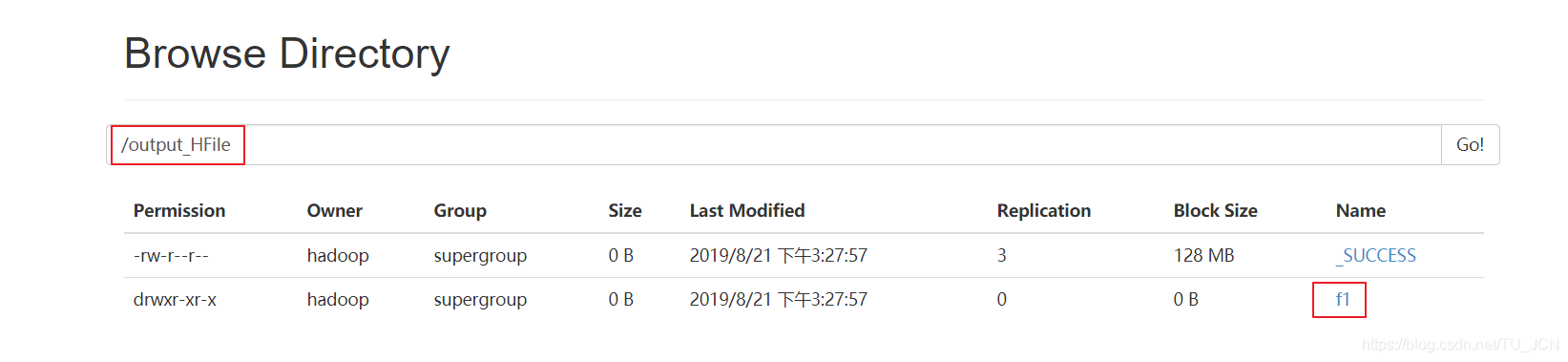
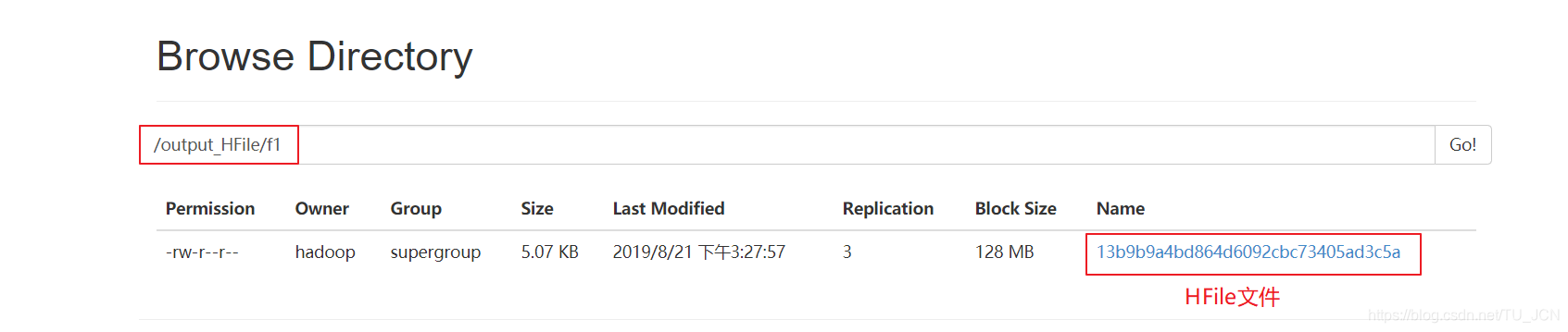
-
4、加载HFile文件到hbase表中
- 方式一:代码加载
package com.kaikeba; import org.apache.hadoop.conf.Configuration; import org.apache.hadoop.fs.Path; import org.apache.hadoop.hbase.HBaseConfiguration; import org.apache.hadoop.hbase.TableName; import org.apache.hadoop.hbase.client.Admin; import org.apache.hadoop.hbase.client.Connection; import org.apache.hadoop.hbase.client.ConnectionFactory; import org.apache.hadoop.hbase.client.Table; import org.apache.hadoop.hbase.mapreduce.LoadIncrementalHFiles; public class LoadData { public static void main(String[] args) throws Exception { Configuration configuration = HBaseConfiguration.create(); configuration.set("hbase.zookeeper.quorum", "node01,node02,node03"); //获取数据库连接 Connection connection = ConnectionFactory.createConnection(configuration); //获取表的管理器对象 Admin admin = connection.getAdmin(); //获取table对象 TableName tableName = TableName.valueOf("t4"); Table table = connection.getTable(tableName); //构建LoadIncrementalHFiles加载HFile文件 LoadIncrementalHFiles load = new LoadIncrementalHFiles(configuration); load.doBulkLoad(new Path("hdfs://node01:8020/hbase/output_file"), admin,table,connection.getRegionLocator(tableName)); } }- 方式二:命令加载
先将hbase的jar包添加到hadoop的classpath路径下
先将hbase的jar包添加到hadoop的classpath路径下
export HBASE_HOME=/kkb/install/hbase-1.2.0-cdh5.14.2/
export HADOOP_HOME=/kkb/install/hadoop-2.6.0-cdh5.14.2/
export HADOOP_CLASSPATH=`${HBASE_HOME}/bin/hbase mapredcp`
-
运行命令
yarn jar /kkb/install/hbase-1.2.0-cdh5.14.2/lib/hbase-server-1.2.0-cdh5.14.2.jar completebulkload /hbase/output_hfile myuser2
2. HBase集成Hive
- Hive提供了与HBase的集成,使得能够在HBase表上使用hive sql 语句进行查询、插入操作以及进行Join和Union等复杂查询,同时也可以将hive表中的数据映射到Hbase中
2.1 HBase与Hive的对比
| Hive | HBase |
|---|---|
| 数据仓库 | 列存储的非关系型数据库 |
| 离线的数据分析和清洗,延迟较高 | 延迟较低,接入在线业务使用 |
| 基于HDFS、MapReduce | 基于HDFS |
| 一种类SQL的引擎,并且运行MapReduce任务 | 一种在Hadoop之上的NoSQL 的Key/vale数据库 |
2.1.1 Hive
-
数据仓库
Hive的本质其实就相当于将HDFS中已经存储的文件在Mysql中做了一个双射关系,以方便使用HQL去管理查询。
-
用于数据分析、清洗
Hive适用于离线的数据分析和清洗,延迟较高
-
基于HDFS、MapReduce
Hive存储的数据依旧在DataNode上,编写的HQL语句终将是转换为MapReduce代码执行。(不要钻不需要执行MapReduce代码的情况的牛角尖)
2.1.2 HBase
-
数据库
是一种面向列存储的非关系型数据库。
-
用于存储结构化和非结构话的数据
适用于单表非关系型数据的存储,不适合做关联查询,类似JOIN等操作。
-
基于HDFS
数据持久化存储的体现形式是Hfile,存放于DataNode中,被ResionServer以region的形式进行管理。
-
延迟较低,接入在线业务使用
面对大量的企业数据,HBase可以直线单表大量数据的存储,同时提供了高效的数据访问速度。
2.1.3 总结:Hive与HBase
- Hive和Hbase是两种基于Hadoop的不同技术,Hive是一种类SQL的引擎,并且运行MapReduce任务,Hbase是一种在Hadoop之上的NoSQL 的Key/vale数据库。这两种工具是可以同时使用的。就像用Google来搜索,用FaceBook进行社交一样,Hive可以用来进行统计查询,HBase可以用来进行实时查询,数据也可以从Hive写到HBase,或者从HBase写回Hive。
2.2 整合配置
2.2.1 拷贝jar包
-
将我们HBase的五个jar包拷贝到hive的lib目录下
-
hbase的jar包都在/kkb/install/hbase-1.2.0-cdh5.14.2/lib
-
我们需要拷贝五个jar包名字如下
hbase-client-1.2.0-cdh5.14.2.jar
hbase-hadoop2-compat-1.2.0-cdh5.14.2.jar
hbase-hadoop-compat-1.2.0-cdh5.14.2.jar
hbase-it-1.2.0-cdh5.14.2.jar
hbase-server-1.2.0-cdh5.14.2.jar
- 我们直接在node03执行以下命令,通过创建软连接的方式来进行jar包的依赖
ln -s /kkb/install/hbase-1.2.0-cdh5.14.2/lib/hbase-client-1.2.0-cdh5.14.2.jar              /kkb/install/hive-1.1.0-cdh5.14.2/lib/hbase-client-1.2.0-cdh5.14.2.jar

ln -s /kkb/install/hbase-1.2.0-cdh5.14.2/lib/hbase-hadoop2-compat-1.2.0-cdh5.14.2.jar      /kkb/install/hive-1.1.0-cdh5.14.2/lib/hbase-hadoop2-compat-1.2.0-cdh5.14.2.jar
ln -s /kkb/install/hbase-1.2.0-cdh5.14.2/lib/hbase-hadoop-compat-1.2.0-cdh5.14.2.jar       /kkb/install/hive-1.1.0-cdh5.14.2/lib/hbase-hadoop-compat-1.2.0-cdh5.14.2.jar
ln -s /kkb/install/hbase-1.2.0-cdh5.14.2/lib/hbase-it-1.2.0-cdh5.14.2.jar     /kkb/install/hive-1.1.0-cdh5.14.2/lib/hbase-it-1.2.0-cdh5.14.2.jar

ln -s /kkb/install/hbase-1.2.0-cdh5.14.2/lib/hbase-server-1.2.0-cdh5.14.2.jar          /kkb/install/hive-1.1.0-cdh5.14.2/lib/hbase-server-1.2.0-cdh5.14.2.jar
2.2.2 修改hive的配置文件
- 编辑node03服务器上面的hive的配置文件hive-site.xml
cd /kkb/install/hive-1.1.0-cdh5.14.2/conf
vim hive-site.xml
- 添加以下两个属性的配置
<property>
		<name>hive.zookeeper.quorum</name>
		<value>node01,node02,node03</value>
</property>
 <property>
		<name>hbase.zookeeper.quorum</name>
		<value>node01,node02,node03</value>
</property>
2.2.3 修改hive-env.sh配置文件
cd /kkb/install/hive-1.1.0-cdh5.14.2/conf
vim hive-env.sh
- 添加以下配置
export HADOOP_HOME=/kkb/install/hadoop-2.6.0-cdh5.14.2
export HBASE_HOME=/kkb/install/hbase-1.2.0-cdh5.14.2
export HIVE_CONF_DIR=/kkb/install/hive-1.1.0-cdh5.14.2/conf
2.3 实战1——hive中分析结果 保存到hbase表当中去
2.3.1 hive当中建表
- node03执行以下命令,进入hive客户端,并创建hive表
cd /kkb/install/hive-1.1.0-cdh5.14.2/
bin/hive
- 创建hive数据库与hive对应的数据库表
create database course;
use course;

create external table if not exists course.score(id int,cname string,score int) row format delimited fields terminated by '\t' stored as textfile ;
2.3.2 准备数据内容如下并加载到hive表
- node03执行以下命令,创建数据文件
cd /kkb/install/hivedatas
vim hive-hbase.txt
- 文件内容如下
1	zhangsan	80
2	lisi	60
3	wangwu	30
4	zhaoliu	70
- 进入hive客户端进行加载数据
hive (course)> load data local inpath '/kkb/install/hivedatas/hive-hbase.txt' into table score;
hive (course)> select * from score;
2.3.3 创建hive管理表与HBase进行映射
-
我们可以创建一个hive的管理表与hbase当中的表进行映射,hive管理表当中的数据,都会存储到hbase上面去
-
hive当中创建内部表
create table course.hbase_score(id int,cname string,score int)
stored by 'org.apache.hadoop.hive.hbase.HBaseStorageHandler'  with serdeproperties("hbase.columns.mapping" = "cf:name,cf:score") tblproperties("hbase.table.name" = "hbase_score");
- 通过insert overwrite select 插入数据
insert overwrite table course.hbase_score select id,cname,score from course.score;
2.3.4 hbase当中查看表hbase_score
- 进入hbase的客户端查看表hbase_score,并查看当中的数据
hbase(main):023:0> list

TABLE                                                                                 hbase_score                                                                           myuser                                                                                 myuser2                                                                               student                                                                               user                                                                                   5 row(s) in 0.0210 seconds
=> ["hbase_score", "myuser", "myuser2", "student", "user"]

hbase(main):024:0> scan 'hbase_score'

ROW                      COLUMN+CELL
 1                       column=cf:name, timestamp=1550628395266, value=zhangsan
 1                       column=cf:score, timestamp=1550628395266, value=80
 2                       column=cf:name, timestamp=1550628395266, value=lisi
 2                       column=cf:score, timestamp=1550628395266, value=60
 3                       column=cf:name, timestamp=1550628395266, value=wangwu
 3                       column=cf:score, timestamp=1550628395266, value=30
 4                       column=cf:name, timestamp=1550628395266, value=zhaoliu
 4                       column=cf:score, timestamp=1550628395266, value=70
4 row(s) in 0.0360 seconds
2.4 实战2——创建hive外部表,映射HBase当中已有的表模型
2.4.1 HBase当中创建表并手动插入加载一些数据
- 进入HBase的shell客户端,
bin/hbase shell
- 手动创建一张表,并插入加载一些数据进去
# 创建一张表
create 'hbase_hive_score',{ NAME =>'cf'}
# 通过put插入数据到hbase表
put 'hbase_hive_score','1','cf:name','zhangsan'
put 'hbase_hive_score','1','cf:score', '95'
put 'hbase_hive_score','2','cf:name','lisi'
put 'hbase_hive_score','2','cf:score', '96'
put 'hbase_hive_score','3','cf:name','wangwu'
put 'hbase_hive_score','3','cf:score', '97'
2.4.2 建立hive的外部表,映射HBase当中的表以及字段
-
在hive当中建立外部表
-
进入hive客户端,然后执行以下命令进行创建hive外部表,就可以实现映射HBase当中的表数据
CREATE external TABLE course.hbase2hive(id int, name string, score int) STORED BY 'org.apache.hadoop.hive.hbase.HBaseStorageHandler' WITH SERDEPROPERTIES ("hbase.columns.mapping" = ":key,cf:name,cf:score") TBLPROPERTIES("hbase.table.name" ="hbase_hive_score");





 扫一扫
扫一扫


 738
738

 被折叠的 条评论
为什么被折叠?
被折叠的 条评论
为什么被折叠?
 到【灌水乐园】发言





