


1 文件读写类
1.1 QFile
QFile简介:
- QFile是Qt中用于文件操作的类。
- QFile对象对应到计算机上的一个文件。
疑问:如何使用ReadWrite对文件进行操作呢?先放在这里。
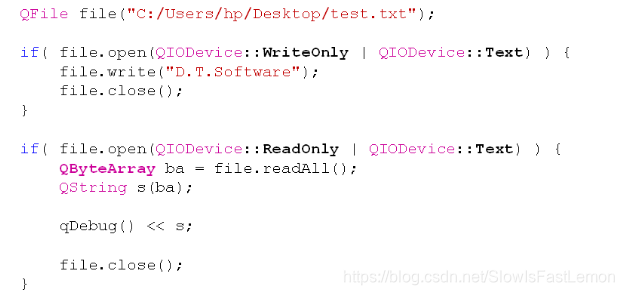
文本文件和数据文件:
Qt中将文件类型分为2大类:
- 文本文件:文件内容是可读的文本字符。
- 数据文件:文件内容是直接的二进制数据。
QFile直接支持文本文件和数据文件的读写:
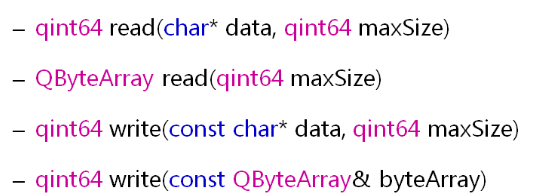
思考:如何将一个浮点数据写入文本文件和数据文件?
#include <QtCore/QCoreApplication>
#include <QFile>
#include <QDebug>

int main(int argc, char *argv[])
{
    QCoreApplication a(argc, argv);
    QFile file("C:/Users/hp/Desktop/test.hex");

    if( file.open(QIODevice::WriteOnly) )	// 不指明就是二进制文件
    {
        QString dt = "D.T.Software";
        double value = 3.14;

        file.write(dt.toStdString().c_str());
        file.write(reinterpret_cast<char*>(&value), sizeof(value));

        file.close();
    }

    if( file.open(QIODevice::ReadOnly) )
    {
        QString dt = "";
        double value = 0;

        dt = QString(file.read(12));
        file.read(reinterpret_cast<char*>(&value), sizeof(value));

        file.close();

        qDebug() << dt;
        qDebug() << value;
    }

    return a.exec();
}
可以看到上面的写入是很麻烦的,并且对于文件写入来说都是讲一段内存空间中的数据写入文件中,而不区分文本文件和数据文件。
为了方便的对文本文件和数据文件,我们可以借助QTextStream和QDataStream。
1.2 QTextStream和QDataStream
Qt提供辅助类简化了文本文件/数据文件的读写:
- QTextStream:写入的数据全部转换为可读文本。
- QDataStream:写入的数据根据类型转换为二进制数据。
IO设备辅助类的使用方式:
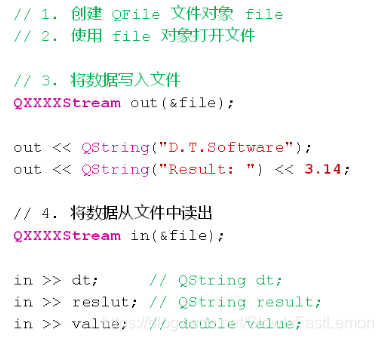
编程实验:使用文件辅助类读写
#include <QtCore/QCoreApplication>
#include <QFile>
#include <QTextStream>
#include <QDataStream>
#include <QDebug>

void text_stream_test(QString f)
{
    QFile file(f);

    if( file.open(QIODevice::WriteOnly | QIODevice::Text) )
    {
        QTextStream out(&file);

        out << QString("D.T.Software") << endl;
        out << QString("Result: ") << endl;
        out << 5 << '*' << 6 << '=' << 5 * 6 << endl;

        file.close();
    }

    if( file.open(QIODevice::ReadOnly | QIODevice::Text) )
    {
        QTextStream in(&file);

        while( !in.atEnd() )
        {
            QString line = in.readLine();

            qDebug() << line;
        }

        file.close();
    }
}

void data_stream_test(QString f)
{
    QFile file(f);

    if( file.open(QIODevice::WriteOnly) )
    {
        QDataStream out(&file);

        out.setVersion(QDataStream::Qt_4_7);

        out << QString("D.T.Software");
        out << QString("Result: ");
        out << 3.14;

        file.close();
    }

    if( file.open(QIODevice::ReadOnly) )
    {
        QDataStream in(&file);
        QString dt = "";
        QString result = "";
        double value = 0;

        in.setVersion(QDataStream::Qt_4_7);

        in >> dt;
        in >> result;
        in >> value;

        file.close();

        qDebug() << dt;
        qDebug() << result;
        qDebug() << value;
    }
}

int main(int argc, char *argv[])
{
    QCoreApplication a(argc, argv);

    text_stream_test("C:/Users/hp/Desktop/text.txt");
    data_stream_test("C:/Users/hp/Desktop/data.dat");

    return a.exec();
}
对于QDataStream来说,不管写入的是QString、C方式的字符串、整形数据等,都有特定的二进制流格式,所以读取的时候才能直接以类型来进行读取。不是任何对象都能使用QDataStream进行序列化的,要想序列化必须自己实现序列化的方法。有很多Qt提供的类都实现了序列化的方法,比如对于QString如下(太长了我才不看):
#if !defined(QT_NO_DATASTREAM) || (defined(QT_BOOTSTRAPPED) && !defined(QT_BUILD_QMAKE))
/*!
    \fn QDataStream &operator<<(QDataStream &stream, const QString &string)
    \relates QString

    Writes the given \a string to the specified \a stream.

    \sa {Serializing Qt Data Types}
*/

QDataStream &operator<<(QDataStream &out, const QString &str)
{
    if (out.version() == 1) {
        out << str.toLatin1();
    } else {
        if (!str.isNull() || out.version() < 3) {
            int byteOrder = out.byteOrder();
            const QChar* ub = str.unicode();
            static const uint auto_size = 1024;
            char t[auto_size];
            char *b;
            if (str.length()*sizeof(QChar) > auto_size) {
                b = new char[str.length()*sizeof(QChar)];
            } else {
                b = t;
            }
            int l = str.length();
            char *c=b;
            while (l--) {
                if (byteOrder == QDataStream::BigEndian) {
                    *c++ = (char)ub->row();
                    *c++ = (char)ub->cell();
                } else {
                    *c++ = (char)ub->cell();
                    *c++ = (char)ub->row();
                }
                ub++;
            }
            out.writeBytes(b, sizeof(QChar)*str.length());
            if (str.length()*sizeof(QChar) > auto_size)
                delete [] b;
        } else {
            // write null marker
            out << (quint32)0xffffffff;
        }
    }
    return out;
}

/*!
    \fn QDataStream &operator>>(QDataStream &stream, QString &string)
    \relates QString

    Reads a string from the specified \a stream into the given \a string.

    \sa {Serializing Qt Data Types}
*/

QDataStream &operator>>(QDataStream &in, QString &str)
{
#ifdef QT_QSTRING_UCS_4
#if defined(Q_CC_GNU)
#warning "operator>> not working properly"
#endif
#endif

    if (in.version() == 1) {
        QByteArray l;
        in >> l;
        str = QString::fromLatin1(l);
    } else {
        quint32 bytes = 0;
        in >> bytes;                                  // read size of string
        if (bytes == 0xffffffff) {                    // null string
            str.clear();
        } else if (bytes > 0) {                       // not empty
            if (bytes & 0x1) {
                str.clear();
                in.setStatus(QDataStream::ReadCorruptData);
                return in;
            }

            const quint32 Step = 1024 * 1024;
            quint32 len = bytes / 2;
            quint32 allocated = 0;

            while (allocated < len) {
                int blockSize = qMin(Step, len - allocated);
                str.resize(allocated + blockSize);
                if (in.readRawData(reinterpret_cast<char *>(str.data()) + allocated * 2,
                                   blockSize * 2) != blockSize * 2) {
                    str.clear();
                    in.setStatus(QDataStream::ReadPastEnd);
                    return in;
                }
                allocated += blockSize;
            }

            if ((in.byteOrder() == QDataStream::BigEndian)
                    != (QSysInfo::ByteOrder == QSysInfo::BigEndian)) {
                ushort *data = reinterpret_cast<ushort *>(str.data());
                while (len--) {
                    *data = qbswap(*data);
                    ++data;
                }
            }
        } else {
            str = QLatin1String("");
        }
    }
    return in;
}
#endif // QT_NO_DATASTREAM
不同版本的数据流文件格式可能不同,我们可以通过如下函数进行设置:
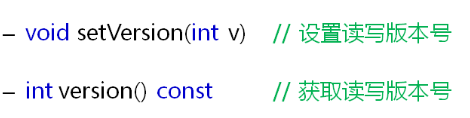
当数据流文件可能在不同版本的Qt程序间传递数据时,我们需要考虑版本问题!
2 文件辅助类
2.1 QFileInfo
QFileInfo类用于读取文件属性信息。
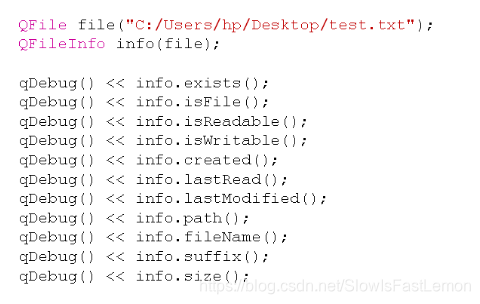
示例程序:
#include <QtCore/QCoreApplication>
#include <QFile>
#include <QByteArray>
#include <QDebug>
#include <QFileInfo>
#include <QDateTime>

void write(QString f)
{
    QFile file(f);

    if( file.open(QIODevice::WriteOnly | QIODevice::Text) )
    {
        file.write("D.T.Software\n");
        file.write("Delphi Tang\n");
        file.close();
    }
}

void read(QString f)
{
    QFile file(f);

    if( file.open(QIODevice::ReadOnly | QIODevice::Text) )
    {
        QByteArray ba = file.readLine();
        QString s(ba);

        qDebug() << s;

        file.close();
    }
}

void info(QString f)
{
    QFile file(f);
    QFileInfo info(file);

    qDebug() << info.exists();
    qDebug() << info.isFile();
    qDebug() << info.isReadable();
    qDebug() << info.isWritable();
    qDebug() << info.created();
    qDebug() << info.lastRead();
    qDebug() << info.lastModified();
    qDebug() << info.path();
    qDebug() << info.fileName();
    qDebug() << info.suffix();
    qDebug() << info.size();
}

int main(int argc, char *argv[])
{
    QCoreApplication a(argc, argv);

    write("C:/Users/hp/Desktop/test.txt");
    read("C:/Users/hp/Desktop/test.txt");
    info("C:/Users/hp/Desktop/test.txt");

    return a.exec();
}
3 临时文件类
3.1 QTemporaryFile
Qt中提供了临时文件操作类QTemporaryFile:
- 安全地创建一个全局唯一的临时文件。
- 当对象销毁时对应的临时文件将被删除。
- 临时文件的默认打开方式为
QIODevice::ReadWrite。 - 临时文件常用于大数据传递或者进程间通信的场合。
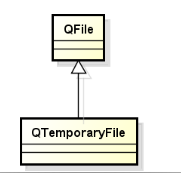
示例程序:
#include <QtCore/QCoreApplication>
#include <QTemporaryFile>
#include <QFileInfo>
#include <QDebug>

int main(int argc, char *argv[])
{
    QCoreApplication a(argc, argv);
    QTemporaryFile tempFile;

    if( tempFile.open() )
    {
        tempFile.write("D.T.Software");
        tempFile.close();
    }

    QFileInfo info(tempFile);

    qDebug() << info.isFile();
    qDebug() << info.path();
    qDebug() << info.fileName();

    return a.exec();
}
参考资料:

 905


 扫一扫


 被折叠的 条评论
为什么被折叠?
 到【灌水乐园】发言


