



 博客围绕USACO的“Your Ride Is Here”题目展开,介绍根据彗星和团体名称转换数字,通过取模判断是否匹配的规则,给出输入输出格式及示例,还给出输出解释,最后提到在USACO刷题的好处并表示该题较简单,要注意格式要求。
Your Ride Is Here
It is a well-known fact that behind every good comet is a UFO. These UFOs often come to collect loyal supporters from here on Earth. Unfortunately, they only have room to pick up one group of followers on each trip. They do, however, let the groups know ahead of time which will be picked up for each comet by a clever scheme: they pick a name for the comet which, along with the name of the group, can be used to determine if it is a particular group’s turn to go (who do you think names the comets?). The details of the matching scheme are given below; your job is to write a program which takes the names of a group and a comet and then determines whether the group should go with the UFO behind that comet.
Both the name of the group and the name of the comet are converted into a number in the following manner: the final number is just the product of all the letters in the name, where “A” is 1 and “Z” is 26. For instance, the group “USACO” would be 21 * 19 * 1 * 3 * 15 = 17955. If the group’s number mod 47 is the same as the comet’s number mod 47, then you need to tell the group to get ready! (Remember that “a mod b” is the remainder left over after dividing a by b; 34 mod 10 is 4.)
Write a program which reads in the name of the comet and the name of the group and figures out whether according to the above scheme the names are a match, printing “GO” if they match and “STAY” if not. The names of the groups and the comets will be a string of capital letters with no spaces or punctuation, up to 6 characters long.
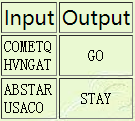
Examples:
INPUT FORMAT
Line 1: An upper case character string of length 1…6 that is the name of the comet.
Line 2: An upper case character string of length 1…6 that is the name of the group.
NOTE: The input file has a newline at the end of each line but does not have a “return”. Sometimes, programmers code for the Windows paradigm of “return” followed by “newline”; don’t do that! Use simple input routines like “readln” (for Pascal) and, for C/C++, “fscanf” and “fid>>string”.
NOTE 2: Because of the extra characters, be sure to leave enough room for a ‘newline’ (also notated as ‘\n’) and an end of string character (’\0’) if your language uses it (as C and C++ do). This means you need eight characters of room instead of six.
SAMPLE INPUT
COMETQ
HVNGAT
OUTPUT FORMAT
A single line containing either the word “GO” or the word “STAY”.
SAMPLE OUTPUT
GO
OUTPUT EXPLANATION
Converting the letters to numbers:
C O M E T Q
3 15 13 5 20 17
H V N G A T
8 22 14 7 1 20
then calculate the product mod 47:
3 * 15 * 13 * 5 * 20 * 17 = 994500 mod 47 = 27
8 * 22 * 14 * 7 * 1 * 20 = 344960 mod 47 = 27
Because both products evaluate to 27 (when modded by 47), the mission is ‘GO’.
C++编写
之后会经常在USACO上面刷题,这个网站刷题其实挺好的,你会了解到很多自己还不知道的东西,个人觉得对自己英语阅读能力也是有一定的提升,该题较为简单,注意一下它的格式等要求就好了,代码如下:
/*
ID: your_id_here           //此处输入你的Username
TASK: ride
LANG: C++
*/
#include<iostream>
#include<cstdio>
#include<string>
using namespace std;

int main()
{
    freopen("ride.in","r",stdin);
    freopen("ride.out","w",stdout);

    int sum1,sum2;
    string a;

    for(int i=0;i<2;i++)
    {
        int sum=1;
        cin>>a;
        for(int j=0;j<a.size();j++)
        {
            sum *= a[j]-64;
        }

        if(i==0)
            sum1=sum;
        else
            sum2=sum;
    }

    if(sum1%47 == sum2%47)
        cout<<"GO"<<endl;
    else
        cout<<"STAY"<<endl;
    return 0;
}





 扫一扫
扫一扫


 671
671

 被折叠的 条评论
为什么被折叠?
被折叠的 条评论
为什么被折叠?
 到【灌水乐园】发言





