数据清洗-地区

本文主要介绍了如何使用Python的pandas库进行数据清洗,包括数据读取、表拼接、去重、以及地区信息的提取,如省份、城市和区县。通过实例展示了如何处理如'市京市六合区瓜埠镇单桥村何庄8号'这样的地址,确保数据的准确性和完整性。最后,进行了数据复盘检查和可视化分析。
部署运行你感兴趣的模型镜像

导包

import pandas as pd
import re
from matplotlib import pyplot as plt
font = {
	"family":"Microsoft Yahei"
}
plt.rc("font",**font)

数据读取

data01 = pd.read_csv("data01.csv")
data02 = pd.read_csv("data02.csv")

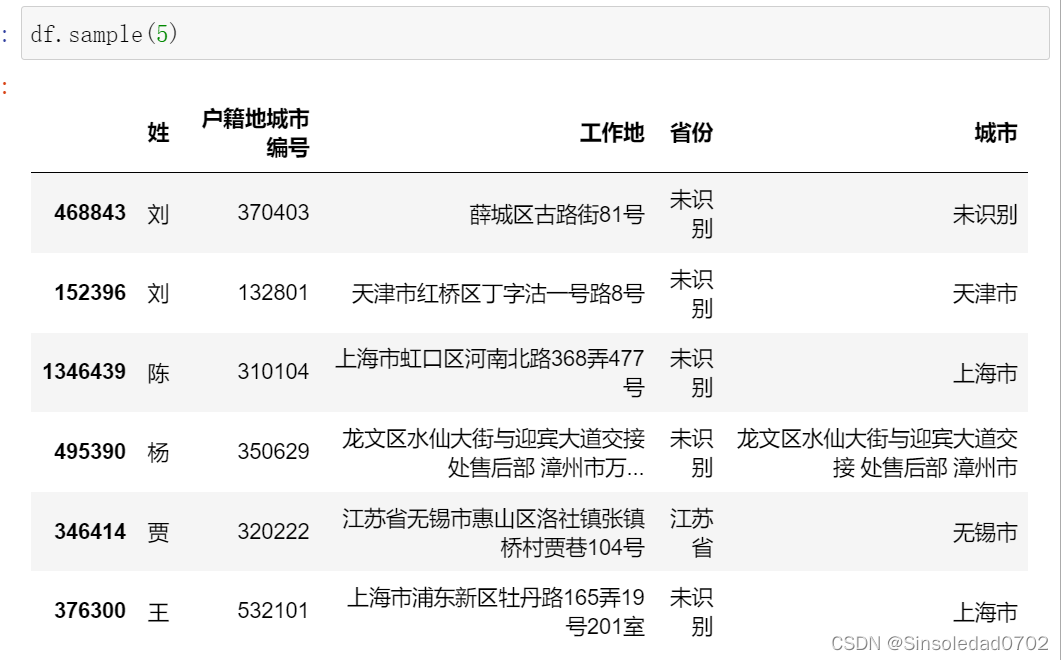
在这里插入图片描述

表拼接

data02 = data02.iloc[:,1:]
df = pd.concat([data01,data02],axis=0)

在这里插入图片描述

去重

df.drop_duplicates(inplace=True)

获取省

def get_province(x):
	if "省" not in x:
		return "未识别"
	else:
		return x.split("省")[0]+"省"

df["省份"] = df["工作地"].apply(get_province)

在这里插入图片描述

获取市

def get_city(x):
	# 市京市六合区(特殊情况增加进函数里)
	if "市京市" in x:
		return "市京市"
	elif "市" in x:
		if "省" in x:
			return x.split("省")[1].split("市")[0]+"市"
		else:
			return x.split("市")[0] + "市"
	else:
		return "未识别"

df["城市"] = df["工作地"].apply(get_city)
		

在这里插入图片描述

提取区县

def get_qu1(x):
	if "市" in x:
		return x.split("市")[1]
	# 特殊符号:"(","(","【","["
	elif "(" in x:
		return x.split("(")[0]
	elif "(" in x:
		return x.split("(")[0]
	elif "【" in  x:
		return x.split("【")[0]
	elif "[" in x:
		return x.split("[")[0]
	else:
		return x
df["区县"] = df["工作地"].apply(get_qu1)
# 去除数字后面的
df["区县"] = df["区县"].apply(lambda x: re.split(r"\d+",x)[0])
def get_qu2(x):
	if "区" in x:
		return x.split("区")[0]+"区"
	elif "县" in x:
		return x.split("县")[0]+"县"
	elif "镇" in x:
		return x.split("镇")[0]+"镇"
	elif "街道" in x:
		return x.split("街道")[0]+"街道"
	elif "道" in x:
		return x.split("道")[0]+"道"
	elif "路" in x:
		return x.split("路")[0]+"路"
	else:
		return x
df["区县"] = df["区县"].apply(get_qu2)

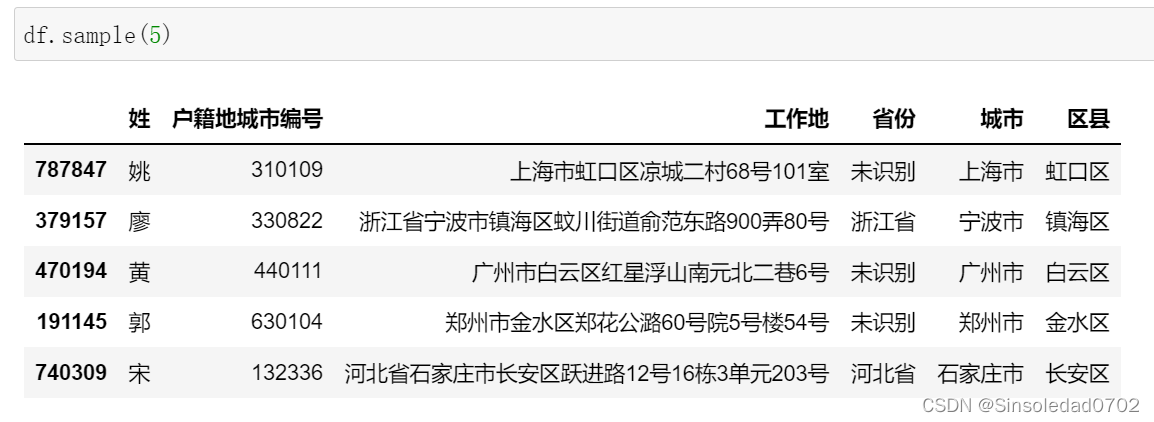
在这里插入图片描述

  • 市京市六合区瓜埠镇单桥村何庄8号
  • 长度=1 5
  • “”
def get_qu3(x):
	len_x = len(x)
	if len_x == 1 or len_x > 5 or x == "":
		return "未识别"
	elif "-" in x:
		return x.split("-","")
	elif "六合区" in x:
		return "六合区"
	elsereturn x
df["区县"] = df["区县"].apply(get_qu3)

复盘检查数据

def qu_jiancha(x):
	if "区" in x or "县" in x or "镇" in x or x == "未识别"return 1
	elif x.endswith("路") or x.endswith("村") or x.endswith("街") or x.endswith("道")return 1
	else:
		return 0
df["quxian"] = df["区县"].apply(qu_jiancha)

a = df[df["quxian"] == 0]["区县"]
b = pd.DataFrame(a.drop_duplicates())
b.to_csv("区县_check.csv",index=False)

def quxian_jiancha(quxian,quxian_jiancha):
	if quxian_jiancha == 1:
		return quxian
	else:
		"未识别"
df["区县"] = df.apply(lambda x:quxian_jiancha(x["区县"],x["quxian"]),axis=1)

del df["quxian"] # 删除辅助类
df.to_csv("data.csv",header=True,index=False)

画图

df_name = pd.DataFrame(df.groupby("姓")["姓"].count())
df_name.columns = ["数量"]
df_name.sort_values("数量",ascending=False,inplace=True)
# 找出top前20
name_top = df_name.head(20).reset_index()
# 求占比
sum_num = df_name.数量.sum()
name_top["占比"] = name_top["数量"]/sum_num
# 保留两位小数
def get_percent(x):
	return str(x*100)[:4] + '%'
name_top["占比"] = name_top["占比"].apply(get_percent)

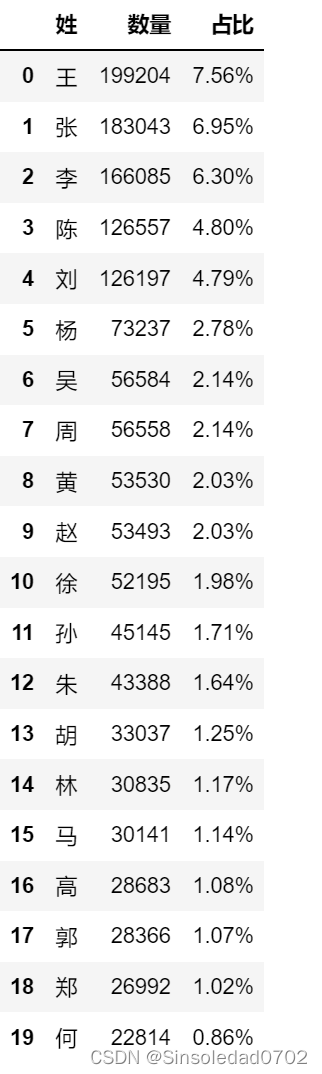
在这里插入图片描述

# 画图
plt.figure(figsize=(20,8),dpi=200)
ax1 = plt.subplot(111)
ax1.bar(name_top.,name_top.数量,label="数量")
ax2 = plt.twinx(ax1)
ax2.plot(name_top.,name_top.占比,marker="o",label="占比")
plt.figure(figsize=(8, 6))
plt.bar(name_top.,name_top.数量,label="数量")
plt.xlabel('top20姓氏')
plt.ylabel('数量')
plt.twinx()
plt.plot(name_top.,name_top.占比,marker="o",label="占比")
plt.ylabel('占比')
plt.title("前20姓氏数量",size=20)
plt.legend()
plt.show()

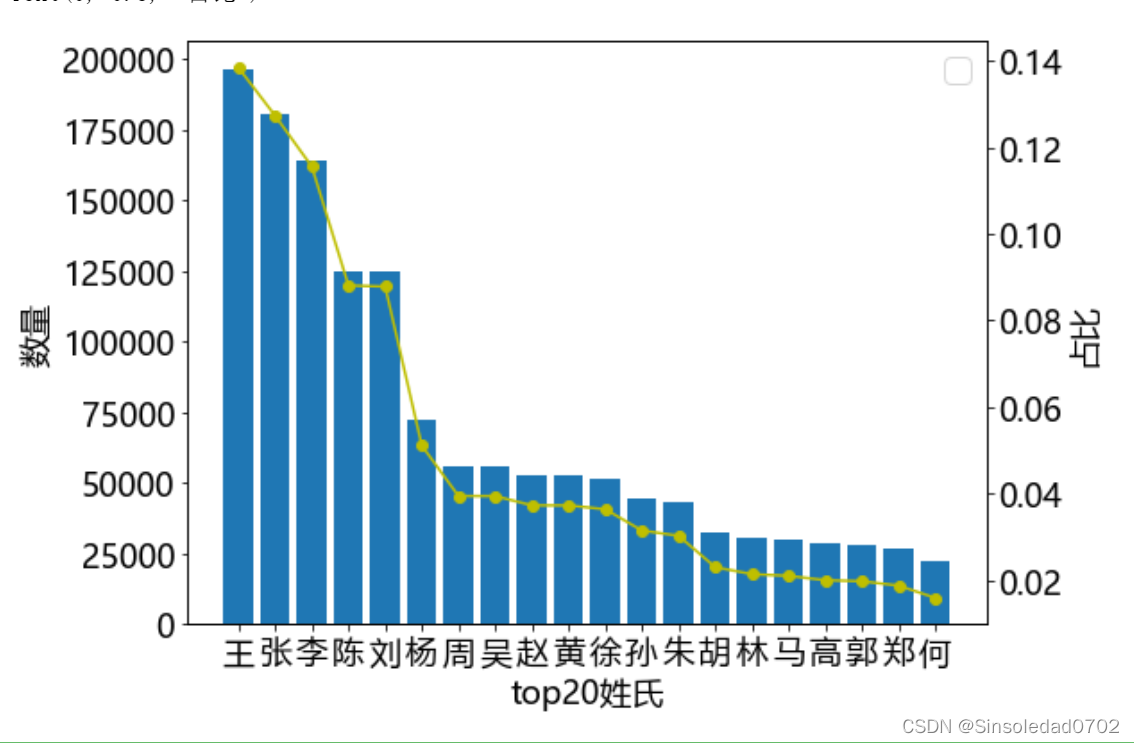
在这里插入图片描述

您可能感兴趣的与本文相关的镜像

Python3.10

Python3.10

Conda
Python

Python 是一种高级、解释型、通用的编程语言,以其简洁易读的语法而闻名,适用于广泛的应用,包括Web开发、数据分析、人工智能和自动化脚本

评论
成就一亿技术人!
拼手气红包6.0元
还能输入1000个字符
 
红包 添加红包
表情包 插入表情
 条评论被折叠 查看
添加红包

请填写红包祝福语或标题

红包个数最小为10个

红包金额最低5元

当前余额3.43前往充值 >
需支付:10.00
成就一亿技术人!
领取后你会自动成为博主和红包主的粉丝 规则
hope_wisdom
发出的红包
实付
使用余额支付
点击重新获取
扫码支付
钱包余额 0

抵扣说明:

1.余额是钱包充值的虚拟货币,按照1:1的比例进行支付金额的抵扣。
2.余额无法直接购买下载,可以购买VIP、付费专栏及课程。

余额充值