



集合(Set、Collections、Map、集合嵌套)
Set系列集合
Set系列集系概述

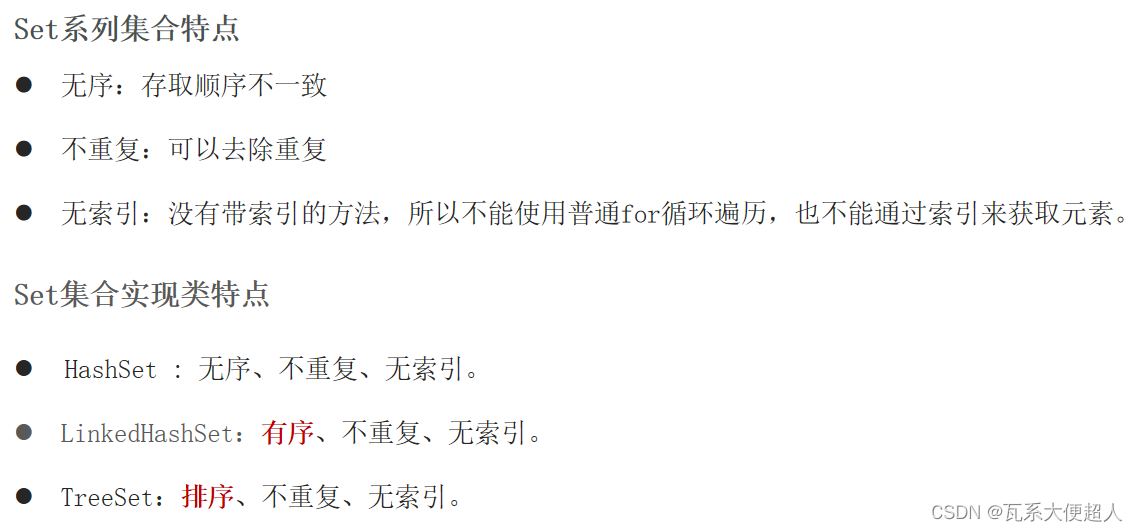
实现类:HashSet集合元素无序的底层原理:哈希表
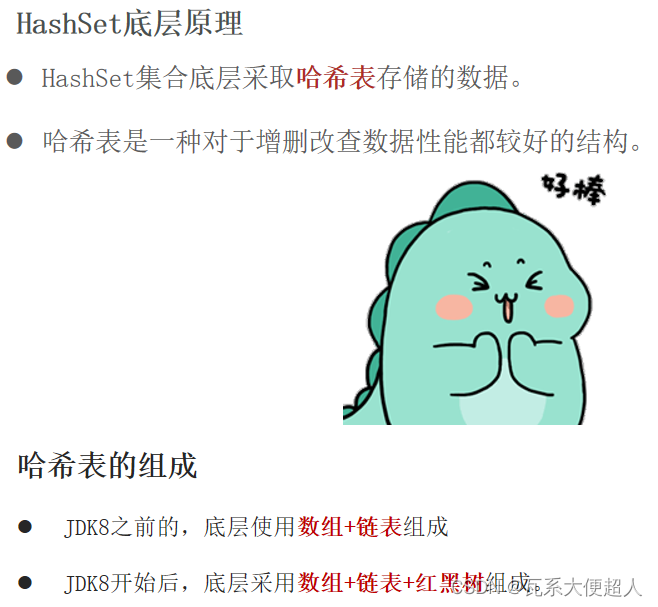

Set集合的底层原理是什么样的?
JDK8之前的,哈希表:底层使用数组+链表组成
JDK8开始后,哈希表:底层采用数组+链表+红黑树组成
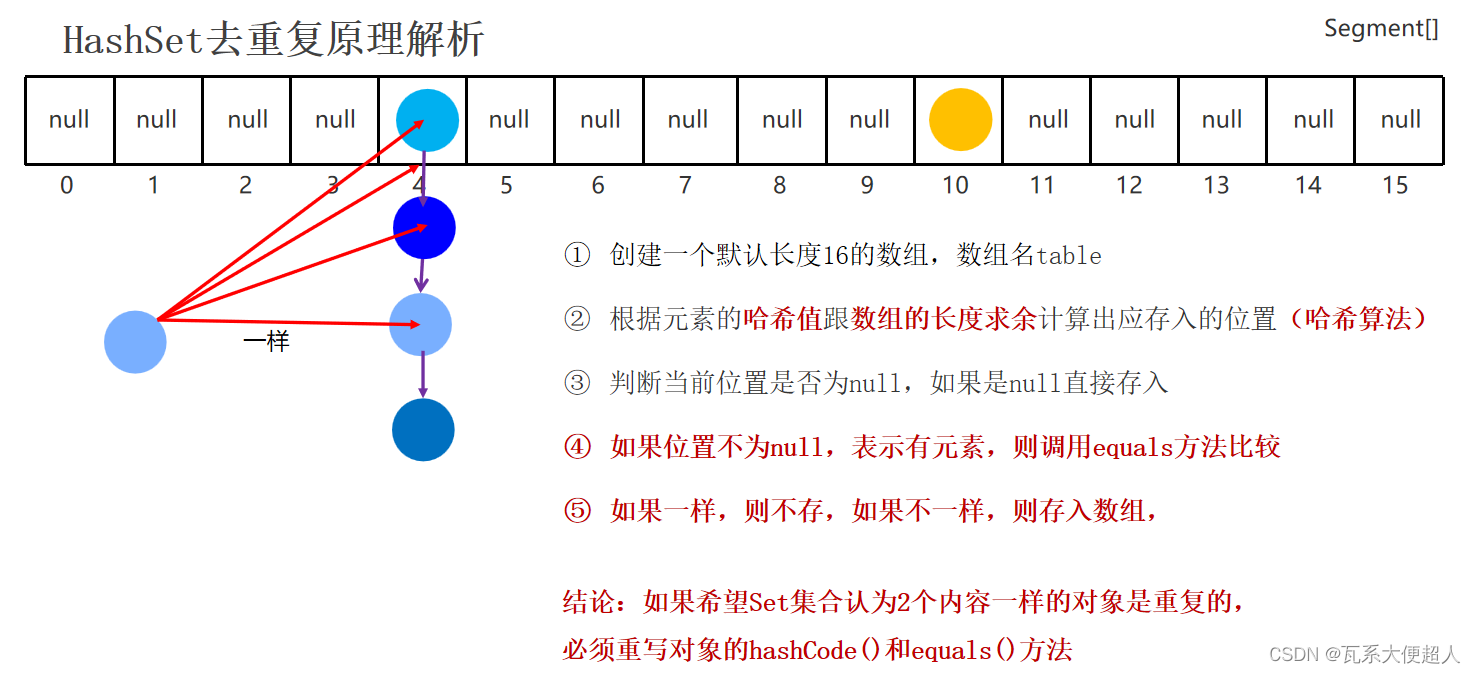
哈希表的详细流程
创建一个默认长度16,默认加载因为0.75的数组,数组名table
根据元素的哈希值跟数组的长度计算出应存入的位置
判断当前位置是否为null,如果是null直接存入,如果位置不为null,表示有元素, 则调用equals方法比较属性值,如果一样,则不存,如果不一样,则存入数组。
当数组存满到16*0.75=12时,就自动扩容,每次扩容原先的两倍
实现类:HashSet集合元素去重复的底层原理
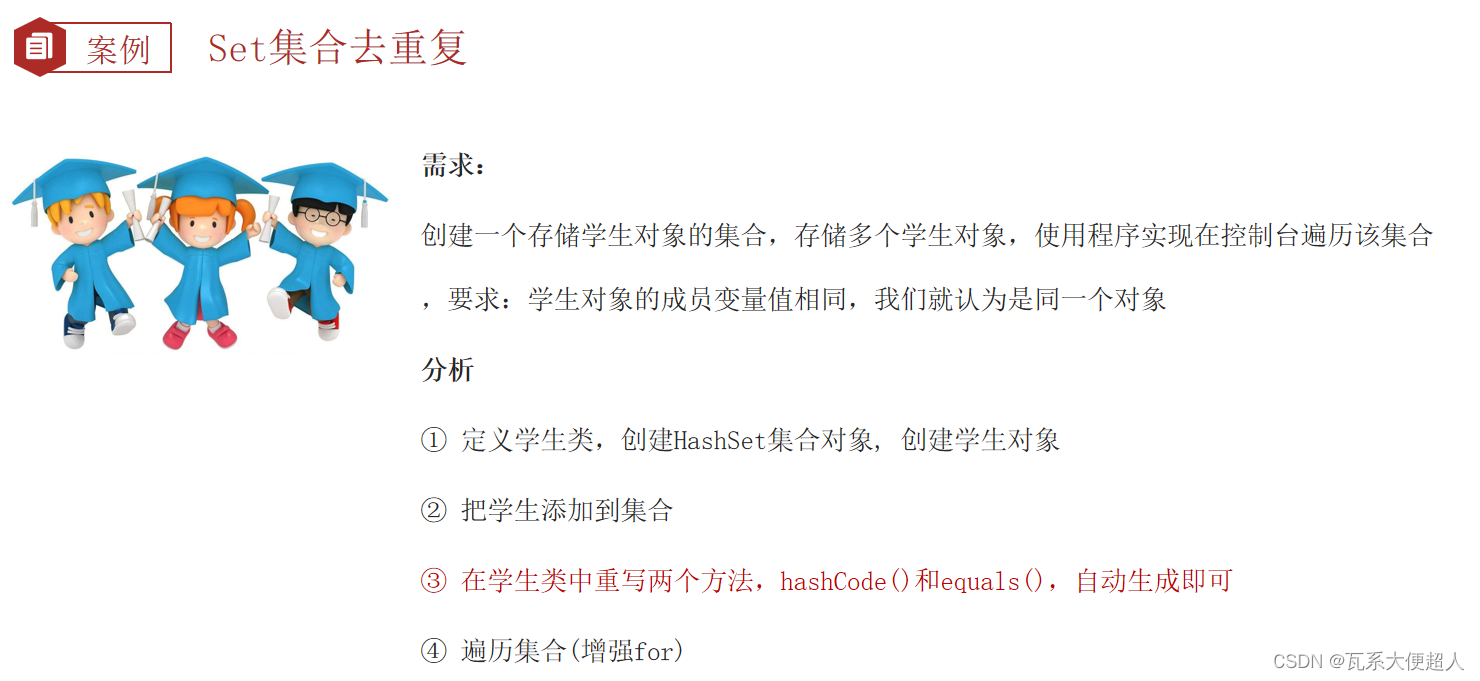
//目标:让Set集合把重复内容的对象去掉一个(去重复)
public class SetDemo3 {
    public static void main(String[] args) {
        //Set集合去重复原因:先判断哈希值,再判断equals
        Set<Student> sets = new HashSet<>();
        Student s1 = new Student("无恙",20,'男');
        Student s2 = new Student("无恙",20,'男');
        Student s3 = new Student("周雄",21,'男');

        System.out.println(s1.hashCode());
        System.out.println(s2.hashCode());
        System.out.println(s3.hashCode());


        sets.add(s1);
        sets.add(s2);
        sets.add(s3);

        System.out.println(sets);

    }

}
public class Student {
    private String name;
    private int age;
    private  char sex;

    public Student() {
    }

    public Student(String name, int age, char sex) {
        this.name = name;
        this.age = age;
        this.sex = sex;
    }

    public String getName() {
        return name;
    }

    public void setName(String name) {
        this.name = name;
    }

    public int getAge() {
        return age;
    }

    public void setAge(int age) {
        this.age = age;
    }

    public char getSex() {
        return sex;
    }

    public void setSex(char sex) {
        this.sex = sex;
    }

    @Override
    public String toString() {
        return "Student{" +
                "name='" + name + '\'' +
                ", age=" + age +
                ", sex=" + sex +
                '}';
    }


    /**
     * 只要2个对象的内容一样,结果一定是true
     * @param o
     * @return
     */

    @Override
    public boolean equals(Object o) {
        if (this == o) return true;
        if (o == null || getClass() != o.getClass()) return false;
        Student student = (Student) o;
        return age == student.age && sex == student.sex && Objects.equals(name, student.name);
    }


    /**
     * s1 = new Student("无恙",20,'男')
     * s2 = new Student("无恙",20,'男')
     * s3 = new Student("周雄",21,'男')
     * @return
     */
    @Override
    public int hashCode() {
        return Objects.hash(name, age, sex);
    }
}
如果希望Set集合认为2个内容相同的对象是重复的应该怎么办?
重写对象的hashCode和equals方法。
实现类:LinkedHashSet
LinkedHashSet集合的特点和原理是怎么样的?
有序、不重复、无索引
底层基于哈希表,使用双链表记录添加顺序。
public class SetDemo4 {
    public static void main(String[] args) {
        //set集合的特点: HashSet LinkedHashSet TreeSet
        //无序不重复,无索引
        Set<String> sets = new LinkedHashSet<>(); //有序 不重复 无索引
        sets.add("MySQL");
        sets.add("MySQL");
        sets.add("Java");
        sets.add("Java");
        sets.add("HTML");
        sets.add("HTML");
        sets.add("SpringBoot");
        sets.add("SpringBoot");
        System.out.println(sets);//[MySQL, Java, HTML, SpringBoot]


    }
}
实现类:TreeSet
TreeSet集合概述和特点
不重复、无索引、可排序
可排序:按照元素的大小默认升序(有小到大)排序。
TreeSet集合底层是基于红黑树的数据结构实现排序的,增删改查性能都较好。
注意:TreeSet集合是一定要排序的,可以将元素按照指定的规则进行排序。
TreeSet集合默认的规则
对于数值类型:Integer , Double,官方默认按照大小进行升序排序。
对于字符串类型:默认按照首字符的编号升序排序。
对于自定义类型如Student对象,TreeSet无法直接排序。
结论:想要使用TreeSet存储自定义类型,需要制定排序规则
自定义排序规则:
TreeSet集合存储对象的的时候有2种方式可以设计自定义比较规则
方式一
让自定义的类(如学生类)实现Comparable接口重写里面的compareTo方法来定制比较规则。
方式二
TreeSet集合有参数构造器,可以设置Comparator接口对应的比较器对象,来定制比较规则。
两种方式中,关于返回值的规则:
如果认为第一个元素大于第二个元素返回正整数即可。
如果认为第一个元素小于第二个元素返回负整数即可。
如果认为第一个元素等于第二个元素返回0即可,此时Treeset集合只会保留一个元素,认为两者重复。
注意:如果TreeSet集合存储的对象有实现比较规则,集合也自带比较器,默认使用集合自带的比较器排序
public class Apple implements Comparable<Apple>{
    private String name;
    private String color;
    private double price;
    private int weight;


    public Apple() {
    }

    public Apple(String name, String color, double price, int weight) {
        this.name = name;
        this.color = color;
        this.price = price;
        this.weight = weight;
    }

    public String getName() {
        return name;
    }

    public void setName(String name) {
        this.name = name;
    }

    public String getColor() {
        return color;
    }

    public void setColor(String color) {
        this.color = color;
    }

    public double getPrice() {
        return price;
    }

    public void setPrice(double price) {
        this.price = price;
    }

    public int getWeight() {
        return weight;
    }

    public void setWeight(int weight) {
        this.weight = weight;
    }

    @Override
    public String toString() {
        return "Apple{" +
                "name='" + name + '\'' +
                ", color='" + color + '\'' +
                ", price=" + price +
                ", weight=" + weight +
                '}';
    }

    /**
     * 方式一:类自定义比较规则
     * o1.compare(ot)
     * @param o
     * @return
     */
    @Override
    public int compareTo(Apple o) {
        //按照重量比较
        return this.weight - o.weight ;//去掉重量重复的元素
        //return this.weight - o.weight >=0 ?1:-1;//保留重量重复的元素
    }
}
//目标:观察TreeSet对于有值特性的数据如何排序
//学会对自定义类型的对象指定规则排序
public class SetDemo5 {
    public static void main(String[] args) {
        Set<Integer> sets = new TreeSet<>();
        sets.add(23);
        sets.add(24);
        sets.add(12);
        sets.add(8);
        System.out.println(sets);//[8, 12, 23, 24]

        Set<String> sets1 = new TreeSet<>();
        sets1.add("Java");
        sets1.add("Java");
        sets1.add("angela");
        sets1.add("黑马");
        sets1.add("Java");
        sets1.add("About");
        sets1.add("Python");
        sets1.add("UI");
        sets1.add("UI");
        System.out.println(sets1);//[About, Java, Python, UI, angela, 黑马]

        System.out.println("---------------------------");
        //方式二:
//        Set<Apple> apples = new TreeSet<>(new Comparator<Apple>() {
//            @Override
//            public int compare(Apple o1, Apple o2) {
//
//                //return o1.getWeight()-o2.getWeight();//升序
//                //return o2.getWeight()-o1.getWeight();//降序
//                //注意:浮点型建议直接使用Doubl.compare进行比较
//                //return Double.compare(o1.getPrice(), o2.getPrice());//升序
//                return Double.compare(o2.getPrice(), o1.getPrice());//降序
//            }
//        });


        //简化后的代码
        Set<Apple> apples = new TreeSet<>((Apple o1, Apple o2) ->Double.compare(o2.getPrice(), o1.getPrice()));


        apples.add(new Apple("红富士","红色",9.9,500));
        apples.add(new Apple("青苹果","绿色",15.9,300));
        apples.add(new Apple("绿苹果","青色",29.9,400));
        apples.add(new Apple("黄苹果","黄色",9.8,500));

        System.out.println(apples);//[Apple{name='绿苹果', color='青色', price=29.9, weight=400}, Apple{name='青苹果', color='绿色', price=15.9, weight=300}, Apple{name='红富士', color='红色', price=9.9, weight=500}, Apple{name='黄苹果', color='黄色', price=9.8, weight=500}]


    }
}
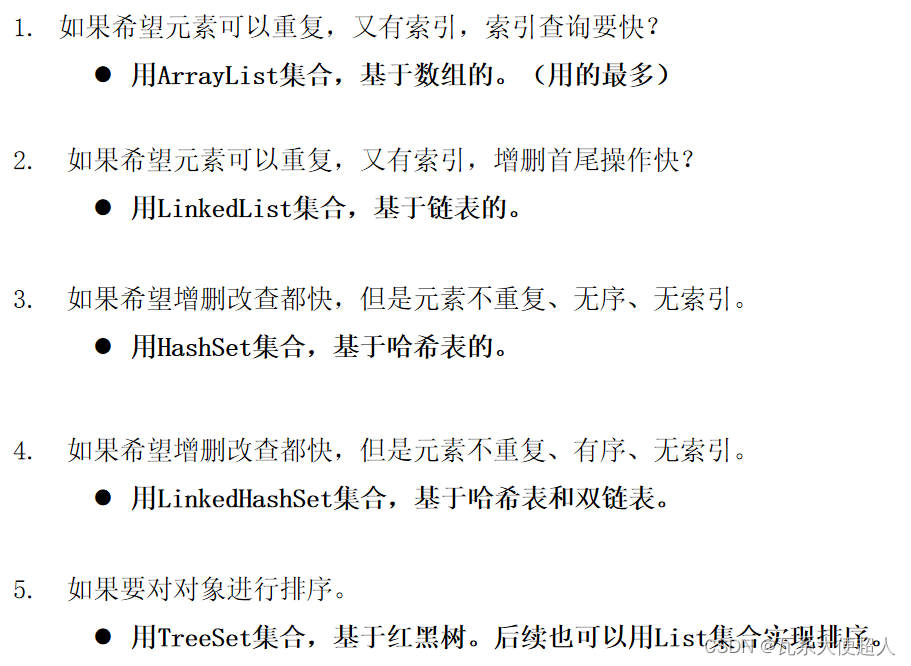
Collection体系的特点、使用场景总结
补充知识:可变参数
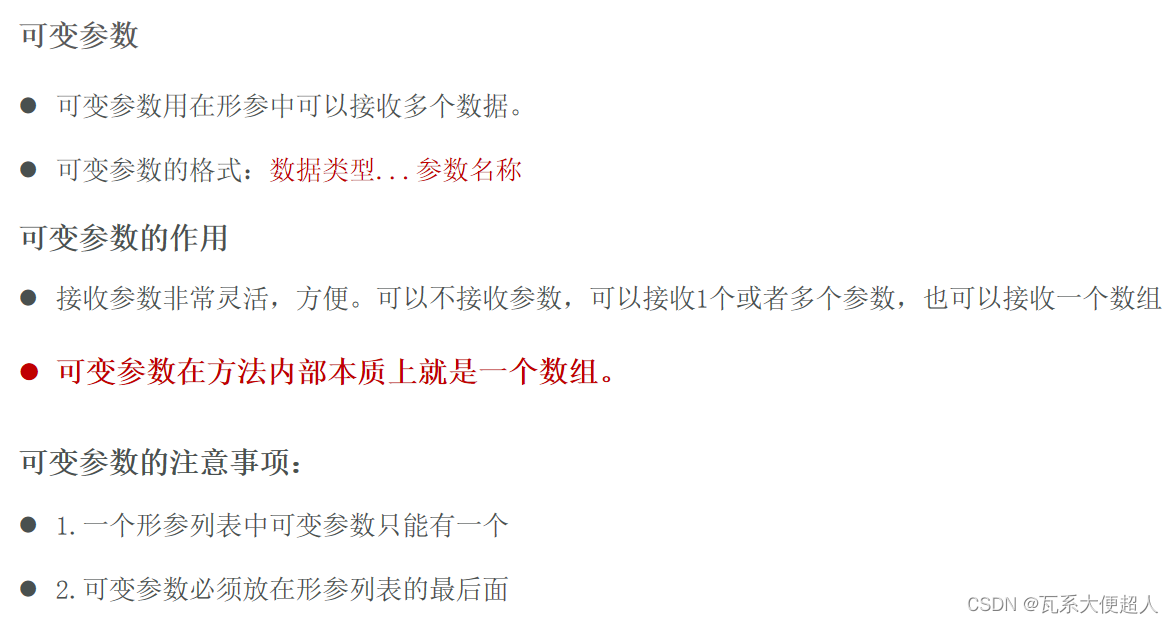
/可变参数
public class MethodDemo {
    public static void main(String[] args) {
        sum();//1.不传参数
        sum(10);//2.传一个参数
        sum(10,20,30);//3.传多个参数
        sum(new int[]{10,20,30,40,50});//4.传一个数组
    }

    /**
     * 注意:一个形参列表中只能有一个可变参数,可变参数必须放在形参列表的最后面
     * @param nums
     */
    public static void sum(int...nums){
        //注意:可变参数在犯法内部其实就是一个数组 nums
        System.out.println("元素个数:" + nums.length);
        System.out.println("元素内容:" + Arrays.toString(nums));
    }

}
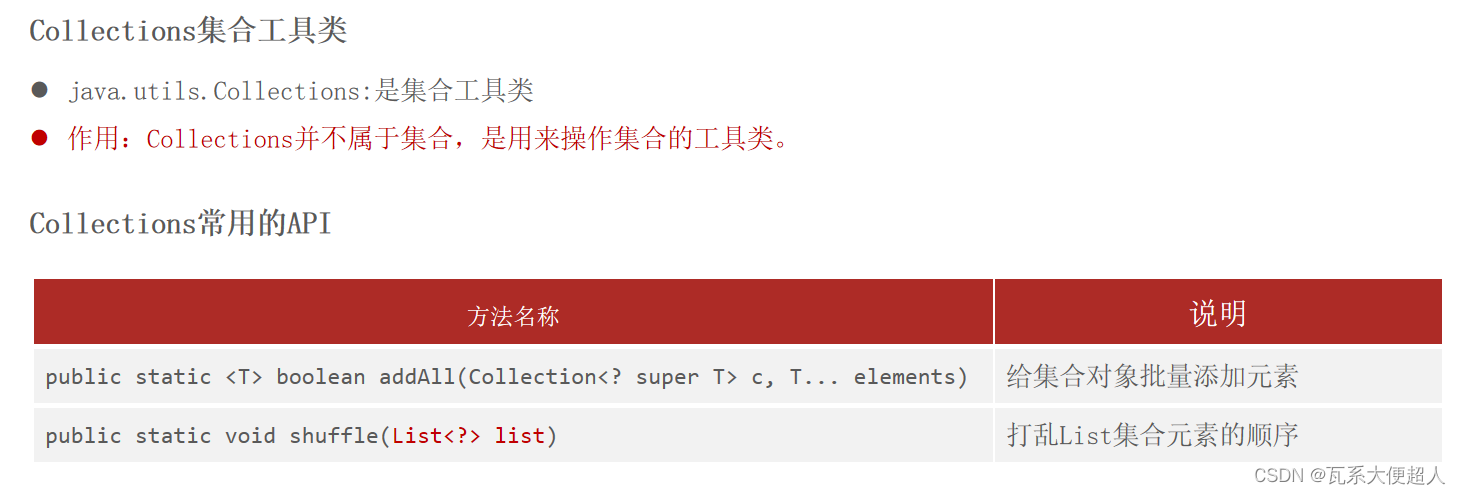
补充知识:集合工具类Collections
public class Apple implements Comparable<Apple>{
    private String name;
    private String color;
    private double price;
    private int weight;


    public Apple() {
    }

    public Apple(String name, String color, double price, int weight) {
        this.name = name;
        this.color = color;
        this.price = price;
        this.weight = weight;
    }

    public String getName() {
        return name;
    }

    public void setName(String name) {
        this.name = name;
    }

    public String getColor() {
        return color;
    }

    public void setColor(String color) {
        this.color = color;
    }

    public double getPrice() {
        return price;
    }

    public void setPrice(double price) {
        this.price = price;
    }

    public int getWeight() {
        return weight;
    }

    public void setWeight(int weight) {
        this.weight = weight;
    }

    @Override
    public String toString() {
        return "Apple{" +
                "name='" + name + '\'' +
                ", color='" + color + '\'' +
                ", price=" + price +
                ", weight=" + weight +
                '}';
    }

    /**
     * 方式一:类自定义比较规则
     * o1.compare(ot)
     * @param o
     * @return
     */
    @Override
    public int compareTo(Apple o) {
        //按照重量比较
        return this.weight - o.weight ;//List集存储相同大小的元素,会保留
        //return this.weight - o.weight >=0 ?1:-1;//保留重量重复的元素
    }
}

/**
 目标:Collections工具类的使用。

 java.utils.Collections:是集合工具类
 Collections并不属于集合,是用来操作集合的工具类。
 Collections有几个常用的API:
 - public static <T> boolean addAll(Collection<? super T> c, T... elements)
 给集合对象批量添加元素!
 - public static void shuffle(List<?> list) :打乱集合顺序。
 - public static <T> void sort(List<T> list):将集合中元素按照默认规则排序。
 - public static <T> void sort(List<T> list,Comparator<? super T> c):将集合中元素按照指定规则排序。
 */


public class CollectionsDemo01 {
    public static void main(String[] args) {
        List<String> names = new ArrayList<>();
//        names.add("楚留香");
//        names.add("胡铁花");
//        names.add("张无忌");
//        names.add("陆小凤");

        Collections.addAll(names,"楚留香","胡铁花","张无忌","陆小凤");
        System.out.println(names);


        //2.public static void shuffle(List<?> list) :打乱集合顺序。
        Collections.shuffle(names);
        System.out.println(names);

        //3. - public static <T> void sort(List<T> list):将集合中元素按照默认规则排序。(排值特性的元素)
        List<Integer> list = new ArrayList<>();
        Collections.addAll(list,12,23,2,4);
        System.out.println(list);
        //法一:
        Collections.sort(list);
        System.out.println(list);
        //法二:(自己结合前面想的)
        list.sort(new Comparator<Integer>() {
            @Override
            public int compare(Integer o1, Integer o2) {
                return o2-o1;
            }
        });
        System.out.println(list);


    }
}

/**
 *  - public static <T> void sort(List<T> list):
 *  将集合中元素按照默认规则排序。
 *  - public static <T> void sort(List<T> list,Comparator<? super T> c):
 *  将集合中元素按照指定规则排序。
 */
public class CollectionsDemo02 {
    public static void main(String[] args) {
        List<Apple> apples = new ArrayList<>();//可以重复
        apples.add(new Apple("红富士","红色",9.9,500));
        apples.add(new Apple("青苹果","绿色",15.9,300));
        apples.add(new Apple("绿苹果","青色",29.9,400));
        apples.add(new Apple("黄苹果","黄色",9.8,500));

        //方式一:
        Collections.sort(apples);//可以的,Apple类已经重写了比较规则
        System.out.println(apples);

        //方式二:sort方法自带比较器对象
        Collections.sort(apples, new Comparator<Apple>() {
            @Override
            public int compare(Apple o1, Apple o2) {
                return Double.compare(o1.getPrice(),o2.getPrice());//按照价格排序!
            }
        });
        System.out.println(apples);

        Collections.sort(apples, (o1,o2)-> Double.compare(o1.getPrice(),o2.getPrice()));//按照价格排序!
        System.out.println(apples);


    }
}
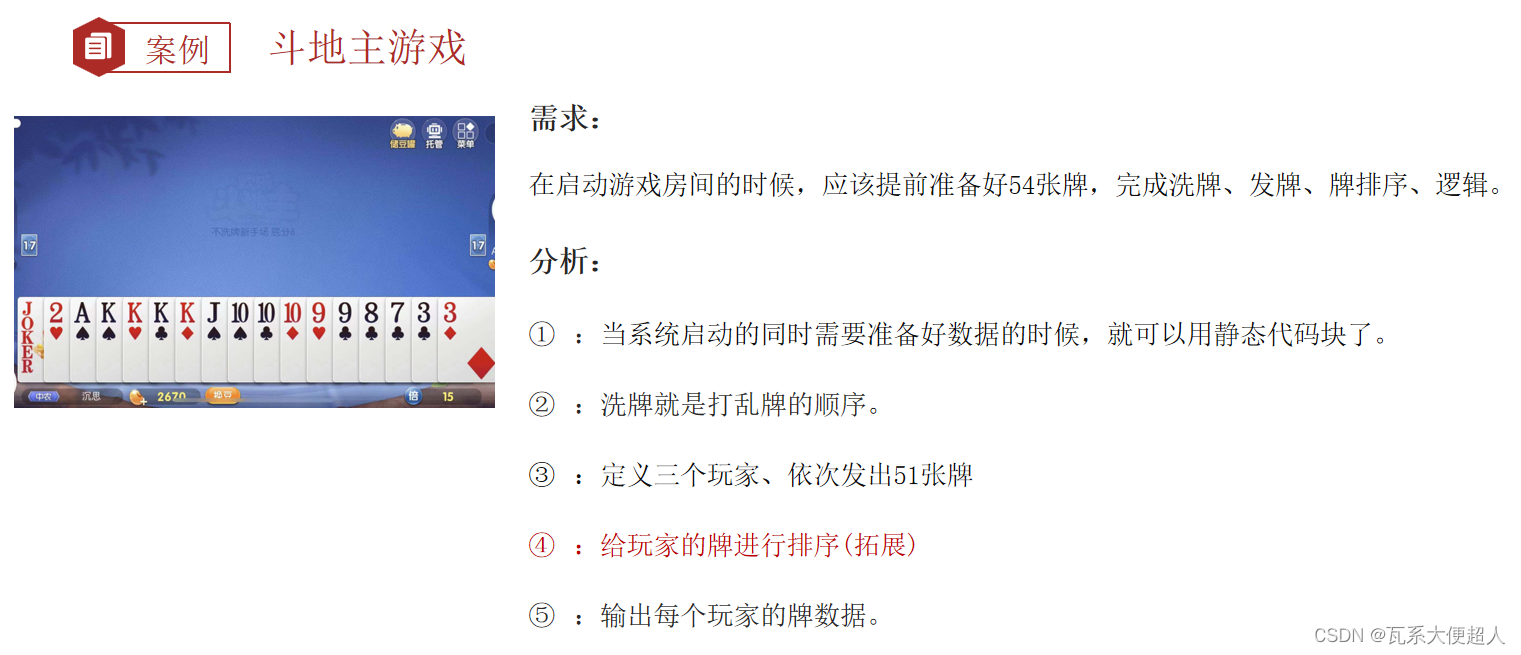
Collection体系的综合案例
public class Card {
    private String size;
    private String color;
    private int index;//牌的真正大小


    public Card() {
    }

    public Card(String size, String colr,int index) {
        this.size = size;
        this.color = colr;
        this.index = index;
    }

    public String getSize() {
        return size;
    }

    public void setSize(String size) {
        this.size = size;
    }

    public String getColor() {
        return color;
    }

    public void setColor(String color) {
        this.color = color;
    }

    public int getIndex() {
        return index;
    }

    public void setIndex(int index) {
        this.index = index;
    }

    @Override
    public String toString() {
        return size + color;
    }
}
/**
 目标:斗地主游戏的案例开发。

 业务需求分析:
 斗地主的做牌, 洗牌, 发牌, 排序(拓展知识), 看牌。
 业务: 总共有54张牌。
 点数: "3","4","5","6","7","8","9","10","J","Q","K","A","2"
 花色: "♠", "♥", "♣", "♦"
 大小王: "👲" , "🃏"
 点数分别要组合4种花色,大小王各一张。
 斗地主:发出51张牌,剩下3张作为底牌。

 功能:
 1.做牌。
 2.洗牌。
 3.定义3个玩家
 4.发牌。
 5.排序(拓展,了解,作业)
 6.看牌
 */
public class GameDemo {
    /**
     1.定义一个静态的集合存储54张牌对象
     */
    public static List<Card> allCards = new ArrayList<>();

    /**
     2.做牌:定义静态代码块初始化牌数据
     */
    static{
        //3.定义点数:个数确定,类型确定,使用数组
        String[] sizes = {"3","4","5","6","7","8","9","10","J","Q","K","A","2"};
        //4.定义花色:个数确定,类型确定,使用数组
        String[] colors = {"♠", "♥", "♣", "♦"};
        //5.组合点数和花色
        int index = 0;//记录牌的大小
        for (String size : sizes) {
            index++;
            for (String color : colors) {
                //6.封装成一个对象
                Card c = new Card(size,color,index);
                //7.存入到集合容器中去
                allCards.add(c);

            }
        }
        //8.大小王存入到集合集合对象中区
        Card c1 = new Card("","🃏",++index);
        Card c2 = new Card("","👲",++index);
        Collections.addAll(allCards,c1,c2);
        System.out.println("新牌:" + allCards);


    }


    public static void main(String[] args) {
        //9.洗牌
        Collections.shuffle(allCards);
        System.out.println("洗牌后:" + allCards);

        //10.发牌(定义三个玩家,每个玩家的牌也是一个集合容器)
        List<Card> linghuchong = new ArrayList<>();
        List<Card> jiumozhi = new ArrayList<>();
        List<Card> renyingying = new ArrayList<>();

        //11.开始发牌(从牌集合中发出51张牌给三个玩家,剩余3张作为底牌
        for (int i = 0; i < allCards.size()-3; i++) {
            Card c = allCards.get(i);
            if(i % 3 == 0){
                linghuchong.add(c);
            }else if(i % 3 == 1){
                jiumozhi.add(c);
            }else if(i %3 == 2){
                renyingying.add(c);
            }
        }

        //12.拿到最后三张底牌(把最后三张牌截取成一个子集合)
        List<Card> lastThreeCards = allCards.subList(allCards.size()-3,allCards.size());

        //13.给玩家的牌排序(从大到小,可以自己先试试)
        sortCards(linghuchong);
        sortCards(jiumozhi);
        sortCards(renyingying);


        //14.输出玩家的牌
        System.out.println("令狐冲:" + linghuchong);
        System.out.println("鸠摩智:" + jiumozhi);
        System.out.println("任盈盈:" + renyingying);
        System.out.println("三张底牌:" + lastThreeCards);


    }

    /**
        给牌排序
     */
    private static void sortCards(List<Card> cards) {
        //
        Collections.sort(cards, new Comparator<Card>() {
            @Override
            public int compare(Card o1, Card o2) {
                return o2.getIndex()-o1.getIndex();
            }
        });
    }


}
Map集合体系
Map集合的概述
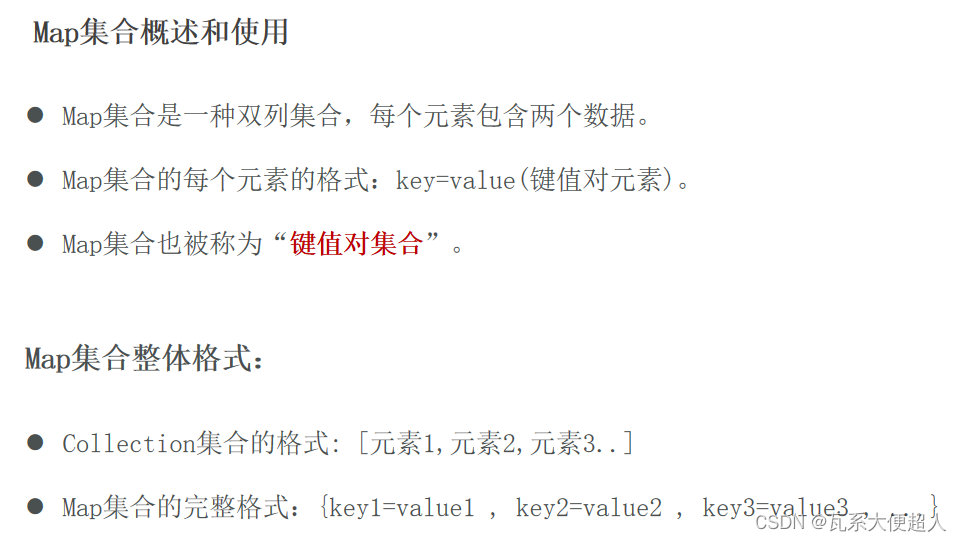
Map集合体系特点


Map集合常用API

Map集合的遍历方式一:键找值
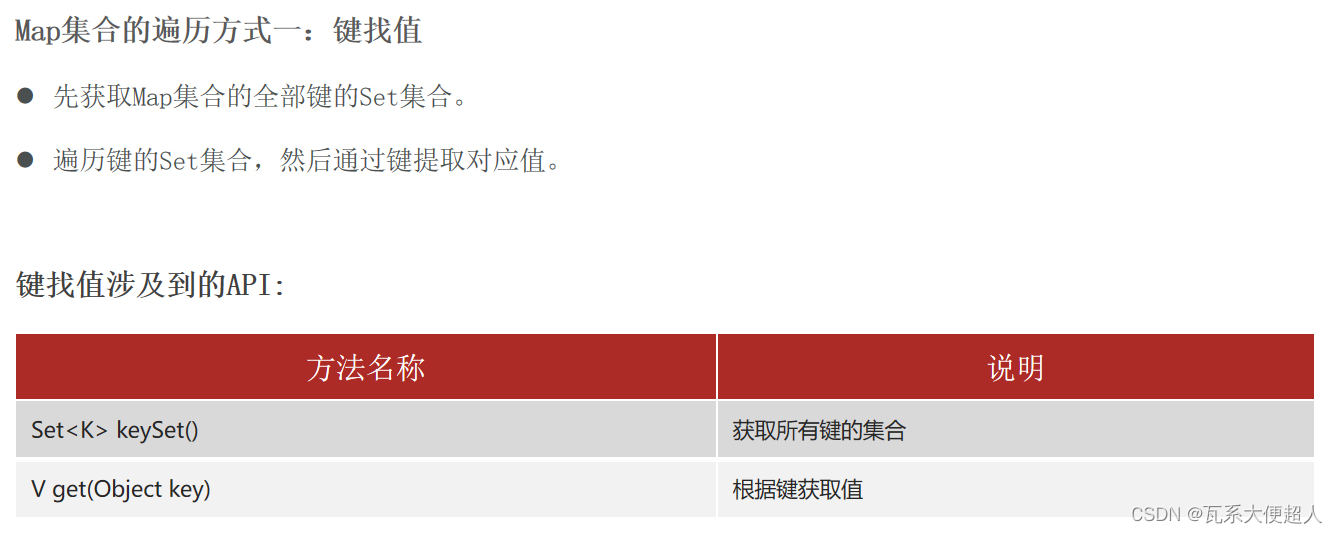
/**
 目标:Map集合的遍历方式一:键找值

 Map集合的遍历方式有:3种。
 (1)“键找值”的方式遍历:先获取Map集合全部的键,再根据遍历键找值。
 (2)“键值对”的方式遍历:难度较大。
 (3)JDK 1.8开始之后的新技术:Lambda表达式。(暂时了解)

 a.“键找值”的方式遍历Map集合。
 1.先获取Map集合的全部键的Set集合。
 2.遍历键的Set集合,然后通过键找值。
 小结:
 代码简单,需要记住!

 */
public class MapDemo01 {
    public static void main(String[] args) {
        Map<String , Integer> maps = new HashMap<>();
        // 1.添加元素: 无序,不重复,无索引。
        maps.put("娃娃",30);
        maps.put("iphoneX",100);
        maps.put("huawei",1000);
        maps.put("生活用品",10);
        maps.put("手表",10);
        System.out.println(maps);
        // maps = {huawei=1000, 手表=10, 生活用品=10, iphoneX=100, 娃娃=30}

        //1.键找值:第一步:先拿到集合的全部键。
        Set<String> keys = maps.keySet();
        //2.第二步,遍历每个键提取值
        for (String key : keys) {
            int value = maps.get(key);
            System.out.println(key + "==>" + value);
        }


    }
}
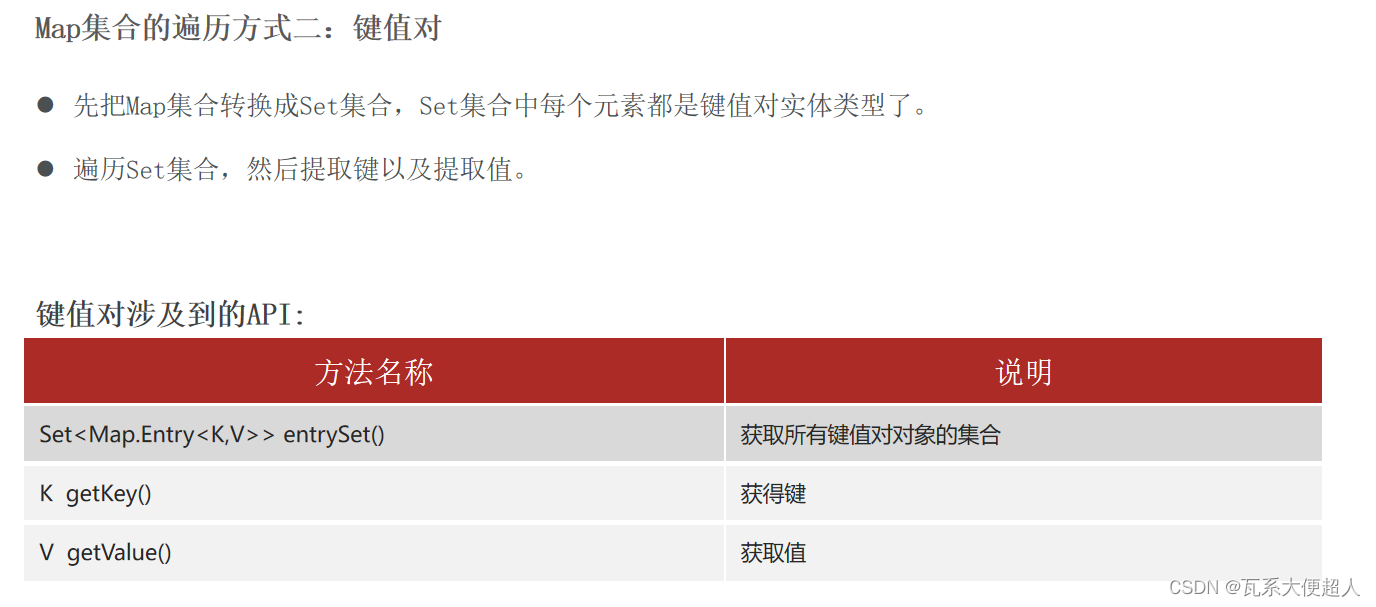
Map集合的遍历方式二:键值对
public class MapDemo02 {
    public static void main(String[] args) {
        Map<String , Integer> maps = new HashMap<>();
        // 1.添加元素: 无序,不重复,无索引。
        maps.put("娃娃",30);
        maps.put("iphoneX",100);
        maps.put("huawei",1000);
        maps.put("生活用品",10);
        maps.put("手表",10);
        System.out.println(maps);
        // maps = {huawei=1000, 手表=10, 生活用品=10, iphoneX=100, 娃娃=30}
        /**
         maps = {huawei=1000, 手表=10, 生活用品=10, iphoneX=100, 娃娃=30}
         👇
         使用foreach遍历map集合.发现Map集合的键值对元素直接是没有类型的。所以不可以直接foreach遍历集合。
         👇
         可以通过调用Map的方法 entrySet把Map集合转换成Set集合形式  maps.entrySet();
         👇
         Set<Map.Entry<String,Integer>> entries =  maps.entrySet();
         [(huawei=1000), (手表=10), (生活用品=10), (iphoneX=100), (娃娃=30)]
         entry
         👇
         此时可以使用foreach遍历
         */

        //1.把Map集合转换成Set集合
        Set<Map.Entry<String, Integer>> entries = maps.entrySet();

        //2.开始遍历
        for(Map.Entry<String,Integer> entry:entries){
            String key = entry.getKey();
            int value = entry.getValue();
            System.out.println(key + "===>" + value);

        }

    }
}
Map集合的遍历方式三:lambda表达式
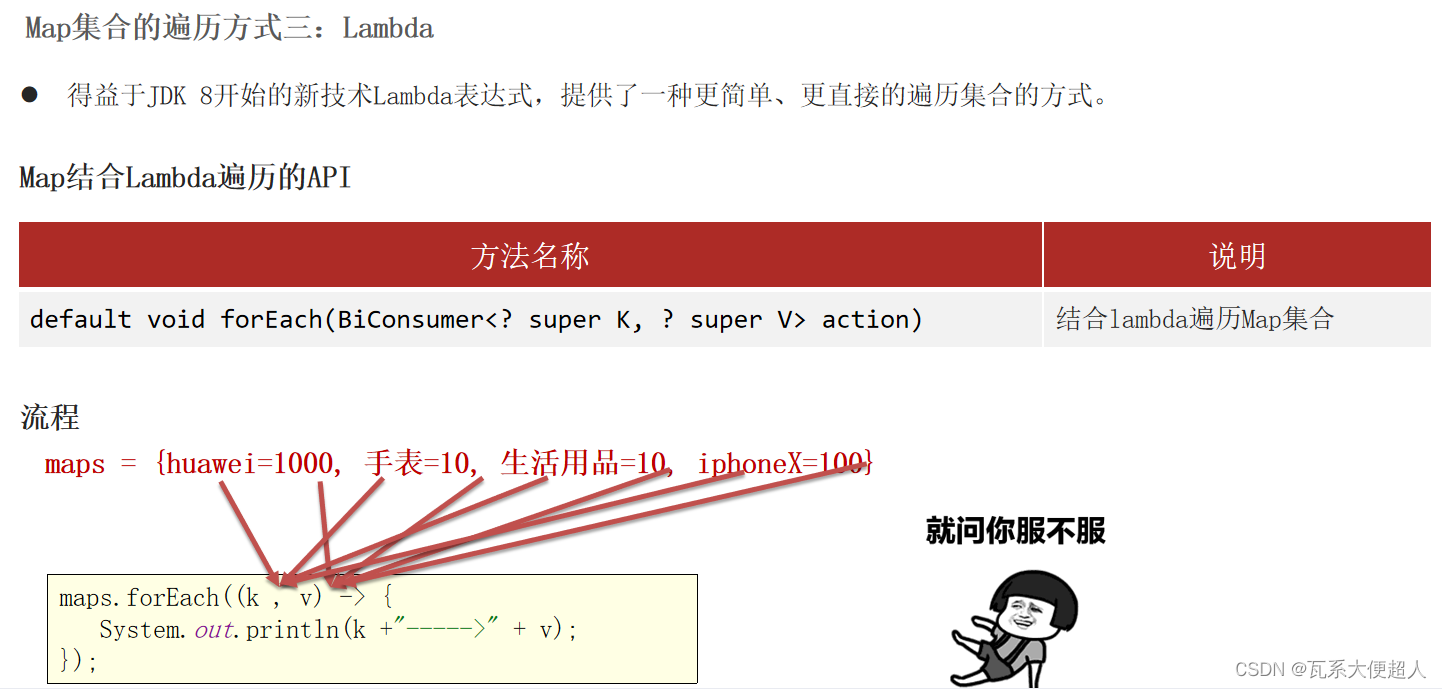
/**
 目标:Map集合的遍历方式。

 Map集合的遍历方式有:3种。
 (1)“键找值”的方式遍历:先获取Map集合全部的键,再根据键找值。
 (2)“键值对”的方式遍历:难度较大。
 (3)JDK 1.8开始之后的新技术:Lambda表达式。

 c.JDK 1.8开始之后的新技术:Lambda表达式。(暂时了解)
 */
public class MapDemo03 {
    public static void main(String[] args) {
        Map<String , Integer> maps = new HashMap<>();
        // 1.添加元素: 无序,不重复,无索引。
        maps.put("娃娃",30);
        maps.put("iphoneX",100);//  Map集合后面重复的键对应的元素会覆盖前面重复的整个元素!
        maps.put("huawei",1000);
        maps.put("生活用品",10);
        maps.put("手表",10);
        System.out.println(maps);

        //  maps = {huawei=1000, 手表=10, 生活用品=10, iphoneX=100, 娃娃=30}
        //简化前的代码:
//        maps.forEach(new BiConsumer<String, Integer>() {
//            @Override
//            public void accept(String key, Integer value) {
//                System.out.println(key + "--->" + value);
//            }
//        });

        //代码简化之后
        maps.forEach((k, v)-> {
            System.out.println(k + "--->" + v);
        });


    }
}

/**
 * 需求:统计投票人数
 */
public class MapTest1 {
    public static void main(String[] args) {
        //1.把80个学生选择的数据拿进来
        String[] selects = {"A","B","C","D"};
        StringBuilder sb = new StringBuilder();
        Random r = new Random();
        for (int i = 0; i < 80; i++) {
            sb.append(selects[r.nextInt(selects.length)]);
        }
        System.out.println(sb);

        //2.定义一个Map集合记录最终统计的结果
        Map<Character,Integer> infos = new HashMap<>();

        //3.遍历80个学生选择的数据
        for (int i = 0; i < sb.length(); i++) {
            //4.提取当前选择结点字符
            char ch = sb.charAt(i);
            //5.判断Map集合中是否存在这个键
            if(infos.containsKey(ch)){
                //让其值+1
                infos.put(ch,infos.get(ch)+1);
            }else{
                //说明此景点是第一次被选
                infos.put(ch,1);
            }

        }

        //4.输出集合
        System.out.println(infos);


    }
}
Map集合的实现类HashMap

HashMap的特点和底层原理
由键决定:无序、不重复、无索引。HashMap底层是哈希表结构的。
依赖hashCode方法和equals方法保证键的唯一。
如果键要存储的是自定义对象,需要重写hashCode和equals方法。
基于哈希表。增删改查的性能都较好
public class HashMapDemo1 {
    public static void main(String[] args) {
        //Map集合是根据键去除重复元素
        Map<Student,String> maps = new HashMap<>();
        Student s1 = new Student("无恙",20,'男');
        Student s2 = new Student("无恙",20,'男');
        Student s3 = new Student("周雄",21,'男');

        maps.put(s1,"北京");
        maps.put(s2,"上海");
        maps.put(s3,"广州");

        System.out.println(maps);//{Student{name='无恙', age=20, sex=男}=上海, Student{name='周雄', age=21, sex=男}=广州}


    }
}
Map集合的实现类LinkedHashMap

/**
 * 目标:认识Map体系的特点:按照无序,不重复,无索引,值不做要求
 */
public class LinkedHashMapDemo2 {
    public static void main(String[] args) {
        //1.创建一个Map集合对象
        //Map<String,Integer> maps = new HashMap<>();
        Map<String,Integer> maps = new LinkedHashMap<>();
        maps.put("鸿星尔克",3);
        maps.put("Java",1);
        maps.put("枸杞",100);
        maps.put("Java",3);//覆盖前面的数据
        maps.put(null,null);
        System.out.println(maps);


    }

}
Map集合的实现类TreeMap
public class TreeDemo3 {
    public static void main(String[] args) {
        Map<Integer,String> maps1 = new TreeMap<>();
        maps1.put(13,"王麻子");
        maps1.put(1,"张三");
        maps1.put(3,"县长");
        System.out.println(maps1);


        //TreeMap集合自带排序 可排序 不重复(只要规则大小一样就认为重复) 无索引
        Map<Apple,String> maps2 = new TreeMap<>(new Comparator<Apple>() {
            @Override
            public int compare(Apple o1, Apple o2) {
                return Double.compare(o2.getPrice(),o2.getPrice());//按照价格降序排序!
            }
        });
        maps2.put(new Apple("红富士","红色",9.9,500) ,"山东");
        maps2.put(new Apple("青苹果","绿色",15.9,300),"广州");
        maps2.put(new Apple("绿苹果","青色",29.9,400),"江西");
        maps2.put(new Apple("黄苹果","黄色",9.8,500) ,"湖北");

        System.out.println(maps2);

    }
}
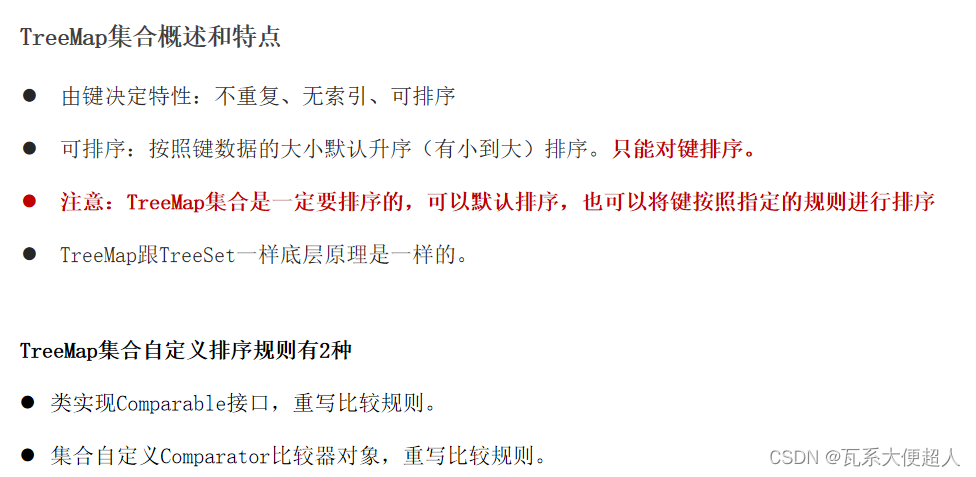
TreeMap集合的特点是怎么样的?
根据键可排序、不重复、无索引
底层基于红黑树实现排序,增删改查性能较好
TreeMap集合自定义排序规则有几种方式
2种。
类实现Comparable接口,重写比较规则。
集合自定义Comparator比较器对象,重写比较规则。
补充知识:集合的嵌套

/**
 * 需求:统计投票人数
 */
public class MapTest4 {
    public static void main(String[] args) {
        //1.要求程序记录每个学生选择的情况
        //使用一个Map集合存储
        Map<String, List<String>> data = new HashMap<>();

        //2.把学生选择的数据存入进去
        List<String> selects = new ArrayList<>();
        Collections.addAll(selects,"A","C");
        data.put("罗勇",selects);

        List<String> selects1 = new ArrayList<>();
        Collections.addAll(selects1,"B","C","D");
        data.put("胡涛",selects1);

        List<String> selects2 = new ArrayList<>();
        Collections.addAll(selects2,"A","B","C","D");
        data.put("刘军",selects2);

        System.out.println(data);

        //3.统计每个景点选择的人数
        Map<String,Integer> infos = new HashMap<>();

        //4.提取所有人选择的景点的信息
        Collection<List<String>> values = data.values();
        System.out.println(values);
        //values = [[A, B, C, D], [B, C, D], [A, C]]

        for (List<String> value : values) {
            for (String s : value) {
                if(infos.containsKey(s)){
                    infos.put(s,infos.get(s)+1);
                }else{
                    infos.put(s,1);
                }
            }
        }

        System.out.println(infos);

    }
}






 扫一扫
扫一扫


 235
235

 被折叠的 条评论
为什么被折叠?
被折叠的 条评论
为什么被折叠?
 到【灌水乐园】发言





