



 本文详细介绍了Java中多线程的创建方式,包括继承Thread类、实现Runnable接口和Callable接口,并探讨了线程安全和同步机制,如同步代码块、同步方法和Lock锁。此外,还讨论了线程池的概念、API以及Executors工具类的使用,以及定时器Timer和ScheduledExecutorService的实现。最后,补充了并发、并行的基本概念和线程的生命周期知识。
多线程
多线程的创建
Java是通过java.lang.Thread 类来代表线程的。
按照面向对象的思想,Thread类应该提供了实现多线程的方式。
方式一:继承Thread类

/**
 * 目标:多线程的创建方式一:继承Thread类实现。
 */
public class ThreadDemo1 {
    public static void main(String[] args) {
        //3.new一个新线程对象
        Thread t = new MyThread();
        //4.调用start方法启动线程(执行的还是run方法)
        t.start();

        for (int i = 0; i < 5; i++) {
            System.out.println("主线程执行输出:" + i);
        }


    }
}

/**
 * 1.定义一个线程类继承Thread类
 */
class MyThread extends Thread{
    /**
     * 2.重写run方法,里面是定义线程以后要干啥
     */
    @Override
    public void run() {
        for (int i = 0; i < 5; i++) {
            System.out.println("子线程执行输出:" + i);
        }
    }
}
1、为什么不直接调用了run方法,而是调用start启动线程。
直接调用run方法会当成普通方法执行,此时相当于还是单线程执行。
只有调用start方法才是启动一个新的线程执行。
2、把主线程任务放在子线程之前了。
这样主线程一直是先跑完的,相当于是一个单线程的效果了。
方式二:实现Runnable接口
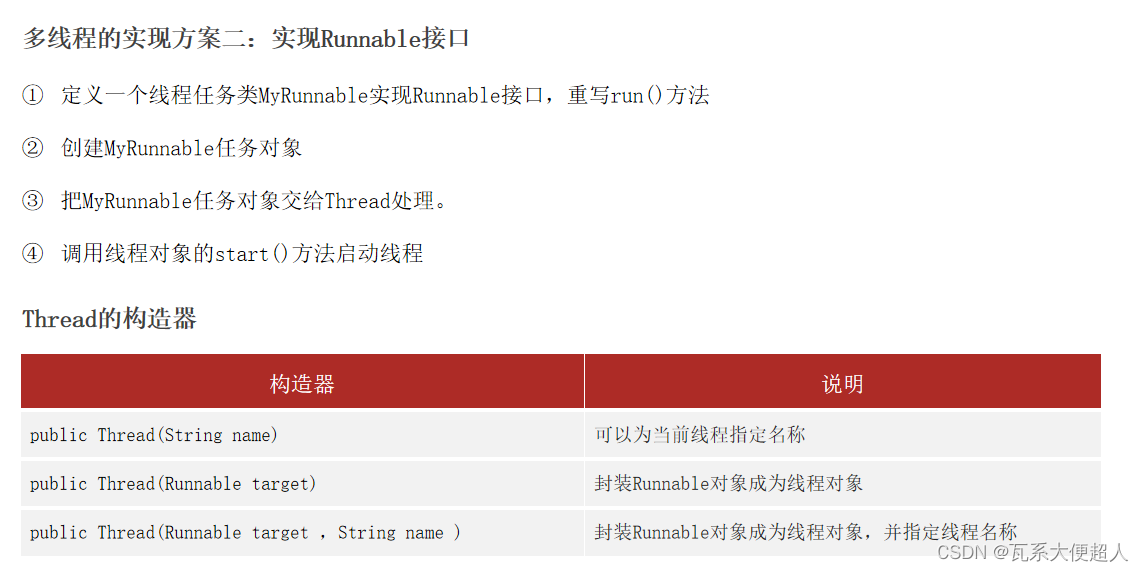
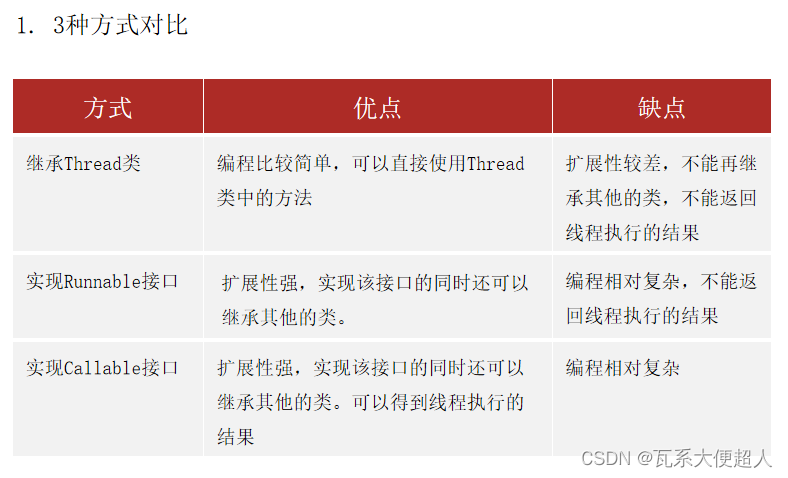
优点:线程任务类只是实现接口,可以继续继承类和实现接口,扩展性强。
缺点:编程多一层对象包装,如果线程有执行结果是不可以直接返回的。
/**
 * 目标:学会线程的创建方式二,理解它的优缺点
 */
public class ThreadDemo2 {
    public static void main(String[] args) {
        //3.创建一个任务对象
        Runnable target = new MyRunnable();
        //4.把任务对象交给Thread处理
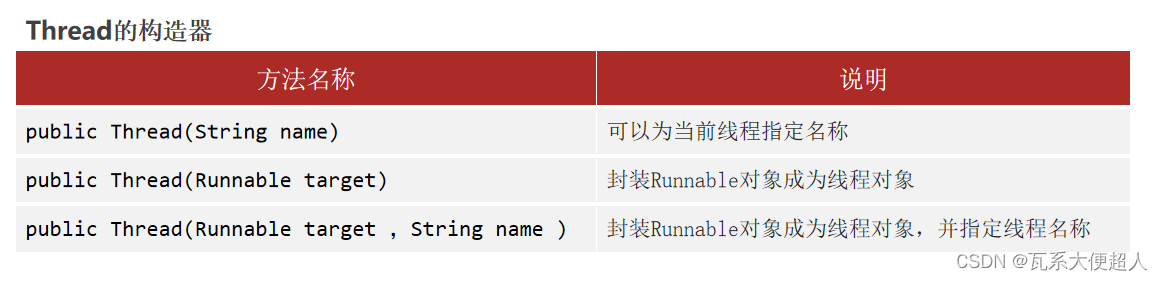
        Thread t = new Thread(target);
//        Thread t = new Thread(target,"1号");
        //5.启动线程
        t.start();

        for (int i = 0; i < 100; i++) {
            System.out.println("主线程执行输出:" + i);
        }


    }
}
/**
 * 1.定义一个线程任务类 实现Runnable接口
 */
class MyRunnable implements Runnable{
    /**
     * 2.重写run方法,定义线程的执行任务
     */
    @Override
    public void run() {
        for (int i = 0; i < 100; i++) {
            System.out.println("子线程执行输出:" + i);
        }
    }
}
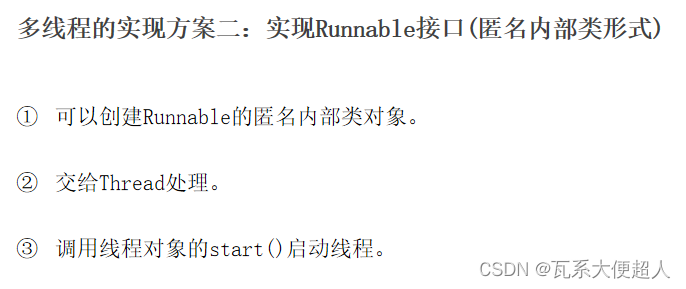
/**
 * 目标:学会线程的创建方式二(匿名内部类方式实现,语法形式)
 */
public class ThreadDemo2_Other {
    public static void main(String[] args) {
        //3.创建一个任务对象
        Runnable target = new Runnable() {
            @Override
            public void run() {
                for (int i = 0; i < 100; i++) {
                    System.out.println("子线程1执行输出:" + i);
                }
            }
        };
        //4.把任务对象交给Thread处理
        Thread t = new Thread(target);
        //5.启动线程
        t.start();


      //简化写法
        new Thread(new Runnable() {
            @Override
            public void run() {
                for (int i = 0; i < 100; i++) {
                    System.out.println("子线程2执行输出:" + i);
                }
            }
        }).start();


        //进一步简化写法
        new Thread(()-> {
                for (int i = 0; i < 100; i++) {
                    System.out.println("子线程3执行输出:" + i);
                }
            }
        ).start();


        for (int i = 0; i < 100; i++) {
            System.out.println("主线程执行输出:" + i);
        }


    }
}
方式三:JDK 5.0新增:实现Callable接口
1、前2种线程创建方式都存在一个问题:
他们重写的run方法均不能直接返回结果。
不适合需要返回线程执行结果的业务场景。
2、怎么解决这个问题呢?
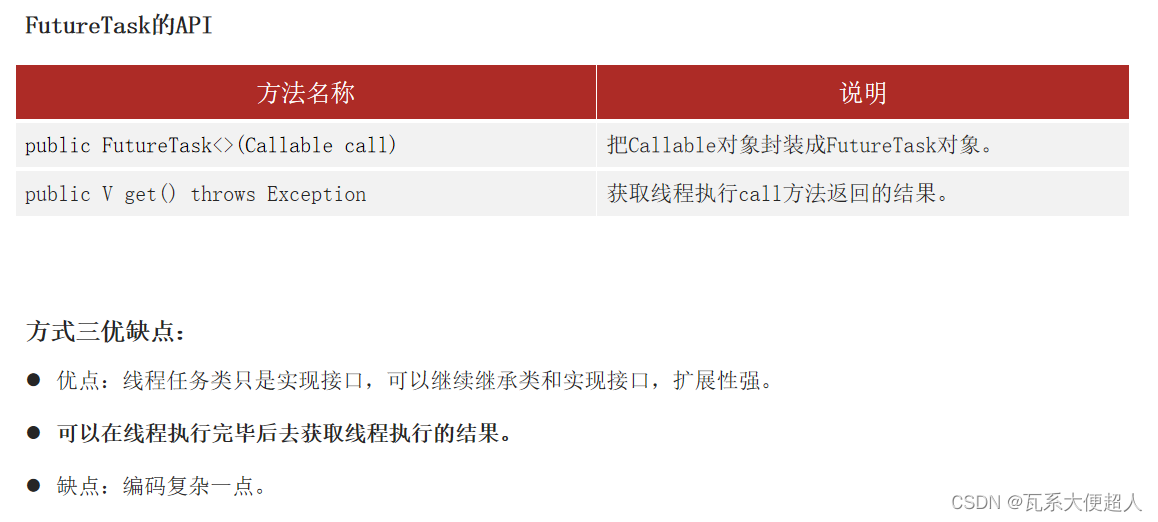
JDK 5.0提供了Callable和FutureTask来实现。
这种方式的优点是:可以得到线程执行的结果。
/**
 * 目标:学会线程的创建方式三:实现Callable接口,结合FutureTask完成。
 */
public class ThreadDemo3 {
    public static void main(String[] args) {
        //3.创建Callable任务对象
        Callable call = new MyCallable(100);
        //4.把Callable任务对象 交给 FutureTask对象
        //FutureTask对象的作用1:是Runnable的对象(实现了Runnable接口)可以交给Thread了
        //FutureTask对象的作用2:可以在线程执行完毕之后调用其get方法得到线程执行完成的结果
        FutureTask<String> f1 = new FutureTask<>(call);
        //5.交给线程处理
        Thread t1 = new Thread(f1);
        t1.start();


        Callable call2 = new MyCallable(200);
        FutureTask<String> f2 = new FutureTask<>(call2);
        Thread t2 = new Thread(f2);
        t2.start();

        try {
            //如果f1任务没有执行完毕,这里的代码会等待,直到线程1跑完才提取结果
            String rs1 = f1.get();
            System.out.println("第一个结果:" + rs1);
        }  catch (Exception e) {
            e.printStackTrace();
        }

        try {
            //如果f2任务没有执行完毕,这里的代码会等待,直到线程2跑完才提取结果
            String rs2 = f2.get();
            System.out.println("第二个结果:" + rs2);
        }  catch (Exception e) {
            e.printStackTrace();
        }


    }
}
/**
 * 1.定义一个任务类:实现Callable接口 应该声明线程任务执行完毕后的结果的数据类型
 */

class MyCallable implements Callable<String>{
    private int n;

    public MyCallable(int n) {
        this.n = n;
    }

    /**
     * 2.重写call方法(任务方法)
     */
    @Override
    public String call() throws Exception {
        int sum = 0;
        for (int i = 0; i <=n; i++) {
            sum+=i;
        }
        return "子线程执行的结果是:"+sum;
    }
}
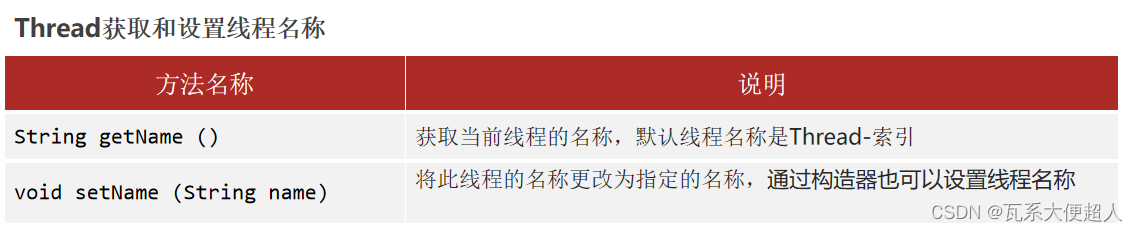
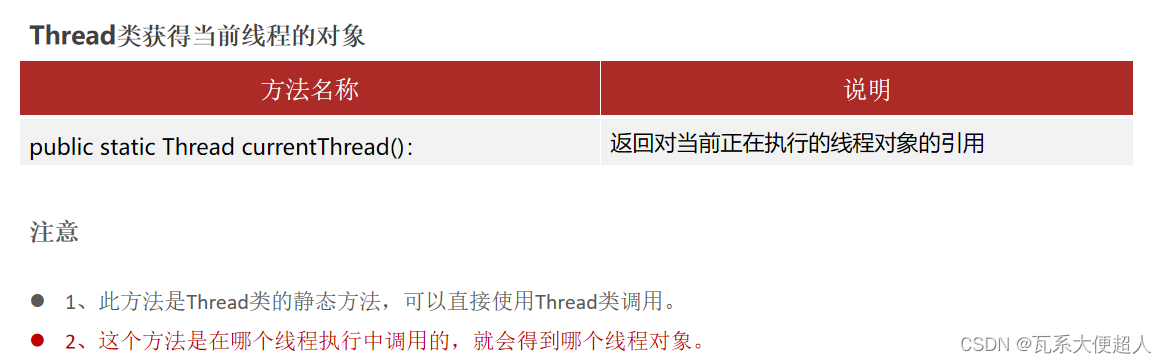
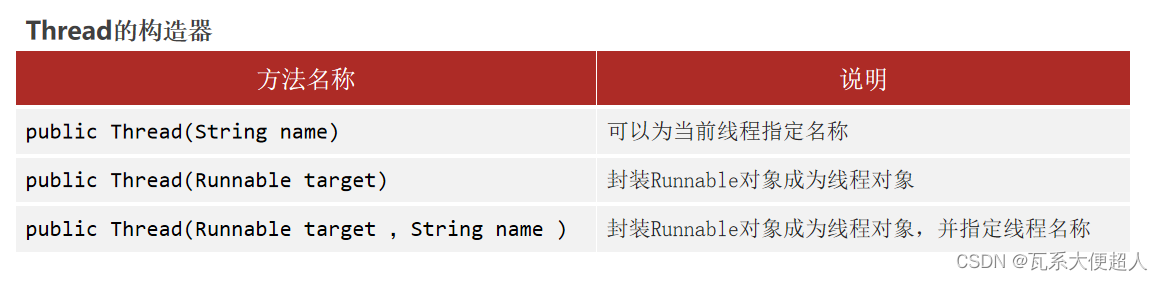
Thread的常用方法

public class MyThread extends Thread{
    public MyThread() {
    }

    public MyThread(String name) {
        //为当前线程对象设置名称,送给父类的有参数构造器初始化名称
        super(name);
    }

    @Override
    public void run() {
        for (int i = 0; i < 5; i++) {
//            System.out.println(this.getName()+"输出:"+i);//也可以
            System.out.println(Thread.currentThread().getName()+"输出:" + i);
        }
    }
}
/**
 * 目标:线程的API
 */
public class ThreadDemo01 {
    //main方法是由主线程负责调度的
    public static void main(String[] args) {
        Thread t1 = new MyThread("1号");
        //t1.setName("1号");
        t1.start();
        System.out.println(t1.getName());


        Thread t2 = new MyThread("2号");
        //t2.setName("2号");
        t2.start();
        System.out.println(t2.getName());

        //哪个线程执行它,它就得到哪个线程对象(当前线程对象)
        //主线程的名称就叫main
        Thread m = Thread.currentThread();
        System.out.println(m.getName());
        m.setName("最牛的线程:");

        for (int i = 0; i < 5; i++) {
            System.out.println(m.getName()+"线程输出:" + i);
        }

    }
}
/**
 * 目标:线程的API
 */
public class ThreadDemo02 {
    //main方法是由主线程负责调度的
    public static void main(String[] args) throws Exception {
        for (int i = 0; i <= 5; i++) {
            System.out.println("输出:" + i);
            if(i==3){
                //让线程进入休眠状态
                //段子:项目经理让我加上这行代码,如果用户愿意交钱,我就注释掉。
                Thread.sleep(3000);
            }
        }
    }
}
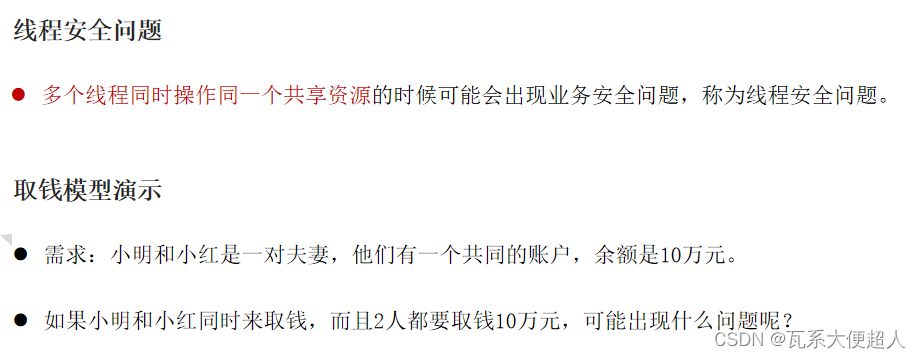
线程安全
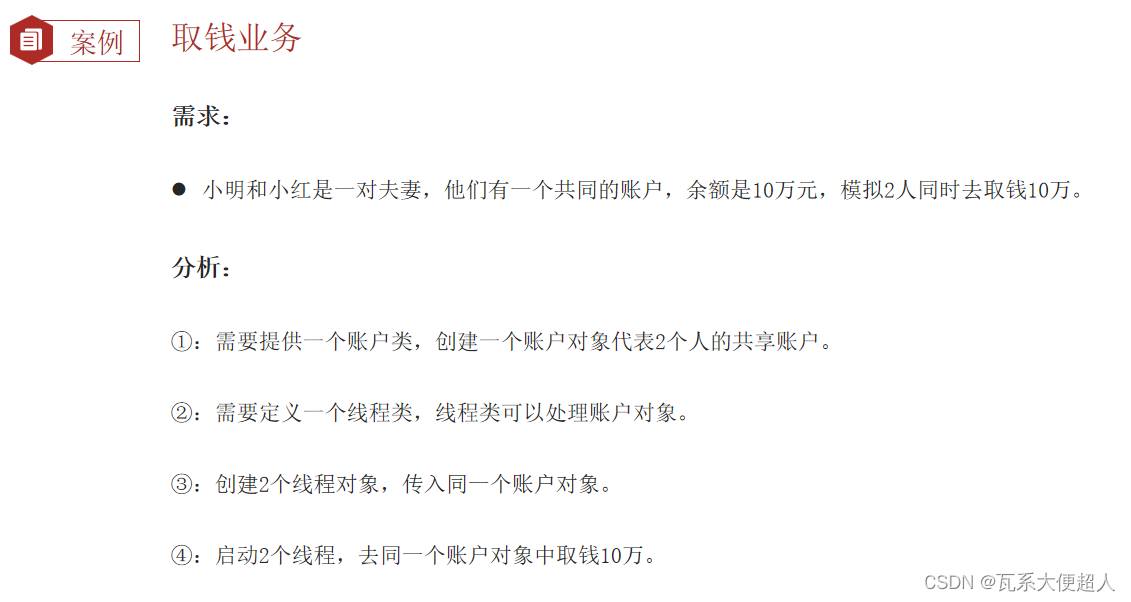
public class Account {
    private String cardId;
    private double money;//账户的余额

    public Account() {
    }

    public Account(String cardId, double money) {
        this.cardId = cardId;
        this.money = money;
    }

    public String getCardId() {
        return cardId;
    }

    public void setCardId(String cardId) {
        this.cardId = cardId;
    }

    public double getMoney() {
        return money;
    }

    public void setMoney(double money) {
        this.money = money;
    }

    /**
     * 小明 小红
     * @param money
     */
    public void drawMoney(double money) {
        //0.先获取是谁来取钱,线程的名字就是人名
        String name = Thread.currentThread().getName();
        //1.判断账户是否够钱
        if(this.money>=money){
            //2.取钱
            System.out.println(name + "来取钱成功,吐出:" + money);
            //3.更新余额
            this.money -= money;
            System.out.println(name + "取钱后剩余:" + this.money);
        }else{
            //4.余额不足
            System.out.println(name + "来取钱,余额不足!");
        }
    }
}
/**
 * 取钱的线程类
 */
public class DrawThread extends Thread{
    //接收处理的账户对象
    private Account acc;
    public DrawThread(Account acc,String name){
        super(name);
        this.acc = acc;
    }

    @Override
    public void run() {
        //小明 小红 取钱的
        acc.drawMoney(100000);
    }
}
/**
 * 需求:模拟取钱案例
 */
public class ThreadDemo {
    public static void main(String[] args) {
        //1.定义线程类,加载一个共享的账户对象
        Account acc = new Account("ICDC-111",100000);

        //2.创建2个线程对象,代表小明和小红同时进来了
        new DrawThread(acc,"小明").start();
        new DrawThread(acc,"小红").start();

    }
}
线程同步
同步思想概述
1、取钱案例出现问题的原因?
多个线程同时执行,发现账户都是够钱的。
2、如何才能保证线程安全呢?
让多个线程实现先后依次访问共享资源,这样就解决了安全问题
线程同步的核心思想
加锁,把共享资源进行上锁,每次只能一个线程进入访问完毕以后解锁,然后其他线程才能进来。
方式一:同步代码块
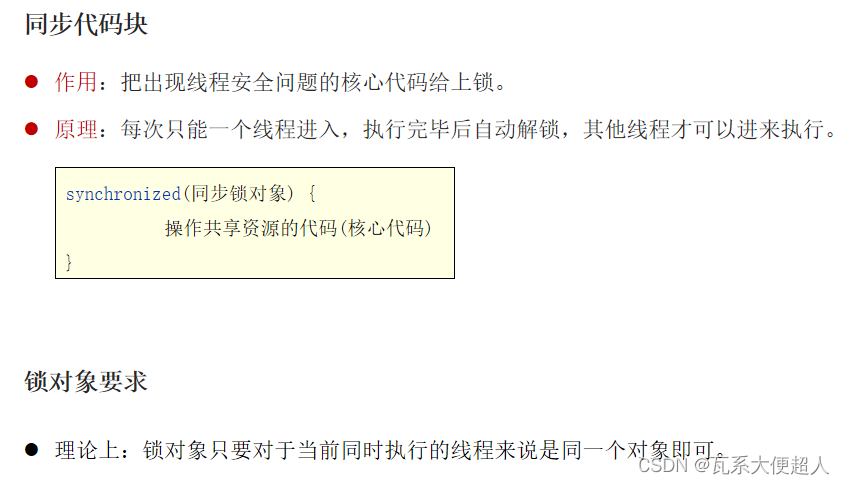
锁对象用任意唯一的对象好不好呢?
不好,会影响其他无关线程的执行。
锁对象的规范要求
规范上:建议使用共享资源作为锁对象。
对于实例方法建议使用this作为锁对象。
对于静态方法建议使用字节码(类名.class)对象作为锁对象。
/**
     * 小明 小红
     * @param money
     */
    public void drawMoney(double money) {
        //0.先获取是谁来取钱,线程的名字就是人名
        String name = Thread.currentThread().getName();
        //同步代码块
        //小明 小红
        //this ===acc 共享账户
        synchronized (this) {
            //1.判断账户是否够钱
            if(this.money>=money){
                //2.取钱
                System.out.println(name + "来取钱成功,吐出:" + money);
                //3.更新余额
                this.money -= money;
                System.out.println(name + "取钱后剩余:" + this.money);
            }else{
                //4.余额不足
                System.out.println(name + "来取钱,余额不足!");
            }
        }

    }

    //100个线程人
    public static void run(){
        synchronized(Account.class){

        }
    }
方式二:同步方法
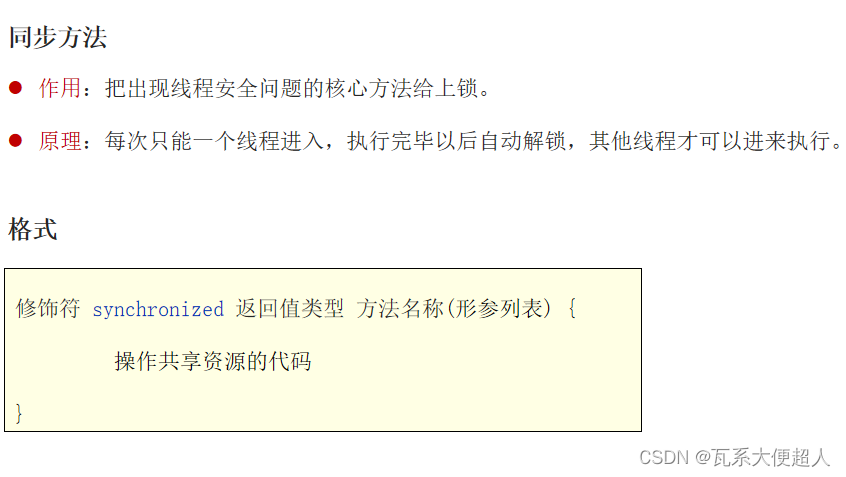
同步方法底层原理:
同步方法其实底层也是有隐式锁对象的,只是锁的范围是整个方法代码。
如果方法是实例方法:同步方法默认用this作为的锁对象。但是代码要高度面向对象!
如果方法是静态方法:同步方法默认用类名.class作为的锁对象。
1、是同步代码块好还是同步方法好一点?
同步代码块锁的范围更小,同步方法锁的范围更大。
/**
     * 小明 小红
     * @param money
     */
    public synchronized void drawMoney(double money) {
        //0.先获取是谁来取钱,线程的名字就是人名
        String name = Thread.currentThread().getName();
        //1.判断账户是否够钱
        if(this.money>=money){
            //2.取钱
            System.out.println(name + "来取钱成功,吐出:" + money);
            //3.更新余额
            this.money -= money;
            System.out.println(name + "取钱后剩余:" + this.money);
        }else{
            //4.余额不足
            System.out.println(name + "来取钱,余额不足!");
        }
    }
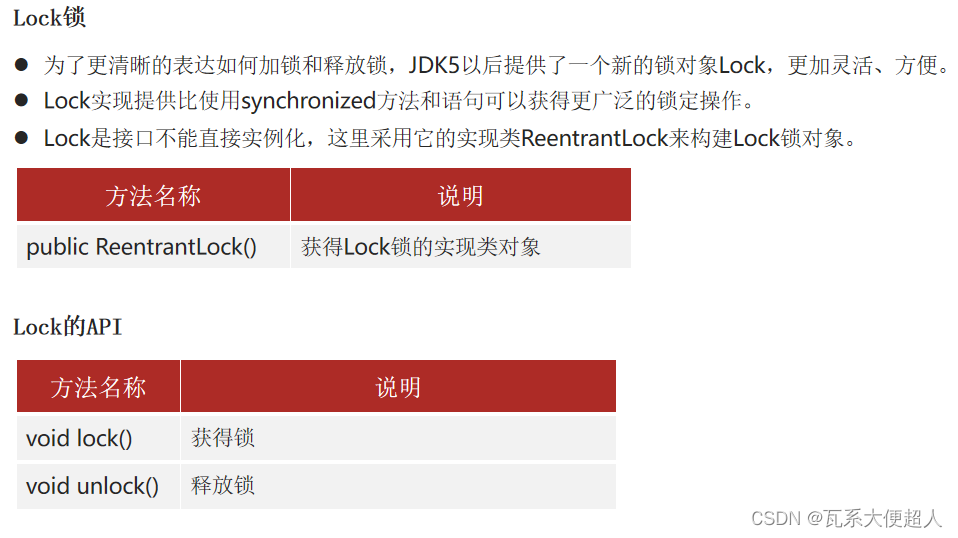
方式三:Lock锁
/**
     * 小明 小红
     * @param money
     */
    public synchronized void drawMoney(double money) {
        //0.先获取是谁来取钱,线程的名字就是人名
        String name = Thread.currentThread().getName();
        //1.判断账户是否够钱
        if(this.money>=money){
            //2.取钱
            System.out.println(name + "来取钱成功,吐出:" + money);
            //3.更新余额
            this.money -= money;
            System.out.println(name + "取钱后剩余:" + this.money);
        }else{
            //4.余额不足
            System.out.println(name + "来取钱,余额不足!");
        }
    }
线程通信
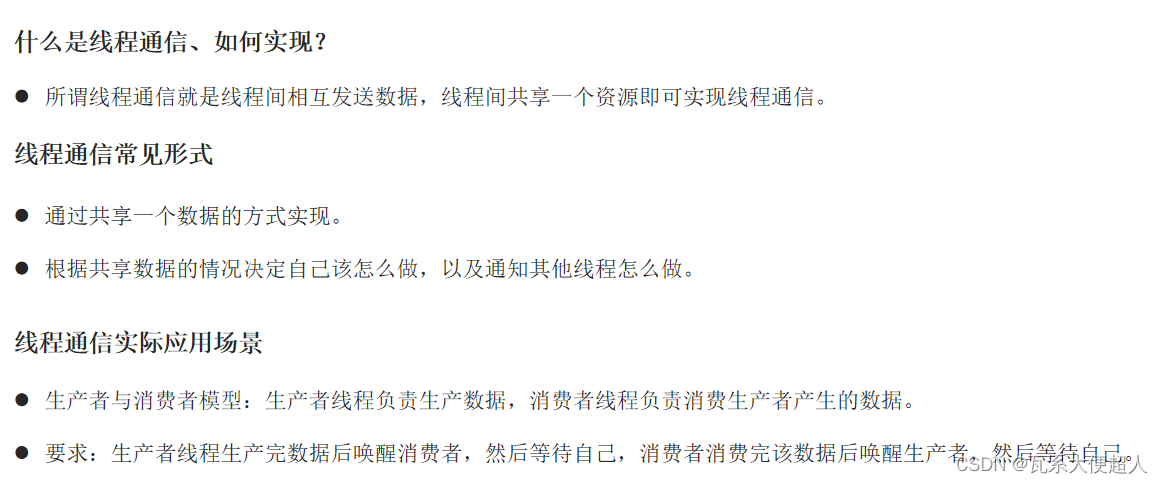
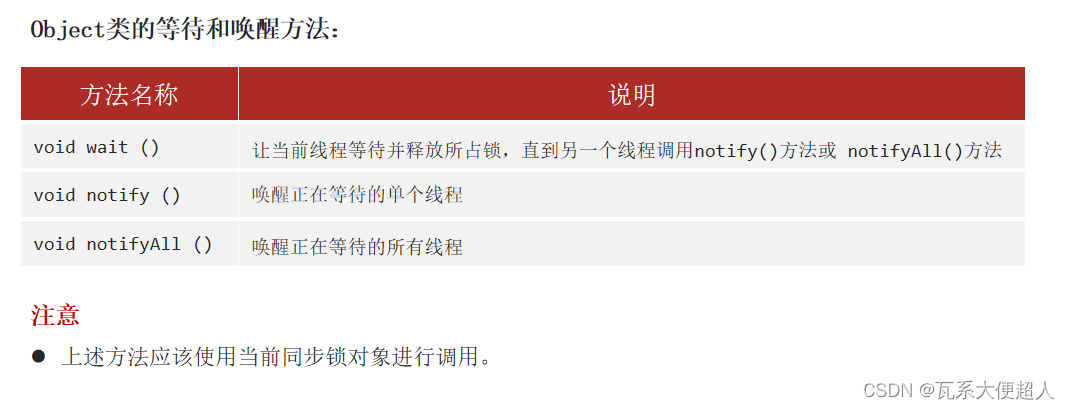
public class Account {
    private String cardId;
    private double money;//账户的余额

    public Account() {
    }

    public Account(String cardId, double money) {
        this.cardId = cardId;
        this.money = money;
    }

    public String getCardId() {
        return cardId;
    }

    public void setCardId(String cardId) {
        this.cardId = cardId;
    }

    public double getMoney() {
        return money;
    }

    public void setMoney(double money) {
        this.money = money;
    }

    /**
     * 小红 小明:取钱
     */
    public synchronized void drawMoney(double money) {
        try {
            String name = Thread.currentThread().getName();
            if(this.money>=money){
                //钱够:可取
                this.money -= money;
                System.out.println(name + "来取钱" + money + "成功!余额是:"+this.money);
                //没钱了
                this.notifyAll();//唤醒所有线程
                this.wait();//锁对象,让当前线程进入等待!

            }else{
                //钱不够:不可取
                //唤醒别人 等待自己
                this.notifyAll();//唤醒所有线程
                this.wait();//锁对象,让当前线程进入等待!
            }
        } catch (Exception e) {
            e.printStackTrace();
        }
    }

    /**
     *  亲爹 干爹 岳父 存钱
     */
    public synchronized void deposit(double money) {
        try {
            String name = Thread.currentThread().getName();
            if(this.money == 0){
                //没钱了:存钱呗
                this.money += money;
                System.out.println(name + "存钱" + money + "成功!存钱后余额是:" + this.money);
                //有钱了:唤醒别人,等待自己
                this.notifyAll();//唤醒所有线程
                this.wait();//锁对象,让当前线程进入等待!
            }else{
                //有钱,不存钱
                this.notifyAll();//唤醒所有线程
                this.wait();//锁对象,让当前线程进入等待!
            }
        } catch (Exception e) {
            e.printStackTrace();
        }


    }
}
/**
 * 取钱的线程类
 */
public class DepositThread extends Thread{
    //接收处理的账户对象
    private Account acc;
    public DepositThread(Account acc, String name){
        super(name);
        this.acc = acc;
    }

    @Override
    public void run() {
        //亲爹 干爹 岳父
        while (true) {

            acc.deposit(100000);
            try {
                Thread.sleep(2000);
            } catch (InterruptedException e) {
                e.printStackTrace();
            }
        }
    }
}
/**
 * 取钱的线程类
 */
public class DrawThread extends Thread{
    //接收处理的账户对象
    private Account acc;
    public DrawThread(Account acc, String name){
        super(name);
        this.acc = acc;
    }

    @Override
    public void run() {
        //小明 小红取钱的
        while (true) {

            acc.drawMoney(100000);
            try {
                Thread.sleep(3000);
            } catch (InterruptedException e) {
                e.printStackTrace();
            }
        }
    }
}
public class ThreadDemo {
    public static void main(String[] args) {
        //目标:了解线程通信的流程
        //使用3个爸爸存钱(生产者) 2个孩子取钱(消费者) 模拟线程通信思想(一存10万 一取10万)
        //1.创建账户对象,代表5个人共同操作的账户
        Account acc = new Account("ICBC-112",0);
        //2.创建2个取钱线程代表小明和小红
        new DrawThread(acc,"小明").start();
        new DrawThread(acc,"小红").start();

        //3.创建3个存钱线程代表:亲爹 干爹 岳父
        new DepositThread(acc,"亲爹").start();
        new DepositThread(acc,"干爹").start();
        new DepositThread(acc,"岳父").start();

    }
}
线程池
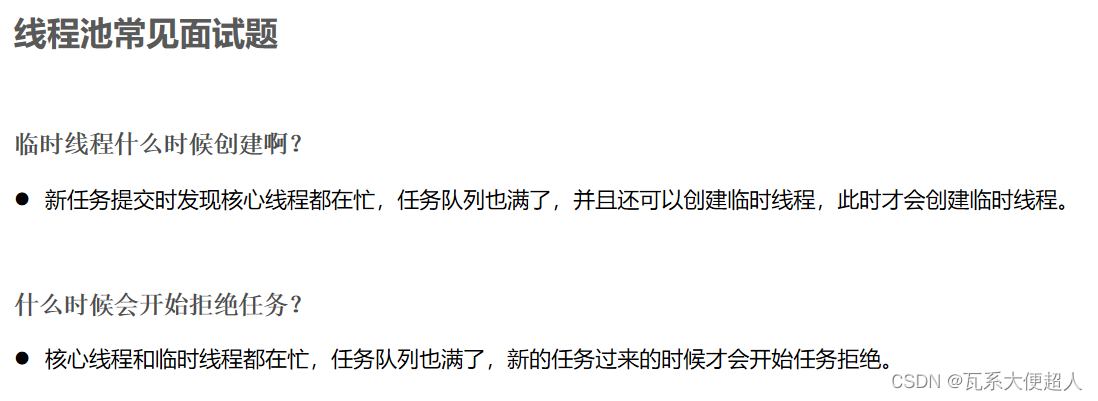
线程池概述
线程池就是一个可以复用线程的技术。
不使用线程池的问题
如果用户每发起一个请求,后台就创建一个新线程来处理,下次新任务来了又要创建新线程,而创建新线程的开销是很大的,这样会严重影响系统的性能。
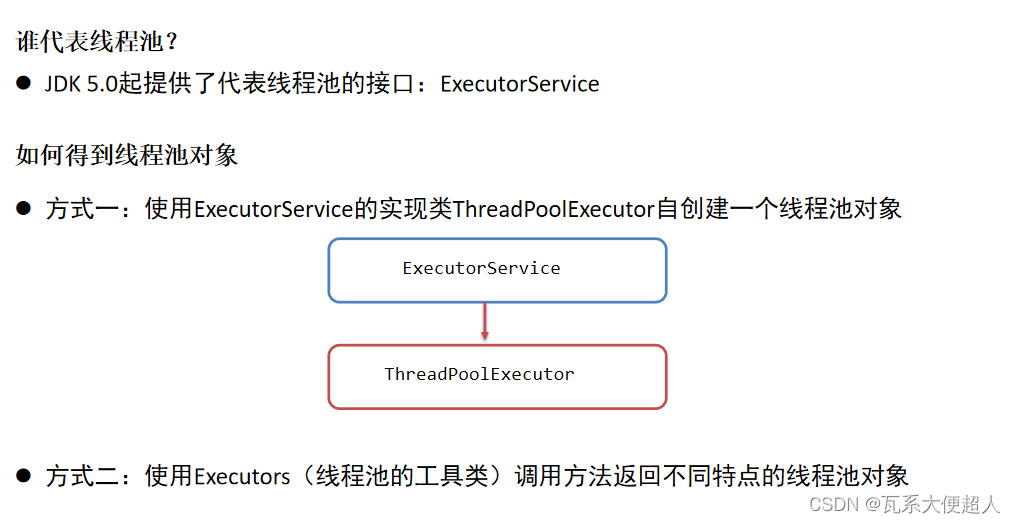
线程池实现的API、参数说明
/*
目标:自定义一个线程池对象,并测试其特性
 */
public class ThreadPoolDemo1 {
    public static void main(String[] args) {
        //1.创建线程池对象
        /*
          int corePoolSize,
          int maximumPoolSize,
          long keepAliveTime,
          TimeUnit unit,
          BlockingQueue<Runnable> workQueue,
          ThreadFactory threadFactory,
          RejectedExecutionHandler handler

         */

        ExecutorService pool = new ThreadPoolExecutor(3,5,6, TimeUnit.SECONDS,new ArrayBlockingQueue<>(5),
                Executors.defaultThreadFactory(),new ThreadPoolExecutor.AbortPolicy());

        //2.给任务线程池处理
        Runnable target = new MyRunnable();
        pool.execute(target);
        pool.execute(target);
        pool.execute(target);

        pool.execute(target);
        pool.execute(target);
        pool.execute(target);
        pool.execute(target);
        pool.execute(target);

        //创建临时线程
        pool.execute(target);
        pool.execute(target);

//        //不创建,拒绝策略被触发!!!
//        pool.execute(target);

        //关闭线程池(开发中一般不会使用)
        //pool.shutdownNow();//立即关闭,即使任务还没有完成,会丢失任务的!
        pool.shutdown();//会等待全部任务执行完毕之后再关闭(建议使用的)


    }
}
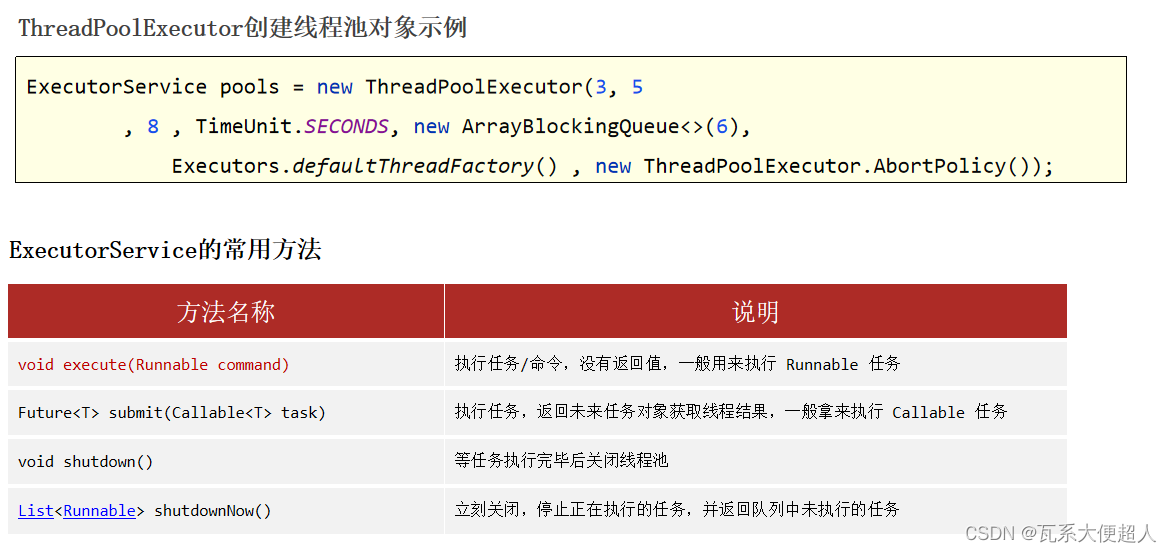
线程池处理Runnable任务

public class MyRunnable implements Runnable{
    @Override
    public void run() {
        for (int i = 0; i < 5; i++) {
            System.out.println(Thread.currentThread().getName() + "输出了:HelloWorld ==>" + i);
        }
        try {
            System.out.println(Thread.currentThread().getName() + "本任务与线程绑定了,线程进入休眠了~~~");
            Thread.sleep(10000000);
        } catch (InterruptedException e) {
            e.printStackTrace();
        }
    }
}
/*
目标:自定义一个线程池对象,并测试其特性
 */
public class ThreadPoolDemo2 {
    public static void main(String[] args) throws Exception {
        //1.创建线程池对象
        /*
          int corePoolSize,
          int maximumPoolSize,
          long keepAliveTime,
          TimeUnit unit,
          BlockingQueue<Runnable> workQueue,
          ThreadFactory threadFactory,
          RejectedExecutionHandler handler

         */

        ExecutorService pool = new ThreadPoolExecutor(3,5,6, TimeUnit.SECONDS,new ArrayBlockingQueue<>(5),
                Executors.defaultThreadFactory(),new ThreadPoolExecutor.AbortPolicy());

        //2.给任务线程池处理
        Future<String> f1 = pool.submit(new MyCallable(100));
        Future<String> f2 = pool.submit(new MyCallable(200));
        Future<String> f3 = pool.submit(new MyCallable(300));
        Future<String> f4 = pool.submit(new MyCallable(400));
        Future<String> f5 = pool.submit(new MyCallable(500));

//        String rs = f1.get();
//        System.out.println(rs);

        System.out.println(f1.get());
        System.out.println(f2.get());
        System.out.println(f3.get());
        System.out.println(f4.get());
        System.out.println(f5.get());

    }
}
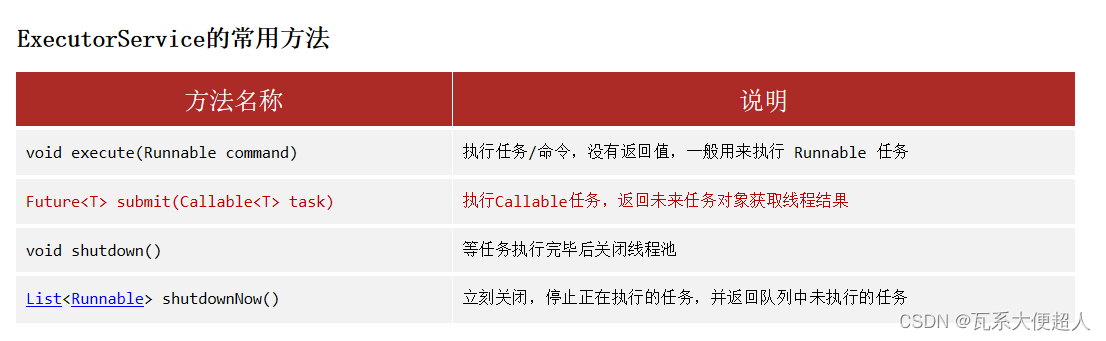
线程池处理Callable任务
/**
 * 1.定义一个任务类:实现Callable接口 应该声明线程任务执行完毕后的结果的数据类型
 */

public class MyCallable implements Callable<String>{
    private int n;

    public MyCallable(int n) {
        this.n = n;
    }

    /**
     * 2.重写call方法(任务方法)
     */
    @Override
    public String call() throws Exception {
        int sum = 0;
        for (int i = 0; i <=n; i++) {
            sum+=i;
        }
        return Thread.currentThread().getName()+ "执行的"+"1-"+n+"的和的结果是:"+sum;
    }
}
/*
目标:使用Executors的工具方法直接得到一个线程池对象。
 */
public class ThreadPoolDemo3 {
    public static void main(String[] args) throws Exception {
        //1.创建固定线程数据的线程池
        ExecutorService pool = Executors.newFixedThreadPool(3);

        pool.execute(new MyRunnable());
        pool.execute(new MyRunnable());
        pool.execute(new MyRunnable());
        pool.execute(new MyRunnable());//已经没有多余线程了


    }
}
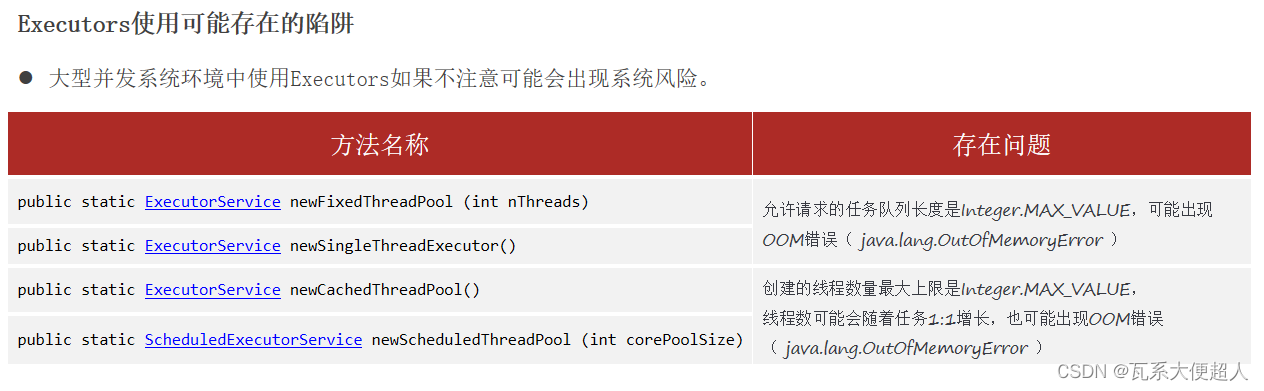
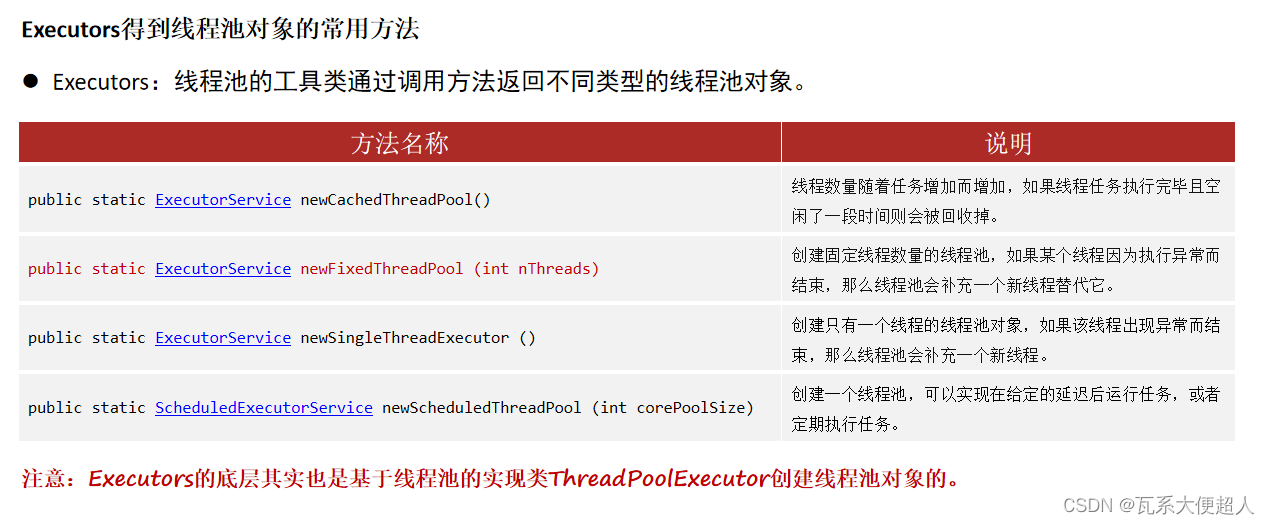
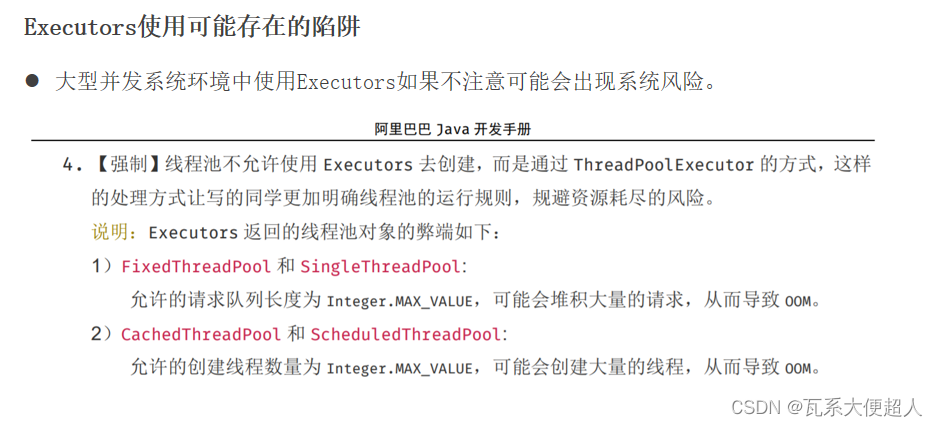
Executors工具类实现线程池
补充知识:定时器
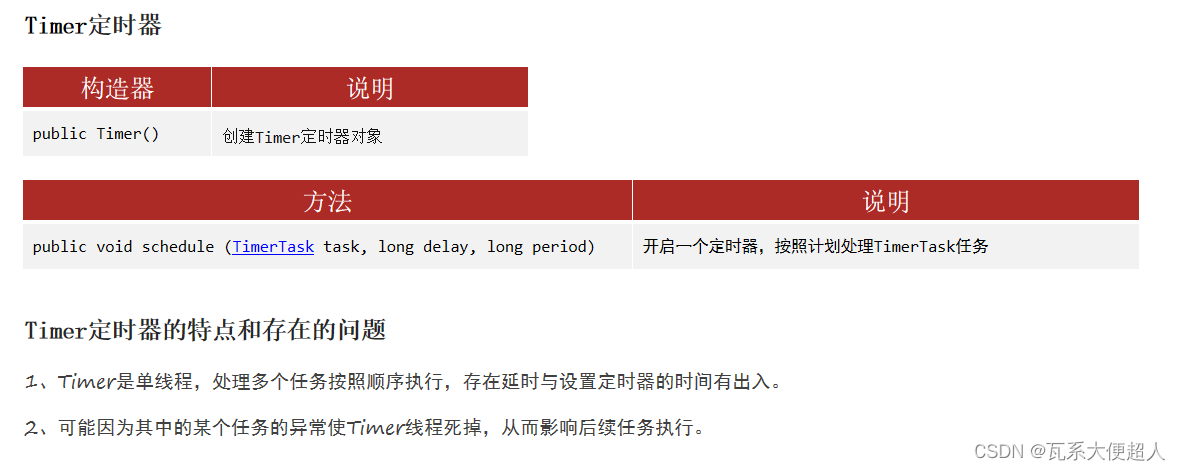
定时器是一种控制任务延时调用,或者周期调用的技术。
作用:闹钟、定时邮件发送。
方式一:Timer
/*
目标:Timer定时器的使用和了解
 */
public class TimerDemo1 {
    public static void main(String[] args) {
        //1.创建Timer定时器
        Timer timer = new Timer();//定时器本身就是一个单线程。
        //2.调用方法,处理定时任务
        timer.schedule(new TimerTask() {
            @Override
            public void run() {
                System.out.println(Thread.currentThread().getName() + "执行AAA~~~"+new Date());
//                try {
//                    Thread.sleep(5000);
//                } catch (InterruptedException e) {
//                    e.printStackTrace();
//                }
            }
        },0,2000);

        timer.schedule(new TimerTask() {
            @Override
            public void run() {
                System.out.println(Thread.currentThread().getName() + "执行BBB~~~"+new Date());
//                System.out.println(10 / 0);
            }
        },0,2000);

        timer.schedule(new TimerTask() {
            @Override
            public void run() {
                System.out.println(Thread.currentThread().getName() + "执行CCC~~~"+new Date());
            }
        },0,3000);


    }

}
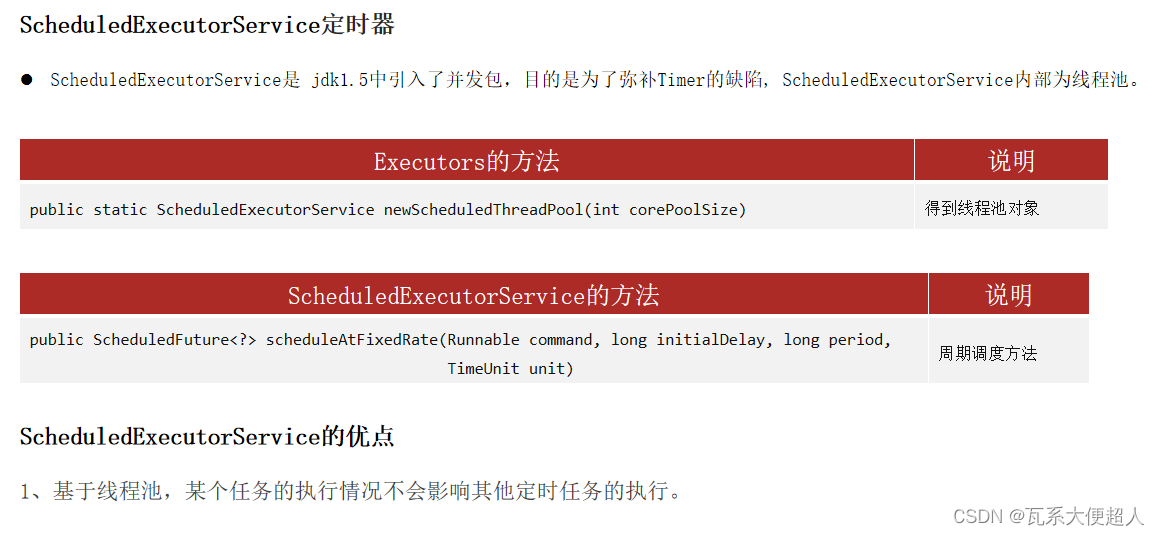
方式二: ScheduledExecutorService
/*
目标:Timer定时器的使用和了解
 */
public class TimerDemo2 {
    public static void main(String[] args) {

        //1.创建ScheduleExecutorService线程池,做定时器
        ScheduledExecutorService pool = Executors.newScheduledThreadPool(3);

        //2.开启定时任务
        pool.scheduleAtFixedRate(new TimerTask() {
            @Override
            public void run() {
                System.out.println(Thread.currentThread().getName() + "执行输出:AAA ==> "+new Date());
                try {
                    Thread.sleep(10000);
                } catch (InterruptedException e) {
                    e.printStackTrace();
                }
            }
        },0,2, TimeUnit.SECONDS);

        pool.scheduleAtFixedRate(new TimerTask() {
            @Override
            public void run() {
                System.out.println(Thread.currentThread().getName() + "执行输出:BBB ==> "+new Date());
                System.out.println(10 / 0);
            }
        },0,2, TimeUnit.SECONDS);

        pool.scheduleAtFixedRate(new TimerTask() {
            @Override
            public void run() {
                System.out.println(Thread.currentThread().getName() + "执行输出:CCC ==> "+new Date());
            }
        },0,2, TimeUnit.SECONDS);

    }

}
补充知识:并发、并行
简单说说并发和并行的含义
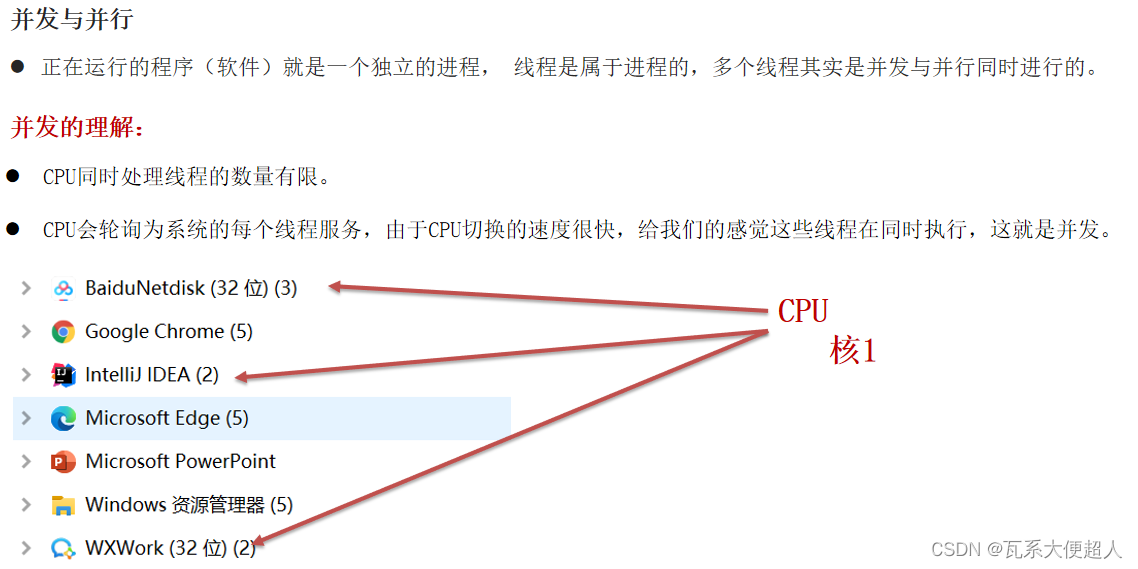
并发:CPU分时轮询的执行线程。
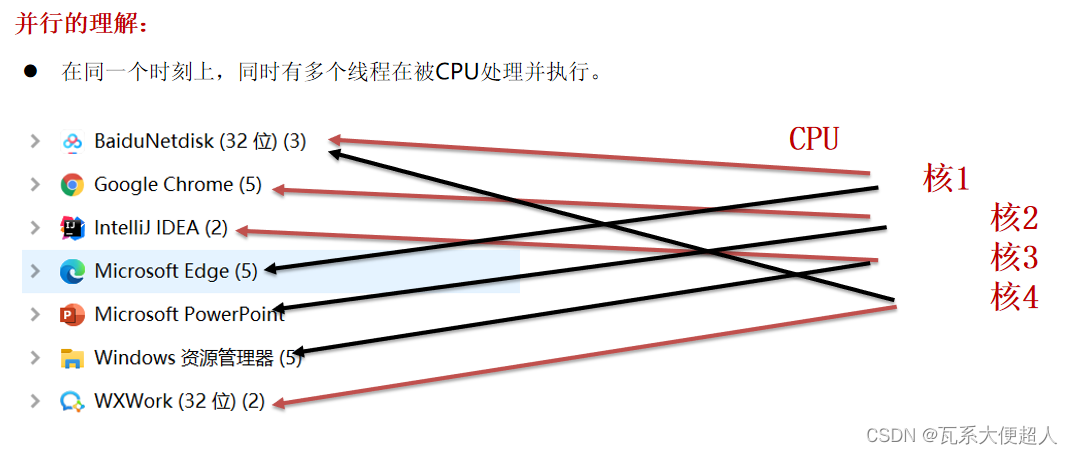
并行:同一个时刻同时在执行。
补充知识:线程的生命周期






 扫一扫
扫一扫


 235
235

 被折叠的 条评论
为什么被折叠?
被折叠的 条评论
为什么被折叠?
 到【灌水乐园】发言





