


1、配置word文件
注意:配置一个docx文件保存在public文件下。比如:信息模版.docx
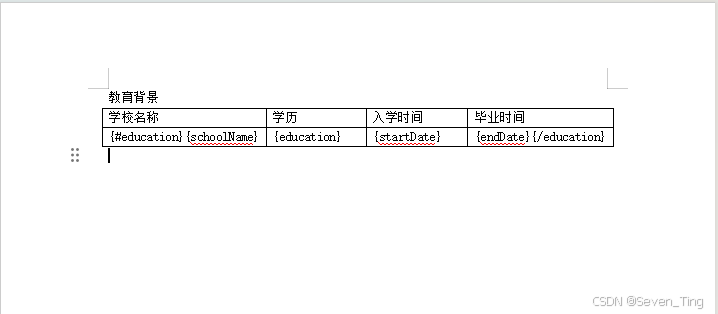
1、安装插件
"docxtemplater": "^3.67.5",
"file-saver": "^2.0.5",
"docx-preview": "^0.3.7",
"pizzip": "^3.2.0",
2、引入插件
import { saveAs } from "file-saver";
import { renderAsync } from "docx-preview";
3、加载Word模板文件
        const fileName = "info.docx";
        const response = await fetch(`/${fileName}`);

        if (!response.ok) {
          throw new Error(`模板文件不存在,状态码:${response.status}`);
        }

        const arrayBuffer = await response.arrayBuffer();
4、初始化docxtemplater
        const PizZip = require("pizzip");
        const Docxtemplater = require("docxtemplater");
        const zip = new PizZip(arrayBuffer);

        const doc = new Docxtemplater(zip, {
          nullGetter: () => "",
        });
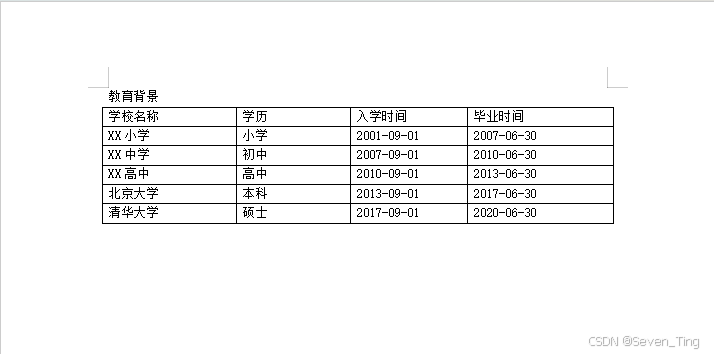
5、准备模板数据(表格数据)
        const data = {
          education: [
            {
              schoolName: 'XX小学',
              education: '小学',
              startDate: '2001-09-01',
              endDate: '2007-06-30'
            },
            {
              schoolName: 'XX中学',
              education: '初中',
              startDate: '2007-09-01',
              endDate: '2010-06-30'
            },
            {
              schoolName: 'XX高中',
              education: '高中',
              startDate: '2010-09-01',
              endDate: '2013-06-30'
            },
            {
              schoolName: '北京大学',
              education: '本科',
              startDate: '2013-09-01',
              endDate: '2017-06-30'
            },
            {
              schoolName: '清华大学',
              education: '硕士',
              startDate: '2017-09-01',
              endDate: '2020-06-30'
            }
          ]
        };
6、设置数据并渲染
        doc.setData(data);
        doc.render();
7、生成文档
        const zipData = doc.getZip();
        const docContent = zipData.generate({
          type: "uint8array",
          mimeType:
            "application/vnd.openxmlformats-officedocument.wordprocessingml.document",
        });
8、生成 blob
        const blob = new Blob([docContent], {
          type: "application/vnd.openxmlformats-officedocument.wordprocessingml.document",
        });

        this.wordBlob = blob;
        this.downloadFileName = `信息-${new Date().getTime()}.docx`;
9、转换为 ArrayBuffer 用于预览.
        const outputArrayBuffer = await blob.arrayBuffer();
        this.loading = false;
10、等待 DOM 更新后再渲染
await this.$nextTick();
11、使用 docx-preview 在页面上渲染
        if (this.$refs.wordContent) {
          try {
            this.$refs.wordContent.innerHTML = "";
            await renderAsync(
              outputArrayBuffer,
              this.$refs.wordContent,
              null,
              {
                className: "docx-wrapper",
                inWrapper: true,
                ignoreWidth: false,
                ignoreHeight: false,
                ignoreFonts: false,
                breakPages: true,
                ignoreLastRenderedPageBreak: true,
                experimental: false,
                trimXmlDeclaration: true,
                useBase64URL: false,
                useMathMLPolyfill: true,
                showChanges: false,
                showComments: false,
                showInserted: true,
                showDeleted: false,
              }
            );
          } catch (renderError) {
            this.$refs.wordContent.innerHTML = `渲染失败!`;
          }
        }
12、点击下载文档
    downloadWord() {
      if (this.wordBlob && this.downloadFileName) {
        saveAs(this.wordBlob, this.downloadFileName);
        this.$message.success("文档下载成功!");
      } else {
        this.$message.warning("文档尚未生成,请先生成文档");
      }
    },
13、下载文件结果显示:
14、全部代码:
<template>
  <div class="word-container">
    <div class="word-card">
      <div class="header-actions">
        <el-button type="primary" @click="downloadWord" :disabled="!wordBlob">
          <i class="el-icon-download"></i> 下载文档
        </el-button>
        <el-button @click="generateWord" :loading="loading">
          <i class="el-icon-refresh"></i> 重新生成
        </el-button>
      </div>

      <div v-if="loading" class="loading">
        <i class="el-icon-loading"></i>
        <p>正在生成 Word 文档...</p>
      </div>
      <div v-else-if="!wordBlob" class="error-message">
        <p>文档生成失败,请重试</p>
      </div>
      <div v-else ref="wordContent" class="word-content"></div>
    </div>
  </div>
</template>

<script>
import { saveAs } from "file-saver";
import { renderAsync } from "docx-preview";

export default {
  name: "InfoPage",
  data() {
    return {
      loading: false,
      wordBlob: null,
      downloadFileName: "",
    };
  },
  mounted() {
    this.generateWord();
  },
  methods: {
    async generateWord() {
      try {
        this.loading = true;

        // 1. 加载Word模板文件
        const fileName = "info.docx";
        const response = await fetch(`/${fileName}`);

        if (!response.ok) {
          throw new Error(`模板文件不存在,状态码:${response.status}`);
        }

        const arrayBuffer = await response.arrayBuffer();

        // 2. 初始化docxtemplater
        const PizZip = require("pizzip");
        const Docxtemplater = require("docxtemplater");
        const zip = new PizZip(arrayBuffer);

        const doc = new Docxtemplater(zip, {
          nullGetter: () => "",
        });

        console.log("✅ Docxtemplater 实例已创建");

        // 3. 准备模板数据(表格数据)
        const data = {
          education: [
            {
              schoolName: 'XX小学',
              education: '小学',
              startDate: '2001-09-01',
              endDate: '2007-06-30'
            },
            {
              schoolName: 'XX中学',
              education: '初中',
              startDate: '2007-09-01',
              endDate: '2010-06-30'
            },
            {
              schoolName: 'XX高中',
              education: '高中',
              startDate: '2010-09-01',
              endDate: '2013-06-30'
            },
            {
              schoolName: '北京大学',
              education: '本科',
              startDate: '2013-09-01',
              endDate: '2017-06-30'
            },
            {
              schoolName: '清华大学',
              education: '硕士',
              startDate: '2017-09-01',
              endDate: '2020-06-30'
            }
          ]
        };

        // 4. 设置数据并渲染
        doc.setData(data);
        doc.render();

        console.log("✅ 模板渲染完成");

        // 5. 生成文档
        const zipData = doc.getZip();
        const docContent = zipData.generate({
          type: "uint8array",
          mimeType:
            "application/vnd.openxmlformats-officedocument.wordprocessingml.document",
        });

        // 6. 生成 blob
        const blob = new Blob([docContent], {
          type: "application/vnd.openxmlformats-officedocument.wordprocessingml.document",
        });

        this.wordBlob = blob;
        this.downloadFileName = `信息-${new Date().getTime()}.docx`;

        // 7. 转换为 ArrayBuffer 用于预览
        const outputArrayBuffer = await blob.arrayBuffer();
        this.loading = false;

        // 8. 等待 DOM 更新后再渲染
        await this.$nextTick();

        // 9. 使用 docx-preview 在页面上渲染
        if (this.$refs.wordContent) {
          try {
            this.$refs.wordContent.innerHTML = "";
            await renderAsync(
              outputArrayBuffer,
              this.$refs.wordContent,
              null,
              {
                className: "docx-wrapper",
                inWrapper: true,
                ignoreWidth: false,
                ignoreHeight: false,
                ignoreFonts: false,
                breakPages: true,
                ignoreLastRenderedPageBreak: true,
                experimental: false,
                trimXmlDeclaration: true,
                useBase64URL: false,
                useMathMLPolyfill: true,
                showChanges: false,
                showComments: false,
                showInserted: true,
                showDeleted: false,
              }
            );
          } catch (renderError) {
            this.$refs.wordContent.innerHTML = `渲染失败!`;
          }
        }
      } catch (error) {
        this.$message.error("生成 Word 文档失败: " + (error.message || "未知错误"));
        this.loading = false;

        // 处理模板错误
        if (error.properties && error.properties.errors) {
          const errors = error.properties.errors;
          console.error(`发现 ${errors.length} 个错误:`, errors);
          this.$message.error(`模板有 ${errors.length} 个错误,请检查控制台`);
        }
      }
    },
    downloadWord() {
      if (this.wordBlob && this.downloadFileName) {
        saveAs(this.wordBlob, this.downloadFileName);
        this.$message.success("文档下载成功!");
      } else {
        this.$message.warning("文档尚未生成,请先生成文档");
      }
    },
  },
};
</script>

<style lang="scss" scoped>
.word-container {
  min-height: 100vh;
  display: flex;
  justify-content: center;
  align-items: center;
  background: linear-gradient(135deg, #74b9ff 0%, #0984e3 50%, #005f99 100%);
  padding: 20px;
}

.word-card {
  width: 100%;
  max-width: 1200px;
  background: #ffffff;
  border-radius: 12px;
  box-shadow: 0 10px 40px rgba(0, 0, 0, 0.1);
  padding: 20px;
  animation: fadeInUp 0.5s ease-out;
  min-height: 600px;
  display: flex;
  flex-direction: column;
}

@keyframes fadeInUp {
  from {
    opacity: 0;
    transform: translateY(30px);
  }
  to {
    opacity: 1;
    transform: translateY(0);
  }
}

.loading {
  display: flex;
  flex-direction: column;
  align-items: center;
  justify-content: center;
  min-height: 400px;
  color: #0984e3;

  i {
    font-size: 32px;
    margin-bottom: 20px;
    animation: rotating 2s linear infinite;
  }

  p {
    font-size: 16px;
    color: #666;
  }
}

@keyframes rotating {
  from {
    transform: rotate(0deg);
  }
  to {
    transform: rotate(360deg);
  }
}

.header-actions {
  display: flex;
  justify-content: flex-end;
  gap: 10px;
  margin-bottom: 20px;
  padding-bottom: 20px;
  border-bottom: 1px solid #eee;
}

.word-content {
  width: 100%;
  min-height: 400px;
  max-height: 80vh;
  overflow-y: auto;
  position: relative;

  :deep(.docx-wrapper) {
    background: #fff;
    padding: 40px;
    box-shadow: 0 2px 8px rgba(0, 0, 0, 0.1);
    border-radius: 4px;
    margin: 0 auto;
    max-width: 800px;
    min-height: 400px;
  }
}

.error-message {
  display: flex;
  align-items: center;
  justify-content: center;
  min-height: 400px;
  color: #f56c6c;
  font-size: 16px;
}

@media (max-width: 768px) {
  .word-card {
    padding: 30px 20px;
    max-width: 100%;
  }
}
</style>





 扫一扫
扫一扫


 8304
8304

 被折叠的 条评论
为什么被折叠?
被折叠的 条评论
为什么被折叠?
 到【灌水乐园】发言





