网络安全-2.4/2.7

2.4已知RSA算法中,素数p=5,q=7,模数n=35,公钥e=5,明文为bed,对明文进行加解密,使用手工完成RSA公开秘钥密码体制算法加密运算。字母数字映射表如下:

1)设计公私密钥(e,n)和(d,n)。
令p=5,q=7,得出n=p×q=3×11=35;f(n)=(p-1)(q-1)=4×6=24;取e=5,(5与24互质)则e×d≡1 mod f(n),即5×d≡1 mod 24
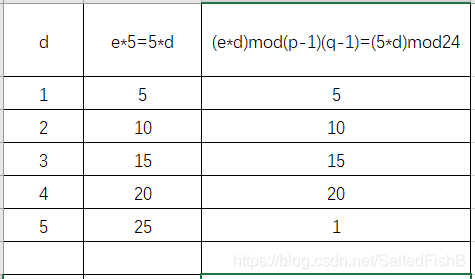
通过试算求得d的值,试算结果见下表:

  通过试算我们找到,当d=5时,e×d≡1 mod f(n)同余等式成立。因此,可令d=5。从而我们可以设计出一对公私密钥,加密密钥(公钥)为:KU =(e,n)=(5,35),解密密钥(私钥)为:KR =(d,n)=(5,35)
(2)英文数字化。
  将明文信息数字化,并将每块两个数字分组。假定明文英文字母编码表为按字母顺序排列数值,即:

http://img.hexun.com/2009-06-24/118958538.jpg
  则得到分组后的bed的明文信息为:02,05,04
(3)明文加密 
  用户加密密钥(5,35) 将数字化明文分组信息加密成密文。由C≡Me(mod n)得:
M1 = {c1}e{mod n} = 025  {mod 35} = 32

M2 = {c1}e{mod n} = 055  {mod 35} = 10

M3 = {c1}e{mod n} = 045  {mod 35} = 9
  因此,得到相应的密文信息为:32109
4)密文解密。
  用户B收到密文,若将其解密,只需要计算http://img.hexun.com/2009-06-24/118958536.gif,即:
M1 = {c1} d {mod n} = 325  {mod 35} = 02

M2 = {c1} d {mod n} = 105  {mod 35} = 05

M3 = {c1} d {mod n} = 95  {mod 35} = 04
  用户B得到明文信息为:02,05,04。根据上面的编码表将其转换为英文,我们又得到了恢复后的原文“bed”。 

2.7从网络安全的整体视角谈谈自己对网络安全的的理解和认识。

网络安全是一门涉及计算机科学、网络技术、通信技术、密码技术、信息安全技术、应用数学、数论、信息论等多种学科的综合性学科。

网络安全是指网络系统的硬件、软件及其系统中的数据受到保护,不受偶然的或者恶意的原因而遭到破坏、更改、泄露,系统连续可靠正常地运行,网络服务不中断。

网络安全从其本质上来讲就是网络上的信息安全。从广义来说,凡是涉及到网络上信息的保密性、完整性、可用性、真实性和可控性的相关技术和理论都是网络安全的研究领域。

在如今号称消息爆炸的时代,随着互联网的普及,网络安全就显得尤为重要。但是当谈到网络安全时,可能大多数人认为网络只是存在于电脑上的互联网,孰不知,网络的定义是十分广泛的。

随着计算机技术的飞速发展,信息网络已经成为社会发展的重要保证。有很多是敏感信息,甚至是国家机密。所以难免会吸引来自世界各地的各种人为攻击(例如信息泄漏、信息窃取、数据篡改、数据删添、 计算机病毒等)。同时,网络实体还要经受诸如水灾、火灾、地震、电磁辐射等方面的考验。

网络给我们的生活带来了便捷,给我们带来了丰富的信息资源,但是我们的网络信息无时无时无刻不存在着危险。例如你的手机随时随地都会出现的垃圾短息,广告等;各种形式的电信诈骗、移动诈骗、网络诈骗。这一切的一切都说明了我们的网络信息安全是存在着很大的问题的。

其中,人为因素是对网络安全威胁最大的因素。人为因素是指一些不法之徒利用计算机网络存在的漏洞,盗用计算机系统资源,非法获取并篡改重要数据、破坏硬件设备、编制计算机病毒等。所以,我们在利用网络的同时,也应该关注网络安全问题,加强网络安全防范,防止网络的侵害,让网络更好的为人们服务。

计算机网络不安全因素主要表现在以下几个方面:

(一)网络的脆弱性

(二)操作系统的安全问题

(三)黑客攻击后果严重

针对网络系统现实情况,处理好网络的安全问题是当务之急。为了保证网络安全可以采用如下方法: 

(一)配置防火墙。

(二)安装防病毒网关软件。

(三)应用入侵检测系统。

(四)利用网络监听维护子网系统安全。

(五)应用数据加密技术。 

(六)常做数据备份。

Microsoft Windows [版本 10.0.26100.6899] (c) Microsoft Corporation。保留所有权利。 C:\Users\ZHUJUNJIE>conda activate yoloe (yoloe) C:\Users\ZHUJUNJIE>cd /users/ZHUJUNJIE/yoloe-main (yoloe) C:\Users\ZHUJUNJIE\yoloe-main>pip install -r requirements.txt ERROR: Could not open requirements file: [Errno 2] No such file or directory: 'requirements.txt' (yoloe) C:\Users\ZHUJUNJIE\yoloe-main>pip install -r /yoloe-main/requirements.txt ERROR: Could not open requirements file: [Errno 2] No such file or directory: '/yoloe-main/requirements.txt' (yoloe) C:\Users\ZHUJUNJIE\yoloe-main>pip install -r yoloe-main/requirements.txt Collecting matplotlib>=3.3.0 (from -r yoloe-main/requirements.txt (line 5)) Using cached matplotlib-3.10.7-cp310-cp310-win_amd64.whl.metadata (11 kB) Collecting numpy==1.24.4 (from -r yoloe-main/requirements.txt (line 6)) Downloading numpy-1.24.4-cp310-cp310-win_amd64.whl.metadata (5.6 kB) Collecting opencv-python>=4.6.0 (from -r yoloe-main/requirements.txt (line 7)) Downloading opencv_python-4.12.0.88-cp37-abi3-win_amd64.whl.metadata (19 kB) Collecting pillow>=7.1.2 (from -r yoloe-main/requirements.txt (line 8)) Downloading pillow-12.0.0-cp310-cp310-win_amd64.whl.metadata (9.0 kB) Collecting pyyaml>=5.3.1 (from -r yoloe-main/requirements.txt (line 9)) Using cached pyyaml-6.0.3-cp310-cp310-win_amd64.whl.metadata (2.4 kB) Collecting requests>=2.23.0 (from -r yoloe-main/requirements.txt (line 10)) Downloading requests-2.32.5-py3-none-any.whl.metadata (4.9 kB) Collecting scipy>=1.4.1 (from -r yoloe-main/requirements.txt (line 11)) Downloading scipy-1.15.3-cp310-cp310-win_amd64.whl.metadata (60 kB) Collecting tqdm>=4.64.0 (from -r yoloe-main/requirements.txt (line 12)) Downloading tqdm-4.67.1-py3-none-any.whl.metadata (57 kB) Collecting pandas>=1.1.4 (from -r yoloe-main/requirements.txt (line 21)) Using cached pandas-2.3.3-cp310-cp310-win_amd64.whl.metadata (19 kB) Collecting seaborn>=0.11.0 (from -r yoloe-main/requirements.txt (line 22)) Downloading seaborn-0.13.2-py3-none-any.whl.metadata (5.4 kB) Collecting psutil (from -r yoloe-main/requirements.txt (line 37)) Downloading psutil-7.1.3-cp37-abi3-win_amd64.whl.metadata (23 kB) Collecting py-cpuinfo (from -r yoloe-main/requirements.txt (line 38)) Downloading py_cpuinfo-9.0.0-py3-none-any.whl.metadata (794 bytes) Collecting thop>=0.1.1 (from -r yoloe-main/requirements.txt (line 39)) Downloading thop-0.1.1.post2209072238-py3-none-any.whl.metadata (2.7 kB) Collecting contourpy>=1.0.1 (from matplotlib>=3.3.0->-r yoloe-main/requirements.txt (line 5)) Downloading contourpy-1.3.2-cp310-cp310-win_amd64.whl.metadata (5.5 kB) Collecting cycler>=0.10 (from matplotlib>=3.3.0->-r yoloe-main/requirements.txt (line 5)) Downloading cycler-0.12.1-py3-none-any.whl.metadata (3.8 kB) Collecting fonttools>=4.22.0 (from matplotlib>=3.3.0->-r yoloe-main/requirements.txt (line 5)) Downloading fonttools-4.60.1-cp310-cp310-win_amd64.whl.metadata (114 kB) Collecting kiwisolver>=1.3.1 (from matplotlib>=3.3.0->-r yoloe-main/requirements.txt (line 5)) Downloading kiwisolver-1.4.9-cp310-cp310-win_amd64.whl.metadata (6.4 kB) Collecting packaging>=20.0 (from matplotlib>=3.3.0->-r yoloe-main/requirements.txt (line 5)) WARNING: Cache entry deserialization failed, entry ignored WARNING: Cache entry deserialization failed, entry ignored Downloading packaging-25.0-py3-none-any.whl.metadata (3.3 kB) Collecting pyparsing>=3 (from matplotlib>=3.3.0->-r yoloe-main/requirements.txt (line 5)) Downloading pyparsing-3.2.5-py3-none-any.whl.metadata (5.0 kB) Collecting python-dateutil>=2.7 (from matplotlib>=3.3.0->-r yoloe-main/requirements.txt (line 5)) Downloading python_dateutil-2.9.0.post0-py2.py3-none-any.whl.metadata (8.4 kB) INFO: pip is looking at multiple versions of opencv-python to determine which version is compatible with other requirements. This could take a while. Collecting opencv-python>=4.6.0 (from -r yoloe-main/requirements.txt (line 7)) Downloading opencv_python-4.11.0.86-cp37-abi3-win_amd64.whl.metadata (20 kB) WARNING: Retrying (Retry(total=4, connect=None, read=None, redirect=None, status=None)) after connection broken by 'ReadTimeoutError("HTTPSConnectionPool(host='pypi.org', port=443): Read timed out. (read timeout=15)")': /simple/charset-normalizer/ Collecting charset_normalizer<4,>=2 (from requests>=2.23.0->-r yoloe-main/requirements.txt (line 10)) Downloading charset_normalizer-3.4.4-cp310-cp310-win_amd64.whl.metadata (38 kB) Collecting idna<4,>=2.5 (from requests>=2.23.0->-r yoloe-main/requirements.txt (line 10)) Downloading idna-3.11-py3-none-any.whl.metadata (8.4 kB) Collecting urllib3<3,>=1.21.1 (from requests>=2.23.0->-r yoloe-main/requirements.txt (line 10)) Downloading urllib3-2.5.0-py3-none-any.whl.metadata (6.5 kB) Collecting certifi>=2017.4.17 (from requests>=2.23.0->-r yoloe-main/requirements.txt (line 10)) Downloading certifi-2025.10.5-py3-none-any.whl.metadata (2.5 kB) Collecting colorama (from tqdm>=4.64.0->-r yoloe-main/requirements.txt (line 12)) Downloading colorama-0.4.6-py2.py3-none-any.whl.metadata (17 kB) Collecting pytz>=2020.1 (from pandas>=1.1.4->-r yoloe-main/requirements.txt (line 21)) Downloading pytz-2025.2-py2.py3-none-any.whl.metadata (22 kB) Collecting tzdata>=2022.7 (from pandas>=1.1.4->-r yoloe-main/requirements.txt (line 21)) Downloading tzdata-2025.2-py2.py3-none-any.whl.metadata (1.4 kB) Collecting torch (from thop>=0.1.1->-r yoloe-main/requirements.txt (line 39)) Downloading torch-2.9.0-cp310-cp310-win_amd64.whl.metadata (30 kB) Collecting six>=1.5 (from python-dateutil>=2.7->matplotlib>=3.3.0->-r yoloe-main/requirements.txt (line 5)) Downloading six-1.17.0-py2.py3-none-any.whl.metadata (1.7 kB) Collecting filelock (from torch->thop>=0.1.1->-r yoloe-main/requirements.txt (line 39)) Downloading filelock-3.20.0-py3-none-any.whl.metadata (2.1 kB) Collecting typing-extensions>=4.10.0 (from torch->thop>=0.1.1->-r yoloe-main/requirements.txt (line 39)) Downloading typing_extensions-4.15.0-py3-none-any.whl.metadata (3.3 kB) Collecting sympy>=1.13.3 (from torch->thop>=0.1.1->-r yoloe-main/requirements.txt (line 39)) Downloading sympy-1.14.0-py3-none-any.whl.metadata (12 kB) Collecting networkx>=2.5.1 (from torch->thop>=0.1.1->-r yoloe-main/requirements.txt (line 39)) Downloading networkx-3.4.2-py3-none-any.whl.metadata (6.3 kB) Collecting jinja2 (from torch->thop>=0.1.1->-r yoloe-main/requirements.txt (line 39)) Using cached jinja2-3.1.6-py3-none-any.whl.metadata (2.9 kB) Collecting fsspec>=0.8.5 (from torch->thop>=0.1.1->-r yoloe-main/requirements.txt (line 39)) Downloading fsspec-2025.10.0-py3-none-any.whl.metadata (10 kB) Collecting mpmath<1.4,>=1.1.0 (from sympy>=1.13.3->torch->thop>=0.1.1->-r yoloe-main/requirements.txt (line 39)) Downloading mpmath-1.3.0-py3-none-any.whl.metadata (8.6 kB) Collecting MarkupSafe>=2.0 (from jinja2->torch->thop>=0.1.1->-r yoloe-main/requirements.txt (line 39)) Downloading markupsafe-3.0.3-cp310-cp310-win_amd64.whl.metadata (2.8 kB) Downloading numpy-1.24.4-cp310-cp310-win_amd64.whl (14.8 MB) ━━━━━━━━━━━━━━━━━━━━━━━━━━━━━━━━━━━━━━━━ 14.8/14.8 MB 29.5 kB/s 0:10:49 Downloading matplotlib-3.10.7-cp310-cp310-win_amd64.whl (8.1 MB) ━━━━━━━━━━━━━━━━━━━━━━━━━━━━━━━━━━━━━━━━ 8.1/8.1 MB 24.4 kB/s 0:06:27 Downloading opencv_python-4.11.0.86-cp37-abi3-win_amd64.whl (39.5 MB) ━━━━━━━━━━━━━━━━━━━━━━━━━━━━━━━━━━━━╺━━━ 35.7/39.5 MB 13.2 kB/s eta 0:04:50 WARNING: Connection timed out while downloading. WARNING: Attempting to resume incomplete download (35.7 MB/39.5 MB, attempt 1) Resuming download opencv_python-4.11.0.86-cp37-abi3-win_amd64.whl (35.7 MB/39.5 MB) ━━━━━━━━━━━━━━━━━━━━━━━━━━━━━━━━━━━━╺━━━ 35.7/39.5 MB ? eta -:--:-- WARNING: Connection timed out while downloading. WARNING: Attempting to resume incomplete download (35.7 MB/39.5 MB, attempt 2) Resuming download opencv_python-4.11.0.86-cp37-abi3-win_amd64.whl (35.7 MB/39.5 MB) ━━━━━━━━━━━━━━━━━━━━━━━━━━━━━━━━━━━━╺━━━ 35.7/39.5 MB ? eta -:--:-- WARNING: Connection timed out while downloading. WARNING: Attempting to resume incomplete download (35.7 MB/39.5 MB, attempt 3) Resuming download opencv_python-4.11.0.86-cp37-abi3-win_amd64.whl (35.7 MB/39.5 MB) ━━━━━━━━━━━━━━━━━━━━━━━━━━━━━━━━━━━━━━━╺ 38.5/39.5 MB 13.1 kB/s eta 0:01:13 WARNING: Connection timed out while downloading. WARNING: Attempting to resume incomplete download (38.5 MB/39.5 MB, attempt 4) Resuming download opencv_python-4.11.0.86-cp37-abi3-win_amd64.whl (38.5 MB/39.5 MB) ━━━━━━━━━━━━━━━━━━━━━━━━━━━━━━━━━━━━━━━╺ 38.5/39.5 MB ? eta -:--:-- WARNING: Connection timed out while downloading. WARNING: Attempting to resume incomplete download (38.5 MB/39.5 MB, attempt 5) WARNING: Retrying (Retry(total=4, connect=None, read=None, redirect=None, status=None)) after connection broken by 'ReadTimeoutError("HTTPSConnectionPool(host='files.pythonhosted.org', port=443): Read timed out. (read timeout=15)")': /packages/a4/7d/f1c30a92854540bf789e9cd5dde7ef49bbe63f855b85a2e6b3db8135c591/opencv_python-4.11.0.86-cp37-abi3-win_amd64.whl Resuming download opencv_python-4.11.0.86-cp37-abi3-win_amd64.whl (38.5 MB/39.5 MB) ━━━━━━━━━━━━━━━━━━━━━━━━━━━━━━━━━━━━━━━╺ 38.5/39.5 MB ? eta -:--:-- WARNING: Connection timed out while downloading. ERROR: Could not install packages due to an OSError: [WinError 32] 另一个程序正在使用此文件,进程无法访问。: 'C:\\Users\\ZHUJUNJIE\\AppData\\Local\\Temp\\pip-unpack-aatdhcmk\\opencv_python-4.11.0.86-cp37-abi3-win_amd64.whl' Consider using the `--user` option or check the permissions. (yoloe) C:\Users\ZHUJUNJIE\yoloe-main>pip install -r /yoloe-main/requirements.txt ERROR: Could not open requirements file: [Errno 2] No such file or directory: '/yoloe-main/requirements.txt' (yoloe) C:\Users\ZHUJUNJIE\yoloe-main>pip Usage: pip <command> [options] Commands: install Install packages. lock Generate a lock file. download Download packages. uninstall Uninstall packages. freeze Output installed packages in requirements format. inspect Inspect the python environment. list List installed packages. show Show information about installed packages. check Verify installed packages have compatible dependencies. config Manage local and global configuration. search Search PyPI for packages. cache Inspect and manage pip's wheel cache. index Inspect information available from package indexes. wheel Build wheels from your requirements. hash Compute hashes of package archives. completion A helper command used for command completion. debug Show information useful for debugging. help Show help for commands. General Options: -h, --help Show help. --debug Let unhandled exceptions propagate outside the main subroutine, instead of logging them to stderr. --isolated Run pip in an isolated mode, ignoring environment variables and user configuration. --require-virtualenv Allow pip to only run in a virtual environment; exit with an error otherwise. --python <python> Run pip with the specified Python interpreter. -v, --verbose Give more output. Option is additive, and can be used up to 3 times. -V, --version Show version and exit. -q, --quiet Give less output. Option is additive, and can be used up to 3 times (corresponding to WARNING, ERROR, and CRITICAL logging levels). --log <path> Path to a verbose appending log. --no-input Disable prompting for input. --keyring-provider <keyring_provider> Enable the credential lookup via the keyring library if user input is allowed. Specify which mechanism to use [auto, disabled, import, subprocess]. (default: auto) --proxy <proxy> Specify a proxy in the form scheme://[user:passwd@]proxy.server:port. --retries <retries> Maximum attempts to establish a new HTTP connection. (default: 5) --timeout <sec> Set the socket timeout (default 15 seconds). --exists-action <action> Default action when a path already exists: (s)witch, (i)gnore, (w)ipe, (b)ackup, (a)bort. --trusted-host <hostname> Mark this host or host:port pair as trusted, even though it does not have valid or any HTTPS. --cert <path> Path to PEM-encoded CA certificate bundle. If provided, overrides the default. See 'SSL Certificate Verification' in pip documentation for more information. --client-cert <path> Path to SSL client certificate, a single file containing the private key and the certificate in PEM format. --cache-dir <dir> Store the cache data in <dir>. --no-cache-dir Disable the cache. --disable-pip-version-check Don't periodically check PyPI to determine whether a new version of pip is available for download. Implied with --no-index. --no-color Suppress colored output. --use-feature <feature> Enable new functionality, that may be backward incompatible. --use-deprecated <feature> Enable deprecated functionality, that will be removed in the future. --resume-retries <resume_retries> Maximum attempts to resume or restart an incomplete download. (default: 5) (yoloe) C:\Users\ZHUJUNJIE\yoloe-main>install -i https://pypi.tuna.tsinghua.edu.cn/simple -r 'install' 不是内部或外部命令,也不是可运行的程序 或批处理文件。 (yoloe) C:\Users\ZHUJUNJIE\yoloe-main>pip Usage: pip <command> [options] Commands: install Install packages. lock Generate a lock file. download Download packages. uninstall Uninstall packages. freeze Output installed packages in requirements format. inspect Inspect the python environment. list List installed packages. show Show information about installed packages. check Verify installed packages have compatible dependencies. config Manage local and global configuration. search Search PyPI for packages. cache Inspect and manage pip's wheel cache. index Inspect information available from package indexes. wheel Build wheels from your requirements. hash Compute hashes of package archives. completion A helper command used for command completion. debug Show information useful for debugging. help Show help for commands. General Options: -h, --help Show help. --debug Let unhandled exceptions propagate outside the main subroutine, instead of logging them to stderr. --isolated Run pip in an isolated mode, ignoring environment variables and user configuration. --require-virtualenv Allow pip to only run in a virtual environment; exit with an error otherwise. --python <python> Run pip with the specified Python interpreter. -v, --verbose Give more output. Option is additive, and can be used up to 3 times. -V, --version Show version and exit. -q, --quiet Give less output. Option is additive, and can be used up to 3 times (corresponding to WARNING, ERROR, and CRITICAL logging levels). --log <path> Path to a verbose appending log. --no-input Disable prompting for input. --keyring-provider <keyring_provider> Enable the credential lookup via the keyring library if user input is allowed. Specify which mechanism to use [auto, disabled, import, subprocess]. (default: auto) --proxy <proxy> Specify a proxy in the form scheme://[user:passwd@]proxy.server:port. --retries <retries> Maximum attempts to establish a new HTTP connection. (default: 5) --timeout <sec> Set the socket timeout (default 15 seconds). --exists-action <action> Default action when a path already exists: (s)witch, (i)gnore, (w)ipe, (b)ackup, (a)bort. --trusted-host <hostname> Mark this host or host:port pair as trusted, even though it does not have valid or any HTTPS. --cert <path> Path to PEM-encoded CA certificate bundle. If provided, overrides the default. See 'SSL Certificate Verification' in pip documentation for more information. --client-cert <path> Path to SSL client certificate, a single file containing the private key and the certificate in PEM format. --cache-dir <dir> Store the cache data in <dir>. --no-cache-dir Disable the cache. --disable-pip-version-check Don't periodically check PyPI to determine whether a new version of pip is available for download. Implied with --no-index. --no-color Suppress colored output. --use-feature <feature> Enable new functionality, that may be backward incompatible. --use-deprecated <feature> Enable deprecated functionality, that will be removed in the future. --resume-retries <resume_retries> Maximum attempts to resume or restart an incomplete download. (default: 5) (yoloe) C:\Users\ZHUJUNJIE\yoloe-main>install -i https://pypi.tuna.tsinghua.edu.cn/simple -r 'install' 不是内部或外部命令,也不是可运行的程序 或批处理文件。 (yoloe) C:\Users\ZHUJUNJIE\yoloe-main>pip cache purge Files removed: 450 (352.7 MB) (yoloe) C:\Users\ZHUJUNJIE\yoloe-main>
最新发布
11-11
评论
成就一亿技术人!
拼手气红包6.0元
还能输入1000个字符
 
红包 添加红包
表情包 插入表情
 条评论被折叠 查看
添加红包

请填写红包祝福语或标题

红包个数最小为10个

红包金额最低5元

当前余额3.43前往充值 >
需支付:10.00
成就一亿技术人!
领取后你会自动成为博主和红包主的粉丝 规则
hope_wisdom
发出的红包
实付
使用余额支付
点击重新获取
扫码支付
钱包余额 0

抵扣说明:

1.余额是钱包充值的虚拟货币,按照1:1的比例进行支付金额的抵扣。
2.余额无法直接购买下载,可以购买VIP、付费专栏及课程。

余额充值