



 Avro是一个数据序列化工具,使用语言无关的模式定义,支持二进制和JSON编码。Avro依赖JSON格式的模式,数据类型映射到Java,并能通过schema生成Java类。本文提供了一个Avro使用实例,包括创建schema文件、使用avro-tools编译以及Java中的序列化和反序列化操作。
Avro简介
Avro是一个数据序列化工具,用语言无关的模式定义,Avro支持二进制编码和JSON编码两种序列化方式。序列化方法为深度优先,从左到右遍历。
Avro数据类型
| 类型 | 描述 | 示例 |
|---|---|---|
| null | 空值 | null |
| boolean | 二进制值 | “boolean” |
| int | 32位整数 | “int” |
| long | 64位证书 | “long” |
| float | 32位浮点数 | “float” |
| double | 64位浮点数 | “double” |
| bytes | 字节序列 | “bytes” |
| string | 字符序列 | “string” |
| array | 排序数组,对象类型一致 | {“type”:“array”,“items”:“long”} |
| map | 键值对,键是字符串 | {“type”:“map”,“values”:“string”} |
| record | 任意类型字段集合 | {“type”:“record”,“name”:“WeatherRecord”,“doc”:“Weather file”,“fileds”:[{“name”,“year”,“type”:“int”}]}} |
| enum | 枚举类型 | {“type”:“enum”,“name”:“cutlery”,“doc”,:file",“symbols”:[“KNIFE”,“FORK”]} |
数据类型Java映射
| Avro类型 | JAVA通用映射 | 特殊映射 |
|---|---|---|
| int | int | - |
| long | long | - |
| float | float | - |
| double | double | - |
| bytes | java.nio.bytebuffer | 字节数组 |
| string | 字符序列 | “string” |
| array | 排序数组,对象类型一致 | {“type”:“array”,“items”:“long”} |
| map | 键值对,键是字符串 | {“type”:“map”,“values”:“string”} |
| record | 任意类型字段集合 | {“type”:“record”,“name”:“WeatherRecord”,“doc”:“Weather file”,“fileds”:[{“name”,“year”,“type”:“int”},{“name”,“temperature”,“type”:“int”}]}} |
| enum | 枚举类型 | {“type”:“enum”,“name”:“cutlery”,“doc”,:file",“symbols”:[“KNIFE”,“FORK”]} |
Avro使用
Avro依赖模式(scehma)实现,模式用JSON格式定义。其中类型分为:
示例
{
	"namespace": "com.test.avro",
	"type":"record",
	"name":"Student",
	"fields":[
		{"name":"name","type":"string"},
		{"name":"age","type":"int"},
		{"name":"sex","type":"string"}
	]
}
可以将模式理解为java的类,类中属性有各种类型。
Avro使用实例
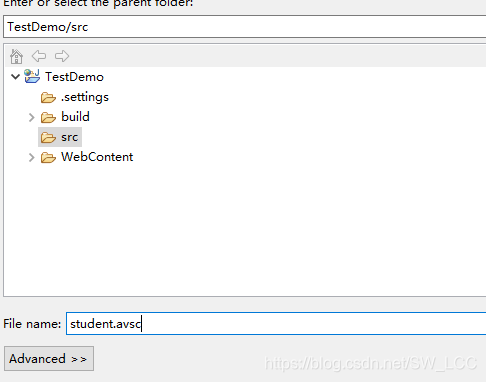
在eclipse新建一个file,名为student.avsc。
加上上述的schema内容
下载avto-tool.1.6.0.jar包
<dependency>
     <groupId>org.apache.avro</groupId>
     <artifactId>avro-tools</artifactId>
     <version>1.6.0</version>
   </dependency>
使用java -jar avro-tools-1.6.0.jar compile schema C:\Users\123\Desktop\student.avsc Student
命令编译。

看到生成Student文件夹目录为:Student/com/test/avro/Student.java
生成的java文件内容为:
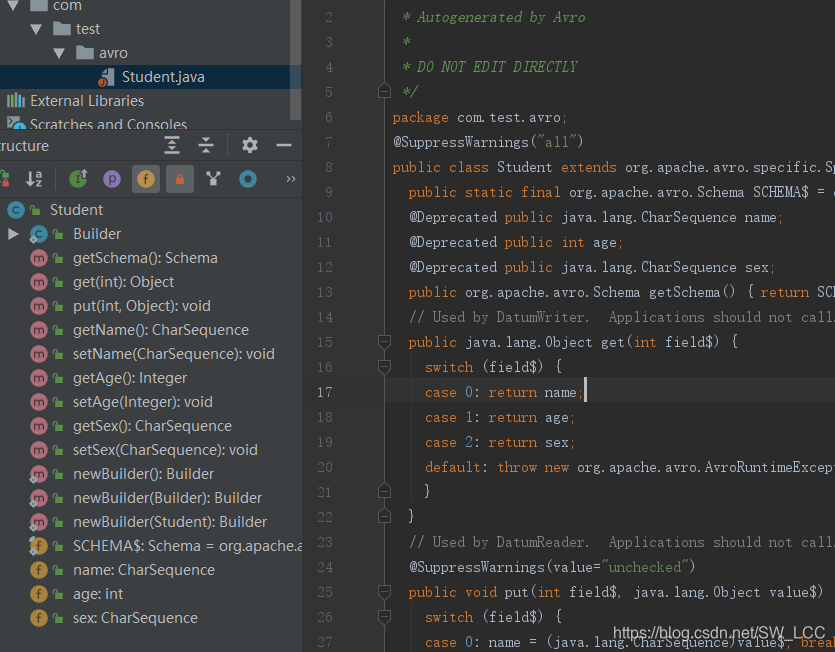
由avro-tool提供的方法通过读取schema的内容生成Student类。
以上是通过手动操作生成,以下通过avro-tool包,进行序列化及反序列化实现如下:
import org.apache.avro.file.DataFileReader;
import org.apache.avro.file.DataFileWriter;
import org.apache.avro.io.DatumReader;
import org.apache.avro.io.DatumWriter;
import org.apache.avro.specific.SpecificDatumReader;
import org.apache.avro.specific.SpecificDatumWriter;

import java.io.File;
import java.io.IOException;

public class AvroDemo {
    public static void main(String[] args) throws Exception {
        Student student1 = new Student();
        student1.setAge(3);
        student1.setName("Arway");
        student1.setSex("boy");
        Student student2 = new Student();
        student2.setAge(7);
        student2.setName("Ben");
        student2.setSex("boy");


        //新建Students.avsc文件
        File file = new File("C:\\Users\\123\\Desktop\\Students.avsc");
        DatumWriter<Student> StudentDatumWriter = new SpecificDatumWriter<Student>(Student.class);
        DataFileWriter<Student> dataFileWriter = new DataFileWriter<Student>(StudentDatumWriter);
        try {
            //写入Students.avsc文件
            dataFileWriter.create(student1.getSchema(), file);
            dataFileWriter.append(student1);
            dataFileWriter.append(student2);
            dataFileWriter.close();
        } catch (IOException e) {
        }
        // 反序列化Student
        DatumReader<Student> StudentDatumReader = new SpecificDatumReader<Student>(Student.class);
        DataFileReader<Student> dataFileReader = null;

        try {
            //读取Students.avsc文件生成Student对象
            dataFileReader = new DataFileReader<Student>(file, StudentDatumReader);
        } catch (IOException e) {
        }
        Student Student = null;
        try {
            while (dataFileReader.hasNext()) {
                Student = dataFileReader.next(Student);
                System.out.println(Student);
            }
        } catch (IOException e) {
        }
    }
}





 扫一扫
扫一扫


 314
314

 被折叠的 条评论
为什么被折叠?
被折叠的 条评论
为什么被折叠?
 到【灌水乐园】发言





