


报错界面如下:
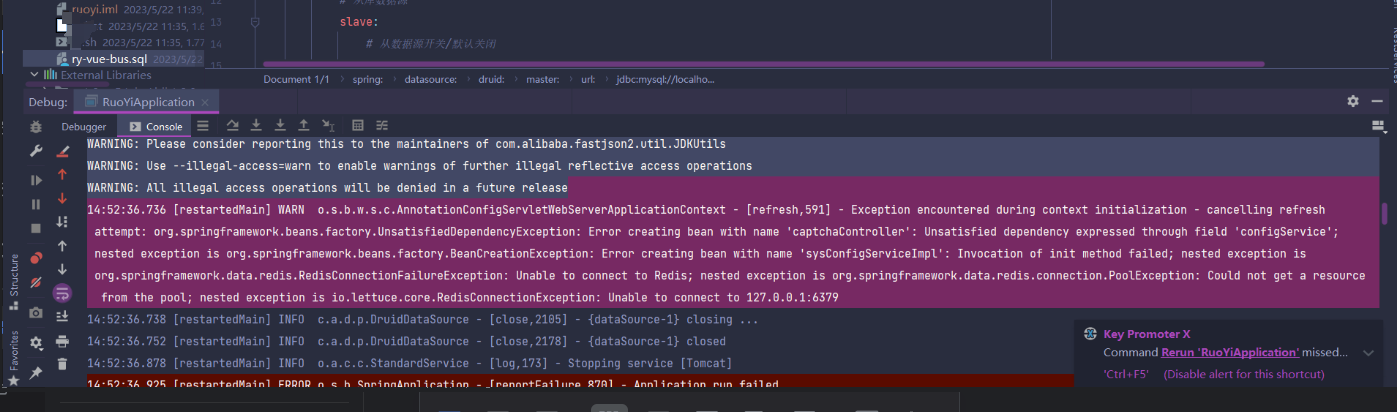
报错信息如下:Exception encountered during context initialization - cancelling refresh attempt: org.springframework.beans.factory.UnsatisfiedDependencyException: Error creating bean with name 'captchaController': Unsatisfied dependency expressed through field 'configService111'; nested exception is org.springframework.beans.factory.BeanCreationException: Error creating bean with name 'sysConfigServiceImpl': Invocation of init method failed; nested exception is org.springframework.data.redis.RedisConnectionFailureException: Unable to connect to Redis; nested exception is org.springframework.data.redis.connection.PoolException: Could not get a resource from the pool; nested exception is io.lettuce.core.RedisConnectionException: Unable to connect to 127.0.0.1:6379
看这句报错信息:Unsatisfied dependency expressed through field 'configService111'就是说configService111对象不存在 ,导致注入的时候失败了,报错核心是 Spring 容器依赖注入失败,本质是:Spring 在初始化某个 Bean 时,发现其字段(一般是通过 @Autowired/@Resource 等注解注入)的依赖无法被容器找到、创建,或匹配规则不满足,导致依赖注入失败。
可以先参考方法1排查configService111(为接口) 这个接口的实现类上看有没加上Service注解,我这里是有的:
所以再去下面的方法2排查 。
1、给依赖类添加 Spring 组件注解(根据业务选):
1)、服务层(ServiceImpl):@Service;
2)、数据层(Controller):@Repository;
3)、工具类:@Component;
4)、控制器:@RestController/@Controller。
2、检查项目中所有.yml文件的数据库密码和redis密码(99%的问题都出在这里)
3、确保注解类在 @ComponentScan 扫描范围内:(Spring Boot 默认扫描「主类所在包及其子包」,若依赖类在外部包,需手动指定扫描路径)
@SpringBootApplication
@ComponentScan(basePackages = {"com.xxx.service", "com.xxx.controller"}) // 显式指定扫描包
public class Application {
    public static void main(String[] args) {
        SpringApplication.run(Application.class, args);
    }
}
4、检查JDK版本,如果是由于版本冲突引发的报错,直接在这里改为1.8即可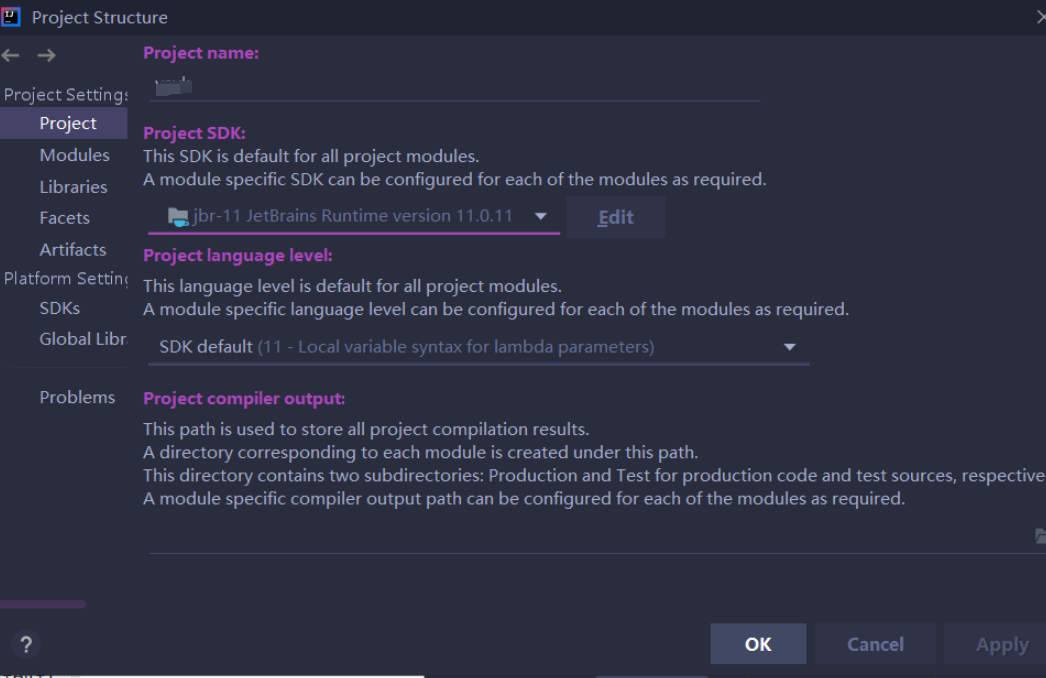
5、查看xml配置文件路径
6、serives和serviceImpl没有对应的方法
7、xml中方法的参数类型paramterType不对
8、application放置的位置不对
9、类没有加 @Repository 注解
10、mybatis-config.xml文件缺少了表头内容 如下:
<!DOCTYPE configuration PUBLIC “-//mybatis.org//DTD Config 3.0//EN” “http://mybatis.org/dtd/mybatis-3-config.dtd”> -------缺少开头的<
例如: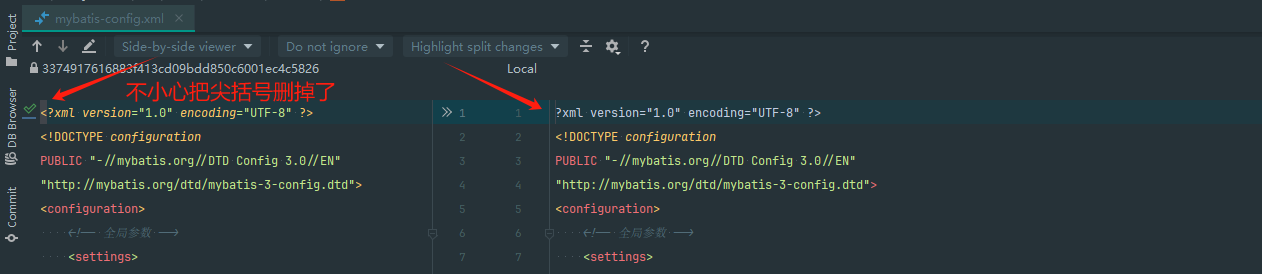
在mapper.xml中resultMap的type中包的路径错误,在这个项目中就是因为.xml中的包路径错误导致
11、pom.xml缺少了某些插件
12、redis服务异常
13、 依赖有多个实现类,注入时未指定名称(报错NoUniqueBeanDefinitionException)
若注入的是「接口」,且接口有多个实现类(都加了注解),Spring 无法确定注入哪个,导致依赖注入失败。
例如:
// 接口
public interface UserService {
    void sayHello();
}

// 实现类1
@Service
public class UserServiceImpl1 implements UserService {
    @Override
    public void sayHello() { System.out.println("实现1"); }
}

// 实现类2
@Service
public class UserServiceImpl2 implements UserService {
    @Override
    public void sayHello() { System.out.println("实现2"); }
}

// 控制器注入接口(Spring 不知道选哪个实现类)
@RestController
public class UserController {
    @Autowired // 报错:NoUniqueBeanDefinitionException
    private UserService userService;
}
修复方案:
方案 1:用 @Qualifier 指定实现类名称(推荐)
@RestController
public class UserController {
    // @Qualifier 中填写实现类的 Bean 名称(默认是类名首字母小写)
    @Autowired
    @Qualifier("userServiceImpl1") // 指定注入 UserServiceImpl1
    private UserService userService;
}
方案 2:给其中一个实现类加 @Primary(标记为默认实现)
@Service
@Primary // 标记为默认实现,注入时优先选这个
public class UserServiceImpl1 implements UserService {
    // ...
}
14、循环依赖问题(A 依赖 B,B 依赖 A)
Spring 默认支持「setter 注入」的循环依赖,但不支持「构造器注入」的循环依赖,若强行构造器注入,会导致依赖注入失败。
错误示例(构造器注入循环依赖):
@Service
public class AService {
    private BService bService;

    // 构造器注入 BService
    @Autowired
    public AService(BService bService) {
        this.bService = bService;
    }
}

@Service
public class BService {
    private AService aService;

    // 构造器注入 AService → 循环依赖,报错
    @Autowired
    public BService(AService aService) {
        this.aService = aService;
    }
}
修复方案:
方案 1:改用 setter 注入(Spring 自动解决循环依赖)
@Service
public class AService {
    private BService bService;

    // setter 注入
    @Autowired
    public void setBService(BService bService) {
        this.bService = bService;
    }
}

@Service
public class BService {
    private AService aService;

    // setter 注入
    @Autowired
    public void setAService(AService aService) {
        this.aService = aService;
    }
}
方案 2:用 @Lazy 延迟加载(构造器注入时)
@Service
public class AService {
    private BService bService;

    // @Lazy 延迟加载 BService,避免循环依赖
    @Autowired
    public AService(@Lazy BService bService) {
        this.bService = bService;
    }
}
方案 3:重构代码(最优),解耦循环依赖(比如抽离公共逻辑到第三方类)。
15、依赖 Bean 创建失败(嵌套异常是关键)
依赖注入失败的根本原因可能不是 “找不到 Bean”,而是 “Bean 能找到,但创建时抛异常”(比如构造器抛异常、依赖的依赖缺失),此时报错堆栈会包含「nested exception」(嵌套异常)。
示例:
@Service
public class UserService {
    private OrderService orderService;

    @Autowired
    public UserService(OrderService orderService) {
        // 构造器中抛异常 → UserService 创建失败
        if (orderService == null) {
            throw new RuntimeException("orderService 不能为空");
        }
        this.orderService = orderService;
    }
}

// 控制器注入 UserService → UserService 创建失败,导致注入失败
@RestController
public class UserController {
    @Autowired // 报错:Unsatisfied dependency,嵌套异常是 RuntimeException
    private UserService userService;
}
修复方案:
- 查看报错堆栈中的「nested exception」(嵌套异常),这是 Bean 创建失败的真正原因;
- 修复嵌套异常(比如解决构造器中的空指针、补充缺失的依赖、处理初始化方法的异常);
- 若 Bean 初始化有耗时操作,用
@PostConstruct替代构造器逻辑:@Service public class UserService { @Autowired private OrderService orderService; // 初始化逻辑放在 @PostConstruct 中,而非构造器 @PostConstruct public void init() { if (orderService == null) { throw new RuntimeException("orderService 不能为空"); } } }
16、注入注解使用不当(@Autowired vs @Resource)
@Autowired:按「类型」注入,默认要求依赖必须存在(required=true);@Resource:按「名称」注入(默认字段名),若名称匹配不上,会降级按类型注入。
17、Bean 作用域不匹配(单例依赖原型 Bean)
Spring 默认 Bean 是单例(@Scope("singleton")),若单例 Bean 注入原型 Bean(@Scope("prototype")),默认只会注入一次(每次用的都是同一个实例),若配置不当也会导致注入失败。修复方案可以用 @Lookup 方法注入原型 Bean
通用排查流程(按优先级)
- 定位核心信息:从报错堆栈中找到「出错的 Bean 类」「出错的字段名」「nested exception(嵌套异常)」;
- 检查依赖类注解:依赖类是否加了
@Service/@Component等注解; - 检查扫描范围:依赖类是否在
@ComponentScan扫描路径内; - 检查多实现类:若注入接口,是否用
@Qualifier/@Primary指定实现类; - 检查嵌套异常:修复 Bean 创建失败的根本原因(如构造器异常、依赖缺失);
- 检查循环依赖:是否有 A 依赖 B、B 依赖 A 的情况,改用 setter 注入或
@Lazy; - 检查注入注解:
@Autowired/@Resource的使用是否匹配类型 / 名称。






 扫一扫
扫一扫


 1万+
1万+

 被折叠的 条评论
为什么被折叠?
被折叠的 条评论
为什么被折叠?
 到【灌水乐园】发言





