
“遥不可及的声明“正确的代码出现红波浪线“unreachable statement“,为鼠标放上去的提示; 意思是->在程序中,一条语句的执行不可能被到达。通常发生在这种情况下是因为程序中存在一个

"遥不可及的声明"正确的代码出现红波浪线"unreachable statement",为鼠标放上去的提示; 意思是->在程序中,一条语句的执行不可能被到达。

通常发生在这种情况下是因为程序中存在一个永远不会为假的条件语句,或者因为在程序的其他地方已经使用了 return, break, continue 等语句终止了程序的执行。

例如:
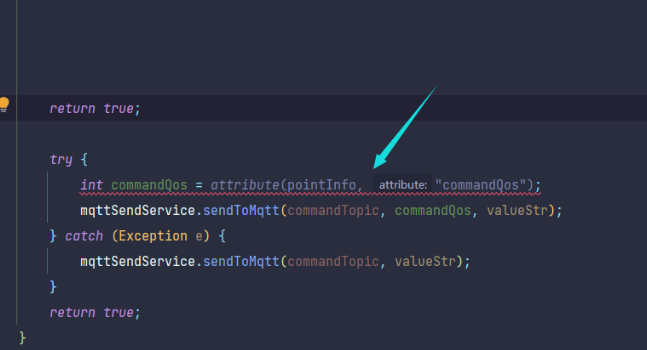
以及:
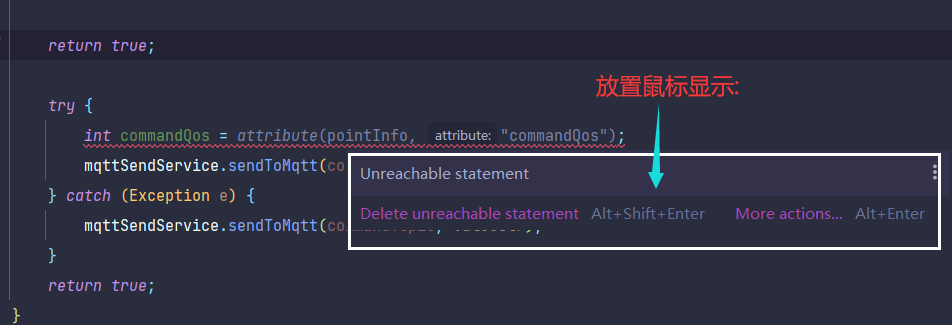
这里就是因为在这块代码前面使用了return,导致程序有永远不可能到达这里所导致的


需要明确的是:“unreachable statement” 表示 编译级错误,不是警告,意味着编译器能明确判断:某行代码永远没有机会被执行,必须修复才能运行。核心原因是「代码执行流被提前终止」或「条件永远无法满足」

一、最常见场景(按发生频率排序)

场景 1:return/throw 语句后有代码(执行流被提前终止)

return(返回结果)或 throw(抛出异常)会直接终止当前方法的执行,后续代码永远走不到。

错误示例:

public String getUserName() {
    return "yang"; // 执行到这里,方法直接返回,后续代码永远不执行
    System.out.println("方法结束"); // 红波浪线:unreachable statement
}

// 抛异常同理
public void checkParam(String param) {
    if (param == null) {
        throw new IllegalArgumentException("参数不能为空"); // 抛出异常后,方法终止
        System.out.println("检查结束"); // 红波浪线:不可达
    }
}

修复方案:

删除 return/throw 后的冗余代码,或调整语句顺序(把需要执行的代码放在前面):

public String getUserName() {
    System.out.println("方法结束"); // 调整顺序,先执行打印
    return "yang"; // 最后返回
}

public void checkParam(String param) {
    if (param == null) {
        System.out.println("参数为空,准备抛异常"); // 先执行必要逻辑
        throw new IllegalArgumentException("参数不能为空");
    }
}

场景 2:if(永远为true) 等条件后有代码(条件分支永远无法进入)

如果条件是「编译期就能确定的常量 true」(如 if(true)if(1==1)),那么 else 分支或条件后的代码永远不可达。

错误示例:

public void testCondition() {
    if (true) { // 条件永远为true,必然进入这个分支
        System.out.println("进入if分支");
        return;
    }
    // 以下代码永远走不到(if分支已经return,且else不存在)
    System.out.println("条件结束"); // 红波浪线:unreachable statement
}

// 同理:else分支永远无法进入
public void testElse() {
    int num = 10;
    if (num > 5) { // 编译期可确定num=10>5,永远为true
        System.out.println("num大于5");
    } else {
        System.out.println("num小于等于5"); // 红波浪线:不可达
    }
}

修复方案:

  • 若条件是故意写死的(如调试):删除冗余的 else 或条件后代码;
  • 若条件需要动态判断:把「常量条件」改为「变量条件」(如 if(num > 5) 中 num 是动态传入的):
public void testCondition(String type) {
    if ("A".equals(type)) { // 动态条件(type由外部传入,不确定值)
        System.out.println("进入A分支");
        return;
    }
    // 此时else分支或后续代码是可达的
    System.out.println("进入默认分支"); 
}

场景 3:while(true) 无 break 的循环后有代码(循环永远不退出)

while(true) 是「无限循环」,如果循环内部没有 break/return/throw 终止循环,循环后的代码永远执行不到。

错误示例:

public void infiniteLoop() {
    while (true) { // 无限循环,无退出条件
        System.out.println("循环中...");
    }
    // 循环永远不结束,后续代码不可达
    System.out.println("循环退出"); // 红波浪线:unreachable statement
}

修复方案:

  • 若循环需要退出:在循环内添加 break(满足条件时退出);
  • 若循环确实无限(如服务监听线程):删除循环后的冗余代码:
public void infiniteLoopWithBreak() {
    int count = 0;
    while (true) {
        System.out.println("循环中...");
        count++;
        if (count >= 10) {
            break; // 满足条件退出循环,后续代码可达
        }
    }
    System.out.println("循环退出"); // 正常执行,无错误
}

场景 4:break/continue 语句后有代码(循环内执行流终止)

break(跳出循环)或 continue(跳过当前循环次)会终止当前循环逻辑,循环体内后续代码不可达。

错误示例:

public void loopTest() {
    for (int i = 0; i < 5; i++) {
        if (i == 2) {
            break; // 跳出整个循环,循环体内后续代码不可达
            System.out.println("i等于2"); // 红波浪线:unreachable statement
        }
        System.out.println("i=" + i);
    }
}

// continue同理
public void continueTest() {
    for (int i = 0; i < 5; i++) {
        if (i % 2 == 0) {
            continue; // 跳过当前次循环,后续代码不执行
            System.out.println("偶数"); // 红波浪线:不可达
        }
    }
}

修复方案:

删除 break/continue 后的冗余代码,或调整逻辑顺序:

public void loopTest() {
    for (int i = 0; i < 5; i++) {
        if (i == 2) {
            System.out.println("i等于2"); // 先执行逻辑,再break
            break;
        }
        System.out.println("i=" + i);
    }
}

场景 5:死代码块(永远无法进入的代码块)

代码块被「永远为 false 的条件」包裹,或处于不可达的分支中。

错误示例:

public void deadCode() {
    boolean flag = false;
    if (flag) { // flag是false,且没有任何地方修改它,代码块永远不执行
        System.out.println("进入flag分支"); // 红波浪线:unreachable statement
    }

    // 更明显的情况:条件是常量false
    if (1 == 2) { // 编译期确定为false
        System.out.println("永远不会执行"); // 红波浪线
    }
}

修复方案:

  • 若代码块无用:直接删除;
  • 若需要执行:修正条件(如把 flag 改为动态赋值,或修正判断逻辑):
public void deadCode(String status) {
    boolean flag = "active".equals(status); // 动态条件(status由外部传入)
    if (flag) { 
        System.out.println("进入flag分支"); // 可达(当status="active"时执行)
    }
}

二、快速排查步骤(30 秒定位问题)

  1. 看红波浪线位置:找到标红的代码行;
  2. 往上找 “终止语句”:查看红波浪线之前的代码,是否有 return/throw/break/continue
  3. 检查条件是否 “恒成立 / 恒不成立”:如果红波浪线在 if/while 分支后,看条件是否是「常量值」(如 true/false1==1);
  4. 删除 / 调整代码:冗余代码直接删除,需要执行的代码调整到「终止语句」之前,或修正条件为动态判断。

三、特殊注意:Lambda / 匿名内部类中的不可达

在 Lambda 或匿名内部类中,若捕获的变量是「final 或 effectively final」(未被重新赋值),也可能出现不可达:

public void lambdaTest() {
    boolean isFinish = true;
    new Thread(() -> {
        if (isFinish) { // isFinish是final(未重新赋值),恒为true
            System.out.println("线程结束");
            return;
        }
        System.out.println("线程运行中"); // 红波浪线:不可达
    }).start();
}

修复:把 isFinish 改为可动态修改(如用 AtomicBoolean),或删除冗余代码。

总结

“unreachable statement” 的核心是「编译器判定代码 “没用”」,修复原则只有一个:确保每一行代码都有 “被执行到的可能”。按以下优先级处理:

  1. 优先删除标红的冗余代码(最常见情况);
  2. 若代码需要执行:调整 return/break 位置,或把「常量条件」改为「动态条件」;
  3. 避免写 while(true) 无退出的循环,或 if(true) 死分支(调试时用完及时删除)。


你遇到的提示: > **“此代码到达”(Unreachable code)**,并且 `self.update_adjusted_info()` 下方有黄色波浪线 这是 **PyCharm、VS Code 或其他 IDE 的静态代码分析警告**,意思是: 👉 “我分析了一下,发现这行代码永远执行到。” --- ## 🔍 为什么会这样? 最常见的原因是:在 `try...finally` 块中,**`try` 部分已经 `return` 了**,导致 `finally` 后面的代码无法被执行。 ### ❌ 错误写法示例(导致“到达”) ```python def on_dimension_changed(self, changed_side): if not self.selected_files: return first_image_path = self.selected_files[0] original_pixmap = QPixmap(first_image_path) if original_pixmap.isNull(): return # ✅ 正常返回 orig_width = original_pixmap.width() orig_height = original_pixmap.height() orig_ratio = orig_width / orig_height keep_aspect = self.ui.checkBox.isChecked() if not keep_aspect: self.update_adjusted_info() return # ← 这里 return 了! try: # ... 计算新尺寸 ... if changed_side == "width": new_width = max(1, current_width) new_height = int(new_width / orig_ratio) self.ui.comboBox_2.setCurrentText(str(new_height)) elif changed_side == "height": new_height = max(1, current_height) new_width = int(new_height * orig_ratio) self.ui.comboBox.setCurrentText(str(new_width)) finally: self.ui.comboBox.blockSignals(False) self.ui.comboBox_2.blockSignals(False) self.update_adjusted_info() # ⚠️ 黄色警告:Unreachable code ``` ### 🚫 问题出在哪? 看这段逻辑: ```python if not keep_aspect: self.update_adjusted_info() return # ← 函数在这里就结束了! ``` 然后后面是 `try...finally`,最后才调用一次 `self.update_adjusted_info()` 但注意:**这个最终的 `self.update_adjusted_info()` 是在 `try...finally` 之后的普通语句** 而你在 `not keep_aspect` 分支里已经 `return` 了,所以当保持比例时: - 执行完 `update_adjusted_info()` 就退出函数 - 会走到后面的 `try...finally` -会走到最后一行 但如果 **保持比例(keep_aspect=True)**,就会进入 `try...finally`,然后继续执行到最后的 `update_adjusted_info()` ✅ 所以只有在 `keep_aspect == True` 时,最后一行才可到达 ❌ 而在 `keep_aspect == False` 时,它根本会被执行 → IDE 判断为“到达” 但实际上你是想让它 **无论是否联动,都要刷新显示** --- ## ✅ 正确解决方案:确保 `update_adjusted_info()` 总能被调用 ### ✅ 改法一:把 `update_adjusted_info()` 移到 `finally` 中(推荐) 因为 `finally` **一定会执行**,管前面有没有 `return` ```python def on_dimension_changed(self, changed_side): if not self.selected_files: return first_image_path = self.selected_files[0] original_pixmap = QPixmap(first_image_path) if original_pixmap.isNull(): return orig_width = original_pixmap.width() orig_height = original_pixmap.height() orig_ratio = orig_width / orig_height keep_aspect = self.ui.checkBox.isChecked() # 获取当前输入值 try: current_width_text = self.ui.comboBox.currentText() current_height_text = self.ui.comboBox_2.currentText() current_width = int(current_width_text) if current_width_text.strip() else orig_width current_height = int(current_height_text) if current_height_text.strip() else orig_height except ValueError: current_width = orig_width current_height = orig_height # 屏蔽信号 self.ui.comboBox.blockSignals(True) self.ui.comboBox_2.blockSignals(True) try: if keep_aspect: if changed_side == "width": new_width = max(1, current_width) new_height = int(new_width / orig_ratio) self.ui.comboBox_2.setCurrentText(str(new_height)) elif changed_side == "height": new_height = max(1, current_height) new_width = int(new_height * orig_ratio) self.ui.comboBox.setCurrentText(str(new_width)) # 如果保持比例,做任何联动操作 finally: # 恢复信号 + 统一刷新界面 ← 关键:放在这里保证一定执行 self.ui.comboBox.blockSignals(False) self.ui.comboBox_2.blockSignals(False) self.update_adjusted_info() # ✅ 放进 finally,确保可达 ``` ### ✅ 效果: - 无论是否保持比例,也无论中间是否有异常或提前逻辑判断 - `finally` 块都会执行 - `update_adjusted_info()` 必然会被调用 - IDE 警告消失 ✅ --- ### ✅ 改法二:统一放在函数末尾,去掉中间的 `return` 如果你想用 `finally` 控制流程,也可以这样写: ```python def on_dimension_changed(self, changed_side): if not self.selected_files: self.update_adjusted_info() return first_image_path = self.selected_files[0] original_pixmap = QPixmap(first_image_path) if original_pixmap.isNull(): self.update_adjusted_info() return orig_width = original_pixmap.width() orig_height = original_pixmap.height() orig_ratio = orig_width / orig_height keep_aspect = self.ui.checkBox.isChecked() # 获取当前输入 try: current_width = int(self.ui.comboBox.currentText()) current_height = int(self.ui.comboBox_2.currentText()) except ValueError: current_width, current_height = orig_width, orig_height # 屏蔽信号 self.ui.comboBox.blockSignals(True) self.ui.comboBox_2.blockSignals(True) try: if keep_aspect: if changed_side == "width" and current_width > 0: new_height = int(current_width / orig_ratio) self.ui.comboBox_2.setCurrentText(str(new_height)) elif changed_side == "height" and current_height > 0: new_width = int(current_height * orig_ratio) self.ui.comboBox.setCurrentText(str(new_width)) finally: self.ui.comboBox.blockSignals(False) self.ui.comboBox_2.blockSignals(False) # ✅ 统一在最后调用,再提前 return self.update_adjusted_info() # 现在这行可达了! ``` 只要你提前 `return`,而是让程序自然流到这里,IDE 就会报错。 --- ## ✅ 如何验证是否修复? 1. 删除所有 `.pyc` 缓存文件或重启 IDE 2. 观察黄色波浪线是否消失 3. 在情况下测试: - 勾选/取消“保持宽高比” - 修改宽度/高度 - 输入非法字符 4. 确保 label 正确刷新、无崩溃 --- ## 🧩 总结:“到达代码”的常见原因 | 原因 | 示例 | 解决方案 | |------|------|----------| | 提前 `return` | `if xxx: return; do_something_after()` | 把关键代码移到 `finally` 或统一结尾 | | `raise Exception` 后还有代码 | `raise ValueError(); print("hello")` | 移动顺序或使用上下文管理器 | | 死循环 | `while True: pass; x=1` | 移动无关代码到外部 | --- 你现在的问题本质是:**控制流设计当导致部分代码路径缺失** ✅ 推荐做法:将“刷新 UI”这类必须执行的操作放在 `finally` 块中,确保万无一失。 ---
评论 5
添加红包

请填写红包祝福语或标题

红包个数最小为10个

红包金额最低5元

当前余额3.43前往充值 >
需支付:10.00
成就一亿技术人!
领取后你会自动成为博主和红包主的粉丝 规则
hope_wisdom
发出的红包
实付
使用余额支付
点击重新获取
扫码支付
钱包余额 0

抵扣说明:

1.余额是钱包充值的虚拟货币,按照1:1的比例进行支付金额的抵扣。
2.余额无法直接购买下载,可以购买VIP、付费专栏及课程。

余额充值



