
el-menu-item动态路径解决方案

本文介绍了一种在el-plus中批量配置el-menu-item的方法,特别是如何处理带有动态参数的路由路径,通过使用computed属性实现菜单项的动态生成与管理。

场景:要配置批量el-menu-item,其中路径带动态参数:/app/:id/path

el-plus API
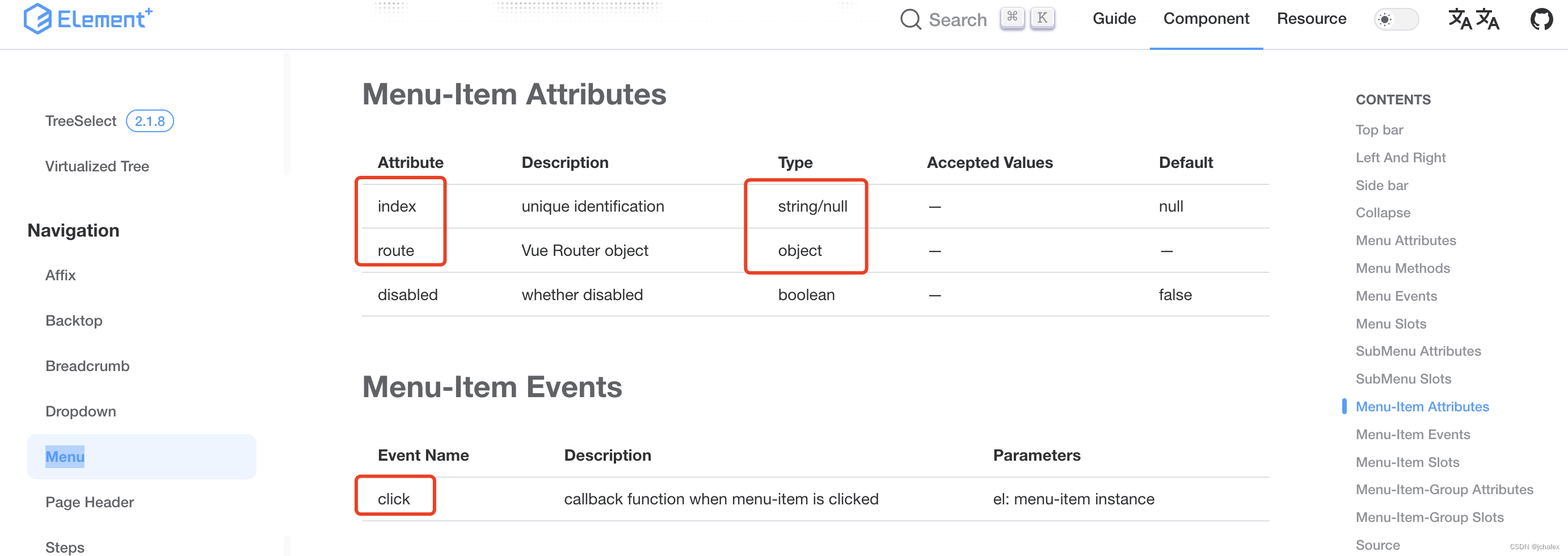
 解决方案:

1. computed + index

1. computed + route + click

Tips:computed 是关键

<el-menu ellipsis class="el-menu-popper-demo" mode="horizontal" style="max-width: 1200px" active-text-color="#ffffff" :default-active="activePath" router > <el-menu-item index="index">首页</el-menu-item> <el-menu-item index="2" id="product">产品及解决方案</el-menu-item> <el-sub-menu :popper-offset="0" index="walkInto" @click="handleMenuClick"> <template #title>走进兴龙</template> <el-menu-item index="/walkInto#profile">公司简介</el-menu-item> <el-menu-item index="/walkInto#process">发展历程</el-menu-item> <el-menu-item index="/walkInto#news">新闻资讯</el-menu-item> </el-sub-menu> <el-menu-item index="user">用户服务</el-menu-item> <el-sub-menu :popper-offset="0" index="0"> <template #title>招贤纳士</template> <el-menu-item index="campus">校园招聘</el-menu-item> <el-menu-item index="society">社会招聘</el-menu-item> </el-sub-menu> <el-menu-item index="contact">联系我们</el-menu-item> <el-menu-item index="medium">媒体中心</el-menu-item> </el-menu> <script setup> import { useRouter,useRoute } from 'vue-router' import { ref, watch } from 'vue'; const route = useRoute(); const activePath = ref("index"); const updateBreadcrumbItems = (route) => { activePath.value = route.name; }; // 监听路由变化 watch( () => route.path, () => { updateBreadcrumbItems(route); } ); const router = useRouter() function goIndex() { router.push({name: 'index'}); } const handleMenuClick = () => { router.push('/walkInto'); }; </script> 这段代码点击el-sub-menu虽然跳转到了walkInto页面但是走进兴龙没有进行高亮显示 其中子菜单的 index="/walkInto#profile" 为锚点设置点击跳转到walkInto页面id为profile处的位置这个不要进行更改 要如何点击el-sub-menu跳转到walkInto页面同时走进兴龙也进行高亮显示
03-27
页面// 展示组件页面 <template> <el-container style="height: 100%; border: 1px solid #eee"> <el-aside width="200px" style="background-color: rgb(238, 241, 246)"> <el-menu :default-openeds="['', '']"> <el-submenu index="0"> <template slot="title"> <i class="el-icon-setting"></i>数据管理</template> <el-menu-item-group> <el-menu-item index="/adminChart">数据统计</el-menu-item> </el-menu-item-group> </el-submenu> <el-submenu index="1"> <template slot="title"> <i class="el-icon-setting"></i>公告</template> <el-menu-item-group> <el-menu-item index="1-1">公告管理</el-menu-item> <el-menu-item index="1-2">反馈信息</el-menu-item> </el-menu-item-group> </el-submenu> <el-submenu index="2"> <template slot="title"><i class="el-icon-menu"></i>用户管理</template> <el-menu-item-group> <el-menu-item index="2-1">用户信息</el-menu-item> <el-menu-item index="2-2">教练信息</el-menu-item> </el-menu-item-group> </el-submenu> <el-submenu index="3"> <template slot="title"> <i class="el-icon-setting"></i>课程管理</template > <el-menu-item-group> <el-menu-item index="3-1">课程信息</el-menu-item> </el-menu-item-group> </el-submenu> <el-submenu index="4"> <template slot="title"> <i class="el-icon-setting"></i>训练馆管理</template > <el-menu-item-group> <el-menu-item index="4-1">器材管理</el-menu-item> <el-menu-item index="4-2">场地管理</el-menu-item> </el-menu-item-group> </el-submenu> </el-menu> </el-aside> <el-container> <el-header style="text-align: right; font-size: 12px"> <el-dropdown> <i class="el-icon-setting" style="margin-right: 15px">管理员</i> <el-dropdown-menu slot="dropdown"> <el-dropdown-item>个人中心</el-dropdown-item> <el-dropdown-item>注销</el-dropdown-item> </el-dropdown-menu> </el-dropdown> </el-header> <el-main> <router-view></router-view> </el-main> </el-container> </el-container> </template> <script> export default { data() { return {}; }, }; </script> <style> .el-header { background-color: #b3c0d1; color: #333; line-height: 60px; } .el-aside { color: #333; } html, body, #app, .el-container { /*设置内部填充为0,几个布局元素之间没有间距*/ padding: 0px; /*外部间距也是如此设置*/ margin: 0px; /*统一设置高度为100%*/ height: 100vh; } .el-aside { height: 100%; background-color: #d3dce6; } </style> js: { path: '/admin', name: 'admin', component: AdminView, children: [ { path: '/adminChart', name:'adminChart', component: ChartView } ] }跳不过去
09-10
评论 1
添加红包

请填写红包祝福语或标题

红包个数最小为10个

红包金额最低5元

当前余额3.43前往充值 >
需支付:10.00
成就一亿技术人!
领取后你会自动成为博主和红包主的粉丝 规则
hope_wisdom
发出的红包
实付
使用余额支付
点击重新获取
扫码支付
钱包余额 0

抵扣说明:

1.余额是钱包充值的虚拟货币,按照1:1的比例进行支付金额的抵扣。
2.余额无法直接购买下载,可以购买VIP、付费专栏及课程。

余额充值



