


人们眼中的天才之所以卓越非凡,并非天资超人一等而是付出了持续不断的努力。1万小时的锤炼是任何人从平凡变成超凡的必要条件。———— 马尔科姆·格拉德威尔
🌟 Hello,我是Xxtaoaooo!
🌈 “代码是逻辑的诗篇,架构是思想的交响”
在AI技术快速发展的今天,MCP(Model Context Protocol)作为Anthropic推出的革命性协议,正在重新定义AI助手与外部工具的交互方式。这个协议的出现解决了一个长期困扰开发者的问题:如何让AI助手能够安全、高效地访问和操作各种外部资源,从数据库查询到文件系统操作,从API调用到复杂的业务逻辑处理。
通过深入研究MCP协议的设计理念和实现机制,我发现它采用了一种优雅的客户端-服务器架构,将AI模型与工具提供者完全解耦。这种设计不仅提高了系统的安全性和可维护性,还为开发者提供了极大的灵活性。与传统的插件系统不同,MCP通过标准化的JSON-RPC通信协议,实现了跨平台、跨语言的工具集成能力。
在实际搭建MCP服务器的过程中,我体验到了这个协议的强大之处。从最基础的文件系统访问工具,到复杂的数据库操作接口,再到自定义的业务逻辑封装,MCP都能够提供统一而简洁的实现方案。特别是在处理敏感数据和权限控制方面,MCP的安全机制设计得相当周到,既保证了功能的完整性,又确保了数据的安全性。
更令人兴奋的是,MCP服务器的扩展性极强。通过模块化的设计,开发者可以轻松地添加新的工具和功能,而无需修改核心代码。这种插件化的架构使得一个MCP服务器可以同时为多个AI助手提供服务,真正实现了"一次开发,多处使用"的理想状态。本文将详细介绍如何从零开始搭建一个功能完整的MCP服务器,包括核心架构设计、工具实现、安全机制和性能优化等关键环节。
一、MCP协议核心概念与架构设计
MCP(Model Context Protocol)是一个开放标准,旨在为AI助手提供安全、可扩展的工具访问能力。它采用客户端-服务器架构,通过标准化的通信协议实现AI模型与外部工具的无缝集成。
1.1 MCP协议基础架构
MCP协议的核心组件包括三个部分:MCP客户端(通常是AI助手)、MCP服务器(工具提供者)和传输层(通信协议)。
// MCP协议基础类型定义
interface MCPMessage {


  jsonrpc: "2.0";
  id?: string | number;
  method?: string;
  params?: any;
  result?: any;
  error?: MCPError;
}

interface MCPError {


  code: number;
  message: string;
  data?: any;
}

// 工具定义接口
interface MCPTool {


  name: string;
  description: string;
  inputSchema: {


    type: "object";
    properties: Record<string, any>;
    required?: string[];
  };
}

// 资源定义接口
interface MCPResource {


  uri: string;
  name: string;
  description?: string;
  mimeType?: string;
}

// MCP服务器基础类
class MCPServer {


  private tools: Map<string, MCPTool> = new Map();
  private resources: Map<string, MCPResource> = new Map();
  private handlers: Map<string, Function> = new Map();

  constructor(private serverInfo: {


    name: string;
    version: string;
    description?: string;
  }) {


    this.setupDefaultHandlers();
  }

  // 注册工具
  addTool(tool: MCPTool, handler: Function) {


    this.tools.set(tool.name, tool);
    this.handlers.set(`tools/call/${

     tool.name}`, handler);
  }

  // 注册资源
  addResource(resource: MCPResource, handler: Function) {


    this.resources.set(resource.uri, resource);
    this.handlers.set(`resources/read/${

     resource.uri}`, handler);
  }

  // 设置默认处理器
  private setupDefaultHandlers() {


    // 初始化处理器
    this.handlers.set('initialize', this.handleInitialize.bind(this));
    this.handlers.set('tools/list', this.handleToolsList.bind(this));
    this.handlers.set('resources/list', this.handleResourcesList.bind(this));
  }

  // 处理初始化请求
  private async handleInitialize(params: any): Promise<any> {


    return {


      protocolVersion: "2024-11-05",
      capabilities: {


        tools: {

    listChanged: true },
        resources: {

    subscribe: true, listChanged: true },
        prompts: {

    listChanged: true }
      },
      serverInfo: this.serverInfo
    };
  }

  // 处理工具列表请求
  private async handleToolsList(): Promise<{

    tools: MCPTool[] }> {


    return {


      tools: Array.from(this.tools.values())
    };
  }

  // 处理资源列表请求
  private async handleResourcesList(): Promise<{

    resources: MCPResource[] }> {


    return {


      resources: Array.from(this.resources.values())
    };
  }

  // 处理消息
  async handleMessage(message: MCPMessage): Promise<MCPMessage | null> {


    try {


      if (message.method) {


        const handler = this.handlers.get(message.method);
        if (handler) {


          const result = await handler(message.params);
          return {


            jsonrpc: "2.0",
            id: message.id,
            result
          };
        } else {


          throw new Error(`Method not found: ${

     message.method}`);
        }
      }
      return null;
    } catch (error) {


      return {


        jsonrpc: "2.0",
        id: message.id,
        error: {


          code: -32603,
          message: error instanceof Error ? error.message : "Internal error"
        }
      };
    }
  }
}
这个基础实现展示了MCP服务器的核心结构。关键的addTool和addResource方法允许动态注册工具和资源,而handleMessage方法则负责处理所有的JSON-RPC请求。
1.2 MCP通信协议设计
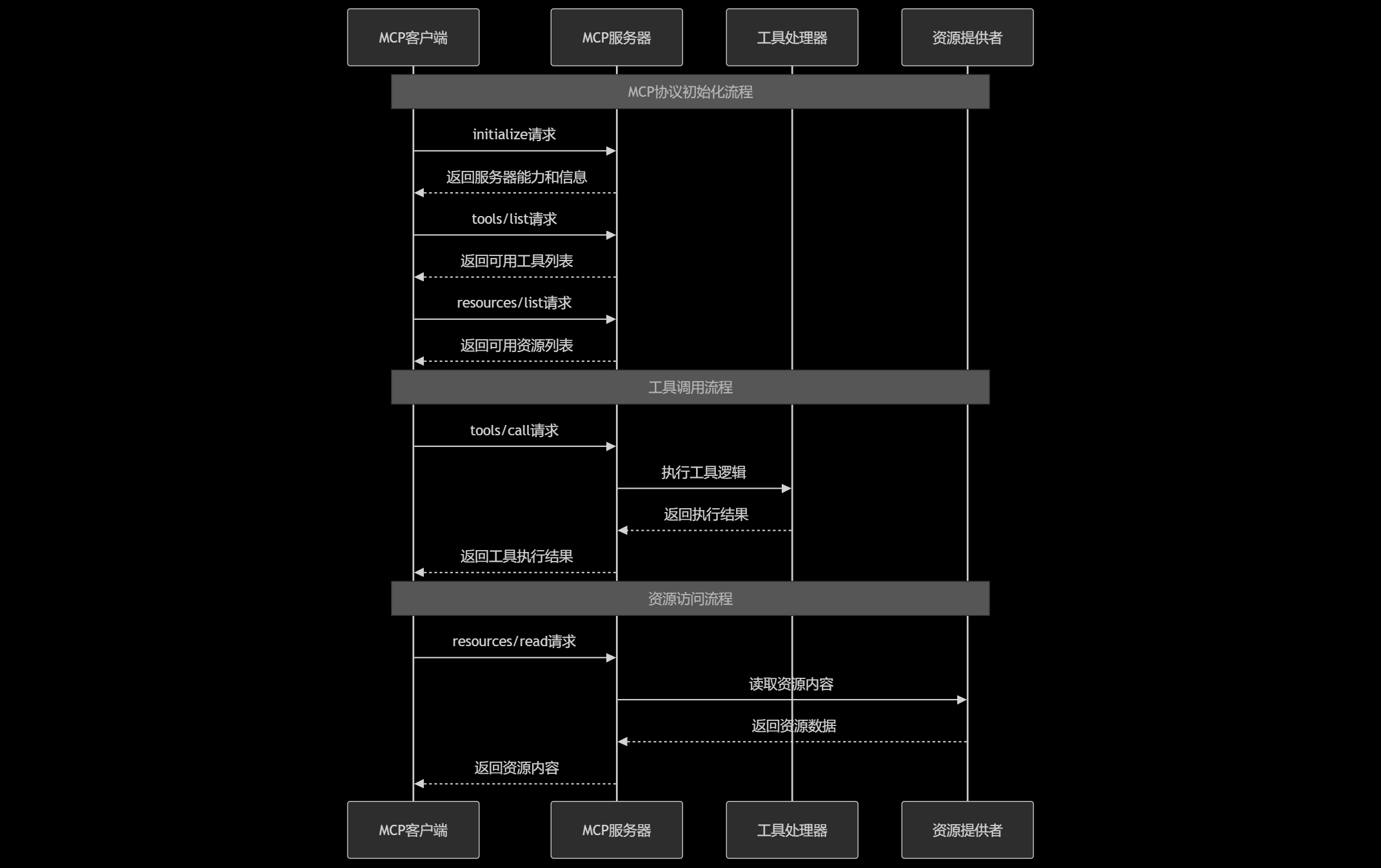
图1:MCP协议通信时序图 - 展示客户端与服务器的完整交互流程
二、核心工具实现与功能扩展
MCP服务器的核心价值在于提供丰富而实用的工具集合。以下是几个关键工具的实现示例。
2.1 文件系统操作工具
文件系统工具是MCP服务器最基础也是最重要的功能之一:
import * as fs from 'fs/promises';
import * as path from 'path';

class FileSystemTools {


  private allowedPaths: string[];

  constructor(allowedPaths: string[] = []) {


    this.allowedPaths = allowedPaths.map(p => path.resolve(p));
  }

  // 验证路径安全性
  private validatePath(filePath: string): boolean {


    const resolvedPath = path.resolve(filePath);
    return this.allowedPaths.some(allowedPath =>
      resolvedPath.startsWith(allowedPath)
    );
  }

  // 注册文件系统工具到MCP服务器
  registerTools(server: MCPServer) {


    // 读取文件工具
    server.addTool({


      name: "read_file",
      description: "读取指定路径的文件内容",
      inputSchema: {


        type: "object",
        properties: {


          path: {


            type: "string",
            description: "要读取的文件路径"
          }
        },
        required: ["path"]
      }
    }, this.readFile.bind(this));

    // 写入文件工具
    server.addTool({


      name: "write_file",
      description: "将内容写入指定路径的文件",
      inputSchema: {


        type: "object",
        properties: {


          path: {


            type: "string",
            description: "要写入的文件路径"
          },
          content: {


            type: "string",
            description: "要写入的文件内容"
          }
        },
        required: ["path", "content"]
      }
    }, this.writeFile.bind(this));

    // 列出目录工具
    server.addTool({


      name: "list_directory",
      description: "列出指定目录下的文件和子目录",
      inputSchema: {


        type: "object",
        properties: {


          path: {


            type: "string",
            description: "要列出的目录路径"
          }
        },
        required: ["path"]
      }
    }, this.listDirectory.bind(this));

    // 创建目录工具
    server.addTool({


      name: "create_directory",
      description: "创建新目录",
      inputSchema: {


        type: "object",
        properties: {


          path: {


            type: "string",
            description: "要创建的目录路径"
          }
        },
        required: ["path"]
      }
    }, this.createDirectory.bind(this));
  }

  // 读取文件实现
  private async readFile(params: {

    path: string }) {


    if (!this.validatePath(params.path)) {


      throw new Error(`Access denied: ${

     params.path}`);
    }

    try {


      const content = await fs.readFile(params.path, 'utf-8');
      const stats = await fs.stat(params.path);

      return {


        content,
        size: stats.size,
        lastModified: stats.mtime.toISOString(),
        encoding: 'utf-8'
      };
    } catch (error) {


      throw new Error(`Failed to read file: ${

     error.message}`);
    }
  }

  // 写入文件实现
  private async writeFile(params: {

    path: string; content: string }) {


    if (!this.validatePath(params.path)) {


      throw new Error(`Access denied: ${

     params.path}`);
    }

    try {


      // 确保目录存在
      const dir = path.dirname(params.path);
      await fs.mkdir(dir, {

    recursive: true });

      await fs.writeFile(params.path, params.content, 'utf-8');
      const stats = await fs.stat(params.path);

      return {


        success: true,
        size: stats.size,
        lastModified: stats.mtime.toISOString()
      };
    } catch (error) {


      throw new Error(`Failed to write file: ${

     error.message}`);
    }
  }

  // 列出目录实现
  private async listDirectory(params: {

    path: string }) {


    if (!this.validatePath(params.path)) {


      throw new Error(`Access denied: ${

     params.path}`);
    }

    try {


      const entries = await fs.readdir(params.path, {

    withFileTypes: true });
      const items = await Promise.all(
        entries.map(async (entry) => {


          const fullPath = path.join(params.path, entry.name);
          const stats = await fs.stat(fullPath);

          return {


            name: entry.name,
            type: entry.isDirectory() ? 'directory' : 'file',
            size: stats.size,
            lastModified: stats.mtime.toISOString()
          };
        })
      );

      return {

    items };
    } catch (error) {


      throw new Error(`Failed to list directory: ${

     error.message}`);
    }
  }

  // 创建目录实现
  private async createDirectory(params: {

    path: string }) {


    if (!this.validatePath(params.path)) {


      throw new Error(`Access denied: ${

     params.path}`);
    }

    try {


      await fs.mkdir(params.path, {

    recursive: true });
      return {

    success: true, path: params.path };
    } catch (error) {


      throw new Error(`Failed to create directory: ${

     error.message}`);
    }
  }
}
这个文件系统工具实现了基本的CRUD操作,并包含了重要的安全检查机制。validatePath方法确保只能访问预先配置的安全路径,防止路径遍历攻击。
2.2 数据库操作工具
数据库工具为AI助手提供了强大的数据查询和操作能力:
import {
Pool, PoolClient } from 'pg';
import mysql from 'mysql2/promise';
class DatabaseTools {
private pgPool?: Pool;
private mysqlPool?: mysql.Pool;
constructor(config: {
postgres?: {
host: string;
port: number;
database: string;
user: string;
password: string;
};
mysql?: {
host: string;
port: number;
database: string;
user: string;
password: string;
};
}) {
if (config.postgres) {
this.pgPool = new Pool(config.postgres);
}
if (config.mysql) {
this.mysqlPool = mysql.createPool(config.mysql);
}
}
registerTools(server: MCPServer) {
// SQL查询工具
server.addTool({
name: "execute_sql",
description: "执行SQL查询语句",
inputSchema: {
type: "object",
properties: {
query: {
type: "string",
description: "要执行的SQL查询语句"
},
database: {
type: "string",
enum: ["postgres", "mysql"],
description: "目标数据库类型"
},
params: {
type: "array",
description: "查询参数数组",
items: {
type: "string" }
}
},
required: ["query", "database"]
}
}, this.executeSQL.bind(this));
// 获取表结构工具
server.addTool({
name: "describe_table",
description: "获取数据表的结构信息",
inputSchema: {
type: "object",
properties: {
tableName: {
type: "string",
description: "表名"
},
database: {
type: "string",
enum: ["postgres", "mysql"],
description: "数据库类型"
}
},
required: ["tableName", "database"]
}
}, this.describeTable.bind(this));
}
// 执行SQL查询
private async executeSQL(params: {
query: string;
database: 'postgres' | 'mysql';
params?: string[];
}) {
// 安全检查:禁止危险操作
const dangerousKeywords = ['DR 最低0.47元/天 解锁文章






 扫一扫
扫一扫


 559
559

 被折叠的 条评论
为什么被折叠?
被折叠的 条评论
为什么被折叠?
 到【灌水乐园】发言





