



 本文详细介绍C++编程的基础知识,涵盖程序开发流程、数据类型、变量、操作符、循环与判断结构等内容,并深入探讨函数与类的定义及使用方法。
C++ learning note
C++基础
C++ 是一个编译性的语言,这意味着想要运行一个C++程序,必须先将它从人类可读的语言翻译为机器可以理解的语言。
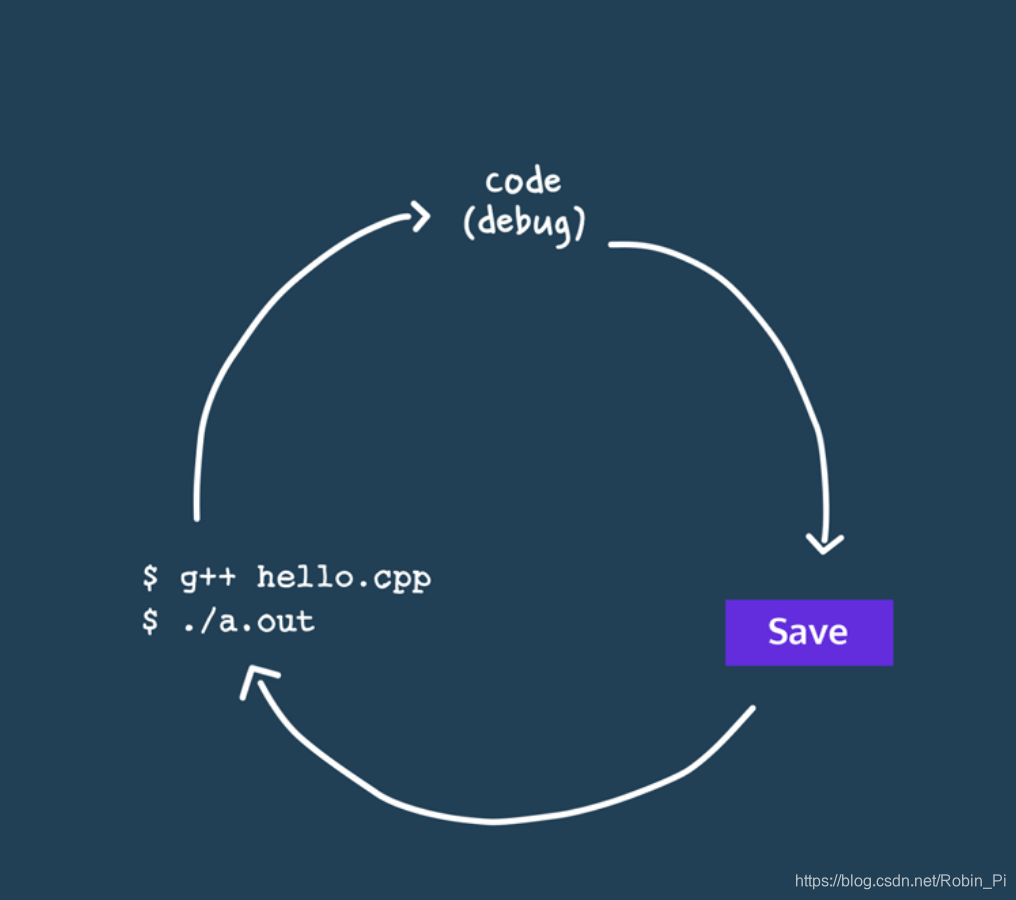
在开发过程中,一般会会经历以下四个步骤:
- Code:写程序
- Save :保存
- Compile :编译(使用终端)
- Execute:执行(使用终端)
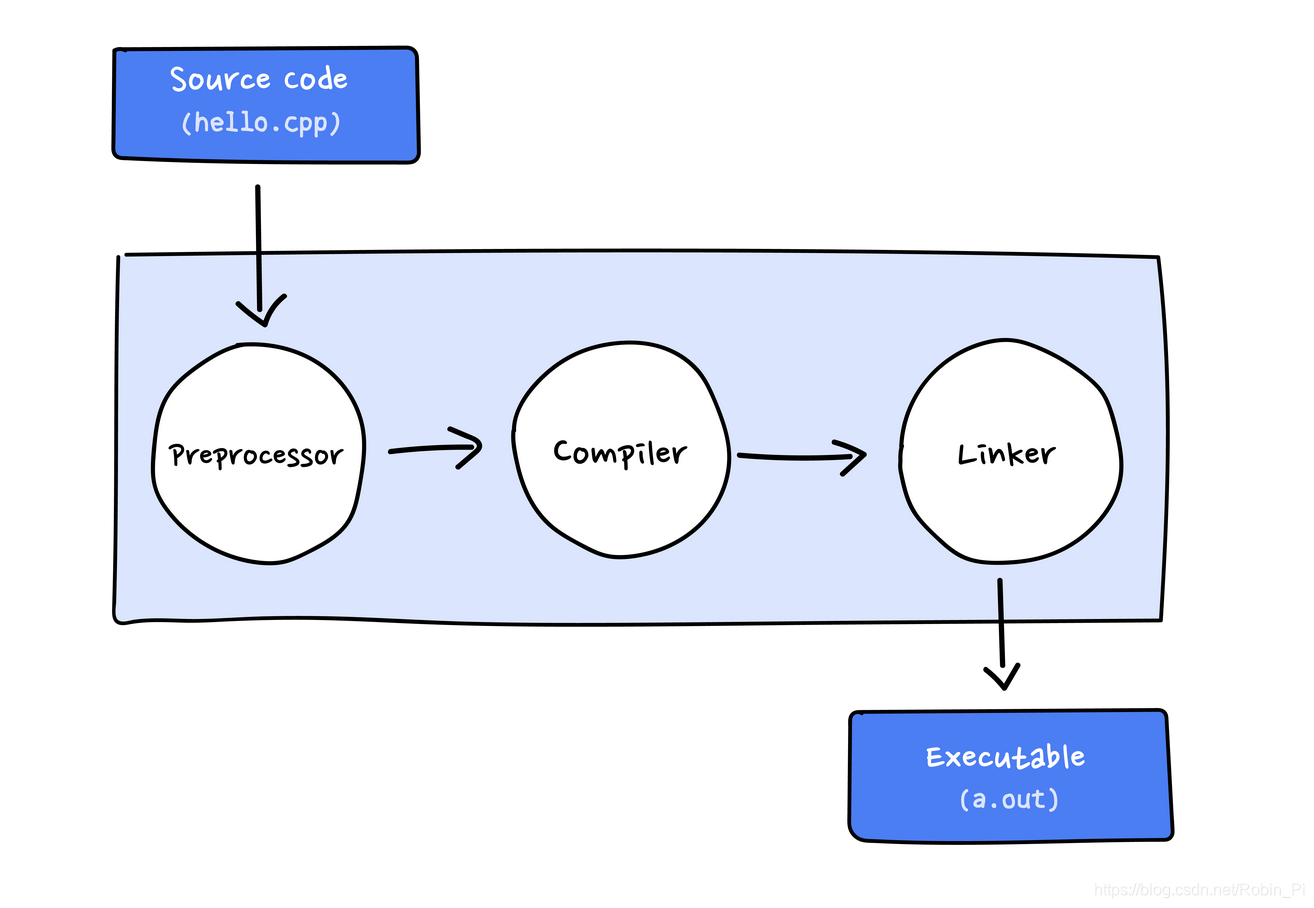
广义的“编译”实际上指的是 编译+链接:
C++环境
搭建C++环境主要有两大块内容:
- 文本编辑器:用来编辑文本(程序语言),包含了
C++程序的文本文件后缀是’.cpp‘或者是.c,它们被叫做源文件(source code file) C++编译器:将高级语言转为机器能够理解的低级语言,比如Linux上的GNU GCC编译器。
第一个C++程序
操作系统:MAC OS
文本编辑器:Vim文本编辑器
编译器:g++
-
现在终端下cd到指定目录:
cd xx -
用Vim新建文本,形成源文件:
vim helloworld.cpp#include<iostream> using namespace std; int main() { cout << "Hello world!\n"; return 0; } -
编译源文件,形成目标文件:
g++ helloword.cpp -o hello -
执行目标文件:
./hello
注意:执行文件之前需要加上./否则可能找不到hello这个可执行文件,因为 Linux 不会搜索当前目录,它会到 PATH 环境变量的路径去搜索程序文件 -
执行结果:Hello world!
逐行分析:
// Simple C++ program to display “Hello World”

comment line
C++ 使用 /* … */ 进行注释
#include<iostream>

It tells the compiler to include the standard iostream file which contains declarations of all the standard input/output library functions.
定义头文件
using namespace std;

This is used to import the entirety of the std namespace into the current namespace of the program.
即导入指定命名空间到当前命名空间,推荐每次使用域操作`::`来声明类型
int main()

This line is used to declare a function named “main” which returns data of integer type.
也就是指定main函数的返回类型
cout << “Hello World”;

This line tells the compiler to display the message “Hello World” on the screen.
即打印指定内容到屏幕上,记住:`<<`之后的都会显示在输出设备上

注意,这里也可以直接使用 std::cout << "Hello World" ,这样就不用使用 using namespace std了
return 0;

This statement is used to return a value from a function and indicates the finishing of a function.
即函数返回值
注(另外三点):
- 大括号
{}中间表示的是函数体 ;表示语句的结束- 缩进是为了代码的可读性
C++的I/O
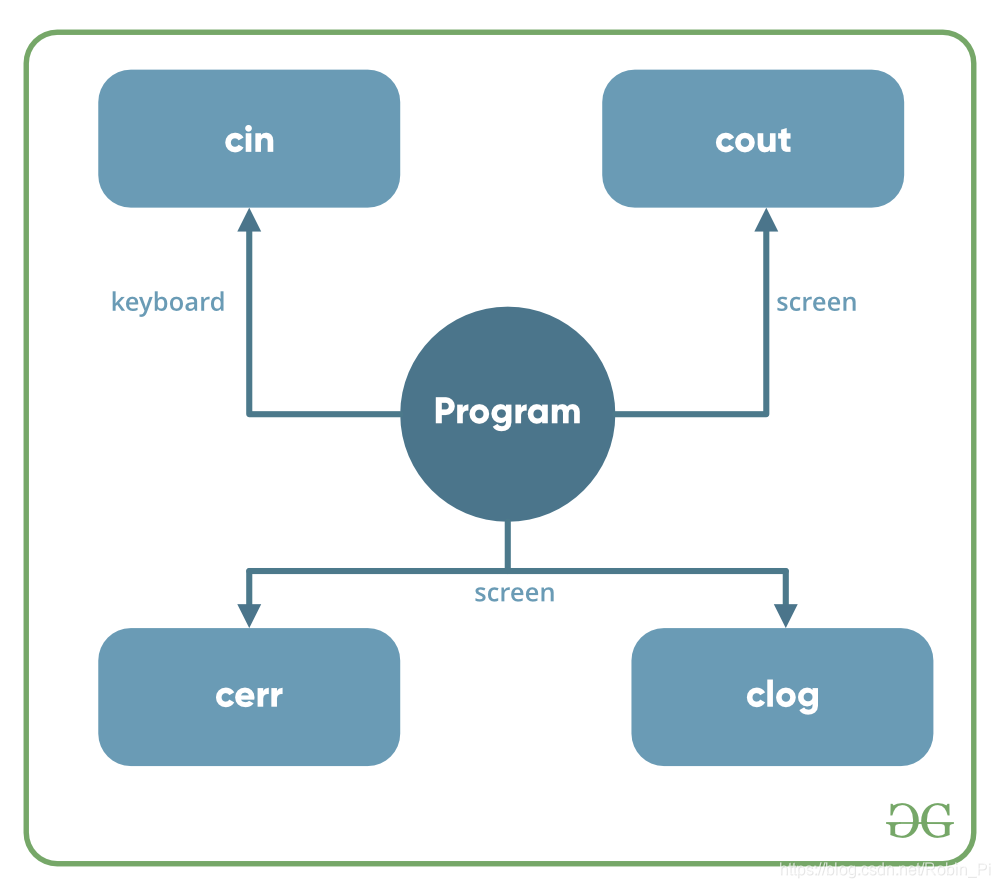
用于输入/输出操作的C ++中可用的头文件有:
- iostream
- iomanip
- fstream
几个关键字:
- cout(
c out?,Character OUTput stream):显示输出,需要用到<<操作符 - cin(
c in?,Character INput):读取设备输入,需要用>>操作符 - cerr:用于输出错误(信息)
- clog:用于输出错误(信息),但是会先将错误插入缓存区
例子:
- cout
#include<iostream>

int main(){
    std::cout << "HI, I'm Robin!";
}
注:可以使用多个<<将我们需要打印的多个东西串起来,比如:
int age = 18;
std::cout << "Hello, I'm " << age << "years old\n"
- cin
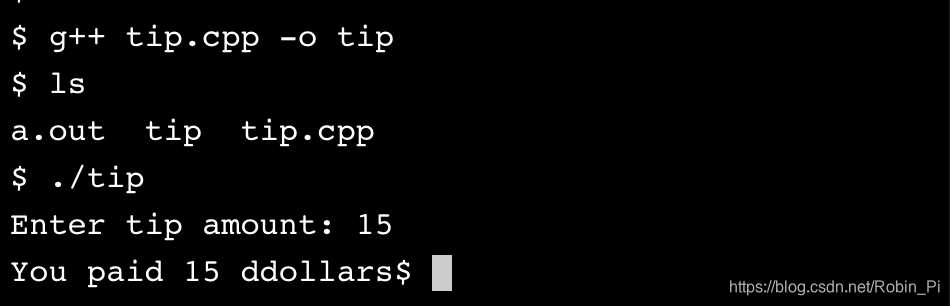
#include <iostream>

int main() {

  int tip = 0;

  std::cout << "Enter tip amount: ";

  std::cin >> tip;

  std::cout << "You paid " << tip << " ddollars";


}
C++数据类型
C++中,在声明变量时都需要指定其数据类型。
- 数据类型告诉变量可以存放什么类型的数据
- 数据类型告诉编译器给变量分配多大的内存空间
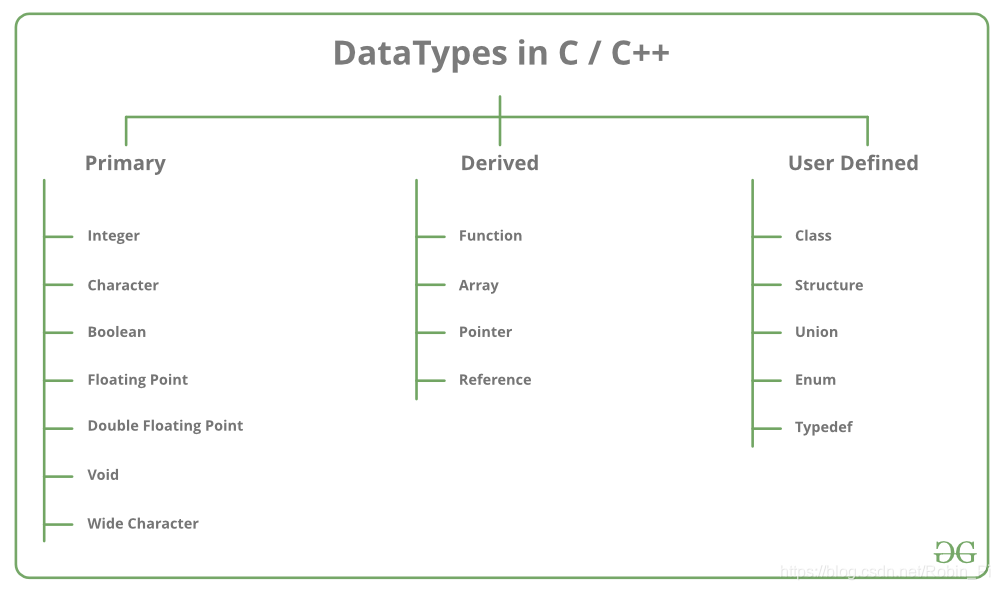
C++的数据类型大致可以分为三大类:
- Primitive Data Types
基本数据类型- int:integer numbers
- char:individual characters
- string:a sequence of characters
- bool:true/false values
- double:double floating point
- …
- Derived Data Types
派生数据类型 - Abstract or User-Defined Data Types
抽象数据类型或者用户自定义数据类型
数据类型操作符:
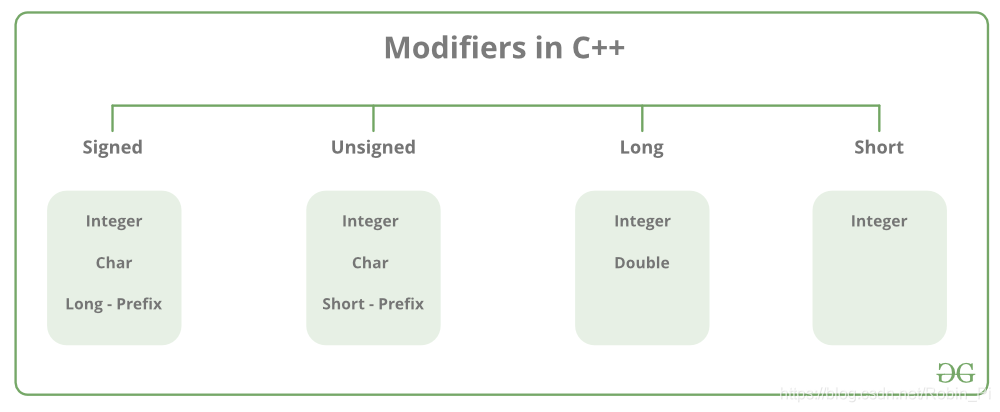
C++的数据类型操作符:
- signed
- unsigned
- short
- long
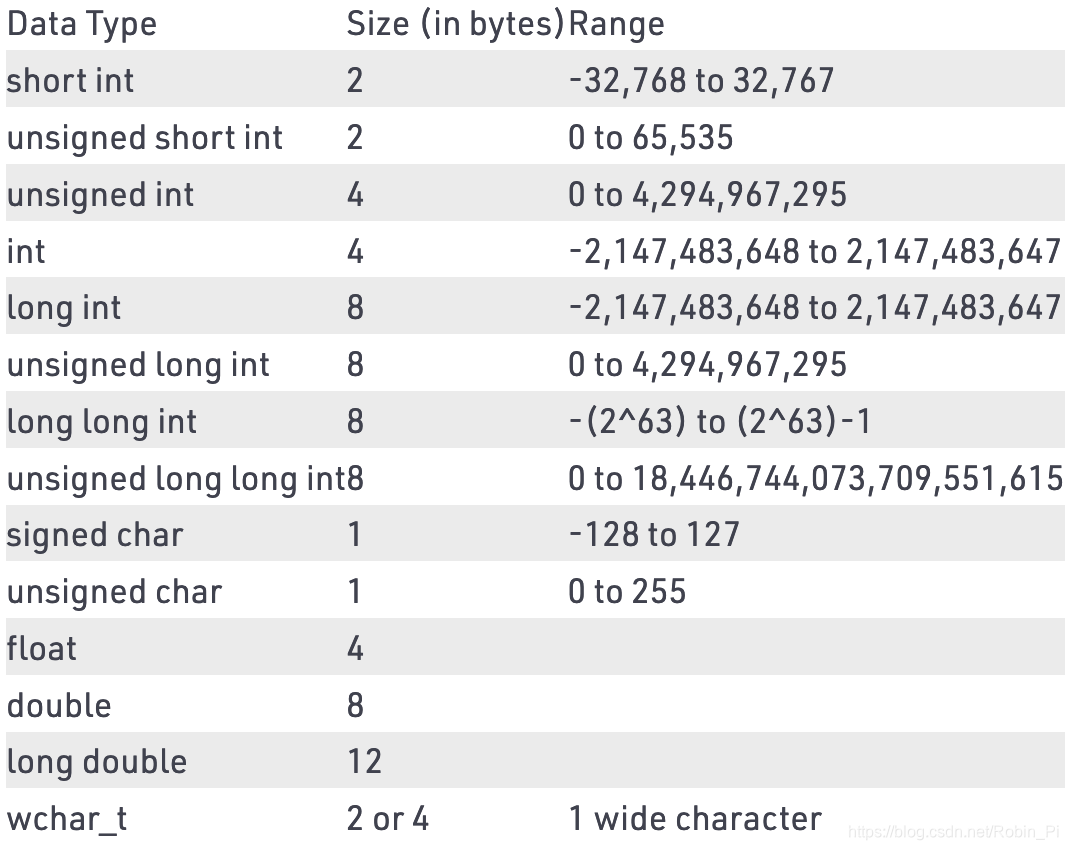
(注意:上面的值可能因编译器到编译器而异。上面的示例基于GCC 32位。)
附:
1、sizeof():可以用sizeof()获取各种数据类型所占用的字节大小
2、typedef 声明:可以使用 typedef 为一个已有的类型取一个新的名字
3、枚举类型-enum :enum <类型名> {<枚举常量表>};用于定义的若干枚举常量的集合
C++的变量
C++中的变量是一块内存地址的名字,它是程序的基本存储单元。
C++中,使用变量之前必须先进行变量声明。
- The value stored in a variable can be changed during program execution.
- A variable is only a name given to a memory location, all the operations done on the variable effects that memory location.
- In C++, all the variables must be declared before use.
变量声明(declare) 的方法:
- 声明单个变量:
type variable_name; - 声明多个变量:
type variable1_name, variable2_name, variable3_name;
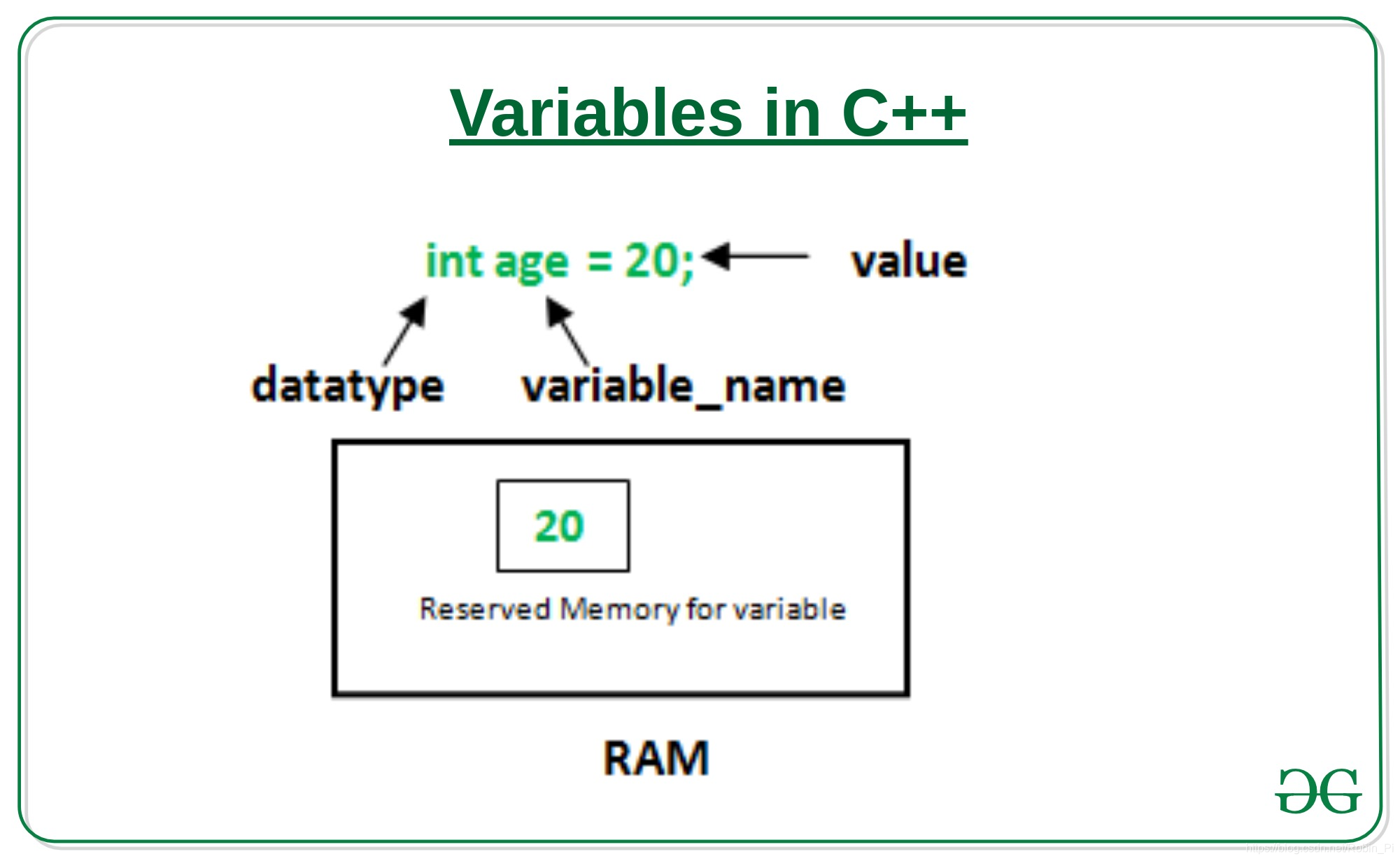
简单例子:
#include <iostream>

int main()
{

  // Declare a variable
  int year;

}
当然,在声明变量的时候,可以同时选择 初始化(initialize) 操作 ,即赋值:
C/C++ 的操作符
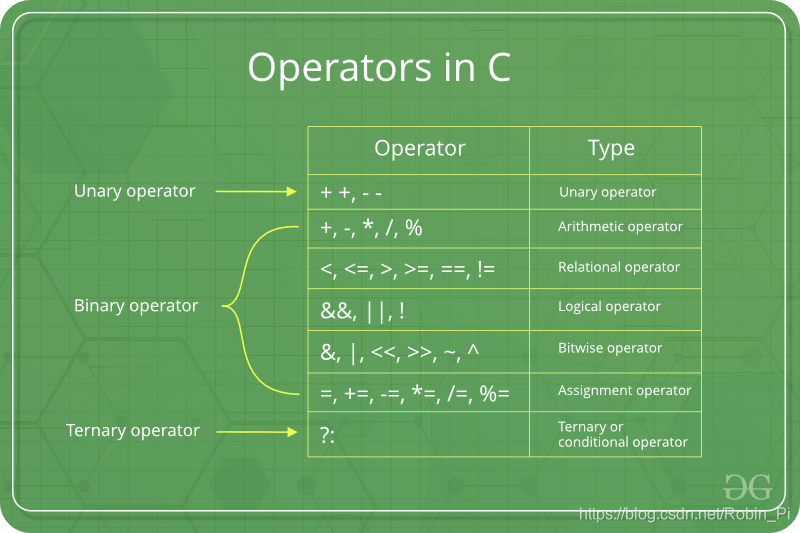
C/C++ 有如下operator types:
- 数值运算符
- 关系运算符:
- ==
- !=
- >
- <
- >=
- <=
- 逻辑运算符
- &&:and
- ||:or
- !:not
- 位运算符
- 赋值运算符
- 其它
C和C++中的循环
在计算机编程中,循环是直到达到某个条件就结束的一系列指令。
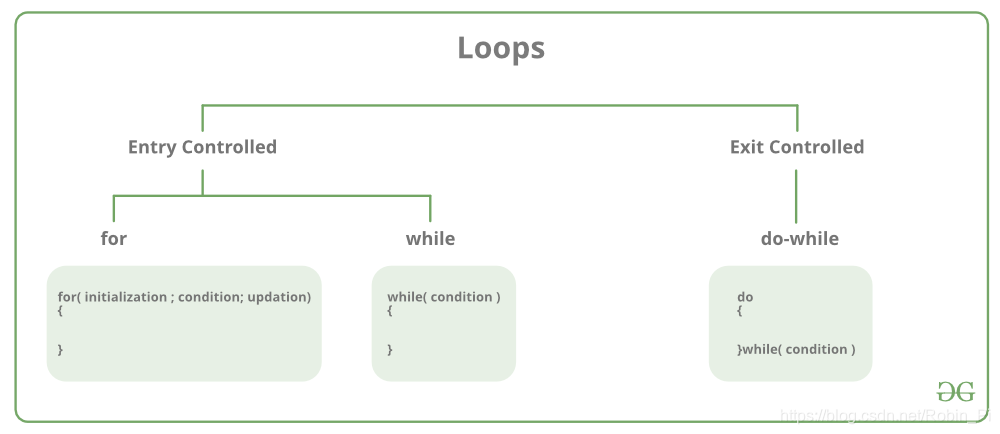
主要有两类循环:
1、Entry Controlled loops
- for 循环
- while 循环
2、Exit Controlled Loops
- do while 循环
for 循环
for 循环
for (initialization expr; test expr; update expr)
{
     // body of the loop
     // statements we want to execute
}
其等价于:
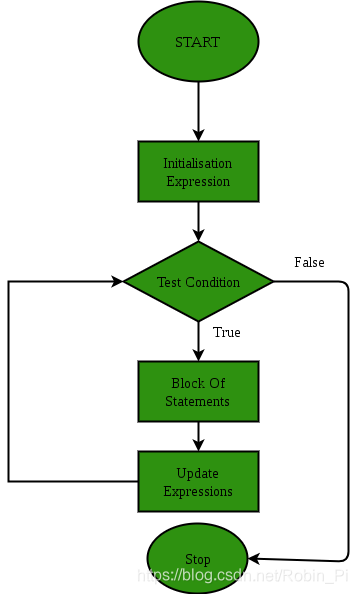
例子:
#include<iostream>
using namespace std;

int main()
{
    for(int i = 1; i<=10; i++)
    {
    cout << "hello world\n" ;
    }
    return 0;
}
while 循环
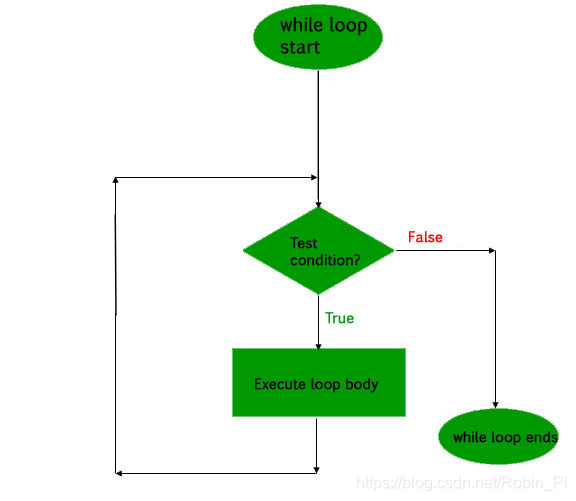
initialization expression;
while (test_expression)
{
   // statements

  update_expression;
}
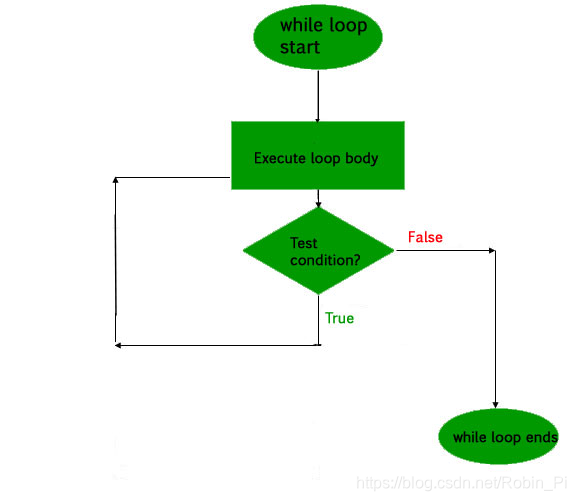
流程图:
例子:
#include<iostream>
using namespace std;
int main()
{
    int i = 1;
    while(i < 6)
    {
        cout << "Hello World\n";
        i++;
    }
    return 0;
}
while循环 和 for循环的区别:
它们可以互相转换,但是for循环一般与”计数“结合起来使用,而 while循环还可以用于非”计数“类的场景(比如判断某个语句的真假)
do while 循环
initialization expression;
do
{
   // statements

   update_expression;
} while (test_expression);
注意:while 的结尾有结束符;
流程图:
例子:
#include<iostream>
using namespace std;

int main(){
    int i = 2;

    do
    {
        cout << "hello_world\n";

        i++;

    } while (i < 1);

    return 0;
}
注意:即使 while 中的条件为假,但是循环还是执行了一次!’
C++中的判断
if esle 和 switch
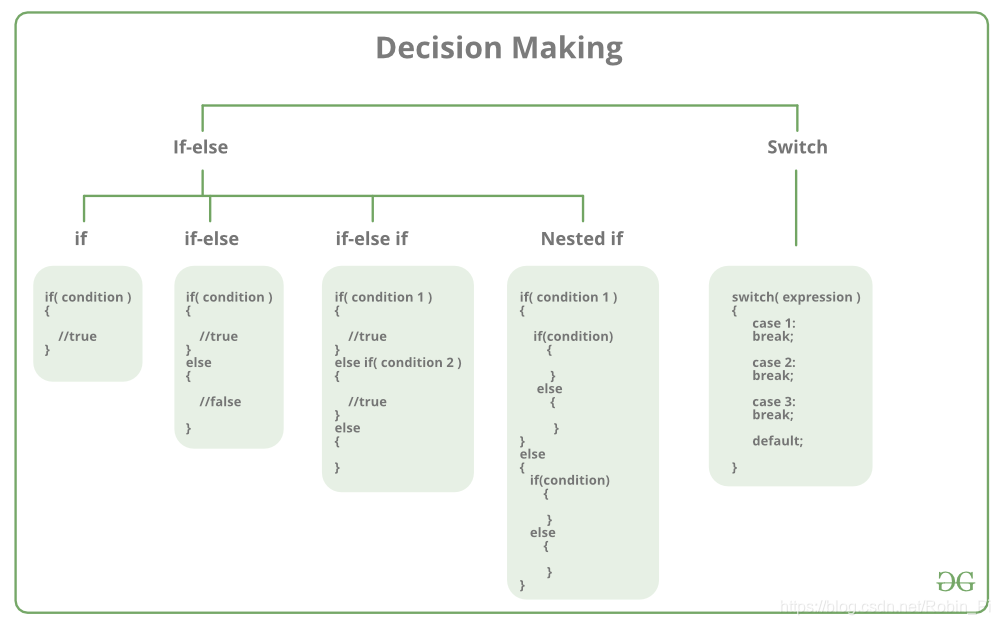
- if else
- if
- if + else
- if + else if
- Nested if
- switch
关注其中的两个:
-
if else用法:
if (condition) { // Executes this block if // condition is true } else { // Executes this block if // condition is false }例子:
#include <iostream> int main() { int grade = 59; if (grade > 60) { std::cout << "Pass\n"; } else{ std::cout << "Fail"; } } -
if else-if else用法:
if (condition) { some code } else if (condition) { some code } else { some code }例子:
#include <iostream> int main() { double ph = 4.6; if (ph > 7){ std::cout << "Basic"; } else if(ph < 7){ std::cout << "Acidic"; } else{ std::cout << "Neutral"; } -
switchswitch (n) { case 1: // code to be executed if n = 1; break; case 2: // code to be executed if n = 2; break; default: // code to be executed if n doesn't match any cases }
#include <iostream>

int main() {

  int number = 9;

  switch(number) {

    case 1 :
      std::cout << "Bulbusaur\n";
      break;
    case 2 :
      std::cout << "Ivysaur\n";
      break;
    case 3 :
      std::cout << "Venusaur\n";
      break;
    case 4 :
      std::cout << "Charmander\n";
      break;
    case 5 :
      std::cout << "Charmeleon\n";
      break;
    case 6 :
      std::cout << "Charizard\n";
      break;
    default :
      std::cout << "Unknown\n";
      break;
    case 7:
      std::cout << "Sqiurtle";
      break;
    case 8:
       std::cout << "Wartortle";
       break;
    case 9:
      std::cout << "Blastoise";
      break;
  }

}
循环控制语句
- break
- continue
- go to
- return
##错误
- Compile-time errors
- Syntax errors
- Type errors
- Link-time errors
- Run-time errors
- Logic errors
向量
- 声明向量:
std::vector<element_type> vector_name = {element1, element2, ...};
当然,
注:多个元素用大括号{}括起来 - 添加元素:
vector.push_back(element);
类似Python 的list - 删除最后一个元素:
vector.pop_back() - 返回向量元素的个数:
vector.size()
函数
函数
(1)函数定义
return_type function_name(type paramater1, type parameter2, ...) {

   // Code block here

   return output_if_there_is_any;

}
注:
-
如果不想函数返回什么 ,
return_type可以指定为void -
返回类型:返回类型一定要与函数定义的类型一致
(2)函数声明
return_type function_name( type parameter1, type parameter2, ...);
当在一个源文件中定义函数且在另一个文件中调用函数时,函数声明是必需的。在这种情况下,您应该在调用函数的文件顶部声明函数。
在函数声明中,参数的名称并不重要,只有参数的类型是必需的
(3)函数调用
调用函数时,传递所需参数,如果函数返回一个值,则可以存储返回值。
(4)注意事项:
- 函数必须先声明然后再定义
通常我们把函数声明叫做函数原型,而把函数定义叫做函数实现。 - 必须存在的函数:
main() - void() 函数没有返回值
附:一些内置函数:
- 返回一个0到10的随机数:
rand() % 10 - 求根运算:
sqrt(9)
作用域和多文档编程
当程序很长的时候,将所有的东西都放在一个.cpp文件下执行就不太可取了,一般有以下几种操作:
- 1、函数调用与函数定义分开,并在main函数中使用函数声明:
mian.cpp (函数声明 + 函数调用)+other.cpp(函数定义)
注意,最后使用g++ main.cpp other.cpp完成编译和执行 - 2、将函数调用与函数定义分开,并且将函数声明也单独放在头文件中:
main.cpp(函数调用)+other.cpp(函数定义)+other.hpp(函数声明)
注意:
- 在main.cpp顶部调用头文件:
#include "other.hpp" - 编译执行:
g++ main.cpp other.cpp
下面是关于 作用域(scope)和多文档编程的一些例子:
(1) what
变量可能存在的位置
- 函数内外:全局和本地
- 文件内外:链接
定义:
局部变量:函数或者代码块内部声明的变量
全局变量:在所有函数外部定义的变量(通常是在程序的头部)
结论:
- 局部变量只能被函数内部或者代码块内部的语句使用
- 全局变量可以被任何函数访问。
- 全局变量的值在程序的整个生命周期内都是有效的。
(2)why
对比几种写法:
-
方法一:函数声明和定义分开在同一文件夹
#include <iostream> // Declaration at the top: void eat(); int main() { eat(); } // Definition at the bottom: void eat() { std::cout << "nom nom nom\n"; } -
方法二:函数声明和定义分开
保留函数声明在main()函数所在的.cpp文件
// leaving a list of declarations above main() #include <iostream> // Declaration at the top: void eat(); int main() { eat(); }而将函数定义在另外一个.cpp文件
// move the function definitions over to another specialized .cpp file

#include <iostream>
void eat() {

  std::cout << "nom nom nom\n";

}
最后编译和执行
g++ main.cpp another.cpp./a.out -
方法三:利用头文件
定义函数:fns.cpp
#include <iostream> #include <cmath> double average(double num1, double num2) { return (num1 + num2) / 2; } int tenth_power(int num) { return pow(num, 10); } bool is_palindrome(std::string text) { std::string reversed_text = ""; for (int i = text.size() - 1; i >= 0; i--) { reversed_text += text[i]; } if (reversed_text == text) { return true; } return false; }将所有声明写入头文件:fns.hpp
// Move function declarations here: double average(double num1, double num2); int tenth_power(int num); bool is_palindrome(std::string text);将头文件写入main.cpp的顶部:main.cpp
#include <iostream>

#include "fns.hpp"

int main() {

  std::cout << is_palindrome("noon") << "\n";
  std::cout << tenth_power(4) << "\n";
  std::cout << average(4.0, 7.0) << "\n";

}
编译和执行
g++ main.cpp fns.cpp./a.out
内联函数(functions inline)
-
定义:
内联函数是一个函数声明,通常用于头文件,定义方式如下:inline void eat() { std::cout << "nom nom nom\n"; }当函数被声明为内联函数之后, 编译器会将其内联展开, 而不是按通常的函数调用机制进行调用。
注:在类内定义的成员函数默认为inline,不论前面是否加了inline
// cookie_functions.hpp // eat() belongs to the Cookie class: void Cookie::eat() {std::cout << "nom nom\n";} -
优点:
当函数体比较小的时候, 内联该函数可以令目标代码更加高效. 对于存取函数以及其它函数体比较短, 性能关键的函数, 鼓励使用内联. -
Tip:
只有当函数只有 10 行甚至更少时才将其定义为内联函数.
默认参数和函数重载
(1)默认参数
注:可以设置默认参数,只需要在函数声明中设置即可,比如:
std::string make_coffee(bool milk = false, bool sugar = false);std::string make_coffee(bool milk = false, bool sugar = false);
注意:
- 在调用函数时:当一个默认参数有特定值时, 它前面所有的参数都必须赋值
- 默认参数在函数声明中提供,当又有声明又有定义时,定义中不允许默认参数。如果函数只有定义,则默认参数才可出现在函数定义中
(2)函数重载
如果你想定义一个可以接收不同类型(比如,int 或者double)的函数;又或者你想定一个参数的数量不定的函数,可以使用函数重载(Function Overload)。
一个函数名具有多种功能, 具有多种形态,即 一个名字, 多个函数
函数重载要满足的条件:
参数类型不同或者参数个数不同
例子:
//nums_ops.cpp
int fancy_number(int num1, int num2) {

  return num1 - num2 + (num1 * num2);

}

int fancy_number(int num1, int num2, int num3) {

  return num1 - num2 - num3 + (num1 * num2 * num3);

}
double fancy_number(double num1, double num2) {

  return num1 - num2 + (num1 * num2);

}
//nums_ops.hpp
int fancy_number(int num1, int num2);
int fancy_number(int num1, int num2, int num3);
double fancy_number(double num1, double num2);
//main.cpp
#include <iostream>

#include "num_ops.hpp"

int main() {

  std::cout << fancy_number(12, 3) << "\n";
  std::cout << fancy_number(12, 3, 19) << "\n";
  std::cout << fancy_number(13.5, 3.8) << "\n";

}
函数模板
(1)What
函数模板(function template)是将数据类型当做参数的一个工具,通常用于函数体一样,而参数数据类型不一样的情况。
(2)How
不同于普通的函数,函数模板是完全
在头文件中创建出来的。(不需要在其它.cpp文件中单独定义函数)
格式:一般用T来标识类型参数, 也可以用其它的
例子:
//number.hpp
template <typename T>
T get_smallest(T num1, T num2) {
  return num2 < num1? num2 : num1;
}
注意:
- 变量和函数的数据类型都变为
T - 不需要在
other.cpp文件中定义函数了
小结
1、作用域
2、C++的函数通常使用模块化的方式来组织代码:
- 声明在头文件中
- 定义在另外一个**.cpp文件**中
3、包含多个.cpp文件的程序在编译(compile)的时候需要被链接(linked):
g++ main.cpp test.cpp
类
什么叫做类?
就是你想自己创造出一个类似int、double、std::string和bool的其它东西。
定义
定义一个空的类:
class Song{

};  // <-- notice this semicolon!
注:
1、如果没有参数,类名称后面不需要加括号。
2、注意:类定义以;结尾
类成员
有两种类成员:
- 属性(Attributes):成员数据,包含了类实例的信息
- 方法(Methods):成员函数,这些函数可以在类实例中使用(句点表示法)
例子
// song.hpp
#include <string>

class Song{

  // Attribute
  std::string title;

public:        // stuff below is public
  // Method
  void add_title(std::string new_title);
  std::string get_title();
};
注:使用关键字public的原因是,类中的所有的东西默认都是private的,也就是类成员被限制在类的作用域之内,想要在类之外获取它们必须使用public。
//song.cpp
#include "song.hpp"

// add Song method definitions here:
void Song::add_title(std::string new_title){
  title = new_title;
}
std::string Song::get_title(){
  return title;
}
//main.cpp
#include <iostream>
#include "song.hpp"

int main() {

}
创建类对象/类实例
-
调用类(创建object)
// City 是一个类
City Shanghai;
Python调用类的方式更像是一个函数式编程,但是C++不是
-
获取类属性
Shanghai.population = 22270000; -
获取类方法
Shanghai.get_population();
例子:
接上面的例子,只需要在主函数中完成类对象或者类实例的创建即可。
可以发现,跟Python完全不同!
//music.cpp
#include <iostream>
#include "song.hpp"

int main() {

  Song electric_relaxation;
  electric_relaxation.add_title("electric songs");
  std::cout << electric_relaxation.get_title();
}
构造函数
构造函数(Constructor)
-
概念:与类同名、无返回值类型的成员函数。
说白了,Constructor 也只是类里面的一个函数啊,所以用法基本一致,只是说函数名与类名一样。 -
作用:初始化对象的数据成员。
类对象被创建时,编译系统对象分配内存空间,并自动调用该构造函数:由构造函数完成成员的初始化工作
例子:
//song.hpp
#include <string>

class Song {

  std::string title;
  std::string artist;

public:
  // Add a constructor here:
  Song(std::string new_title, std::string new_artist);

};
//song.cpp
#include "song.hpp"

// add the Song constructor here:


Song::Song(std::string new_title, std::string new_artist) {

  title = new_title;
  artist = new_artist;

}

std::string Song::get_title() {

  return title;

}

std::string Song::get_artist() {

  return artist;

}
//music.cpp ——> main()
#include <iostream>
#include "song.hpp"

int main() {

  Song back_to_black("Back to Black", "Amy Winehouse");

}
可以发现有了构造函数就可以直接向类传递参数了。
析构函数
析构函数(Destructor)
和构造函数相似,析构函数也是一个特殊的类方法,它是用来自动释放对象的。
不过在它之前有一个~符号,如下:
City::~City() {

  // any final cleanup

}
通常来说,析构函数是不需要手动进行的,当出现以下情况就会自动执行:
- The object moves out of scope.
- The object is explicitly deleted.
- When the program ends.
实现一个自己的类:
//my_class.hpp
#include <string>

class City{

  std::string direction;
  std::string number;

public:
  std::string city_location(std::string new_direction);

  std::string city_population(std::string new_number);

};
//my_class.cpp
#include "my_class.hpp"

std::string City::city_location(std::string new_direction){
  direction = new_direction;
  return "located in " + direction;
}

std::string City::city_population(std::string new_number){
  number = new_number;
  return "Population is " + number;
}
//main.cpp
#include <iostream>
#include <string>
#include "my_class.hpp"


int main() {

    City Shanghai;

    std::cout << Shanghai.city_location("East") << '\n' << Shanghai.city_population("25000000")
    << '\n';
}
引用和指针
引用
引用(reference)
在C++中,引用变量(reference variable)是已经存在的其它东西的别名(alias),使用方法:在声明中用在变量的前面:
int &Robin = Bing;
对其中任何一个做出修改,则会改变另外一个。
#include <iostream>

int main() {

  int soda = 99;

  int &pop = soda;

  pop += 1;

  std::cout << pop << "\n" << soda;
}
100
100
对于 references 要注意两点:
- Anything we do to the reference also happens to the original.
- Aliases cannot be changed to alias something else.
&符号的两个用法:
&用在声明中:reference operator&不是用在声明中:address operator
指针
建议避免使用指针,而是尽可能地使用引用。
指针和普通的变量一样,必须在使用之前就被声明,且使用*来和普通变量进行区分,比如:int* number、double* decimal和char* character。
(1)创建指针:
#include <iostream>

int main() {

  int power = 9000;

  // Create pointer
  int* ptr = &power;
  // Print ptr
  std::cout << ptr;

}
Null Pointer:
有时候我们会创建一个空指针(C++11)来代替NULL:
int* ptr = nullptr;
(2)获取指针所指向的值
int blah = *ptr;
*符号的两种用法:
*用在声明中:创建一个指针;*不是用在声明中:代表这是一个dereference operator(解引用) ——*pi表示取指针pi所指向的变量的值
小结
// Reference
int &reference = original;

// Pointer
int* pointer = &original;
#一些小疑问
-
return 0;是必须的吗? -
C++ 打印字符串内的结尾为什么要添加换行符?
-
函数一定要定义类型么?
-
函数传参时,
std::string name前面有std::,int x前面为什么可以没有?
到底什么时候需要加std::?参考:在C++中什么时候需要加上std:: -
C++中单引号和双引号有区别么?
单引号:字符型的值(代表
ASCII 码中的一个值)
双引号:字符串型的值(代表字符串) -
在定义函数时,任何情况都可以使用
void么?
仅仅在不需要函数返回值的时候使用void! -
C++函数定义不包括函数体的部分与函数声明
总是一模一样么? -
函数参数的默认值为什么在函数声明中设置而不是函数定义时也设置?
默认参数在函数声明中提供,当又有声明又有定义时,定义中不允许默认参数。如果函数只有定义,则默认参数才可出现在函数定义中 -
C++类和C语言结构体的区别
C**++中的类**也是一种构造类型,但是进行了一些扩展,类的成员不但可以是变量,还可以是函数;通过类定义出来的变量也有特定的称呼,叫做“对象”。
参考:
- Geeksforgeeks
- W3Cschool(实际上你会发现就上对Geeksforgeeks的翻译)
- codecademy.com——含有在线练习,主要参考





 扫一扫
扫一扫


 2244
2244

 被折叠的 条评论
为什么被折叠?
被折叠的 条评论
为什么被折叠?
 到【灌水乐园】发言





