





 本文介绍了如何在Spring Boot应用中集成RabbitMQ,包括使用Docker搭建RabbitMQ服务,配置Maven依赖,实现消息的接收和发送,并分享了在集成过程中遇到的问题及解决方案。
RabbitMQ is an open source multi-protocol messaging broker.
前言
参照官方Messaging with RabbitMQ,记录在实战中的一些坑。
搭建RabbitMQ服务
本文使用Docker搭建MQ服务。Docker部署服务,快捷、方便。
安装镜像
参照docker 安装ubuntu安装镜像


启动镜像
docker run -d -p 15672:15672 -p 5672:5672 rabbitmq:3-management

这里要映射2个端口:15672是Web管理界面的端口;5672是MQ访问的端口。
Web管理界面
http://192.168.99.100:15672/
guest/guest


RabbitMQ服务部署好了。。。
集成
环境
IntelliJ IDEA 2016.3.4
    <parent>
        <groupId>org.springframework.boot</groupId>
        <artifactId>spring-boot-starter-parent</artifactId>
        <version>1.5.1.RELEASE</version>
</parent> <java.version>1.8</java.version>
maven依赖
    <dependencies>
        <dependency>
            <groupId>org.springframework.boot</groupId>
            <artifactId>spring-boot-starter-amqp</artifactId>
        </dependency>
    </dependencies>
代码实现
配置

AmqpInitConfig
@Configuration
@ConditionalOnProperty(prefix = "spring.rabbitmq",name = "enable", matchIfMissing = false)
public class AmqpInitConfig {

    final static String queueName="spring.boot";

    @Bean
    public Queue queue(){
        return new Queue(queueName,false);
    }

    @Bean
    public TopicExchange exchange(){
        return new TopicExchange("spring.boot.exchange");
    }

    @Bean
    public Binding binding(TopicExchange exchange,Queue queue){
        return BindingBuilder.bind(queue).to(exchange).with(queueName+".key");
    }

    @Bean
    public SimpleMessageListenerContainer container(ConnectionFactory connectionFactory, MessageListenerAdapter listenerAdapter){
        SimpleMessageListenerContainer container=new SimpleMessageListenerContainer();
        container.setConnectionFactory(connectionFactory);
        container.setMessageListener(listenerAdapter);
        container.addQueueNames(queueName);
        return container;
    }

    @Bean
    public MessageListenerAdapter listenerAdapter(Receiver receiver){
        return new MessageListenerAdapter(receiver,"receiveMessage");
    }
}
接受消息
Receiver
@Component
public class Receiver {
    CountDownLatch latch = new CountDownLatch(1);

    public void receiveMessage(String message) {
        System.out.println("Received <" + message + ">");
        latch.countDown();
    }

    public CountDownLatch getLatch() {
        return latch;
    }
}
发送消息
Runner
@Component
public class Runner implements CommandLineRunner {
    private final RabbitTemplate rabbitTemplate;
    private final Receiver receiver;
    private final ConfigurableApplicationContext context;

    public Runner(Receiver receiver, RabbitTemplate rabbitTemplate,
                  ConfigurableApplicationContext context) {
        this.receiver = receiver;
        this.rabbitTemplate = rabbitTemplate;
        this.context = context;
    }

    @Override
    public void run(String... args) throws Exception {
        System.out.println("Sending message...");
        rabbitTemplate.convertAndSend("spring.boot.exchange","spring.boot.key", "Hello from RabbitMQ!");
        receiver.getLatch().await(  10000, TimeUnit.MILLISECONDS);
        context.close();
    }

}
启动
AmqpApplication
@SpringBootApplication
@ComponentScan(basePackages = "com.wxs.amqp")
public class AmqpApplication {
    public static void main(String[] args) {
        SpringApplication.run(AmqpApplication.class,args);
    }
}
踩过的坑
坑一
发送消息需要制定exchange,如果不指定,不会发送消息。

坑二
跨局域网访问MQ。需要把虚拟机的网络改为桥接网络。
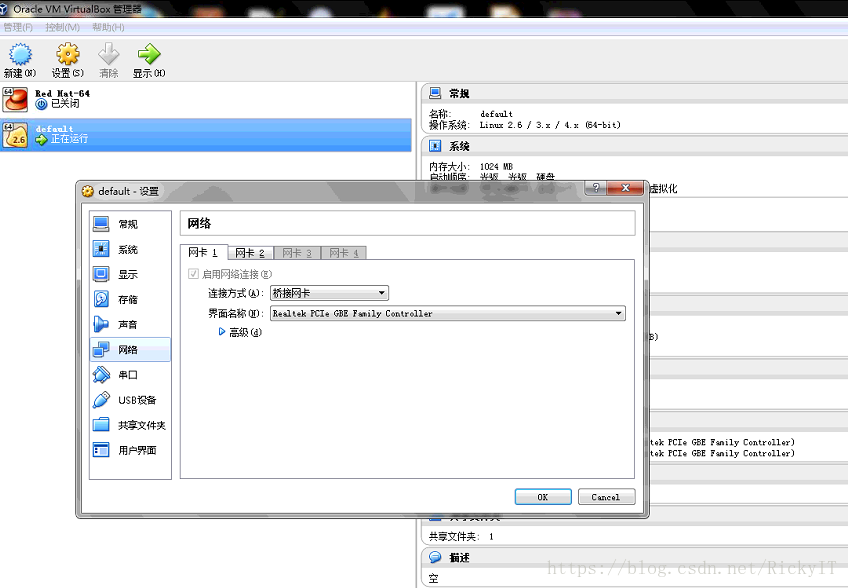
打卡虚拟机终端,ifconfig eth0查看IP
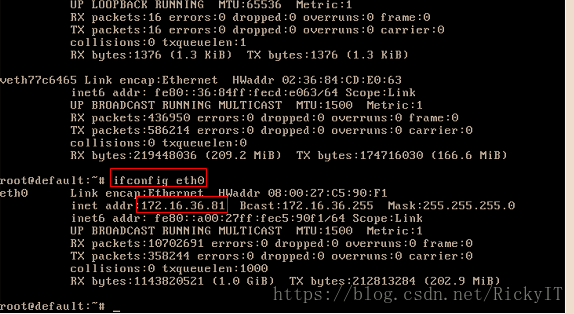
192.168.99.100→172.16.36.81
参考
Messaging with RabbitMQ
How to use this image Running the daemon






 扫一扫
扫一扫


 1268
1268

 被折叠的 条评论
为什么被折叠?
被折叠的 条评论
为什么被折叠?
 到【灌水乐园】发言





