


Python高手养成指南:四阶段突破法从入门到架构师
一份被数万名开发者验证的Python进阶路线图
前言:为什么大多数Python学习者无法成为高手?
在Python学习道路上,很多开发者陷入了"调包侠"的困境——只会调用第三方库,却不懂底层原理。真正的Python高手不仅能写出优雅的代码,更能设计复杂的系统架构。本文将为你揭示一条从零基础到Python专家的完整成长路径。
学习路径总览:四个关键阶段
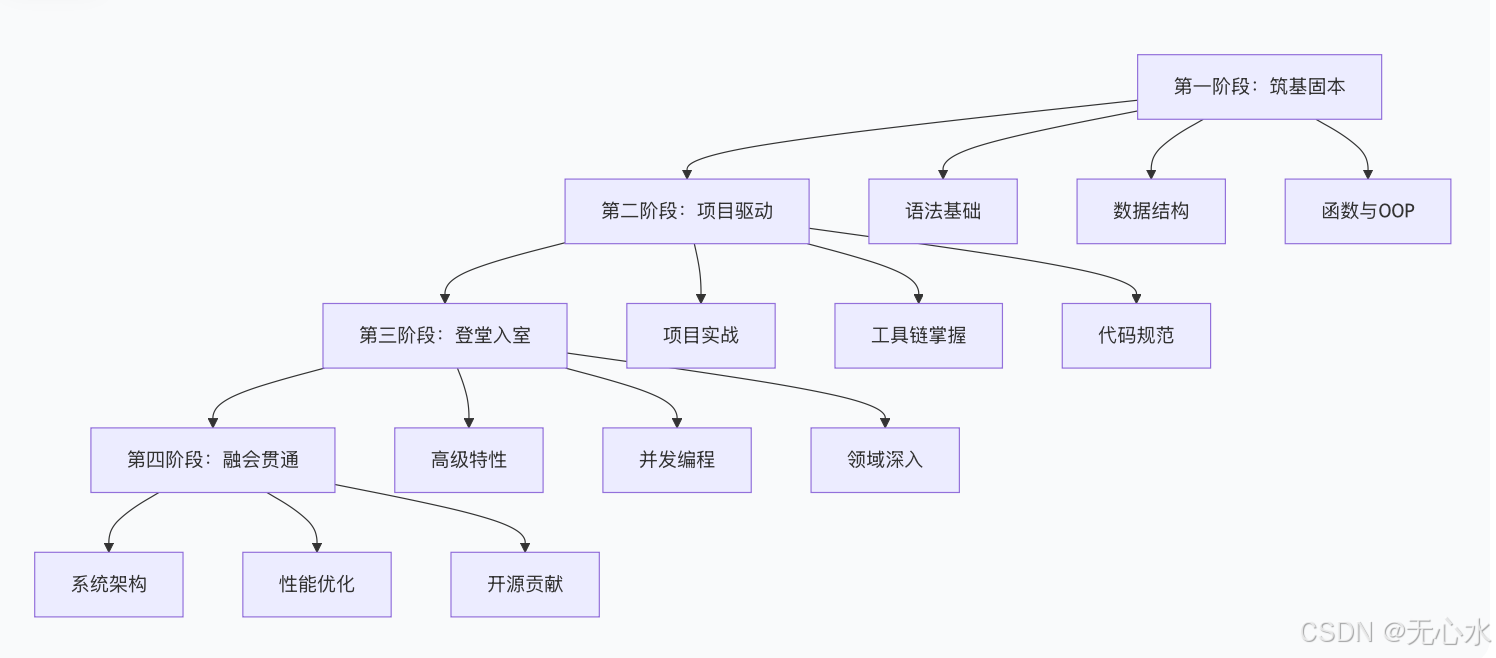
第一阶段:筑基固本 —— 从"能用"到"会用"
核心突破点:理解Python的"灵魂"
数据结构时间复杂度是关键:
# 理解为什么set/dict查找比list快
# list: O(n)查找
my_list = [1, 2, 3, 4, 5]
print(5 in my_list)  # 需要遍历整个列表

# set: O(1)查找
my_set = {1, 2, 3, 4, 5}
print(5 in my_set)   # 哈希表直接定位
手写数据结构加深理解:
# 手写简化版字典,理解哈希表原理
class MyDict:
    def __init__(self, size=8):
        self._table = [[] for _ in range(size)]
        self._size = size
        self._count = 0

    def __setitem__(self, key, value):
        hash_val = hash(key)
        idx = hash_val % self._size

        # 处理哈希冲突
        for i, (k, v) in enumerate(self._table[idx]):
            if k == key:
                self._table[idx][i] = (key, value)
                return

        self._table[idx].append((key, value))
        self._count += 1

        # 扩容机制
        if self._count / self._size > 0.7:
            self._resize()

    def __getitem__(self, key):
        hash_val = hash(key)
        idx = hash_val % self._size

        for k, v in self._table[idx]:
            if k == key:
                return v
        raise KeyError(key)

    def _resize(self):
        new_size = self._size * 2
        new_table = [[] for _ in range(new_size)]

        for bucket in self._table:
            for key, value in bucket:
                hash_val = hash(key)
                idx = hash_val % new_size
                new_table[idx].append((key, value))

        self._table = new_table
        self._size = new_size
装饰器:函数的高级玩法
import time
from functools import wraps

def timer(func):
    """记录函数运行时间的装饰器"""
    @wraps(func)
    def wrapper(*args, **kwargs):
        start_time = time.time()
        result = func(*args, **kwargs)
        end_time = time.time()
        print(f"{func.__name__} 运行时间: {end_time - start_time:.4f}秒")
        return result
    return wrapper

@timer
def heavy_calculation(n):
    """模拟耗时计算"""
    return sum(i * i for i in range(n))

# 使用示例
result = heavy_calculation(1000000)
第二阶段:项目驱动 —— 从"会用"到"好用"
代码规范:写出专业的Python代码
# ❌ 不规范的写法 - 链式调用过长,难以阅读
v.A(param1, param2, param3).B(param4, param5).C(param6, param7).D()

# ✅ 规范的写法 - 合理换行,清晰易读
v.A(param1, param2, param3) \
 .B(param4, param5) \
 .C(param6, param7) \
 .D()
项目实战:选择你的方向
Web开发项目架构:
数据分析项目示例:
import pandas as pd
import numpy as np
import matplotlib.pyplot as plt
from pathlib import Path

class DataAnalyzer:
    """数据分析工具类"""

    def __init__(self, data_path):
        self.data_path = Path(data_path)
        self.df = None

    def load_data(self):
        """加载数据"""
        if self.data_path.suffix == '.csv':
            self.df = pd.read_csv(self.data_path)
        elif self.data_path.suffix == '.xlsx':
            self.df = pd.read_excel(self.data_path)
        return self

    def clean_data(self):
        """数据清洗"""
        # 处理缺失值
        self.df.fillna(method='ffill', inplace=True)
        # 去除重复值
        self.df.drop_duplicates(inplace=True)
        return self

    def analyze(self):
        """数据分析"""
        summary = {
            'total_records': len(self.df),
            'columns': list(self.df.columns),
            'numeric_stats': self.df.describe()
        }
        return summary

    def visualize(self, column):
        """数据可视化"""
        if column in self.df.select_dtypes(include=[np.number]).columns:
            plt.figure(figsize=(10, 6))
            self.df[column].hist(bins=30)
            plt.title(f'Distribution of {column}')
            plt.show()

# 使用示例
analyzer = DataAnalyzer('sales_data.csv')
result = analyzer.load_data().clean_data().analyze()
第三阶段:登堂入室 —— 从"好用"到"精湛"
并发编程:突破GIL限制
import asyncio
import aiohttp
from concurrent.futures import ProcessPoolExecutor

# 异步编程示例
async def fetch_url(session, url):
    """异步获取URL内容"""
    async with session.get(url) as response:
        return await response.text()

async def batch_fetch_urls(urls):
    """批量异步获取URL"""
    async with aiohttp.ClientSession() as session:
        tasks = [fetch_url(session, url) for url in urls]
        return await asyncio.gather(*tasks)

# 多进程处理CPU密集型任务
def cpu_intensive_task(data):
    """CPU密集型任务"""
    return sum(i * i for i in range(data))

def parallel_processing(data_list):
    """多进程并行处理"""
    with ProcessPoolExecutor() as executor:
        results = list(executor.map(cpu_intensive_task, data_list))
    return results
生成器:内存友好的大数据处理
def process_large_file(file_path):
    """使用生成器处理大文件,避免内存溢出"""
    with open(file_path, 'r', encoding='utf-8') as file:
        for line in file:
            # 对每行数据进行处理
            processed_line = line.strip().lower()
            if processed_line:  # 跳过空行
                yield processed_line

def word_count_large_file(file_path):
    """统计大文件中单词频率"""
    word_count = {}
    for line in process_large_file(file_path):
        words = line.split()
        for word in words:
            word_count[word] = word_count.get(word, 0) + 1
    return word_count

# 使用示例
counts = word_count_large_file('huge_file.txt')
第四阶段:融会贯通 —— 从"精湛"到"高手"
性能优化:找到瓶颈并解决
import cProfile
import pstats
from line_profiler import LineProfiler

def optimize_performance():
    """性能优化实战"""

    # 使用cProfile分析性能
    profiler = cProfile.Profile()
    profiler.enable()

    # 你的代码在这里
    slow_function()

    profiler.disable()
    stats = pstats.Stats(profiler)
    stats.sort_stats('cumulative').print_stats(10)

def slow_function():
    """需要优化的慢速函数"""
    result = []
    for i in range(10000):
        # 低效的写法
        temp = []
        for j in range(100):
            temp.append(i * j)
        result.extend(temp)
    return result

# 优化后的版本
def optimized_function():
    """优化后的函数"""
    return [i * j for i in range(10000) for j in range(100)]
设计模式:创建可扩展的架构
from abc import ABC, abstractmethod
from typing import List, Dict

# 观察者模式实现
class Observer(ABC):
    """观察者基类"""

    @abstractmethod
    def update(self, message: str):
        pass

class Subject:
    """主题类"""

    def __init__(self):
        self._observers: List[Observer] = []

    def attach(self, observer: Observer):
        """添加观察者"""
        self._observers.append(observer)

    def detach(self, observer: Observer):
        """移除观察者"""
        self._observers.remove(observer)

    def notify(self, message: str):
        """通知所有观察者"""
        for observer in self._observers:
            observer.update(message)

class EmailNotifier(Observer):
    """邮件通知器"""

    def update(self, message: str):
        print(f"发送邮件通知: {message}")

class SMSNotifier(Observer):
    """短信通知器"""

    def update(self, message: str):
        print(f"发送短信通知: {message}")

# 使用示例
subject = Subject()
email_notifier = EmailNotifier()
sms_notifier = SMSNotifier()

subject.attach(email_notifier)
subject.attach(sms_notifier)

subject.notify("系统有新更新!")
高手成长路线图
各阶段能力对比
| 能力维度 | 初学者 | 中级开发者 | 高级开发者 | 专家 |
|---|---|---|---|---|
| 语法基础 | ⭐☆☆☆☆ | ⭐⭐⭐⭐☆ | ⭐⭐⭐⭐⭐ | ⭐⭐⭐⭐⭐ |
| 数据结构 | ⭐⭐☆☆☆ | ⭐⭐⭐⭐☆ | ⭐⭐⭐⭐⭐ | ⭐⭐⭐⭐⭐ |
| 面向对象编程 | ⭐☆☆☆☆ | ⭐⭐⭐☆☆ | ⭐⭐⭐⭐⭐ | ⭐⭐⭐⭐⭐ |
| 项目经验 | ⭐☆☆☆☆ | ⭐⭐⭐☆☆ | ⭐⭐⭐⭐⭐ | ⭐⭐⭐⭐⭐ |
| 工具链 | ⭐☆☆☆☆ | ⭐⭐⭐☆☆ | ⭐⭐⭐⭐⭐ | ⭐⭐⭐⭐⭐ |
| 性能优化 | ⭐☆☆☆☆ | ⭐⭐☆☆☆ | ⭐⭐⭐⭐☆ | ⭐⭐⭐⭐⭐ |
| 系统架构 | ⭐☆☆☆☆ | ⭐⭐☆☆☆ | ⭐⭐⭐⭐☆ | ⭐⭐⭐⭐⭐ |
说明:
- ⭐☆☆☆☆ (1分):基础了解
- ⭐⭐☆☆☆ (2分):基本掌握
- ⭐⭐⭐☆☆ (3分):熟练应用
- ⭐⭐⭐⭐☆ (4分):深入理解
实战检验:你的Python水平在哪个阶段?
初级阶段检验
- 能否手写实现基本数据结构?
- 是否理解装饰器的原理和应用?
- 能否写出符合PEP 8规范的代码?
中级阶段检验
- 能否独立完成一个完整的项目?
- 是否掌握Git和虚拟环境的使用?
- 能否优化代码的性能?
高级阶段检验
- 能否设计系统架构?
- 是否参与过开源项目?
- 能否进行技术分享和团队指导?
学习资源推荐
- 官方文档:Python官方文档是最权威的学习资料
- 经典书籍:《流畅的Python》、《Effective Python》
- 开源项目:Requests、Flask、FastAPI等优质项目源码
- 实践平台:GitHub、LeetCode、Kaggle
结语
成为Python高手不是一蹴而就的过程,而是持续学习、不断实践的积累。记住这条路径:
基础语法 → 项目实践 → 原理深入 → 系统架构
每个阶段都需要刻意练习和深度思考。最重要的是:开始行动,持续坚持。从今天起,选择一个方向开始你的Python高手之旅吧!
进一步学习建议:关注Python最新特性,参与开源项目,保持技术敏感度,才能在快速变化的技术浪潮中立于不败之地。







 扫一扫
扫一扫


 551
551

 被折叠的 条评论
为什么被折叠?
被折叠的 条评论
为什么被折叠?
 到【灌水乐园】发言





