





文章目录
Window安装mysql教程
一、安装服务端
1、方式1:安装包
后续补充…
2、方式2:绿色版
1、下载安装包
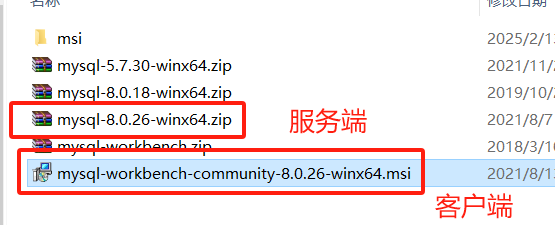
下载地址:https://dev.mysql.com/downloads/mysql/ 这里下载mysql-8.0.26-winx64.zip
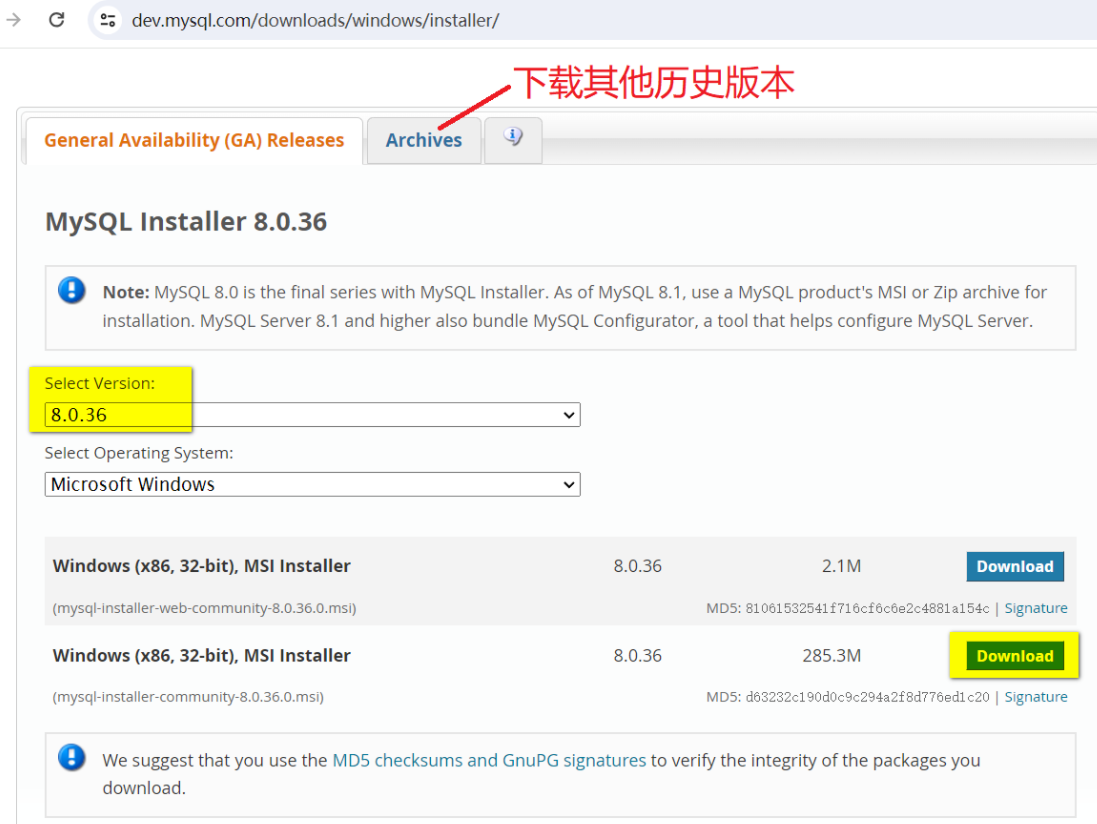
下载msi安装包:https://dev.mysql.com/downloads/installer/
2、解压到某个目录 C:\database\
3、按照以下命令行操作 (此处要用管理员身份打开CMD而非PowerShell)
cd D:\ProgramData\mysql-8.0.26-winx64\bin
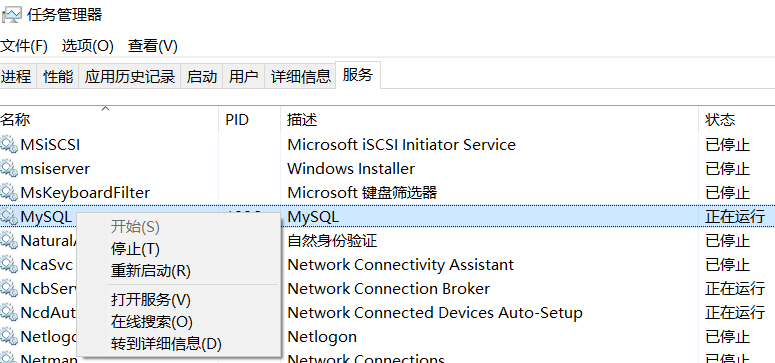
停止服务操作:
Microsoft Windows [版本 10.0.19042.1110]
(c) Microsoft Corporation。保留所有权利。
# 1、以管理员身份运行cmd,进入bin目录
C:\WINDOWS\system32>cd C:\database\mysql-8.0.26-winx64\bin
# 2、初始化,在上一级目录下生成data目录
C:\database\mysql-8.0.26-winx64\bin>mysqld --initialize-insecure --user=mysql
# 3、安装mysql 后台服务
C:\database\mysql-8.0.26-winx64\bin>mysqld -install
Service successfully installed.
# 4、启动服务
C:\database\mysql-8.0.26-winx64\bin>net start MySQL
MySQL 服务正在启动 .
MySQL 服务已经启动成功。
# 5、用root账号登陆mysql,默认密码为空
C:\database\mysql-8.0.26-winx64\bin>mysql -u root -p
Enter password: # 直接enter
Welcome to the MySQL monitor.  Commands end with ; or \g.
Your MySQL connection id is 8
Server version: 8.0.26 MySQL Community Server - GPL

Copyright (c) 2000, 2021, Oracle and/or its affiliates.

Oracle is a registered trademark of Oracle Corporation and/or its
affiliates. Other names may be trademarks of their respective
owners.

Type 'help;' or '\h' for help. Type '\c' to clear the current input statement.
# 6、查看用户表信息
mysql> select host,user,authentication_string from mysql.user;
+-----------+------------------+------------------------------------------------------------------------+
| host      | user             | authentication_string                                                  |
+-----------+------------------+------------------------------------------------------------------------+
| localhost | mysql.infoschema | $A$005$THISISACOMBINATIONOFINVALIDSALTANDPASSWORDTHATMUSTNEVERBRBEUSED |
| localhost | mysql.session    | $A$005$THISISACOMBINATIONOFINVALIDSALTANDPASSWORDTHATMUSTNEVERBRBEUSED |
| localhost | mysql.sys        | $A$005$THISISACOMBINATIONOFINVALIDSALTANDPASSWORDTHATMUSTNEVERBRBEUSED |
| localhost | root             |                                                                        |
+-----------+------------------+------------------------------------------------------------------------+
4 rows in set (0.00 sec)
# 7、使用mysql数据库(直接跳过8、9步骤)
mysql> use mysql;
Database changed
# 8、修改用户表账号密码(这个方法有问题)
mysql> update mysql.user set authentication_string=("123456") where user="root";
Query OK, 1 row affected (0.00 sec)
Rows matched: 1  Changed: 1  Warnings: 0

mysql> select host,user,authentication_string from mysql.user;
+-----------+------------------+------------------------------------------------------------------------+
| host      | user             | authentication_string                                                  |
+-----------+------------------+------------------------------------------------------------------------+
| localhost | mysql.infoschema | $A$005$THISISACOMBINATIONOFINVALIDSALTANDPASSWORDTHATMUSTNEVERBRBEUSED |
| localhost | mysql.session    | $A$005$THISISACOMBINATIONOFINVALIDSALTANDPASSWORDTHATMUSTNEVERBRBEUSED |
| localhost | mysql.sys        | $A$005$THISISACOMBINATIONOFINVALIDSALTANDPASSWORDTHATMUSTNEVERBRBEUSED |
| localhost | root             | 123456                                                                 |
+-----------+------------------+------------------------------------------------------------------------+
4 rows in set (0.00 sec)

mysql> exit
Bye
# 9、设置好密码后重新登陆,发现登陆失败
C:\database\mysql-8.0.26-winx64\bin>mysql -u root -p
Enter password: ******
ERROR 1045 (28000): Access denied for user 'root'@'localhost' (using password: YES)

# 10、登陆失败解决方法:删除步骤2生成的data目录(需要停止服务),重来步骤2、4、5、7
mysql> ALTER USER 'root'@'localhost' IDENTIFIED WITH mysql_native_password BY '123456';
Query OK, 0 rows affected (0.00 sec)

mysql> flush privileges;
Query OK, 0 rows affected (0.00 sec)

mysql> quit
Bye

C:\database\mysql-8.0.26-winx64\bin>mysql -u root -p
Enter password: ******
Welcome to the MySQL monitor.  Commands end with ; or \g.
Your MySQL connection id is 9
Server version: 8.0.26 MySQL Community Server - GPL

Copyright (c) 2000, 2021, Oracle and/or its affiliates.

Oracle is a registered trademark of Oracle Corporation and/or its
affiliates. Other names may be trademarks of their respective
owners.

Type 'help;' or '\h' for help. Type '\c' to clear the current input statement.

mysql>
3、安装报错汇总
1)微软dll丢失问题
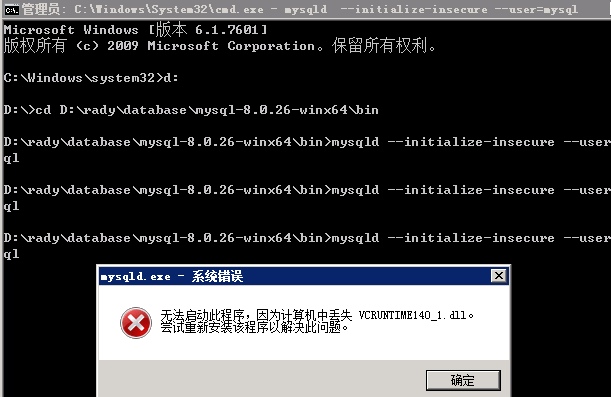
在cmd哪里输入mysqld --initialize --console,会提示计算机中丢失MSVCP140.dll、vcruntime140.dll
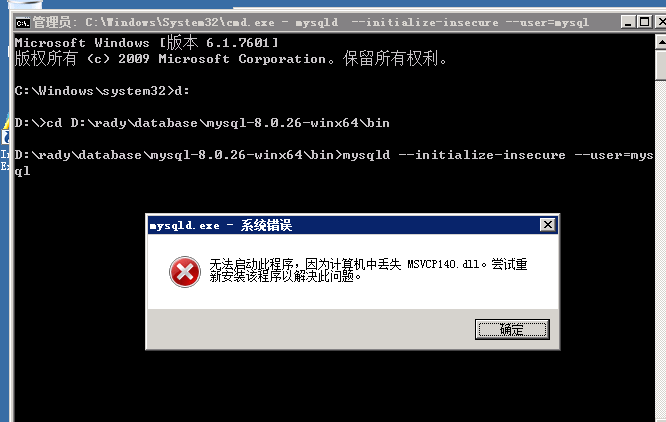
解决办法:就是缺少了Microsoft.Net.Framework的安装。现将整个流程整理如下:所需安装包已下载在这里
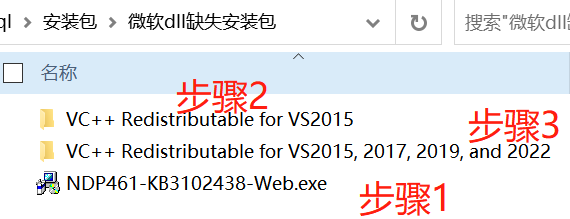
步骤1、去微软官网下载Microsoft.Net.Framework 4.6.1
——其适用于 Windows 7 SP1、Windows 8、Windows 8.1、Windows 10、Windows Server 2008 R2 SP1、Windows Server 2012 和 Windows Server 2012 R2操作系统
下载地址:https://www.microsoft.com/zh-CN/download/details.aspx?id=49981
步骤2、去微软官网下载Visual C++ Redistributable for Visual Studio 2015
下载地址:https://www.microsoft.com/zh-cn/download/details.aspx?id=48145
备注:如果服务器所在的windows操作系统是32位的,就下载vc_redist.x86.exe;如果是64位的先下载64位,如果不行,同时下载32位安装,vc_redist.x64.exe与vc_redist.x86.exe最好都下载安装
注意点:vc_redist.x64.exe与vc_redist.x86.exe所属VC++版本需保持一直,比如都是2015或都是2012。
步骤3、安装后运行mysqld --initialize-insecure --user=mysql还是报丢失vcruntime140_1.dll
https://docs.microsoft.com/en-US/cpp/windows/latest-supported-vc-redist?view=msvc-170
This table lists the latest supported English (en-US) Microsoft Visual C++ Redistributable packages for Visual Studio 2015, 2017, 2019, and 2022. The latest supported version has the most recent implemented C++ features, security, reliability, and performance improvements. It also includes the latest C++ standard language and library standards conformance updates. We recommend you install this version for all applications created using Visual Studio 2015, 2017, 2019, or 2022.
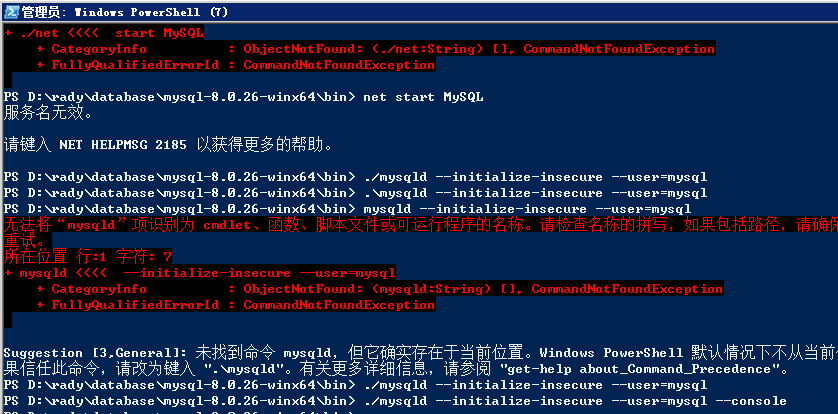
2)使用PowerShell安装不会报以上的错误,但安装不成功
二、安装客户端
1、mysql-workbench
三、数据库管理
1、创建账号
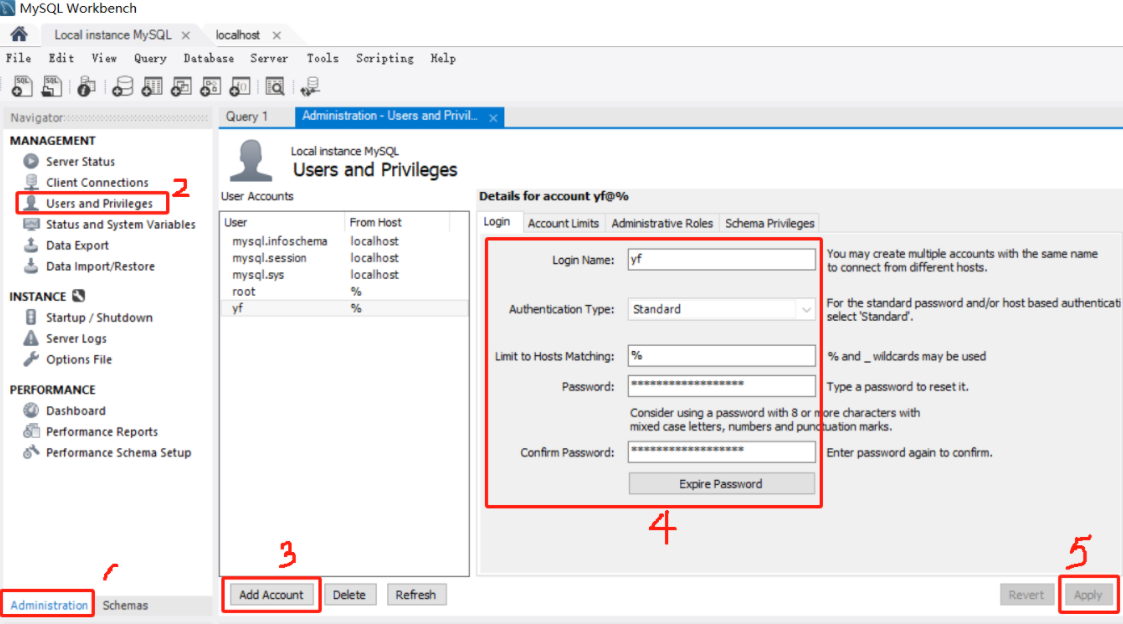
注意:要留意Limit to Host Matching有没有设置成通配符%,如果没有可能造成其他电脑无法连接到该数据库。
2、分配权限
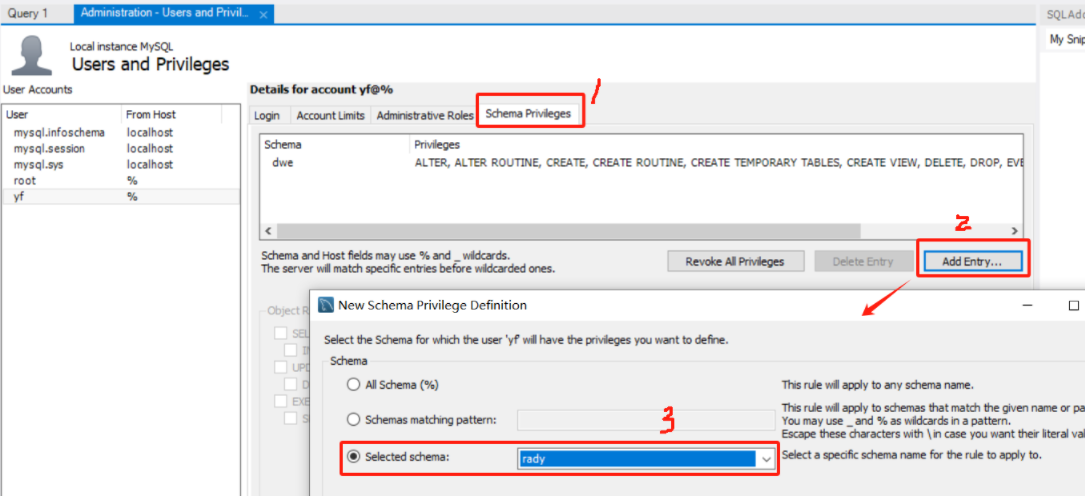
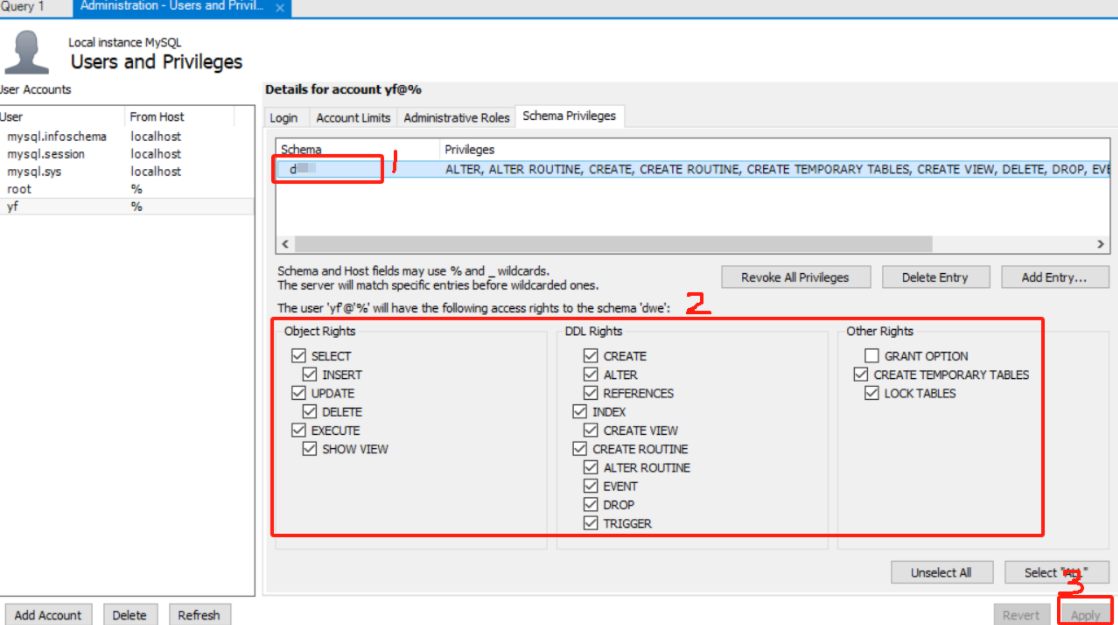
3、配置白名单
命令行方式:
-- 允许特定客户端 ip 地址连接
mysql> GRANT ALL ON *.* to root@'192.168.1.4' IDENTIFIED BY 'your-root-password';
mysql> FLUSH PRIVILEGES;

-- 允许特定客户端ip网段连接
GRANT ALL ON *.* to root@'119.143.12..%' IDENTIFIED BY 'password'; -- %表示通配的意思
4、查看用户权限
命令行方式:
mysql> grant select,create,drop,update,alter on *.* to 'rady'@'localhost' identified by 'rady123' with grant option;
# 查看其他 MySQL 用户权限:
mysql> show grants for 'rady'@'localhost';
# 查看当前用户(自己)权限:
show grants;
5、修改密码
更新mysql.user表
mysql> update user set authentication_string=password('123456') where user='root';
mysql> flush privileges;
用set password命令
语法:set password for ‘用户名’@’登录地址’=password(‘密码’)
mysql> set password for 'root'@'localhost'=password('123456');
mysqladmin
语法:mysqladmin -u用户名 -p旧的密码 password 新密码
mysql> mysqladmin -uroot -p123456 password 1234abcd
注意:mysqladmin位于mysql安装目录的bin目录下。
6、管理mysql相关线程
在日常mysql运维中,经常要查询当前mysql下正在执行的sql语句及其他在跑的mysql相关线程,这就用到mysql processlist这个命令了。
mysql> show processlist;      //查询正在执行的sql语句
mysql> show full processlist;    //查询正在执行的完整sql语句
mysql> kill connection id;      //停掉processlist查询出的某个线程,id是对应的id号
mysql> show processlist;
除此之外,show processlist还能查看当前mysql连接数。
如果是root帐号,能看到所有用户的当前连接。
如果是其它普通帐号,只能看到自己占用的连接。
注意:
show processlist;只列出前100条
如果想全列出要使用show full processlist;
7、全面查看mysql状态
使用show status;可以比较全面地查看到mysql状态
mysql> show status;
-- 参数解释:
Aborted_clients        由于客户没有正确关闭连接已经死掉,已经放弃的连接数量。
Aborted_connects      尝试已经失败的MySQL服务器的连接的次数。
Connections          试图连接MySQL服务器的次数。
Created_tmp_tables    当执行语句时,已经被创造了的隐含临时表的数量。
Delayed_insert_threads  正在使用的延迟插入处理器线程的数量。
Delayed_writes        用INSERT DELAYED写入的行数。
Delayed_errors        用INSERT DELAYED写入的发生某些错误(可能重复键值)的行数。
Flush_commands       执行FLUSH命令的次数。
Handler_delete         请求从一张表中删除行的次数。
Handler_read_first      请求读入表中第一行的次数。
Handler_read_key       请求数字基于键读行。
Handler_read_next      请求读入基于一个键的一行的次数。
Handler_read_rnd       请求读入基于一个固定位置的一行的次数。
Handler_update         请求更新表中一行的次数。
Handler_write          请求向表中插入一行的次数。
Key_blocks_used        用于关键字缓存的块的数量。
Key_read_requests      请求从缓存读入一个键值的次数。
Key_reads             从磁盘物理读入一个键值的次数。
Key_write_requests      请求将一个关键字块写入缓存次数。
Key_writes             将一个键值块物理写入磁盘的次数。
Max_used_connections    同时使用的连接的最大数目。
Not_flushed_key_blocks   在键缓存中已经改变但是还没被清空到磁盘上的键块。
Not_flushed_delayed_rows 在INSERT DELAY队列中等待写入的行的数量。
Open_tables            打开表的数量。
Open_files              打开文件的数量。
Open_streams           打开流的数量(主要用于日志记载)
Opened_tables           已经打开的表的数量。
Questions              发往服务器的查询的数量。
Slow_queries            要花超过long_query_time时间的查询数量。
Threads_connected        当前打开的连接的数量。
Threads_running          不在睡眠的线程数量。
Uptime                 服务器工作了多少秒。






 扫一扫
扫一扫


 42万+
42万+

 被折叠的 条评论
为什么被折叠?
被折叠的 条评论
为什么被折叠?
 到【灌水乐园】发言





