

H264/AVC SEI和VUI

本文详细介绍了H.264编码中的Supplemental Enhancement Information (SEI)和Video Usability Information (VUI)参数。SEI信息以独立的NALU形式传输,提供额外的解码辅助信息;而VUI参数在PPS中传输,包含解码显示相关设置。这些参数虽然非解码必需,但对视频质量和解码体验有重要影响。

Supplemental Enhancement Information(SEI)和Video Usability Information(VUI)是可以作为264码流的一部分被传输的参数。SEI和VUI参数可能对解码器有用,但对基本解码过程(basic decoding process)不是必要的。


SEI

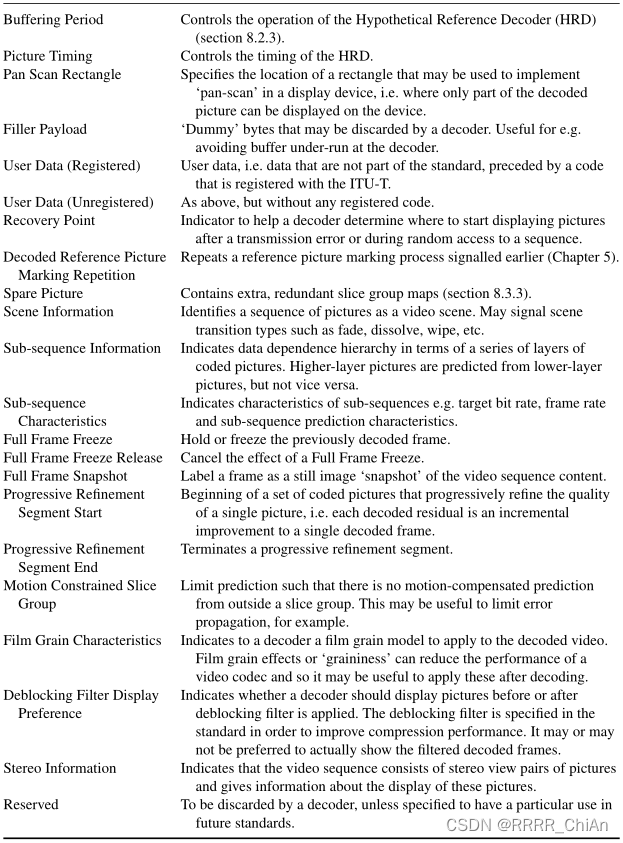
一个SEI信息以SEI RBSP形式传输,每个SEI信息作为一个独立的NALU发送。下面是一些SEI信息。

VUI

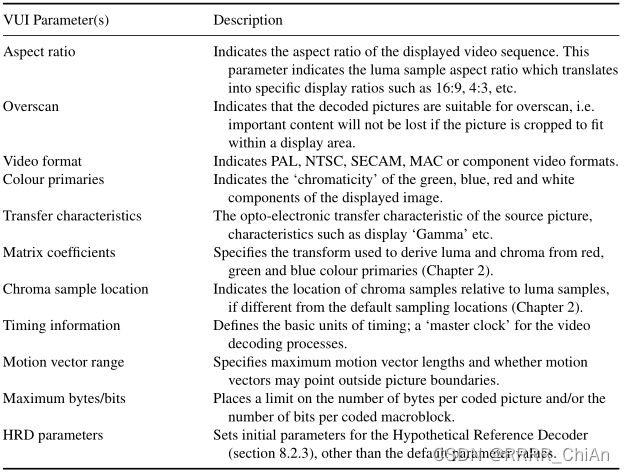
VUI信息在PPS的可选结构中传输,VUI参数语法结构包含标志和参数,具体如下表中展示的那些:
 

H264编码开源代码 Video Usability Information (VUI) Guide by Christian Heine ( sennindemokrit at gmx dot net ) 1. Sample Aspect Ratio ----------------------- * What is it? The Sample Aspect Ratio (SAR) (sometimes called Pixel Aspect Ratio or just Pel Aspect Ratio) is defined as the ratio of the width of the sample to the height of the sample. While pixels on a computer monitor generally are "square" meaning that their SAR is 1:1, digitized video usually has rather odd SARs. Playback of material with a particular SAR on a system with a different SAR will result in a stretched/squashed image. A correction is necessary that relies on the knowledge of both SARs. * How do I use it? You can derive the SAR of an image from the width, height and the display aspect ratio (DAR) of the image as follows: SAR_x DAR_x * height ----- = -------------- SAR_y DAR_y * width for example: width x height = 704x576, DAR = 4:3 ==> SAR = 2304:2112 or 12:11 Please note that if your material is a digitized analog signal, you should not use this equation to calculate the SAR. Refer to the manual of your digitizing equipment or this link instead. A Quick Guide to Digital Video Resolution and Aspect Ratio Conversions http://www.iki.fi/znark/video/conversion/ * Should I use this option? In one word: yes. Most decoders/ media players nowadays support automatic correction of aspect ratios, and there are just few exceptions. You should even use it, if the SAR of your material is 1:1, as the default of x264 is "SAR not defined".
评论
添加红包

请填写红包祝福语或标题

红包个数最小为10个

红包金额最低5元

当前余额3.43前往充值 >
需支付:10.00
成就一亿技术人!
领取后你会自动成为博主和红包主的粉丝 规则
hope_wisdom
发出的红包
实付
使用余额支付
点击重新获取
扫码支付
钱包余额 0

抵扣说明:

1.余额是钱包充值的虚拟货币,按照1:1的比例进行支付金额的抵扣。
2.余额无法直接购买下载,可以购买VIP、付费专栏及课程。

余额充值


