


打开虚拟机,连接xshell。
安装实验环境。
[root@localhost ~]# yum -y install wget gcc gcc-c++ pcre-devel zlib-devel openssl-devel lrzsz perl-devel vim unzip
下载并安装libfastcommon
[root@localhost ~]# cd /usr/local/src/
[root@localhost src]# wget https://github.com/happyfish100/libfastcommon/archive/V1.0.7.tar.gz
[root@localhost src]# ls
V1.0.7.tar.gz
[root@localhost src]# mkdir -p /data/server/fastDFS
[root@localhost src]# tar zxf V1.0.7.tar.gz -C /data/server/fastDFS/
[root@localhost src]# cd /data/server/fastDFS/libfastcommon-1.0.7/
[root@localhost libfastcommon-1.0.7]# ./make.sh
[root@localhost libfastcommon-1.0.7]# ./make.sh install
创建软链接。
[root@localhost libfastcommon-1.0.7]# ln -s /usr/lib64/libfastcommon.so /usr/local/lib/libfastcommon.so
[root@localhost libfastcommon-1.0.7]# ln -s /usr/lib64/libfastcommon.so /usr/lib/libfastcommon.so
下载安装fastDFS。
[root@localhost libfastcommon-1.0.7]# cd /usr/local/src/
[root@localhost src]# wget https://github.com/happyfish100/fastdfs/archive/V5.05.tar.gz
[root@localhost src]# ls
V1.0.7.tar.gz  V5.05.tar.gz
[root@localhost src]# tar zxf V5.05.tar.gz -C /data/server/fastDFS/
[root@localhost src]# cd /data/server/fastDFS/fastdfs-5.05/
[root@localhost fastdfs-5.05]# ./make.sh
[root@localhost fastdfs-5.05]# ./make.sh install
做软链接。
[root@localhost fastdfs-5.05]# ln -s /usr/bin/fdfs_trackerd /usr/local/bin
[root@localhost fastdfs-5.05]# ln -s /usr/bin/fdfs_storaged /usr/local/bin/
[root@localhost fastdfs-5.05]# ln -s /usr/bin/stop.sh /usr/local/bin/
[root@localhost fastdfs-5.05]# ln -s /usr/bin/restart.sh /usr/local/bin/
配置tracker
[root@localhost fastdfs-5.05]# cd /etc/fdfs/
[root@localhost fdfs]# cp tracker.conf.sample tracker.conf
[root@localhost fdfs]# vim tracker.conf
只修改以下行
base_path=/fastdfs/tracker
http.server_port=80
创建tracker目录,并设置tracker开机启动。
[root@localhost fdfs]# mkdir -p /fastdfs/tracker
[root@localhost fdfs]# chkconfig fdfs_trackerd on
配置storage
[root@localhost fdfs]# cp storage.conf.sample storage.conf
[root@localhost fdfs]# vim storage.conf
base_path=/fastdfs/storage
store_path0=/fastdfs/file
tracker_server=192.168.1.17:22122
http.server_port=80
创建storage目录
[root@localhost fdfs]# mkdir /fastdfs/storage
[root@localhost fdfs]# mkdir /fastdfs/file
设置开机启动
[root@localhost fdfs]# chkconfig fdfs_storaged on
上传测试
[root@localhost fdfs]# cp client.conf.sample client.conf
[root@localhost fdfs]# vim client.conf
base_path=/fastdfs/client
tracker_server=192.168.1.17 :22122
创建client目录
[root@localhost fdfs]# mkdir /fastdfs/client
执行上传命令
[root@localhost fdfs]# service fdfs_trackerd start
Starting fdfs_trackerd (via systemctl):                    [  OK  ]
[root@localhost fdfs]# service fdfs_storaged start
Starting fdfs_storaged (via systemctl):                    [  OK  ]
[root@localhost fdfs]# /usr/bin/fdfs_upload_file /etc/fdfs/client.conf storage.conf
返回ID号
group1/M00/00/00/wKgBEV4NeY6AO6EeAAAehU5sP7I80.conf
安装nginx
安装nginx模块
[root@localhost fdfs]# cd /usr/local/src/
[root@localhost src]# wget https://github.com/happyfish100/fastdfs-nginx-module/archive/5e5f3566bbfa57418b5506aaefbe107a42c9fcb1.zip
[root@localhost src]# unzip 5e5f3566bbfa57418b5506aaefbe107a42c9fcb1.zip
[root@localhost src]# mv fastdfs-nginx-module-5e5f3566bbfa57418b5506aaefbe107a42c9fcb1/  fastdfs-nginx-module-master
[root@localhost src]# mv fastdfs-nginx-module-master /data/server/fastDFS/
安装nginx
[root@localhost src]# wget -c https://nginx.org/download/nginx-1.12.1.tar.gz
[root@localhost src]# tar zxf nginx-1.12.1.tar.gz -C /data/server/fastDFS/
[root@localhost src]# cd /data/server/fastDFS/nginx-1.12.1/
[root@localhost nginx-1.12.1]# ./configure --add-module=../fastdfs-nginx-module-master/src
[root@localhost nginx-1.12.1]# make && make install
[root@localhost nginx-1.12.1]# /usr/local/nginx/sbin/nginx -V
出现下行则为成功

修改配置文件
[root@localhost nginx-1.12.1]# cd /data/server/fastDFS/fastdfs-nginx-module-master/src/
[root@localhost src]# cp mod_fastdfs.conf /etc/fdfs/
[root@localhost src]# vim /etc/fdfs/mod_fastdfs.conf
修改以下行:
connect_timeout=10
tracker_server=192.168.1.17:22122
storage_server_port=23000
url_have_group_name = true
store_path0=/fastdfs/file
复制配置文件到/etc/fdfs
[root@localhost src]# cd /data/server/fastDFS/fastdfs-5.05/conf
[root@localhost conf]# cp anti-steal.jpg http.conf mime.types /etc/fdfs/
修改nginx.conf
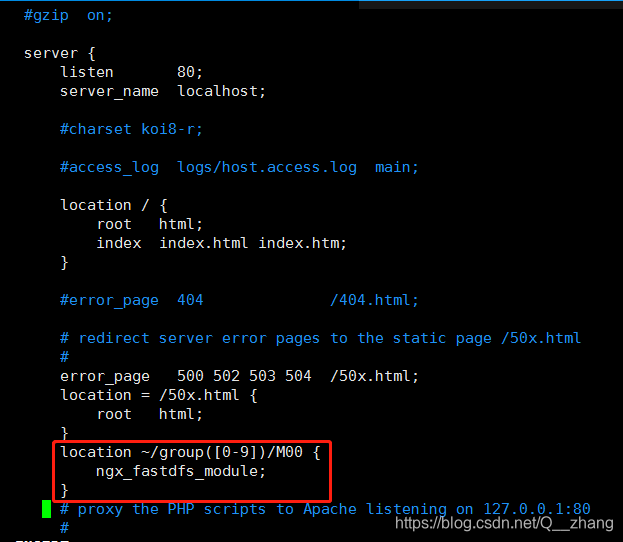
[root@localhost conf]# vim /usr/local/nginx/conf/nginx.conf
location ~/group([0-9])/M00 {
    ngx_fastdfs_module;
}
创建软链接
[root@localhost conf]# ln -s /fastdfs/file/data/ /fastdfs/file/data/M00
开启nginx,关闭防火墙,降低沙盒。
[root@localhost conf]# /usr/local/nginx/sbin/nginx
ngx_http_fastdfs_set pid=26564
[root@localhost conf]# systemctl stop firewalld
[root@localhost conf]# setenforce 0
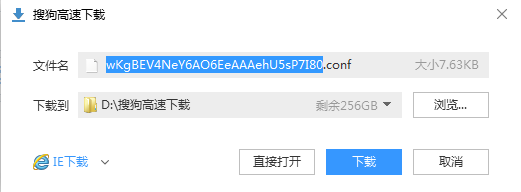
在浏览器上访问:192.168.1.17/group1/M00/00/00/wKgBEV4NeY6AO6EeAAAehU5sP7I80.conf
能下载文件就算安装成功。





 扫一扫
扫一扫


 372
372

 被折叠的 条评论
为什么被折叠?
被折叠的 条评论
为什么被折叠?
 到【灌水乐园】发言





