View Controller学习笔记—第四章Adaptivity and Size Change

17、iOS设备方向过渡与导航控制器自定义过渡动画 本文详细介绍了iOS开发中设备方向过渡与UINavigationController自定义过渡动画的实现方法。在设备方向过渡部分,通过viewWillTransition(to:with:)方法处理屏幕旋转并优化视图动画效果;在导航控制器自定义过渡部分,通过实现UIViewControllerAnimatedTransitioning和UINavigationControllerDelegate协议创建揭示动画并优化动画体验。最后总结了实现要点并展望了更多动画开发的可能性。 阅读详情

各位iOS开发大佬们好:
我是一名Swift+SwiftUI栈的iOS小白,目前还在上大三,最近准备实习,面试的过程中发现现在大公司很多还在用OC + UIKit的技术栈,OC我还在考虑要不要学,目前想先把UIKit学完,这是我在官网学习UIKit英文文档时摘录的本人认为的重点,如果你们也觉得对你们有用的话欢迎持续关注,我大概一天更一节,有事除外。格式什么的我也就不做了,翻译都是我自己翻译的,哪里不对欢迎在评论区指正,感谢各位大佬支持

今天2021年12月14日
这一章叫做Adaptivity and Size Change

The Adaptive Model

当约束不足以管理布局时可以用traits,VC,View和其他一部分对象管理了traits的集合,指定了关联对象的环境
以下是部分traits
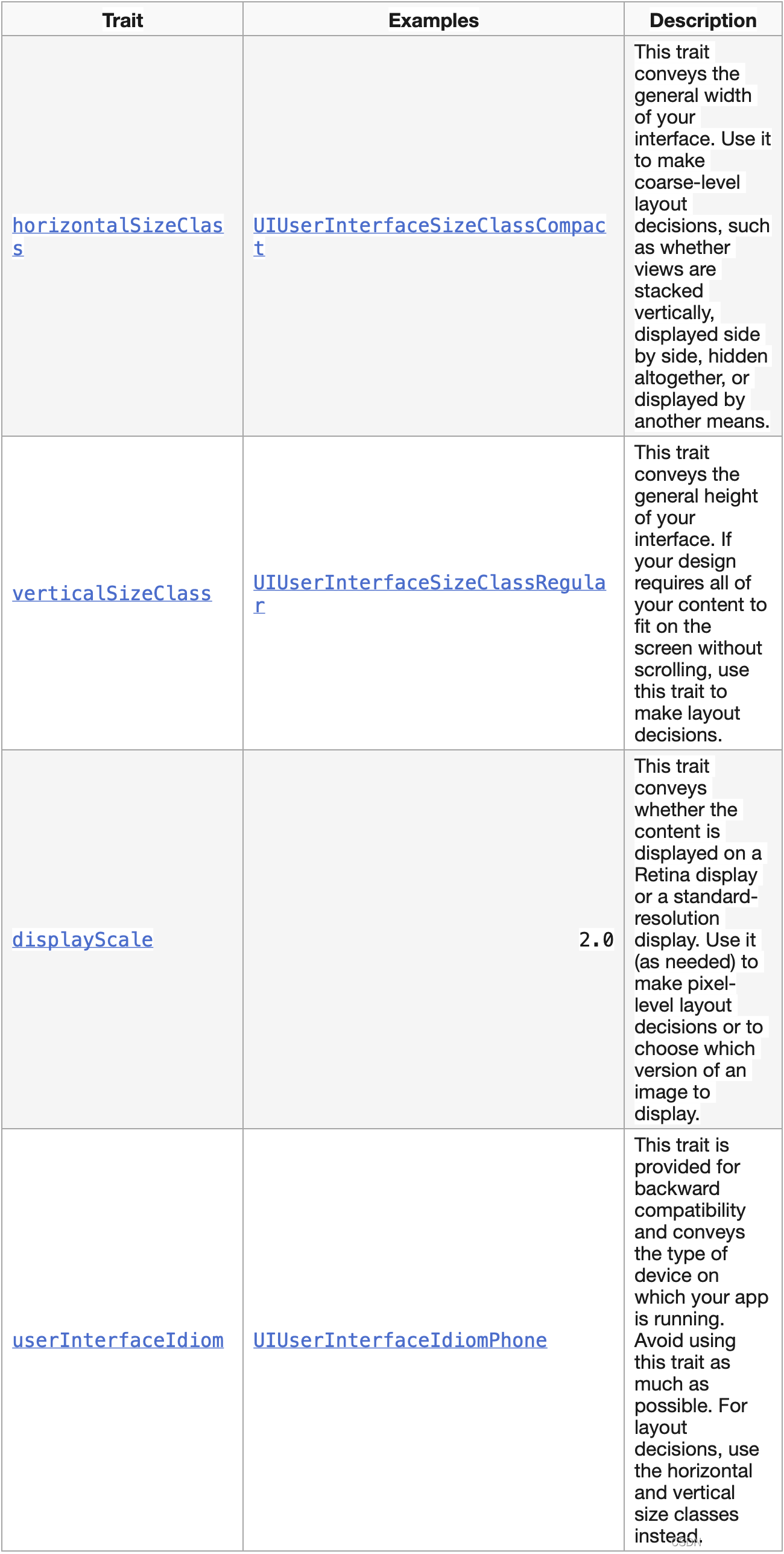
在这里插入图片描述

用traits决定如何展现视图。许多UIKit类根据你指定的traits定制信息。
下面是一些使用各种类型traits的小提示:
Use size classes to make coarse changes to your interface. Size class changes are an appropriate time to add or remove views, add or remove child view controllers, or change your layout constraints. You can also do nothing and let your interface adapt automatically using its existing layout constraints.
使用size类做粗略改变,比如添加或移除View或子VC,或改变布局约束
Never assume that a size class corresponds to the specific width or height of a view. Your view controllers’ size classes can change for many reasons. For example, a container view controller on iPhone might make one of its children horizontally regular to force it to display its contents differently.
不要以为size类会和view的特定尺寸一致,size类会因很多因素而发生改变。
Avoid using idiom information to make decisions about the layout or content of your interface. Apps running on iPad and iPhone should generally display the same information and should use size classes to make layout decisions.
不要用不靠谱的消息改变界面的布局或内容
Trait不经常发生,UIKit会根据底层环境改变更新VC的traits
Size class traits are much more likely to change than the display scale trait. The idiom trait should rarely, if ever, change. Size class changes occur for the following reasons:
The vertical or horizontal size class of the view controller’s window changed, usually because of a device rotation.
The horizontal or vertical size class of a container view controller changed.
The horizontal or vertical size class of the current view controller was changed explicitly by its container.
size traits发生无非以下几种情况:
VC的window横竖尺寸改变,一般是设备旋转
容器VC的横竖尺寸改变
VC因为容器VC横竖尺寸改变而显式改变

Size类改变会影响到该视图在视图层级中的所有子视图
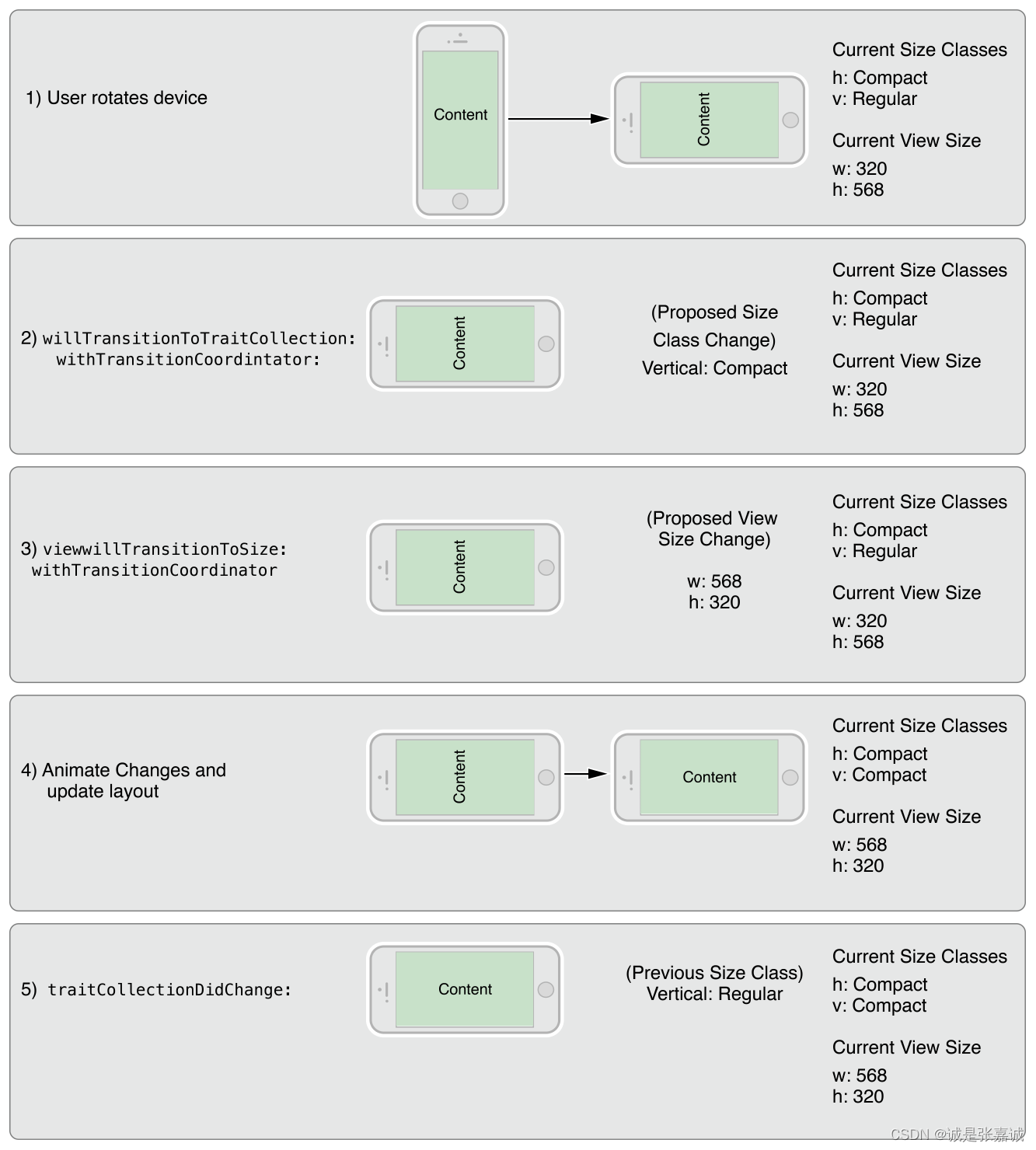
The window size change is propagated down the view controller hierarchy along with any corresponding trait changes. For each view controller in the hierarchy, UIKit calls the following methods to report those changes:
The willTransitionToTraitCollection:withTransitionCoordinator: tells each relevant view controller that its traits are about to change.
The viewWillTransitionToSize:withTransitionCoordinator: tells each relevant view controller that its size is about to change.
The traitCollectionDidChange: tells each relevant view controller that its traits have now changed.
When walking the view controller hierarchy, UIKit reports changes to a view controller only when there is a change to report. If a container view controller overrides the size classes of its children, those children are not notified when the container’s size class changes. Similarly, if a view controller’s view has a fixed width and height, it does not receive size change notifications.
Window尺寸改变会影响到当前VC层级中的所有VC,引发相同的traits改变,层级中的每个VC都会被UIKit以以下方式通知:
willTransitionToTraitCollection:withTransitionCoordinator: 告诉所有有关VC的traits将要改变
viewWillTransitionToSize:withTransitionCoordinator:告诉所有有关VC的尺寸将要改变
traitCollectionDidChange: 通知所有有关VC的traits已经改变完成
UIKit只会通知应该通知的,如果一个容器VC重写了子VC的size类,那么当容器VC的size类发生改变时子VC将不会被通知,如果子VC的长宽是混合的,那么它也不会被通知。
在这里插入图片描述

Never assume that your app will be displayed with a specific size class on a device. Always check the size class found in an object’s trait collection when making decisions about how to configure that object.
不要觉得app会自己显示成特定的size,当决定如何配置对象时,时刻检查它traits的size类

Building an Adaptive Interface

一个适应性强的界面应该能响应trait和size的改变,在VC级别使用traits做一些粗略改变,大的调好了就该微调了。
子VC默认继承父VC的traits,对于一些traits,父VC的不一定在子VC上也管用
When implementing a container view controller, you modify the traits of the child by calling the setOverrideTraitCollection:forChildViewController: method of the container view controller. You create a new set of traits and associate them with a child view controller. You execute this code from your parent view controller and only need to do so once. Overridden traits remain with the child until you change them again or until you remove the child from your view controller hierarchy
When the traits of the parent view controller change, children inherit any traits that are not explicitly overridden by the parent. For example, when the parent’s horizontal size class changes from regular to compact, the child in the preceding example retains its regular horizontal size class. However, if the displayScale trait changes, the child inherits the new value.
当初始化容器VC时,通过调用容器VC的setOverrideTraitCollection:forChildViewController: 方法修改子VC的traits,创建一个新traits集合并与子VC关联,从父VC那执行代码并且仅执行一次,被重写的traits保留子VC直到你再一次修改它们或者你不再需要他们
当父VC的traits改变时,子VC继承所有没有被父VC显式重写的traits,比如size就不会跟着变,但如果是displayScale就会跟着变
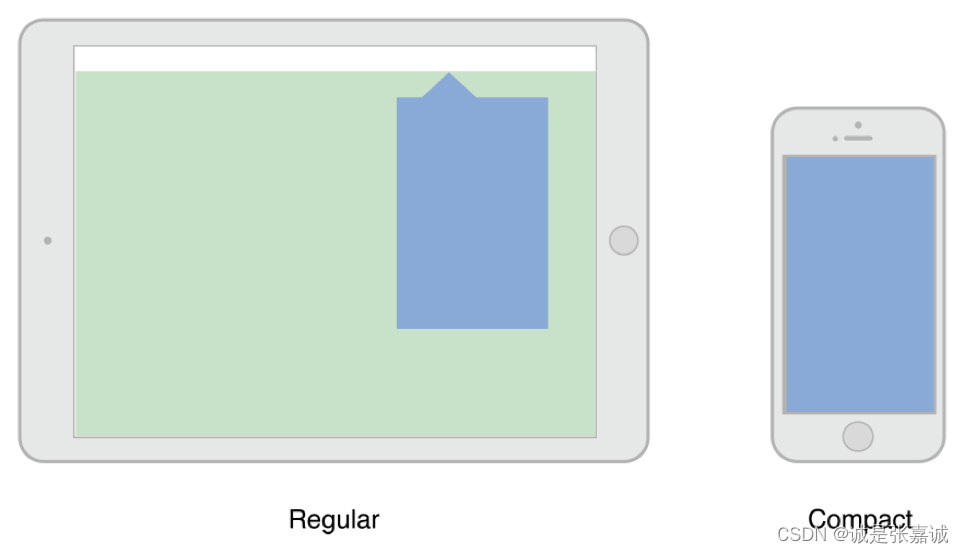
For some apps, adapting to a full-screen style may present problems. For example, a popover is normally dismissed by tapping outside its bounds, but doing so is not possible in a compact environment where the popover covers the entire screen, as shown in Figure 13-3. When the default adaptation style is not appropriate, you can tell UIKit to use a different style or present an entirely different view controller that is better suited to the full-screen style.
Figure 13-3A popover in regular and compact environments
在这里插入图片描述

presented VC自动适配横竖屏,过渡的时候默认将 presentation style变为UIModalPresentationFullScreen,对于自定义的风格 presentation控制器可以根据它决定适配情况。但对于某些视图来说,全屏就不合适,比如全屏的弹出框,因为弹出框在点击区域外才会消失,当适配模式不合适时,可以更换或显示其他适合全屏的VC

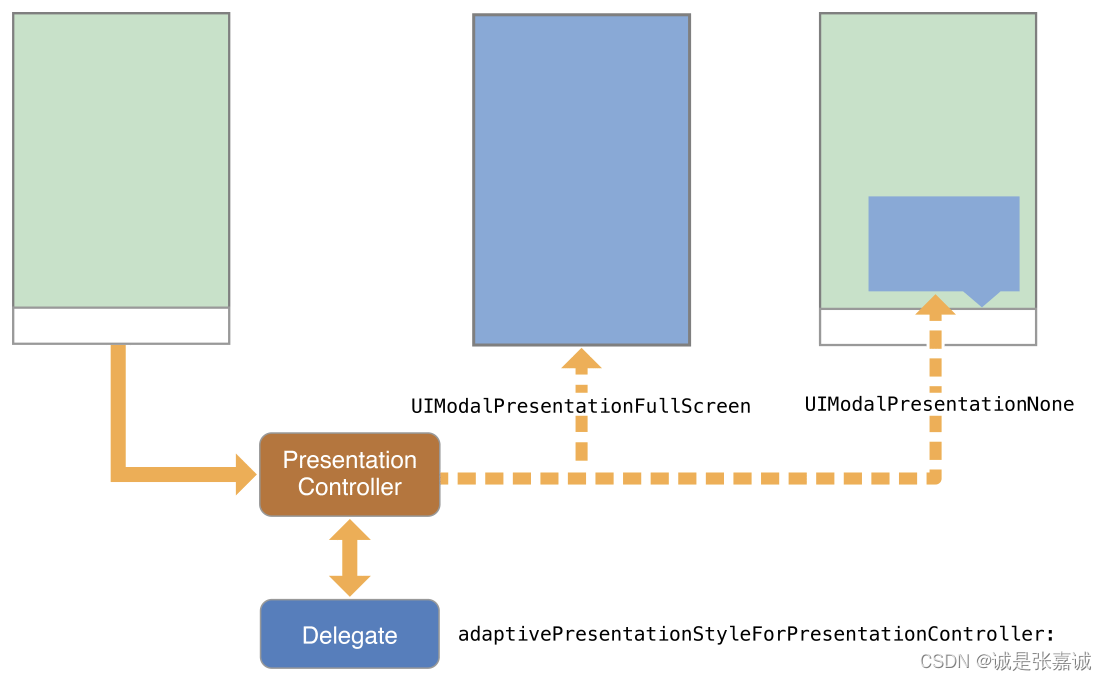
To change the default adaptive behavior for a presentation style, assign a delegate to the associated presentation controller. You access the presentation controller using the presented view controller’s presentationController property. The presentation controller consults your delegate object before making any adaptivity-related changes. The delegate can return a different presentation style than the default and it can provide the presentation controller with an alternate view controller to display.
Use the delegate’s adaptivePresentationStyleForPresentationController: method to specify a different presentation style than the default. When transitioning to a compact environment, the only supported styles are the two full-screen styles or UIModalPresentationNone. Returning UIModalPresentationNone tells the presentation controller to ignore the compact environment and continue using the previous presentation style. In the case of a popover, ignoring the change gives you the same iPad-like popover behavior on all devices. Figure 13-4 shows the default full-screen adaption and no adaptation side by side so that you can compare the resulting presentations.
Figure 13-4Changing the adaptive behavior for a presented view controller
在这里插入图片描述

To replace the view controller altogether, implement the delegate’s presentationController:viewControllerForAdaptivePresentationStyle: method. When adapting to a compact environment, you might use that method to insert a navigation controller into your view hierarchy or load a view controller that was specifically designed for the smaller space.

通过赋一个代理给有关的presentation控制器来更改适配模式,通过访问新VC的presentationController 属性来访问它的presentation控制器。presentation控制器在做和适配有关的更改时需要询问代理对象,代理可以返回一个不同的presentation风格,用adaptivePresentationStyleForPresentationController: 方法指定其他的显示风格,当过渡到紧凑情况下时,支持的风格只有两种全屏风格或UIModalPresentationNone.,UIModalPresentationNone.意味着他会忽略紧凑并沿用之前的风格
实现代理的presentationController:viewControllerForAdaptivePresentationStyle: 方法一起替换VC,当适配紧凑环境时,你可能会用它插入navigation控制器到层级中或为紧凑环境特制的VC

实现适配弹出框的小贴士
弹出框在从横全屏到横分屏之间需要更多的操作改变,当变成紧凑环境时默认弹出框全屏,影响到了弹出框最好的消失方式(点击弹出框外侧)。 通过以下方式补偿
Push the popover’s view controller onto an existing navigation stack. When there is a parent navigation controller available, dismiss the popover and push its view controller onto the navigation stack.
Add controls to dismiss the popover when it is presented full-screen. You can add controls to the popover’s view controller, but a better option is to swap out the popover for a navigation controller using the presentationController:viewControllerForAdaptivePresentationStyle: method. Using a navigation controller gives you a modal interface and space to add a Done button or other controls to dismiss the content.
Use a presentation controller delegate to eliminate any adaptivity changes. Get the popover presentation controller and assign a delegate to it that implements the adaptivePresentationStyleForPresentationController: method. Returning UIModalPresentationNone from that method causes the popover to continue to be displayed as a popover.

尺寸可能由于许多原因改变:比如:
The dimensions of the underlying window change, usually because of an orientation change. 底层window尺寸改变(坐标改变)
A parent view controller resizes one of its children. 父VC重新计算子VC的大小
A presentation controller changes the size of its presented view controller.旧VC改变新VC的大小
When size changes happen, UIKit automatically updates the size and position of the visible view controller hierarchies through the normal layout process. If you specified the size and position of your views using Auto Layout constraints, your app adapts automatically to any size changes and should run on devices with different screen sizes.
If your Auto Layout constraints are insufficient to achieve the look you want, you can use the viewWillTransitionToSize:withTransitionCoordinator: method to make changes to your layout. You can also use that method to create additional animations to run alongside the size-change animations. For example, during an interface rotation, you might use the transition coordinator’s targetTransform property to to create a counter-rotation matrix for parts of your interface.

CocosCreator视频播放黑屏?手把手教你封装VideoPlayer组件解决Web环境问题 本文针对Cocos Creator在Web环境下视频播放黑屏等常见问题,提供了一套工程化的VideoPlayer组件封装解决方案。文章深入剖析了浏览器自动播放策略、DOM样式隔离等核心挑战,并手把手教你实现一个健壮的管理器,涵盖兼容性处理、性能优化与内存管理,确保视频播放稳定流畅。 阅读详情

相关推荐

解决RocketMQ中@Bean配置DefaultMQProducer时的MQClientException问题

本文针对Spring Boot整合RocketMQ时,因在@Bean配置中手动调用DefaultMQProducer的start()方法而引发的MQClientException问题,深入剖析了其根本原因在于生命周期管理冲突。文章提供了简洁有效的解决方案——移除手动启动,让Spring容器自动管理,并给出了完整的配置示例与生产环境最佳实践。

rnn9storyteller的博客 691

细数AutoLayout以来UIView和UIViewController新增的相关API

iOS开发里键盘是经常需要打交道的地方,下面为大家带来我整理总结的几种隐藏键盘的方法。 一、隐藏自身软键盘 当对于有多个UITextField控件都想通过点击“Return”来隐藏自身软键盘的情况,这时的最好办法是使用Did End on Exit事件。在点击软键盘右下角的“Return”按钮后,会触发该事件。 该事件有一个sender参数表示当前文本框,这样便可以编写一个通用的事件处理方法

u011736319的专栏 1094

RseQC实战指南:从安装到RNA-Seq数据质控全流程解析

本文提供了一份详尽的RseQC实战指南,涵盖从安装配置到RNA-Seq数据质控的全流程。文章重点解析了RseQC作为专业质控工具的核心价值,手把手指导如何通过Conda或pip完成安装,并深入讲解了bam_stat.py、geneBody_coverage.py等关键模块的使用方法与结果解读技巧,帮助用户有效评估RNA完整性、文库构建质量及链特异性,确保下游分析的可靠性。

weixin_29200741的博客 204

iOS9-by-Tutorials-学习笔记五:Multitasking

iOS9-by-Tutorials-学习笔记五:Multitasking 本文版权归作者所有,如需转载请联系孟祥月 优快云博客:http://blog.youkuaiyun.com/mengxiangyue 独立博客:http://mengxiangyue.com 在WWDC 2015上,苹果推出了multitasking,这个功能允许我们同时运行两个App,比如在看视频的时候,能够同时

孟祥月的专栏 1940

别再折腾框架了!用华为应用市场官方渠道搞定GBOX,安全安装谷歌全家桶(鸿蒙HarmonyOS 3/4实测)

本文详细介绍了如何在鸿蒙系统上通过华为应用市场官方渠道安全安装GBOX,实现谷歌全家桶的无损使用。该方法避免了传统破解方式的安全风险,利用沙箱技术隔离运行环境,确保系统稳定性和数据安全。特别适合鸿蒙HarmonyOS 3/4用户安全使用谷歌生态应用。

weixin_29305313的博客 4837

MOOS-ivp 实验三 MOOS简介(1)

系列文章目录 提示:这里可以添加系列文章的所有文章的目录,目录需要自己手动添加 例如:第一章 Python 机器学习入门之pandas的使用 提示:写完文章后,目录可以自动生成,如何生成可参考右边的帮助文档 文章目录系列文章目录前言一、pandas是什么?二、使用步骤1.引入库2.读入数据总结 前言 提示:这里可以添加本文要记录的大概内容: 例如:随着人工智能的不断发展,机器学习这门技术也越来越重要,很多人都开启了学习机器学习,本文就介绍了机器学习的基础内容。 提示:以下是本篇文章正文内容,下面案例

weixin_44151170的博客 7435

问题5:屏幕旋转时,对布局的处理

2019独角兽企业重金招聘Python工程师标准>>> ...

weixin_34268843的博客 337

ABAP动态填充Word模板:基于cl_docx_document的XML替换方案

本文详细介绍了ABAP中基于cl_docx_document类的动态Word模板填充方案。该方案通过直接操作DOCX文件的XML核心,完美解决了传统OLE/DOI方法在格式保真、性能和后台运行方面的痛点,是实现复杂、批量Word文档生成的优雅解决方案。

gpt4scribbler的博客 526

iOS 横竖屏适配

iOS 横竖屏适配,在旋转手机的时候,自动适配 // 刚要旋转时的方法 - (void)willTransitionToTraitCollection:(UITraitCollection *)newCollection withTransitionCoordinator:(id)coordinator {     if (newCollection.hor

杨永福 871

Midscene.js(3):手把手教你用 YAML 脚本实现 AI 驱动的 Web UI 自动化「喂饭教程」

Midscene.js是一款开源的AI驱动UI自动化工具,通过自然语言描述即可控制浏览器或Android设备执行操作。它支持YAML脚本编写测试用例,降低了自动化测试门槛。

blues_C的博客 3247

VN1640 CH5 I/O通道终极指南:【从硬件原理—>工程实战—>自动化测试实战】

摘要:本文详细解析Vector VN1640 CH5 I/O通道的硬件原理与工程应用,涵盖模拟输入(AIN)、数字输入(DIN)和数字输出(DOUT)三大功能模块的配置指南。通过硬件隔离设计实现高精度信号采集与驱动控制,重点分析开漏输出特性及保护机制。提供PWM控制、ECU上电时序测试、传感器闭环控制等实战案例的CAPL脚本代码,并强调多设备同步采集的精准性(时间偏差<1µs)。适用于汽车电子HIL测试、ECU信号监测等场景,所有方案均通过实际项目验证。

汽车控制器系统开发、VIL测试、HIL测试、MIL测试、EMS电喷系统标定与开发、热管理系统标定 761

IOS 适配的几种模式

1.尺寸适配 1.原因 iOS7中所有导航栏都为半透明,导航栏(height=44)和状态栏(height=20)不再单独占用高度,即View的(0,0)坐标是从屏幕左上角开始的;而在iOS7之前的系统中,导航栏和状态栏单独占用高度,即View的(0,0)的坐标从导航栏下面开始的。 解决方案: 1&gt; 修改window的frame坐标 这个思路是在iOS7系统里面把w...

iteye_14589的博客 2117

MediaPipe 从入门到精通:安装、配置与多场景应用实战手册

人体姿态检测是 MediaPipe 的核心功能之一,它能够从图像或视频中识别人体姿态,并输出关键点的坐标。这些关键点覆盖了身体的主要部位,例如肩膀、肘部、髋部、膝盖等,总计 33 个点。每个关键点包含 x、y、z 坐标(归一化到 0-1 范围)以及可见性评分,可用于分析动作、姿势或开发健身、游戏等应用。手部关键点检测是 MediaPipe 的另一大亮点,它可以识别图像或视频中的手部,并输出 21 个关键点的坐标。这些关键点覆盖手掌和手指的各个部位,适用于手势识别、虚拟现实或交互式应用。

m0_71589036的博客 389

为iPhone6设计自适应布局(纯代码实现)

目前网络上已经有很多关于AutoLayout的讲义可供大家学习,大部分的Demo都是通过IB或者Storyboard上完成的。很多人也在思考,到目前iOS 8这个版本,使用代码来实现UI布局是不是合适?今天有时间,使用纯代码写了一小段布局代码,供大家比较。 本文所需要实现的界面布局来自这一篇博客:ADAPTIVE LAYOUTS FOR iPHONE 6,对应的中文翻译版本为:为iPhone

Su_tianbiao的专栏 1619

ET2012新版免狗免安装绿色软件

ET2012新版免狗免安祖昂绿色软件。,新界面,新视觉,

深度学习工具包 DeepLearningToolbox

深度学习工具包Deprecation notice.-----This toolbox is outdated and no longer maintained.There are much better tools available for deep learning than this toolbox, e.g. [Theano](http://deeplearning.net/software/theano/), [torch](http://torch.ch/) or [tensorflow](http://www.tensorflow.org/)I would suggest you use one of the tools mentioned above rather than use this toolbox.Best, Rasmus.DeepLearnToolbox================A Matlab toolbox for Deep Learning.Deep Learning is a new subfield of machine learning that focuses on learning deep hierarchical models of data.It is inspired by the human brain's apparent deep (layered, hierarchical) architecture.A good overview of the theory of Deep Learning theory is[Learning Deep Architectures for AI](http://www.iro.umontreal.ca/~bengioy/papers/ftml_book.pdf)For a more informal introduction, see the following videos by Geoffrey Hinton and Andrew Ng.* [The Next Generation of Neural Networks](http://www.youtube.com/watch?v=AyzOUbkUf3M) (Hinton, 2007)* [Recent Developments in Deep Learning](http://www.youtube.com/watch?v=VdIURAu1-aU) (Hinton, 2010)* [Unsupervised Feature Learning and Deep Learning](http://www.youtube.com/watch?v=ZmNOAtZIgIk) (Ng, 2011)If you use this toolbox in your research please cite [Prediction as a candidate for learning deep hierarchical models of data](http://www2.imm.dtu.dk/pubdb/views/publication_details.php?id=6284)```@MASTERSTHESIS\{IMM2012-06284, author = "R. B. Palm", title = "Prediction as a candidate for learning deep hierarchical models of data", year = "2012",}```Contact: rasmusbergpalm at gmail dot comDirectories included in the toolbox-----------------------------------`NN/` - A library for Feedforward Backpropagation Neural Networks`CNN/` - A library for Convolutional Neural Networks`DBN/` - A library for Deep Belief Networks`SAE/` - A library for Stacked Auto-Encoders`CAE/` - A library for Convolutional Auto-Encoders`util/` - Utility functions used by the libraries`data/` - Data used by the examples`tests/` - unit tests to verify toolbox is workingFor references on each library check REFS.mdSetup-----1. Download.2. addpath(genpath('DeepLearnToolbox'));Example: Deep Belief Network---------------------```matlabfunction test_example_DBNload mnist_uint8;train_x = double(train_x) / 255;test_x = double(test_x) / 255;train_y = double(train_y);test_y = double(test_y);%% ex1 train a 100 hidden unit RBM and visualize its weightsrand('state',0)dbn.sizes = [100];opts.numepochs = 1;opts.batchsize = 100;opts.momentum = 0;opts.alpha = 1;dbn = dbnsetup(dbn, train_x, opts);dbn = dbntrain(dbn, train_x, opts);figure; visualize(dbn.rbm{1}.W'); % Visualize the RBM weights%% ex2 train a 100-100 hidden unit DBN and use its weights to initialize a NNrand('state',0)%train dbndbn.sizes = [100 100];opts.numepochs = 1;opts.batchsize = 100;opts.momentum = 0;opts.alpha = 1;dbn = dbnsetup(dbn, train_x, opts);dbn = dbntrain(dbn, train_x, opts);%unfold dbn to nnnn = dbnunfoldtonn(dbn, 10);nn.activation_function = 'sigm';%train nnopts.numepochs = 1;opts.batchsize = 100;nn = nntrain(nn, train_x, train_y, opts);[er, bad] = nntest(nn, test_x, test_y);assert(er < 0.10, 'Too big error');```Example: Stacked Auto-Encoders---------------------```matlabfunction test_example_SAEload mnist_uint8;train_x = double(train_x)/255;test_x = double(test_x)/255;train_y = double(train_y);test_y = double(test_y);%% ex1 train a 100 hidden unit SDAE and use it to initialize a FFNN% Setup and train a stacked denoising autoencoder (SDAE)rand('state',0)sae = saesetup([784 100]);sae.ae{1}.activation_function = 'sigm';sae.ae{1}.learningRate = 1;sae.ae{1}.inputZeroMaskedFraction = 0.5;opts.numepochs = 1;opts.batchsize = 100;sae = saetrain(sae, train_x, opts);visualize(sae.ae{1}.W{1}(:,2:end)')% Use the SDAE to initialize a FFNNnn = nnsetup([784 100 10]);nn.activation_function = 'sigm';nn.learningRate = 1;nn.W{1} = sae.ae{1}.W{1};% Train the FFNNopts.numepochs = 1;opts.batchsize = 100;nn = nntrain(nn, train_x, train_y, opts);[er, bad] = nntest(nn, test_x, test_y);assert(er < 0.16, 'Too big error');```Example: Convolutional Neural Nets---------------------```matlabfunction test_example_CNNload mnist_uint8;train_x = double(reshape(train_x',28,28,60000))/255;test_x = double(reshape(test_x',28,28,10000))/255;train_y = double(train_y');test_y = double(test_y');%% ex1 Train a 6c-2s-12c-2s Convolutional neural network %will run 1 epoch in about 200 second and get around 11% error. %With 100 epochs you'll get around 1.2% errorrand('state',0)cnn.layers = { struct('type', 'i') %input layer struct('type', 'c', 'outputmaps', 6, 'kernelsize', 5) %convolution layer struct('type', 's', 'scale', 2) %sub sampling layer struct('type', 'c', 'outputmaps', 12, 'kernelsize', 5) %convolution layer struct('type', 's', 'scale', 2) %subsampling layer};cnn = cnnsetup(cnn, train_x, train_y);opts.alpha = 1;opts.batchsize = 50;opts.numepochs = 1;cnn = cnntrain(cnn, train_x, train_y, opts);[er, bad] = cnntest(cnn, test_x, test_y);%plot mean squared errorfigure; plot(cnn.rL);assert(er<0.12, 'Too big error');```Example: Neural Networks---------------------```matlabfunction test_example_NNload mnist_uint8;train_x = double(train_x) / 255;test_x = double(test_x) / 255;train_y = double(train_y);test_y = double(test_y);% normalize[train_x, mu, sigma] = zscore(train_x);test_x = normalize(test_x, mu, sigma);%% ex1 vanilla neural netrand('state',0)nn = nnsetup([784 100 10]);opts.numepochs = 1; % Number of full sweeps through dataopts.batchsize = 100; % Take a mean gradient step over this many samples[nn, L] = nntrain(nn, train_x, train_y, opts);[er, bad] = nntest(nn, test_x, test_y);assert(er < 0.08, 'Too big error');%% ex2 neural net with L2 weight decayrand('state',0)nn = nnsetup([784 100 10]);nn.weightPenaltyL2 = 1e-4; % L2 weight decayopts.numepochs = 1; % Number of full sweeps through dataopts.batchsize = 100; % Take a mean gradient step over this many samplesnn = nntrain(nn, train_x, train_y, opts);[er, bad] = nntest(nn, test_x, test_y);assert(er < 0.1, 'Too big error');%% ex3 neural net with dropoutrand('state',0)nn = nnsetup([784 100 10]);nn.dropoutFraction = 0.5; % Dropout fraction opts.numepochs = 1; % Number of full sweeps through dataopts.batchsize = 100; % Take a mean gradient step over this many samplesnn = nntrain(nn, train_x, train_y, opts);[er, bad] = nntest(nn, test_x, test_y);assert(er < 0.1, 'Too big error');%% ex4 neural net with sigmoid activation functionrand('state',0)nn = nnsetup([784 100 10]);nn.activation_function = 'sigm'; % Sigmoid activation functionnn.learningRate = 1; % Sigm require a lower learning rateopts.numepochs = 1; % Number of full sweeps through dataopts.batchsize = 100; % Take a mean gradient step over this many samplesnn = nntrain(nn, train_x, train_y, opts);[er, bad] = nntest(nn, test_x, test_y);assert(er < 0.1, 'Too big error');%% ex5 plotting functionalityrand('state',0)nn = nnsetup([784 20 10]);opts.numepochs = 5; % Number of full sweeps through datann.output = 'softmax'; % use softmax outputopts.batchsize = 1000; % Take a mean gradient step over this many samplesopts.plot = 1; % enable plottingnn = nntrain(nn, train_x, train_y, opts);[er, bad] = nntest(nn, test_x, test_y);assert(er < 0.1, 'Too big error');%% ex6 neural net with sigmoid activation and plotting of validation and training error% split training data into training and validation datavx = train_x(1:10000,:);tx = train_x(10001:end,:);vy = train_y(1:10000,:);ty = train_y(10001:end,:);rand('state',0)nn = nnsetup([784 20 10]); nn.output = 'softmax'; % use softmax outputopts.numepochs = 5; % Number of full sweeps through dataopts.batchsize = 1000; % Take a mean gradient step over this many samplesopts.plot = 1; % enable plottingnn = nntrain(nn, tx, ty, opts, vx, vy); % nntrain takes validation set as last two arguments (optionally)[er, bad] = nntest(nn, test_x, test_y);assert(er < 0.1, 'Too big error');```[![Bitdeli Badge](https://d2weczhvl823v0.cloudfront.net/rasmusbergpalm/deeplearntoolbox/trend.png)](https://bitdeli.com/free "Bitdeli Badge")

iOS 13 正式发布,来看看有哪些 API 变动

iOS 13 已正式发布,网上对其用户体验上的新特性的描述也很多。对于开发来说,需要关注的另一方面是新系统在 API 层面做了哪些改动,从而会对我们现有的代码产生什么影响。 在这里,我们基于 iOS 13 Release Notes 做了一些整理,主要是列表出 Apple 提供的一些新的 API 和弃用了哪些 API,一起来看看。 General iOS 13 不再支持 UIApplicatio...

jike_yangyujing的博客 566

计算机控制技术及应用

《计算机控制技术及应用》通过总结作者的科研成果和吸收国内外的先进理论、方法和技术,以计算机控制系统的网络化、开放化、智能化和集成化发展趋势为主线索,主要介绍计算机控制系统的基本概念和计算机控制系统的典型形式,计算机控制系统的数学描述与基本分析方法,以及数字PID控制器、最少拍控制系统、达林算法、状态变量设计法等设计方法及其各种改进算法。重点突出计算机控制系统输入输出通道接口的设计方法和典型控制系统的设计案例与实现方法等。

iOS视频播放的横屏与竖屏的处理

一般来说,视频播放的横竖屏处理有两种: 1、视频播放的选装有两种方式进行处理,一种是旋转的的时候,视频也跟着旋转; 2、还有一种可能就是屏幕旋转的时候,通过一个按钮只是选装视频一个横屏,一个为竖屏就好了; 对于播放界面不随着屏幕旋转的方式,通过改变keywindow的大小和方向来修改横屏,通过一个按钮的点击事件; 若是通过第1种方案,也就是随着屏幕的旋转播放页面发生了旋转的时候,需要UITraitEnvironment 接口的方法,好像这个方法监听,这个接口的方法调用情况:(1)初始...

程序猿老樊的博客 4017

jdk-8u144-linux-x64.tar.gz.

该资源为搭建Linux系统Java环境用,资源的后缀为tar.gz格式的压缩包

iOS屏幕旋转及其基本适配方法

屏幕旋转示例.jpeg 前段时间抽空总结了一下iOS视频播放的基本用法,发现这其中还有一个我们无法绕过的问题,那就是播放界面的旋转与适配。的确,视频播放与游戏类型的App经常会遇到这个的问题。由于至今接手的项目中不常涉及这块知识疏于总结,在搜索了一些资料后也发现都很散乱,所以决定在这里重新整理一下。 目录 一、最让人纠结的三种枚举 二、两种屏幕旋转的触发方式 三、屏幕旋转控制的优先级 四、开启屏幕旋转的全局权限 五、开启屏幕旋转的局部权限(视图控制器) 六、实现需求:项目主要界面竖屏,部分界面横屏..

u013712343的博客 2834

【iOS】UIViewController的生命周期

本篇博客主要是关于UIViewController的生命周期。在iOS开发中UIViewController扮演者非常重要的角色,它是视图view和数据model的桥梁,通过UIViewController的管理有条不紊的将数据展示在视图上。作为UIKit中最基本的一个类,一般复杂的项目都离不开UIViewController作为基类。所以了解UIViewController的整个生命周期是有必要的。理解并正确实现这些生命周期方法是开发 iOS 应用的关键部分。

2301_80467753的博客 1599

Swift 之横竖屏切换

文章目录1、核心方法 viewWillTransition2、如何在横竖屏切换时更改 UI 细节?3、后续问题发现(1) 如果在两个类中使用 viewWillTransitionToSize 不起作用 1、核心方法 viewWillTransition /// 切换横竖屏时,重设子view布局 public override func viewWillTransition(to size: CGSize, with coordinator: UIViewControllerTransitionCoordi

qq_39438055的博客 6087

iOS 9:iPad上的多任务处理简介

介绍 在iOS 9中,Apple引入了许多针对iPad的多任务处理功能。 其中包括幻灯片 , 拆分视图和画中画 。 如果您不熟悉这些新功能,这里是简要概述。 滑过 iPad Mini 2及更高版本,所有iPad Air型号和iPad Pro均提供Slide Over。 它允许应用程序从屏幕的右侧滑入,并保持屏幕的整个高度(双向)和iPhone屏幕的大致宽度。 画中画 画中画功能在所有支...

代码教主 1682

iOS横竖屏旋转及其基本适配方法

前段时间抽空总结了一下iOS视频播放的基本用法,发现这其中还有一个我们无法绕过的问题,那就是播放界面的旋转与适配。的确,视频播放与游戏类型的App经常会遇到这个的问题。由于至今接手的项目中不常涉及这块知识疏于总结,在搜索了一些资料后也发现都很散乱,所以决定在这里重新整理一下。 目录 一、最让人纠结的三种枚举 二、两种屏幕旋转的触发方式 三、屏幕旋转控制的优先级 四、开启屏幕旋转的全局

梧雨北辰的博客 2万+

iOS 屏幕旋转的实践解析

摘要:如何更灵活便捷的实现自定义屏幕旋转场景,本文带你揭秘! 文|即构 iOS 应用开发团队 屏幕旋转是在视频直播类 APP 中常见的场景,在即构科技之前发布的 Roomkit SDK 中也有屏幕跟随手机自动旋转的场景。 在 Roomkit SDK 自身开发和客户接入的过程中我们也会发现,实现屏幕旋转的需求往往没有那么顺利,经常会出现无法旋转、旋转后布局适配等问题。 本篇文章根据我们以往的开发经验整理了屏幕旋转实现的相关实践方法,解析在实现过程中遇到的常见问题。 一、快速实现旋转

ZEGO即构科技 1981

屏幕旋转

override func viewWillTransition(to size: CGSize, with coordinator: UIViewControllerTransitionCoordinator) { super.viewWillTransition(to: size, with: coordinator) coordinator.a...

weixin_30951743的博客 144

爬爬爬之路:UI(三)自定义视图 MVC浅谈 视图控制器 屏幕旋转事件获取

自定义视图自定义视图是一种封装的方法通常一些复杂的界面都是由一些常用的控件组合构成的, 将这些组合提取出来.写成一个组合控件, 在完成复杂界面的时候, 就可以通过组合控件简化界面的逻辑.这个组合控件就称为自定义视图. 自定义视图的优劣取决于它的复用性. 自定义视图的复用性越高, 则它的质量就越高. 一个高质量的自定义视图, 可以让程序员在铺设界面的时候极大的缩减代码量和时间.如何完成一个自定义视图

慢慢向上爬的蜗牛的博客 861

popoverPresentationController

2019独角兽企业重金招聘Python工程师标准>>> ...

weixin_34198453的博客 242

UIPopoverPresentationController在横屏状态显示问题解决

iOS在iphone设备上使用UIPopoverPresentationController在横屏状态显示问题解决办法 问题描述 在项目中使用UIPopoverPresentationController,项目中有横竖屏切换的需求,在竖屏状态下,显示正常,但是切换到横屏状态下,显示错误,在屏幕中央由下弹起。经过一番研究找到了解决办法。 解决方案 //只实现这个代理的话,会有横屏显示不正确的问题...

chaoaifan的博客 952
上一篇: View Controller学习笔记—第三章Presentation and Transition
下一篇: Table View学习笔记—第一部分
诚是张嘉诚
博客等级 码龄7年 15粉丝 24原创
评论
成就一亿技术人!
拼手气红包6.0元
还能输入1000个字符
 
 条评论被折叠 查看
添加红包

请填写红包祝福语或标题

个

红包个数最小为10个

元

红包金额最低5元

当前余额3.43元 前往充值 >
需支付:10.00元
成就一亿技术人!
领取后你会自动成为博主和红包主的粉丝 规则
hope_wisdom
发出的红包
实付元
使用余额支付
点击重新获取
扫码支付
钱包余额 0

抵扣说明:

1.余额是钱包充值的虚拟货币,按照1:1的比例进行支付金额的抵扣。
2.余额无法直接购买下载,可以购买VIP、付费专栏及课程。

余额充值