


各位iOS开发大佬们好:
我是一名Swift+SwiftUI栈的iOS小白,目前还在上大三,最近准备实习,面试的过程中发现现在大公司很多还在用OC + UIKit的技术栈,OC我还在考虑要不要学,目前想先把UIKit学完,这是我在官网学习UIKit英文文档时摘录的本人认为的重点,如果你们也觉得对你们有用的话欢迎持续关注,我大概一天更一节,有事除外。格式什么的我也就不做了,翻译都是我自己翻译的,哪里不对欢迎在评论区指正,感谢各位大佬支持
今天2021年12月12日
这一章叫做
目录
Defining Your Subclass
使用自定义的UIViewController子类显示内容,大部分自定义VC都是内容VC,意思是他需要管理它的所有视图和数据,而另一部分是容器类VC,可能它的视图并不由它管理(详见上一章)
对于内容类VC,它的父类有以下几种情况
如果是列表视图就用UITableViewController
如果是集合视图就用UICollectionViewController
其他的就用UIVeiwController
对于容器类VC可以改系统定义的也可以子类化UIViewController
An app’s responder objects process incoming events and take appropriate actions. Although view controllers are responder objects, they rarely process touch events directly. Instead, view controllers typically handle events in the following ways.
View controllers define action methods for handling higher-level events. Action methods respond to:
Specific actions. Controls and some views call an action method to report specific interactions.
Gesture recognizers. Gesture recognizers call an action method to report the current status of a gesture. Use your view controller to process status changes or respond to the completed gesture.
View controllers observe notifications sent by the system or other objects. Notifications report changes and are a way for the view controller to update its state.
View controllers act as a data source or delegate for another object. View controllers are often used to manage the data for tables, and collection views. You can also use them as a delegate for an object such as a CLLocationManager object, which sends updated location values to its delegate.
Responding to events often involves updating the content of views, which requires having references to those views. Your view controller is a good place to define outlets for any views that you need to modify later.
应用程序的响应器对象处理传入事件并采取适当的操作。虽然VC就是响应器对象,但它一般不直接处理触摸事件,而是通过以下几个方法
VC定义的action方法是用来处理更高级的事件的,action对特定事件做出特定交互,对手势进行识别,通过VC进行状态转化或响应最终手势
VC观察系统通知或其他对象并更新自己的状态
VC作为一个数据源或其他对象的代理
响应事件通常会引起view内容更新,所以需要那些可能会更新View的引用
class MyViewController: UIViewController {
@IBOutlet weak var myButton : UIButton!
@IBOutlet weak var myTextField : UITextField!
@IBAction func myButtonAction(sender: id)
}
When you add, remove, or modify the size or position of views, remember to add and remove any constraints that apply to those views. Making layout-related changes to your view hierarchy causes UIKit to mark the layout as dirty. During the next update cycle, the layout engine computes the size and position of views using the current layout constraints and applies those changes to the view hierarchy.
当你增删改view的尺寸位置时,记得要添加或移除所有view上的约束,当在视图层级上进行和布局有关的更改时,会导致UIKit将布局标记为脏,在下个周期中会使用当前约束重新计算大小和位置,并将这些更改应用于视图层级中
When the size and position of views changes, UIKit updates the layout information for your view hierarchy. For views configured using Auto Layout, UIKit engages the Auto Layout engine and uses it to update the layout according to the current constraints. UIKit also lets other interested objects, such as the active presentation controller, know abut the layout changes so that they can respond accordingly.
During the layout process, UIKit notifies you at several points so that you can perform additional layout-related tasks. Use these notifications to modify your layout constraints or to make final tweaks to the layout after the layout constraints have been applied. During the layout process, UIKit does the following for each affected view controller:
Updates the trait collections of the view controller and its views, as needed; see When Do Trait and Size Changes Happen?
Calls the view controller’s viewWillLayoutSubviews method.
Calls the containerViewWillLayoutSubviews method of the current UIPresentationController object.
Calls the layoutSubviews method of view controller’s root view.
The default implementation of this method computes the new layout information using the available constraints. The method then traverses the view hierarchy and calls layoutSubviews for each subview.
Applies the computed layout information to the views.
Calls the view controller’s viewDidLayoutSubviews method.
Calls the containerViewDidLayoutSubviews method of the current UIPresentationController object.
View controllers can use the viewWillLayoutSubviews and viewDidLayoutSubviews methods to perform additional updates that might impact the layout process. Before layout, you might add or remove views, update the size or position of views, update constraints, or update other view-related properties. After layout, you might reload table data, update the content of other views, or make final adjustments to the size and position of views.
Here are some tips for managing your layout effectively:
Use Auto Layout. The constraints you create using Auto Layout are a flexible and easy way to position your content on different screen sizes.
Take advantage of the top and bottom layout guides. Laying out content to these guides ensures that your content is always visible. The position of the top layout guide factors in the height of the status bar and navigation bar. Similarly, the position of the bottom layout guide factors in the height of a tab bar or toolbar.
Remember to update constraints when adding or removing views. If you add or remove views dynamically, remember to update the corresponding constraints.
Remove constraints temporarily while animating your view controller’s views. When animating views using UIKit Core Animation, remove your constraints for the duration of the animations and add them back when the animations finish. Remember to update your constraints if the position or size of your views changed during the animation.
当view的大小位置更改时,UIKit会更新视图层级中的布局信息,如果配置了自动布局,UIKit根据当前约束使用自动布局修改。UIKit还允许其他希望根据变化做出响应的对象,如活动表示控制器,了解布局更改,以便它们做出相应响应。
布局过程中,UIKit会给你以下几个关键点让你有机会做其他操作:
更新视图控制器及其视图的特征集合
调用VC的viewWillLayoutSubviews 方法
调用当前UIPresentationController 对象的containerViewWillLayoutSubviews 方法
调用VC根视图的layoutSubviews 方法,此方法的默认实现使用可用的约束计算布局信息
将计算完成的布局应用到View上
调用VC的viewDidLayoutSubviews 方法
调用当前UIPresentationController 对象的containerViewDidLayoutSubviews 方法
WillLayoutSubviews和DidLayoutSubviews方法中可实现其他行为,比如will之前添加或删除其他view,改大小位置,更新约束,更改其他和视图有关的属性,Did时重新加载数据,更新其他view的内容
以下是一些更有效布局的提示
用autoLayout
充分利用上下的布局导航,可以让你的内容一直可视。比如上面状态栏、导航栏,下面tab bar
记得当增删View时同时更改约束信息
当动画VC中的View时先暂时去除约束
Managing Memory Efficiently
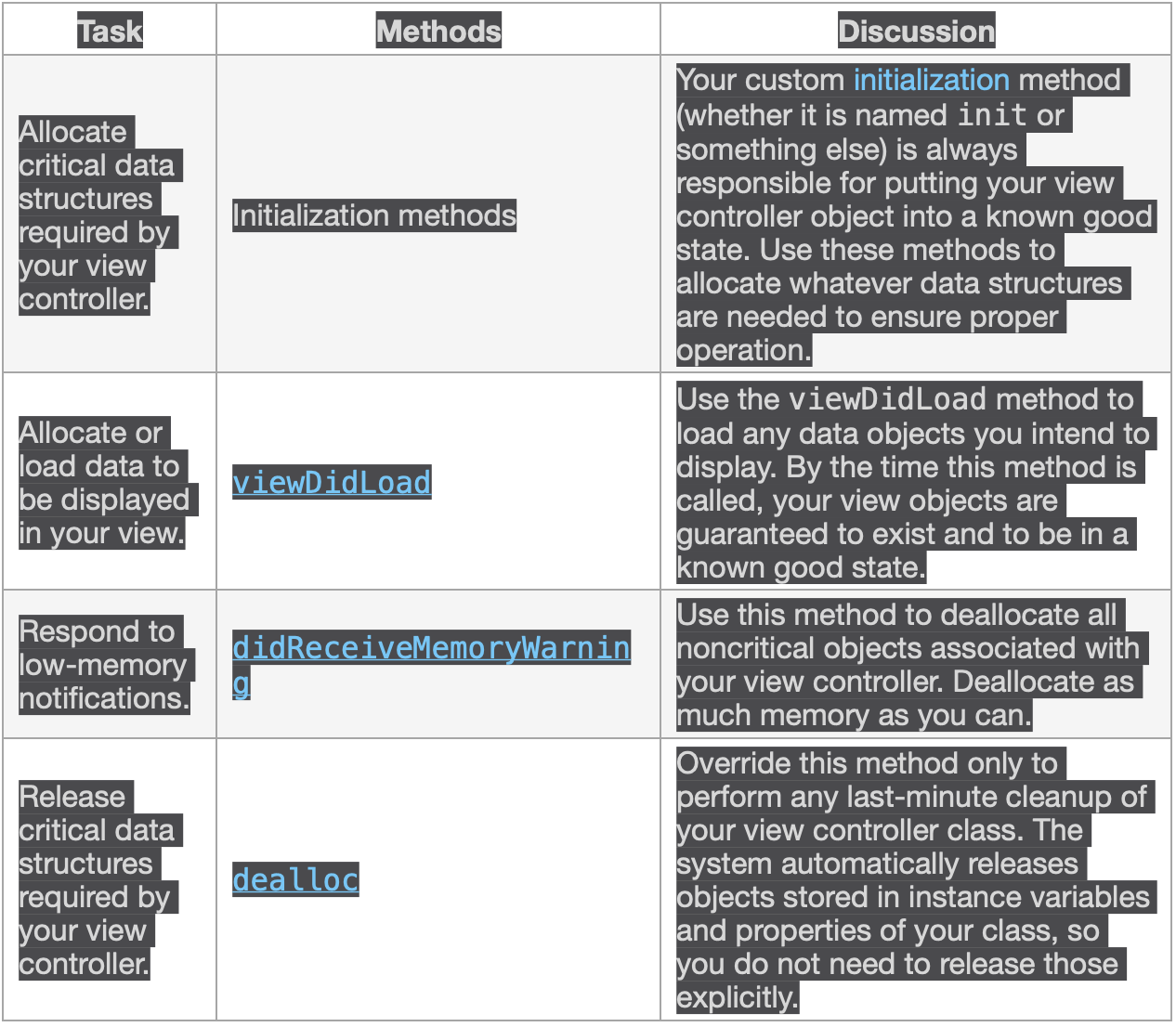
Although most aspects of memory allocation are for you to decide, Table 4-1 lists the methods of UIViewController where you are most likely to allocate or deallocate memory. Most deallocations involve removing strong references to objects. To remove a strong reference to an object, set properties and variables pointing to that object to nil.
Table 4-1Places to allocate and deallocate memory
内存管理
大部分deallocations都会引起对象移除强引用,移除对象强引用的方法则是设置指向对象的变量或属性为nil
Implementing a Container View Controller
容器类VC和普通VC没啥区别,都管理着一个root View和一些content,区别就是它有一部分内容是从其他VC那获取到的,而那些内容仍然由那些VC来管,容器类VC不管,容器类VC管的是那些提供内容的VC
设计时需要考虑一下问题
What is the role of the container and what role do its children play?
How many children are displayed simultaneously?
What is the relationship (if any) between sibling view controllers?
How are child view controllers added to or removed from the container?
Can the size or position of the children change? Under what conditions do those changes occur?
Does the container provide any decorative or navigation-related views of its own?
What kind of communication is required between the container and its children? Does the container need to report specific events to its children other than the standard ones defined by the UIViewController class?
Can the appearance of the container be configured in different ways? If so, how?
容器和它内容扮演的职责
同时显示多少部分内容
子VC添加移除的方式
子内容的大小位置可否变化啥情况会引起变化
容器是否提供自己的任何装饰性的或导航相关的视图?
容器和其内容之间需要哪种联系,容器类是否需要向子内容分发除了UIViewController类定义的标准事件之外的其他事件
容器的外观可以用不同的方式配置吗?如果可以的话怎么做
The only requirement from UIKit is that you establish a formal parent-child relationship between the container view controller and any child view controllers. The parent-child relationship ensures that the children receive any relevant system messages. Apart from that, most of the real work happens during the layout and management of the contained views, which is different for each container.
实现容器类VC时UIKit的唯一要求就是你得为容器和内容之间创建父子隶属关系,这种关系确保了内容可以接受所有系统消息。除此之外,大部分工作都发生在布局和管理内容上,这更需要这种隶属关系
然后举了一个分屏显示的例子
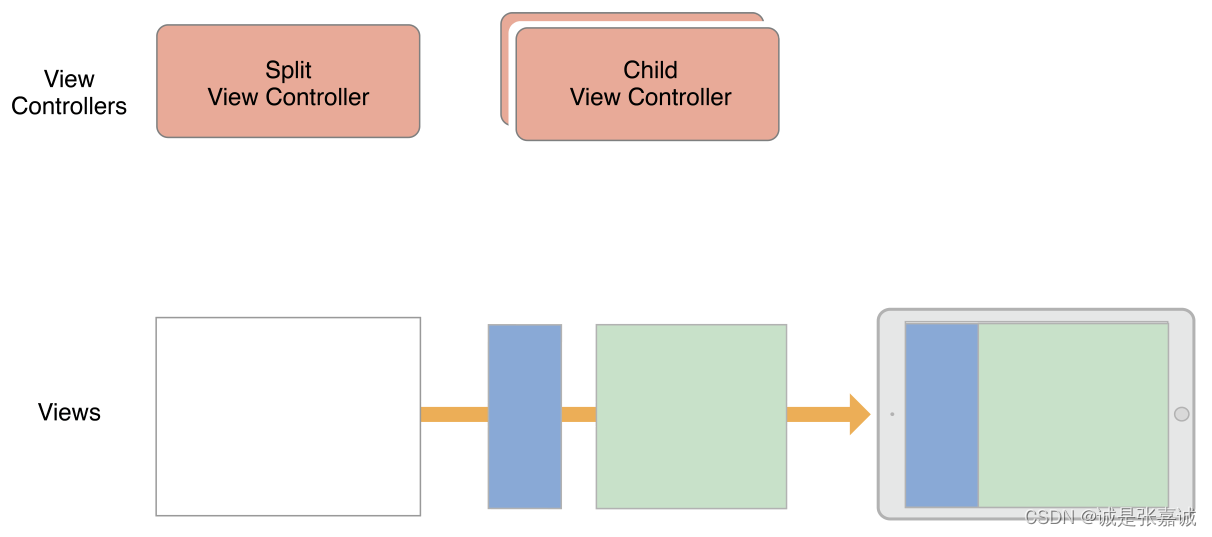
A UISplitViewController object displays the content of two view controllers in a master-detail arrangement. In this arrangement, the content of one view controller (the master) determines what details are displayed by the other view controller. The visibility of the two view controllers is configurable but is also governed by the current environment. In a regularly horizontal environment, the split view controller can show both child view controllers side-by-side or it can hide the master and display it as needed. In a compact environment, the split view controller displays only one view controller at a time.
分屏显示下主view控制着副view的显示情况
Figure 5-2 shows the structure of a split view interface and its views in a regularly horizontal environment. The split view controller itself has only its container view by default. In this example, the two child views are displayed side-by-side. The size of the child views is configurable, as is the visibility of the master view.
Figure 5-2A split view interface
通过以下方式创建view之间的隶属关系
Call the addChildViewController: method of your container view controller.
This method tells UIKit that your container view controller is now managing the view of the child view controller.
Add the child’s root view to your container’s view hierarchy.
Always remember to set the size and position of the child’s frame as part of this process.
Add any constraints for managing the size and position of the child’s root view.
Call the didMoveToParentViewController: method of the child view controller.
After adding the view, the container calls the child’s didMoveToParentViewController: method to give the child view controller a chance to respond to the change in view ownership.
创建隶属关系之后,容器会调用内容的didMoveToParentViewController方法给它做一些其他操作的机会
只需要调did不需要调用will是因为will的调用被包含在了容器的addChildViewController方法中
When using Auto Layout, set up constraints between the container and child after adding the child to the container’s view hierarchy. Your constraints should affect the size and position of only the child’s root view. Do not alter the contents of the root view or any other views in the child’s view hierarchy.
重点!!!使用自动布局时注意为容器视图层级中添加子视图后要设置约束,约束应只影响子VC的根视图
移除VC和隶属关系的操作如下
Call the child’s willMoveToParentViewController: method with the value nil.
Remove any constraints that you configured with the child’s root view.
Remove the child’s root view from your container’s view hierarchy.
Call the child’s removeFromParentViewController method to finalize the end of the parent-child relationship.
The removeFromParentViewController method also calls the child’s didMoveToParentViewController: method, passing that method a value of nil. Setting the parent view controller to nil finalizes the removal of the child’s view from your container.
相反地removeFromParentViewController会调子VC的didMoveToParentViewController: 方法,传一个nil进去
内容之间的转换
When you want to animate the replacement of one child view controller with another, incorporate the addition and removal of the child view controllers into the transition animation process. Before the animations, make sure both child view controllers are part of your content but let the current child know that it is about to go away. During your animations, move the new child’s view into position and remove the old child’s view. At the completion of the animation, complete the removal of the child view controller.
当你需要做替换内容的动画时,你需要将内容的添加和移除都写入转换动画过程中,动画开始之前要确保他们都是内容的一部分,通知当前内容将要被移除,动画过程中把新的视图挪进来把旧的视图挪出去,动画结束后,移除旧视图相应的VC
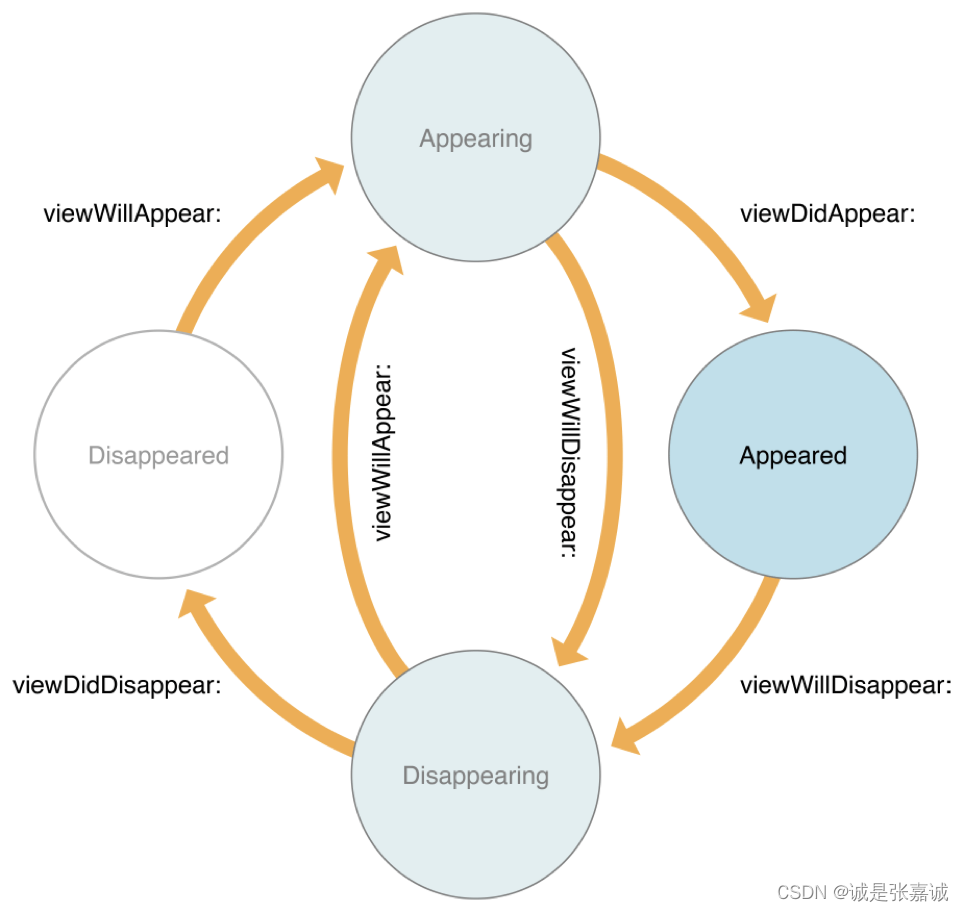
After adding a child to a container, the container automatically forwards appearance-related messages to the child. This is normally the behavior you want, because it ensures that all events are properly sent. However, sometimes the default behavior may send those events in an order that doesn’t make sense for your container. For example, if multiple children are simultaneously changing their view state, you may want to consolidate the changes so that the appearance callbacks all happen at the same time in a more logical order.
To take over responsibility for appearance callbacks, override the shouldAutomaticallyForwardAppearanceMethods method in your container view controller and return NO,
添加内容后,容器自动将外观相关的消息转发给内容,这是一种默认操作,有时候可能默认操作会以一种对容器没什么意义的顺序发送,比如内容同时更改了他们的视图状态,你想合并这些更改并使回调同时发生。
要接管外观回调的责任,请在容器视图控制器中重写shouldAutomaticlyForwardAppearanceMethods方法并返回NO。
When an appearance transition occurs, call the child’s beginAppearanceTransition:animated: or endAppearanceTransition method as appropriate. For example, if your container has a single child referenced by a child property, your container would forward these messages to the child as shown in Listing 5-5
当外观转换发生时,调用内容的beginAppearanceTransition:animated: 或 endAppearanceTransition 方法,例如容器只有一个被一个child属性引用的内容,那么你可能通过以下代码实现
func viewWillAppear(animated: Bool){
self.child.beginAppearanceTransition(true, animated: animated)
}
func viewDidAppear(animated: Bool){
self.child.endAppearanceTransition()
}
func viewWillDisappear(animated: Bool){
self.child.beginAppearanceTransition(false, animated: animated)
}
func viewDidDisappear(animated: Bool){
self.child.endAppearanceTransition()
}
容器类VC的大部分操作都是很费时费力的,设计时应注意以下几点:
Access only the root view of a child view controller. A container should access only the root view of each child—that is, the view returned by the child’s view property. It should never access any of the child’s other views.
Child view controllers should have minimal knowledge of their container. A child view controller should focus on its own content. If the container allows its behavior to be influenced by a child, it should use the delegation design pattern to manage those interactions.
Design your container using regular views first. Using regular views (instead of the views from child view controllers) gives you an opportunity to test layout constraints and animated transitions in a simplified environment. When the regular views work as expected, swap them out for the views of your child view controllers.
容器应该只管理内容的根视图
内容最好少知道关于容器的信息
最好用系统的东西
Delegating Control to a Child View Controller
A container view controller can delegate some aspects of its own appearance to one or more of its children. You can delegate control in the following ways:
Let a child view controller determine the status bar style. To delegate the status bar appearance to a child, override one or both of the childViewControllerForStatusBarStyle and childViewControllerForStatusBarHidden methods in your container view controller.
Let the child specify its own preferred size. A container with a flexible layout can use the child’s own preferredContentSize property to help determine the size of the child.
容器VC可以代理内容的一些外观控制,比如状态栏风格,让内容指定自己prefer的大小
Supporting Accessibility
在支持辅助功能时,需要做到:
View中每个元素都可到达,包括小小的label
确保所有元素都能提供精确并有帮助的信息
可以通过设置VO的合适位置提升用户体验,识别一些特殊的手势来通知辅助事件触发
When the layout of a screen changes, the VoiceOver focus ring, also known as the VoiceOver cursor, resets its position to the first element displayed on the screen from left to right and top to bottom.
Layout每次改变,光标都会移到屏幕显示的第一个元素,一般是左上角
To change the position of the cursor, post a UIAccessibilityScreenChangedNotification notification using the UIAccessibilityPostNotification function. The notification tells VoiceOver that the contents of the screen changed. When posting the notification, specify the element to which you want to assign the focus
通过使用UIAccessibilityPostNotification方法发送UIAccessibilityScreenChangedNotification 通知来改变光标位置,通知VO屏幕内容已经改变
UIAccessibilityLayoutChangedNotification. 通知了layout改变,可以指定VO的第一个指向元素
一共有五种特殊手势
Escape. A two-finger Z-shaped gesture that dismisses a modal dialog, or goes back one level in a navigation hierarchy.
Magic Tap. A two-finger double-tap that performs the most-intended action.
Three-Finger Scroll. A three-finger swipe that scrolls content vertically or horizontally.
Increment. A one-finger swipe up that increments a value in an element.
Decrement. A one-finger swipe down that decrements a value in an element.
处理事件使用对应的accessibilityPerformXXX方法,Three-Finger Scroll使用accessibilityScroll: 方法
Preserving and Restoring State
在app被挂起之前State preservation记录了app的配置以便于app重新回到active状态时恢复配置
这些操作时自动完成的,但你需要通过以下步骤让iOS知道app的哪部分需要被保护:
(Required) Assign restoration identifiers to the view controllers whose configuration you want to preserve。每个VC都有一个restorationIdentifier 属性,默认为nil,赋值为一个合法的字符串变量让UIKit知悉此VC需要保存UIKit starts at the window’s root view controller and walks the view controller hierarchy. If a view controller in that hierarchy does not have a restoration identifier, the view controller and all of its child view controllers and presented view controllers are ignored.
UIKit从根视图沿着视图层级保存,如果层级中有任何一个VC没有identifier,那么层级中的所有VC的保存将被取消
(Required) Tell iOS how to create or locate new view controller objects at launch time. If UIKit cannot automatically create one of your view controllers, it asks you to create it, providing you with the restoration identifiers of the view controller and all of its parent view controllers. This chain of identifiers represents the restoration path for the view controller and is how you determine which view controller is being requested. The restoration path starts at the root view controller and includes every view controller up to and including the one that was requested. 标识符一般就用类名,UIKit之后将会用标识符重构VC,如果UIkit不能自动创建,那么需要你来创建,给你提供VC的标识符和它的所有父VC,此标识符链表示视图控制器的恢复路径,以及您确定请求哪个视图控制器的方式。从根视图开始包括了所有VC和被请求的VC。The restoration path for every view controller must be unique. If a container view controller has two children, the container must assign each child a unique restoration identifier. Some container view controllers in UIKit automatically disambiguate their child view controllers, allowing you to use the same restoration identifiers for each child. 每个VC的标识符都必须是唯一的,有些容器类VC会让它的内容拥有相同的标识符,比如navigationViewController。若要从还原过程中排除整个vc组,请将父vc的还原标识符设置为nil。图7-1 显示了将恢复标识符设置为nil时, 对视图控制器层次结构的影响。这会导致由于缺少保存数据,无法在以后还原该vc。
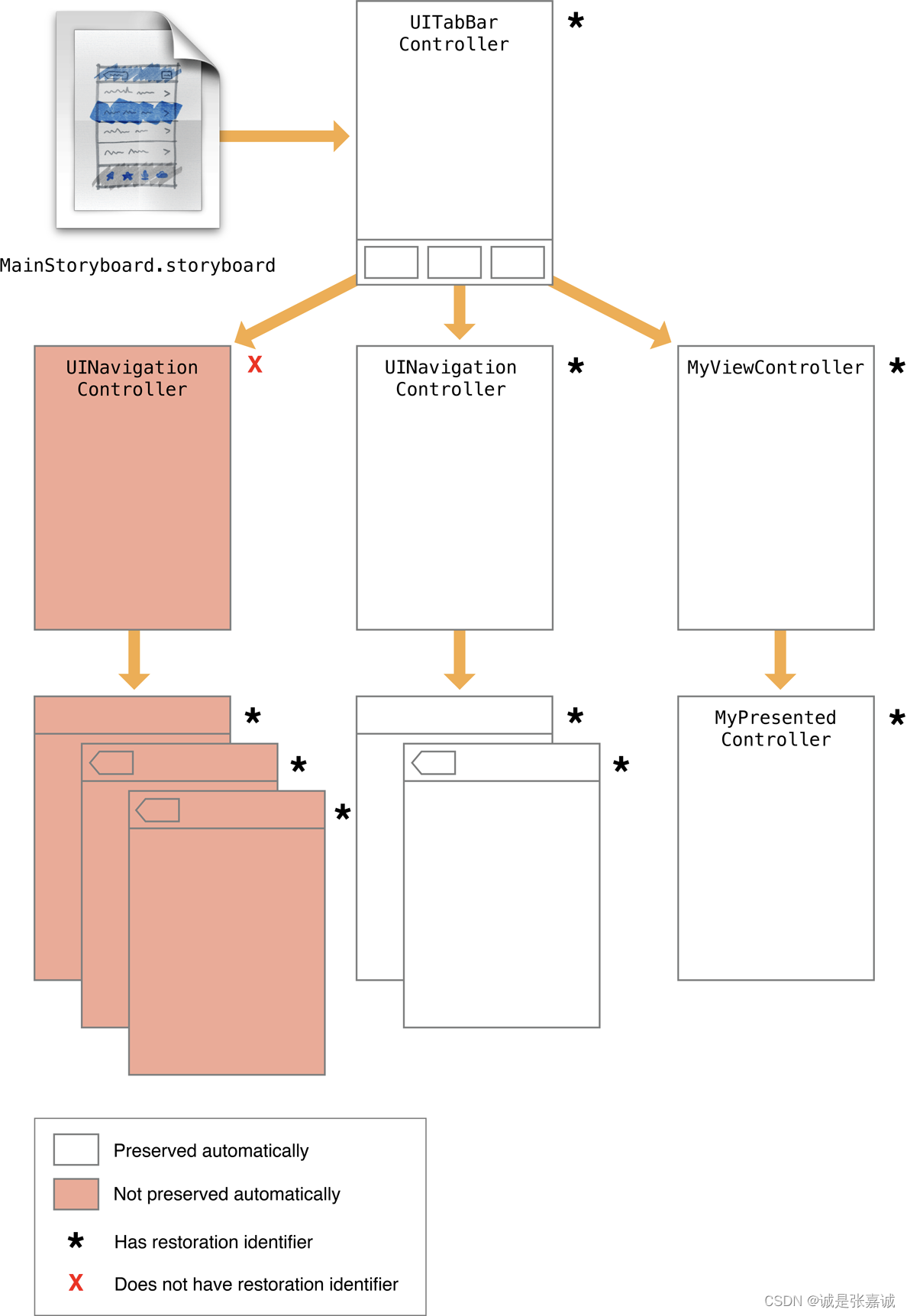
在自动保存过程排除掉的vc并不妨碍您手动保存它们。在恢复存档中保存对vc的引用将会保存vc及其状态信息。例如,如果图7-1 中的app委托保存了导航控制器的三个子控件,它们的状态将被保留。在恢复期间,app的委托可以重新创建那些视图控制器,并将它们压到导航vc的堆栈上
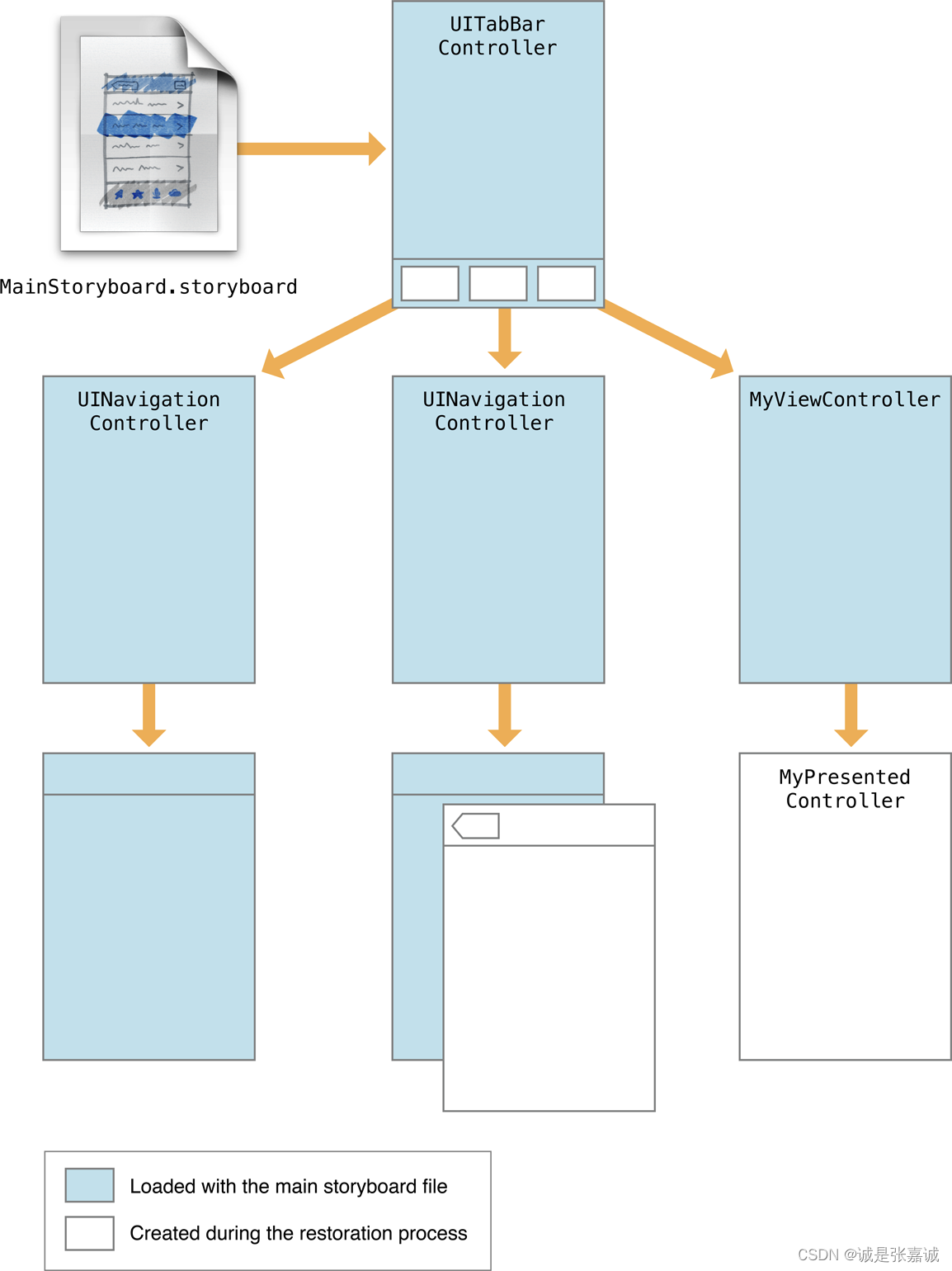
(Optional) For each view controller, store any specific configuration data needed to return that view controller to its original configuration
要保存视图的状态,请执行以下操作:
Assign a valid string to the view’s restorationIdentifier property.
为“视图”的restorationIdentifier属性分配一个有效的字符串
Use the view from a view controller that also has a valid restoration identifier.
使用具有有效恢复标识符的vc中的视图。
For table views and collection views, assign a data source that adopts the UIDataSourceModelAssociation protocol.对于列表视图和集合视图,分配一个采用UIDataSourceModelAssociation协议的数据源。
Assigning a restoration identifier to a view tells UIKit that it should write that view’s state to the preservation archive. When the view controller is restored later, UIKit also restores the state of any views that had restoration identifiers.
给”视图“分配一个恢复标识符,用来告诉UIKit, 它应该把哪个视图的状态写到保存存档。当vc稍后被恢复时,UIKit也会恢复任何有恢复标识符的视图的状态
在启动期,UIKit会尝试将您的app还原到以前的状态。此时,UIKit会要求应用程序创建(或定位)组成被保留的用户界面的vc对象。UIKit查找vc时按以下顺序搜索:
If the view controller had a restoration class, UIKit asks that class to provide the view controller. UIKit calls the viewControllerWithRestorationIdentifierPath:coder: method of the associated restoration class to retrieve the view controller. If that method returns nil, it is assumed that the app does not want to recreate the view controller and UIKit stops looking for it.
If the view controller did not have a restoration class, UIKit asks the app delegate to provide the view controller. UIKit calls the application:viewControllerWithRestorationIdentifierPath:coder: method of your app delegate to look for view controllers without a restoration class. If that method returns nil, UIKit tries to find the view controller implicitly.
If a view controller with the correct restoration path already exists, UIKit uses that object. If your app creates view controllers at launch time (either programmatically or by loading them from a storyboard) and those view controllers have restoration identifiers, UIKit finds them implicitly based on their restoration paths.
如果vc有一个还原类,UIKit会要求还原类提供该vc。UIKit调用该还原类的 viewControllerWithRestorationIdentifierPath: coder:方法来检索vc。如果该方法返回nil,则假定应用程序不希望重新创建vc,并且UIKit停止查找它。
如果vc没有还原类,UIKit会要求App代理提供VC。UIKit调用app代理的 viewControllerWithRestorationIdentifierPath: coder: 方法来查找没有还原类的vc。如果该方法返回nil,则UIKit会尝试隐式查找vc
如果已存在具有正确还原路径的vc,则UIKit将使用该vc。如果应用程序在启动时创建vc(以编程方式或storyboard的方式加载vc),并且这些vc具有还原标识符,则UIKit会根据它们的还原路径“隐式”查找它们。
Assigning a restoration class to a view controller prevents UIKit from searching for that view controller implicitly. Using a restoration class gives you more control over whether you really want to create a view controller. For example, your viewControllerWithRestorationIdentifierPath:coder: method can return nil if your class determines that the view controller should not be recreated. When no restoration class is present, UIKit does everything it can to find or create the view controller and restore it.
When using a restoration class, your viewControllerWithRestorationIdentifierPath:coder: method should create a new instance of the class, perform minimal initialization, and return the resulting object.
Reassigning the restoration identifier and restoration class is a good habit to adopt when recreating view controllers manually. The simplest way to restore the restoration identifier is to grab the last item in the identifierComponents array and assign it to your view controller.
为VC分配restoration类避免了UIKit隐式搜索VC,使用restoration类更好的控制VC是否被创建,比如viewControllerWithRestorationIdentifierPath:coder: 方法返回nil确定了VC不会被重建。当不存在restoration类时,UIKit会尽其所能查找或创建视图控制器并恢复它。当使用restoration类时,viewControllerWithRestorationIdentifierPath:coder: 方法应创建一个新的类实例,执行最少的初始化并返回结果对象。
在手动重建VC时,重新分配restoration标识符和restoration类是一个很好的习惯。恢复restoration标识符的最简单方法是抓取identifierComponents数组中的最后一个项目并将其分配给VC。
For each object slated for preservation, UIKit calls the object’s encodeRestorableStateWithCoder: method to give it a chance to save its state. During the restoration process, UIKit calls the matching decodeRestorableStateWithCoder: method to decode that state and apply it to the object. The implementation of these methods is optional, but recommended, for your view controllers. You might use them to save and restore the following types of information:
References to any data being displayed (not the data itself)
For a container view controller, references to its child view controllers
Information about the current selection
For view controllers with a user-configurable view, information about the current configuration of that view.
In your encode and decode methods, you can encode objects and any data types supported by the coder. For all objects except views and view controllers, the object must adopt the NSCoding protocol and use the methods of that protocol to write its state. For views and view controllers, the coder does not use the NSCoding protocol to save the object’s state. Instead, the coder saves the restoration identifier of the object and adds it to the list of preservable objects, which causes that object’s encodeRestorableStateWithCoder: method to be called.
The encodeRestorableStateWithCoder: and decodeRestorableStateWithCoder: methods of your view controllers must call super at some point in their implementation. Calling super gives the parent class a chance to save and restore any additional information
Coder objects are not shared during the encode and decode process. Each object with preservable state receives its own coder object. The use of unique coders means that you do not have to worry about namespace collisions among your keys. However, do not use the UIApplicationStateRestorationBundleVersionKey, UIApplicationStateRestorationUserInterfaceIdiomKey, and UIStateRestorationViewControllerStoryboardKey key names yourself. Those keys are used by UIKit to store additional information about the state of your view controller.
对于预定保存的对象,UIKit会调用其encodeRestorableStateWithCoder: 方法为他保存自己的状态,restoration过程中,UIKit调用匹配的decodeRestorableStateWithCoder: 方法解析它的状态并应用于此对象,这些方法是可选的,但很推荐,可以用来保存以下信息:
显示的数据的引用
对于容器类VC,保存它子VC的引用
当前选项信息
对于用户配置View的VC,保存view的当前配置
Encode和decode方法中你可以编解码任何类型数据,对于除了view和VC的对象,必须遵守NSCoding协议并使用该协议方法编解码,对于view和VC,coder保存了对象的restoration标识符并添加到preservable 对象列表中,会引起encodeRestorableStateWithCoder: 方法被调用
encodeRestorableStateWithCoder: 和decodeRestorableStateWithCoder: 方法有些时候必须super,给父类一个保存和恢复其他信息的机会
Coder对象在编解码过程中不共享,每个需要保存状态的对象都必须有自己的coder对象。但是,不要使用UIApplicationStateRestorationBundleVersionKey、UIApplicationStateRestorationUserInterfaceIdiomKey和UIStateRestorationViewControllerStoryboardKey。UIKit使用这些key来存储有关视图控制器状态的其他信息。
保存和恢复VC的提示
记住不必保存所有VC
恢复期间不要交换VC类
状态保护系统希望你按预期使用VC。

 383


 扫一扫


 被折叠的 条评论
为什么被折叠?
 到【灌水乐园】发言


