



第三章:SpringBoot热部署devtool和配置文件自动注入实战
03-3 Spring注解把配置文件自动映射到属性和实体类实战
简介:讲解使用@value注解配置文件自动映射到属性和实体类

1、配置文件加载
	方式一
		1、Controller上面配置
		   @PropertySource({"classpath:resource.properties"})
		2、增加属性
			 @Value("${test.name}")
	 		 private String name;

	方式二:实体类配置文件
	步骤:
		1、添加 @Component 注解;
		2、使用 @PropertySource 注解指定配置文件位置;
		3、使用 @ConfigurationProperties 注解,设置相关属性;

		4、必须 通过注入IOC对象Resource 进来 , 才能在类中使用获取的配置文件值。
			@Autowired
    		private ServerSettings serverSettings;

    		例子:
    			@Configuration
				@ConfigurationProperties(prefix="test")
				@PropertySource(value="classpath:resource.properties")
				public class ServerConstant {
	常见问题:
			1、配置文件注入失败,Could not resolve placeholder
				解决:根据springboot启动流程,会有自动扫描包没有扫描到相关注解,
				默认Spring框架实现会从声明@ComponentScan所在的类的package进行扫描,来自动注入,
				因此启动类最好放在根路径下面,或者指定扫描包范围
				spring-boot扫描启动类对应的目录和子目录
			2、注入bean的方式,属性名称和配置文件里面的key一一对应,就用加@Value 这个注解
				如果不一样,就要加@value("${XXX}")
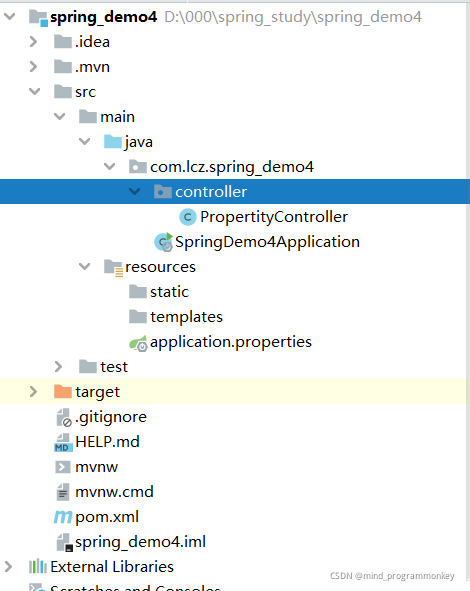
1.配置文件注入
项目目录结构
在application.properties添加
project.name = hello springboot!
若想在后端代码中引用即
@RestController
@PropertySource({"classpath:application.properties"})
public class PropertityController {

    @Value("${project.name}")
    private String project_name;

    @GetMapping(value = "/testproperty")
    public Object testProperty(){
        System.out.println(project_name);
        return "helloworld!";
    }
}
测试结果

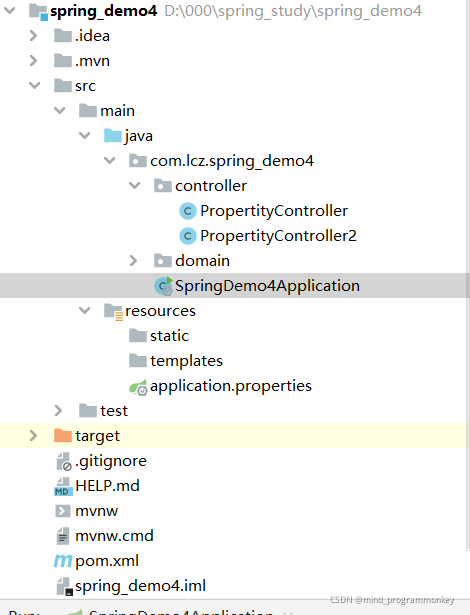
2.实体类配置注入
目录结构
配置信息
project.name = mind_programmonkey
project.domain = https://blog.youkuaiyun.com/Mind_programmonkey
实体类
package com.lcz.spring_demo4.domain;

import org.springframework.boot.context.properties.ConfigurationProperties;
import org.springframework.boot.context.properties.EnableConfigurationProperties;
import org.springframework.context.annotation.PropertySource;
import org.springframework.stereotype.Component;

/**
 * @author : codingchao
 * @date : 2021-11-18 13:24
 * @Description:
 **/
@Component
@PropertySource({"classpath:application.properties"})
@ConfigurationProperties(prefix = "project")
public class ServerSettings {
    private String name;
    private String domain;

    public String getName() {
        return name;
    }

    public void setName(String name) {
        this.name = name;
    }

    public String getDomain() {
        return domain;
    }

    public void setDomain(String domain) {
        this.domain = domain;
    }
}
测试类
package com.lcz.spring_demo4.controller;

import com.lcz.spring_demo4.domain.ServerSettings;
import org.springframework.beans.factory.annotation.Autowired;
import org.springframework.beans.factory.annotation.Value;
import org.springframework.context.annotation.PropertySource;
import org.springframework.web.bind.annotation.GetMapping;
import org.springframework.web.bind.annotation.RestController;

/**
 * @author : codingchao
 * @date : 2021-11-18 11:13
 * @Description:
 **/
@RestController
public class PropertityController2 {
    @Autowired
    private ServerSettings serverSettings;
    @GetMapping("test_properties")
    public Object testProperties(){
        return serverSettings;
    }
}
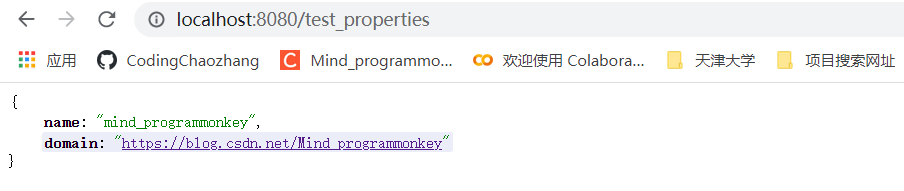
实际结果:
还有后续工作,大家点赞评论收藏关注走起来!!!学起来!!!





 扫一扫
扫一扫


 6201
6201

 被折叠的 条评论
为什么被折叠?
被折叠的 条评论
为什么被折叠?
 到【灌水乐园】发言





