


【人工智能项目】卷积神经网络图片分类框架

本次硬核分享当时做图片分类的工作,主要是整理了一个图片分类的框架,如果想换模型,引入新模型,在config中修改即可。那么走起来瓷!!!

整体结构
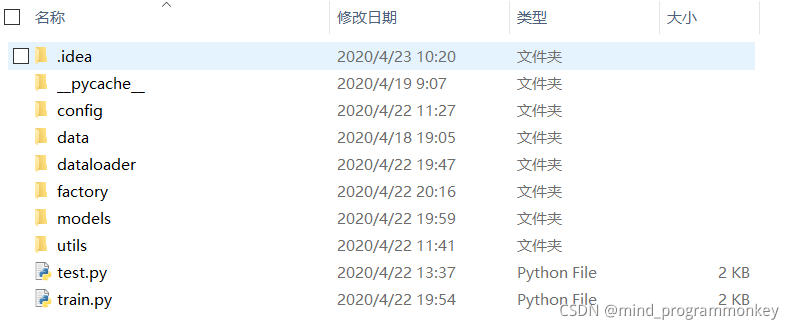
config
在config文件夹下的config.py中主要定义数据集的位置,训练轮数,batch_size以及本次选用的模型。
# 定义训练集和测试集的路径
train_data_path = "./data/train/"
train_anno_path = "./data/train.csv"
test_data_path = "./data/test/"
# 定义多线程
num_workers = 8
# 定义batch_size大小
batch_size = 8

# 定义训练轮数
epochs = 20
# 定义k折交叉验证
k = 5
# 定义模型选择
# inception_v3_google inceptionv4
# vgg16
# resnet50 resnet101 resnet152 resnext50_32x4d resnext101_32x8d wide_resnet50_2  wide_resnet101_2
# senet154 se_resnet50 se_resnet101  se_resnet152  se_resnext50_32x4d  se_resnext101_32x4d
# nasnetalarge  pnasnet5large
# densenet121 densenet161 densenet169 densenet201
# efficientnet-b0 efficientnet-b1 efficientnet-b2 efficientnet-b3 efficientnet-b4 efficientnet-b5 efficientnet-b6 efficientnet-b7
# xception
# squeezenet1_0 squeezenet1_1
# mobilenet_v2
# mnasnet0_5 mnasnet0_75 mnasnet1_0 mnasnet1_3
# shufflenet_v2_x0_5 shufflenet_v2_x1_0
model_name = "vgg16"

# 定义分类类别
num_classes = 102
# 定义图片尺寸
img_width = 320
img_height = 320
data
data文件夹存放了train和test图片信息。

在train.csv中的存放图片名称以及对应的标签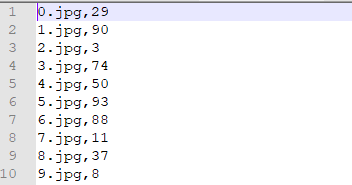
dataloader
dataloader里面主要有data.py和data_augmentation.py文件。其中一个用于读取数据,另外一个用于数据增强操作。
import torch
from PIL import Image
from torch.utils.data.dataset import Dataset
import numpy as np
import PIL
from torchvision import transforms
from config import config
import  os
import cv2
# 定义DataSet和Transform


# 将df转换成标准的numpy array形式
def get_anno(path, images_path):
    data = []
    with open(path) as f:
        for line in f:
            idx, label = line.strip().split(',')
            data.append((os.path.join(images_path, idx), int(label)))
    return np.array(data)

# 定义读取trainData,读取df文件
# 通过df的idx,来获取image_path和label
class trainDataset(Dataset):
    def __init__(self, data, transform=None):
        self.data = data
        self.transform = transform

    def __getitem__(self, idx):
        img_path, label = self.data[idx]
        img = Image.open(img_path).convert('RGB')
        #img = cv2.imread(img_path)
        #img = cv2.cvtColor(img, cv2.COLOR_BGR2RGB)
        if self.transform is not None:
            img = self.transform(img)
        return img, int(label)

    def __len__(self):
        return len(self.data)


# 通过文件路径来读取测试图片
class testDataset(Dataset):
    def __init__(self, img_path, transform=None):
        self.img_path = img_path
        if transform is not None:
            self.transform = transform
        else:
            self.transform = None

    def __getitem__(self, index):
        img = Image.open(self.img_path[index]).convert('RGB')
        # img = cv2.imread(self.img_path[index])
        # img = cv2.cvtColor(img, cv2.COLOR_BGR2RGB)

        if self.transform is not None:
            img = self.transform(img)
        return img

    def __len__(self):
        return len(self.img_path)


# train_transform = transforms.Compose([
#     transforms.Resize([config.img_width, config.img_height]),
#     transforms.RandomRotation(10),
#     transforms.ColorJitter(brightness=0.3, contrast=0.2),
#     transforms.RandomHorizontalFlip(),
#     transforms.ToTensor(),  # range [0, 255] -> [0.0,1.0]
#     transforms.Normalize([0.485, 0.456, 0.406], [0.229, 0.224, 0.225])
# ])

train_transform = transforms.Compose([
    transforms.Pad(4, padding_mode='reflect'),
    transforms.RandomRotation(10),
    transforms.RandomResizedCrop([config.img_width, config.img_height]),
    transforms.RandomHorizontalFlip(),
    transforms.ToTensor(),
    transforms.Normalize([0.485, 0.456, 0.406], [0.229, 0.224, 0.225])
])

val_transform = transforms.Compose([
    transforms.RandomResizedCrop([config.img_width, config.img_height]),
    transforms.ToTensor(),
    transforms.Normalize([0.485, 0.456, 0.406], [0.229, 0.224, 0.225])
])

test_transform = transforms.Compose([
    transforms.RandomResizedCrop([config.img_width, config.img_height]),
    transforms.ToTensor(),
    transforms.Normalize([0.485, 0.456, 0.406], [0.229, 0.224, 0.225])
])
import random

from __future__ import division
import cv2
import numpy as np
from numpy import random
import math
from sklearn.utils import shuffle

# 固定角度随机旋转
class FixedRotation(object):
    def __init__(self, angles):
        self.angles = angles

    def __call__(self, img):
        return fixed_rotate(img, self.angles)


def fixed_rotate(img, angles):
    angles = list(angles)
    angles_num = len(angles)
    index = random.randint(0, angles_num - 1)
    return img.rotate(angles[index])


__all__ = ['Compose','RandomHflip', 'RandomUpperCrop', 'Resize', 'UpperCrop', 'RandomBottomCrop',"RandomErasing",
           'BottomCrop', 'Normalize', 'RandomSwapChannels', 'RandomRotate', 'RandomHShift',"CenterCrop","RandomVflip",
           'ExpandBorder', 'RandomResizedCrop','RandomDownCrop', 'DownCrop', 'ResizedCrop',"FixRandomRotate"]

def rotate_nobound(image, angle, center=None, scale=1.):
    (h, w) = image.shape[:2]


    # if the center is None, initialize it as the center of
    # the image
    if center is None:
        center = (w // 2, h // 2)

    # perform the rotation
    M = cv2.getRotationMatrix2D(center, angle, scale)
    rotated = cv2.warpAffine(image, M, (w, h))

    return rotated

def scale_down(src_size, size):
    w, h = size
    sw, sh = src_size
    if sh < h:
        w, h = float(w * sh) / h, sh
    if sw < w:
        w, h = sw, float(h * sw) / w
    return int(w), int(h)


def fixed_crop(src, x0, y0, w, h, size=None):
    out = src[y0:y0 + h, x0:x0 + w]
    if size is not None and (w, h) != size:
        out = cv2.resize(out, (size[0], size[1]), interpolation=cv2.INTER_CUBIC)
    return out

class FixRandomRotate(object):
    def __init__(self, angles=[0,90,180,270], bound=False):
        self.angles = angles
        self.bound = bound

    def __call__(self,img):
        do_rotate = random.randint(0, 4)
        angle=self.angles[do_rotate]
        if self.bound:
            img = rotate_bound(img, angle)
        else:
            img = rotate_nobound(img, angle)
        return img

def center_crop(src, size):
    h, w = src.shape[0:2]
    new_w, new_h = scale_down((w, h), size)

    x0 = int((w - new_w) / 2)
    y0 = int((h - new_h) / 2)

    out = fixed_crop(src, x0, y0, new_w, new_h, size)
    return out


def bottom_crop(src, size):
    h, w = src.shape[0:2]
    new_w, new_h = scale_down((w, h), size)

    x0 = int((w - new_w) / 2)
    y0 = int((h - new_h) * 0.75)

    out = fixed_crop(src, x0, y0, new_w, new_h, size)
    return out

def rotate_bound(image, angle):
    # grab the dimensions of the image and then determine the
    # center
    h, w = image.shape[:2]

    (cX, cY) = (w // 2, h // 2)

    M = cv2.getRotationMatrix2D((cX, cY), angle, 1.0)
    cos = np.abs(M[0, 0])
    sin = np.abs(M[0, 1])

    # compute the new bounding dimensions of the image
    nW = int((h * sin) + (w * cos))
    nH = int((h * cos) + (w * sin))

    # adjust the rotation matrix to take into account translation
    M[0, 2] += (nW / 2) - cX
    M[1, 2] += (nH / 2) - cY

    rotated = cv2.warpAffine(image, M, (nW, nH))

    return rotated


class Compose(object):
    def __init__(self, transforms):
        self.transforms = transforms
    def __call__(self, img):
        for t in self.transforms:
            img = t(img)
        return img
class RandomRotate(object):
    def __init__(self, angles, bound=False):
        self.angles = angles
        self.bound = bound

    def __call__(self,img):
        do_rotate = random.randint(0, 2)
        if do_rotate:
            angle = np.random.uniform(self.angles[0], self.angles[1])
            if self.bound:
                img = rotate_bound(img, angle)
            else:
                img = rotate_nobound(img, angle)
        return img
class RandomBrightness(object):
    def __init__(self, delta=10):
        assert delta >= 0
        assert delta <= 255
        self.delta = delta

    def __call__(self, image):
        if random.randint(2):
            delta = random.uniform(-self.delta, self.delta)
            image = (image + delta).clip(0.0, 255.0)
            # print('RandomBrightness,delta ',delta)
        return image


class RandomContrast(object):
    def __init__(self, lower=0.9, upper=1.05):
        self.lower = lower
        self.upper = upper
        assert self.upper >= self.lower, "contrast upper must be >= lower."
        assert self.lower >= 0, "contrast lower must be non-negative."

    # expects float image
    def __call__(self, image):
        if random.randint(2):
            alpha = random.uniform(self.lower, self.upper)
            # print('contrast:', alpha)
            image = (image * alpha).clip(0.0,255.0)
        return image


class RandomSaturation(object):
    def __init__(self, lower=0.8, upper=1.2):
        self.lower = lower
        self.upper = upper
        assert self.upper >= self.lower, "contrast upper must be >= lower."
        assert self.lower >= 0, "contrast lower must be non-negative."

    def __call__(self, image):
        if random.randint(2):
            alpha = random.uniform(self.lower, self.upper)
            image[:, :, 1] *= alpha
            # print('RandomSaturation,alpha',alpha)
        return image


class RandomHue(object):
    def __init__(self, delta=18.0):
        assert delta >= 0.0 and delta <= 360.0
        self.delta = delta

    def __call__(self, image):
        if random.randint(2):
            alpha = random.uniform(-self.delta, self.delta)
            image[:, :, 0] += alpha
            image[:, :, 0][image[:, :, 0] > 360.0] -= 360.0
            image[:, :, 0][image[:, :, 0] < 0.0] += 360.0
            # print('RandomHue,alpha:', alpha)
        return image


class ConvertColor(object):
    def __init__(self, current='BGR', transform='HSV'):
        self.transform = transform
        self.current = current

    def __call__(self, image):
        if self.current == 'BGR' and self.transform == 'HSV':
            image = cv2.cvtColor(image, cv2.COLOR_BGR2HSV)
        elif self.current == 'HSV' and self.transform == 'BGR':
            image = cv2.cvtColor(image, cv2.COLOR_HSV2BGR)
        else:
            raise NotImplementedError
        return image

class RandomSwapChannels(object):
    def __call__(self, img):
        if np.random.randint(2):
            order = np.random.permutation(3)
            return img[:,:,order]
        return img

class RandomCrop(object):
    def __init__(self, size):
        self.size = size
    def __call__(self, image):
        h, w, _ = image.shape
        new_w, new_h = scale_down((w, h), self.size)

        if w == new_w:
            x0 = 0
        else:
            x0 = random.randint(0, w - new_w)

        if h == new_h:
            y0 = 0
        else:
            y0 = random.randint(0, h - new_h)

        out = fixed_crop(image, x0, y0, new_w, new_h, self.size)
        return out


class RandomResizedCrop(object):
    def __init__(self, size,scale=(0.49, 1.0), ratio=(1., 1.)):
        self.size = size
        self.scale = scale
        self.ratio = ratio

    def __call__(self,img):
        if random.random() < 0.2:
            return cv2.resize(img,self.size)
        h, w, _ = img.shape
        area = h * w
        d=1
        for attempt in range(10):
            target_area = random.uniform(self.scale[0], self.scale[1]) * area
            aspect_ratio = random.uniform(self.ratio[0], self.ratio[1])


            new_w = int(round(math.sqrt(target_area * aspect_ratio)))
            new_h = int(round(math.sqrt(target_area / aspect_ratio)))

            if random.random() < 0.5:
                new_h, new_w = new_w, new_h

            if new_w < w and new_h < h:
                x0 = random.randint(0, w - new_w)
                y0 = (random.randint(0, h - new_h))//d
                out = fixed_crop(img, x0, y0, new_w, new_h, self.size)

                return out

        # Fallback
        return center_crop(img, self.size)


class DownCrop():
    def __init__(self, size,  select, scale=(0.36,0.81)):
        self.size = size
        self.scale = scale
        self.select = select

    def __call__(self,img, attr_idx):
        if attr_idx not in self.select:
            return img, attr_idx
        if attr_idx == 0:
            self.scale=(0.64,1.0)
        h, w, _ = img.shape
        area = h * w

        s = (self.scale[0]+self.scale[1])/2.0

        target_area = s * area

        new_w = int(round(math.sqrt(target_area)))
        new_h = int(round(math.sqrt(target_area)))

        if new_w < w and new_h < h:
            dw = w-new_w
            x0 = int(0.5*dw)
            y0 = h-new_h
            out = fixed_crop(img, x0, y0, new_w, new_h, self.size)
            return out, attr_idx

        # Fallback
        return center_crop(img, self.size), attr_idx


class ResizedCrop(object):
    def __init__(self, size, select,scale=(0.64, 1.0), ratio=(3. / 4., 4. / 3.)):
        self.size = size
        self.scale = scale
        self.ratio = ratio
        self.select = select

    def __call__(self,img, attr_idx):
        if attr_idx not in self.select:
            return img, attr_idx
        h, w, _ = img.shape
        area = h * w
        d=1
        if attr_idx == 2:
            self.scale=(0.36,0.81)
            d=2
        if attr_idx == 0:
            self.scale=(0.81,1.0)

        target_area = (self.scale[0]+self.scale[1])/2.0 * area
        # aspect_ratio = random.uniform(self.ratio[0], self.ratio[1])


        new_w = int(round(math.sqrt(target_area)))
        new_h = int(round(math.sqrt(target_area)))

        # if random.random() < 0.5:
        #     new_h, new_w = new_w, new_h

        if new_w < w and new_h < h:
            x0 =  (w - new_w)//2
            y0 = (h - new_h)//d//2
            out = fixed_crop(img, x0, y0, new_w, new_h, self.size)
            # cv2.imshow('{}_img'.format(idx2attr_map[attr_idx]), img)
            # cv2.imshow('{}_crop'.format(idx2attr_map[attr_idx]), out)
            #
            # cv2.waitKey(0)
            return out, attr_idx

        # Fallback
        return center_crop(img, self.size), attr_idx

class RandomHflip(object):
    def __call__(self, image):
        if random.randint(2):
            return cv2.flip(image, 1)
        else:
            return image
class RandomVflip(object):
    def __call__(self, image):
        if random.randint(2):
            return cv2.flip(image, 0)
        else:
            return image


class Hflip(object):
    def __init__(self,doHflip):
        self.doHflip = doHflip

    def __call__(self, image):
        if self.doHflip:
            return cv2.flip(image, 1)
        else:
            return image


class CenterCrop(object):
    def __init__(self, size):
        self.size = size

    def __call__(self, image):
        return center_crop(image, self.size)

class UpperCrop():
    def __init__(self, size, scale=(0.09, 0.64)):
        self.size = size
        self.scale = scale

    def __call__(self,img):
        h, w, _ = img.shape
        area = h * w

        s = (self.scale[0]+self.scale[1])/2.0

        target_area = s * area

        new_w = int(round(math.sqrt(target_area)))
        new_h = int(round(math.sqrt(target_area)))

        if new_w < w and new_h < h:
            dw = w-new_w
            x0 = int(0.5*dw)
            y0 = 0
            out = fixed_crop(img, x0, y0, new_w, new_h, self.size)
            return out

        # Fallback
        return center_crop(img, self.size)


class RandomUpperCrop(object):
    def __init__(self, size, select, scale=(0.09, 0.64), ratio=(3. / 4., 4. / 3.)):
        self.size = size
        self.scale = scale
        self.ratio = ratio
        self.select = select

    def __call__(self,img, attr_idx):
        if random.random() < 0.2:
            return img, attr_idx
        if attr_idx not in self.select:
            return img, attr_idx

        h, w, _ = img.shape
        area = h * w
        for attempt in range(10):
            s = random.uniform(self.scale[0], self.scale[1])
            d = 0.1 + (0.3 - 0.1) / (self.scale[1] - self.scale[0]) * (s - self.scale[0])
            target_area = s * area
            aspect_ratio = random.uniform(self.ratio[0], self.ratio[1])
            new_w = int(round(math.sqrt(target_area * aspect_ratio)))
            new_h = int(round(math.sqrt(target_area / aspect_ratio)))


            # new_w = int(round(math.sqrt(target_area)))
            # new_h = int(round(math.sqrt(target_area)))

            if new_w < w and new_h < h:
                dw = w-new_w
                x0 = random.randint(int((0.5-d)*dw), int((0.5+d)*dw)+1)
                y0 = (random.randint(0, h - new_h))//10
                out = fixed_crop(img, x0, y0, new_w, new_h, self.size)
                return out, attr_idx

        # Fallback
        return center_crop(img, self.size), attr_idx
class RandomDownCrop(object):
    def __init__(self, size, select, scale=(0.36, 0.81), ratio=(3. / 4., 4. / 3.)):
        self.size = size
        self.scale = scale
        self.ratio = ratio
        self.select = select

    def __call__(self,img, attr_idx):
        if random.random() < 0.2:
            return img, attr_idx
        if attr_idx not in self.select:
            return img, attr_idx
        if attr_idx == 0:
            self.scale=(0.64,1.0)

        h, w, _ = img.shape
        area = h * w
        for attempt in range(10):
            s = random.uniform(self.scale[0], self.scale[1])
            d = 0.1 + (0.3 - 0.1) / (self.scale[1] - self.scale[0]) * (s - self.scale[0])
            target_area = s * area
            aspect_ratio = random.uniform(self.ratio[0], self.ratio[1])
            new_w = int(round(math.sqrt(target_area * aspect_ratio)))
            new_h = int(round(math.sqrt(target_area / aspect_ratio)))
            #
            # new_w = int(round(math.sqrt(target_area)))
            # new_h = int(round(math.sqrt(target_area)))

            if new_w < w and new_h < h:
                dw = w-new_w
                x0 = random.randint(int((0.5-d)*dw), int((0.5+d)*dw)+1)
                y0 = (random.randint((h - new_h)*9//10, h - new_h))
                out = fixed_crop(img, x0, y0, new_w, new_h, self.size)

                # cv2.imshow('{}_img'.format(idx2attr_map[attr_idx]), img)
                # cv2.imshow('{}_crop'.format(idx2attr_map[attr_idx]), out)
                #
                # cv2.waitKey(0)

                return out, attr_idx

        # Fallback
        return center_crop(img, self.size), attr_idx

class RandomHShift(object):
    def __init__(self, select, scale=(0.0, 0.2)):
        self.scale = scale
        self.select = select

    def __call__(self,img, attr_idx):
        if attr_idx not in self.select:
            return img, attr_idx
        do_shift_crop = random.randint(0, 2)
        if do_shift_crop:
            h, w, _ = img.shape
            min_shift = int(w*self.scale[0])
            max_shift = int(w*self.scale[1])
            shift_idx = random.randint(min_shift, max_shift)
            direction = random.randint(0,2)
            if direction:
                right_part = img[:, -shift_idx:, :]
                left_part = img[:, :-shift_idx, :]
            else:
                left_part = img[:, :shift_idx, :]
                right_part = img[:, shift_idx:, :]
            img = np.concatenate((right_part, left_part), axis=1)

        # Fallback
        return img, attr_idx


class RandomBottomCrop(object):
    def __init__(self, size, select, scale=(0.4, 0.8)):
        self.size = size
        self.scale = scale
        self.select = select

    def __call__(self,img, attr_idx):
        if attr_idx not in self.select:
            return img, attr_idx

        h, w, _ = img.shape
        area = h * w
        for attempt in range(10):
            s = random.uniform(self.scale[0], self.scale[1])
            d = 0.25 + (0.45 - 0.25) / (self.scale[1] - self.scale[0]) * (s - self.scale[0])
            target_area = s * area

            new_w = int(round(math.sqrt(target_area)))
            new_h = int(round(math.sqrt(target_area)))

            if new_w < w and new_h < h:
                dw = w-new_w
                dh = h - new_h
                x0 = random.randint(int((0.5-d)*dw), min(int((0.5+d)*dw)+1,dw))
                y0 = (random.randint(max(0,int(0.8*dh)-1), dh))
                out = fixed_crop(img, x0, y0, new_w, new_h, self.size)
                return out, attr_idx

        # Fallback
        return bottom_crop(img, self.size), attr_idx


class BottomCrop():
    def __init__(self, size,  select, scale=(0.4, 0.8)):
        self.size = size
        self.scale = scale
        self.select = select

    def __call__(self,img, attr_idx):
        if attr_idx not in self.select:
            return img, attr_idx

        h, w, _ = img.shape
        area = h * w

        s = (self.scale[0]+self.scale[1])/3.*2.

        target_area = s * area

        new_w = int(round(math.sqrt(target_area)))
        new_h = int(round(math.sqrt(target_area)))

        if new_w < w and new_h < h:
            dw = w-new_w
            dh = h-new_h
            x0 = int(0.5*dw)
            y0 = int(0.9*dh)
            out = fixed_crop(img, x0, y0, new_w, new_h, self.size)
            return out, attr_idx

        # Fallback
        return bottom_crop(img, self.size), attr_idx


class Resize(object):
    def __init__(self, size, inter=cv2.INTER_CUBIC):
        self.size = size
        self.inter = inter

    def __call__(self, image):
        return cv2.resize(image, (self.size[0], self.size[0]), interpolation=self.inter)

class ExpandBorder(object):
    def __init__(self,  mode='constant', value=255, size=(336,336), resize=False):
        self.mode = mode
        self.value = value
        self.resize = resize
        self.size = size

    def __call__(self, image):
        h, w, _ = image.shape
        if h > w:
            pad1 = (h-w)//2
            pad2 = h - w - pad1
            if self.mode == 'constant':
                image = np.pad(image, ((0, 0), (pad1, pad2), (0, 0)),
                               self.mode, constant_values=self.value)
            else:
                image = np.pad(image,((0,0), (pad1, pad2),(0,0)), self.mode)
        elif h < w:
            pad1 = (w-h)//2
            pad2 = w-h - pad1
            if self.mode == 'constant':
                image = np.pad(image, ((pad1, pad2),(0, 0), (0, 0)),
                               self.mode,constant_values=self.value)
            else:
                image = np.pad(image, ((pad1, pad2), (0, 0), (0, 0)),self.mode)
        if self.resize:
            image = cv2.resize(image, (self.size[0], self.size[0]),interpolation=cv2.INTER_LINEAR)
        return image
class AstypeToInt():
    def __call__(self, image, attr_idx):
        return image.clip(0,255.0).astype(np.uint8), attr_idx

class AstypeToFloat():
    def __call__(self, image, attr_idx):
        return image.astype(np.float32), attr_idx

import matplotlib.pyplot as plt
class Normalize(object):
    def __init__(self,mean, std):
        '''
        :param mean: RGB order
        :param std:  RGB order
        '''
        self.mean = np.array(mean).reshape(3,1,1)
        self.std = np.array(std).reshape(3,1,1)
    def __call__(self, image):
        '''
        :param image:  (H,W,3)  RGB
        :return:
        '''
        # plt.figure(1)
        # plt.imshow(image)
        # plt.show()
        return (image.transpose((2, 0, 1)) / 255. - self.mean) / self.std

class RandomErasing(object):
    def __init__(self, select,EPSILON=0.5,sl=0.02, sh=0.09, r1=0.3, mean=[0.485, 0.456, 0.406]):
        self.EPSILON = EPSILON
        self.mean = mean
        self.sl = sl
        self.sh = sh
        self.r1 = r1
        self.select = select

    def __call__(self, img,attr_idx):
        if attr_idx not in self.select:
            return img,attr_idx

        if random.uniform(0, 1) > self.EPSILON:
            return img,attr_idx

        for attempt in range(100):
            area = img.shape[1] * img.shape[2]

            target_area = random.uniform(self.sl, self.sh) * area
            aspect_ratio = random.uniform(self.r1, 1 / self.r1)

            h = int(round(math.sqrt(target_area * aspect_ratio)))
            w = int(round(math.sqrt(target_area / aspect_ratio)))

            if w <= img.shape[2] and h <= img.shape[1]:
                x1 = random.randint(0, img.shape[1] - h)
                y1 = random.randint(0, img.shape[2] - w)
                if img.shape[0] == 3:
                    # img[0, x1:x1+h, y1:y1+w] = random.uniform(0, 1)
                    # img[1, x1:x1+h, y1:y1+w] = random.uniform(0, 1)
                    # img[2, x1:x1+h, y1:y1+w] = random.uniform(0, 1)
                    img[0, x1:x1 + h, y1:y1 + w] = self.mean[0]
                    img[1, x1:x1 + h, y1:y1 + w] = self.mean[1]
                    img[2, x1:x1 + h, y1:y1 + w] = self.mean[2]
                    # img[:, x1:x1+h, y1:y1+w] = torch.from_numpy(np.random.rand(3, h, w))
                else:
                    img[0, x1:x1 + h, y1:y1 + w] = self.mean[1]
                    # img[0, x1:x1+h, y1:y1+w] = torch.from_numpy(np.random.rand(1, h, w))
                return img,attr_idx

        return img,attr_idx

# if __name__ == '__main__':
#     import matplotlib.pyplot as plt
#
#
#     class FSAug(object):
#         def __init__(self):
#             self.augment = Compose([
#                 AstypeToFloat(),
#                 # RandomHShift(scale=(0.,0.2),select=range(8)),
#                 # RandomRotate(angles=(-20., 20.), bound=True),
#                 ExpandBorder(select=range(8), mode='symmetric'),# symmetric
#                 # Resize(size=(336, 336), select=[ 2, 7]),
#                 AstypeToInt()
#             ])
#
#         def __call__(self, spct,attr_idx):
#             return self.augment(spct,attr_idx)
#
#
#     trans = FSAug()
#
#     img_path = '/media/gserver/data/FashionAI/round2/train/Images/coat_length_labels/0b6b4a2146fc8616a19fcf2026d61d50.jpg'
#     img = cv2.cvtColor(cv2.imread(img_path),cv2.COLOR_BGR2RGB)
#     img_trans,_ = trans(img,5)
#     # img_trans2,_ = trans(img,6)
#     print img_trans.max(), img_trans.min()
#     print img_trans.dtype
#
#     plt.figure()
#     plt.subplot(221)
#     plt.imshow(img)
#
#     plt.subplot(222)
#     plt.imshow(img_trans)
#
#     # plt.subplot(223)
#     # plt.imshow(img_trans2)
#     # plt.imshow(img_trans2)
#     plt.show()
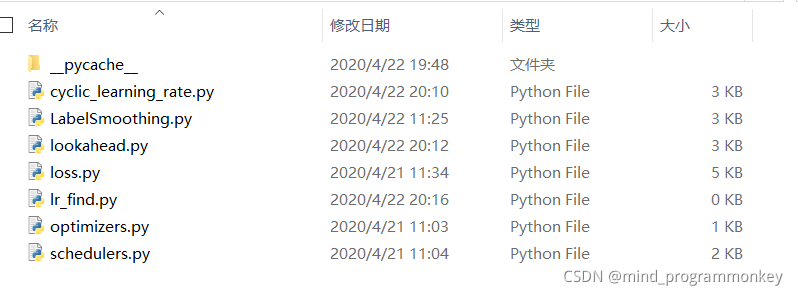
factory
factory里面主要定义了一些学习率,损失函数,优化器等之类的。
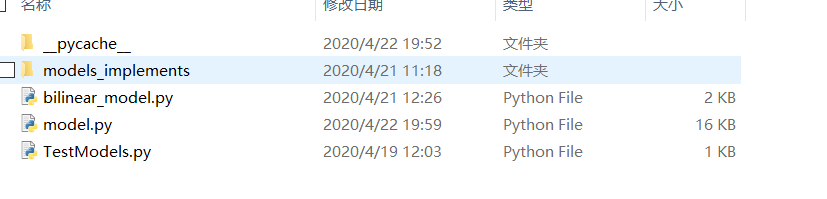
models
models中主要定义了常见的分类模型。
train.py
import os
from sklearn.model_selection import KFold
from torchvision import transforms
import torch.utils.data
from dataloader.data import trainDataset,train_transform,val_transform,get_anno
from factory.loss import *
from models.model import Model
from config import config
import numpy as np
from utils import utils
from factory.LabelSmoothing import LSR


def train(model_type, prefix):
    # df -> numpy.array()形式
    data = get_anno(config.train_anno_path, config.train_data_path)
    # 5折交叉验证
    skf = KFold(n_splits=config.k, random_state=233, shuffle=True)

    for flod_idx, (train_indices, val_indices) in enumerate(skf.split(data)):
        train_loader = torch.utils.data.DataLoader(
            trainDataset(data[train_indices],
                         train_transform),
            batch_size=config.batch_size, shuffle=True, num_workers=config.num_workers, pin_memory=True
        )

        val_loader = torch.utils.data.DataLoader(
            trainDataset(data[val_indices],
                         val_transform),
            batch_size=config.batch_size, shuffle=False, num_workers=config.num_workers, pin_memory=True
        )

        #criterion = FocalLoss(0.5)
        criterion = LSR()
        device = 'cuda' if torch.cuda.is_available() else 'cpu'
        model = Model(model_type, config.num_classes, criterion, device=device, prefix=prefix, suffix=str(flod_idx))

        for epoch in range(config.epochs):
            print('Epoch: ', epoch)

            model.fit(train_loader)
            model.validate(val_loader)


if __name__ == '__main__':
    model_type_list = [config.model_name]
    for model_type in model_type_list:
        train(model_type, "resize")
小结
本次主要给出一个图片分类的框架,方便快速的切换模型。
那下回见!!!欢迎大家多多点赞评论呀!!!


 1万+


 扫一扫


 被折叠的 条评论
为什么被折叠?
 到【灌水乐园】发言


