


一、简介
1 高斯羽烟模型方程
式中c为污染物浓度(单位:kg/m3)
Q为源强(单位:kg/s)
u为泄漏高度的平均风速(单位:m/s)
y、z分别用浓度标准偏差表示的y轴及z轴上的扩散参数
H为泄漏有效高度(单位:m)
2 扩散系数系数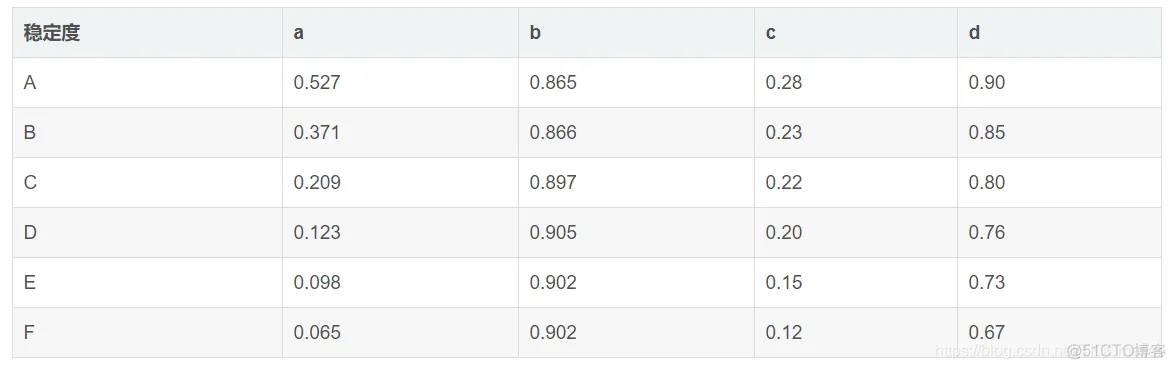
二、源代码
function varargout = mGA_new(varargin)
% MGA_NEW MATLAB code for mGA_new.fig
%      MGA_NEW, by itself, creates a new MGA_NEW or raises the existing
%      singleton*.
%
%      H = MGA_NEW returns the handle to a new MGA_NEW or the handle to
%      the existing singleton*.
%
%      MGA_NEW('CALLBACK',hObject,eventData,handles,...) calls the local
%      function named CALLBACK in MGA_NEW.M with the given input arguments.
%
%      MGA_NEW('Property','Value',...) creates a new MGA_NEW or raises the
%      existing singleton*.  Starting from the left, property value pairs are
%      applied to the GUI before mGA_new_OpeningFcn gets called.  An
%      unrecognized property name or invalid value makes property application
%      stop.  All inputs are passed to mGA_new_OpeningFcn via varargin.
%
%      *See GUI Options on GUIDE's Tools menu.  Choose "GUI allows only one
%      instance to run (singleton)".
%
% See also: GUIDE, GUIDATA, GUIHANDLES

% Edit the above text to modify the response to help mGA_new

% Last Modified by GUIDE v2.5 04-Jul-2020 16:21:23

% Begin initialization code - DO NOT EDIT
gui_Singleton = 1;
gui_State = struct('gui_Name',       mfilename, ...
                   'gui_Singleton',  gui_Singleton, ...
                   'gui_OpeningFcn', @mGA_new_OpeningFcn, ...
                   'gui_OutputFcn',  @mGA_new_OutputFcn, ...
                   'gui_LayoutFcn',  [] , ...
                   'gui_Callback',   []);
if nargin && ischar(varargin{1})
    gui_State.gui_Callback = str2func(varargin{1});
end

if nargout
    [varargout{1:nargout}] = gui_mainfcn(gui_State, varargin{:});
else
    gui_mainfcn(gui_State, varargin{:});
end
% End initialization code - DO NOT EDIT


% --- Executes just before mGA_new is made visible.
function mGA_new_OpeningFcn(hObject, eventdata, handles, varargin)
% This function has no output args, see OutputFcn.
% hObject    handle to figure
% eventdata  reserved - to be defined in a future version of MATLAB
% handles    structure with handles and user data (see GUIDATA)
% varargin   command line arguments to mGA_new (see VARARGIN)

% Choose default command line output for mGA_new
handles.output = hObject;

% Update handles structure
guidata(hObject, handles);

% UIWAIT makes mGA_new wait for user response (see UIRESUME)
% uiwait(handles.figure1);


% --- Outputs from this function are returned to the command line.
function varargout = mGA_new_OutputFcn(hObject, eventdata, handles)
% varargout  cell array for returning output args (see VARARGOUT);
% hObject    handle to figure
% eventdata  reserved - to be defined in a future version of MATLAB
% handles    structure with handles and user data (see GUIDATA)

% Get default command line output from handles structure
varargout{1} = handles.output;


% --- Executes on selection change in popupmenu1.
function popupmenu1_Callback(hObject, eventdata, handles)
% hObject    handle to popupmenu1 (see GCBO)
% eventdata  reserved - to be defined in a future version of MATLAB
% handles    structure with handles and user data (see GUIDATA)

% Hints: contents = cellstr(get(hObject,'String')) returns popupmenu1 contents as cell array
%        contents{get(hObject,'Value')} returns selected item from popupmenu1


% --- Executes during object creation, after setting all properties.
function popupmenu1_CreateFcn(hObject, eventdata, handles)
% hObject    handle to popupmenu1 (see GCBO)
% eventdata  reserved - to be defined in a future version of MATLAB
% handles    empty - handles not created until after all CreateFcns called

% Hint: popupmenu controls usually have a white background on Windows.
%       See ISPC and COMPUTER.
if ispc && isequal(get(hObject,'BackgroundColor'), get(0,'defaultUicontrolBackgroundColor'))
    set(hObject,'BackgroundColor','white');
end


function feng_Callback(hObject, eventdata, handles)
% hObject    handle to feng (see GCBO)
% eventdata  reserved - to be defined in a future version of MATLAB
% handles    structure with handles and user data (see GUIDATA)

% Hints: get(hObject,'String') returns contents of feng as text
%        str2double(get(hObject,'String')) returns contents of feng as a double


% --- Executes during object creation, after setting all properties.
function feng_CreateFcn(hObject, eventdata, handles)
% hObject    handle to feng (see GCBO)
% eventdata  reserved - to be defined in a future version of MATLAB
% handles    empty - handles not created until after all CreateFcns called

% Hint: edit controls usually have a white background on Windows.
%       See ISPC and COMPUTER.
if ispc && isequal(get(hObject,'BackgroundColor'), get(0,'defaultUicontrolBackgroundColor'))
    set(hObject,'BackgroundColor','white');
end


function gaodu_Callback(hObject, eventdata, handles)
% hObject    handle to gaodu (see GCBO)
% eventdata  reserved - to be defined in a future version of MATLAB
% handles    structure with handles and user data (see GUIDATA)

% Hints: get(hObject,'String') returns contents of gaodu as text
%        str2double(get(hObject,'String')) returns contents of gaodu as a double


% --- Executes during object creation, after setting all properties.
function gaodu_CreateFcn(hObject, eventdata, handles)
% hObject    handle to gaodu (see GCBO)
% eventdata  reserved - to be defined in a future version of MATLAB
% handles    empty - handles not created until after all CreateFcns called

% Hint: edit controls usually have a white background on Windows.
%       See ISPC and COMPUTER.
if ispc && isequal(get(hObject,'BackgroundColor'), get(0,'defaultUicontrolBackgroundColor'))
    set(hObject,'BackgroundColor','white');
end


% --- Executes on button press in jiancedian.
function jiancedian_Callback(hObject, eventdata, handles)
% hObject    handle to jiancedian (see GCBO)
% eventdata  reserved - to be defined in a future version of MATLAB
% handles    structure with handles and user data (see GUIDATA)
[filename,pathname]=uigetfile({'*xls;*.xlsx'},'读入测量数据文件');%加载路径的选择
fpath=[pathname,filename];%总的路径
data=xlsread(fpath);%读测量文件
set(handles.guance,'data',data);%写入到表中
setappdata(handles.jiancedian,'data',data);


% --- Executes on button press in fansuan.
function fansuan_Callback(hObject, eventdata, handles)
% hObject    handle to fansuan (see GCBO)
% eventdata  reserved - to be defined in a future version of MATLAB
% handles    structure with handles and user data (see GUIDATA)
 %% 获取参数
% diedai=str2double(get(handles.deidai,'String'));% 进化次数
val=get(handles.popupmenu1,'value'); %这是获取当前选项的位置,从上到下是1,2,3...
str=get(handles.popupmenu1,'string');
W=str{val}; %这个将返回当前选项的内容,若是纯数字用str2num(str(val))
popsize=100; %种群规模
lenchrom=3;%变量字串长度
maxgen=str2double(get(handles.diedai,'String'));% 进化次数
% maxgen=1000;% 进化次数
popmax=500;% 种群最大值
popmin=-500;% 种群最小值
u1=str2double(get(handles.feng,'String'));
hr=str2double(get(handles.gaodu,'String'));
% % z1=str2double(get(handles.edit3,'String'));
% z1=0;
% Q=str2double(get(handles.edit8,'String'));
dt=getappdata(handles.jiancedian,'data');
d=dt(:,:);
% mGA.data(:,1)=dt(:,2);
% mGA.data(:,2)=dt(:,3);
% % z1=dt(:,3);
% % set(handles.uitable2,'data',data);
%% 开始
bound=[0 20000;popmin popmax;popmin popmax];  %变量范围
for i=1:popsize
    %随机产生一个种群
    GApop(i,:)=Code(lenchrom,bound);       %随机产生个体
%     GApop(i,:)=mGA.data(i,:);
    %计算适应度
    fitvalue(i)=fitness(GApop(i,:),u1,hr,d,W);            %染色体的适应度
end
% set(handles.uitable2,'data',fitvalue);
%% 找最好的染色体
[bestfitness,bestindex]=min(fitvalue);
xm=GApop(bestindex,:);   %全局最佳
gbest=GApop;                %体最佳
fitnessgbest=fitvalue;       %个体最佳适应度值
xv=bestfitness;   %全局最佳适应度值
% % set(handles.uitable2,'data',xv);
%% 迭代寻优
for i=1:maxgen
        %种群更新 GA选择更新
        GApop=Select(GApop,fitvalue,popsize); % 其中Select为选择算子函数

        % 交叉操作 GA
        pc=i/maxgen; % maxgen  进化次数
        GApop=Cross(pc,lenchrom,GApop,popsize,bound); % 其中Cross为交叉算子函数

        % 变异操作 GA变异
        pm=i/maxgen;
        GApop=Mutation(pm,lenchrom,GApop,popsize,[i maxgen],bound);

        pop=GApop;

      for j=1:popsize
        %适应度值即变量约束条件
        if 1*pop(j,1)+0*pop(j,2)+0*pop(j,3)<=20000 && 1*pop(j,1)+0*pop(j,2)+0*pop(j,3)>=0
            if 0*pop(j,1)+1*pop(j,2)+0*pop(j,3)<=500 && 0*pop(j,1)+1*pop(j,2)+0*pop(j,3)>=-500
               if 0*pop(j,1)+0*pop(j,2)+1*pop(j,3)<=500 && 0*pop(j,1)+0*pop(j,2)+1*pop(j,3)>=-500
                    fitvalue(j)=fitness(pop(j,:),u1,hr,d,W);
               end
            end
        end
        %个体最优更新
        if fitvalue(j) < fitnessgbest(j)
            gbest(j,:) = pop(j,:);
            fitnessgbest(j) = fitvalue(j);
        end

        %群体最优更新
        if fitvalue(j) < xv
            xm = pop(j,:);
            xv = fitvalue(j);
        end
      end
       QQ(i)=xm(:,1);
       x(i)=xm(:,2);
       y(i)=xm(:,3);
       v(i)=xv;
end
- 1.
- 2.
- 3.
- 4.
- 5.
- 6.
- 7.
- 8.
- 9.
- 10.
- 11.
- 12.
- 13.
- 14.
- 15.
- 16.
- 17.
- 18.
- 19.
- 20.
- 21.
- 22.
- 23.
- 24.
- 25.
- 26.
- 27.
- 28.
- 29.
- 30.
- 31.
- 32.
- 33.
- 34.
- 35.
- 36.
- 37.
- 38.
- 39.
- 40.
- 41.
- 42.
- 43.
- 44.
- 45.
- 46.
- 47.
- 48.
- 49.
- 50.
- 51.
- 52.
- 53.
- 54.
- 55.
- 56.
- 57.
- 58.
- 59.
- 60.
- 61.
- 62.
- 63.
- 64.
- 65.
- 66.
- 67.
- 68.
- 69.
- 70.
- 71.
- 72.
- 73.
- 74.
- 75.
- 76.
- 77.
- 78.
- 79.
- 80.
- 81.
- 82.
- 83.
- 84.
- 85.
- 86.
- 87.
- 88.
- 89.
- 90.
- 91.
- 92.
- 93.
- 94.
- 95.
- 96.
- 97.
- 98.
- 99.
- 100.
- 101.
- 102.
- 103.
- 104.
- 105.
- 106.
- 107.
- 108.
- 109.
- 110.
- 111.
- 112.
- 113.
- 114.
- 115.
- 116.
- 117.
- 118.
- 119.
- 120.
- 121.
- 122.
- 123.
- 124.
- 125.
- 126.
- 127.
- 128.
- 129.
- 130.
- 131.
- 132.
- 133.
- 134.
- 135.
- 136.
- 137.
- 138.
- 139.
- 140.
- 141.
- 142.
- 143.
- 144.
- 145.
- 146.
- 147.
- 148.
- 149.
- 150.
- 151.
- 152.
- 153.
- 154.
- 155.
- 156.
- 157.
- 158.
- 159.
- 160.
- 161.
- 162.
- 163.
- 164.
- 165.
- 166.
- 167.
- 168.
- 169.
- 170.
- 171.
- 172.
- 173.
- 174.
- 175.
- 176.
- 177.
- 178.
- 179.
- 180.
- 181.
- 182.
- 183.
- 184.
- 185.
- 186.
- 187.
- 188.
- 189.
- 190.
- 191.
- 192.
- 193.
- 194.
- 195.
- 196.
- 197.
- 198.
- 199.
- 200.
- 201.
- 202.
- 203.
- 204.
- 205.
- 206.
- 207.
- 208.
- 209.
- 210.
- 211.
- 212.
- 213.
- 214.
- 215.
- 216.
- 217.
- 218.
- 219.
- 220.
- 221.
- 222.
- 223.
- 224.
- 225.
- 226.
- 227.
- 228.
- 229.
- 230.
- 231.
- 232.
- 233.
- 234.
- 235.
- 236.
- 237.
- 238.
- 239.
- 240.
- 241.
- 242.
- 243.
- 244.
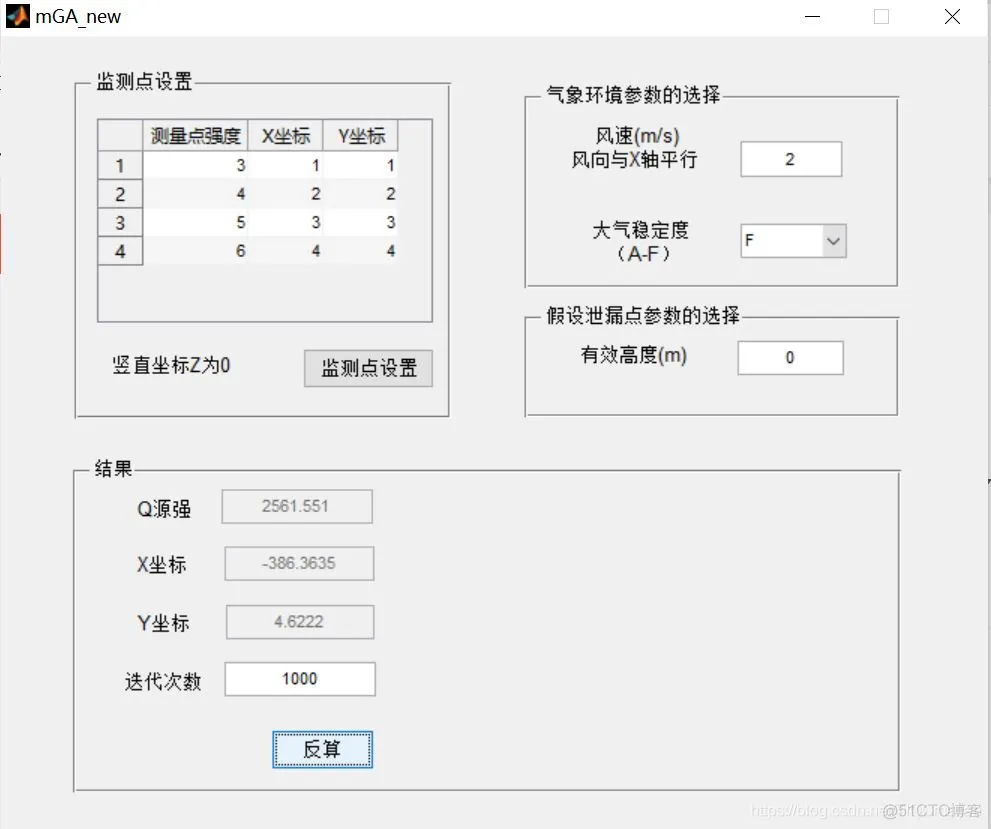
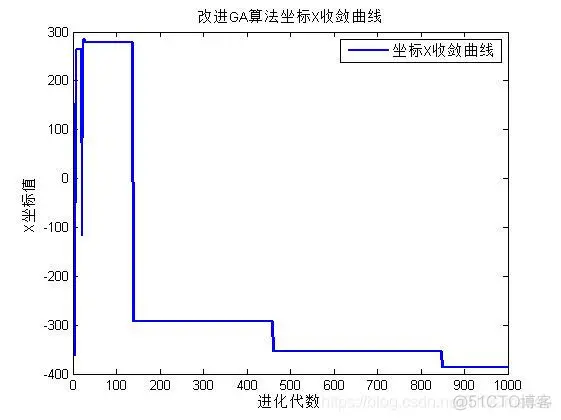
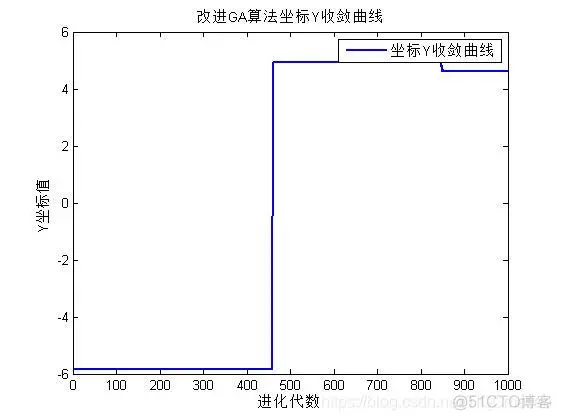
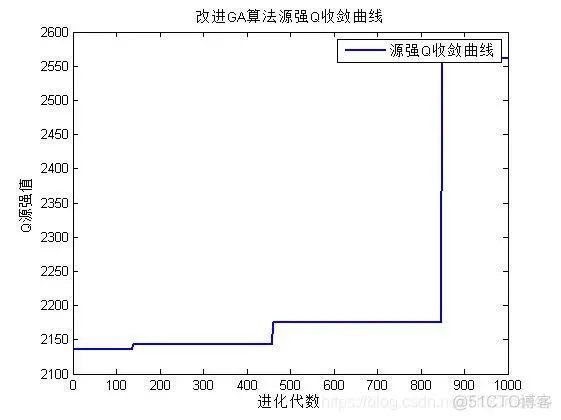
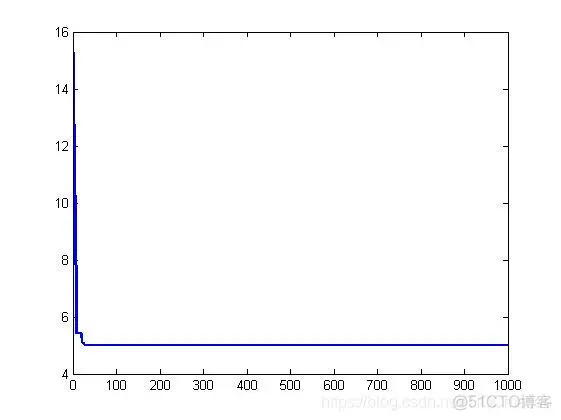
三、运行结果





 扫一扫
扫一扫


 2219
2219

 被折叠的 条评论
为什么被折叠?
被折叠的 条评论
为什么被折叠?
 到【灌水乐园】发言





