


一、简介
空域滤波是一种邻域处理方法,通过直接在图像空间中对邻域内像素进行处理,达到平滑或锐化图像的作用。此外,在图像识别中,通过滤波还可以抽出图像的特征作为图像识别的特征模式。
空域滤波是图像处理领域中广泛使用的主要工具。空域滤波主要可以分为线性滤波和非线性滤波,其中,线性滤波和频域滤波存在一一对应的关系。但是,空域滤波可以用于非线性滤波,但是频域滤波不能用于非线性滤波。
从根源上讲,滤波这一词语来自于频域,信号处理中频域滤波指的是允许或者限制一定的频率成分通过。但空域滤波直接在图像空间中增强图像的某些特征或者减弱图像的某些特征。
空域滤波的作用域是像素及其邻域,通常使用空域模板对邻域内的像素进行处理从而产生该像素的输出值。
线性空域滤波指的是像素的输出值是计算该像素邻域内像素值的线性组合,系数矩阵在这里我们称之为模板。由信号处理的原理可以得出,线性滤波可以用卷积来实现。因此,在数字图像处理中,线性滤波通常是利用滤波模板与图像的空域进行卷积来实现的,在线性滤波中滤波模板也称为卷积模板。
根据空域卷积的定义可以知道,卷积首先需要将模板进行反褶,也就是将模板绕模板中心旋转180°,但是在数字图像处理中,卷积模板通常是关于原点对称的,因此通常不需要考虑反褶过程。模板卷积的主要步骤包括如下几个步骤,
(a.将模板在图像中进行遍历,将模板中心和各个像素位置重合;
(b.将模板的各个系数与模板对应像素值进行相乘;
(c.将所有的乘积相加,并将求和结果赋值于模板中心对应的像素
对于尺寸为m*n的模板,线性滤波在图像中像素(x,y)处的相应输出g(x,y)的一般表达式如下:

上式中,w(s,t)和f(x+s,y+t)分别为模板系数和模板对应像素,其中,为了保证唯一坐标s和t是整数,要求m和n是奇数。在一般情况下,线性滤波选取尺寸为奇数的正方形模板。
为了方便进行描述,设模板的尺寸为mxn,线性滤波在像素(x,y)处的相应输出R的另一种简单化表示为: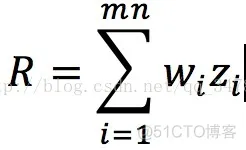
上式中wi表示的是模板系数,zi表示与模板系数对应的像素值,这里i = 1,2,3,…,mn,mn这里指的是模板对应的像素总数。
在非线性空域滤波中也是采用基于邻域的处理,而且模板滑过一幅图像的机理和线性空域滤波是一致的。非线性滤波处理也取决于模板对应的邻域内的像素,然而,因为不能直接利用上面g(x,y)的表达式计算乘积求和。例如非常有用的中值滤波,它是将模板对应的邻域内的像素值进行排序,然后查找中间值。利用这种方法可以有效地去除椒盐噪声,但是因为非线性滤波涉及到了像素值的排序操作,因此它的时间开销要比线性滤波的大。
对于实现空域滤波的最后一个问题是对于图像边界像素邻域的处理。对于尺寸为n*n的空域模板,当模板中心距离图像边界为(n-1)/2像素时,该模板正好在图像的内部。如果模板的中心继续像图像外边界靠近,那么模板的行或列就会超出图像之外。因此常常采用延拓的方式解决外边界问题。常用的方法有四种,分别是补零、重复、对称和循环方式,补零是指通过补零来扩展图像。重复是指通过复制外边界的值来扩展图像,对称是指通过镜像反射外边界的值来扩展图像,循环是指将图像看成二维周期函数的一个周期来扩展。在空域滤波完成后,从处理后的图像裁剪出与源图像对应的部分,使处理后的图像与源图像的尺寸相等。
二、源代码
function varargout = spatial_filter(varargin)
% SPATIAL_FILTER M-file for spatial_filter.fig
%      SPATIAL_FILTER, by itself, creates a new SPATIAL_FILTER or raises the existing
%      singleton*.
%
%      H = SPATIAL_FILTER returns the handle to a new SPATIAL_FILTER or the handle to
%      the existing singleton*.
%
%      SPATIAL_FILTER('CALLBACK',hObject,eventData,handles,...) calls the local
%      function named CALLBACK in SPATIAL_FILTER.M with the given input arguments.
%
%      SPATIAL_FILTER('Property','Value',...) creates a new SPATIAL_FILTER or raises the
%      existing singleton*.  Starting from the left, property value pairs are
%      applied to the GUI before spatial_filter_OpeningFunction gets called.  An
%      unrecognized property name or invalid value makes property application
%      stop.  All inputs are passed to spatial_filter_OpeningFcn via varargin.
%
%      *See GUI Options on GUIDE's Tools menu.  Choose "GUI allows only one
%      instance to run (singleton)".
%
% See also: GUIDE, GUIDATA, GUIHANDLES

% Edit the above text to modify the response to help spatial_filter

% Last Modified by GUIDE v2.5 31-May-2014 09:03:34

% Begin initialization code - DO NOT EDIT
gui_Singleton = 1;
gui_State = struct('gui_Name',       mfilename, ...
                   'gui_Singleton',  gui_Singleton, ...
                   'gui_OpeningFcn', @spatial_filter_OpeningFcn, ...
                   'gui_OutputFcn',  @spatial_filter_OutputFcn, ...
                   'gui_LayoutFcn',  [] , ...
                   'gui_Callback',   []);
if nargin & isstr(varargin{1})
    gui_State.gui_Callback = str2func(varargin{1});
end

if nargout
    [varargout{1:nargout}] = gui_mainfcn(gui_State, varargin{:});
else
    gui_mainfcn(gui_State, varargin{:});
end
% End initialization code - DO NOT EDIT


% --- Executes just before spatial_filter is made visible.
function spatial_filter_OpeningFcn(hObject, eventdata, handles, varargin)
% This function has no output args, see OutputFcn.
% hObject    handle to figure
% eventdata  reserved - to be defined in a future version of MATLAB
% handles    structure with handles and user data (see GUIDATA)
% varargin   command line arguments to spatial_filter (see VARARGIN)
axes(handles.axes1);
img = imread('lena.bmp');
imshow(img);
[M,N] = size(img);
g = imnoise(img,'gaussian',0.05,0.01);
axes(handles.axes2);
imshow(g);
w = fspecial('average',[3,3]);
f = imfilter(g,w);
axes(handles.axes3);
imshow(f);
set(handles.m_edit,'string',0.05);
set(handles.v_edit,'string',0.01);
set(handles.c_edit,'string',3);
% Choose default command line output for spatial_filter
handles.output = hObject;

% Update handles structure
guidata(hObject, handles);

% UIWAIT makes spatial_filter wait for user response (see UIRESUME)
% uiwait(handles.figure1);


% --- Outputs from this function are returned to the command line.
function varargout = spatial_filter_OutputFcn(hObject, eventdata, handles)
% varargout  cell array for returning output args (see VARARGOUT);
% hObject    handle to figure
% eventdata  reserved - to be defined in a future version of MATLAB
% handles    structure with handles and user data (see GUIDATA)

% Get default command line output from handles structure
varargout{1} = handles.output;

% --- Executes during object creation, after setting all properties.
function m_edit_CreateFcn(hObject, eventdata, handles)
% hObject    handle to m_edit (see GCBO)
% eventdata  reserved - to be defined in a future version of MATLAB
% handles    empty - handles not created until after all CreateFcns called

% Hint: edit controls usually have a white background on Windows.
%       See ISPC and COMPUTER.
if ispc
    set(hObject,'BackgroundColor','white');
else
    set(hObject,'BackgroundColor',get(0,'defaultUicontrolBackgroundColor'));
end


function m_edit_Callback(hObject, eventdata, handles)
% hObject    handle to m_edit (see GCBO)
% eventdata  reserved - to be defined in a future version of MATLAB
% handles    structure with handles and user data (see GUIDATA)

% Hints: get(hObject,'String') returns contents of m_edit as text
%        str2double(get(hObject,'String')) returns contents of m_edit as a double


% --- Executes during object creation, after setting all properties.
function v_edit_CreateFcn(hObject, eventdata, handles)
% hObject    handle to v_edit (see GCBO)
% eventdata  reserved - to be defined in a future version of MATLAB
% handles    empty - handles not created until after all CreateFcns called

% Hint: edit controls usually have a white background on Windows.
%       See ISPC and COMPUTER.
if ispc
    set(hObject,'BackgroundColor','white');
else
    set(hObject,'BackgroundColor',get(0,'defaultUicontrolBackgroundColor'));
end


function v_edit_Callback(hObject, eventdata, handles)
% hObject    handle to v_edit (see GCBO)
% eventdata  reserved - to be defined in a future version of MATLAB
% handles    structure with handles and user data (see GUIDATA)

% Hints: get(hObject,'String') returns contents of v_edit as text
%        str2double(get(hObject,'String')) returns contents of v_edit as a double


% --- Executes during object creation, after setting all properties.
function c_edit_CreateFcn(hObject, eventdata, handles)
% hObject    handle to c_edit (see GCBO)
% eventdata  reserved - to be defined in a future version of MATLAB
% handles    empty - handles not created until after all CreateFcns called

% Hint: edit controls usually have a white background on Windows.
%       See ISPC and COMPUTER.
if ispc
    set(hObject,'BackgroundColor','white');
else
    set(hObject,'BackgroundColor',get(0,'defaultUicontrolBackgroundColor'));
end


function c_edit_Callback(hObject, eventdata, handles)
% hObject    handle to c_edit (see GCBO)
% eventdata  reserved - to be defined in a future version of MATLAB
% handles    structure with handles and user data (see GUIDATA)

% Hints: get(hObject,'String') returns contents of c_edit as text
%        str2double(get(hObject,'String')) returns contents of c_edit as a double


% --- Executes on button press in apply_button.
function apply_button_Callback(hObject, eventdata, handles)
% hObject    handle to apply_button (see GCBO)
% eventdata  reserved - to be defined in a future version of MATLAB
% handles    structure with handles and user data (see GUIDATA)
% m = str2num(get(handles.m_edit,'string'));
% v = str2num(get(handles.v_edit,'string'));
c = str2num(get(handles.c_edit,'string'));
if c>0&&c==floor(c)&&size(c,1)*size(c,2)==1%c为整数且输入是‘一个’整数

img = getimage(handles.axes1);
val1 = get(handles.filter_pop_menu,'value');
str1 = get(handles.filter_pop_menu,'string');
g = getimage(handles.axes2);
switch str1{val1}
    case '均值滤波器'
         w = fspecial('average',[c,c]);
         f = imfilter(g,w);
     case '中值滤波器'
         f = medfilt2(g,[c,c]);
     case '最大滤波器'
         f = ordfilt2(g,9,ones(c,c));
     case '最小滤波器'
         f = ordfilt2(g,1,ones(c,c));
     end
- 1.
- 2.
- 3.
- 4.
- 5.
- 6.
- 7.
- 8.
- 9.
- 10.
- 11.
- 12.
- 13.
- 14.
- 15.
- 16.
- 17.
- 18.
- 19.
- 20.
- 21.
- 22.
- 23.
- 24.
- 25.
- 26.
- 27.
- 28.
- 29.
- 30.
- 31.
- 32.
- 33.
- 34.
- 35.
- 36.
- 37.
- 38.
- 39.
- 40.
- 41.
- 42.
- 43.
- 44.
- 45.
- 46.
- 47.
- 48.
- 49.
- 50.
- 51.
- 52.
- 53.
- 54.
- 55.
- 56.
- 57.
- 58.
- 59.
- 60.
- 61.
- 62.
- 63.
- 64.
- 65.
- 66.
- 67.
- 68.
- 69.
- 70.
- 71.
- 72.
- 73.
- 74.
- 75.
- 76.
- 77.
- 78.
- 79.
- 80.
- 81.
- 82.
- 83.
- 84.
- 85.
- 86.
- 87.
- 88.
- 89.
- 90.
- 91.
- 92.
- 93.
- 94.
- 95.
- 96.
- 97.
- 98.
- 99.
- 100.
- 101.
- 102.
- 103.
- 104.
- 105.
- 106.
- 107.
- 108.
- 109.
- 110.
- 111.
- 112.
- 113.
- 114.
- 115.
- 116.
- 117.
- 118.
- 119.
- 120.
- 121.
- 122.
- 123.
- 124.
- 125.
- 126.
- 127.
- 128.
- 129.
- 130.
- 131.
- 132.
- 133.
- 134.
- 135.
- 136.
- 137.
- 138.
- 139.
- 140.
- 141.
- 142.
- 143.
- 144.
- 145.
- 146.
- 147.
- 148.
- 149.
- 150.
- 151.
- 152.
- 153.
- 154.
- 155.
- 156.
- 157.
- 158.
- 159.
- 160.
- 161.
- 162.
- 163.
- 164.
- 165.
- 166.
- 167.
- 168.
- 169.
- 170.
- 171.
- 172.
- 173.
- 174.
- 175.
- 176.
- 177.
- 178.
- 179.
- 180.
- 181.
- 182.
- 183.
- 184.
- 185.
- 186.
- 187.
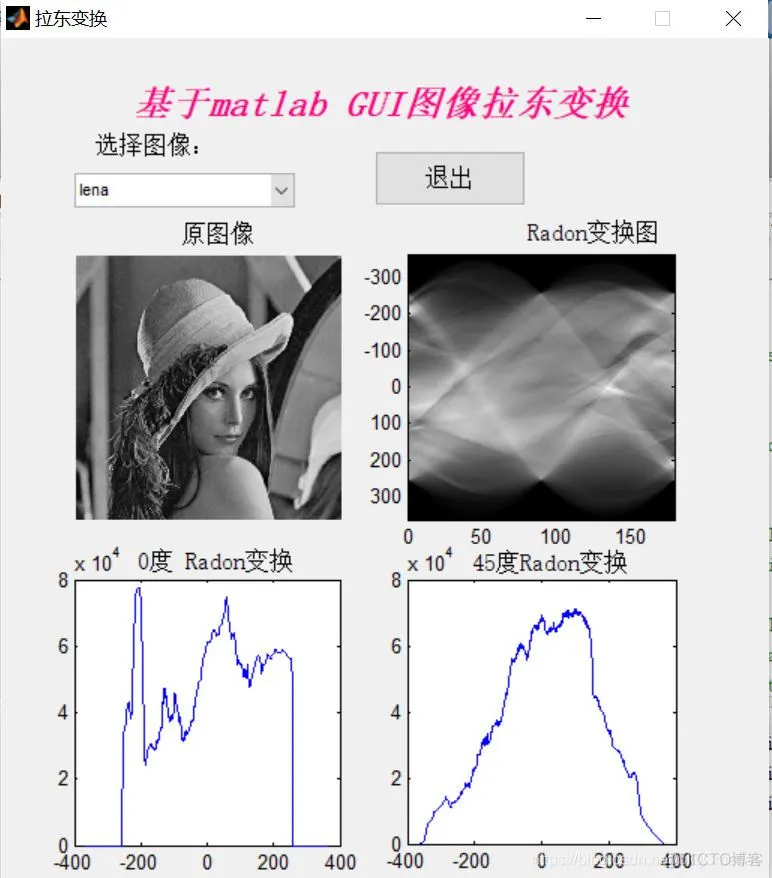
三、运行结果





 扫一扫
扫一扫


 1550
1550

 被折叠的 条评论
为什么被折叠?
被折叠的 条评论
为什么被折叠?
 到【灌水乐园】发言





