


一、简介
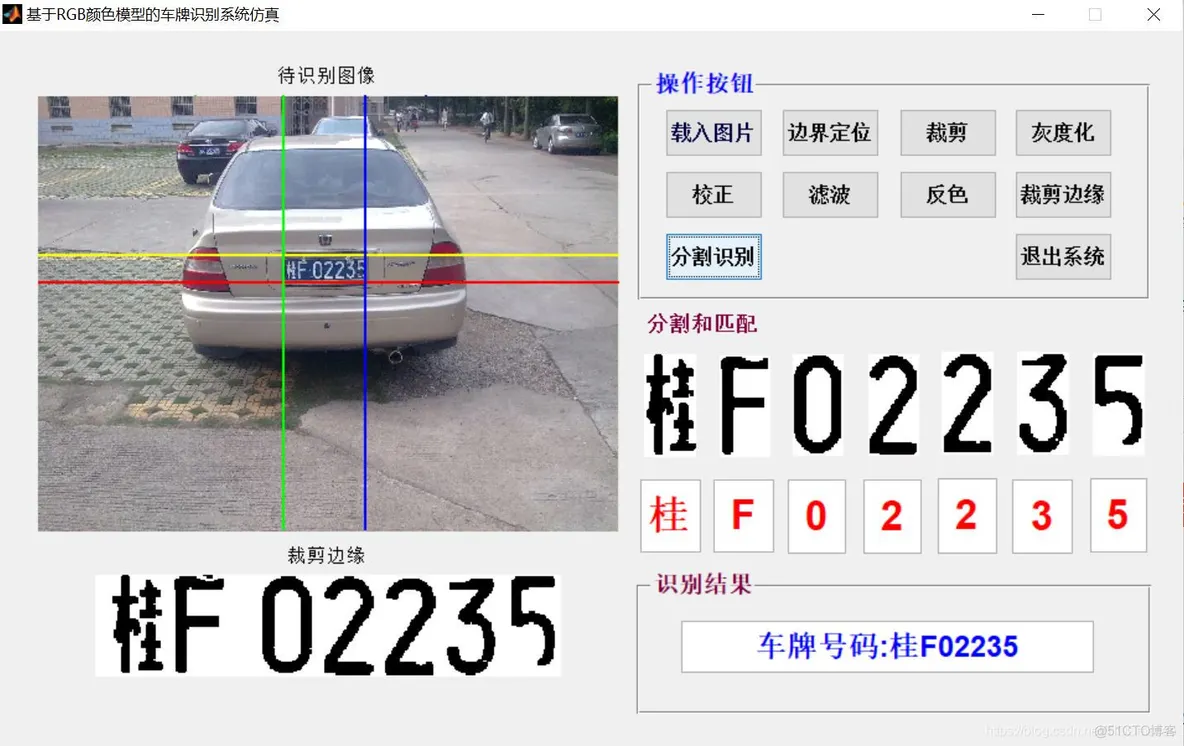
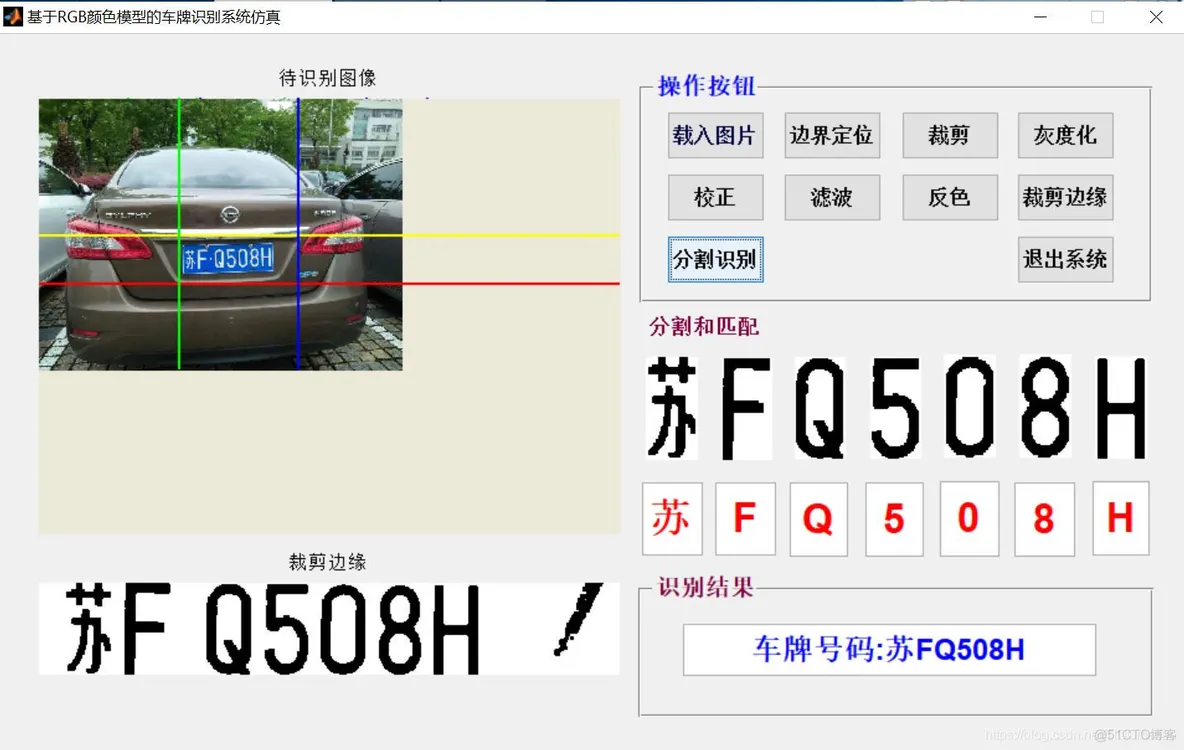
基于matlab GUI RGB颜色模型车牌识别
二、源代码
function varargout = main(varargin)

gui_Singleton = 1;
gui_State = struct('gui_Name',       mfilename, ...
                   'gui_Singleton',  gui_Singleton, ...
                   'gui_OpeningFcn', @main_OpeningFcn, ...
                   'gui_OutputFcn',  @main_OutputFcn, ...
                   'gui_LayoutFcn',  [] , ...
                   'gui_Callback',   []);
if nargin && ischar(varargin{1})
    gui_State.gui_Callback = str2func(varargin{1});
end

if nargout
    [varargout{1:nargout}] = gui_mainfcn(gui_State, varargin{:});
else
    gui_mainfcn(gui_State, varargin{:});
end
% End initialization code - DO NOT EDIT


% --- Executes just before main is made visible.
function main_OpeningFcn(hObject, eventdata, handles, varargin)
% This function has no output args, see OutputFcn.
% hObject    handle to figure
% eventdata  reserved - to be defined in a future version of MATLAB
% handles    structure with handles and user data (see GUIDATA)
% varargin   command line arguments to main (see VARARGIN)

% Choose default command line output for main
handles.output = hObject;

% Update handles structure
guidata(hObject, handles);

% UIWAIT makes main wait for user response (see UIRESUME)
% uiwait(handles.figure1);


% --- Outputs from this function are returned to the command line.
function varargout = main_OutputFcn(hObject, eventdata, handles)
% varargout  cell array for returning output args (see VARARGOUT);
% hObject    handle to figure
% eventdata  reserved - to be defined in a future version of MATLAB
% handles    structure with handles and user data (see GUIDATA)

% Get default command line output from handles structure
varargout{1} = handles.output;


% --- Executes on button press in pushbutton1.
function pushbutton1_Callback(hObject, eventdata, handles)
% hObject    handle to pushbutton1 (see GCBO)
% eventdata  reserved - to be defined in a future version of MATLAB
% handles    structure with handles and user data (see GUIDATA)
dd=imread('222.jpg');
 axes(handles.axes1);imshow(dd);
 axes(handles.axes71);imshow(dd);
 axes(handles.axes64);imshow(dd);
axes(handles.axes65);imshow(dd);
axes(handles.axes70);imshow(dd);
axes(handles.axes67);imshow(dd);
axes(handles.axes66);imshow(dd);
axes(handles.axes68);imshow(dd);
 axes(handles.axes69);imshow(dd);

set(handles.edit32,'string','');
set(handles.edit33,'string','');
set(handles.edit34,'string','');
set(handles.edit35,'string','');
set(handles.edit36,'string','');
set(handles.edit37,'string','');
set(handles.edit38,'string','');
set(handles.edit1,'string','');
global I,global I_bai,
global PY2,global PX1,global PX2,global PY1
set(handles.pushbutton2,'Enable','off');
[filename pathname] = ...
uigetfile({'*.jpg';'*.bmp';'*.gif'}, '');
str=[pathname filename];
I=imread(str);
I_bai=I;
[PY2,PY1,PX2,PX1]=caitu_fenge(I);
axes(handles.axes1);
imshow(I_bai);title('待识别图像');
set(handles.pushbutton2,'Enable','on');
% --- Executes on button press in pushbutton2.
function pushbutton2_Callback(hObject, eventdata, handles)
% hObject    handle to pushbutton2 (see GCBO)
% eventdata  reserved - to be defined in a future version of MATLAB
% handles    structure with handles and user data (see GUIDATA)
global I,global PY2,global PX1,global PX2,global PY1,global I_bai,global Plate,global threshold
set(handles.pushbutton6,'Enable','off');
[U V]=size(I);
%===============车牌区域根据面积二次修正======================
[PY2,PY1,PX2,PX1,threshold]=SEC_xiuzheng(PY2,PY1,PX2,PX1);
%==============更新图片=============================
Plate=I_bai(PY1:PY2,PX1:PX2,:);%使用caitu_tiqu
 hold on;
        line1 = [1 PY1; V PY1];
         plot(line1(:, 1), line1(:, 2), 'y-', 'LineWidth', 2);pause(1.5);
 hold on;
        line2 = [1 PY2; V PY2];
         plot(line2(:, 1), line2(:, 2), 'r-', 'LineWidth', 2);pause(1.5);
    hold on;
        line3 = [PX1 1; PX1 U];
         plot(line3(:, 1), line3(:, 2), 'g-', 'LineWidth', 2);pause(1.5);
          hold on;
        line4 = [PX2 1; PX2 U];
         plot(line4(:, 1), line4(:, 2), 'b-', 'LineWidth', 2);
set(handles.pushbutton6,'Enable','on');
% --- Executes on button press in pushbutton6.
function pushbutton6_Callback(hObject, eventdata, handles)
% hObject    handle to pushbutton6 (see GCBO)
% eventdata  reserved - to be defined in a future version of MATLAB
% handles    structure with handles and user data (see GUIDATA)
global Plate
axes(handles.axes71);
imshow(Plate);title('边界定位图');
% --- Executes on button press in pushbutton7.
function pushbutton7_Callback(hObject, eventdata, handles)
% hObject    handle to pushbutton7 (see GCBO)
% eventdata  reserved - to be defined in a future version of MATLAB
% handles    structure with handles and user data (see GUIDATA)
global Plate,global bw
bw=rgb2gray(Plate);
axes(handles.axes71);
imshow(bw);title('灰度化');
% --- Executes on button press in pushbutton8.
function pushbutton8_Callback(hObject, eventdata, handles)
% hObject    handle to pushbutton8 (see GCBO)
% eventdata  reserved - to be defined in a future version of MATLAB
% handles    structure with handles and user data (see GUIDATA)
global bw,global qingxiejiao
qingxiejiao=rando_bianhuan(bw);
bw=imrotate(bw,qingxiejiao,'bilinear','crop');
axes(handles.axes71);
imshow(bw);title('倾斜校正');
% --- Executes on button press in pushbutton9.
function pushbutton9_Callback(hObject, eventdata, handles)
% hObject    handle to pushbutton9 (see GCBO)
% eventdata  reserved - to be defined in a future version of MATLAB
% handles    structure with handles and user data (see GUIDATA)
global bw,global threshold
bw=im2bw(bw);%figure,imshow(bw);
bw=bwmorph(bw,'hbreak',inf);%figure,imshow(bw);
bw=bwmorph(bw,'spur',inf);%figure,imshow(bw);title('擦除之前');
bw=bwmorph(bw,'open',5);%figure,imshow(bw);title('闭合运算');
bw = bwareaopen(bw, threshold);
axes(handles.axes71);
imshow(bw);title('擦除');
% --- Executes on button press in pushbutton10.
function pushbutton10_Callback(hObject, eventdata, handles)
% hObject    handle to pushbutton10 (see GCBO)
% eventdata  reserved - to be defined in a future version of MATLAB
% handles    structure with handles and user data (see GUIDATA)
global bw
bw=~bw;
axes(handles.axes71);
imshow(bw);title('反色')

% --- Executes on button press in pushbutton11.
function pushbutton11_Callback(hObject, eventdata, handles)
% hObject    handle to pushbutton11 (see GCBO)
% eventdata  reserved - to be defined in a future version of MATLAB
% handles    structure with handles and user data (see GUIDATA)
 global bw
 bw=touying(bw);
axes(handles.axes71);
imshow(bw);title('裁剪边缘');
% --- Executes on button press in pushbutton12.
function pushbutton12_Callback(hObject, eventdata, handles)
% hObject    handle to pushbutton12 (see GCBO)
% eventdata  reserved - to be defined in a future version of MATLAB
% handles    structure with handles and user data (see GUIDATA)
 global bw,global threshold,global qingxiejiao
bw=~bw;
bw = bwareaopen(bw, threshold);
bw=~bw;%figure,imshow(bw);title('二次擦除');
[y,x]=size(bw);%对长宽重新赋值
%=================文字分割=================================
fenge=shuzifenge(bw,qingxiejiao)
[m,k]=size(fenge);
%=================显示分割图像结果=========================

%================ 给七张图片定位===============桂AV6388
han_zi  =bw( 1:y,fenge(1):fenge(2));
zi_mu   =bw( 1:y,fenge(3):fenge(4));
zm_sz_1 =bw( 1:y,fenge(5):fenge(6));
zm_sz_2 =bw( 1:y,fenge(7):fenge(8));
shuzi_1 =bw( 1:y,fenge(9):fenge(10));
shuzi_2 =bw( 1:y,fenge(11):fenge(12));
shuzi_3 =bw( 1:y,fenge(13):fenge(14));
%==========================识别====================================
%======================把修正数据读入==============================
xiuzhenghanzi =   imresize(han_zi, [110 55],'bilinear');
xiuzhengzimu  =   imresize(zi_mu,  [110 55],'bilinear');
xiuzhengzm_sz_1=  imresize(zm_sz_1,[110 55],'bilinear');
xiuzhengzm_sz_2 = imresize(zm_sz_2,[110 55],'bilinear');
xiuzhengshuzi_1 = imresize(shuzi_1,[110 55],'bilinear');
xiuzhengshuzi_2 = imresize(shuzi_2,[110 55],'bilinear');
xiuzhengshuzi_3 = imresize(shuzi_3,[110 55],'bilinear');

axes(handles.axes64);imshow(xiuzhenghanzi);
axes(handles.axes65);imshow(xiuzhengzimu);
axes(handles.axes66);imshow(xiuzhengzm_sz_1);
axes(handles.axes67);imshow(xiuzhengzm_sz_2);
axes(handles.axes68);imshow(xiuzhengshuzi_1);
axes(handles.axes69);imshow(xiuzhengshuzi_2);
axes(handles.axes70);imshow(xiuzhengshuzi_3);

%============ 把0-9 , A-Z以及省份简称的数据存储方便访问====================
hanzishengfen=duquhanzi(imread('cpgui.bmp'),imread('cpguizhou.bmp'),imread('cpjing.bmp'),imread('cpsu.bmp'),imread('cpyue.bmp'));
%因数字和字母比例不同。这里要修改
shuzizimu=duquszzm(imread('0.bmp'),imread('1.bmp'),imread('2.bmp'),imread('3.bmp'),imread('4.bmp'),...
                   imread('5.bmp'),imread('6.bmp'),imread('7.bmp'),imread('8.bmp'),imread('9.bmp'),...
                   imread('10.bmp'),imread('11.bmp'),imread('12.bmp'),imread('13.bmp'),imread('14.bmp'),...
                   imread('15.bmp'),imread('16.bmp'),imread('17.bmp'),imread('18.bmp'),imread('19.bmp'),...
                   imread('20.bmp'),imread('21.bmp'),imread('22.bmp'),imread('23.bmp'),imread('24.bmp'),...
                   imread('25.bmp'),imread('26.bmp'),imread('27.bmp'),imread('28.bmp'),imread('29.bmp'),...
                   imread('30.bmp'),imread('31.bmp'),imread('32.bmp'),imread('33.bmp'));
zimu  = duquzimu(imread('10.bmp'),imread('11.bmp'),imread('12.bmp'),imread('13.bmp'),imread('14.bmp'),...
                 imread('15.bmp'),imread('16.bmp'),imread('17.bmp'),imread('18.bmp'),imread('19.bmp'),...
                 imread('20.bmp'),imread('21.bmp'),imread('22.bmp'),imread('23.bmp'),imread('24.bmp'),...
                 imread('25.bmp'),imread('26.bmp'),imread('27.bmp'),imread('28.bmp'),imread('29.bmp'),...
                 imread('30.bmp'),imread('31.bmp'),imread('32.bmp'),imread('33.bmp'));
shuzi = duqushuzi(imread('0.bmp'),imread('1.bmp'),imread('2.bmp'),imread('3.bmp'),imread('4.bmp'),...
                 imread('5.bmp'),imread('6.bmp'),imread('7.bmp'),imread('8.bmp'),imread('9.bmp'));
%============================识别结果================================
i=1;%shibiezm_sz该函数识别数字有问题
jieguohanzi  = shibiehanzi(hanzishengfen,xiuzhenghanzi);shibiejieguo(1,i) =jieguohanzi;  i=i+1;
jieguozimu   = shibiezimu(zimu,xiuzhengzimu);           shibiejieguo(1,i) =jieguozimu;   i=i+1;
jieguozm_sz_1= shibiezm_sz(shuzizimu,xiuzhengzm_sz_1);  shibiejieguo(1,i) =jieguozm_sz_1;i=i+1;
jieguozm_sz_2= shibiezm_sz(shuzizimu,xiuzhengzm_sz_2);  shibiejieguo(1,i) =jieguozm_sz_2;i=i+1;
jieguoshuzi_1= shibieshuzi(shuzi,xiuzhengshuzi_1);      shibiejieguo(1,i) =jieguoshuzi_1;i=i+1;
jieguoshuzi_2= shibieshuzi(shuzi,xiuzhengshuzi_2);      shibiejieguo(1,i) =jieguoshuzi_2;i=i+1;
jieguoshuzi_3= shibieshuzi(shuzi,xiuzhengshuzi_3);      shibiejieguo(1,i) =jieguoshuzi_3;i=i+1;
%==========================对话框显示显示=============================================
 NN=shibiejieguo;
%msgbox(shibiejieguo,'识别结果');
%=====================导出文本==================
fid=fopen('Data.xls','a+');
fprintf(fid,'%s\r\n',shibiejieguo,datestr(now));
fclose(fid);

 set(handles.edit32,'string',char(NN(1)));
  set(handles.edit33,'string',char(NN(2)));
   set(handles.edit34,'string',char(NN(3)));
    set(handles.edit35,'string',char(NN(4)));
     set(handles.edit36,'string',char(NN(5)));
      set(handles.edit37,'string',char(NN(6))); set(handles.edit38,'string',char(NN(7)));
% --- Executes on button press in pushbutton13.

 set(handles.edit1,'string',['车牌号码:',NN]);

% --- Executes on button press in pushbutton15.
function pushbutton15_Callback(hObject, eventdata, handles)
% hObject    handle to pushbutton15 (see GCBO)
% eventdata  reserved - to be defined in a future version of MATLAB
% handles    structure with handles and user data (see GUIDATA)
close(gcf);


function edit1_Callback(hObject, eventdata, handles)
% hObject    handle to edit1 (see GCBO)
% eventdata  reserved - to be defined in a future version of MATLAB
% handles    structure with handles and user data (see GUIDATA)

% Hints: get(hObject,'String') returns contents of edit1 as text
%        str2double(get(hObject,'String')) returns contents of edit1 as a double


% --- Executes during object creation, after setting all properties.
function edit1_CreateFcn(hObject, eventdata, handles)
% hObject    handle to edit1 (see GCBO)
% eventdata  reserved - to be defined in a future version of MATLAB
% handles    empty - handles not created until after all CreateFcns called

% Hint: edit controls usually have a white background on Windows.
%       See ISPC and COMPUTER.
if ispc
    set(hObject,'BackgroundColor','white');
else
    set(hObject,'BackgroundColor',get(0,'defaultUicontrolBackgroundColor'));
end


function edit2_Callback(hObject, eventdata, handles)
% hObject    handle to edit2 (see GCBO)
% eventdata  reserved - to be defined in a future version of MATLAB
% handles    structure with handles and user data (see GUIDATA)

% Hints: get(hObject,'String') returns contents of edit2 as text
%        str2double(get(hObject,'String')) returns contents of edit2 as a double


% --- Executes during object creation, after setting all properties.
function edit2_CreateFcn(hObject, eventdata, handles)
% hObject    handle to edit2 (see GCBO)
% eventdata  reserved - to be defined in a future version of MATLAB
% handles    empty - handles not created until after all CreateFcns called

% Hint: edit controls usually have a white background on Windows.
%       See ISPC and COMPUTER.
if ispc
    set(hObject,'BackgroundColor','white');
else
    set(hObject,'BackgroundColor',get(0,'defaultUicontrolBackgroundColor'));
end
- 1.
- 2.
- 3.
- 4.
- 5.
- 6.
- 7.
- 8.
- 9.
- 10.
- 11.
- 12.
- 13.
- 14.
- 15.
- 16.
- 17.
- 18.
- 19.
- 20.
- 21.
- 22.
- 23.
- 24.
- 25.
- 26.
- 27.
- 28.
- 29.
- 30.
- 31.
- 32.
- 33.
- 34.
- 35.
- 36.
- 37.
- 38.
- 39.
- 40.
- 41.
- 42.
- 43.
- 44.
- 45.
- 46.
- 47.
- 48.
- 49.
- 50.
- 51.
- 52.
- 53.
- 54.
- 55.
- 56.
- 57.
- 58.
- 59.
- 60.
- 61.
- 62.
- 63.
- 64.
- 65.
- 66.
- 67.
- 68.
- 69.
- 70.
- 71.
- 72.
- 73.
- 74.
- 75.
- 76.
- 77.
- 78.
- 79.
- 80.
- 81.
- 82.
- 83.
- 84.
- 85.
- 86.
- 87.
- 88.
- 89.
- 90.
- 91.
- 92.
- 93.
- 94.
- 95.
- 96.
- 97.
- 98.
- 99.
- 100.
- 101.
- 102.
- 103.
- 104.
- 105.
- 106.
- 107.
- 108.
- 109.
- 110.
- 111.
- 112.
- 113.
- 114.
- 115.
- 116.
- 117.
- 118.
- 119.
- 120.
- 121.
- 122.
- 123.
- 124.
- 125.
- 126.
- 127.
- 128.
- 129.
- 130.
- 131.
- 132.
- 133.
- 134.
- 135.
- 136.
- 137.
- 138.
- 139.
- 140.
- 141.
- 142.
- 143.
- 144.
- 145.
- 146.
- 147.
- 148.
- 149.
- 150.
- 151.
- 152.
- 153.
- 154.
- 155.
- 156.
- 157.
- 158.
- 159.
- 160.
- 161.
- 162.
- 163.
- 164.
- 165.
- 166.
- 167.
- 168.
- 169.
- 170.
- 171.
- 172.
- 173.
- 174.
- 175.
- 176.
- 177.
- 178.
- 179.
- 180.
- 181.
- 182.
- 183.
- 184.
- 185.
- 186.
- 187.
- 188.
- 189.
- 190.
- 191.
- 192.
- 193.
- 194.
- 195.
- 196.
- 197.
- 198.
- 199.
- 200.
- 201.
- 202.
- 203.
- 204.
- 205.
- 206.
- 207.
- 208.
- 209.
- 210.
- 211.
- 212.
- 213.
- 214.
- 215.
- 216.
- 217.
- 218.
- 219.
- 220.
- 221.
- 222.
- 223.
- 224.
- 225.
- 226.
- 227.
- 228.
- 229.
- 230.
- 231.
- 232.
- 233.
- 234.
- 235.
- 236.
- 237.
- 238.
- 239.
- 240.
- 241.
- 242.
- 243.
- 244.
- 245.
- 246.
- 247.
- 248.
- 249.
- 250.
- 251.
- 252.
- 253.
- 254.
- 255.
- 256.
- 257.
- 258.
- 259.
- 260.
- 261.
- 262.
- 263.
- 264.
- 265.
- 266.
- 267.
- 268.
- 269.
- 270.
- 271.
- 272.
- 273.
- 274.
- 275.
- 276.
- 277.
- 278.
- 279.
- 280.
- 281.
- 282.
- 283.
- 284.
- 285.
- 286.
- 287.
- 288.
- 289.
- 290.
- 291.
- 292.
- 293.
- 294.
- 295.
- 296.
- 297.
- 298.
- 299.
- 300.
- 301.
- 302.
- 303.
- 304.
- 305.
- 306.
- 307.
- 308.
- 309.
- 310.
三、运行结果
四、备注
版本:2014a





 扫一扫
扫一扫


 2166
2166

 被折叠的 条评论
为什么被折叠?
被折叠的 条评论
为什么被折叠?
 到【灌水乐园】发言





