


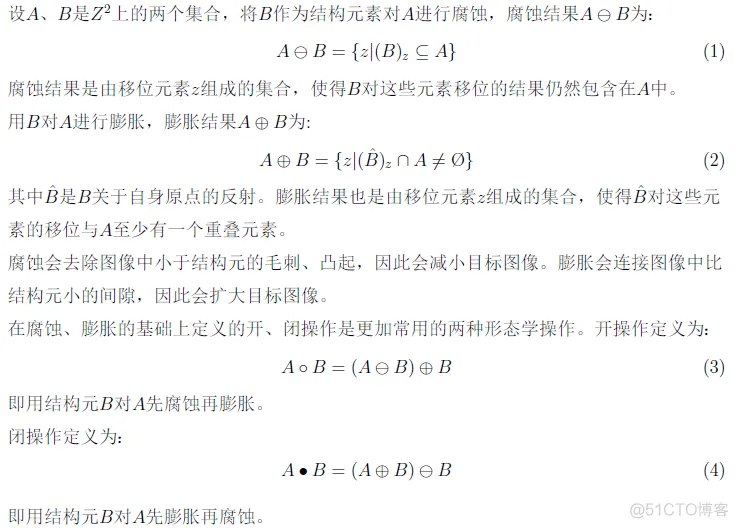
一、二值图像的腐蚀、膨胀、开、闭操作

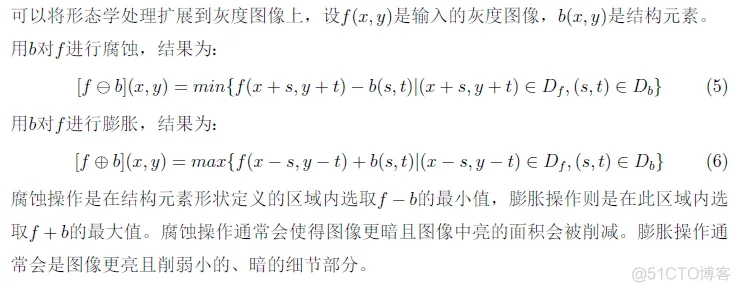
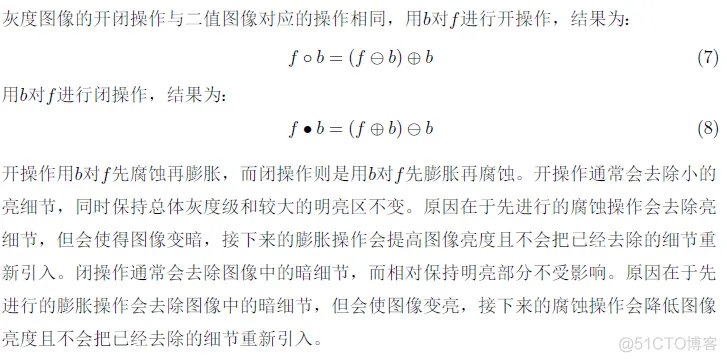
二、灰度图像的腐蚀、膨胀、开、闭操作
function [rectx,recty,area,perimeter,long,width] = minboundrect(x,y,metric)
% minboundrect: Compute the minimal bounding rectangle of points in the plane
% usage: [rectx,recty,area,perimeter] = minboundrect(x,y,metric)
%
% arguments: (input)
%  x,y - vectors of points, describing points in the plane as
%        (x,y) pairs. x and y must be the same lengths.
%
%  metric - (OPTIONAL) - single letter character flag which
%        denotes the use of minimal area or perimeter as the
%        metric to be minimized. metric may be either 'a' or 'p',
%        capitalization is ignored. Any other contraction of 'area'
%        or 'perimeter' is also accepted.
%
%        DEFAULT: 'a'    ('area')
%
% arguments: (output)
%  rectx,recty - 5x1 vectors of points that define the minimal
%        bounding rectangle(长方形).
%
%  area - (scalar) area of the minimal rect itself.
%
%  perimeter - (scalar) perimeter of the minimal rect as found
%
% Note: For those individuals who would prefer the rect with minimum
% perimeter or area, careful testing convinces me that the minimum area
% rect was generally also the minimum perimeter rect on most problems
% (with one class of exceptions). This same testing appeared to verify my
% assumption that the minimum area rect must always contain at least
% one edge of the convex hull. The exception I refer to above is for
% problems when the convex hull is composed of only a few points,
% most likely exactly 3. Here one may see differences between the
% two metrics. My thanks to Roger Stafford for pointing out this
% class of counter-examples.
%
% Thanks are also due to Roger for pointing out a proof that the
% bounding rect must always contain an edge of the convex hull, in
% both the minimal perimeter and area cases.
%
% See also: minboundcircle, minboundtri, minboundsphere
%
% Author: John D'Errico
% E-mail: woodchips@rochester.rr.com
% Release: 3.0
% Release date: 3/7/07

% default for metric

% global long

if (nargin<3) || isempty(metric)
  metric = 'a';
elseif ~ischar(metric)
  error 'metric must be a character flag if it is supplied.'
else
  % check for 'a' or 'p'
  metric = lower(metric(:)');
  ind = strmatch(metric,{'area','perimeter'});
  if isempty(ind)
    error 'metric does not match either ''area'' or ''perimeter'''
  end

  % just keep the first letter.
  metric = metric(1);
end

% preprocess data
x=x(:);
y=y(:);

% not many error checks to worry about
n = length(x);
if n~=length(y)
  error 'x and y must be the same sizes'
end

% start out with the convex hull of the points to
% reduce the problem dramatically. Note that any
% points in the interior of the convex hull are
% never needed, so we drop them.
if n>3
   edges = convhull(x,y);
  %edges = convhull(x,y,{'Qt'});  % 'Pp' will silence the warnings

  % exclude those points inside the hull as not relevant
  % also sorts the points into their convex hull as a
  % closed polygon

  x = x(edges);
  y = y(edges);

  % probably fewer points now, unless the points are fully convex
  nedges = length(x) - 1;
elseif n>1
  % n must be 2 or 3
  nedges = n;
  x(end+1) = x(1);
  y(end+1) = y(1);
else
  % n must be 0 or 1
  nedges = n;
end

% now we must find the bounding rectangle of those
% that remain.

% special case small numbers of points. If we trip any
% of these cases, then we are done, so return.
switch nedges
  case 0
    % empty begets empty
    rectx = [];
    recty = [];
    area = [];
    perimeter = [];
    long = [];
    width = [];
    return
  case 1
    % with one point, the rect is simple.
    rectx = repmat(x,1,5);
    recty = repmat(y,1,5);
    area = 0;
    perimeter = 0;
    long =0;
    width =0;
    return
  case 2
    % only two points. also simple.
    rectx = x([1 2 2 1 1]);
    recty = y([1 2 2 1 1]);
    area = 0;
    perimeter = 2*sqrt(diff(x).^2 + diff(y).^2);
    long=perimeter;
    width =perimeter;
    return
end
% 3 or more points.

% will need a 2x2 rotation matrix through an angle theta
Rmat = @(theta) [cos(theta) sin(theta);-sin(theta) cos(theta)];

% get the angle of each edge of the hull polygon.
ind = 1:(length(x)-1);
edgeangles = atan2(y(ind+1) - y(ind),x(ind+1) - x(ind));
% move the angle into the first quadrant.
edgeangles = unique(mod(edgeangles,pi/2));

% now just check each edge of the hull
nang = length(edgeangles);
area = inf;
perimeter = inf;
long=inf;
width =inf;
met = inf;
xy = [x,y];
for i = 1:nang
  % rotate the data through -theta
  rot = Rmat(-edgeangles(i));
  xyr = xy*rot;
  xymin = min(xyr,[],1);
  xymax = max(xyr,[],1);

  % The area is simple, as is the perimeter
  A_i = prod(xymax - xymin);
  P_i = 2*sum(xymax-xymin);

  if metric=='a'
    M_i = A_i;
  else
    M_i = P_i;
  end

  % new metric value for the current interval. Is it better?
  if M_i<met
    % keep this one
    met = M_i;
    area = A_i;
    perimeter = P_i;

    rect = [xymin;[xymax(1),xymin(2)];xymax;[xymin(1),xymax(2)];xymin];
    rect = rect*rot';
    rectx = rect(:,1);
    recty = rect(:,2);
  end
end
% get the final rect

L=sqrt(diff(rectx).^2 + diff(recty).^2);
long=max(L);
width=min(L);


% all done

end % mainline end- 1.
- 2.
- 3.
- 4.
- 5.
- 6.
- 7.
- 8.
- 9.
- 10.
- 11.
- 12.
- 13.
- 14.
- 15.
- 16.
- 17.
- 18.
- 19.
- 20.
- 21.
- 22.
- 23.
- 24.
- 25.
- 26.
- 27.
- 28.
- 29.
- 30.
- 31.
- 32.
- 33.
- 34.
- 35.
- 36.
- 37.
- 38.
- 39.
- 40.
- 41.
- 42.
- 43.
- 44.
- 45.
- 46.
- 47.
- 48.
- 49.
- 50.
- 51.
- 52.
- 53.
- 54.
- 55.
- 56.
- 57.
- 58.
- 59.
- 60.
- 61.
- 62.
- 63.
- 64.
- 65.
- 66.
- 67.
- 68.
- 69.
- 70.
- 71.
- 72.
- 73.
- 74.
- 75.
- 76.
- 77.
- 78.
- 79.
- 80.
- 81.
- 82.
- 83.
- 84.
- 85.
- 86.
- 87.
- 88.
- 89.
- 90.
- 91.
- 92.
- 93.
- 94.
- 95.
- 96.
- 97.
- 98.
- 99.
- 100.
- 101.
- 102.
- 103.
- 104.
- 105.
- 106.
- 107.
- 108.
- 109.
- 110.
- 111.
- 112.
- 113.
- 114.
- 115.
- 116.
- 117.
- 118.
- 119.
- 120.
- 121.
- 122.
- 123.
- 124.
- 125.
- 126.
- 127.
- 128.
- 129.
- 130.
- 131.
- 132.
- 133.
- 134.
- 135.
- 136.
- 137.
- 138.
- 139.
- 140.
- 141.
- 142.
- 143.
- 144.
- 145.
- 146.
- 147.
- 148.
- 149.
- 150.
- 151.
- 152.
- 153.
- 154.
- 155.
- 156.
- 157.
- 158.
- 159.
- 160.
- 161.
- 162.
- 163.
- 164.
- 165.
- 166.
- 167.
- 168.
- 169.
- 170.
- 171.
- 172.
- 173.
- 174.
- 175.
- 176.
- 177.
- 178.
- 179.
- 180.
- 181.
- 182.
- 183.
- 184.
- 185.
- 186.
- 187.
- 188.
- 189.
- 190.
- 191.
- 192.
- 193.
- 194.
- 195.
- 196.





 扫一扫
扫一扫


 8826
8826

 被折叠的 条评论
为什么被折叠?
被折叠的 条评论
为什么被折叠?
 到【灌水乐园】发言





