



 本文介绍了实体关系模型(ER Diagram)中超级键(Superkey)、键(Key)、候选键(Candidate Key)和复合键(Composite Key)的概念,并通过学生选课实例展示了如何建立E-R图,强调了主键(Primary Key)的选择过程。
首先了解这样几个名词:
Entity 我们要依此建模的实体,在E-R图中用矩形表示(例子中的student、course)
Attributes 实体的属性, 在E-R图中用椭圆表示,与相应的entity连接
Relationship 实体与实体之间的关系,在E-R图中用菱形表示,连接相应的实体(数量没有限制,依情况而定)
Primary Key 在E-R图中,属于主键的属性要加下划线
Keys(键的几种分类)
- A superkey is any set of attributes whose values uniquely identify each entity instance in an entity set.
- A key is a minimal set of attributes whose values uniquely identify each entity instance in an entity set.
- Where there is more than one such set, each forms a candidate key.
- Any key with more than one attribute is a composite key.
- One of the candidate keys is selected as the primary key.
接下来以学生选课作为例子,给出相应的E-R 图。
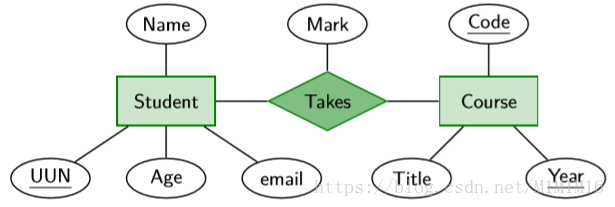
由图可知:
两个entity分别是Student和Course ,他们之间的关系是Takes
Student的属性有UUN、Age、email、Name,主键为UUN
Course的属性有Code、Title、Year,主键由Code和Year组成






 扫一扫
扫一扫


 670
670

 被折叠的 条评论
为什么被折叠?
被折叠的 条评论
为什么被折叠?
 到【灌水乐园】发言





