


Three20
Three20 is a collection of iPhone UI classes, like a photo viewer, and general utilities, like an HTTP disk cache. Three20 is derived from the Facebook iPhone app, which is one of the most downloaded iPhone apps ever.



Community
If you would like to ask any questions regarding Three20, please check out any of the following:
Documentation
You can access Three20 API documentation in several ways:
- Online: http://facebook.github.com/three20/api
- Within Xcode:
- Open your Xcode Preferences (
⌘,) and switch to Documentation tab. - Click the
+button - Add the Three20 doc set feed:
feed://facebook.github.com/three20/api/com.facebook.Three20.atom
- Open your Xcode Preferences (
- Generate the documentation from the project repository with the
src/scripts/docs.pyscript
Adding Three20 to your project
Three20 is compiled as static libraries. It use Xcode's "dependent project" facilities. There are two methods of adding Three20 to your project.
The first is with the TTModule Python Script.
The Second option is to add it to your project manually. Here is how:
Estimated time: 5 minutes.
-
Clone the three20 git repository:
git clone git://github.com/facebook/three20.git. Make sure you store the repository in a permanent place because Xcode will need to reference the files every time you compile your project. -
Locate the "Three20.xcodeproj" file under "
three20/src/Three20/". Drag Three20.xcodeproj and drop it onto the root of your Xcode project's "Groups and Files" sidebar. A dialog will appear -- make sure "Copy items" is unchecked and "Reference Type" is "Relative to Project" before clicking "Add". -
Open the Three20 Xcode Project that you just added to your app and expand the "Dependencies" group. Select all of the projects listed there and drag them to your app as well. You should now have the following list of Three20 projects added to your app:
- Three20Core
- Three20Network
- Three20Style
- Three20UICommon
- Three20UINavigator
- Three20UI
- Three20
-
Now you need to link the Three20 static libraries to your project. Select all of the project items that you just added to the sidebar. Under the "Details" table, you will see a number of items, such as libThree20.a and libThree20Core.a. Check the checkbox on the far right for each of the
libfiles (not the UnitTests). This will link each part of the Three20 framework to your app. -
Now you need to add Three20 as a dependency of your project, so Xcode compiles it whenever you compile your project. Expand the "Targets" section of the sidebar and double-click your application's target. Under the "General" tab you will see a "Direct Dependencies" section. Click the "+" button, select "Three20" and each of the other libs, and click "Add Target". You do not need to add the
UnitTeststarget for each lib. -
Now you need to add the bundle of images and strings to your app. Locate "Three20.bundle" under "three20/src" and drag and drop it into your project. A dialog will appear -- make sure "Create Folder References" is selected, "Copy items" is unchecked, and "Reference Type" is "Relative to Project" before clicking "Add".
-
Now you need to add the Core Animation framework to your project. Right click on the "Frameworks" group in your project (or equivalent) and select Add > Existing Frameworks. Then locate QuartzCore.framework and add it to the project.
-
Finally, we need to tell your project where to find the Three20 headers. Open your "Project Settings" and go to the "Build" tab. Look for "Header Search Paths" and double-click it. Add the relative path from your project's directory to the "three20/Build/Products/three20" directory.
-
While you are in Project Settings, go to "Other Linker Flags" under the "Linker" section, and add "-ObjC" and "-all_load" to the list of flags.
-
You're ready to go. Just #import "Three20/Three20.h" anywhere you want to use Three20 classes in your project.
An Overview of Three20
Photo Viewer
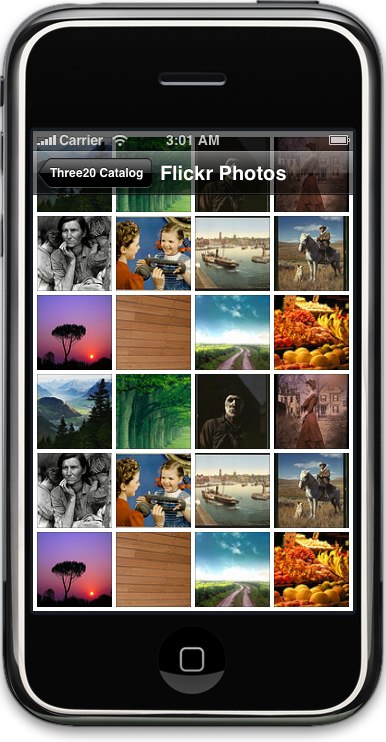
TTPhotoViewController emulates Apple's Photos app with all of its flick n' pinch delight. You can supply your own "photo sources", which works similiarly to the data sources used by UITableView. Unlike Apple's Photos app, it isn't limited to photos stored locally. Your photos can be loaded from the network, and long lists of photos can be loaded incrementally.
Message composer
TTMessageController emulates the message composer in Apple's Mail app. You can customize it to send any kind of message you want. Include your own set of message fields, or use the standard "To:" and "Subject:". Recipient names can be autocompleted from a data source that you provide.
Web image views
TTImageView makes it as easy to display an image as it is in HTML. Just supply the URL of the image, and TTImageView loads it and displays it efficiently. TTImageView also works with the HTTP cache described below to avoid hitting the network when possible.
Internet-aware table view controllers
TTTableViewController and TTTableViewDataSource help you to build tables which load their content from the Internet. Rather than just assuming you have all the data ready to go, like UITableView does by default, TTTableViewController lets you communicate when your data is loading, and when there is an error or nothing to display. It also helps you to add a "More" button to load the next page of data, and optionally supports reloading the data by shaking the device.
Better text fields
TTTextEditor is a UITextView which can grow in height automatically as you type. I use this for entering messages in Facebook Chat, and it behaves similarly to the editor in Apple's SMS app.
TTPickerTextField is a type-ahead UITextField. As you type it searches a data source, and it adds bubbles into the flow of text when you choose a type-ahead option. I use this in TTMessageController for selecting the names of message recipients.
HTTP disk cache
TTURLRequest is a replacement for NSURLRequest which supports a disk cache (NSURLRequest can only cache in RAM). It has some other nice features too. HTTP posts are as easy as supplying a dictionary of parameters. The TTURL loading system can also be suspended and resumed at any time, which is a great performance helper. Network threads often fight with the UI thread, so you can suspend the network any time your app is momentarily graphically intensive.
URL-based Navigation
TTNavigator is for those grizzled old web developers like myself who want to organize their app by "pages" which can be displayed by visiting a URL.
Your view controllers can simply register URL patterns that they handle, and when those URLs are visited the controllers will be created and displayed. You can also register generic actions that are called when a URL is visited.
TTNavigator also persists and restores the full path of navigation controllers and modal view controllers, so your users can quite the app and come back exactly where they left off.
Learn more at Three20.info
 337


 扫一扫


 被折叠的 条评论
为什么被折叠?
 到【灌水乐园】发言


