


Hello,大家好
这里是失踪回归人口小杨同学
由于最近到了一个新的公司,学习了新的技术,在学习的过程中遇到了一个我认为值得记录的问题,就放在这里供大家参考参考吧。我希望能帮助到刚开始学习C#的小白朋友们,当然如果有问题也请大佬帮我指出来,我会认真倾听并改正的,嘻嘻嘻。
接下来进入正题
是这样子的,老师给我的需求是需要我用WPF做一个应用程序可以实现从电脑文件选择一个文件夹显示在程序上然后客户选择所需要的文件进行上传。
这里的话我先分享其中的一步,即如何使用TreeView实现展示文件目录树
第一步,打开VS2022,创建一个项目
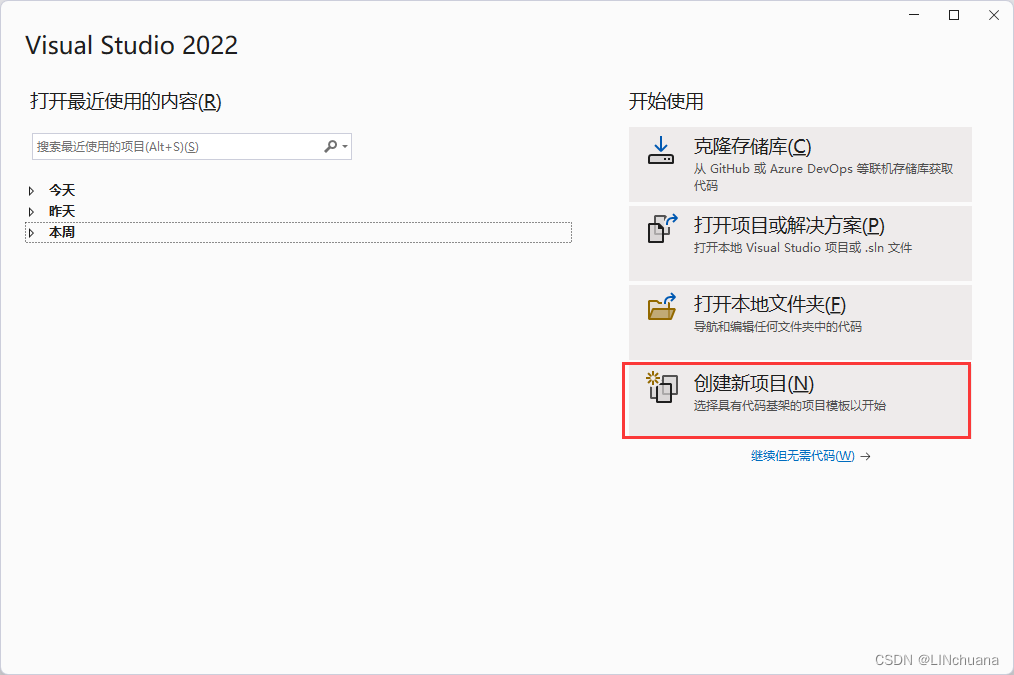
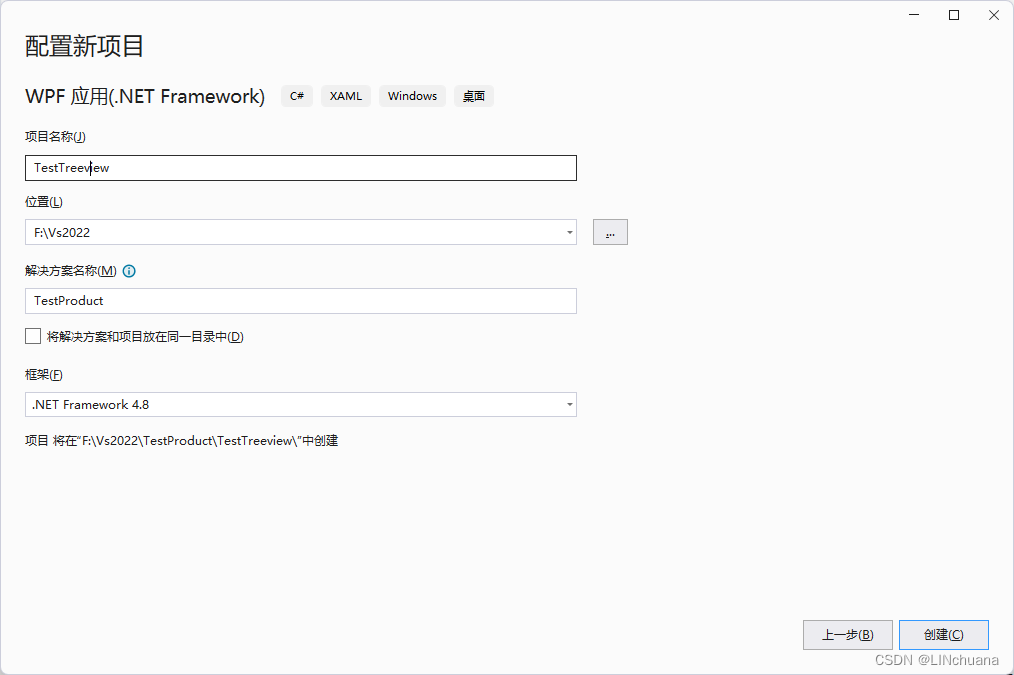
我们需要一个WPF应用(.NET Framework)可以在上方搜索框搜索找到

第二步,按照这个目录创建文件夹以及创建类
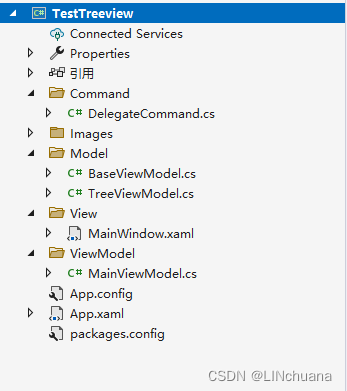
每个类的代码如下
DelegateCommand.cs
using System;
using System.Collections.Generic;
using System.Linq;
using System.Text;
using System.Threading.Tasks;
using System.Windows;
using System.Windows.Input;

namespace TestTreeview.Command
{
    public class DelegateCommand<T> : ICommand
    {
        private readonly Action<T> _execute;
        private readonly Func<T, bool> _canExecute;
        private TreeViewModel treeViewModel;


        public DelegateCommand(Action<T> execute, Func<T, bool> canExecute = null)
        {
            if (execute == null)
                throw new ArgumentNullException(nameof(execute));

            _execute = execute;
            _canExecute = canExecute;
        }

        public event EventHandler CanExecuteChanged;

        public bool CanExecute(object parameter)
        {
            return _canExecute == null || _canExecute((T)parameter);
        }

        public void Execute(object parameter)
        {
            _execute((T)parameter);
        }

    }

    public class DelegateCommand : ICommand
    {
        private readonly Action _execute;
        private readonly Func<bool> _canExecute;
        private DelegateCommand ensure;
        private Action<Window> cancel;

        public DelegateCommand(DelegateCommand ensure)
        {
            this.ensure = ensure;
        }

        public DelegateCommand(Action<Window> cancel)
        {
            this.cancel = cancel;
        }

        public DelegateCommand(Action execute, Func<bool> canExecute = null)
        {
            if (execute == null)
                throw new ArgumentNullException(nameof(execute));

            _execute = execute;
            _canExecute = canExecute;
        }

        public virtual event EventHandler CanExecuteChanged;

        public virtual bool CanExecute(object parameter = null)
        {
            return _canExecute == null || _canExecute();
        }

        public virtual void Execute(object parameter = null)
        {
            _execute();
        }

    }
}
Images用来存放图片
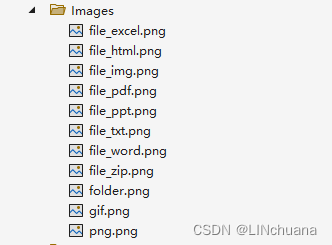
我一般喜欢去阿里的图标库找需要的icon
阿里巴巴矢量图标库 https://www.iconfont.cn/
BaseViewModel.cs
using CommunityToolkit.Mvvm.ComponentModel;
using System;
using System.Collections.Generic;
using System.Collections.ObjectModel;
using System.ComponentModel;
using System.Linq;
using System.Runtime.CompilerServices;
using System.Text;
using System.Threading.Tasks;

namespace TestTreeview
{
    internal class BaseViewModel :  ObservableObject, INotifyPropertyChanged
    {

		public void RaisePropertyChanged([CallerMemberName] string property ="")
		{
			PropertyChanged?.Invoke(this, new PropertyChangedEventArgs(property));
		}

        public event PropertyChangedEventHandler PropertyChanged;
    }
}
TreeViewModel.cs
using System;
using System.Collections.Generic;
using System.Collections.ObjectModel;
using System.ComponentModel;
using System.Linq;
using System.Text;
using System.Threading.Tasks;
using System.Windows;
using System.Windows.Controls;
using System.Windows.Forms;

namespace TestTreeview
{


    internal class TreeViewModel:BaseViewModel
    {
		private string _name;

		public string Name
		{
			get { return _name; }
			set { _name = value; RaisePropertyChanged(); }
		}


        bool _isSelected;
        public virtual bool IsSelected
        {
            get { return _isSelected; }
            set
            {
                SetProperty<bool>(ref _isSelected, value);
            }
        }

        TreeNode _node;


        private string _path;

		public string Path
		{
			get { return _path; }
			set { _path = value; RaisePropertyChanged(); }
		}

		private string _imgPath;

		public string ImgPath
		{
			get { return _imgPath; }
			set { _imgPath = value; }
		}

        public TreeViewModel Parent;

		public ObservableCollection<TreeViewModel> Children { get; set; } = new ObservableCollection<TreeViewModel>();

        public IDisposable Subscribe(IObserver<TreeNode> observer)
        {
            throw new NotImplementedException();
        }
    }
}
MainWindow.xaml
<Window x:Class="TestTreeview.MainWindow"
        xmlns="http://schemas.microsoft.com/winfx/2006/xaml/presentation"
        xmlns:x="http://schemas.microsoft.com/winfx/2006/xaml"
        xmlns:d="http://schemas.microsoft.com/expression/blend/2008"
        xmlns:mc="http://schemas.openxmlformats.org/markup-compatibility/2006"
        xmlns:local="clr-namespace:TestTreeview"
        xmlns:i="clr-namespace:System.Windows.Interactivity;assembly=System.Windows.Interactivity"
        mc:Ignorable="d"
        Title="MainWindow" Height="450" Width="800">

    <Window.DataContext>
        <local:MainViewModel/>
    </Window.DataContext>
    <Grid>
        <Grid.RowDefinitions>
            <RowDefinition Height="Auto"></RowDefinition>
            <RowDefinition Height="*"></RowDefinition>
            <RowDefinition Height="Auto" ></RowDefinition>
        </Grid.RowDefinitions>
        <Grid.ColumnDefinitions>
            <ColumnDefinition Width="270"></ColumnDefinition>
            <ColumnDefinition Width="150"></ColumnDefinition>
            <ColumnDefinition Width="*"></ColumnDefinition>
        </Grid.ColumnDefinitions>
        <GroupBox Grid.Column="0" Grid.RowSpan="3" Margin="0 0 0 40 ">

        <TreeView   ItemsSource="{Binding RootModel.Children}">

            <TreeView.ItemTemplate>
                <HierarchicalDataTemplate DataType="{x:Type local:TreeViewModel}" ItemsSource="{Binding Children}">
                        <!--<CheckBox IsChecked="{Binding IsSelected}" Name="Nodes">-->
                    <StackPanel Orientation="Horizontal">
                        <Image Source="{Binding ImgPath}" Width="16" Height="16"/>
                        <CheckBox Content="{Binding Name}">
                            <i:Interaction.Triggers>
                                <i:EventTrigger EventName="Click">
                                    <i:InvokeCommandAction Command="{Binding DataContext.ClickCommand,RelativeSource={RelativeSource AncestorType=Window,Mode=FindAncestor}}" CommandParameter="{Binding}"/>
                                </i:EventTrigger>
                            </i:Interaction.Triggers>
                        </CheckBox>

                     </StackPanel>

                        <!--</CheckBox>-->
                    </HierarchicalDataTemplate>
            </TreeView.ItemTemplate>
        </TreeView>
        </GroupBox>
        <StackPanel Orientation="Horizontal" Grid.Row="2" Grid.Column="2" Margin="180 10 10 10">
        <Button Content="选择文件夹" Width="70" Height="20"  Click="Button_Click" Command="{Binding GetFileCommand}" Margin="10 0 20 0"></Button>
        <Button Content="确认选择" Width="70" Height="20" ></Button>
        </StackPanel>
        <GroupBox Grid.Column="1" Grid.RowSpan="3" Grid.ColumnSpan="2" Margin="0 0 0 40">
            <ListBox>
                <ListBox.ItemTemplate>
                    <DataTemplate>
                        <TextBlock></TextBlock>
                    </DataTemplate>
                </ListBox.ItemTemplate>
            </ListBox>
        </GroupBox>
    </Grid>
</Window>
MainViewModel.cs
using System;
using System.Collections.Generic;
using System.IO;
using System.Linq;
using System.Text;
using System.Threading.Tasks;
using System.Windows;
using System.Windows.Forms;
using System.Xml.Linq;
using TestTreeview.Command;


namespace TestTreeview
{
    internal class MainViewModel:BaseViewModel
    {

		private TreeViewModel _rootModel;

		public TreeViewModel RootModel
		{
			get { return _rootModel; }
			set { _rootModel = value; RaisePropertyChanged(); }
		}

        public DelegateCommand<TreeViewModel> GetFileCommand { get; set; }
        public DelegateCommand<TreeViewModel> ClickCommand { get; set; }
        public List<TreeViewModel> SelectItem { get; set; } = new List<TreeViewModel>();

        public MainViewModel()
		{

			GetFileCommand = new DelegateCommand<TreeViewModel>(GetFile);


        }


        public void GetFile(TreeViewModel parent = null)
		{
            System.Windows.Forms.FolderBrowserDialog ofd = new System.Windows.Forms.FolderBrowserDialog();
            if (ofd.ShowDialog() == System.Windows.Forms.DialogResult.OK)
            {
                //System.Windows.MessageBox.Show(ofd.SelectedPath);
                RootModel = new TreeViewModel();
                RootModel.Path = ofd.SelectedPath;
                RootModel.Name = ofd.SelectedPath;
                RootModel = LoadData(RootModel);


            }

        }


        //递归获取文件夹及其子目录下的文件
		public TreeViewModel LoadData(TreeViewModel parent = null)
		{

			DirectoryInfo directoryInfo = new DirectoryInfo(parent.Path);
			var ds = directoryInfo.GetDirectories();

            foreach (var  d in ds)
            {
				TreeViewModel sub = new TreeViewModel() {Path = d.FullName,Name = d.Name };

				if (d.Exists)

				{
					sub.ImgPath = "/Images/folder.png";

				}


				var result = LoadData(sub);
                parent.Children.Add(result);


            }

            var fs = directoryInfo.GetFiles();
            foreach (var fileInfo in fs)
            {
				TreeViewModel file = new TreeViewModel() { Path = fileInfo.FullName, Name = fileInfo.Name };

                if (fileInfo.Name.Contains(".docx"))
				{
					file.ImgPath = "/Images/file_word.png";
				}else if (fileInfo.Name.Contains(".xlsx"))
				{
					file.ImgPath = "/Images/file_excel.png";
				}
                else if (fileInfo.Name.Contains(".ppt"))
                {
                    file.ImgPath = "/Images/file_ppt.png";
                }
                else if (fileInfo.Name.Contains(".pdf"))
                {
                    file.ImgPath = "/Images/file_pdf.png";
                }
                else if (fileInfo.Name.Contains(".txt"))
                {
                    file.ImgPath = "/Images/file_txt.png";
                }
                else if (fileInfo.Name.Contains(".rar")|| fileInfo.Name.Contains(".zip"))
                {
                    file.ImgPath = "/Images/file_zip.png";
                }
                else if (fileInfo.Name.Contains(".jpg"))
                {
                    file.ImgPath = "/Images/file_img.png";
                }
                else if (fileInfo.Name.Contains(".html"))
                {
                    file.ImgPath = "/Images/file_html.png";
                }
                else if (fileInfo.Name.Contains(".png"))
                {
                    file.ImgPath = "/Images/png.png";
                }
                else if (fileInfo.Name.Contains(".gif"))
                {
                    file.ImgPath = "/Images/gif.png";
                }

                parent.Children.Add(file);

            }
			return parent;
        }


    }
}
然后运行就好啦
运行结果如下

首先选择选择文件夹,选择你想要打开的目录
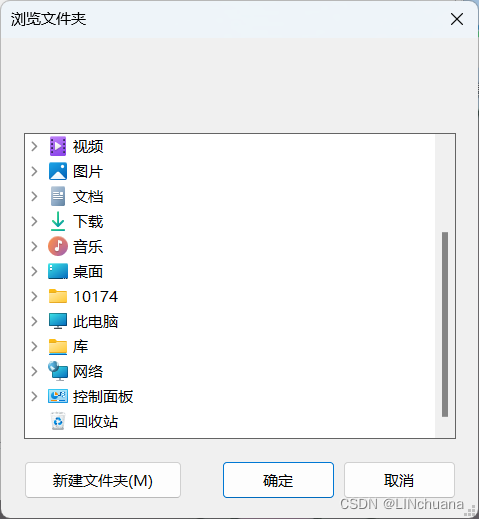
这里我放创建了一个测试的文件夹放在F盘的
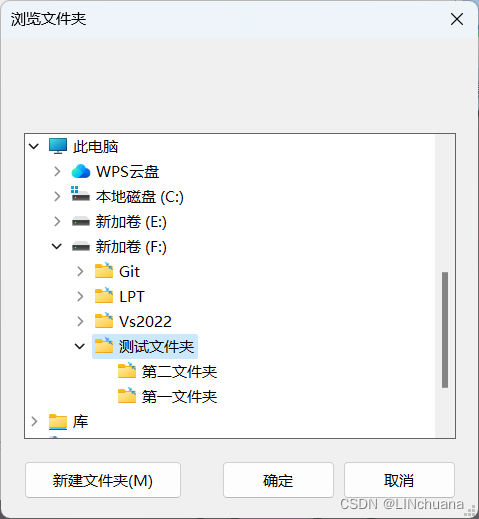
打开后是这个样子
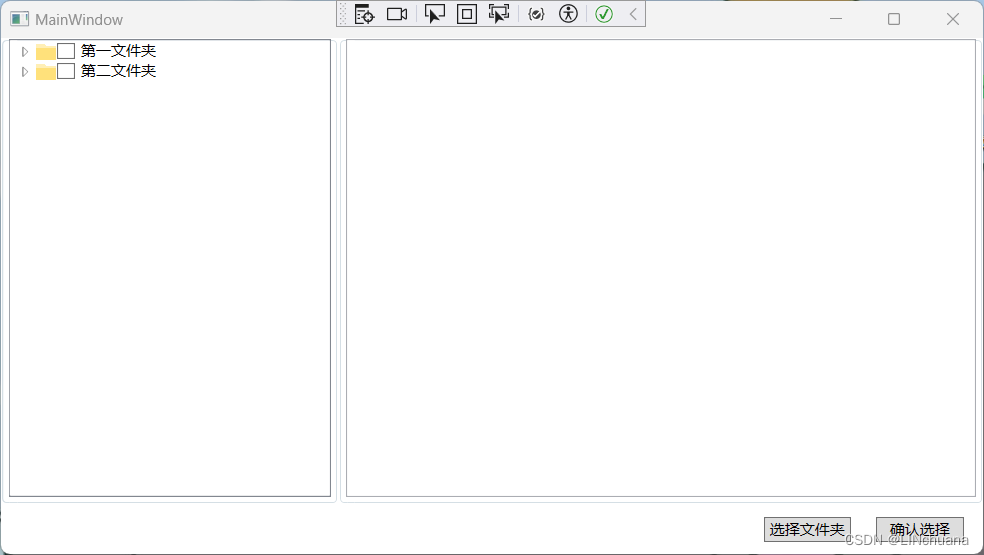
里面还有一些文件
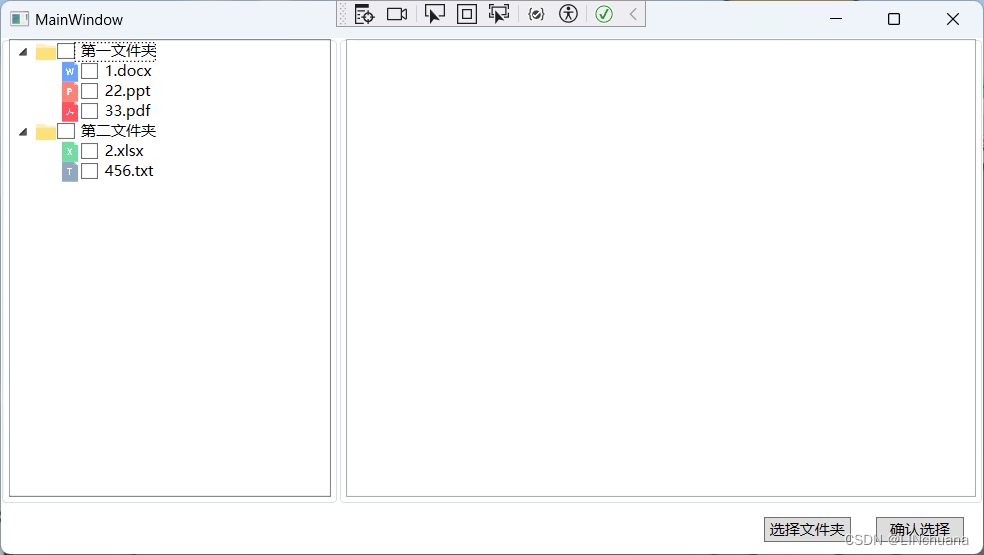
还有一些功能没有做完,等我做完再给你们更新吧~
希望能帮到你们^ - ^






 扫一扫
扫一扫


 1500
1500

 被折叠的 条评论
为什么被折叠?
被折叠的 条评论
为什么被折叠?
 到【灌水乐园】发言





