



前言
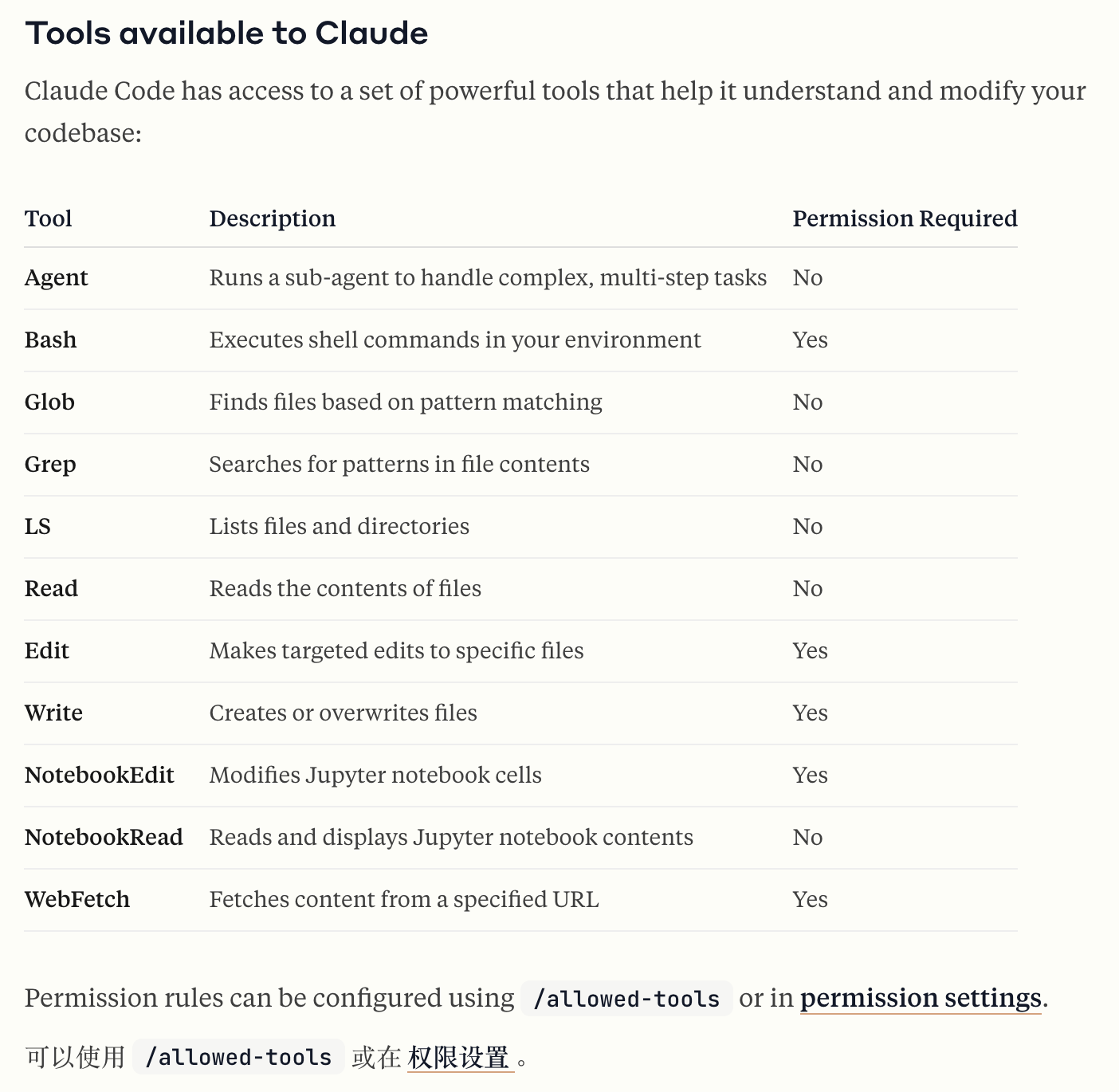
之前我们在第一篇中 Claude Code Agent 模式深度解读(一)!Anthropic提出的下一代Code CLI工具介绍了Claude Code Agent 模式的System Prompt方案,了解到其Agent的实现是基于Function Call的,那么Claude Code用到的工具(官网有贴出列表,见下图)有哪些作用呢,以及每个工具的详细内容描述是什么呢,看本篇的详细解读即可。
Agent Tool
这个Tool非常特殊,是作为一个子Agent,用来给主Agent启动的,因为在第一篇解读里面说到过,Claude Code是个multi-agent的架构。
在下面的Tool Descrption中,其实主要说了两个方面的事情:
-
何时能用Agent Tool:比如查找关键字、搜索文件等。如果用了,要注意同时启动多个Agent(其实就是tool),tool返回的结果用户是不可见的。
-
何时不适合用Agent Tool:比如查看特定的文件,查找某个类的定义等,可以理解成只使用一个tool即可完成的任务。
Launch a new agent that has access to the following tools: ${(await bv1(I)).map((W) => W.name).join(", ")}. When you are searching for a keyword or file and are not confident that you will find the right match in the first few tries, use the Agent tool to perform the search for you.

  When to use the Agent tool:
  - If you are searching for a keyword like "config" or "logger", or for questions like "which file does X?", the Agent tool is strongly recommended

  When NOT to use the Agent tool:
  - If you want to read a specific file path, use the ${uw.name} or ${rw.name} tool instead of the Agent tool, to find the match more quickly
  - If you are searching for a specific class definition like "class Foo", use the ${rw.name} tool instead, to find the match more quickly
  - If you are searching for code within a specific file or set of 2-3 files, use the ${uw.name} tool instead of the Agent tool, to find the match more quickly

  Usage notes:
  1. Launch multiple agents concurrently whenever possible, to maximize performance; to do that, use a single message with multiple tool uses
  2. When the agent is done, it will return a single message back to you. The result returned by the agent is not visible to the user. To show the user the result, you should send a text message back to the user with a concise summary of the result.
  3. Each agent invocation is stateless. You will not be able to send additional messages to the agent, nor will the agent be able to communicate with you outside of its final report. Therefore, your prompt should contain a highly detailed task description for the agent to perform autonomously and you should specify exactly what information the agent should return back to you in its final and only message to you.
  4. The agent's outputs should generally be trusted${
      I === "bypassPermissions"
        ? ""
        : `
  5. IMPORTANT: The agent can not use ${c9.name}, ${wI.name}, ${VI.name}, ${bW.name}, so can not modify files. If you want to use these tools, use them directly instead of going through the agent.
File Processing Tools
File Read Tool
-
从本地文件系统读取文件。
-
file_path 参数必须是绝对路径,而非相对路径。
-
默认情况下,它会从文件开头开始读取最多 2000 行。
-
您可以选择指定行偏移量和行数限制(这对于长文件尤其有用),但建议您不要指定这些参数,而是读取整个文件。任何超过 2000 个字符的行都将被截断。
-
对于图像文件,该工具将为您显示图像。对于 Jupyter Notebook(.ipynb 文件),请使用 VH.name。
{
  "name": "View",
  "description": "Reads a file from the local filesystem. The file_path parameter must be an absolute path, not a relative path. By default, it reads up to 2000 lines starting from the beginning of the file. You can optionally specify a line offset and limit (especially handy for long files), but it's recommended to read the whole file by not providing these parameters. Any lines longer than 2000 characters will be truncated. For image files, the tool will display the image for you. For Jupyter notebooks (.ipynb files), use the VH.name instead.",
  "inputSchema": {
    "type": "strictObject",
    "properties": {
      "file_path": {
        "type": "string",
        "description": "The absolute path to the file to read"
      },
      "offset": {
        "type": "number",
        "optional": true,
        "description": "The line number to start reading from. Only provide if the file is too large to read at once"
      },
      "limit": {
        "type": "number",
        "optional": true,
        "description": "The number of lines to read. Only provide if the file is too large to read at once."
      }
    }
  },
}
File Edit Tool (Create, Update, Delete)
这是一个用于编辑文件的工具。
要移动或重命名文件,通常应该使用 Bash 工具中的“mv”命令。对于较大的编辑,请使用“写入”工具覆盖文件。
{
  "name": "Edit",
  "description": "This is a tool for editing files. For moving or renaming files, you should generally use the Bash tool with the 'mv' command instead. For larger edits, use the Write tool to overwrite files. For Jupyter notebooks (.ipynb files), use the ${RI.name} instead.
Before using this tool:
1. Use the View tool to understand the file's contents and context
2. Verify the directory path is correct (only applicable when creating new files):
   - Use the LS tool to verify the parent directory exists and is the correct location
To make a file edit, provide the following:
1. file_path: The absolute path to the file to modify (must be absolute, not relative)
2. old_string: The text to replace (must be unique within the file, and must match the file contents exactly, including all whitespace and indentation)
3. new_string: The edited text to replace the old_string
The tool will replace ONE occurrence of old_string with new_string in the specified file.
CRITICAL REQUIREMENTS FOR USING THIS TOOL:
1. UNIQUENESS: The old_string MUST uniquely identify the specific instance you want to change. This means:
   - Include AT LEAST 3-5 lines of context BEFORE the change point
   - Include AT LEAST 3-5 lines of context AFTER the change point
   - Include all whitespace, indentation, and surrounding code exactly as it appears in the file
2. SINGLE INSTANCE: This tool can only change ONE instance at a time. If you need to change multiple instances:
   - Make separate calls to this tool for each instance
   - Each call must uniquely identify its specific instance using extensive context
3. VERIFICATION: Before using this tool:
   - Check how many instances of the target text exist in the file
   - If multiple instances exist, gather enough context to uniquely identify each one
   - Plan separate tool calls for each instance
WARNING: If you do not follow these requirements:
   - The tool will fail if old_string matches multiple locations
   - The tool will fail if old_string doesn't match exactly (including whitespace)
   - You may change the wrong instance if you don't include enough context
When making edits:
   - Ensure the edit results in idiomatic, correct code
   - Do not leave the code in a broken state
   - Always use absolute file paths (starting with /)
If you want to create a new file, use:
   - A new file path, including dir name if needed
   - An empty old_string
   - The new file's contents as new_string
Remember: when making multiple file edits in a row to the same file, you should prefer to send all edits in a single message with multiple calls to this tool, rather than multiple messages with a single call each.",
  "inputSchema": {
    "type": "strictObject",
    "properties": {
      "file_path": {
        "type": "string",
        "description": "The absolute path to the file to modify"
      },
      "old_string": {
        "type": "string",
        "description": "The text to replace"
      },
      "new_string": {
        "type": "string",
        "description": "The text to replace it with"
      }
    }
  }
}
File Replace Tool
将文件写入本地文件系统。如果存在现有文件,则覆盖现有文件。
使用此工具前:
-
使用 ReadFile 工具了解文件的内容和上下文
-
目录验证(仅适用于创建新文件时):使用 LS 工具验证父目录是否存在且位置正确
{
  "name": "Replace",
  "description": "Write a file to the local filesystem. Overwrites the existing file if there is one.
Before using this tool:
1. Use the ReadFile tool to understand the file's contents and context
2. Directory Verification (only applicable when creating new files):
   - Use the LS tool to verify the parent directory exists and is the correct location",
  "inputSchema": {
    "type": "strictObject",
    "properties": {
      "file_path": {
        "type": "string",
        "description": "The absolute path to the file to write (must be absolute, not relative)"
      },
      "content": {
        "type": "string",
        "description": "The content to write to the file"
      }
    }
  }
}
Jupyter Notebook Tools
Jupyter Notebook Read Tool
从 Jupyter Notebook 的所有代码单元中提取并读取源代码。
读取 Jupyter Notebook(.ipynb 文件)并返回所有单元及其输出。Jupyter Notebook 是结合了代码、文本和可视化效果的交互式文档,常用于数据分析和科学计算。notebook_path 参数必须是绝对路径,而不是相对路径。
{
  "description": "Extract and read source code from all code cells in a Jupyter notebook. Reads a Jupyter notebook (.ipynb file) and returns all of the cells with their outputs. Jupyter notebooks are interactive documents that combine code, text, and visualizations, commonly used for data analysis and scientific computing. The notebook_path parameter must be an absolute path, not a relative path.",
  "inputSchema": {
    "type": "strictObject",
    "properties": {
      "notebook_path": {
        "type": "string",
        "description": "The absolute path to the Jupyter notebook file to read (must be absolute, not relative)"
      }
    }
  }
}
Jupyter Notebook Edit Tool
替换 Jupyter 笔记本中特定单元格的内容。
将 Jupyter 笔记本(.ipynb 文件)中特定单元格的内容完全替换为新源。Jupyter 笔记本是结合了代码、文本和可视化效果的交互式文档,常用于数据分析和科学计算。notebook_path 参数必须是绝对路径,不能是相对路径。cell_number 的索引从 0 开始。使用 edit_mode=insert 可在 cell_number 指定的索引处添加新单元格。使用 edit_mode=delete 可在 cell_number 指定的索引处删除单元格。
{
  "name": "NotebookEditCell",
  "description": "Replace the contents of a specific cell in a Jupyter notebook. Completely replaces the contents of a specific cell in a Jupyter notebook (.ipynb file) with new source. Jupyter notebooks are interactive documents that combine code, text, and visualizations, commonly used for data analysis and scientific computing. The notebook_path parameter must be an absolute path, not a relative path. The cell_number is 0-indexed. Use edit_mode=insert to add a new cell at the index specified by cell_number. Use edit_mode=delete to delete the cell at the index specified by cell_number.",
  "inputSchema": {
    "type": "strictObject",
    "properties": {
      "notebook_path": {
        "type": "string",
        "description": "The absolute path to the Jupyter notebook file to edit (must be absolute, not relative)"
      },
      "cell_number": {
        "type": "number",
        "description": "The index of the cell to edit (0-based)"
      },
      "new_source": {
        "type": "string",
        "description": "The new source for the cell"
      },
      "cell_type": {
        "type": "enum",
        "values": ["code", "markdown"],
        "optional": true,
        "description": "The type of the cell (code or markdown). If not specified, it defaults to the current cell type. If using edit_mode=insert, this is required."
      },
      "edit_mode": {
        "type": "string",
        "optional": true,
        "description": "The type of edit to make (replace, insert, delete). Defaults to replace."
      }
    }
  }
}
Search Tools
List Files Tool
列出给定路径下的文件和目录。
路径参数必须是绝对路径,不能是相对路径。如果您知道要搜索哪些目录,通常应该优先使用 Glob 和 Grep 工具。
{
  "name": "LS",
  "description": "Lists files and directories in a given path. The path parameter must be an absolute path, not a relative path. You should generally prefer the Glob and Grep tools, if you know which directories to search.",
  "inputSchema": {
    "type": "object",
    "properties": {
      "path": {
        "type": "string",
        "description": "The absolute path to the directory to list (must be absolute, not relative)"
      }
    },
    "required": ["path"],
    "additionalProperties": false
  },
}
Search Glob Tool
-
快速文件模式匹配工具,适用于任何大小的代码库
-
支持“**/*.js”或“src/**/*.ts”等全局模式
-
返回按修改时间排序的匹配文件路径
-
当您需要按名称模式查找文件时,请使用此工具
-
当您进行开放式搜索,可能需要多轮全局搜索和 grepping 操作时,请使用 Agent 工具
{
  "name": "GlobTool",
  "description": "- Fast file pattern matching tool that works with any codebase size
- Supports glob patterns like "**/*.js" or "src/**/*.ts"
- Returns matching file paths sorted by modification time
- Use this tool when you need to find files by name patterns
- When you are doing an open ended search that may require multiple rounds of globbing and grepping, use the Agent tool instead",
  "inputSchema": {
    "type": "strictObject",
    "properties": {
      "pattern": {
        "type": "string",
        "description": "The glob pattern to match files against"
      },
      "path": {
        "type": "string",
        "optional": true,
        "description": "The directory to search in. Defaults to the current working directory."
      }
    }
  },
}
Grep Tool
-
快速内容搜索工具,适用于任何代码库大小
-
使用正则表达式搜索文件内容
-
支持完整的正则表达式语法(例如“log.*Error”、“function\\s+\\w+”等)
-
使用 include 参数按模式过滤文件(例如“*.js”、“*.{ts,tsx}”)
-
返回按修改时间排序的匹配文件路径
-
当您需要查找包含特定模式的文件时,请使用此工具
-
当您进行开放式搜索,可能需要多次遍历和查找时,请使用 Agent 工具
{
  "name": "GrepTool",
  "description": "- Fast content search tool that works with any codebase size
- Searches file contents using regular expressions
- Supports full regex syntax (eg. "log.*Error", "function\\s+\\w+", etc.)
- Filter files by pattern with the include parameter (eg. "*.js", "*.{ts,tsx}")
- Returns matching file paths sorted by modification time
- Use this tool when you need to find files containing specific patterns
- When you are doing an open ended search that may require multiple rounds of globbing and grepping, use the Agent tool instead",
  "inputSchema": {
    "type": "strictObject",
    "properties": {
      "pattern": {
        "type": "string",
        "description": "The regular expression pattern to search for in file contents"
      },
      "path": {
        "type": "string",
        "optional": true,
        "description": "The directory to search in. Defaults to the current working directory."
      },
      "include": {
        "type": "string",
        "optional": true,
        "description": "File pattern to include in the search (e.g. \"*.js\", \"*.{ts,tsx}\")"
      }
    }
  }
}
PR Tools
PR Comments Tool
从 GitHub 拉取请求获取评论。
{
  "name": "pr-comments",
  "description": "Get comments from a GitHub pull request",
  "getPromptForCommand": {
    "role": "user",
    "content": [
      {
        "type": "text",
        "text": "You are an AI assistant integrated into a git-based version control system. Your task is to fetch and display comments from a GitHub pull request.
Follow these steps:
1. Use `gh pr view --json number,headRepository` to get the PR number and repository info
2. Use `gh api /repos/{owner}/{repo}/issues/{number}/comments` to get PR-level comments
3. Use `gh api /repos/{owner}/{repo}/pulls/{number}/comments` to get review comments. Pay particular attention to the following fields: `body`, `diff_hunk`, `path`, `line`, etc. If the comment references some code, consider fetching it using eg `gh api /repos/{owner}/{repo}/contents/{path}?ref={branch} | jq .content -r | base64 -d`
4. Parse and format all comments in a readable way
5. Return ONLY the formatted comments, with no additional text
Format the comments as:
## Comments
[For each comment thread:]
- @author file.ts#line:
  ```diff
  [diff_hunk from the API response]
  ```
  > quoted comment text

  [any replies indented]
If there are no comments, return "No comments found."
Remember:
1. Only show the actual comments, no explanatory text
2. Include both PR-level and code review comments
3. Preserve the threading/nesting of comment replies
4. Show the file and line number context for code review comments
5. Use jq to parse the JSON responses from the GitHub API
Additional user input:"
      }
    ]
  }
}
PR Review Tool
审查拉取请求。
{
  "name": "review",
  "description": "Review a pull request",
  "getPromptForCommand": {
    "role": "user",
    "content": [
      {
        "type": "text",
        "text": "You are an expert code reviewer. Follow these steps:
1. If no PR number is provided in the args, use BashTool("gh pr list") to show open PRs
2. If a PR number is provided, use BashTool("gh pr view <number>") to get PR details
3. Use BashTool("gh pr diff <number>") to get the diff
4. Analyze the changes and provide a thorough code review that includes:
   - Overview of what the PR does
   - Analysis of code quality and style
   - Specific suggestions for improvements
   - Any potential issues or risks

Keep your review concise but thorough. Focus on:
- Code correctness
- Following project conventions
- Performance implications
- Test coverage
- Security considerations
Format your review with clear sections and bullet points.
PR number:"
      }
    ]
  }
}
History Tools
Git History Tool
检索经常修改的文件的 git 历史记录。
{
  "name": "getGitHistory",
  "description": "Retrieves git history of frequently modified files",
  "steps": [
    {
      "step": "check_git_repository",
      "command": "gitRevParse()",
      "failure": "returns empty array"
    },
    {
      "step": "get_user_modified_files",
      "command": "git log -n 1000 --pretty=format: --name-only --diff-filter=M --author=$(git config user.email) | sort | uniq -c | sort -nr | head -n 20",
      "outputProcessing": {
        "minLines": 10,
        "fallback": {
          "step": "get_all_modified_files",
          "command": "git log -n 1000 --pretty=format: --name-only --diff-filter=M | sort | uniq -c | sort -nr | head -n 20"
        }
      }
    },
    {
      "step": "analyze_with_ai",
      "systemPrompt": "You are an expert at analyzing git history. Given a list of files and their modification counts, return exactly five filenames that are frequently modified and represent core application logic (not auto-generated files, dependencies, or configuration). Make sure filenames are diverse, not all in the same folder, and are a mix of user and other users. Return only the filenames' basenames (without the path) separated by newlines with no explanation.",
      "requirements": {
        "outputFormat": "text",
        "minResults": 5
      }
    },
    {
      "step": "error_handling",
      "behavior": "returns empty array on error"
    }
  ],
  "output": {
    "description": "Array of 5 filenames (basenames only)",
    "type": "string[]",
    "emptyCase": "returns empty array"
  }
}
Clear Conversation Tool
清除对话历史记录并释放上下文。
{
  "name": "clear",
  "description": "Clear conversation history and free up context",
}
Compact Conversation Tool
清除对话历史记录,但保留上下文摘要。
{
  "name": "compact",
  "description": "Clear conversation history but keep a summary in context",
  "prompt": {
    "role": "summary_assistant",
    "instructions": [
      "You are a helpful AI assistant tasked with summarizing conversations.",
      "Provide a detailed but concise summary of our conversation above. Focus on information that would be helpful for continuing the conversation, including:",
      {
        "items": [
          "What we did",
          "What we're doing",
          "Which files we're working on",
          "What we're going to do next"
        ]
      }
    ]
  }
}
Init Codebase Tool
使用代码库文档初始化一个新的 CLAUDE.md 文件。
{
  "name": "init",
  "description": "Initialize a new CLAUDE.md file with codebase documentation",
  "getPromptForCommand": {
    "role": "user",
    "content": [
      {
        "type": "text",
        "text": "Please analyze this codebase and create a CLAUDE.md file containing:
1. Build/lint/test commands - especially for running a single test
2. Code style guidelines including imports, formatting, types, naming conventions, error handling, etc.
The file you create will be given to agentic coding agents (such as yourself) that operate in this repository. Make it about 20 lines long.
If there's already a CLAUDE.md, improve it.
If there are Cursor rules (in .cursor/rules/ or .cursorrules) or Copilot rules (in .github/copilot-instructions.md), make sure to include them."
      }
    ]
  }
}
Other Tools
Thinking Tool
这是一个用于记录模型思考的无操作工具,它的灵感来源于 tau-bench think 工具。
{
  "name": "Think",
  "description": "This is a no-op tool that logs a thought. It is inspired by the tau-bench think tool.",
  "inputSchema": {
    "type": "object",
    "properties": {
      "thought": {
        "type": "string",
        "description": "Your thoughts."
      }
    }
  },
  "prompt": "Use the tool to think about something. It will not obtain new information or make any changes to the repository, but just log the thought. Use it when complex reasoning or brainstorming is needed.
Common use cases:
1. When exploring a repository and discovering the source of a bug, call this tool to brainstorm several unique ways of fixing the bug, and assess which change(s) are likely to be simplest and most effective
2. After receiving test results, use this tool to brainstorm ways to fix failing tests
3. When planning a complex refactoring, use this tool to outline different approaches and their tradeoffs
4. When designing a new feature, use this tool to think through architecture decisions and implementation details
5. When debugging a complex issue, use this tool to organize your thoughts and hypotheses
The tool simply logs your thought process for better transparency and does not execute any code or make changes.",
}
Architect Tool
该Tool属于内置tool,需要通过命令行参数 enableArchitect 手动开启。
开启了之后,Claude Code 就会将Prompt的内容传给模型,让模型来进行Planing,并将结果加入到对话历史中去。
{
  "name": "Architect",
  "description": "Your go-to tool for any technical or coding task. Analyzes requirements and breaks them down into clear, actionable implementation steps. Use this whenever you need help planning how to implement a feature, solve a technical problem, or structure your code.",
  "inputSchema": {
    "type": "strictObject",
    "properties": {
      "prompt": {
        "type": "string",
        "description": "The technical request or coding task to analyze"
      },
      "context": {
        "type": "string",
        "description": "Optional context from previous conversation or system state",
        "optional": true
      }
    }
  },
  "userFacingName": "Architect",
  "prompt": "You are an expert software architect. Your role is to analyze technical requirements and produce clear, actionable implementation plans.
These plans will then be carried out by a junior software engineer so you need to be specific and detailed. However do not actually write the code, just explain the plan.
Follow these steps for each request:
1. Carefully analyze requirements to identify core functionality and constraints
2. Define clear technical approach with specific technologies and patterns
3. Break down implementation into concrete, actionable steps at the appropriate level of abstraction
Keep responses focused, specific and actionable.
IMPORTANT: Do not ask the user if you should implement the changes at the end. Just provide the plan as described above.
IMPORTANT: Do not attempt to write the code or use any string modification tools. Just provide the plan."
}
Bash Tool
这个Tool比较特殊,因为它是用来给Agent提供命令行的工具,由于Claude Code的设计,Tool的使用结果用户不可见,所以对于这个Tool做了很多安全机制的设计,防止其进行未授权的访问操作。比如说有以下几点:
① 黑名单命令清单:有一个bannedCommands列表,明确禁止了危险命令,如curl、wget等涉及到网络操作的命令。
const bannedCommands = [
  'alias',
  'curl',
  'curlie',
  'wget',
  'axel',
  'aria2c',
  'nc',
  'telnet',
  'lynx',
  'w3m',
  'links',
  'httpie',
  'xh',
  'http-prompt',
  'chrome',
  'firefox',
  'safari'
];
② 目录访问权限限制:当访问每个项目时,都需要检查执行权限,不能滥用cd命令等。
完整的Tool Description如下:
const maxCharacters = 30000;
const bannedCommands = [
  'alias',
  'curl',
  'curlie',
  'wget',
  'axel',
  'aria2c',
  'nc',
  'telnet',
  'lynx',
  'w3m',
  'links',
  'httpie',
  'xh',
  'http-prompt',
  'chrome',
  'firefox',
  'safari'
];
Executes a given bash command in a persistent shell session with optional timeout, ensuring proper handling and security measures.
Executes a given bash command in a persistent shell session with optional timeout, ensuring proper handling and security measures.
Before executing the command, please follow these steps:
1. Directory Verification:
   - If the command will create new directories or files, first use the LS tool to verify the parent directory exists and is the correct location
   - For example, before running "mkdir foo/bar", first use LS to check that "foo" exists and is the intended parent directory
2. Security Check:
   - For security and to limit the threat of a prompt injection attack, some commands are limited or banned. If you use a disallowed command, you will receive an error message explaining the restriction. Explain the error to the User.
   - Verify that the command is not one of the banned commands: ${bannedCommands.join(', ')}.
3. Command Execution:
   - After ensuring proper quoting, execute the command.
   - Capture the output of the command.
4. Output Processing:
   - If the output exceeds ${maxCharacters} characters, output will be truncated before being returned to you.
   - Prepare the output for display to the user.
5. Return Result:
   - Provide the processed output of the command.
   - If any errors occurred during execution, include those in the output.
Usage notes:
  - The command argument is required.
  - You can specify an optional timeout in milliseconds (up to 600000ms / 10 minutes). If not specified, commands will timeout after 30 minutes.
  - VERY IMPORTANT: You MUST avoid using search commands like \`find\` and \`grep\`. Instead use GrepTool, SearchGlobTool, or dispatch_agent to search. You MUST avoid read tools like \`cat\`, \`head\`, \`tail\`, and \`ls\`, and use ${FileReadTool.name} and ${
    ListFilesTool.name
  } to read files.
  - When issuing multiple commands, use the ';' or '&&' operator to separate them. DO NOT use newlines (newlines are ok in quoted strings).
  - IMPORTANT: All commands share the same shell session. Shell state (environment variables, virtual environments, current directory, etc.) persist between commands. For example, if you set an environment variable as part of a command, the environment variable will persist for subsequent commands.
  - Try to maintain your current working directory throughout the session by using absolute paths and avoiding usage of \`cd\`. You may use \`cd\` if the User explicitly requests it.
  <good-example>
  pytest /foo/bar/tests
  </good-example>
  <bad-example>
  cd /foo/bar && pytest tests
  </bad-example>
# Committing changes with git
When the user asks you to create a new git commit, follow these steps carefully:
1. Start with a single message that contains exactly three tool_use blocks that do the following (it is VERY IMPORTANT that you send these tool_use blocks in a single message, otherwise it will feel slow to the user!):
   - Run a git status command to see all untracked files.
   - Run a git diff command to see both staged and unstaged changes that will be committed.
   - Run a git log command to see recent commit messages, so that you can follow this repository's commit message style.
2. Use the git context at the start of this conversation to determine which files are relevant to your commit. Add relevant untracked files to the staging area. Do not commit files that were already modified at the start of this conversation, if they are not relevant to your commit.
3. Analyze all staged changes (both previously staged and newly added) and draft a commit message. Wrap your analysis process in <commit_analysis> tags:
<commit_analysis>
- List the files that have been changed or added
- Summarize the nature of the changes (eg. new feature, enhancement to an existing feature, bug fix, refactoring, test, docs, etc.)
- Brainstorm the purpose or motivation behind these changes
- Do not use tools to explore code, beyond what is available in the git context
- Assess the impact of these changes on the overall project
- Check for any sensitive information that shouldn't be committed
- Draft a concise (1-2 sentences) commit message that focuses on the "why" rather than the "what"
- Ensure your language is clear, concise, and to the point
- Ensure the message accurately reflects the changes and their purpose (i.e. "add" means a wholly new feature, "update" means an enhancement to an existing feature, "fix" means a bug fix, etc.)
- Ensure the message is not generic (avoid words like "Update" or "Fix" without context)
- Review the draft message to ensure it accurately reflects the changes and their purpose
</commit_analysis>
4. Create the commit with a message ending with:
\uD83E\uDD16 Generated with ${NAME}
Co-Authored-By: Claude <noreply@anthropic.com>
- In order to ensure good formatting, ALWAYS pass the commit message via a HEREDOC, a la this example:
<example>
git commit -m "$(cat <<'EOF'
   Commit message here.
   \uD83E\uDD16 Generated with ${NAME}
   Co-Authored-By: Claude <noreply@anthropic.com>
   EOF
   )"
</example>
5. If the commit fails due to pre-commit hook changes, retry the commit ONCE to include these automated changes. If it fails again, it usually means a pre-commit hook is preventing the commit. If the commit succeeds but you notice that files were modified by the pre-commit hook, you MUST amend your commit to include them.
6. Finally, run git status to make sure the commit succeeded.
Important notes:
- When possible, combine the "git add" and "git commit" commands into a single "git commit -am" command, to speed things up
- However, be careful not to stage files (e.g. with \`git add .\`) for commits that aren't part of the change, they may have untracked files they want to keep around, but not commit.
- NEVER update the git config
- DO NOT push to the remote repository
- IMPORTANT: Never use git commands with the -i flag (like git rebase -i or git add -i) since they require interactive input which is not supported.
- If there are no changes to commit (i.e., no untracked files and no modifications), do not create an empty commit
- Ensure your commit message is meaningful and concise. It should explain the purpose of the changes, not just describe them.
- Return an empty response - the user will see the git output directly
# Creating pull requests
Use the gh command via the Bash tool for ALL GitHub-related tasks including working with issues, pull requests, checks, and releases. If given a Github URL use the gh command to get the information needed.
IMPORTANT: When the user asks you to create a pull request, follow these steps carefully:
1. Understand the current state of the branch. Remember to send a single message that contains multiple tool_use blocks (it is VERY IMPORTANT that you do this in a single message, otherwise it will feel slow to the user!):
   - Run a git status command to see all untracked files.
   - Run a git diff command to see both staged and unstaged changes that will be committed.
   - Check if the current branch tracks a remote branch and is up to date with the remote, so you know if you need to push to the remote
   - Run a git log command and \`git diff main...HEAD\` to understand the full commit history for the current branch (from the time it diverged from the \`main\` branch.)
2. Create new branch if needed
3. Commit changes if needed
4. Push to remote with -u flag if needed
5. Analyze all changes that will be included in the pull request, making sure to look at all relevant commits (not just the latest commit, but all commits that will be included in the pull request!), and draft a pull request summary. Wrap your analysis process in <pr_analysis> tags:
<pr_analysis>
- List the commits since diverging from the main branch
- Summarize the nature of the changes (eg. new feature, enhancement to an existing feature, bug fix, refactoring, test, docs, etc.)
- Brainstorm the purpose or motivation behind these changes
- Assess the impact of these changes on the overall project
- Do not use tools to explore code, beyond what is available in the git context
- Check for any sensitive information that shouldn't be committed
- Draft a concise (1-2 bullet points) pull request summary that focuses on the "why" rather than the "what"
- Ensure the summary accurately reflects all changes since diverging from the main branch
- Ensure your language is clear, concise, and to the point
- Ensure the summary accurately reflects the changes and their purpose (ie. "add" means a wholly new feature, "update" means an enhancement to an existing feature, "fix" means a bug fix, etc.)
- Ensure the summary is not generic (avoid words like "Update" or "Fix" without context)
- Review the draft summary to ensure it accurately reflects the changes and their purpose
</pr_analysis>
6. Create PR using gh pr create with the format below. Use a HEREDOC to pass the body to ensure correct formatting.
<example>
gh pr create --title "the pr title" --body "$(cat <<'EOF'
## Summary
<1-3 bullet points>
## Test plan
[Checklist of TODOs for testing the pull request...]
\uD83E\uDD16 Generated with ${NAME}
EOF
)"
</example>
Important:
- Return an empty response - the user will see the gh output directly
- Never update git config
总结
通过对Tools部分的描述,加上第一篇对System Prompt的解读,可以看到Claude Code 有着鲜明的几点特征:
-
极强的安全和隐私设计:用户的查询会直接发送到Anthropic的API中,没有经过任何中间服务器。而且在执行终端操作的时候,涉及到需要用户确认才能进行的操作时,都做到了详细的Prompt约束和权限控制。
-
命令行参数控制:给用户提供了重要的命令行参数来控制用户的行为,比如启动交互模式、任务规划能力等。
-
multi-agent的架构足够自适应:复杂任务尽量启动多个子Agent(tool)解决问题,简单任务尽量以单Agent的模式一次性解决,在性能与成本之间取得平衡。
附录 - Claude Code 更多使用技巧
这里依然要贴出两个官方的链接:
-
官方博客链接:https://docs.anthropic.com/en/docs/agents-and-tools/claude-code/overview
-
官方Github链接:https://github.com/anthropics/claude-code
尤其是博客链接,官方提供了常见工作流程的分步教程,非常详细。
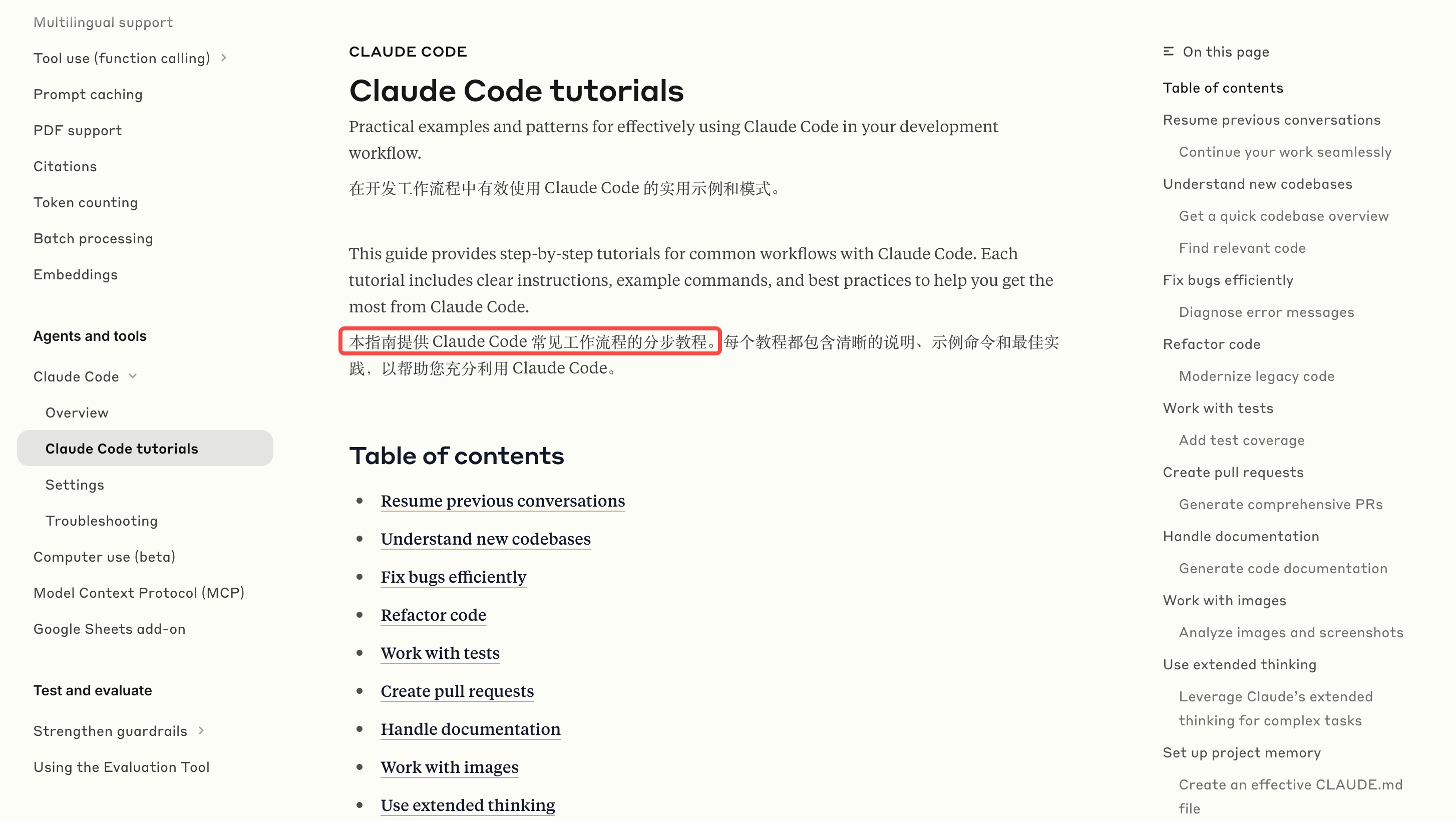
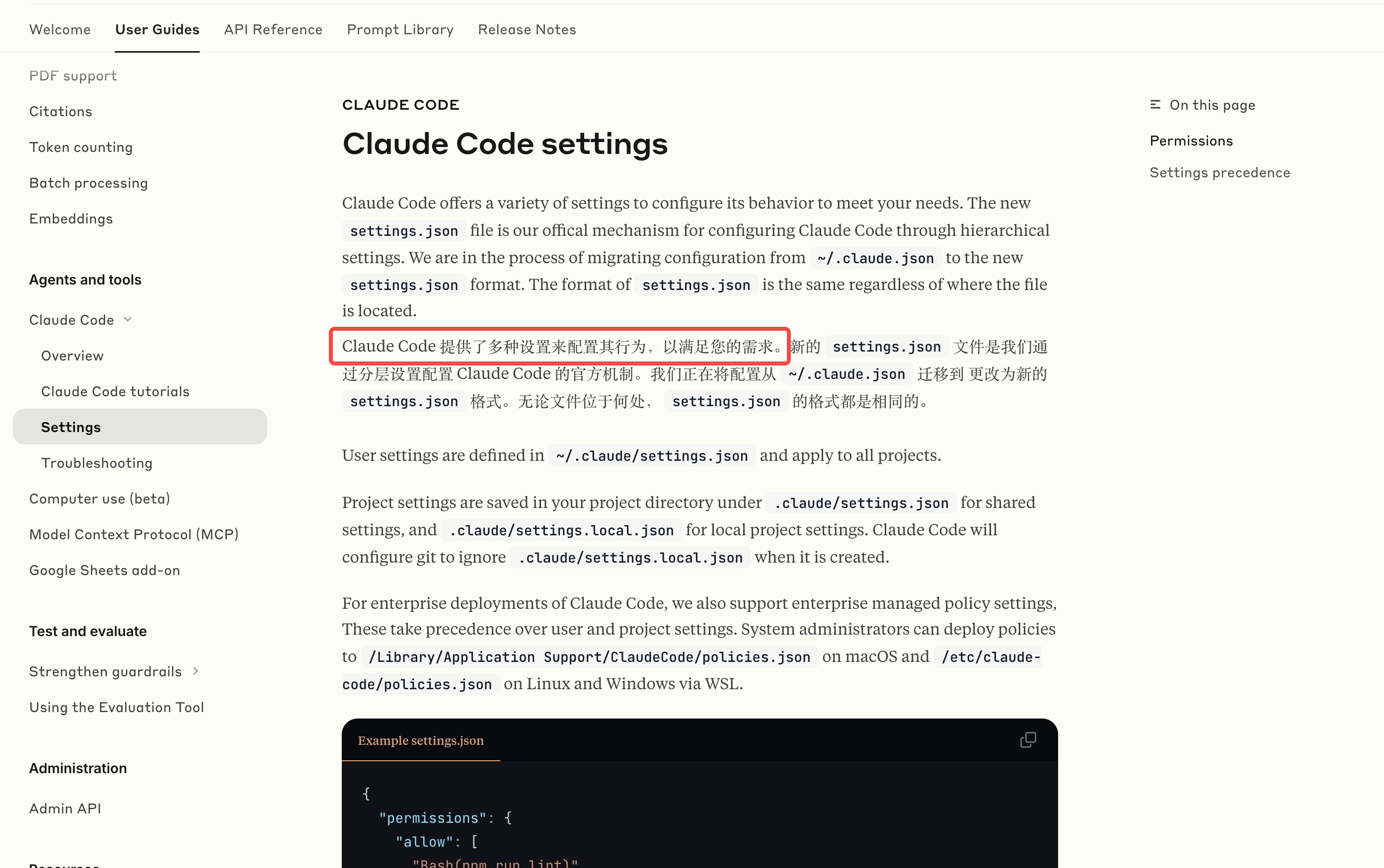
除此之外,还有配置方法以及常见问题介绍等,有条件的同学可以下载个Claude Code,并配合官方教程进行体验,结合自家Claude模型的效果,不会让你失望的。





 扫一扫
扫一扫


 1220
1220

 被折叠的 条评论
为什么被折叠?
被折叠的 条评论
为什么被折叠?
 到【灌水乐园】发言





