


Node.js 是一个基于 Chrome V8 JavaScript 引擎构建的 JavaScript 运行时环境。简单来说,Node.js 让 JavaScript 可以在服务器端运行,而不仅仅局限于浏览器中。
创建第一个 Node.js 项目
在项目文件夹执行npm init -y
会出现package.json
然后新建app.js
输入测试代码:
const http = require('http');

const server = http.createServer((req,res)=>{
    res.statusCode = 200;
    res.setHeader('Content-Type','text/plain');
    res.end('RUNOOB Node Test ~ hello,Node js\n');
});

const port = 3000;
server.listen(port,()=>{
    console.log(`服务器运行地址:http://localhost:${port}/`);
})
访问3000,打印了
Nodejs包含哪几部分
1.使用 require 指令来加载和引入模块
const module = require('module-name');2.创建服务器
使用http.createServer()创建,
listen方法监听
函数通过request,response接收和响应
简便写法:
var http = require('http');

http.createServer(function (request, response) {

        response.writeHead(200, {'Content-Type': 'text/plain'});
        response.end('Hello World\n');
}).listen(8888);

console.log('Server running at http://127.0.0.1:8888/');
Nodejs路由控制
const http = require('http');

const server = http.createServer((req,res)=>{
    if(req.url === '/'){
        res.writeHead(200,{"content-type":'text/plain'});
        res.end("welcome ");
    }else if(req.url === '/about'){
        res.writeHead(200,{"content-type":'text/plain'});
        res.end("about");
    }else{
        res.writeHead(404,{"content-type":'text/plain'});
        res.end('404 Not Found');
    }
});

const port = 3000;
server.listen(port,()=>{
    console.log(`服务器运行地址:http://localhost:${port}/`);
})
node实现打包工具webpack
蓝桥杯要求手写一个 Webpack,这是一道考察前端构建原理的综合题。
Webpack 本质是一个模块打包工具,它的核心工作流程包括:
- 解析入口文件:从入口文件开始,递归分析所有依赖。
- 构建依赖图:记录每个模块的依赖关系和源代码。
- 转换模块代码:通过 Loader 处理不同类型的文件(如 CSS、图片)。
- 打包输出:将所有模块合并为一个或多个 bundle 文件。
const fs = require('fs');
const path = require('path');
const babel = require('@babel/core');

class MyWebpack {
  constructor(config) {
    this.config = config;
    this.entry = config.entry; // 入口文件路径
    this.output = config.output; // 输出配置
    this.modules = []; // 存储所有模块信息
  }

  // 启动打包
  run() {
    this.buildModule(this.entry, true);
    this.emitFiles();
  }

  // 构建模块
  buildModule(filename, isEntry) {
    const moduleId = './' + path.relative(process.cwd(), filename);
    const source = fs.readFileSync(filename, 'utf-8');
    const { dependencies, transformedSource } = this.parseModule(source, filename);

    const module = {
      id: moduleId,
      filename,
      dependencies,
      source: transformedSource
    };

    this.modules.push(module);

    // 递归处理依赖
    dependencies.forEach(dep => {
      this.buildModule(path.join(path.dirname(filename), dep));
    });

    return module;
  }

  // 解析模块:转换代码并提取依赖
  parseModule(source, filename) {
    const dependencies = [];

    // 使用 Babel 转换 ES6+ 代码为 CommonJS 格式
    const { code } = babel.transformSync(source, {
      presets: ['@babel/preset-env'],
      plugins: [
        [
          // 自定义插件:分析 import 语句收集依赖
          function() {
            return {
              visitor: {
                ImportDeclaration(path) {
                  dependencies.push(path.node.source.value);
                }
              }
            };
          }
        ]
      ]
    });

    return { dependencies, transformedSource: code };
  }

  // 生成输出文件
  emitFiles() {
    const outputPath = path.join(this.output.path, this.output.filename);

    // 创建模块映射函数
    const modules = this.modules.reduce((acc, module) => {
      acc[module.id] = `
        function(module, exports, require) {
          ${module.source}
        }
      `;
      return acc;
    }, {});

    // 生成自执行的 bundle 代码
    const bundle = `
      (function(modules) {
        // 模块缓存
        const installedModules = {};

        // 自定义 require 函数
        function require(id) {
          if (installedModules[id]) {
            return installedModules[id].exports;
          }

          const module = installedModules[id] = {
            exports: {},
            id: id,
            loaded: false
          };

          // 执行模块函数
          modules[id].call(
            module.exports,
            module,
            module.exports,
            require
          );

          module.loaded = true;
          return module.exports;
        }

        // 从入口模块开始执行
        return require('${this.entry}');
      })({${Object.entries(modules).map(([id, fn]) => `
        "${id}": ${fn}
      `).join(',')}});
    `;

    // 写入输出文件
    fs.writeFileSync(outputPath, bundle);
    console.log(`Bundle created at ${outputPath}`);
  }
}

module.exports = MyWebpack;
使用express构建node项目
1.npm install express
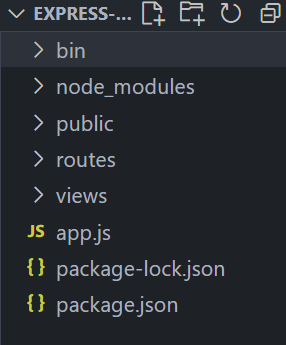
2.npx express-generator,就自动创建好了
3.基本路由
appis an instance ofexpress.METHODis an HTTP request method, in lowercase.PATHis a path on the server.HANDLERis the function executed when the route is matched.
app.method('path',handler)
app.get('/', (req, res) => {
  res.send('Hello World!')
})
4.利用 Express 托管静态文件
为了提供诸如图像、CSS 文件和 JavaScript 文件之类的静态文件,请使用 Express 中的 express.static 内置中间件函数。
此函数特征如下:
express.static(root, [options])例如,通过如下代码就可以将 public 目录下的图片、CSS 文件、JavaScript 文件对外开放访问:
app.use(express.static('public'))现在,你就可以访问 public 目录中的所有文件了:
http://localhost:3000/images/kitten.jpg
http://localhost:3000/css/style.css
http://localhost:3000/js/app.js
http://localhost:3000/images/bg.png
http://localhost:3000/hello.html
要为 express.static 函数服务的文件创建虚拟路径前缀(该路径在文件系统中不存在),请为静态目录指定挂载路径,如下所示:
<span style="background-color:#f7f7f7"><span style="color:black"><code class="language-javascript">app<span style="color:#999999">.</span><span style="color:#dd4a68">use<span style="color:#999999">(</span></span><span style="color:#669900">'/static'</span><span style="color:#999999">,</span> express<span style="color:#999999">.</span><span style="color:#0077aa">static</span><span style="color:#999999">(</span><span style="color:#669900">'public'</span><span style="color:#999999">)</span><span style="color:#999999">)</span>
</code></span></span>
现在,你就可以通过带有 /static 前缀地址来访问 public 目录中的文件了。
http://localhost:3000/static/images/kitten.jpg
http://localhost:3000/static/css/style.css
http://localhost:3000/static/js/app.js
http://localhost:3000/static/images/bg.png
http://localhost:3000/static/hello.html更多例子Express examples





 扫一扫
扫一扫


 970
970

 被折叠的 条评论
为什么被折叠?
被折叠的 条评论
为什么被折叠?
 到【灌水乐园】发言





