

part1__ubuntu20.04安装Nginx

本文介绍了Nginx的基本概念,它是高性能的HTTP和反向代理服务器。讲解了如何在Ubuntu系统中安装、更新和管理Nginx,以及默认配置文件的位置和用途。还提到了nginx.conf文件的作用和包括其他配置文件的方法。

Nginx是什么?

Nginx是一个高性能的HTTP和反向代理服务器,也是一个IMAP/POP3/SMTP服务器。

Nginx是一个免费的开源Linux应用程序,用于Web服务器。它通过将Web流量定向到特定服务器来充当反向代理服务器。Nginx用于安全和负载平衡,但也可以作为Web服务器独立运行。

安装nginx

1 更新资源列表

sudo apt update

2 开始安装

sudo apt install nginx

3 查看版本

nginx -v
# 输出示例
nginx version: nginx/1.18.0 (Ubuntu)

3 浏览器查看
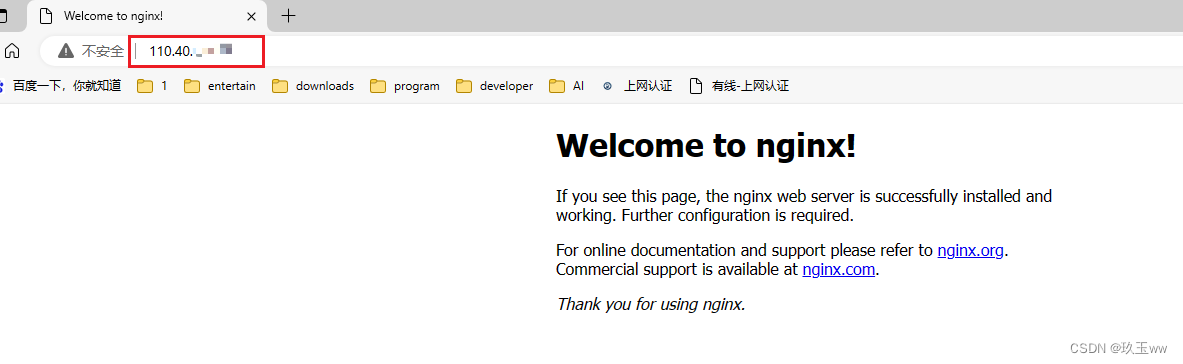
在浏览器地址栏输入ip地址,加载出nginx欢迎页面
在这里插入图片描述

Nginx命令

解释命令
查看nginx版本nginx -v
启动Nginx服务sudo service nginx start
启动状态sudo service nginx status
开机自动启动sudo service nginx enable
禁止开机自动启动sudo service nginx disable
停止sudo service nginx stop
重启sudo service nginx restart

sudo systemctl restart nginx.service
重载配置nginx -s reload
验证配置文件问题nginx -t

nginx配置

nginx默认安装位置

可执行程序:/usr/sbin/nginx

配置文件

配置文件位置:/etc/nginx/

Nginx 网站默认配置文件

网站默认配置文件: /etc/nginx/sites-available/default
可以修改此文件配置成自己网站,也可以复制此文件(推荐)到任意位置,在复制本上做修改。
/etc/nginx/sites-enabled/default文件的内容和/etc/nginx/sites-available/default一样,是/etc/nginx/sites-available/default的软链接,它们会同步修改。

ll 即 ls -l

/etc/nginx/sites-enabled/default指向了/etc/nginx/sites-available/default

在这里插入图片描述
软链接使用@符号区分
在这里插入图片描述

ls -i
查看inode号,原文件和软链接不同。

在这里插入图片描述

nginx配置文件

/etc/nginx/nginx.conf
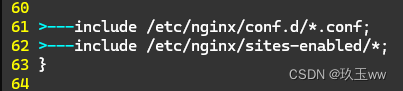
nginx.conf文件中可以include其他目录下的配置文件,如自己网站的nginx配置文件。
默认情况下,包含了/etc/nginx/conf.d/目录下所有.conf文件 和 /etc/nginx/sites-enabled/目录下的所有文件。
在这里插入图片描述

s@s-virtual-machine:~/下载$ cd ~ s@s-virtual-machine:~$ sudo apt update 命中:1 http://mirrors.ustc.edu.cn/ros/ubuntu focal InRelease 获取:3 http://security.ubuntu.com/ubuntu focal-security InRelease [128 kB] 命中:2 http://mirrors.tuna.tsinghua.edu.cn/ubuntu focal InRelease 命中:4 http://mirrors.tuna.tsinghua.edu.cn/ubuntu focal-updates InRelease 命中:5 http://mirrors.tuna.tsinghua.edu.cn/ubuntu focal-backports InRelease 获取:6 http://security.ubuntu.com/ubuntu focal-security/main amd64 DEP-11 Metadata [74.7 kB] 获取:7 http://security.ubuntu.com/ubuntu focal-security/restricted amd64 DEP-11 Metadata [212 B] 获取:8 http://security.ubuntu.com/ubuntu focal-security/universe amd64 DEP-11 Metadata [159 kB] 获取:9 http://security.ubuntu.com/ubuntu focal-security/multiverse amd64 DEP-11 Metadata [940 B] 已下载 363 kB,耗时 6秒 (61.9 kB/s) 正在读取软件包列表... 完成 正在分析软件包的依赖关系树 正在读取状态信息... 完成 有 228 个软件包可以升级。请执行 ‘apt list --upgradable’ 来查看它们。 s@s-virtual-machine:~$ lsb_release -a No LSB modules are available. Distributor ID: Ubuntu Description: Ubuntu 20.04.3 LTS Release: 20.04 Codename: focal s@s-virtual-machine:~$ cat /etc/apt/sources.list #deb cdrom:[Ubuntu 20.04.3 LTS _Focal Fossa_ - Release amd64 (20210819)]/ focal main restricted # See http://help.ubuntu.com/community/UpgradeNotes for how to upgrade to # newer versions of the distribution. deb http://cn.archive.ubuntu.com/ubuntu/ focal main restricted # deb-src http://cn.archive.ubuntu.com/ubuntu/ focal main restricted ## Major bug fix updates produced after the final release of the ## distribution. deb http://cn.archive.ubuntu.com/ubuntu/ focal-updates main restricted # deb-src http://cn.archive.ubuntu.com/ubuntu/ focal-updates main restricted ## N.B. software from this repository is ENTIRELY UNSUPPORTED by the Ubuntu ## team. Also, please note that software in universe WILL NOT receive any ## review or updates from the Ubuntu security team. deb http://cn.archive.ubuntu.com/ubuntu/ focal universe # deb-src http://cn.archive.ubuntu.com/ubuntu/ focal universe deb http://cn.archive.ubuntu.com/ubuntu/ focal-updates universe # deb-src http://cn.archive.ubuntu.com/ubuntu/ focal-updates universe ## N.B. software from this repository is ENTIRELY UNSUPPORTED by the Ubuntu ## team, and may not be under a free licence. Please satisfy yourself as to ## your rights to use the software. Also, please note that software in ## multiverse WILL NOT receive any review or updates from the Ubuntu ## security team. deb http://cn.archive.ubuntu.com/ubuntu/ focal multiverse # deb-src http://cn.archive.ubuntu.com/ubuntu/ focal multiverse deb http://cn.archive.ubuntu.com/ubuntu/ focal-updates multiverse # deb-src http://cn.archive.ubuntu.com/ubuntu/ focal-updates multiverse ## N.B. software from this repository may not have been tested as ## extensively as that contained in the main release, although it includes ## newer versions of some applications which may provide useful features. ## Also, please note that software in backports WILL NOT receive any review ## or updates from the Ubuntu security team. deb http://cn.archive.ubuntu.com/ubuntu/ focal-backports main restricted universe multiverse # deb-src http://cn.archive.ubuntu.com/ubuntu/ focal-backports main restricted universe multiverse ## Uncomment the following two lines to add software from Canonical's ## 'partner' repository. ## This software is not part of Ubuntu, but is offered by Canonical and the ## respective vendors as a service to Ubuntu users. # deb http://archive.canonical.com/ubuntu focal partner # deb-src http://archive.canonical.com/ubuntu focal partner deb http://security.ubuntu.com/ubuntu focal-security main restricted # deb-src http://security.ubuntu.com/ubuntu focal-security main restricted deb http://security.ubuntu.com/ubuntu focal-security universe # deb-src http://security.ubuntu.com/ubuntu focal-security universe deb http://security.ubuntu.com/ubuntu focal-security multiverse # deb-src http://security.ubuntu.com/ubuntu focal-security multiverse # This system was installed using small removable media # (e.g. netinst, live or single CD). The matching "deb cdrom" # entries were disabled at the end of the installation process. # For information about how to configure apt package sources, # see the sources.list(5) manual.
最新发布
12-24
评论 2
添加红包

请填写红包祝福语或标题

红包个数最小为10个

红包金额最低5元

当前余额3.43前往充值 >
需支付:10.00
成就一亿技术人!
领取后你会自动成为博主和红包主的粉丝 规则
hope_wisdom
发出的红包
实付
使用余额支付
点击重新获取
扫码支付
钱包余额 0

抵扣说明:

1.余额是钱包充值的虚拟货币,按照1:1的比例进行支付金额的抵扣。
2.余额无法直接购买下载,可以购买VIP、付费专栏及课程。

余额充值




