


什么是向量库?
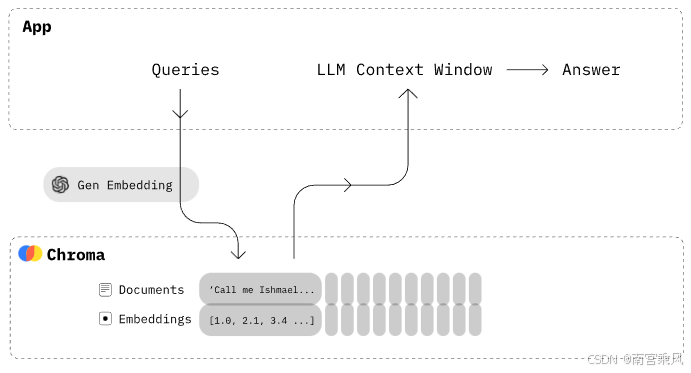
向量库(Vector Database)是一种专门设计用来存储和检索向量数据的数据库系统。在这个文件中使用的ChromaDB就是一种向量数据库。
向量库的核心概念:
- 向量嵌入(Embeddings) :将文本、图像等非结构化数据转换为高维数字向量
- 相似性搜索 :基于向量间的距离(如余弦相似度)快速查找相似内容
- 高效索引 :使用特殊的索引结构(如HNSW)加速相似性搜索
向量库的用途
在这个项目中,向量库主要用于客服问答系统:
- 知识库管理 :存储问题和答案对,并将问题转换为向量形式存储
- 语义搜索 :当用户提问时,将问题转换为向量,在向量库中查找最相似的已存问题
- 智能匹配 :根据语义相似度而非简单的关键词匹配,找到最相关的答案
Chroma 向量库实战
Chroma 是一个用于构建带有嵌入向量(vector embedding)的 AI 应用程序的向量数据库。它们可以表示文本、图像,很快还可以表示音频和视频。它内置了您开始使用所需的一切,并在您的计算机上运行。他是开源免费,可以本地部署,支持python和js。这是他的优点。pinecone则是付费,而且需要存储数据到pinecone服务器上面,这点对于数据比较重要的企业尤其不好,Chroma则是存储在自己的服务器
ChromaDB 是一个开源的向量数据库,专门用于存储和检索向量数据。它特别适合构建语义搜索、问答系统等 AI 应用。本文将介绍如何使用 ChromaDB 实现基本的向量数据库操作,包括数据的增删改查。
环境准备
本示例使用了以下主要依赖:
- chromadb:向量数据库
- dashscope:文本向量化服务
pip install chromadb
pip install dashscope
import chromadb
# chroma_client = chromadb.Client() #内存模式
# 数据保存在磁盘
client = chromadb.PersistentClient(path="E:\\Code\\Python\\weather\\chromadbTest")
collection = client.get_collection(name="fruit_collection")
# 插入数据
collection.add(
documents=["This is a document about apples", "This is a document about oranges"],
metadatas=[{"source": "web"}, {"source": "book"}],
ids=["id1", "id2"]
)客服向量库实战
EmbeddingClient
EmbeddingClient 类负责将文本转换为向量表示。它使用单例模式确保全局只有一个实例,并通过 dashscope 服务进行文本向量化。
class EmbeddingClient:
    def get_embedding(self, text: Union[str, List[str]]) -> List[float]:
        """获取文本的向量表示"""
        # 通过 dashscope 服务将文本转换为向量
        resp = dashscope.TextEmbedding.call(
            model=self.model,
            input=text
        )
        return resp.output['embeddings'][0]['embedding']
完整代码:
DashScope是阿里云的一款模型服务产品,简化了AI模型的应用与部署。
已开通服务并获得API-KEY:开通DashScope并创建API-KEY。
from http import HTTPStatus
import dashscope
from typing import List, Union
from utils.LogHandler import log

# from conf.config import dashscope_api_key

dashscope_api_key = "sk-xxxxxxxxxxx"


class EmbeddingClient:
    _instance = None  # 用于保存单例对象

    def __new__(cls):
        """
        确保 `EmbeddingClient` 类只有一个实例(单例模式)
        """
        if cls._instance is None:
            cls._instance = super().__new__(cls)
            cls._instance._initialize()
        return cls._instance

    def _initialize(self):
        """
        初始化客户端连接
        """
        dashscope.api_key = dashscope_api_key
        self.model = dashscope.TextEmbedding.Models.text_embedding_v3

    def get_embedding(self, text: Union[str, List[str]]) -> List[float]:
        """
        获取文本的向量表示
        :param text: 输入文本,可以是字符串或字符串列表
        :return: 向量列表
        """
        try:
            resp = dashscope.TextEmbedding.call(
 最低0.47元/天 解锁文章






 扫一扫
扫一扫


 2227
2227

 被折叠的 条评论
为什么被折叠?
被折叠的 条评论
为什么被折叠?
 到【灌水乐园】发言





