



在设备模型中, 包含总线、 设备、 驱动和类四个概念。 在前面的章节中, 我们学习了设备模型的基本框架 kobject 和 kset。 而在本章节中, 我们将学习设备模型中总线的概念。 并进行实验——注册一个自己的总线。
文章目录
前言
如前言所说,设备模型中包含总线、设备、驱动、类四个概念,这里我们从总线的角度看看总线的真面目
参考资料
迅为设备模型资料参考
注册一个自己的总线
在总线目录下创建属性文件
驱动-平台总线-platform设备注册platform驱动注册篇
驱动-平台总线-probe
之前了解过平台总线platform 设置注册、驱动注册、平台总线probe 知识点。当了解这里bus 总线知识点时候好多地方似曾相识,拿来对比、参考、知识温习。
一、基础知识点 /sys/bus
在 Linux 系统中,/sys/bus 目录是 sysfs 文件系统的一部分,用于展示系统总线(bus)、设(devices)、驱动(drivers)以及它们之间的层级和关联关系。它是内核与用户空间交互的重要接口,通过虚拟文件和目录的方式动态反映内核中的设备模型(Device Model)。
为什么还是要补一下这个基础知识点,忙于学习和总结中总是容易忘记基本知识点,不知所以然。
/sys/bus 的作用
组织设备和驱动
/sys/bus 按总线类型(如 PCI、USB、I2C、SCSI 等)分类,每个子目录对应一种总线。例如:
- /sys/bus/pci:PCI 总线设备。
- /sys/bus/usb:USB 总线设备。
- /sys/bus/cpu:CPU 相关设备。
查看总线下挂载的设备与驱动
每个总线目录下通常包含:
-
devices/:该总线上连接的设备。
-
drivers/:该总线支持的驱动程序。
-
其他总线特定文件(如 uevent、probe 等)。
用户空间与内核的交互
通过读写 /sys/bus 中的文件,可以动态操作设备或驱动。例如:
- 加载/卸载驱动。
- 触发设备探测(如 echo 1 > /sys/bus/pci/rescan 重新扫描 PCI 设备)。
- 查看设备信息(如厂商 ID、电源状态等)。
支持热插拔(Hotplug)
当设备插入或移除时,内核会通过 uevent 机制通知用户空间(如 udev),并在 /sys/bus 中动态更新设备状态。
示例:查看 PCI 设备
# 列出所有 PCI 设备
ls /sys/bus/pci/devices/

# 查看某个 PCI 设备的详细信息(如 0000:00:1f.2)
ls -l /sys/bus/pci/devices/0000:00:1f.2/
与其他 sysfs 目录的关系
- /sys/devices:按物理层级展示所有设备。
- /sys/class:按功能分类设备(如网卡、磁盘)。
- /sys/block:块设备(磁盘、分区)。
/sys/bus 更强调设备与总线的归属关系,而其他目录可能以不同视角组织设备
实际应用场景
- 调试设备驱动:查看设备是否被内核正确识别。
- 动态加载驱动:通过 bind/unbind 文件手动绑定设备与驱动。
- 电源管理:调整设备的电源状态(如 auto/on/suspend)。
总之,/sys/bus 是理解 Linux 设备模型和硬件管理的重要窗口,尤其在嵌入式或驱动开发中非常有用
二、创建自己的总线
源码程序
#include <linux/module.h>
#include <linux/init.h>
#include <linux/slab.h>
#include <linux/configfs.h>
#include <linux/kernel.h>
#include <linux/kobject.h>
#include <linux/device.h>

int mybus_match(struct device *dev, struct device_driver *drv)
{
    printk("chufa mybus_match hanshu ");
    return (strcmp(dev_name(dev), drv->name) == 0);
};

int mybus_probe(struct device *dev)
{
    struct device_driver *drv = dev->driver;
    if (drv->probe)
        drv->probe(dev);

    printk("chufa mybus_probe hanshu ");
    return 0;
};

struct bus_type mybus = {
    .name = "mybus",
    .match = mybus_match,
    .probe = mybus_probe,
};

// 模块的初始化函数
static int bus_init(void)
{
    int ret;
    ret = bus_register(&mybus);
    return 0;
}

// 模块退出函数
static void bus_exit(void)
{
    bus_unregister(&mybus);
}

module_init(bus_init); // 指定模块的初始化函数
module_exit(bus_exit); // 指定模块的退出函数

MODULE_LICENSE("GPL");     // 模块使用的许可证
MODULE_AUTHOR("fangchen"); // 模块的作者
程序结果
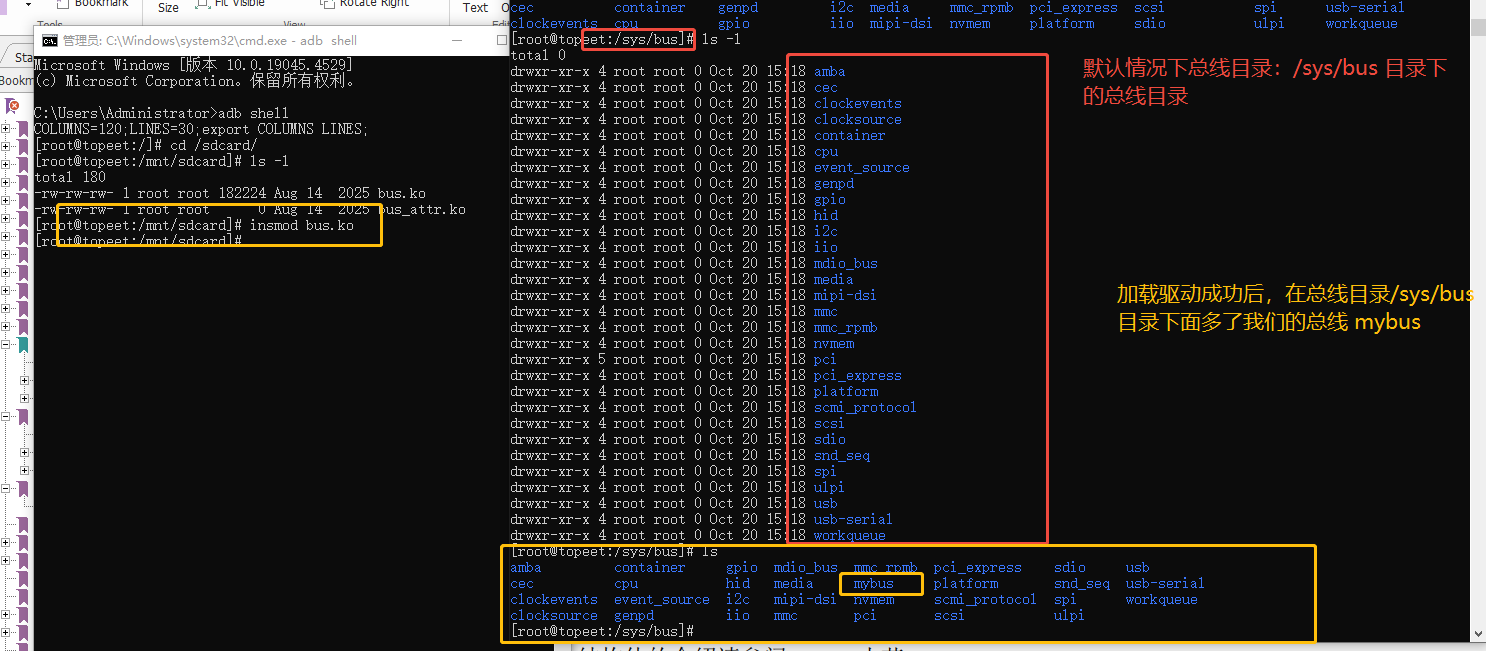
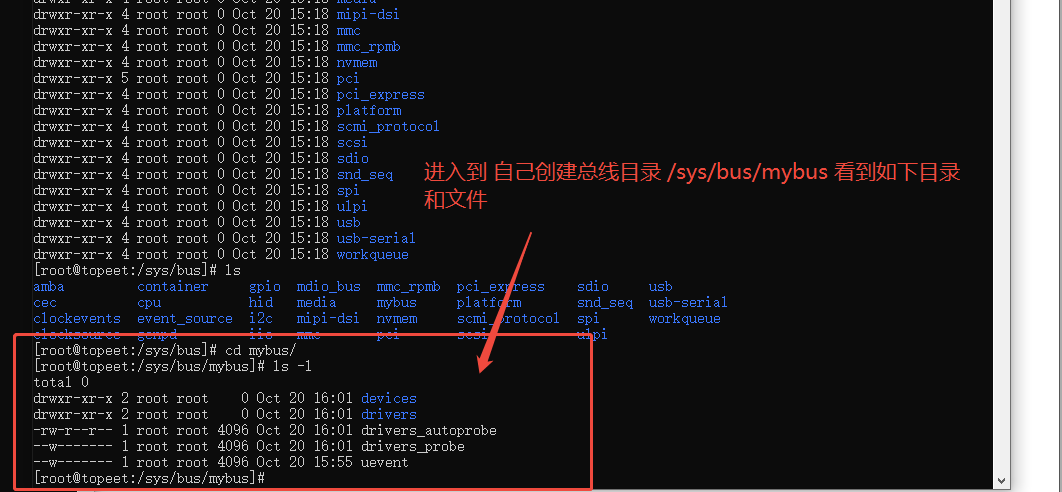
源码分析
函数 bus_register
直接看源码先 bus_register
/**
 * bus_register - register a driver-core subsystem
 * @bus: bus to register
 *
 * Once we have that, we register the bus with the kobject
 * infrastructure, then register the children subsystems it has:
 * the devices and drivers that belong to the subsystem.
 */
int bus_register(const struct bus_type *bus)
{
	....
	return retval;
}
这个结构体注释写得蛮好的,就是注册一个驱动核心的子系统。一旦注册那么设备和驱动会自动属于子系统。
bus_register 函数的主要功能是在内核中注册一个新的总线类型,使其成为设备驱动模型的一部分。注册后,该总线可以用于连接设备和驱动程序。
注册后主要结果
- 总线添加到系统:新的总线会被添加到内核的总线系统中,可以通过/sys/bus/目录看到新注册的总线。
- sysfs条目创建:
在/sys/bus/目录下创建以总线名称命名的新目录
在该目录下创建devices和drivers子目录
- 总线对象创建:内核会创建一个struct bus_type的实例,并将其加入到内核维护的总线列表中。
- 设备匹配机制就绪:总线注册成功后,可以开始处理设备与驱动程序的匹配操作。
- 热插拔支持:如果总线支持热插拔,相应的热插拔事件处理机制会被激活。
示例
成功注册后,你可以在/sys/bus/下看到类似的结构:
/sys/bus/your_bus_name/
├── devices
├── drivers
├── uevent
└── ...
总线注册是Linux设备模型中的关键步骤,它建立了设备与驱动程序交互的基础框架。
bus_type 结构体详解
bus_type 是 Linux 内核中用于表示总线类型的重要数据结构,定义在 <linux/device/bus.h> 头文件中。它是 Linux 设备模型的核心组成部分之一,用于管理总线、设备和驱动之间的关联。
结构体定义
struct bus_type {
    const char		*name;
    const char		*dev_name;
    struct device		*dev_root;
    struct device_attribute	*dev_attrs;
    const struct attribute_group **bus_groups;
    const struct attribute_group **dev_groups;
    const struct attribute_group **drv_groups;

    int (*match)(struct device *dev, struct device_driver *drv);
    int (*uevent)(struct device *dev, struct kobj_uevent_env *env);
    int (*probe)(struct device *dev);
    int (*remove)(struct device *dev);
    void (*shutdown)(struct device *dev);

    int (*online)(struct device *dev);
    int (*offline)(struct device *dev);

    int (*suspend)(struct device *dev, pm_message_t state);
    int (*resume)(struct device *dev);

    const struct dev_pm_ops *pm;

    struct subsys_private *p;
    struct lock_class_key lock_key;
};
基本属性
- name: 总线的名称(如 “pci”、“usb”、“i2c” 等)
- dev_name: 用于在 devtmpfs 中创建的总线设备名称
核心回调函数
match:
- 当一个新设备或驱动被添加到总线时调用
- 用于确定驱动是否支持特定设备
- 返回非零表示匹配成功
uevent:
- 在为用户空间生成 uevent 时调用
- 用于添加特定总线的环境变量
probe:
- 当匹配设备和驱动后调用
- 执行设备初始化
remove:
- 当设备从总线移除时调用
- 执行清理工作
使用示例
static int my_bus_match(struct device *dev, struct device_driver *drv)
{
    /* 实现匹配逻辑 */
    return 1;
}

struct bus_type my_bus_type = {
    .name = "mybus",
    .match = my_bus_match,
    .uevent = my_bus_uevent,
};

int __init my_bus_init(void)
{
    int ret;
    ret = bus_register(&my_bus_type);
    if (ret)
        return ret;
    /* 其他初始化 */
    return 0;
}

void __exit my_bus_exit(void)
{
    bus_unregister(&my_bus_type);
}

module_init(my_bus_init);
module_exit(my_bus_exit);
小结
上面bus_register 和 bus_type 知识点分析以后,我们再看看我们的核心代码,一目了然:
- 就是bus_rester 注册了bus_type
- bus_type 声明了回调的match 和 probe 方法。一个用来判断设备名称和驱动名称是否一致来判断;如果成功才会回调 my_bus_probe 对应的probe 函数。
- mybus_probe 里面调用的是什么,调用了驱动层的probe 回调。 这不就是之前平台总线的知识点吗
int mybus_match(struct device *dev, struct device_driver *drv)
{
    printk("chufa mybus_match hanshu ");
    return (strcmp(dev_name(dev), drv->name) == 0);
};

int mybus_probe(struct device *dev)
{
    struct device_driver *drv = dev->driver;
    if (drv->probe)
        drv->probe(dev);

    printk("chufa mybus_probe hanshu ");
    return 0;
};

struct bus_type mybus = {
    .name = "mybus",
    .match = mybus_match,
    .probe = mybus_probe,
};
三、在总线目录下创建属性文件
源码程序
#include <linux/module.h>
#include <linux/init.h>
#include <linux/slab.h>
#include <linux/configfs.h>
#include <linux/kernel.h>
#include <linux/kobject.h>
#include <linux/device.h>
#include <linux/sysfs.h>

int mybus_match(struct device *dev, struct device_driver *drv)
{
    // 检查设备名称和驱动程序名称是否匹配
    return (strcmp(dev_name(dev), drv->name) == 0);
};

int mybus_probe(struct device *dev)
{
    struct device_driver *drv = dev->driver;
    if (drv->probe)
        drv->probe(dev);
    return 0;
};

struct bus_type mybus = {
    .name = "mybus",      // 总线的名称
    .match = mybus_match, // 设备和驱动程序匹配的回调函数
    .probe = mybus_probe, // 设备探测的回调函数
};

EXPORT_SYMBOL_GPL(mybus); // 导出总线符号

ssize_t mybus_show(struct bus_type *bus, char *buf)
{
    // 在 sysfs 中显示总线的值
    return sprintf(buf, "%s\n", "mybus_show");
};

struct bus_attribute mybus_attr = {
    .attr = {
        .name = "value", // 属性的名称
        .mode = 0664,    // 属性的访问权限
    },
    .show = mybus_show, // 属性的 show 回调函数
};

// 模块的初始化函数
static int bus_init(void)
{
    int ret;
    ret = bus_register(&mybus);                 // 注册总线
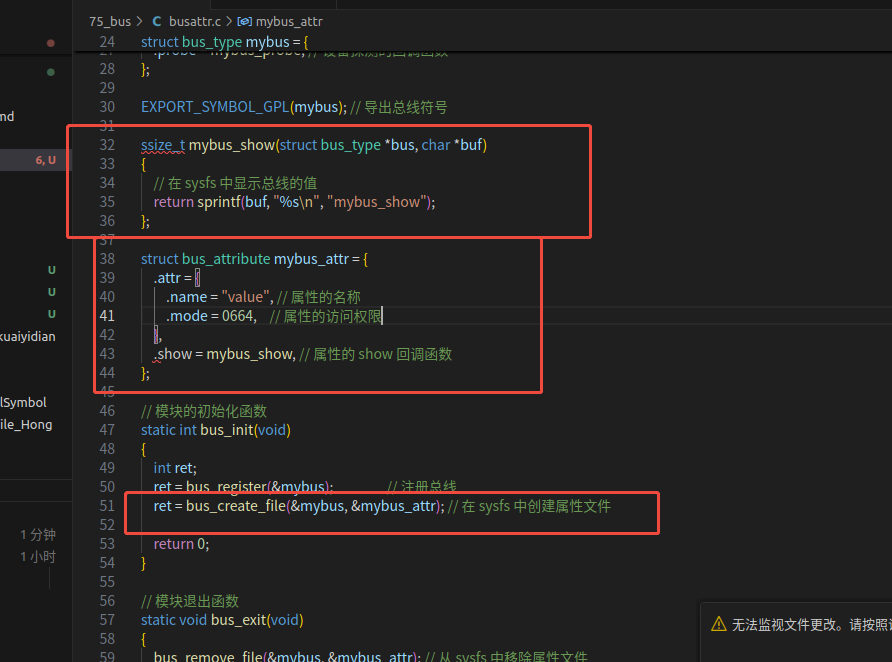
    ret = bus_create_file(&mybus, &mybus_attr); // 在 sysfs 中创建属性文件
    return 0;
}

// 模块退出函数
static void bus_exit(void)
{
    bus_remove_file(&mybus, &mybus_attr); // 从 sysfs 中移除属性文件
    bus_unregister(&mybus);               // 取消注册总线
}

module_init(bus_init); // 指定模块的初始化函数
module_exit(bus_exit); // 指定模块的退出函数

MODULE_LICENSE("GPL");     // 模块使用的许可证
MODULE_AUTHOR("fangchen"); // 模块的作者
源码结果
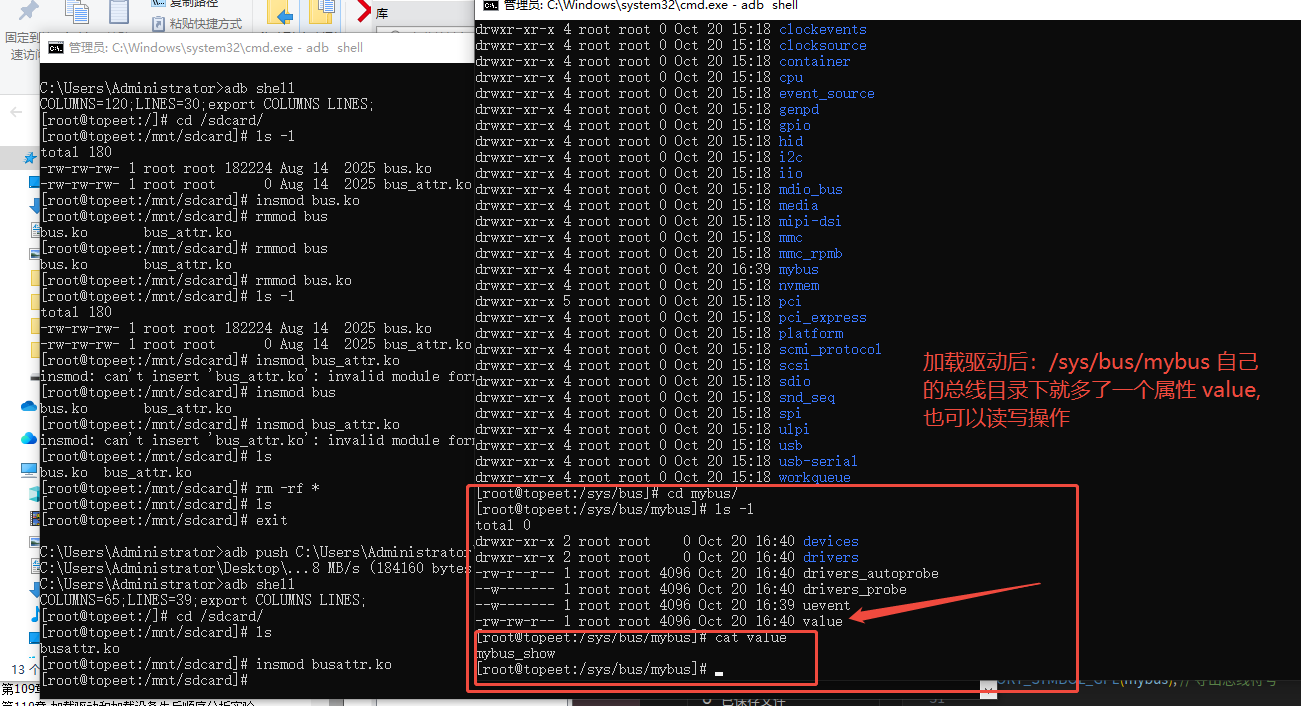
和上面创建bus 源码对比如下:就是多了一个创建属性的操作 bus_create_file
源码分析-bus_create_file
bus_create_file 是 Linux 内核中与设备模型和 sysfs 文件系统相关的函数,通常用于在 sysfs 中为总线类型创建属性文件。以下是对该函数的分析:
相关数据结构- bus_type 、 bus_attribute
struct bus_type:表示内核中的总线类型
struct bus_type {
    const char *name;
    struct bus_attribute *bus_attrs;
    // ... 其他成员
    struct subsys_private *p;
};
struct bus_attribute:总线属性结构
struct bus_attribute {
    struct attribute attr;
    ssize_t (*show)(struct bus_type *bus, char *buf);
    ssize_t (*store)(struct bus_type *bus, const char *buf, size_t count);
};
使用示例
static ssize_t my_bus_attr_show(struct bus_type *bus, char *buf)
{
    return sprintf(buf, "%s\n", "Hello from bus attribute");
}

static BUS_ATTR(my_attribute, 0444, my_bus_attr_show, NULL);

// 在总线初始化代码中
bus_create_file(&my_bus_type, &bus_attr_my_attribute);
总结
- 总线bus 相关最基础知识了解
- 创建总线、创建总线下的属性并读写知识点了解





 扫一扫
扫一扫


 1045
1045

 被折叠的 条评论
为什么被折叠?
被折叠的 条评论
为什么被折叠?
 到【灌水乐园】发言





