


 本文介绍了如何在C++中创建ANSI编码格式的文本,尤其是在遇到默认为UTF-8编码时的处理方法。通过特定操作,可以将包含中文的内容追加到ANSI编码的文本中,并提供了设置Visual Studio默认编码格式为UTF-8或GB2312-80的教程链接。
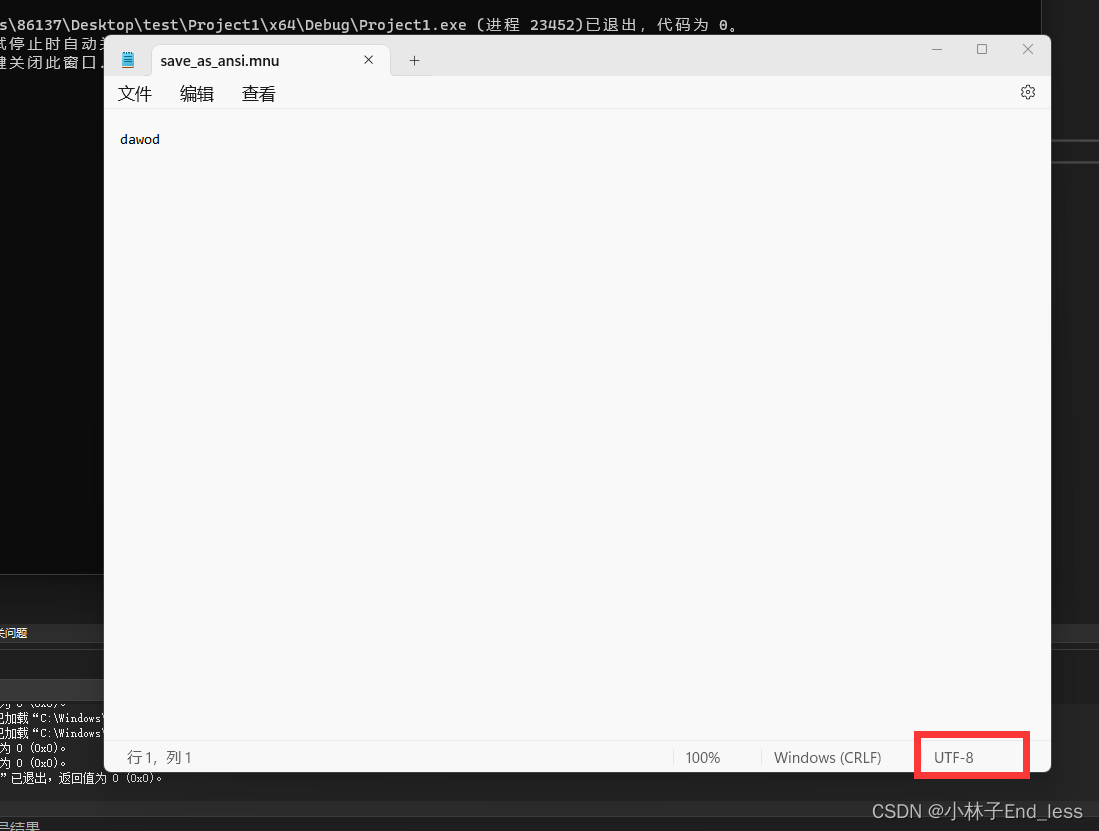
在此处,我想创建一个ANSI编码格式的文本,但是在没有输入中文的情况下,默认会创建为utf-8,代码及结果如下所示:
#include <iostream>
#include <fstream>
#include <locale>
using namespace std;


int main()
{
    std::locale::global(std::locale("chs"));

    wstring content = L"dawod";
    wofstream ofs("save_as_ansi.mnu", ios::app);
    ofs.write(content.c_str(), content.size());
    ofs.close();

    return 0;
}
当内容包含中文时,在其后追加内容,则默认更改为了ANSI编码格式,代码及内容如下:
#include <iostream>
#include <fstream>
#include <locale>
using namespace std;


int main()
{
    std::locale::global(std::locale("chs"));

    wstring content = L"最爱吃兽奶!!!!";
    wofstream ofs("save_as_ansi.mnu", ios::app);
    ofs.write(content.c_str(), content.size());
    ofs.close();

    return 0;
}
如此,问题就解决了?当然不是,我们还需要设置Visual Studio 默认编码格式为 UTF-8 或 GB2312-80 ,此处引用一下大佬的设置方法(31条消息) Visual Studio 设置默认编码格式为 UTF-8 或 GB2312-80 与文件没有高级保存选项怎么显示_Come_code的博客-优快云博客

这样就可以啦!拿走不谢





 扫一扫
扫一扫


 537
537

 被折叠的 条评论
为什么被折叠?
被折叠的 条评论
为什么被折叠?
 到【灌水乐园】发言





