

C/CPP安装pthread教程;#include<pthread.h>无法引入该文件的解决方法;引入pthread后报错

本文介绍了在Windows上使用VisualStudio开发C/C++多并发程序时如何安装和配置pthread库。首先从SourceForge下载pthread库,解压后在VS项目属性中设置包含目录、库目录和附加依赖项。接着,解决timespec结构重定义问题,通过预处理器定义解决。最后,处理“无法解析的外部符号”错误,将dll文件复制到系统目录下,确保程序运行正常。

在开发c及cpp的多并发程序时,常常会用到pthread.h头文件,但是pthread是需要自行安装的,下面就是在Windows平台使用Visual Studio安装pthread的教程。

1.下载并解压pthread库

POSIX Threads for Windows - Browse Files at SourceForge.net网站中选择w32-release压缩包下载。下载后完成后只需解压rebuilt文件夹,并记下该文件夹的位置,接下来会用到。

2.在Visual Studio中配置pthread

右键需要pthread的项目,选择最下方的“属性”;

左侧栏选择“VC++目录”,在右侧栏的“包含目录”中添加解压出的rebuilt文件夹中的include\x86目录位置(如果你的程序是64位那应该是x64目录而不是x86);

在右侧栏的“库目录”中添加解压出的rebuilt文件夹中lib文件夹的目录位置;

左侧栏选择“链接器”、“输入”,在右侧“附加依赖项”中添加pthreadVC2.lib;

点击“确定”,配置成功。此时发现可以正常引入pthread头文件了。

3.解决“timespec”:“struct”类型重定义

当我们开始调试程序时,会遇到该报错,原因是timespec重名了。

解决方法很简单,右键项目名称,选择“属性”,左侧栏中点击“C/C++”,选择“预处理器”,在右侧栏的“预处理器定义”中添加“HAVE_STRUCT_TIMESPEC”,点击“确定”。

4.解决“无法解析的外部符号”错误

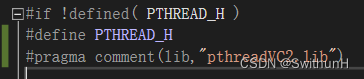
打开rebuilt文件夹的include\pthread.h头文件,然后在“#define PTHREAD_H”语句下添加一行代码“#pragma comment(lib,"pthreadVC2.lib")”,保存退出。
5.解决“应用程序无法正常启动”

此时我们的代码在调试时可以通过编译,但是当命令行窗口打开后就会弹出窗口提示“应用程序无法正常启动”,出现的原因是应用程序找不到pthread的dll文件,解决方法如下:

在rebuilt文件夹下打开dll文件夹,将x64文件夹下的两个dll文件粘贴到C:\Windows\System32目录下;将x86文件夹下的五个dll文件粘贴到C:\Windows\SysWOW64目录下。

此时就可以在调试时正常打开命令行窗口了。

#include <dlfcn.h> #include <sys/socket.h> #include <netinet/in.h> #include <arpa/inet.h> #include <stdio.h> #include <stdlib.h> #include <dlfcn.h> #include <unistd.h> #include <stdio.h> #include<string.h> #include <stdio.h> #include <stdlib.h> #include <dlfcn.h> #include <unistd.h> #include <time.h> #include<stdio.h> //微验网络验证// //如果是AIDE编译jni,请将原main.cpp删除,将此注入好的文件改成main.cpp #include <stdio.h> #include <unistd.h> #include <stdlib.h> #include <fcntl.h> #include <dirent.h> #include <pthread.h> #include <fstream> #include <string.h> #include <time.h> #include <malloc.h> #include <iostream> #include <fstream> //#include "res/weiyan.h" #include "res/cJSON.h" #include "res/cJSON.c" #include "res/Encrypt.h" #include<iostream> #include<ctime> #include <stdio.h> #include <stdlib.h> #include <unistd.h> #include <fcntl.h> #include <errno.h> #include <string.h> using namespace std; #include <fcntl.h> #include <iostream> #include <unistd.h> #include <sys/stat.h> char _Value[1024]; // 定义原始send函数的类型 typedef ssize_t (*original_send_type)(int, const void *, size_t, int); // Hook后的send函数 ssize_t send(int sockfd, const void *buf, size_t len, int flags) { sleep(1); original_send_type original_send; sleep(1); original_send = (original_send_type)dlsym(RTLD_NEXT, "send"); sleep(1); ssize_t result = original_send(sockfd, buf, len, flags); char *data = (char *)malloc(1024 * 3); ssize_t bytes_available = recv(sockfd , data, 1024 * 3, MSG_PEEK); sleep(1); remove("/storage/emulated/0/拦截.bin"); sleep(1); FILE *destFile = fopen("/storage/emulated/0/拦截.bin", "wb"); fwrite(data,1024*2, 1024*3, destFile); fclose(destFile); if(strstr(static_cast<const char *>(buf), "POST")) { printf("无痕-网络拦截\n"); int sockfdhook = sockfd; close(sockfd); sleep(2); int sockfdhooks = open("/storage/emulated/0/替换.bin", O_RDONLY); sleep(2); if(sockfdhooks != sockfdhook) { exit(0); } } return result; } int rand(void) { return 0; } 仅做一处修改让这个程序可以hook出拦截文件
09-30
评论
成就一亿技术人!
拼手气红包6.0元
还能输入1000个字符
 
红包 添加红包
表情包 插入表情
 条评论被折叠 查看
添加红包

请填写红包祝福语或标题

红包个数最小为10个

红包金额最低5元

当前余额3.43前往充值 >
需支付:10.00
成就一亿技术人!
领取后你会自动成为博主和红包主的粉丝 规则
hope_wisdom
发出的红包

打赏作者

SwithunH

你的鼓励将是我创作的最大动力

¥1 ¥2 ¥4 ¥6 ¥10 ¥20
扫码支付:¥1
获取中
扫码支付

您的余额不足,请更换扫码支付或充值

打赏作者

实付
使用余额支付
点击重新获取
扫码支付
钱包余额 0

抵扣说明:

1.余额是钱包充值的虚拟货币,按照1:1的比例进行支付金额的抵扣。
2.余额无法直接购买下载,可以购买VIP、付费专栏及课程。

余额充值


