samba挂载报错“mount error(13): Permission denied“

Samba挂载报错全攻略:从Permission denied到Not a directory的避坑指南 本文全面解析Samba挂载过程中常见的Permission denied、Input/output error和Not a directory等报错问题,提供从服务端配置、文件系统权限到客户端挂载参数的完整解决方案。特别针对CentOS7环境,详细讲解协议版本选择、身份验证优化和SELinux策略配置等关键技术要点,帮助系统管理员快速定位和解决Samba挂载难题。 阅读详情
AI摘要

在CentOS7系统中尝试挂载SMB共享文件夹时遇到了多种错误,包括Permissiondenied,Input/outputerror和Notadirectory。通过检查smb.conf配置文件,重启SMB服务,以及正确指定挂载路径和参数,最终成功挂载了名为temp的共享文件夹。

“mount error(13): Permission denied”

环境:CentOS7
挂载报错:

[root@chenshuyi ~]# mount -t cifs //127.0.0.1/printers /tmp/samba
Password for root@//127.0.0.1/printers:
mount error(13): Permission denied
Refer to the mount.cifs(8) manual page (e.g. man mount.cifs)

据说使格式错

[root@chenshuyi ~]# mount -t cifs //127.0.0.1/printers /tmp/samba -o username=smb1,password=123
mount error(5): Input/output error
Refer to the mount.cifs(8) manual page (e.g. man mount.cifs)

“mount error(5): Input/output error”

  • 查看共享状态
[root@chenshuyi ~]# smbclient -L //127.0.0.1
Enter MYGROUP\root's password:
Anonymous login successful

        Sharename       Type      Comment
        ---------       ----      -------
        IPC$            IPC       IPC Service (Samba Server Version 4.10.16)
Reconnecting with SMB1 for workgroup listing.
Anonymous login successful

        Server               Comment
        ---------            -------

        Workgroup            Master
        ---------            -------
        MYGROUP              CHENSHUYI
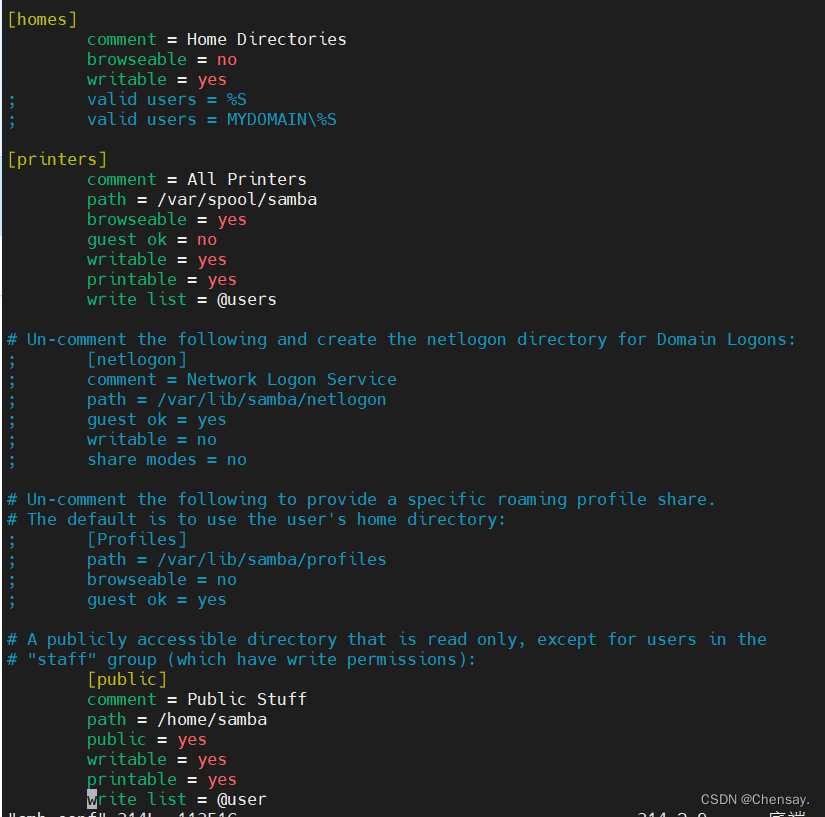
  • 无共享文件(更改smb.conf文件)

在这里插入图片描述

  • 重启服务,查看文件共享
[root@chenshuyi samba]# smbclient -L //127.0.0.1
Enter MYGROUP\root's password:
Anonymous login successful

        Sharename       Type      Comment
        ---------       ----      -------
        public          Printer   Public Stuff
        IPC$            IPC       IPC Service (Samba Server Version 4.10.16)
Reconnecting with SMB1 for workgroup listing.
Anonymous login successful

        Server               Comment
        ---------            -------

        Workgroup            Master
        ---------            -------
        MYGROUP
  • 重新挂载
[root@chenshuyi samba]# mount -t cifs //127.0.0.1/public /tmp/samba -o username=smb1,password=123
mount error(20): Not a directory
Refer to the mount.cifs(8) manual page (e.g. man mount.cifs)

又报错"mount error(20): Not a directory"

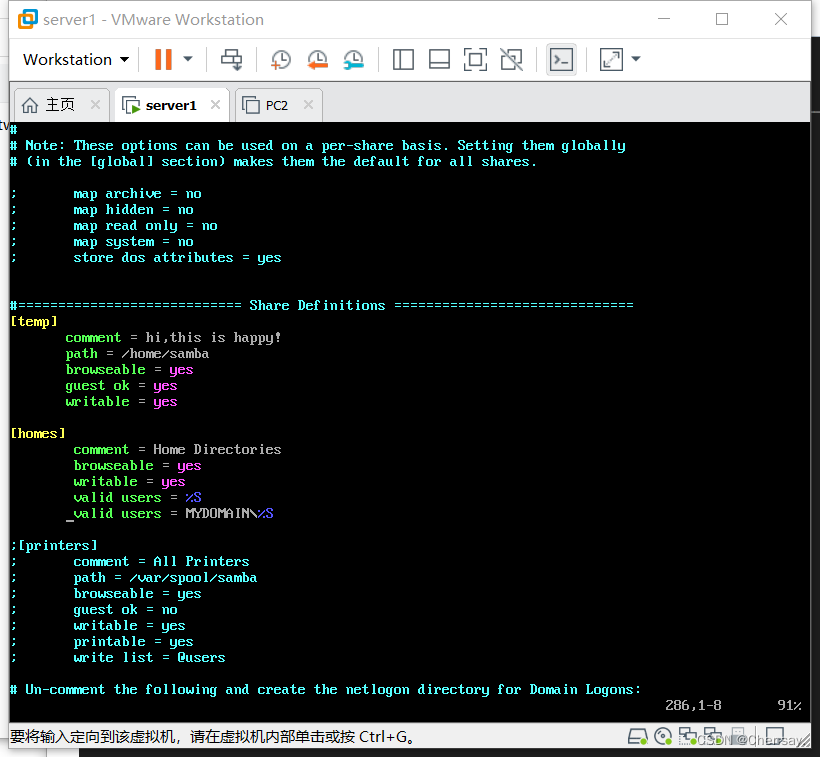
  • 重新打开samba的主配置文件,共享文件这一块,其他的都注释掉,就剩眼见的。

在这里插入图片描述

  • 重启服务,重新挂载
[root@chenshuyi home]# mount -t cifs //127.0.0.1/temp /tmp/samba -o username=smb1,password=123
[root@chenshuyi home]# df -h
文件系统                 容量  已用  可用 已用% 挂载点
devtmpfs                 475M     0  475M    0% /dev
tmpfs                    487M     0  487M    0% /dev/shm
tmpfs                    487M  7.7M  479M    2% /run
tmpfs                    487M     0  487M    0% /sys/fs/cgroup
/dev/mapper/centos-root   17G  1.6G   16G   10% /
/dev/sr0                 4.5G  4.5G     0  100% /mnt
/dev/sda1               1014M  137M  878M   14% /boot
tmpfs                     98M     0   98M    0% /run/user/0
//127.0.0.1/temp          17G  1.6G   16G   10% /tmp/samba
[root@chenshuyi home]# smbclient //127.0.0.1/temp
Enter MYGROUP\root's password:
Anonymous login successful
Try "help" to get a list of possible commands.
smb: \>
麒麟系统挂载Windows共享文件夹:从SMB协议到自动挂载的完整指南 在跨平台文件共享场景中,SMB/CIFS协议是实现异构系统间数据互通的核心技术。该协议定义了客户端与服务器之间的通信规则,通过身份认证、会话建立等机制,将网络共享目录映射为本地文件系统。在信创国产化替代背景下,Linux系统(如银河麒麟)访问Windows文件服务器成为保障业务连续性的关键技术。通过安装cifs-utils工具包,结合mount命令或图形界面,可实现共享文件夹的挂载。针对生产环境需求,需解决身份认证安全、中文编码乱码、文件权限映射等工程问题,并通过配置/etc/fstab实现开机自动挂载。本 阅读详情

相关推荐

Debian 11 NFS 搭建全解析:从内核模块到挂载排障

NFS(Network File System)是 Linux 下最成熟的分布式文件共享协议,其核心在于内核级 VFS 集成与 RPC 远程过程调用机制。它不依赖用户态代理,数据直通 TCP/IP 栈,因此性能接近本地磁盘,但也要求对模块加载、rpcbind 协同、/etc/exports 语法及 NFSv3/v4 协议差异有深入理解。在 Debian 11 中,systemd 对 rpcbind.socket 的惰性激活、默认禁用 NFSv3 兼容、以及 fsid=0 等伪根约束,共同构成典型部署陷阱。本

weixin_34226706的博客 351

Linux: mount error(13): Permission denied 挂载报错的解决措施

mount error(13): Permission denied 挂载报错的解决措施 挂载之前先ping一下,若能ping通试试文件能不能远程访问到,验证用户名跟密码 挂载时报错主要有以下原因导致: 1. 地址拼写错误 右键需要挂载的文件=>属性=>共享,把网络路径pc名字换成ip地址,再检查下虚拟机需要挂载的地址是否正确。尽量不要在挂载的目录下执行挂载命令。 2. 用户名或密码错误 mount -t cifs -o username=用户名,password="密码" //ip地址/

CIOCC的博客 2万+

Ubuntu 18.04 sudo权限配置原理与实战:setuid、组策略与sudoers三重校验

sudo是Linux系统中实现特权提升的核心机制,其本质并非简单命令开关,而是融合文件权限(setuid位)、用户组成员关系(如sudo组)和PAM/sudoers策略的三层安全校验体系。理解setuid位如何使/usr/bin/sudo以root身份执行,掌握usermod -aG对组关系的原子性修改,以及识别/etc/sudoers中Defaults env_reset等策略对环境变量的影响,是解决‘sudo: effective uid is not 0’‘command not found’等高频故

372

使用mount挂载出现mount error(13): Permission denied

3.2 linux的mount命令正确;填写用户名,密码正确;3.1 linux上可以ping通windows的IP;4.2 重启windows服务器,取消文件夹占用;2.2 windows文件夹共享属性正常;2.3 windows IP及目录正确;3.3 linux本地挂载目录属性正确?4.3 重新执行挂载,挂载成功;2.1 用户名,密码正确;

u010066903的博客 5796

COCO2017数据集类别分布深度解析

本文深入解析了COCO2017数据集的类别分布情况,包括80个常见物体的分类统计和样本数量分析。通过对比训练集与验证集的分布一致性,探讨了数据均衡性问题,并针对高频和低频类别提出了实用的数据预处理和模型训练建议,帮助优化计算机视觉任务的性能。

weixin_42533751的博客 370

视觉SLAM十四讲习题答案

阅读《视觉SLAM十四讲》中遇到的问题及习题资源整理,或为原创,或来自网络,如有问题请与我联系,会在第一时间加以修正。 后来自己写完看到另一位写的博客,相形见绌,大家可以互相结合的看。 第一讲 1.线性方程的解:转载自宋洋鹏(youngpan1101),了解线性代数可关注B站3Blue1Brown,以及线性代数,知乎上有其精细笔记。 2.高斯分布参考这位博主Johnny-Cuii的文章,具体...

INFINITE POSSIBILITIES 1万+

使用mount临时挂载出现mount error(13): Permission denied

/报错信息,提示账号密码错误,其实并不是添加参数即可;中途可能需要等一些时间。

一个懒鬼的博客 9832

图像特征(一)——颜色特征(颜色直方图,颜色矩,颜色集,颜色聚合向量和颜色相关图)

本文主要是为了更好地理解图像特征,理解各方法的原理。转载请注明出处https://mp.youkuaiyun.com/console/editor/html/105090183 图像模式识别的一般步骤为:输入图像--图像预处理--特征提取--特征选择--图像分类--输出结果。 图像特征主要有:颜色特征、形状特征、纹理特征和空间关系特征。 本文主要介绍颜色特征,并给出matlab上实现的demo。 颜...

gloria_iris的博客 3万+

mount error(13): Permission denied

mount挂载时错误

2301_76895548的博客 1420

Innovus Function ECO实战:5步搞定数字后端设计中的网表修正(含Calibre LVS验证技巧)

本文提供了一份完整的Innovus Function ECO实战指南,详细解析了数字后端设计中网表修正的五步流程。从理解Function ECO概念、准备关键文件,到在Innovus中执行逻辑比对、自动布线及GUI检查,并重点攻克了ECO后Calibre LVS验证的难点与调试技巧,帮助工程师高效、精准地完成流片前的设计微调。

day7的博客 948

gem5 run parsec2.1 ---- 亲测跑通教程

使用gem5模拟仿真parsec2.1,排除了各种bug,成功跑通,亲测有效!!!

m0_55539563的博客 1546

Linux 挂载Windows10文件夹 mount error(13): Permission denied Refer to the mount.cifs(8) manual page 问题解决

背景: Linux系统想挂载一个windows10的共享文件夹。总是报错: mount error(13): Permission denied Refer to the mount.cifs(8) manual page 后来发现是windows10用pin码登录的问题。改成用密码登录就好了。 一、创建共享文件夹 这一步网上很多资料,我这里还简要是贴一下(只是个人记录用,读者可略过不看,直接看第二部分)。 在windows10上选择一个文件夹,右键-->属性-->共享--&

xiaopang_love_study的博客 6063

AI测试:手把手教你用AI创建流程图「喂饭教程」

本文介绍了如何利用next-ai-draw-io开源项目,通过AI快速生成专业流程图,提升测试工作效率。该工具支持自然语言交互,兼容多种AI模型(如OpenAI、Claude等),并集成draw.io图表引擎,实现实时编辑。

blues_C的博客 757

centos7.4挂载windwos10共享文件夹报错:mount error(13): Permission denied等

一、实现描述 在centos平台上挂载windows10的共享文件过程中,遇到好多狗血的问题,在此记录问题以及解决方法,防止今后踩坑。 二、问题 1.问题描述 在Centos上挂载Windows共享文件夹,但是报错:mount error(13): Permission denied [root@localhost ~]# mount -t cifs -o username=win10...

小蚯蚓的博客 4578

Arch Linux 命令大全,值得收藏!

Arch Linux 是一款轻量级、高度可定制的 Linux 发行版,以其简洁和强大的特性深受高级用户喜爱。但对于新手来说,完全掌握 Arch Linux 的操作需要时间和实践。本文将为您详细介绍常用的 Arch Linux 命令,涵盖系统管理、文件操作、用户管理、软件安装与管理、网络配置和磁盘管理等内容,帮助您更高效地使用 Arch Linux。

网络技术联盟站 973

【FreeSwitch开发实践】外呼网关配置(拨打电话)

FreeSwitch开发一个重要应用是外呼,所谓外呼就拨打真实电话或手机号呼叫,配合语音机器人可以实现智能客服的功能。外呼配置主要是配置外呼服务器,外呼服务器主要指SIP网关,每个外呼服务器就是一个SIP节点,FreeSwitch服务也可以是一个SIP节点。本文主要介绍了FreeSwitch外呼相关配置,主要有外呼配置的模式,包括注册模式和非注册模式网关加载的查看方法拨号中常见的呼出配置和呼入配置如果觉得有些帮助或觉得文章还不错,请关注一下博主,你的关注是我持续写作的动力。............

xiao2macf的专栏 1万+

挂载存储报错 mount error(13): Permission denied

3、考虑是挂载用的账户密码不对,执行smbpasswd -a root,重新设置root的密码,再次挂载解决。1、查看samba存储所在服务器的防火墙和selinux已全部关闭,挂载时依然报错。2、查看samba存储所在服务器的挂载目录有可写可执行的权限,挂载时依然报错。问题:使用的samba存储,挂载存储时报错权限不允许。

m0_59644956的博客 886

IMSL CNL 7.0.0 (x86-64)Crack

IMSL CNL 7.0.0 (x86-64)Crack intel的算法库破解文件,这是C++版本的破解文件

mount error(13): Permission denied Refer to the mount.cifs(8) manual page (e.g. man mount.cifs) RHE...

一般使用SMB(Server Message Block)协议共享文件,都是客户机或是服务器是windows,才会使用。而samba是在Linux上实现SMB协议的自由软件。另外还使用到一个协议CIFS(Common Internet File System)通用的互联网文件系统,是基于SMB协议开发的文件共享协议。可以看做是增强SMB协议跨平台,通用性的协议。作为练习,服务器和客户机都是RHEL...

weixin_30819163的博客 8384

Statistics and Machine Learning Toolbox

Statistics and Machine Learning Toolbox(带书签),MATLAB统计学习工具

IDEA的使用指南

IDEA基于java的使用手册,可以最快速的上手,在使用中不断的丰富自己的使用技巧.

linux访问samba,mount errer 13,mount挂载报错mount error(13): Permission denied

"sec" is the security mode and determines how passwords are encrypted between server and client ( even if you don't require passwords ).ntlm used to be the default which is why you never had to specif...

weixin_33670352的博客 1162

深度学习工具包 DeepLearningToolbox

深度学习工具包Deprecation notice.-----This toolbox is outdated and no longer maintained.There are much better tools available for deep learning than this toolbox, e.g. [Theano](http://deeplearning.net/software/theano/), [torch](http://torch.ch/) or [tensorflow](http://www.tensorflow.org/)I would suggest you use one of the tools mentioned above rather than use this toolbox.Best, Rasmus.DeepLearnToolbox================A Matlab toolbox for Deep Learning.Deep Learning is a new subfield of machine learning that focuses on learning deep hierarchical models of data.It is inspired by the human brain's apparent deep (layered, hierarchical) architecture.A good overview of the theory of Deep Learning theory is[Learning Deep Architectures for AI](http://www.iro.umontreal.ca/~bengioy/papers/ftml_book.pdf)For a more informal introduction, see the following videos by Geoffrey Hinton and Andrew Ng.* [The Next Generation of Neural Networks](http://www.youtube.com/watch?v=AyzOUbkUf3M) (Hinton, 2007)* [Recent Developments in Deep Learning](http://www.youtube.com/watch?v=VdIURAu1-aU) (Hinton, 2010)* [Unsupervised Feature Learning and Deep Learning](http://www.youtube.com/watch?v=ZmNOAtZIgIk) (Ng, 2011)If you use this toolbox in your research please cite [Prediction as a candidate for learning deep hierarchical models of data](http://www2.imm.dtu.dk/pubdb/views/publication_details.php?id=6284)```@MASTERSTHESIS\{IMM2012-06284, author = "R. B. Palm", title = "Prediction as a candidate for learning deep hierarchical models of data", year = "2012",}```Contact: rasmusbergpalm at gmail dot comDirectories included in the toolbox-----------------------------------`NN/` - A library for Feedforward Backpropagation Neural Networks`CNN/` - A library for Convolutional Neural Networks`DBN/` - A library for Deep Belief Networks`SAE/` - A library for Stacked Auto-Encoders`CAE/` - A library for Convolutional Auto-Encoders`util/` - Utility functions used by the libraries`data/` - Data used by the examples`tests/` - unit tests to verify toolbox is workingFor references on each library check REFS.mdSetup-----1. Download.2. addpath(genpath('DeepLearnToolbox'));Example: Deep Belief Network---------------------```matlabfunction test_example_DBNload mnist_uint8;train_x = double(train_x) / 255;test_x = double(test_x) / 255;train_y = double(train_y);test_y = double(test_y);%% ex1 train a 100 hidden unit RBM and visualize its weightsrand('state',0)dbn.sizes = [100];opts.numepochs = 1;opts.batchsize = 100;opts.momentum = 0;opts.alpha = 1;dbn = dbnsetup(dbn, train_x, opts);dbn = dbntrain(dbn, train_x, opts);figure; visualize(dbn.rbm{1}.W'); % Visualize the RBM weights%% ex2 train a 100-100 hidden unit DBN and use its weights to initialize a NNrand('state',0)%train dbndbn.sizes = [100 100];opts.numepochs = 1;opts.batchsize = 100;opts.momentum = 0;opts.alpha = 1;dbn = dbnsetup(dbn, train_x, opts);dbn = dbntrain(dbn, train_x, opts);%unfold dbn to nnnn = dbnunfoldtonn(dbn, 10);nn.activation_function = 'sigm';%train nnopts.numepochs = 1;opts.batchsize = 100;nn = nntrain(nn, train_x, train_y, opts);[er, bad] = nntest(nn, test_x, test_y);assert(er < 0.10, 'Too big error');```Example: Stacked Auto-Encoders---------------------```matlabfunction test_example_SAEload mnist_uint8;train_x = double(train_x)/255;test_x = double(test_x)/255;train_y = double(train_y);test_y = double(test_y);%% ex1 train a 100 hidden unit SDAE and use it to initialize a FFNN% Setup and train a stacked denoising autoencoder (SDAE)rand('state',0)sae = saesetup([784 100]);sae.ae{1}.activation_function = 'sigm';sae.ae{1}.learningRate = 1;sae.ae{1}.inputZeroMaskedFraction = 0.5;opts.numepochs = 1;opts.batchsize = 100;sae = saetrain(sae, train_x, opts);visualize(sae.ae{1}.W{1}(:,2:end)')% Use the SDAE to initialize a FFNNnn = nnsetup([784 100 10]);nn.activation_function = 'sigm';nn.learningRate = 1;nn.W{1} = sae.ae{1}.W{1};% Train the FFNNopts.numepochs = 1;opts.batchsize = 100;nn = nntrain(nn, train_x, train_y, opts);[er, bad] = nntest(nn, test_x, test_y);assert(er < 0.16, 'Too big error');```Example: Convolutional Neural Nets---------------------```matlabfunction test_example_CNNload mnist_uint8;train_x = double(reshape(train_x',28,28,60000))/255;test_x = double(reshape(test_x',28,28,10000))/255;train_y = double(train_y');test_y = double(test_y');%% ex1 Train a 6c-2s-12c-2s Convolutional neural network %will run 1 epoch in about 200 second and get around 11% error. %With 100 epochs you'll get around 1.2% errorrand('state',0)cnn.layers = { struct('type', 'i') %input layer struct('type', 'c', 'outputmaps', 6, 'kernelsize', 5) %convolution layer struct('type', 's', 'scale', 2) %sub sampling layer struct('type', 'c', 'outputmaps', 12, 'kernelsize', 5) %convolution layer struct('type', 's', 'scale', 2) %subsampling layer};cnn = cnnsetup(cnn, train_x, train_y);opts.alpha = 1;opts.batchsize = 50;opts.numepochs = 1;cnn = cnntrain(cnn, train_x, train_y, opts);[er, bad] = cnntest(cnn, test_x, test_y);%plot mean squared errorfigure; plot(cnn.rL);assert(er<0.12, 'Too big error');```Example: Neural Networks---------------------```matlabfunction test_example_NNload mnist_uint8;train_x = double(train_x) / 255;test_x = double(test_x) / 255;train_y = double(train_y);test_y = double(test_y);% normalize[train_x, mu, sigma] = zscore(train_x);test_x = normalize(test_x, mu, sigma);%% ex1 vanilla neural netrand('state',0)nn = nnsetup([784 100 10]);opts.numepochs = 1; % Number of full sweeps through dataopts.batchsize = 100; % Take a mean gradient step over this many samples[nn, L] = nntrain(nn, train_x, train_y, opts);[er, bad] = nntest(nn, test_x, test_y);assert(er < 0.08, 'Too big error');%% ex2 neural net with L2 weight decayrand('state',0)nn = nnsetup([784 100 10]);nn.weightPenaltyL2 = 1e-4; % L2 weight decayopts.numepochs = 1; % Number of full sweeps through dataopts.batchsize = 100; % Take a mean gradient step over this many samplesnn = nntrain(nn, train_x, train_y, opts);[er, bad] = nntest(nn, test_x, test_y);assert(er < 0.1, 'Too big error');%% ex3 neural net with dropoutrand('state',0)nn = nnsetup([784 100 10]);nn.dropoutFraction = 0.5; % Dropout fraction opts.numepochs = 1; % Number of full sweeps through dataopts.batchsize = 100; % Take a mean gradient step over this many samplesnn = nntrain(nn, train_x, train_y, opts);[er, bad] = nntest(nn, test_x, test_y);assert(er < 0.1, 'Too big error');%% ex4 neural net with sigmoid activation functionrand('state',0)nn = nnsetup([784 100 10]);nn.activation_function = 'sigm'; % Sigmoid activation functionnn.learningRate = 1; % Sigm require a lower learning rateopts.numepochs = 1; % Number of full sweeps through dataopts.batchsize = 100; % Take a mean gradient step over this many samplesnn = nntrain(nn, train_x, train_y, opts);[er, bad] = nntest(nn, test_x, test_y);assert(er < 0.1, 'Too big error');%% ex5 plotting functionalityrand('state',0)nn = nnsetup([784 20 10]);opts.numepochs = 5; % Number of full sweeps through datann.output = 'softmax'; % use softmax outputopts.batchsize = 1000; % Take a mean gradient step over this many samplesopts.plot = 1; % enable plottingnn = nntrain(nn, train_x, train_y, opts);[er, bad] = nntest(nn, test_x, test_y);assert(er < 0.1, 'Too big error');%% ex6 neural net with sigmoid activation and plotting of validation and training error% split training data into training and validation datavx = train_x(1:10000,:);tx = train_x(10001:end,:);vy = train_y(1:10000,:);ty = train_y(10001:end,:);rand('state',0)nn = nnsetup([784 20 10]); nn.output = 'softmax'; % use softmax outputopts.numepochs = 5; % Number of full sweeps through dataopts.batchsize = 1000; % Take a mean gradient step over this many samplesopts.plot = 1; % enable plottingnn = nntrain(nn, tx, ty, opts, vx, vy); % nntrain takes validation set as last two arguments (optionally)[er, bad] = nntest(nn, test_x, test_y);assert(er < 0.1, 'Too big error');```[![Bitdeli Badge](https://d2weczhvl823v0.cloudfront.net/rasmusbergpalm/deeplearntoolbox/trend.png)](https://bitdeli.com/free "Bitdeli Badge")

WSL2 网络共享挂载排错:4类常见错误(如 mount error(13))的根因分析与修复

本文详细解析了WSL2网络共享挂载过程中常见的4类错误(如mount error(13)),包括权限拒绝、主机不可达、文件系统不支持和重启失效问题。通过根因分析与修复方案,帮助开发者快速解决Windows与WSL2之间的文件共享问题,提升开发效率。

weixin_30384217的博客 424

linux访问samba,mount errer 13,centos7 装了samba,用mount挂载网络路径出错的问题?

在centos7 使用1.yum -y install samba samba-client 安装了samba服务,2.然后进入/etc/samba/smb.conf 进行配置,内容如下:[global]workgroup = WORKGROUPserver string = Samba Server Version %vnetbios name = MYSERVERsecurity = user...

weixin_39558521的博客 249

samba在linux之间共享文件挂载报错

测试linux和windows之间是可以登录的,但是在两个linux系统之间挂载报错, 提示“mount error(13): Permission denied Refer to the mount.cifs(8) manual page (e.g. man mount.cifs)” samba服务端安装配置好后,在客户端安装cifs yum install -y cifs 使

wzq的博客 5351

WSL2文件系统挂载优化:解决权限混乱与性能瓶颈的实践指南

在跨平台开发环境中,文件系统挂载是实现操作系统间数据互通的基础技术。其核心原理是通过特定的文件系统驱动(如WSL2的drvfs)和协议(如9p),在Linux内核与Windows主机间建立虚拟通道,实现文件访问。这项技术的价值在于打破了系统壁垒,允许开发者无缝使用两套生态的工具链。然而,默认的通用挂载方案往往在**文件权限**映射和**I/O性能**上存在妥协,导致开发工作流中出现权限错乱、工具链报错以及大量小文件操作卡顿等问题。典型的应用场景包括在WSL2中访问Windows项目目录、使用Windows

angou6476的博客 362

麒麟系统挂载WINDOWS共享目录

本文介绍了在麒麟系统中挂载局域网Windows共享目录的方法。临时方案使用mount -t cifs命令;永久方案推荐安装nfs-utils、配置凭据文件、写入/etc/fstab并执行mount -a测试。同时提及常见权限报错及解决参考文档。

AlickLbc的博客 217

SSHFS实战指南:用SSH加密通道挂载远程Linux文件系统

SSHFS是一种基于SSH协议的用户态网络文件系统技术,它利用FUSE内核模块和SFTP子系统,将远程Linux服务器目录以加密方式挂载为本地路径。其核心原理是复用OpenSSH成熟加密栈(AES-GCM、ECDH等),无需额外服务端部署,仅依赖sshd与sftp-server,默认启用。相比rsync(单向同步)、NFS(需开放端口且不加密)、WebDAV(需HTTP服务)等方案,SSHFS在安全性、易用性与系统集成度上优势显著,特别适合开发调试、日志分析、跨网协作等交互式场景。本文详解从零挂载、VS C

weixin_34138056的博客 461

ESXi USB硬盘挂载实战:透传+Linux+NFS企业级方案

USB存储设备在虚拟化环境中并非即插即用,其本质是协议语义不匹配——ESXi存储栈仅原生支持SCSI/SATA/NVMe类设备,而USB Mass Storage虽底层兼容SCSI命令,却被内核标记为IsUSB:true并限制用于VMFS数据存储。这一设计源于企业级Hypervisor对I/O可预测性与审计合规的刚性要求。因此,绕过ESXi直挂限制、采用USB透传至轻量Linux虚拟机再通过NFS共享的架构,成为兼顾安全性、稳定性与工程落地性的主流实践。该方案将USB设备管理责任下沉至成熟Linux生态(u

weixin_33901641的博客 365
上一篇: 数据结构【查找】
下一篇: Tripwire 完整性分析工具(Linux系统)
Chensay.
博客等级 码龄6年 1万+粉丝 122原创
评论
成就一亿技术人!
拼手气红包6.0元
还能输入1000个字符
 
 条评论被折叠 查看
添加红包

请填写红包祝福语或标题

个

红包个数最小为10个

元

红包金额最低5元

当前余额3.43元 前往充值 >
需支付:10.00元
成就一亿技术人!
领取后你会自动成为博主和红包主的粉丝 规则
hope_wisdom
发出的红包
实付元
使用余额支付
点击重新获取
扫码支付
钱包余额 0

抵扣说明:

1.余额是钱包充值的虚拟货币,按照1:1的比例进行支付金额的抵扣。
2.余额无法直接购买下载,可以购买VIP、付费专栏及课程。

余额充值