




 本文介绍了如何使用CMake构建C++项目,并通过VSCode进行配置,包括任务配置和调试配置。展示了从安装依赖、编写CMakeLists.txt到编译运行的全过程,最后成功运行并输出了预期结果。
目录结构:
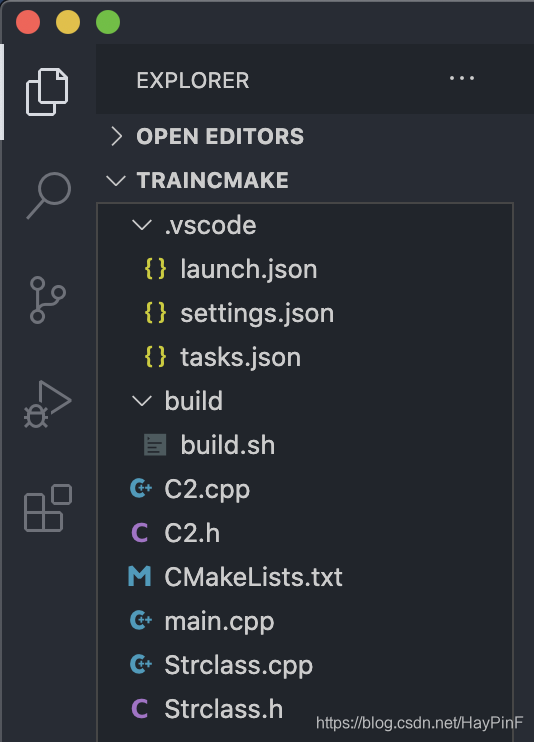
HaypinsMBP:trainCmake haypin$ tree .
.
├── C2.cpp
├── C2.h
├── CMakeLists.txt
├── Strclass.cpp
├── Strclass.h
├── build
│ └── build.sh
└── main.cpp
1 directory, 7 files
首先要安装有clang++(XCode自带)、cmake(可以用brew install cmake下载安装,静默安装在/usr/local/bin/cmake)
haypin@MBP ~ brew install cmake
==> Downloading https://homebrew.bintray.com/bottles/cmake-3.18.3.catalina.bottl
==> Downloading from https://d29vzk4ow07wi7.cloudfront.net/2cc57360f3dc4889657e1
######################################################################## 100.0%
==> Pouring cmake-3.18.3.catalina.bottle.tar.gz
==> Caveats
Emacs Lisp files have been installed to:
/usr/local/share/emacs/site-lisp/cmake
==> Summary
🍺 /usr/local/Cellar/cmake/3.18.3: 6,263 files, 60.1MB
haypin@MBP ~ 代码:
main.cpp:
#include <iostream>
#include <string>
#include "Strclass.h"
using namespace std;

int main(int argc,char *argv[]){
    Cstrclass objcstr=Cstrclass("heihei","haha");
    cout<<objcstr.staticMeth()<<"\n";   //通过实例调用类静态方法
    cout<<Cstrclass::staticMeth()<<"\n";//通过类名调用类静态方法

    objcstr.print();
}
Strclass.h:
#pragma once
#include<string>
// class C2;
#include "C2.h"
using namespace std;
class Cstrclass{
    private:
        static string sattr;
        string m_str;
        C2 m_C2;
        //如果只是在头文件单独声明class C2则cmake编译报错:error: field has incomplete type
    public:
        Cstrclass(string val,string val2);
        ~Cstrclass(void);
        static string staticMeth();//静态方法只能操作类静态字段与其他静态方法,相当于Python的类方法
        string Meth();//方法也可以操作全局作用域的变量,此时相当于Python的静态方法
        void print();
};
Strclass.cpp:
#include <iostream>
// #include "C2.h"
#include "Strclass.h"
string globvar="haha";
string Cstrclass::sattr="heihei";
//类静态字段必须在全局作用域初始化,扮演者全局作用域变量的角色,只不过是封装在类内
Cstrclass::Cstrclass(string val ,string val2):m_str(val) \
    ,m_C2(val2){
    // m_str=val;
};
Cstrclass::~Cstrclass(){};
string Cstrclass::staticMeth(){
    return sattr;
};
string Cstrclass::Meth(){
    return globvar;
};
void Cstrclass::print(){
    cout<<m_str<<"-"<<m_C2.Getm_str()<<"\n";
};
C2.h:
#pragma once
#include<string>
class C2{
    private:
        std::string m_str;
    public:
        C2(std::string val);
        ~C2(void);
        std::string Getm_str();
};
C2.cpp:
#include <iostream>
#include "C2.h"
using namespace std;
C2::C2(std::string val ):m_str(val){
    // m_str=val;
};
C2::~C2(){}
std::string C2::Getm_str(){
    return m_str;
};
编译配置文件:
.vscode/tasks.json:
我build.sh需要sudo权限所以要加"sudo bash ${workspaceRoot}/build/build.sh"
{
	"version": "2.0.0",
	"tasks": [
		{
			"type": "shell",
			"label": "cmake build",
			"command": "sudo bash ${workspaceRoot}/build/build.sh",
			"group": "build",
			"problemMatcher": [
				"$gcc"
			]
		},
		{
			"label": "run",
			"type": "shell",
			"command": "${workspaceRoot}/build/main"
		},
		{
			"label": "cmake build and run",
			"type": "shell",
			"command": "${workspaceRoot}/build/build.sh && ${workspaceRoot}/build/main"
		}
	]
}
build/build.sh:
#!/bin/bash
cd build
cmake ..
make -j8
CMakeLists.txt:
cmake_minimum_required(VERSION 3.0)
project(main)

set(CMAKE_CXX_FLAGS ${CMAKE_CXX_FLAGS} -g)
set(SOURCE main.cpp Strclass.h Strclass.cpp C2.h C2.cpp)

add_executable(main ${SOURCE})
调试配置文件:
{
    // Use IntelliSense to learn about possible attributes.
    // Hover to view descriptions of existing attributes.
    // For more information, visit: https://go.microsoft.com/fwlink/?linkid=830387
    "version": "0.2.0",
    "configurations": [
        {
            "name": "(lldb) 启动",
            "type": "cppdbg",
            "request": "launch",
            "program": "${workspaceRoot}/build/main",
            "args": [],
            "stopAtEntry": true,
            "cwd": "${workspaceFolder}",
            "environment": [],
            "externalConsole": false,
            "MIMode": "lldb"
        }
    ]
}
编译生成:
HaypinsMBP:trainCmake haypin$ sudo bash ./build/build.sh
Password:
-- The C compiler identification is AppleClang 12.0.0.12000032
-- The CXX compiler identification is AppleClang 12.0.0.12000032
-- Detecting C compiler ABI info
-- Detecting C compiler ABI info - done
-- Check for working C compiler: /Applications/Xcode.app/Contents/Developer/Toolchains/XcodeDefault.xctoolchain/usr/bin/cc - skipped
-- Detecting C compile features
-- Detecting C compile features - done
-- Detecting CXX compiler ABI info
-- Detecting CXX compiler ABI info - done
-- Check for working CXX compiler: /Applications/Xcode.app/Contents/Developer/Toolchains/XcodeDefault.xctoolchain/usr/bin/c++ - skipped
-- Detecting CXX compile features
-- Detecting CXX compile features - done
-- Configuring done
-- Generating done
-- Build files have been written to: /Users/haypin/VScode/cpptest/trainCmake/build
Scanning dependencies of target main
[ 75%] Building CXX object CMakeFiles/main.dir/Strclass.cpp.o
[ 75%] Building CXX object CMakeFiles/main.dir/main.cpp.o
[ 75%] Building CXX object CMakeFiles/main.dir/C2.cpp.o
[100%] Linking CXX executable main
[100%] Built target main
HaypinsMBP:trainCmake haypin$
运行:
HaypinsMBP:trainCmake haypin$ ./build/main
heihei
heihei
heihei-haha
HaypinsMBP:trainCmake haypin$





 扫一扫
扫一扫


 4470
4470

 被折叠的 条评论
为什么被折叠?
被折叠的 条评论
为什么被折叠?
 到【灌水乐园】发言





