



 本文介绍了如何使用C#实现CSV和TXT文件的流式写入,包括StreamWriter的实例化、文件路径管理、时间命名规则,并强调了UTF-8编码的应用。
1、写格式为.csv的方式
StreamWriter txtLog;
txtLog = new StreamWriter(File_txtPath, true, Encoding.UTF8);
if (!File.Exists(File_txtPath))
    File.Create(File_txtPath).Close();
txtLog.Write(strRS + ",");	//中间逗号表示不换行
txtLog.Write(Data + "\r\n");
txtLog.Flush();
txtLog.Close();
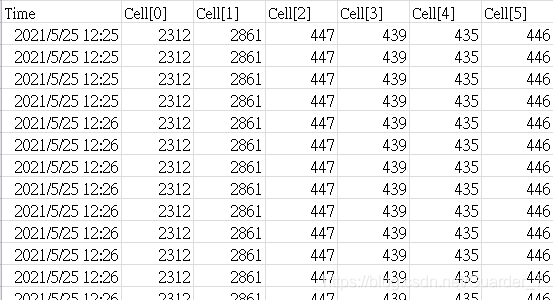 2、写格式为txt的方式
StreamWriter swlog;//实例化StreamWriter
public void Writetxt(string str)
{
    swlog = new StreamWriter(@".\Log.txt", true, Encoding.Default);
    //开始写入
    // sw.WriteLine(str);
    swlog.WriteLine(DateTime.Now.ToString("yyyy-MM-dd hh:mm:ss")+"   "+ str);
    //清空缓冲区
    swlog.Flush();
    //关闭流
    swlog.Close();
   // fs.Close();
}

文件命名
以时间为节点命名:
string  FilePath=@"E:\Test";
DateTime dateTime=DateTime.Now;
if(!Directory.Exits(FilePath))
    Directory.CreateDirectory(FilePath);
FilePath=string.Format(FilePath + "\\{0:D4}{1:D2}{2:D2}{3:D2}{4:D2}{5:D2}.txt", dateTime.Year, dateTime.Month, dateTime.Day , dateTime.Hour, dateTime.Minute, dateTime.Second);
swlog = new StreamWriter(FilelName, true, Encoding.UTF8);
//开始写入
swlog.Write(strData);
//清空缓冲区
swlog.Flush();
//关闭流
swlog.Close();





 扫一扫
扫一扫


 2122
2122

 被折叠的 条评论
为什么被折叠?
被折叠的 条评论
为什么被折叠?
 到【灌水乐园】发言





