 FTP详解
FTP详解



FTP (File Transfer Protocol)
连接模式
FTP 支持两种主要的数据传输模式:
主动模式是相对于服务端的,服务器端主动发起请求交主动模式,服务端接收请求交被动模式。
主动模式(Active Mode)
客户端发起控制连接:客户端随机选择一个端口(通常大于1024)与FTP服务器的21端口建立控制连接。
客户端通知服务器:客户端通过控制连接告诉服务器它监听的端口(数据端口)。
服务器发起数据连接:服务器使用自己的20端口主动连接到客户端的数据端口,建立数据连接。
数据传输:通过这个数据连接进行文件的上传和下载。
优点
实现简单。
在客户端没有防火墙的情况下工作良好。
缺点
客户端通常位于防火墙后面,防火墙可能会阻止来自外部的主动连接请求,导致数据连接无法建立。
被动模式(Passive Mode)
优点:
适用于客户端位于防火墙后面的情况,因为数据连接是由客户端发起的,防火墙通常允许这种出站连接。
提高了连接的可靠性。
缺点:
服务器端可能需要配置防火墙以允许来自外部的连接请求。
如果服务器位于防火墙后面,可能需要额外的配置来允许这些随机端口的入站连接。
端口选择
FTP主要使用两个端口20和21.
端口21:
端口21用于FTP的控制连接。
客户端通过这个端口与FTP服务器建立控制连接,用于发送FTP命令和接收服务器的响应。
控制连接在整个FTP会话期间保持打开状态,直到会话结束。
----------
端口20:
端口20用于FTP的数据连接,但仅在主动模式(Active Mode)下使用。
在主动模式下,FTP服务器使用端口20主动连接到客户端的数据端口,以进行文件传输。
在被动模式(Passive Mode)下,端口20不用于数据连接。相反,服务器会告诉客户端一个不同的端口(通常是大于1024的随机端口),客户端会连接到这个端口以建立数据连接。
多通道协议
FTP 是一个多通道协议,它使用两个 TCP 连接来完成操作:
控制连接 (Control Connection): 使用端口 21,用于发送命令和接收应答。
数据连接 (Data Connection): 使用端口 20 或由服务器在被动模式下指定的端口,用于传输实际的数据。
数据类型
Binary (二进制): 用于传输非文本文件,如图片、音频文件等。
ASCII (美国标准信息交换代码): 用于传输纯文本文件。
匿名登录
Anonymous: 匿名的FTP,用户可以使用 "anonymous" 作为用户名进行登录,并且可以输入任何字符作为密码。
防火墙问题
    FTP 是明文传输协议,可能需要在防火墙上配置额外的安全规则以允许数据传输。
    SFTP (Secure File Transfer Protocol) 是通过 SSH 协议提供的加密版本的 FTP。
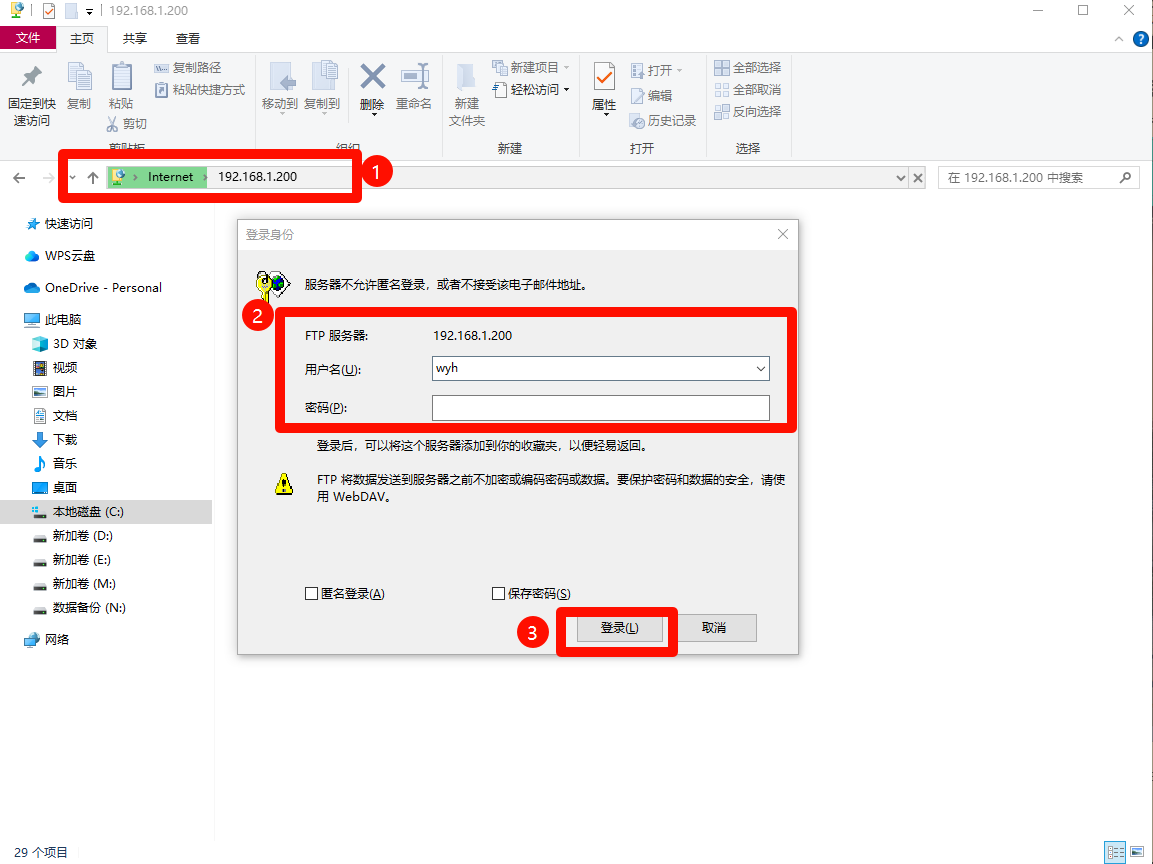
在Windows上使用
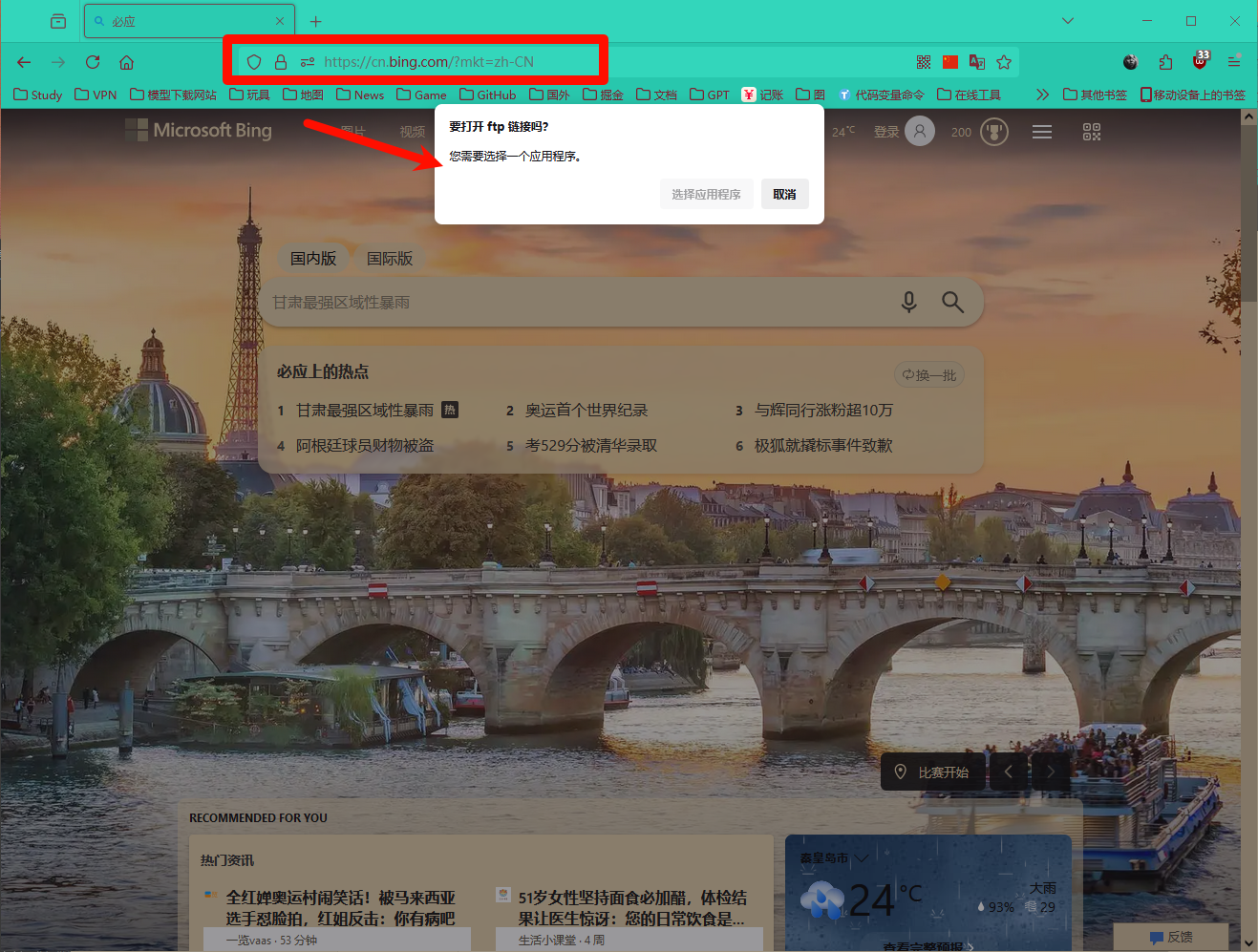
浏览器
浏览器上不能访问了。
资源管理器
使用资源管理器访问:
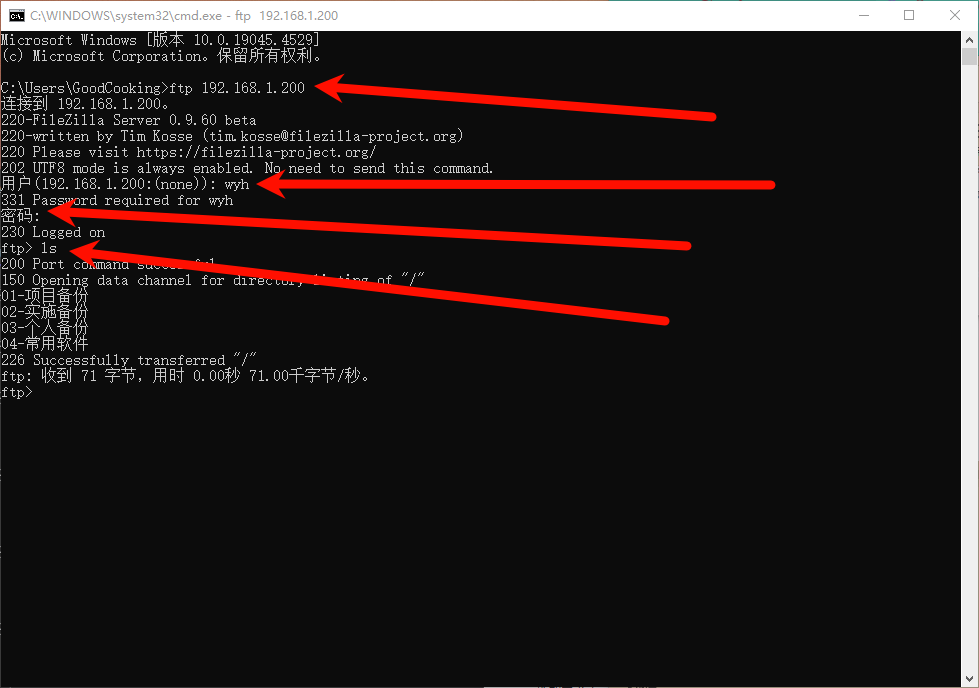
命令行
Win+R 输入cmd打开控制台。
输入:ftp [ip]
然后输入用户名
密码
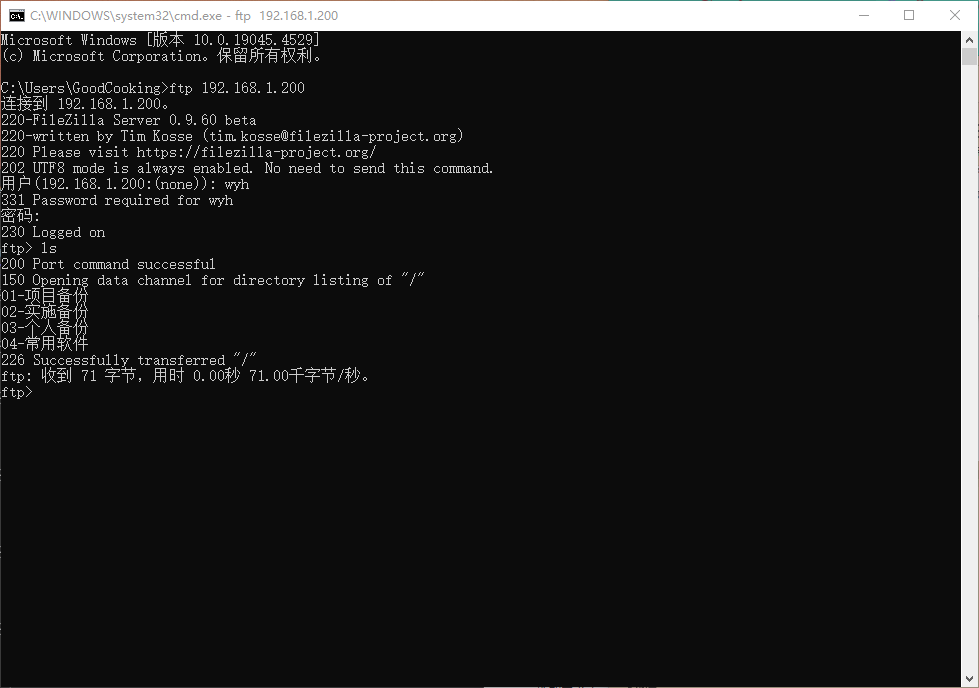
输入ls浏览目录
常用命令
    PUT: 上传文件到服务器。
    GET: 从服务器下载文件。
    DELETE: 删除服务器上的文件。
    LS 或 LIST: 显示服务器目录的内容。
    CD: 更改服务器上的工作目录。
    QUIT: 终止 FTP 会话。
    BINARY: 设置传输模式为二进制。
    ASCII: 设置传输模式为 ASCII。
其他端口
    21: FTP 控制连接端口。
    20: FTP 主动模式下的数据连接端口。
    22: SSH (Secure Shell) 协议端口。
    23: Telnet 协议端口。
C# 的示例项目
using System;
using System.IO;
using System.Net;

namespace FTP实践
{
    internal class Program
    {
        //upload
        //https://dlptest.com/ftp-test/
        //download
        //ftp://test.rebex.net/


        /// <summary>
        /// 下载文件的保存路径
        /// </summary>
        private const string DownloadSaveFilePath = "C:\\Users\\GoodCooking\\Pictures\\readme.txt";

        /// <summary>
        /// 上传文件的本地文件的路径
        /// </summary>
        private const string UpLoadFilePath = "C:\\Users\\GoodCooking\\Pictures\\readme.txt";


        private static string FTPServerAdr = "ftp://ftp.dlptest.com/";
        private static string UserName = "dlpuser";
        private static string PassWord = "rNrKYTX9g7z3RgJRmxWuGHbeu";


        static void Main(string[] args)
        {
            FtpClient ftpClient = new FtpClient(FTPServerAdr, UserName, PassWord);

            Console.WriteLine("Listing Directory:");
            ftpClient.ListDirectory();

            //Console.WriteLine("Downloading File:");
            //ftpClient.DownloadFile("readme.txt", DownloadSaveFilePath);

            //Console.WriteLine("Uploading File:");
            //ftpClient.UploadFile(UpLoadFilePath);

            Console.WriteLine("结束");

            Console.ReadKey();
            Console.ReadKey();
            Console.ReadKey();

        }

    }


    class FtpClient
    {
        private string ftpUrl;
        private string username;
        private string password;

        public FtpClient(string ftpUrl, string username, string password)
        {
            this.ftpUrl = ftpUrl;
            this.username = username;
            this.password = password;
        }

        public void ListDirectory()
        {
            FtpWebRequest request = (FtpWebRequest)WebRequest.Create(ftpUrl);
            request.Method = WebRequestMethods.Ftp.ListDirectory;
            request.Credentials = new NetworkCredential(username, password);

            using (FtpWebResponse response = (FtpWebResponse)request.GetResponse())
            using (Stream responseStream = response.GetResponseStream())
            using (StreamReader reader = new StreamReader(responseStream))
            {
                Console.WriteLine(reader.ReadToEnd());
            }
        }

        public void UploadFile(string localFilePath)
        {
            FtpWebRequest request = (FtpWebRequest)WebRequest.Create(ftpUrl + Path.GetFileName(localFilePath));
            request.Method = WebRequestMethods.Ftp.UploadFile;
            request.Credentials = new NetworkCredential(username, password);

            using (Stream requestStream = request.GetRequestStream())
            using (FileStream fileStream = new FileStream(localFilePath, FileMode.Open))
            {
                fileStream.CopyTo(requestStream);
            }

            using (FtpWebResponse response = (FtpWebResponse)request.GetResponse())
            {
                Console.WriteLine($"Upload File Complete, status {response.StatusDescription}");
            }
        }

        public void DownloadFile(string remoteFileName, string localFilePath)
        {
            FtpWebRequest request = (FtpWebRequest)WebRequest.Create(ftpUrl + remoteFileName);
            request.Method = WebRequestMethods.Ftp.DownloadFile;
            request.Credentials = new NetworkCredential(username, password);

            FtpWebResponse response;
            using (response = (FtpWebResponse)request.GetResponse())
            using (Stream responseStream = response.GetResponseStream())
            using (FileStream fileStream = new FileStream(localFilePath, FileMode.Create))
            {
                responseStream.CopyTo(fileStream);
            }

            Console.WriteLine($"Download File Complete, status {response.StatusDescription}");
        }
    }
}





 扫一扫
扫一扫


 3150
3150

 被折叠的 条评论
为什么被折叠?
被折叠的 条评论
为什么被折叠?
 到【灌水乐园】发言





