



 本文详细介绍了如何使用Mycat配合MySQL实现读写分离,包括Mycat的基本概念、目录结构、配置文件解读,以及Zookeeper的安装和Mycat-eye的部署。Mycat是一个开源的分布式数据库系统,作为数据库中间件实现数据分库分表,提供读写分离功能。文章还提供了配置和验证步骤。
MySQL
Mycat配合Mysql实现读写分离
1.mycat的基本概念
导读模块:1.任何技术或者产品的诞生都是有相应的背景的,这就如佛家所说的万事皆结果。
2.21世纪世界快速发展的一个新的纪元,每一天人们都会产生很多数据,而这些数据肯定是很大的财富,也是很重要的,但是要想存储和读取这些数据就可以变的有些棘手了,
这时候我们就要立足于数据库(mysql)端的主从复制的基础上开始思考,于是就产生了mycat,那么mycat到底是什么呢?
3.其实与mycat类似的产品有很多例如:OneProxy,AtLas(360),Vitess ,但是他们中只有mycat是大公司出产的且是开源的,且是社区最活跃的,所以我们选择mycat
补充参考:https://www.2cto.com/database/201804/737663.html
https://blog.youkuaiyun.com/kobejayandy/article/details/60869530
1.mycat:它是一个开源的分布式数据库系统,是一个实现了MySQL协议的服务器,前端用户可以把它看作是一个数据库代理,用MySQL客户端工具和命令行访问,
而其后端可以用MySQL原生协议与多个MySQL服务器通信,也可以用JDBC协议与大多数主流数据库服务器通信,其核心功能是分表分库,即将一个大表水平分割为N个小表,
存储在后端MySQL服务器里或者其他数据库里。
            1)mycat是一个管理数据库的软件
            2)经常被称之为数据库中间件
            3)可以通过他实现读写分离和分库分表的管理
PS:mycat是不存储数据记录的
MyCat发展到目前的版本,已经不是一个单纯的MySQL代理了,它的后端可以支持MySQL、SQL Server、Oracle、DB2、PostgreSQL等主流数据库,也支持MongoDB这种新型NoSQL方式的存储,
未来还会支持更多类型的存储。而在最终用户看来,无论是那种存储方式,在MyCat里,都是一个传统的数据库表,支持标准的SQL语句进行数据的操作,这样一来,对前端业务系统来说,
可以大幅降低开发难度,提升开发速度
简而言之:就是阿里出产的开源免费的一款数据库中间件(就是后台程序与数据库之间的一个软件产品)
官网:http://mycat.io/
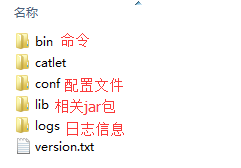
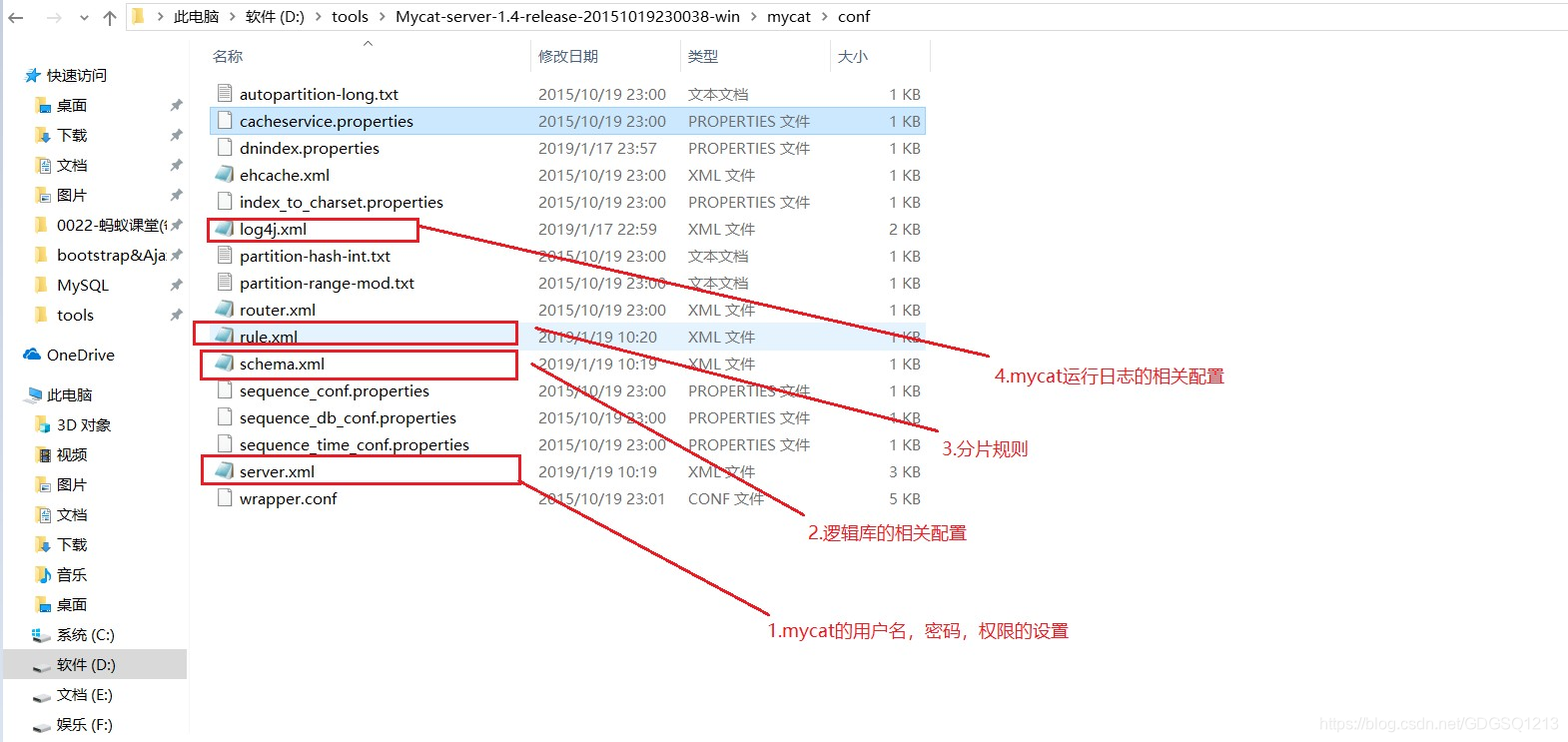
2.mycat目录结构以及主要配置文件解读
3.mycat运行原理图
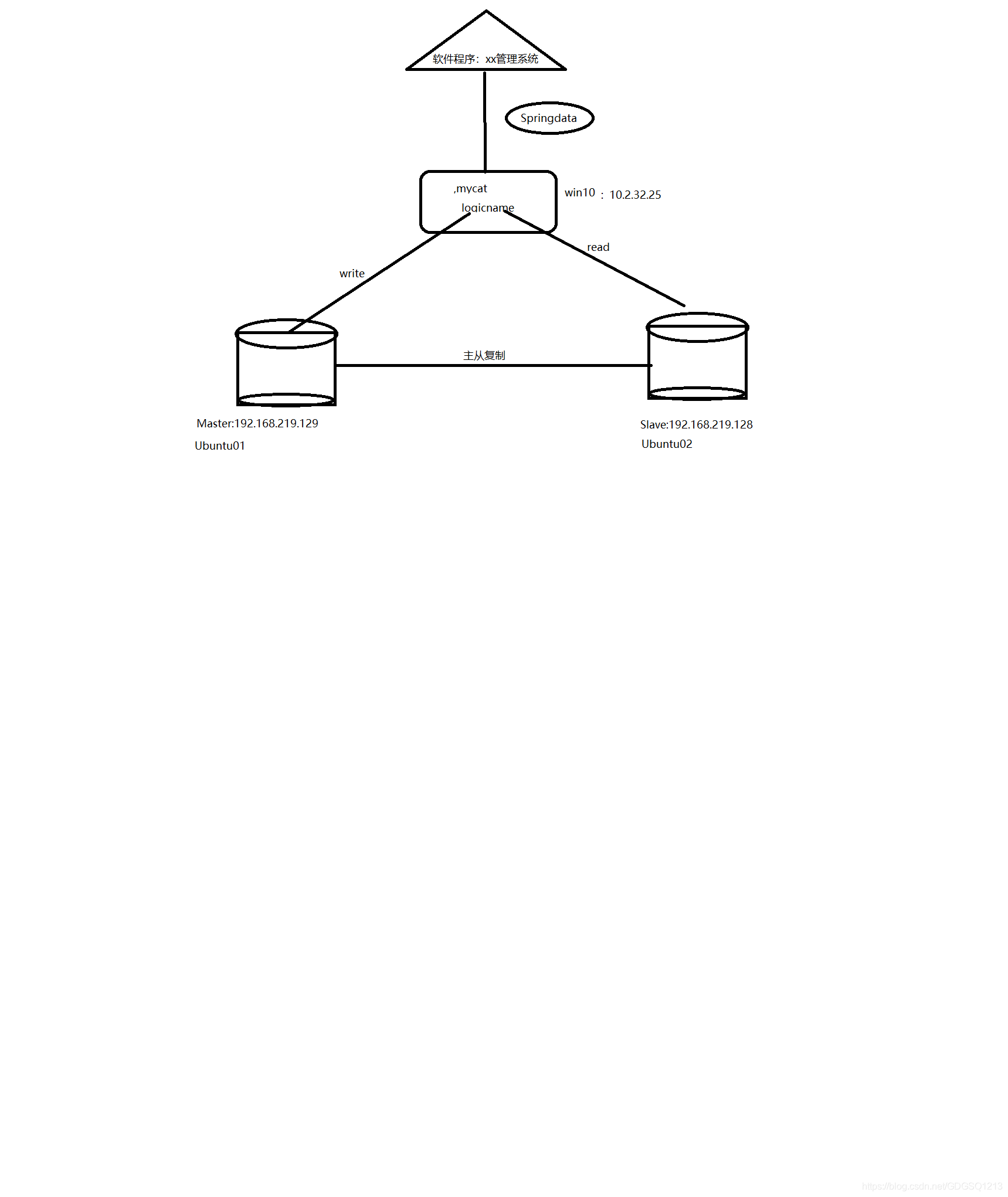
4.mycat实现读写分离
1.先从官网上下载Mycat-server-1.4-release-20151019230038-win.tar.gz
2.进入到mycat的conf下依次修改:server.xml, schema.xml , rule.xml , log4j.xml
2.1server.xml
	<!-- 添加user -->
   <user name="mycat">
    <property name="password">mycat</property>
    <property name="schemas">logicname</property>
    </user>


	<!-- 添加user -->
   <user name="mycat_read">
    <property name="password">mycat_read</property>
    <property name="schemas">logicname</property>
	<property name="readOnly">true</property>
    </user>
2.2 schema.xml
<?xml version="1.0"?>
<!DOCTYPE mycat:schema SYSTEM "schema.dtd">
<mycat:schema xmlns:mycat="http://org.opencloudb/">
    <!-- 与server.xml中user的schemas名一致 -->
    <schema name="logicname" checkSQLschema="true" sqlMaxLimit="100">
        <table name="user" primaryKey="id" dataNode="dn1" rule="rule1"/>

    </schema>
<dataNode name="dn1" dataHost="jdbchost" database="test20190115" />

    <dataHost name="jdbchost" maxCon="1000" minCon="10" balance="1"
                writeType="0" dbType="mysql" dbDriver="native" switchType="1"
                slaveThreshold="100">
         <heartbeat>select user()</heartbeat>

	    <writeHost host="hostMaster" url="192.168.219.129:3306" user="root" password="root">

			<readHost host="hostSlave" url="192.168.219.128:3306" user="root" password="root" />
		</writeHost>


</mycat:schema>
2.3rule.xml
<?xml version="1.0" encoding="UTF-8"?>
<!-- - - Licensed under the Apache License, Version 2.0 (the "License");
	- you may not use this file except in compliance with the License. - You
	may obtain a copy of the License at - - http://www.apache.org/licenses/LICENSE-2.0
	- - Unless required by applicable law or agreed to in writing, software -
	distributed under the License is distributed on an "AS IS" BASIS, - WITHOUT
	WARRANTIES OR CONDITIONS OF ANY KIND, either express or implied. - See the
	License for the specific language governing permissions and - limitations
	under the License. -->
<!DOCTYPE mycat:rule SYSTEM "rule.dtd">
<mycat:rule xmlns:mycat="http://org.opencloudb/">
	 <tableRule name="rule1">
        <rule>
            <columns>id</columns>
            <algorithm>func1</algorithm>
        </rule>
    </tableRule>
    <function name="func1" class="org.opencloudb.route.function.AutoPartitionByLong">
  	<property name="mapFile">autopartition-long.txt</property>
    </function>
</mycat:rule>
2.4log4j.xml
  <root>
    <level value="debug" />
    <appender-ref ref="FILE" />
     <!--<appender-ref ref="FILE" />-->
  </root>
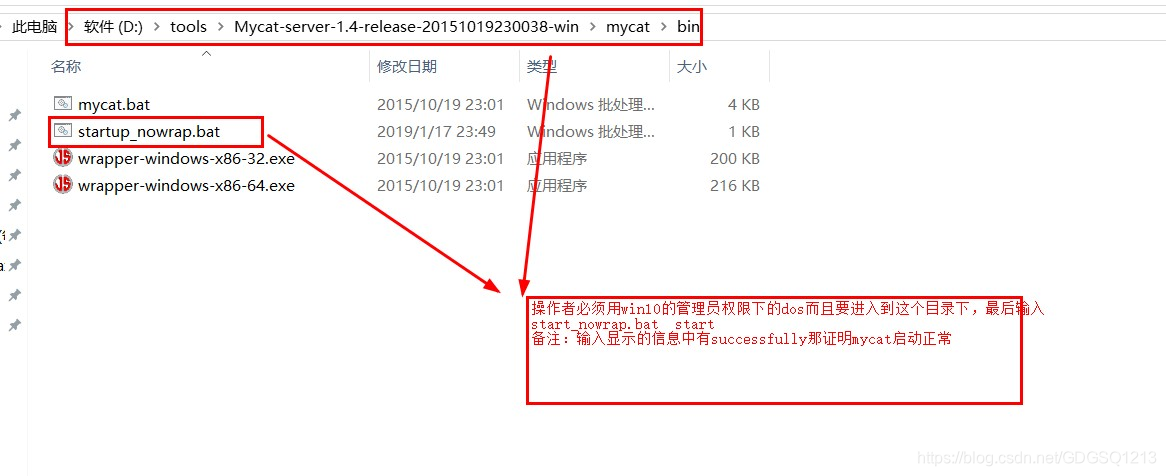
3.进入到bin目录下以管理员权限dos启动mycat: startup_nowrap.bat
4.使用Navicat Premium 12创建两个mycat链接,且名字分别为mycat-write, mycat-read其实这样做的目的是为了验证读写分离是否起作用了
友情提示:具体的链接步骤可以查阅图:mycat-read配置的详解图.bmp , mycat-write的配置详解图.bmp
5.验证是否mycat读写分离是否成功:参考图片:mycat-读写分离的验证效果图.png
5.1 ZK的安装
0.导读模块:要想ZK正常好使则必须先安装且配置jdk1.7+
1.安装Zookeeper. 在官网http://zookeeper.apache.org/下载zookeeper.我下载的是zookeeper-3.4.6版本。
解压zookeeper-3.4.6至\
友情提示:ZK的安装模式分为3种:单机模式(本次就用这种),伪分布式模式,分布式模式
2.进入conf文件夹下找到zoo_sample.cfg,然后复制一份且该名字为zoo.cfg
3.修改zoo.cfg内容:
#The number of milliseconds of each tick
tickTime=2000
#The number of ticks that the initial
#synchronization phase can take
initLimit=10
#The number of ticks that can pass between
#sending a request and getting an acknowledgement
syncLimit=5
#the directory where the snapshot is stored.
#do not use /tmp for storage, /tmp here is just
#example sakes.
dataDir=D:\\zookeeper\\data
dataLogDir=D:\\zookeeper\\log
#the port at which the clients will connect
clientPort=2181
#the maximum number of client connections.
#increase this if you need to handle more clients
#maxClientCnxns=60
#
#Be sure to read the maintenance section of the
#administrator guide before turning on autopurge.
#
#http://zookeeper.apache.org/doc/current/zookeeperAdmin.html#sc_maintenance
#
#The number of snapshots to retain in dataDir
#autopurge.snapRetainCount=3
#Purge task interval in hours
#Set to "0" to disable auto purge feature
#autopurge.purgeInterval=1
4.创建两个文件夹分别用来盛放data和log
5.在win10下用管理员权限打开dos窗口进入ZK的bin目录下
输入:zkServer.cmd 敲击回车执行
6.判断ZK是否成功启动
重新打开一个管理员dos窗口:输入jps 如果显示QuorumPeerMain即为成功
5.2Mycat-eye的安装
1.mycat-eye:是阿里Mycat匹配的一个开源软件产品,且主要是对mycat,mysql,jvm以及sql执行情况的统计展示工具
下载地址:http://dl.mycat.io/mycat-web-1.0/
2.前置条件
必须先提前在自己的机器上安装zookeeper,因为各种节点数据都是通过zk来管理的。即便咱们是单一的一组节点
3.启动Mycat-eye:
将下载的mycat-eye解压之后即可看到:start.bat
切换出win10下非管理员dos窗口输入:start.bat
友情提示:因为我们自己电脑上的有些环境和软件没有配置所有会显示出错误的信息,不过这不妨碍我们下面的操作
4.打开浏览器:输入:http://localhost:8082/mycat 如果能显示mycat-eye.png即为成功





 扫一扫
扫一扫


 被折叠的 条评论
为什么被折叠?
被折叠的 条评论
为什么被折叠?
 到【灌水乐园】发言





