


网站需求:
1.基于域名www.openlab.com可以访问网站内容为 welcome to openlab!!!
2.给该公司创建三个子界面分别显示学生信息,教学资料和缴费网站,基于www.openlab.com/student 网站访问学生信息,www.openlab.com/data网站访问教学资料
www.openlab.com/money网站访问缴费网站。
3.要求 (1)访问该网站http请求都通过https响应。
(2)学生信息网站只有song和tian两人可以访问,其他用户不能访问。
一、前提配置

[root@BBB ~]# systemctl stop firewalld ---- 关闭防火墙
[root@BBB ~]# setenforce 0 ----关闭SELinux
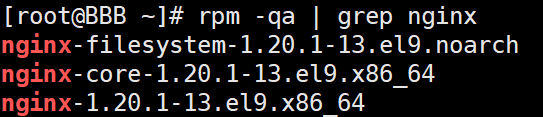
[root@BBB ~]# rpm -qa | grep nginx ---- 确认nginx是否安装
若没有安装,则需先挂载再安装
 [root@BBB ~]# mount /dev/sr0 /mnt --- 挂载
[root@BBB ~]# dnf install nginx -y ---- 安装

[root@BBB ~]# systemctl start nginx --- 启动nginx
[root@BBB ~]# systemctl status nginx ---- 检查是否成功启动
二、创建域名为www.openlab.com的网站
[root@BBB ~]# vim /etc/nginx/conf.d/host.conf --- 创建一个以域名为区别的服务器配置文件
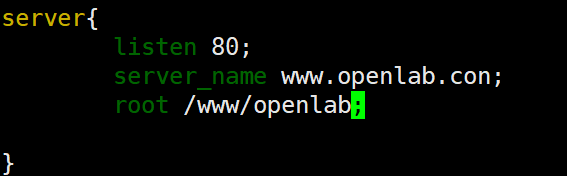

echo内容要用‘’ 单引号 ,不然!!会重复执行上一条命令,使编入内容出错
由于openlab域名服务器已经存在了,所以我们得用
[root@BBB ~]# vim /etc/hosts

将openlab域名服务器,映射到自己主机IP地址

[root@BBB ~]# systemctl restart nginx --- 重启nginx服务
[root@BBB ~]# curl www.openlab.com --- 查看网站内容





 扫一扫
扫一扫


 393
393

 被折叠的 条评论
为什么被折叠?
被折叠的 条评论
为什么被折叠?
 到【灌水乐园】发言





