


 本文介绍如何在Vue项目中使用ElementUI库创建一个实用的日历组件。通过CSS进行样式调整,使得日历面板更加符合需求。提供了一张展示效果的图片。
<div>
            <i class="el-icon-arrow-left weekStr-icon" @click="yearClick(0)"></i>
            <samp>{{dateYear}}</samp>
            <i class="el-icon-arrow-right weekStr-icon" @click="yearClick(1)"></i>
          </div>
          <div>
            <i
              class="el-icon-arrow-left weekStr-icon"
              :style="dateMonth == 1 && 'color:#ddd' "
              @click="monthClick(0)"
            ></i>
            <samp>{{dateMonth}}月</samp>
            <i
              class="el-icon-arrow-right weekStr-icon"
              :style="dateMonth == 12 && 'color:#ddd' "
              @click="monthClick(1)"
            ></i>
          </div>
        </div>
      </div>
      <el-calendar
        :scoped-slot="calendarDate"
        class="calendar-sty"
        style="height:320px"
        v-model="calendarDate"
      ></el-calendar>

.calendar-sty{
  .el-calendar__header{
    display: none;
  }
  .el-calendar-table .el-calendar-day{
    height: 40px;
  }
}
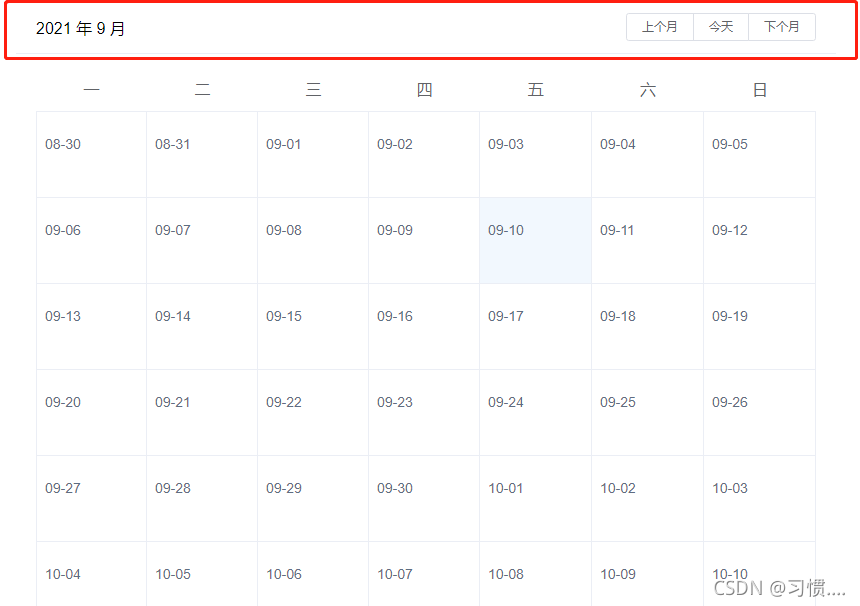
先用css把这块隐藏
date: new Date(),
calendarDate: '',
dateYear: '',
dateMonth: 0,
dateday: 0,
whetherClick: false,

  watch: {
    'dateYear' () {
      this.calendarDate = this.dateYear + '/' + this.dateMonth + '/' + this.dateday
    },
    'dateMonth' () {
      this.calendarDate = this.dateYear + '/' + this.dateMonth + '/' + this.dateday
    },
    'calendarDate' () {
      // console.log('单元格点击')
      // console.log(typeof (this.calendarDate))
      if (typeof (this.calendarDate) !== 'string') {
        this.whetherClick = true
        this.dateYear = this.calendarDate.getFullYear()
        this.dateMonth = (this.calendarDate.getMonth() + 1)
        this.dateday = this.calendarDate.getDate()
        this.whetherClick = false
      }
    }
  },
    /** 年份选择 */
    yearClick (res) {
      if (res === 1) {
        this.dateYear = this.dateYear + 1
        this.dateday = 1
      } else {
        this.dateYear = this.dateYear - 1
        this.dateday = 1
      }
    },
    /** 月份选择 */
    monthClick (res) {
      if (res === 1 && this.dateMonth !== 12) {
        this.dateMonth = this.dateMonth + 1
        this.dateday = 1
      } else if (this.dateMonth !== 1) {
        this.dateMonth = this.dateMonth - 1
        this.dateday = 1
      }
    },
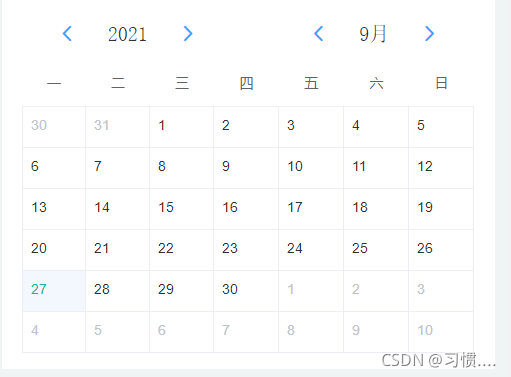
效果图





 扫一扫
扫一扫


 810
810

 被折叠的 条评论
为什么被折叠?
被折叠的 条评论
为什么被折叠?
 到【灌水乐园】发言





