


QStretch_Sidebar类的实现
效果图
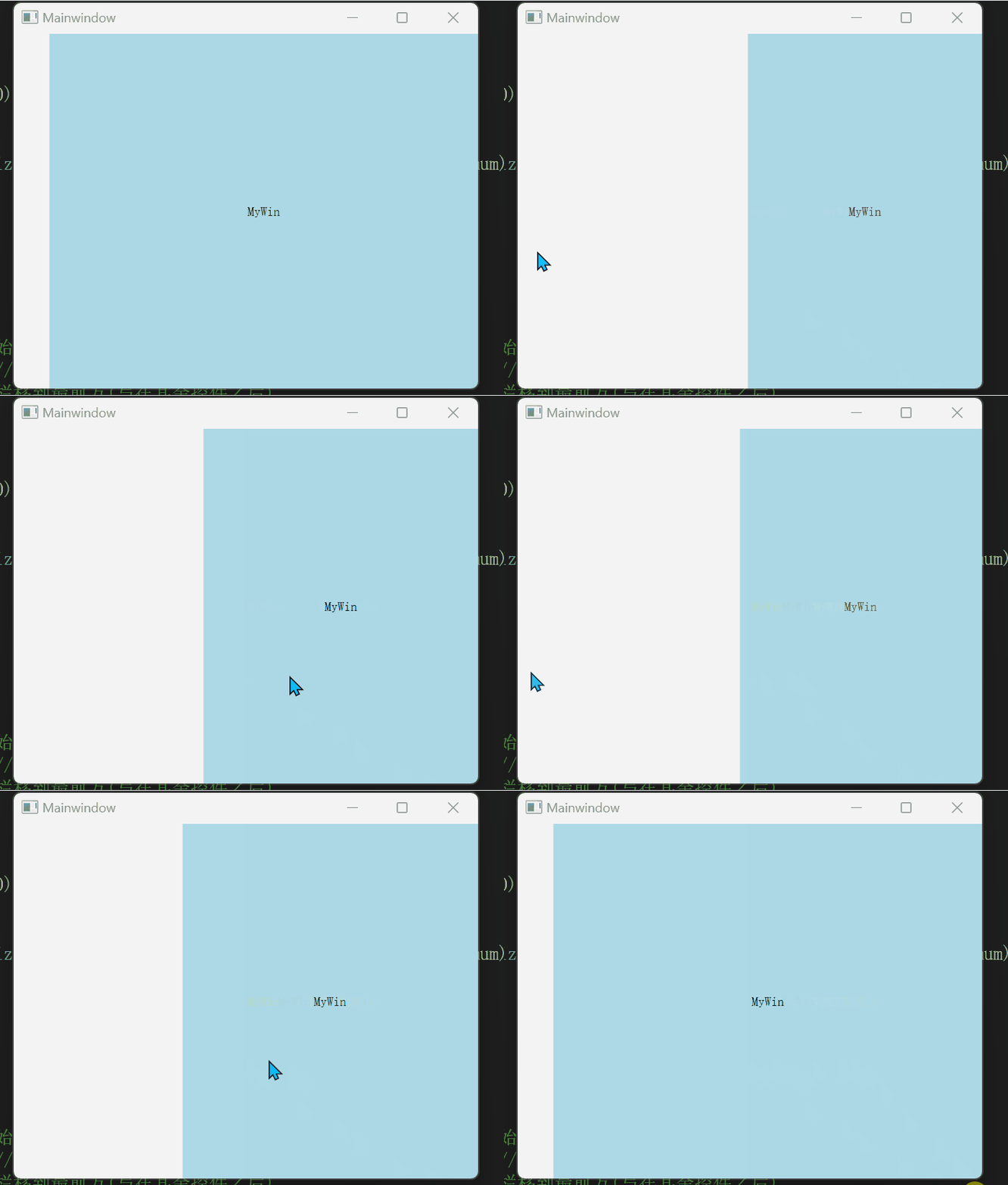
侧边栏展开时,右侧窗口自动收缩。

侧边栏展开时不影响右侧窗口大小。
1.初始化侧边栏
构造函数中,首先初始化侧边栏的布局,动画以及初始尺寸,使用布局管理子控件,以便后续在侧边栏添加自定义控件,以及设置动画持续时间以及边框线的宽度。
QStretch_Sidebar::QStretch_Sidebar(QWidget* parent, int initialWidth)
    : QWidget{ parent },
    animation{ new QPropertyAnimation(this, "size") },
    verticalLayout{ new QVBoxLayout(this) }
{
    this->verticalLayout->setSpacing(4);
    this->verticalLayout->setContentsMargins(5, 5, 5, 5);
    this->animation->setDuration(150);
    this->borderLinePen.setWidth(2);

    // 信号连接,处理动画结束后的逻辑
    connect(this->animation, &QPropertyAnimation::finished, this, [&] {
        if (this->initialSize.height() != this->window()->height()) {
            this->initialSize.rheight() = this->window()->height();
            this->endSize.rheight() = this->initialSize.rheight();
            this->animation->setStartValue(this->initialSize);
            this->animation->setEndValue(this->endSize);
            this->resize(this->width(), this->window()->height());
        }
        this->isExpanded = !this->isExpanded;
        this->isAnimationRunning = false;
        if (this->isExpanded)
            emit this->expandFinished();
        else
            emit this->shrinkFinished();
        emit this->finished();
    });

    this->initialSize.rwidth() = initialWidth;
    this->initialSize.rheight() = this->window()->height();
    this->endSize.rwidth() = this->initialSize.rwidth() + 270;
    this->endSize.rheight() = this->initialSize.rheight();

    this->resize(initialWidth, this->window()->height());
}
2.动画效果
QPropertyAnimation是Qt框架提供的一个用于进行动画处理的类,可以在程序中实现平滑、自然过度的动画。
在“expand()”方法中启动展开动画,在“shrink()”中启动收缩动画,并通过信号槽机制在动画结束时调整侧边栏。
void QStretch_Sidebar::expand()
{
    if (!this->isExpanded && !this->isAnimationRunning)
    {
        this->animation->setDirection(QAbstractAnimation::Forward);
        this->animation->start();
        this->isAnimationRunning = true;
        emit this->expandStart();
    }
}

void QStretch_Sidebar::shrink()
{
    if (this->isExpanded && !this->isAnimationRunning)
    {
        this->animation->setDirection(QAbstractAnimation::Backward);
        this->animation->start();
        this->isAnimationRunning = true;
        emit this->shrinkStart();
    }
}
3.调整侧边栏尺寸
通过“setIncreasedWidth()”方法设置展开时增加的宽度,在resize事件中处理父窗口的大小变化时的调整逻辑。
void QStretch_Sidebar::setIncreasedWidth(quint32 increasedWidth)
{
    this->endSize.rwidth() += increasedWidth - this->endSize.rwidth() + this->initialSize.rwidth();
}

void QStretch_Sidebar::resizeEvent(QResizeEvent*)
{
    if (!this->isAnimationRunning)
    {
        this->initialSize.rheight() = this->height();
        this->endSize.rheight() = this->initialSize.rheight();
        this->animation->setStartValue(this->initialSize);
        this->animation->setEndValue(this->endSize);
    }
    emit widthchanged(this->width());
}
接下来我们使用此类在主窗口与QStackWidget实现联动
4.初始化主窗口
void QWithStretch_SidebarWindow::setupUi(QWidget* parent)
{
    this->horizontalLayout = new QHBoxLayout(parent);
    this->horizontalLayout->setContentsMargins(0, 0, 0, 0);

    this->placeholderSpring_ = new QSpacerItem(50, 0, QSizePolicy::Fixed, QSizePolicy::Minimum);
    this->stackedWidget_ = new QStackedWidget(parent);

    this->horizontalLayout->addItem(placeholderSpring_);
    this->horizontalLayout->addWidget(stackedWidget_);
    this->stackedWidget_->setCurrentIndex(-1);
    this->sidebar_ = new QStretch_Sidebar(parent);
    this->sidebar_->raise();

    connect(sidebar_, &QStretch_Sidebar::widthchanged, this, [=](int sidebarWidth) {
        int stackedWidgetWidth = width() - sidebarWidth;
        int stackedWidgetX = stackedWidget_->x() + (sidebar_->width() - sidebarWidth);
        stackedWidget_->setGeometry(sidebarWidth, stackedWidget_->y(), stackedWidgetWidth, height());
        placeholderSpring_->changeSize(sidebarWidth, 0, QSizePolicy::Fixed, QSizePolicy::Minimum);
    });

    this->resize(600, 400);
}
在“resizeEvent”中处理窗口大小变化,调整侧边栏的高度与主窗口一致。
void QWithStretch_SidebarWindow::resizeEvent(QResizeEvent* event)
{
    QWidget::resizeEvent(event);
    this->sidebar_->resize(sidebar_->width(), height());
}





 扫一扫
扫一扫


 1万+
1万+


 到【灌水乐园】发言



