


介绍
本篇主要介绍如何在HarmonyOS中,在页面跳转之间如何传值
HarmonyOS 的页面指的是带有@Entry装饰器的文件,其不能独自存在,必须依赖UIAbility这样的组件容器
如下是官方关于State模型开发模式下的应用包结构示意图,Page就是带有@Entry装饰器的文件
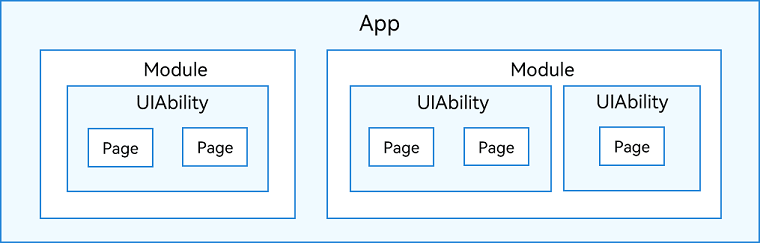
那么在页面跳转时,在代码层面最长路径其实是有两步 1,打开UIAbility 2. 打开Page
整体交互效果
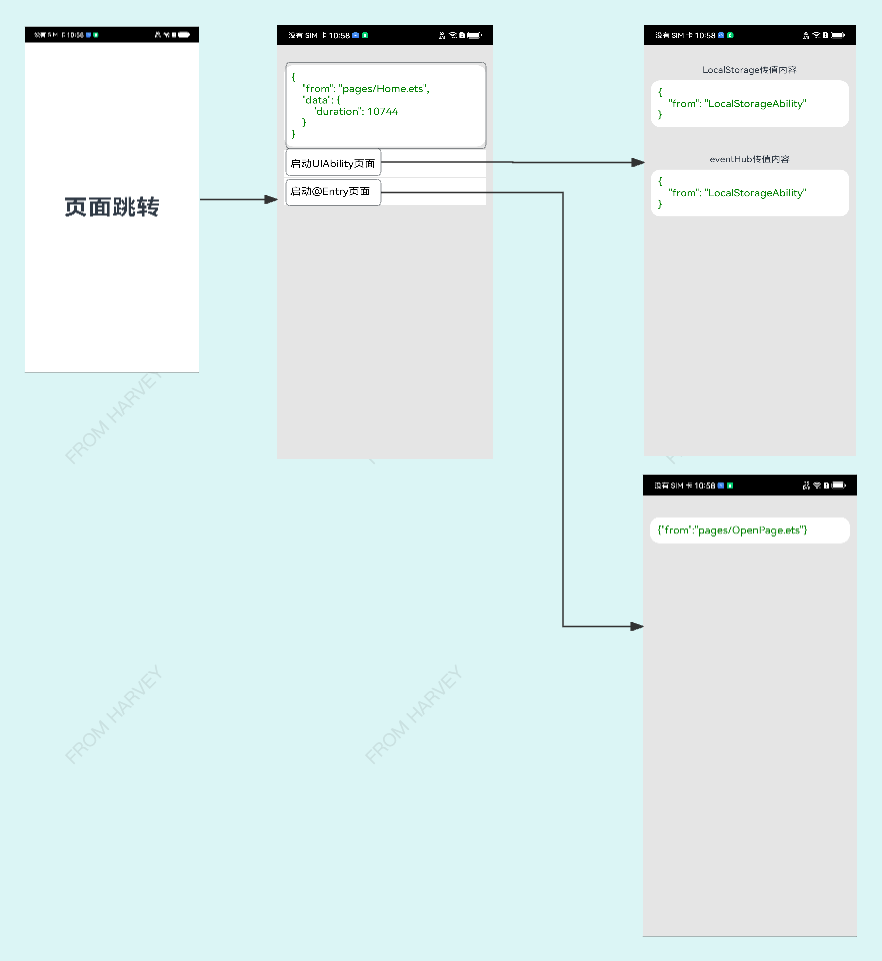
传值理论
- 基于LocalStorage
- 基于EventHub
- 基于router
准备
请参照官方指导,创建一个Demo工程,选择Stage模型
代码实践
1.定制主入口页面
功能
- 页面曝光停留时长计算
- 增加进入二级页面入口
import systemDateTime from '@ohos.systemDateTime'
import router from '@ohos.router'

@Entry
@Component
struct Index {
  @State message: string = '页面跳转'

  private showDuration: number = 0

  onPageShow() {

    this.showDuration = 0
    systemDateTime.getCurrentTime(false, (error, data) => {
      if(!error){
        this.showDuration = data
      }
    })

  }

  build() {
    Row() {
      Column() {
        Text(this.message)
          .fontSize(50)
          .fontWeight(FontWeight.Bold)
          .onClick(()=>{
            systemDateTime.getCurrentTime(false, (error, data) => {
              router.pushUrl({ url: 'pages/OpenPage', params: {
                "from": "pages/Home.ets",
                "data": {
                  "duration":(data - this.showDuration)
                }
              } })
                .then(() => {
                  console.info('Succeeded in jumping to the second page.')
                }).catch((error) => {
                console.log(error)
              })
            })
          })
      }
      .width('100%')
    }
    .height('100%')
  }

}
2.添加二级页面
注意
OpenPage.ets需要在main_pages.json中的注册
{
  "src": [
    "pages/Index" //主入口页面
    ,"pages/OpenPage" //二级页面
    ,"pages/Test" //三级页面
    ,"pages/LocalStorageAbilityPage" //三级页面
  ]
}
功能
- 展示主入口页面停留时间
- 添加通过UIAbility方式打开页面的入口
- 添加通过router.pushUrl方式打开页面的入口
/**
* 路由 3.1/4.0 文档
* https://developer.harmonyos.com/cn/docs/documentation/doc-references-V3/js-apis-router-0000001478061893-V3#ZH-CN_TOPIC_0000001523808578__routerp 最低0.47元/天 解锁文章






 扫一扫
扫一扫


 2520
2520

 被折叠的 条评论
为什么被折叠?
被折叠的 条评论
为什么被折叠?
 到【灌水乐园】发言





