




canmengqian
</div><!--end: blogTitle 博客的标题和副标题 -->
<div id="navigator">
- 联系
- 订阅
- 管理
	<div class="blogStats">

		<span id="stats_post_count">随笔 -
32
文章 -
5
评论 -
2</div><!--end: blogStats --> </div><!--end: navigator 博客导航栏 -->Mybatis源码分析: MapperMethod功能讲解(1)
        </h1>
        <div class="clear"></div>
        <div class="postBody">
Mybatis源码分析: MapperMethod功能讲解(1)
MapperMethod主要的功能是执行SQL的相关操作,在初始化时会实例化两个组件Sql命令(SqlCommand)和方法签名(MethodSignature)这两个组件会在后续进行详解,同时MapperMethod必须提供Mapper的接口路径,待执行的方法,配置Configuration作为入参。通过获取SqlCommand中的执行类型,MapperMethod才知道该Mapper接口将要执行什么样的操作。构造方法如下所示:
1 public MapperMethod(Class<?> mapperInterface, Method method, Configuration config) { 2 //初始化SqlCommand 3 this.command = new SqlCommand(config, mapperInterface, method); 4 //初始化方法签名 5 this.method = new MethodSignature(config, mapperInterface, method); 6 }Mybatis中定义了5种操作:SELECT,INSERT,UPDATE,DELETE,FLUSH。其中SELECT中包含了5中查询,结果类型处理器,返回NULL值,多条记录查询,单记录查询,游标查询,和map查询。相关操作和方法如下表对应。从表中可以看到,Sql执行方式本质上时通过sqlSession调用的,在SELECT操作中,虽然调用了MapperMethod中的方法,但本质上仍是通过Sqlsession下的select(),selectList(),selectCursor(),selectMap()等方法实现的。
操作 方法名 INSERT sqlSession.insert() UPDATE sqlSession.update() DELETE sqlSession.delete() FLUSH sqlSession.flushStatements() SELECT executeWithResultHandler(sqlSession, args)
executeForMany(sqlSession, args)
method.returnsMap()
executeForCursor()
sqlSession.selectOne(command.getName(), param)

 1 public Object execute(SqlSession sqlSession, Object[] args) {
 2 Object result;
 3 //判断命令类型
 4 switch (command.getType()) {
 5 case INSERT: {
 6 //将参数转为Sql参数
 7 Object param = method.convertArgsToSqlCommandParam(args);
 8 //获取插入结果
 9 result = rowCountResult(sqlSession.insert(command.getName(), param));
10 break;
11 }
12 case UPDATE: {
13 Object param = method.convertArgsToSqlCommandParam(args);
14 result = rowCountResult(sqlSession.update(command.getName(), param));
15 break;
16 }
17 case DELETE: {
18 Object param = method.convertArgsToSqlCommandParam(args);
19 result = rowCountResult(sqlSession.delete(command.getName(), param));
20 break;
21 }
22 case SELECT:
23 if (method.returnsVoid() && method.hasResultHandler()) {
24 //带有结果处理器的
25 executeWithResultHandler(sqlSession, args);
26 result = null;
27 } else if (method.returnsMany()) {
28 //多条查询
29 result = executeForMany(sqlSession, args);
30 } else if (method.returnsMap()) {
31 //返回map
32 result = executeForMap(sqlSession, args);
33 } else if (method.returnsCursor()) {
34 //游标查询
35 result = executeForCursor(sqlSession, args);
36 } else {
37 //单条查询
38 Object param = method.convertArgsToSqlCommandParam(args);
39 result = sqlSession.selectOne(command.getName(), param);
40 }
41 break;
42 case FLUSH:
43 //清除操作
44 result = sqlSession.flushStatements();
45 break;
46 default:
47 throw new BindingException("Unknown execution method for: " + command.getName());
48 }
49 if (result == null && method.getReturnType().isPrimitive() && !method.returnsVoid()) {
50 throw new BindingException("Mapper method '" + command.getName()
51 + " attempted to return null from a method with a primitive return type (" + method.getReturnType() + ").");
52 }
53 return result;
54 }
参数解析器在上述代码中经常能看见这样一句代码 method.convertArgsToSqlCommandParam(args);,该方法主要的功能是获取@Param注解上的参数值,而实现方式便是通过参数解析器(ParamNameResolver),convertArgsToSqlCommandParam(args)方法实际上调用的是ParamNameResolver下的getNamedParams(args)方法。在分析该方法之前,先看看构造器都做了些什么操作。
 1 public ParamNameResolver(Configuration config, Method method) {
 2 final Class<?>[] paramTypes = method.getParameterTypes(); //获取所有参数类型
 3 final Annotation[][] paramAnnotations = method.getParameterAnnotations();//获取方法中的所有注解
 4 final SortedMap<Integer, String> map = new TreeMap<Integer, String>();
 5 //判断注解数组长度
 6 int paramCount = paramAnnotations.length;
 7 // get names from @Param annotations
 8 for (int paramIndex = 0; paramIndex < paramCount; paramIndex++) {
 9 if (isSpecialParameter(paramTypes[paramIndex])) {
10 // skip special parameters
11 continue;
12 }
13 String name = null;
14 for (Annotation annotation : paramAnnotations[paramIndex]) {
15 //判断是否是Param标签的子类,也就是说@param中是否存在value值
16 if (annotation instanceof Param) {
17 hasParamAnnotation = true;
18 //获取标签中的value值
19 name = ((Param) annotation).value();
20 break;
21 }
22 }
23 if (name == null) {
24 // @Param was not specified.
25 //是否使用了真实值,也就是说没有设置value值
26 if (config.isUseActualParamName()) {
27 //获取方法中参数的名字
28 name = getActualParamName(method, paramIndex);
29 }
30 if (name == null) {
31 // use the parameter index as the name ("0", "1", ...)
32 // gcode issue #71
33 name = String.valueOf(map.size());
34 }
35 }
36 map.put(paramIndex, name);
37 }
38 //设置所有参数名为不可修改的集合
39 names = Collections.unmodifiableSortedMap(map);
40 }
构造器同样需要两个入参,配置类和方法名,ParamNameResolver下包含了两个属性字段GENERIC_NAME_PREFIX属性前缀和参数集合names,构造器会将Method中所有参数级别的注解全部解析出来方法有序参数集中,names中存储形式为<参数下标,参数名>,如果在注解上设置了参数名,则会直接获取注解的value值,如果没有使用@Param注解,则使用真实的参数名,注意,真实参数名其实是arg0,arg1....的形式展现的,在判断真实参数名时,Mybatis会检查JDK版本是否包含java.lang.reflect.Parameter类,不存在该类的化会抛出ClassNotFoundException异常。 完成初始化后,就可以调用getNamedParams(args)方法了,如下代码所示,该方法使用了类中的names属性,从有序集合中取出所有的<参数索引,参数名>键值对>,随后填充到另外一个集合中,以<参数名,参数下标索引,>形式呈现,同时会保留一份<param+下标索引,参数下标>的键值对。
 1 public Object getNamedParams(Object[] args) {
 2 //判断参数个数
 3 final int paramCount = names.size();
 4 if (args == null || paramCount == 0) {
 5 return null;
 6 }
 7 //返回首个参数
 8 else if (!hasParamAnnotation && paramCount == 1) {
 9 return args[names.firstKey()];
10 } else {
11 final Map<String, Object> param = new ParamMap<Object>();
12 int i = 0;
13 for (Map.Entry<Integer, String> entry : names.entrySet()) {
14 //设置参数的值和键名
15 param.put(entry.getValue(), args[entry.getKey()]);
16 // add generic param names (param1, param2, ...)
17 //增加参数名
18 final String genericParamName = GENERIC_NAME_PREFIX + String.valueOf(i + 1);
19 // ensure not to overwrite parameter named with @Param
20 if (!names.containsValue(genericParamName)) {
21 param.put(genericParamName, args[entry.getKey()]);
22 }
23 i++;
24 }
25 return param;
26 }
27 }
需掌握的知识点
- Method类的使用,常用的方法
方法名 作用 getName() 获取方法名 isVarArgs() 如果该方法声明为采用可变数量的参数,则返回true; 否则返回false getModifiers() 获取权限修饰符 getReturnType() 获取返回类型 getExceptionTypes() 获取所有抛出的异常类型 getGenericReturnType () 返回Type类型 getParameterTypes() 获取所有参数的类型 getParameterCount() 获取所有参数的个数 getAnnotations() 获取方法级别的注解
- 集合的使用
Collections.unmodifiableSortedMap(map);可修饰为一个不可变的集合
如何实现自定义注解,并对注解进行解析
见实现自定义注解,并对注解进行解析 文章
 00
00<div class="clear"></div> <div id="post_next_prev"> <a href="https://www.cnblogs.com/zhengzuozhanglina/p/10927591.html" class="p_n_p_prefix">« </a> 上一篇: <a href="https://www.cnblogs.com/zhengzuozhanglina/p/10927591.html" title="发布于 2019-05-26 21:08">windows下安装RabbitMQ</a> <br> <a href="https://www.cnblogs.com/zhengzuozhanglina/p/11219844.html" class="p_n_p_prefix">» </a> 下一篇: <a href="https://www.cnblogs.com/zhengzuozhanglina/p/11219844.html" title="发布于 2019-07-20 23:52">反射类 Method类的使用</a></div><!--end: topics 文章、评论容器-->最新 IT 新闻:
· Google Chrome 浏览器重新设计“隐私和安全设置”页面
· Gartner:全球公有云收入明年将增长17%达2664亿美元
· 华为云新一代云操作系统“瑶光”智慧云脑正式商用
· 媒体:阿里巴巴香港上市募股获得“数倍”认购
· 谷歌取消每周一次全员大会:将改为每月一次 重点讨论业务和战略
» 更多新闻...<div id="sideBar"> <div id="sideBarMain"><div id="profile_block"> 昵称: <a href="https://home.cnblogs.com/u/zhengzuozhanglina/"> 爱吃猫的鱼z </a> <br> 园龄: <a href="https://home.cnblogs.com/u/zhengzuozhanglina/" title="入园时间:2016-10-17"> 3年 </a> <br> 粉丝: <a href="https://home.cnblogs.com/u/zhengzuozhanglina/followers/"> 2 </a> <br> 关注: <a href="https://home.cnblogs.com/u/zhengzuozhanglina/followees/"> 2 </a> <div id="p_b_follow">+加关注
<div id="blog-calendar" style="">< 2019年11月 > 日 一 二 三 四 五 六 27 28 29 30 31 1 2 3 4 5 6 7 8 9 10 11 12 13 14 15 16 17 18 19 20 21 22 23 24 25 26 27 28 29 30 1 2 3 4 5 6 7 <div id="leftcontentcontainer"> <div id="blog-sidecolumn">-
随笔分类
C语言(2)</h3> <ul> <li>
Erlang</li> <li>
java(2)</li> <li>
Jedis(5)</li> <li>
linux(2)</li> <li>
mybatis源码分析(12)</li> <li>
mysql</li> <li>
Oracle</li> <li>
RabbitMQ</li> <li>
redis</li> <li>
spring</li> <li>
spring-boot</li> <li>
springmvc</li> <li>
SQL</li> <li>
Struts2(1)</li> <li>
UML</li> <li>
vm虚拟机(1)</li> <li>
XML</li> <li>
大数据(2)</li> <li>
多线程(1)</li> <li>
设计模式</li> <li>
数据结构与算法</li> <li></li> </ul> </div> <div id="sidebar_postarchive" class="catListPostArchive sidebar-block"> <h3 class="catListTitle">随笔档案
2019年9月(1)</h3> <ul> <li>
2019年8月(13)</li> <li>
2019年7月(9)</li> <li>
2019年5月(1)</li> <li>
2018年10月(2)</li> <li>
2018年9月(1)</li> <li>
2016年12月(1)</li> <li>
2016年11月(1)</li> <li>
2016年10月(3)</li> <li></li> </ul> </div> <div id="sidebar_articlecategory" class="catListArticleCategory sidebar-block"> <h3 class="catListTitle">文章分类
C语言(3)</h3> <ul> <li>
Eclipse(1)</li> <li>
Hodoop</li> <li>
ibatis(2)</li> <li>
Java.Thread</li> <li>
JavaScript</li> <li>
MyBatis</li> <li>
Oracle</li> <li>
Spring</li> <li>
spring-boot</li> <li>
SpringMVC</li> <li>
SQL</li> <li>
算法和数据结构</li> <li></li> </ul> </div></div><!--end: sideBarMain --> </div><!--end: sideBar 侧边栏容器 --> <div class="clear"></div> </div><!--end: main --> <div class="clear"></div> <div id="footer"> <!--done-->Copyright © 2019 爱吃猫的鱼z
Powered by .NET Core 3.0.0 on Linux</div><!--end: footer -->
canmengqian
新随笔</div><!--end: blogTitle 博客的标题和副标题 --> <div id="navigator"> - 联系
- 订阅
- 管理
<div class="blogStats"> <span id="stats_post_count">随笔 -32
文章 -
5
评论 -
2</div><!--end: blogStats --> </div><!--end: navigator 博客导航栏 -->Mybatis源码分析:MapperMethod中内部静态类SqlCommand的作用
</h1> <div class="clear"></div> <div class="postBody">MapperMethod中内部静态类SqlCommand的作用
在MapperMethod初始化中,会首先初始化两个内部静态类,SqlCommand就是其中之一,SqlCommand的作用主要体现在MapperMethod类的execute()方法里,SqlCommand为其提供了查询类型和方法id两个信息,从而使用Sqlseesion执行不同的方法,那么SqlCommand是如何获取到查询类型和方法id的呢?其中又做了哪些操作呢?
首先看看构造器中的代码执行顺序。构造器需要传入配置类,Mapper接口和Method类.
- 从Method类中获取方法名和该方法所在的类路径
- 根据mapper接口信息和配置类获取到XML对应的MapperStatement对象
- 判断映射语句对象是否为NULL,如果不为NULL,则从中获取到语句的id和待执行的Sql类型,如果为NULL,再次判断待执行方法上是否标注有Flush的注解,如果不满足条件,则会抛出BindingException异常。
流程图如下所示:
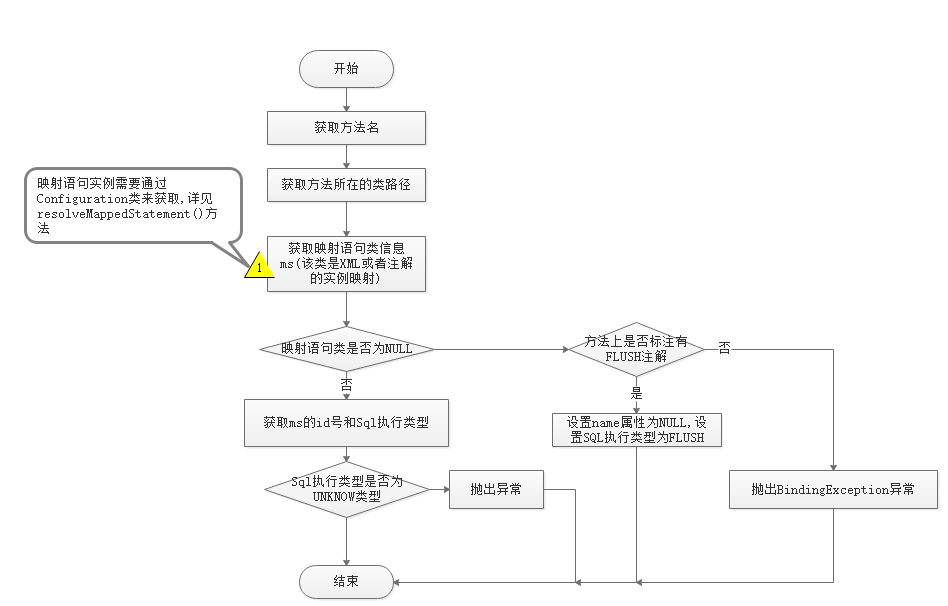
值得注意的是,在获取映射语句对象是通过调用resolveMappedStatement()方法实现的。见如下的讲述。
1 public SqlCommand(Configuration configuration, Class<?> mapperInterface, Method method) { 2 //获取方法名 3 final String methodName = method.getName(); 4 //获取方法所在的类 5 final Class<?> declaringClass = method.getDeclaringClass(); 6 //获取映射语句信息 7 MappedStatement ms = resolveMappedStatement(mapperInterface, methodName, declaringClass, 8 configuration); 9 //如果映射语句对象是NULL,那么查看该方法上是否标注了FLUSH标签,如果存在,则设置查询类型为FLUSH,否则抛出BindingException异常表示接口找不到定义的方法。 10 if (ms == null) { 11 if (method.getAnnotation(Flush.class) != null) { 12 name = null; 13 type = SqlCommandType.FLUSH; 14 } else { 15 throw new BindingException("Invalid bound statement (not found): " 16 + mapperInterface.getName() + "." + methodName); 17 } 18 } 19 //如果映射语句对象不为空,则设置指定的查询类型,如果为UNKNOWN 类型,则直接抛出BindingException异常 20 else { 21 name = ms.getId(); 22 type = ms.getSqlCommandType(); 23 if (type == SqlCommandType.UNKNOWN) { 24 throw new BindingException("Unknown execution method for: " + name); 25 } 26 } 27 }
resolveMappedStatement()方法
该方法主要是获取映射语句对象,在xml配置中,像select,update,delete,insert 都需要提供id号和sql语句以及入参和出参信息,而MappedStatement就是xml到java对象的映射,一个<select//>标签就会对应一个MappedStatement对象,这个目前了解即可,在后续会专门进行介绍。现简要说明下代码的执行流程。
1. 获取待执行语句的id号,id号形式为类路径.方法名
2. 在配置类中是否能找到该语句的id号,如果能找到,则直接从配置类中返回MappedStatement实例,否则从父类接口中继续查找,如果找不到就返回NULL
3. 如果入参接口路径就是方法所在的类路径,那么直接返回NULL
1 private MappedStatement resolveMappedStatement(Class<?> mapperInterface, String methodName, 2 Class<?> declaringClass, Configuration configuration) { 3 //获取语句id 形式为接口名.方法名 4 String statementId = mapperInterface.getName() + "." + methodName; 5 //判断配置中是否存在该方法id 6 if (configuration.hasStatement(statementId)) { 7 //返回映射语句 8 return configuration.getMappedStatement(statementId); 9 } 10 //如果接口信息就是所在类的话,直接返回NULL 11 else if (mapperInterface.equals(declaringClass)) { 12 return null; 13 } 14 //获取该类下的所有接口信息 15 for (Class<?> superInterface : mapperInterface.getInterfaces()) { 16 //从父接口中查找对应的方法ID,下列语句使用递归的方式进行查找 17 if (declaringClass.isAssignableFrom(superInterface)) { 18 MappedStatement ms = resolveMappedStatement(superInterface, methodName, 19 declaringClass, configuration); 20 if (ms != null) { 21 return ms; 22 } 23 } 24 } 25 return null; 26 } 27 }
分类: mybatis源码分析<div id="blog_post_info">
00<div class="clear"></div> <div id="post_next_prev"> <a href="https://www.cnblogs.com/zhengzuozhanglina/p/11219844.html" class="p_n_p_prefix">« </a> 上一篇: <a href="https://www.cnblogs.com/zhengzuozhanglina/p/11219844.html" title="发布于 2019-07-20 23:52">反射类 Method类的使用</a> <br> <a href="https://www.cnblogs.com/zhengzuozhanglina/p/11223568.html" class="p_n_p_prefix">» </a> 下一篇: <a href="https://www.cnblogs.com/zhengzuozhanglina/p/11223568.html" title="发布于 2019-07-22 00:47">Mybatis源码分析:MapperMethod中内部静态类MethodSignature的作用</a></div><!--end: topics 文章、评论容器-->【推荐】腾讯云海外1核2G云服务器低至2折,半价续费券限量免费领取!
【活动】京东云服务器_云主机低于1折,低价高性能产品备战双11
【推荐】超50万行VC++源码: 大型组态工控、电力仿真CAD与GIS源码库
【培训】马士兵老师一对一职业规划指导!程序员突破年薪80W!
【推荐】天翼云双十一翼降到底,云主机11.11元起,抽奖送大礼
【培训】2019年这些技术点你都不懂的话,如何去争取高薪呢?
【推荐】流程自动化专家UiBot,体系化教程成就高薪RPA工程师
    <div id="google_ads_iframe_/1090369/C2_0__container__" style="border: 0pt none;"><iframe id="google_ads_iframe_/1090369/C2_0" title="3rd party ad content" name="google_ads_iframe_/1090369/C2_0" width="468" height="60" scrolling="no" marginwidth="0" marginheight="0" frameborder="0" srcdoc="" style="border: 0px; vertical-align: bottom;" data-google-container-id="2" data-load-complete="true"></iframe></div></div>
</div>
<div id="under_post_kb">
最新 IT 新闻:
· Google Chrome 浏览器重新设计“隐私和安全设置”页面
· Gartner:全球公有云收入明年将增长17%达2664亿美元
· 华为云新一代云操作系统“瑶光”智慧云脑正式商用
· 媒体:阿里巴巴香港上市募股获得“数倍”认购
· 谷歌取消每周一次全员大会:将改为每月一次 重点讨论业务和战略
» 更多新闻...<div id="sideBar"> <div id="sideBarMain"><div id="profile_block"> 昵称: <a href="https://home.cnblogs.com/u/zhengzuozhanglina/"> 爱吃猫的鱼z </a> <br> 园龄: <a href="https://home.cnblogs.com/u/zhengzuozhanglina/" title="入园时间:2016-10-17"> 3年 </a> <br> 粉丝: <a href="https://home.cnblogs.com/u/zhengzuozhanglina/followers/"> 2 </a> <br> 关注: <a href="https://home.cnblogs.com/u/zhengzuozhanglina/followees/"> 2 </a> <div id="p_b_follow">+加关注
<div id="blog-calendar" style="">< 2019年11月 > 日 一 二 三 四 五 六 27 28 29 30 31 1 2 3 4 5 6 7 8 9 10 11 12 13 14 15 16 17 18 19 20 21 22 23 24 25 26 27 28 29 30 1 2 3 4 5 6 7 <div id="leftcontentcontainer"> <div id="blog-sidecolumn">-
随笔分类
C语言(2)</h3> <ul> <li>
Erlang</li> <li>
java(2)</li> <li>
Jedis(5)</li> <li>
linux(2)</li> <li>
mybatis源码分析(12)</li> <li>
mysql</li> <li>
Oracle</li> <li>
RabbitMQ</li> <li>
redis</li> <li>
spring</li> <li>
spring-boot</li> <li>
springmvc</li> <li>
SQL</li> <li>
Struts2(1)</li> <li>
UML</li> <li>
vm虚拟机(1)</li> <li>
XML</li> <li>
大数据(2)</li> <li>
多线程(1)</li> <li>
设计模式</li> <li>
数据结构与算法</li> <li></li> </ul> </div> <div id="sidebar_postarchive" class="catListPostArchive sidebar-block"> <h3 class="catListTitle">随笔档案
2019年9月(1)</h3> <ul> <li>
2019年8月(13)</li> <li>
2019年7月(9)</li> <li>
2019年5月(1)</li> <li>
2018年10月(2)</li> <li>
2018年9月(1)</li> <li>
2016年12月(1)</li> <li>
2016年11月(1)</li> <li>
2016年10月(3)</li> <li></li> </ul> </div> <div id="sidebar_articlecategory" class="catListArticleCategory sidebar-block"> <h3 class="catListTitle">文章分类
C语言(3)</h3> <ul> <li>
Eclipse(1)</li> <li>
Hodoop</li> <li>
ibatis(2)</li> <li>
Java.Thread</li> <li>
JavaScript</li> <li>
MyBatis</li> <li>
Oracle</li> <li>
Spring</li> <li>
spring-boot</li> <li>
SpringMVC</li> <li>
SQL</li> <li>
算法和数据结构</li> <li></li> </ul> </div></div><!--end: sideBarMain --> </div><!--end: sideBar 侧边栏容器 --> <div class="clear"></div> </div><!--end: main --> <div class="clear"></div> <div id="footer"> <!--done-->Copyright © 2019 爱吃猫的鱼z
Powered by .NET Core 3.0.0 on Linux</div><!--end: footer -->





 扫一扫
扫一扫


 5467
5467


 到【灌水乐园】发言



【活动】京东云服务器_云主机低于1折,低价高性能产品备战双11
【推荐】超50万行VC++源码: 大型组态工控、电力仿真CAD与GIS源码库
【培训】马士兵老师一对一职业规划指导!程序员突破年薪80W!
【推荐】天翼云双十一翼降到底,云主机11.11元起,抽奖送大礼
【培训】2019年这些技术点你都不懂的话,如何去争取高薪呢?
【推荐】流程自动化专家UiBot,体系化教程成就高薪RPA工程师
· Mybatis源码分析:MapperMethod中内部静态类MethodSignature的作用
· Mybatis源码分析:MapperMethod中内部静态类SqlCommand的作用
· MyBatis框架的使用及源码分析(八) MapperMethod
· MyBatis源码分析1参数映射分析
· MyBatis学习记录3MapperMethod类
» 更多推荐...